
FortiSwitch FS-224E Tanzania
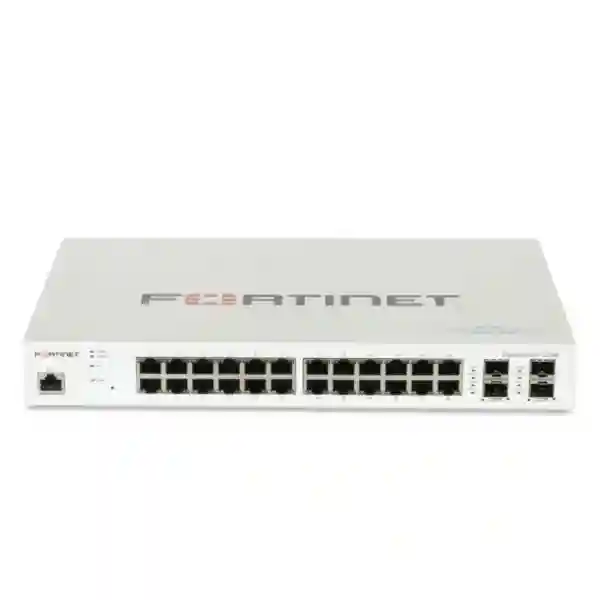
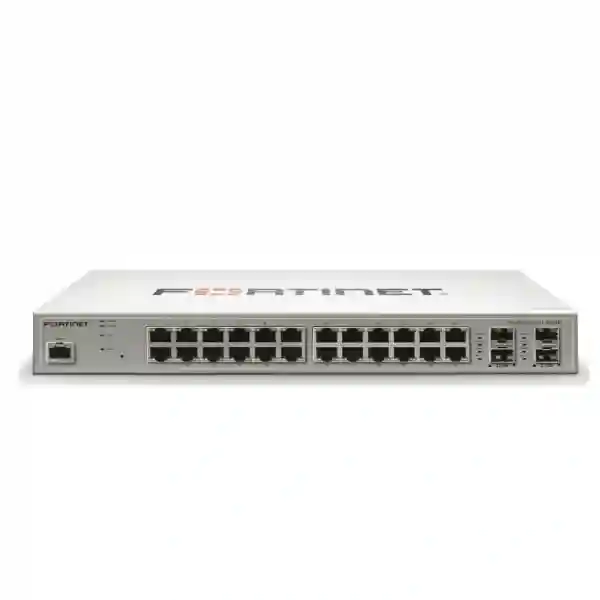
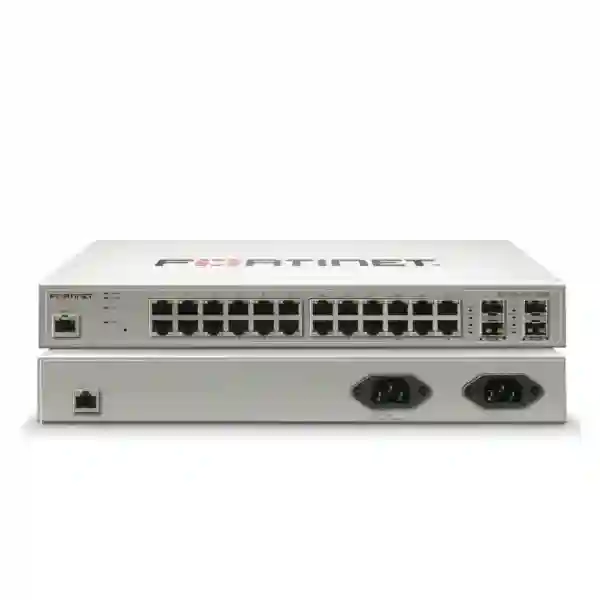
FortiSwitch FS-224E is a business-focused Layer 2/3 access switch for organizations that need dependable Gigabit Ethernet connectivity and integration with a Fortinet-managed network. The model provides 24 GE RJ45 access ports plus four GE SFP interfaces and is identified by Fortinet as FortiGate switch-controller compatible. Its fanless design is particularly useful where low acoustic output and fewer moving parts are desirable, including offices, branch communications rooms, retail sites, professional workplaces and distributed enterprise environments.
Gigabit copper access connectivity for desktops, printers, servers, appliances and other Ethernet endpoints.
SFP interfaces provide flexible uplink options for suitable fiber or transceiver-based network designs.
Built for managed business access networks where segmentation, switching and controlled network growth matter.
Passive cooling supports quiet deployment in suitable business environments without a switch cooling fan.
What FortiSwitch FS-224E Solves
A business access switch has to do more than add Ethernet sockets. It becomes the point where users, business systems, printers, local servers and other wired devices join the network. The FS-224E is suited to organizations that want 24 copper Gigabit access ports in a managed Fortinet switching environment while retaining dedicated SFP interfaces for uplinks. That makes it useful when a network needs structured VLAN design, controlled access, clear uplink planning and a switch that can fit into an existing FortiGate-centered architecture.
For buyers in Tanzania, the most important first step is to confirm that the non-PoE FS-224E matches the endpoint plan. This model should not be confused with FS-224E-POE. If phones, cameras or wireless access points need electrical power delivered through Ethernet, the power requirement should be evaluated separately and an appropriate PoE model considered. When endpoints have independent power, the standard FS-224E can be a straightforward choice for data connectivity.
Verified FS-224E Hardware Profile
| Model | FortiSwitch FS-224E |
| Switching class | Layer 2/3 |
| Copper interfaces | 24 × GE RJ45 |
| SFP interfaces | 4 × GE SFP |
| FortiGate management compatibility | FortiGate switch-controller compatible |
| Cooling | Fanless |
| PoE | This FS-224E model is the non-PoE variant; FS-224E-POE is a separate model. |
FortiGate Integration and Network Management
Fortinet documents FortiSwitch as capable of operating in standalone mode or under supported Fortinet management approaches, including FortiGate management. In a FortiGate-centered deployment, the design goal is usually to simplify operational visibility by coordinating switching with the security gateway rather than treating access switching as an unrelated island. This can be valuable for businesses that want network segmentation and access policy decisions to follow a consistent architecture.
Before deployment, confirm the FortiGate model, FortiOS version, intended FortiSwitchOS version, uplink topology, VLAN plan and required management mode. Firmware compatibility should be checked against current Fortinet documentation rather than assumed. A migration should also document existing VLAN IDs, trunk links, native VLAN behavior, management addressing, link aggregation requirements and any dependencies on DHCP, DNS, authentication or monitoring systems.
Use Cases for the FS-224E
Branch Offices
Connect employee workstations, printers, local appliances and other independently powered devices while reserving SFP ports for suitable uplinks or inter-switch connectivity.
Professional Offices
The fanless design can suit quiet office environments where the switching platform is installed close to occupied work areas and a 24-port access footprint is appropriate.
Retail and Distributed Sites
Provide managed Ethernet access for POS-supporting infrastructure, office systems and local network devices where PoE is not required from the switch itself.
Fortinet Network Refresh
Use the switch as part of a planned Fortinet access-layer design when the organization already operates FortiGate and wants compatible managed switching.
Related FourTeck Resources
For wider security and networking planning, review FourTeck Tanzania for Tanzania-focused technology solutions. Regional projects can also reference FourTeck Uganda, FourTeck Kenya, FourTeck Africa and FourTeck Fortinet UAE. These regional resources are useful when a procurement project spans multiple countries or when a business wants to align switching, firewall and security requirements across distributed sites.
FortiSwitch FS-224E Tanzania
Organizations searching for FortiSwitch FS-224E Tanzania are often planning a branch refresh, replacing unmanaged switching, extending a FortiGate environment or standardizing network access across multiple offices. The FS-224E offers a practical 24-port Gigabit copper footprint, four GE SFP interfaces and Layer 2/3 capabilities in a fanless design. For Tanzania deployments, selection should begin with an accurate port count and a clear distinction between data-only Ethernet endpoints and devices that need PoE. The standard FS-224E does not provide the PoE capability of the separate FS-224E-POE model, so phones, cameras and access points need an appropriate power plan.
A strong Tanzania design should document the firewall, internet edge, VLAN structure, server connections, user groups, guest access requirements and expected growth. If the switch will be FortiGate-managed, software compatibility and FortiLink topology should be checked against the current Fortinet guidance before configuration. SFP selection should also be based on the actual fiber type, distance and equipment at the opposite end of the link. This avoids purchasing transceivers merely because they fit physically while overlooking optical or link requirements.
For procurement, provide the exact FS-224E model, quantity, required support coverage, transceiver needs and target deployment schedule when requesting a quotation. It is also useful to identify whether the switch is for a new installation or an existing Fortinet environment. That information allows the solution to be reviewed in context rather than treating the switch as an isolated component. Businesses with multiple Tanzania sites can additionally plan consistent naming, VLAN templates, management addressing and documentation so future support is easier.
FortiSwitch FS-224E Dar es Salaam
For Dar es Salaam businesses, FS-224E procurement commonly fits office, branch, hospitality administration, professional service and distributed enterprise network projects. The 24 GE RJ45 ports provide a useful access-layer size for a moderate number of wired endpoints, while four GE SFP ports can be planned for uplinks. In dense business environments, the fanless chassis can be attractive when a communications cabinet is near occupied space, although ventilation, rack layout and ambient operating conditions still need proper engineering.
A Dar es Salaam network refresh should map every endpoint before the switch is ordered. Separate computers and printers from PoE-dependent phones, cameras and wireless access points. If the planned endpoint list contains significant PoE demand, compare the requirement with a suitable FortiSwitch PoE model rather than adding power assumptions to the FS-224E. Where fiber links connect floors or buildings, record fiber type, connector strategy, distance and transceiver requirements. The four SFP interfaces create flexibility, but the optical design must be validated independently.
When FortiGate is already part of the site architecture, the FS-224E can be evaluated as a compatible managed access switch. Prepare current firewall model and software details, desired VLANs, IP ranges and uplink design for implementation planning. For quotations, include switch quantity, support requirements and any SFP modules or cabling that should be considered. This produces a more useful bill of materials and reduces the risk of receiving only the base switch when the deployment needs additional network components.
FortiSwitch FS-224E Mwanza
Businesses evaluating FortiSwitch FS-224E in Mwanza may be upgrading from basic switching to a managed network, adding a branch to an existing Fortinet environment or increasing wired capacity. The model combines 24 Gigabit RJ45 access ports with four GE SFP ports, giving network planners room for user connectivity and dedicated uplink choices. Its fanless design also removes switch fan noise, a useful characteristic in compact office installations where network equipment may not sit in a dedicated data room.
For a Mwanza deployment, start by identifying how many ports are needed immediately and how much spare capacity should remain for growth. Avoid sizing exactly to the current device count when additional workstations, printers, servers or network appliances are expected. At the same time, identify endpoints requiring PoE because the standard FS-224E is data-only from a PoE perspective. A separate power method or an appropriate PoE switch model is necessary for powered Ethernet devices.
If the switch connects back to another floor, building or communications room using fiber, validate the SFP and fiber requirements before ordering. For FortiGate-managed environments, verify supported software combinations and document the desired segmentation model. A useful quotation request should include the model, quantity, target topology, SFP requirements, support expectations and existing FortiGate details. This helps procurement focus on a deployable network outcome rather than a standalone hardware purchase.
FortiSwitch FS-224E Arusha
FortiSwitch FS-224E can suit Arusha organizations that need structured wired access for offices, tourism administration, professional workplaces, branch operations and other business environments. With 24 GE RJ45 ports and four GE SFP interfaces, the switch supports a conventional access-layer design in which local copper devices connect at the edge while SFP links are reserved for appropriate uplinks. The fanless design can be useful in quieter workplaces, provided installation conditions follow the vendor’s environmental requirements.
Arusha buyers should distinguish switching capacity from complete network design. A managed switch works best when VLANs, gateway policy, addressing, uplinks and device roles are planned together. If FortiGate is used at the security edge, evaluate the FS-224E in the context of FortiGate-compatible management and current firmware support. This can simplify how the access layer fits into a Fortinet architecture, but compatibility should always be checked for the actual software versions in use.
Before requesting pricing, count copper endpoints, identify PoE requirements, define SFP link requirements and note whether rack accessories, patching or support services are part of the project. Because FS-224E is not the FS-224E-POE, powered devices need separate consideration. Clear project inputs make it easier to compare the standard model with alternative FortiSwitch options and choose a switch based on actual network needs rather than model naming alone.
FortiSwitch FS-224E Dodoma
In Dodoma, the FS-224E can be considered for government-supporting contractors, offices, institutions, professional firms and branch networks that require managed Gigabit access. Its 24 copper ports give a useful mid-sized access footprint, and four SFP ports support uplink planning without consuming the RJ45 access ports. The Layer 2/3 classification and FortiGate switch-controller compatibility make the model relevant where network segmentation and Fortinet integration are part of the design.
Procurement teams should prepare a simple network schedule before selecting the unit. List each wired device, its VLAN, whether it needs PoE, its expected traffic role and where it physically terminates. Then reserve sensible capacity for expansion. This process quickly reveals whether one FS-224E is sufficient, multiple switches are needed or a different port-density model is more appropriate. It also prevents the common mistake of selecting a non-PoE switch for a deployment dominated by powered cameras, phones or access points.
For sites already using FortiGate, include firewall and software details in the technical review. For fiber uplinks, specify link distance and media rather than ordering generic SFPs. A well-prepared Dodoma quotation request should state FS-224E quantity, required accessories, support needs and implementation context. That gives technical and purchasing teams a common basis for reviewing the proposal and planning the deployment.
FortiSwitch FS-224E UAE
The FortiSwitch FS-224E is also relevant to UAE businesses maintaining Fortinet-based branch and office networks. Companies with operations in both East Africa and the UAE may value a repeatable switching architecture, especially when IT teams want consistent VLAN structures, documentation and management practices across sites. The FS-224E provides 24 GE RJ45 ports, four GE SFP interfaces, Layer 2/3 functionality and a fanless design for suitable access-layer deployments.
Cross-region standardization should not mean copying a configuration without review. Each UAE site can have different endpoint counts, fiber layouts, rack conditions, ISP handoffs and PoE requirements. The standard FS-224E is not a PoE model, so powered endpoints must be addressed in the bill of materials. Likewise, SFP selection should be matched to the real link design. If FortiGate management is intended, confirm the supported software matrix for the specific environment.
For multi-country procurement, record the exact model and accessories per location rather than using a generic switch line item. This improves quotation clarity and reduces confusion between FS-224E and FS-224E-POE. It also makes future asset management easier because each site can be documented with the same naming, firmware, VLAN and support conventions while still respecting local deployment requirements.
FortiSwitch FS-224E Uganda
Uganda organizations can evaluate the FS-224E when a 24-port non-PoE Gigabit access switch fits their network design. The four GE SFP interfaces provide uplink flexibility, while FortiGate switch-controller compatibility makes the model relevant to businesses already using Fortinet at the network edge. Typical planning scenarios include branch modernization, replacing unmanaged switches, adding structured VLAN segmentation or extending a standardized Fortinet environment to another office.
The key buying question is whether the endpoint mix is compatible with a non-PoE switch. Desktop computers, printers and many appliances have independent power, while IP phones, cameras and wireless access points often depend on PoE. Separate these categories before selecting the switch. If fiber is part of the topology, define the SFP requirement from the link specification rather than assuming any module will work.
Organizations operating between Tanzania and Uganda can benefit from common documentation and configuration standards. Keep model numbers, software versions, VLAN IDs, port roles and support information in the network record. When requesting a quotation, provide this context together with quantities and accessories. It makes the procurement conversation more precise and helps determine whether FS-224E is the correct access-layer choice for each site.
FortiSwitch FS-224E Kampala
Kampala businesses looking for FortiSwitch FS-224E may be supporting head offices, branch locations, service businesses or distributed corporate networks. A 24-port Gigabit switch is often a practical building block for a defined workgroup or access cabinet, while four SFP interfaces allow network designers to keep uplink connectivity separate from the copper edge ports. The fanless design is another useful consideration for installations near workspaces.
A Kampala deployment should be sized from a port schedule rather than employee count alone. Include printers, servers, appliances, access control systems and any other wired equipment. Mark PoE devices separately because FS-224E does not provide PoE. Where a FortiGate is already deployed, record its model and software version so FortiSwitch management compatibility can be reviewed before implementation.
If the site uses fiber between cabinets or floors, define the required media and transceivers as part of the design. For purchasing, ask for the exact FS-224E model and list support and accessory needs explicitly. This avoids ambiguity and creates a quotation that can be evaluated technically as well as commercially.
FortiSwitch FS-224E Arua
For Arua offices and branch environments, FS-224E can provide managed Gigabit access when the project requires up to 24 copper edge connections and suitable SFP uplinks. It is especially relevant where a business wants to move away from unmanaged switching and introduce clearer segmentation, documented port roles and Fortinet-compatible management. The fanless design also supports quieter installations where appropriate.
Remote or distributed sites benefit from disciplined network documentation. Define which ports serve users, printers, infrastructure and uplinks, and keep a record of VLAN assignments. Check whether any endpoint requires PoE before choosing FS-224E, since this is the non-PoE model. If powered Ethernet is a major requirement, compare a suitable PoE alternative rather than building the project around external injectors without analysis.
For a useful quotation, include the target deployment, switch quantity, FortiGate environment if applicable, SFP requirements and desired support coverage. Planning these items together helps reduce installation surprises and gives the purchasing team a clearer view of the complete network requirement.
FortiSwitch FS-224E Mbarara
Mbarara organizations considering FS-224E can use it as a managed access-layer component for offices, institutions and branch networks where 24 Gigabit copper ports are appropriate. Four GE SFP ports add options for uplinks to another switch or network layer, subject to correct transceiver and fiber selection. The switch’s Layer 2/3 positioning makes it suitable for structured networks rather than simple plug-and-forget connectivity.
When replacing an older switch, document the existing VLANs and uplinks before disconnecting equipment. Note any tagged links, management addresses and dependencies. If FortiGate management will be used, confirm software compatibility and plan the migration so security and switching changes do not become an uncoordinated cutover. Because FS-224E is non-PoE, also identify how phones, cameras or access points receive power.
Procurement requests should specify FS-224E exactly, not simply “24-port FortiSwitch.” Include quantities, uplink modules, support needs and the target topology. This gives vendors and technical teams enough information to assess the requirement without inventing assumptions about the site.
FortiSwitch FS-224E Gulu
In Gulu, the FortiSwitch FS-224E can be evaluated for business sites that need reliable managed Ethernet access with a moderate port count. The 24 GE RJ45 ports support wired endpoints and the four GE SFP interfaces can serve suitable uplink designs. For businesses with FortiGate, the model’s switch-controller compatibility can help align the access layer with the broader Fortinet network architecture.
The purchase decision should consider growth and power requirements. Leave capacity for future endpoints rather than consuming every port on day one. Separately identify devices that need PoE; the FS-224E is not the PoE version. For SFP connections, confirm the fiber type and link design. These basic checks often matter more to a successful deployment than comparing switches only by headline port count.
A Gulu quotation request can include the existing firewall platform, required switch quantity, support expectations and accessories. This provides a clearer path from procurement to installation and makes it easier to determine whether the FS-224E or another FortiSwitch variant best matches the site.
FortiSwitch FS-224E Kenya
Kenya-based organizations and multi-country companies can consider FS-224E for standardized branch access networks. Its combination of 24 Gigabit RJ45 ports and four GE SFP ports gives network teams a familiar 24-port access footprint with separate uplink options. FortiGate-compatible management can be particularly relevant where Fortinet firewalls are already standardized across the business.
For Kenya projects, avoid assuming that identical office sizes require identical switch configurations. Count actual wired endpoints, identify PoE demand, determine uplink media and reserve expansion capacity. The standard FS-224E does not supply PoE, so compare another model when powered Ethernet is a primary requirement. Where FortiGate management is planned, validate current firmware compatibility before rollout.
Cross-border IT teams can simplify operations by keeping common templates for VLAN naming, port descriptions, management addressing and configuration records. Procurement should still list accessories and support per site. This balance between standardization and site-specific validation is important for scalable network operations.
FortiSwitch FS-224E Kuwait
The FS-224E can support Kuwait office and branch deployments where a non-PoE 24-port managed Gigabit switch matches the endpoint plan. Four GE SFP ports provide uplink choices, and the fanless design can be useful in suitable indoor business environments. Organizations operating across Kuwait, UAE and East Africa may also evaluate the model as part of a standardized Fortinet access strategy.
Standardization should include model control and documentation. Record whether each location needs FS-224E or a PoE alternative, because the names are similar but the power capabilities differ. Confirm SFP media and FortiGate/FortiSwitch software compatibility for each deployment. Environmental and rack requirements should also be checked against official documentation before installation.
When requesting a Kuwait quotation, specify quantity, support coverage, transceivers and any implementation requirement. Clear inputs make regional purchasing easier and help prevent substitutions that do not match the intended network design.
FortiSwitch FS-224E Ghana
Ghana organizations can evaluate FortiSwitch FS-224E for managed office and branch access where 24 copper Gigabit ports provide the right density. The four SFP interfaces can be planned for suitable fiber or transceiver-based uplinks, while FortiGate compatibility can help organizations that already operate Fortinet security gateways maintain a coordinated architecture.
A Ghana network design should separate current needs from future growth. Count endpoints, reserve spare ports and document VLANs. Identify all PoE-dependent devices because FS-224E is the non-PoE variant. For fiber, confirm optics and distances. For managed integration, verify software support against current Fortinet documentation before deployment.
Businesses managing sites in both Ghana and Tanzania can use common configuration standards while adapting the bill of materials to each site. A quotation request should state exact model, quantity, accessories and support requirements so commercial comparison remains tied to a technically valid design.
FortiSwitch FS-224E Nigeria
For Nigeria offices, branch networks and distributed enterprises, FS-224E offers a 24-port Gigabit access platform with four GE SFP interfaces. It can fit projects that prioritize managed connectivity and Fortinet integration without requiring PoE from the switch. The fanless design is also relevant to suitable installations where acoustic noise is a consideration.
Network planners should first identify the edge device mix and uplink topology. If IP phones, cameras or wireless access points rely on PoE, the standard FS-224E may not be the correct model. If FortiGate is used, document the firewall and software versions and validate the intended management mode. SFP modules should be selected according to actual link requirements.
For multi-site Nigerian projects, a repeatable deployment worksheet can capture switch model, port assignments, VLANs, management addressing, firmware and support. That information also improves procurement accuracy because each quotation can be matched to a defined technical baseline rather than a generic hardware request.
FortiSwitch FS-224E Seychelles
Seychelles businesses can consider the FS-224E for managed wired access in offices, hospitality administration environments and branch networks where 24 Gigabit RJ45 ports suit the device count. Four GE SFP interfaces support uplink planning, and the fanless chassis can be attractive for quieter indoor deployments. The switch can also be assessed alongside FortiGate when an organization wants compatible Fortinet management.
Island deployments can make procurement planning especially important, so identify the complete accessory requirement before ordering. Confirm SFP modules, fiber type, patching, rack needs and support requirements. Separate PoE endpoints from independently powered devices because the FS-224E itself is not the PoE variant. This avoids discovering after delivery that additional power hardware or a different switch model is required.
A detailed quotation request should include exact model, quantity, desired support and the intended topology. Organizations with sites elsewhere in Africa can also keep consistent network documentation while adapting the physical and connectivity details to each location.
FS-224E Selection and Sizing Guide
Choose the FS-224E when 24 Gigabit copper access ports, four GE SFP interfaces and non-PoE operation align with the design. Do not select it only because the port count looks sufficient. Review endpoint power, uplink speed and media, growth, management method and software compatibility. If the project requires PoE, higher port density or different uplink performance, compare the relevant FortiSwitch model rather than forcing the FS-224E into an unsuitable role.
For existing networks, collect a configuration backup and document the current switch before migration. For new networks, prepare the VLAN and IP plan first. Label uplinks and important endpoints, define management access, and decide how monitoring and configuration changes will be controlled. These operational steps improve long-term maintainability regardless of site location.
Quotation Checklist
Frequently Asked Questions
How many ports does FortiSwitch FS-224E have?
Fortinet specifies 24 GE RJ45 ports and four GE SFP ports for the FS-224E.
Does FS-224E support PoE?
The standard FS-224E described here is the non-PoE model. FS-224E-POE is a separate model and should be evaluated when Ethernet-powered endpoints are required.
Can FS-224E work with FortiGate?
Fortinet identifies FS-224E as FortiGate switch-controller compatible. Confirm the current supported software combination for the FortiGate and FortiSwitch versions planned for deployment.
Is FortiSwitch FS-224E fanless?
Yes. Fortinet’s Secure Access Series information identifies the FS-224E as fanless.
What should I provide for an FS-224E quotation?
Provide quantity, deployment location, existing FortiGate details where applicable, SFP requirements, endpoint count, PoE needs and desired support coverage. This helps determine whether FS-224E is the correct model and what accessories belong in the bill of materials.
Decision Recap
FortiSwitch FS-224E is best evaluated as a 24-port non-PoE Gigabit managed access switch with four GE SFP ports, Layer 2/3 capabilities, FortiGate switch-controller compatibility and fanless cooling. It can be a strong architectural fit when those exact characteristics match the site. If the network requires PoE, a different port density or another uplink profile, compare the appropriate FortiSwitch alternative before purchasing.
Plan Your FortiSwitch Deployment
For a useful technical and commercial discussion, prepare your switch quantity, site locations, endpoint count, PoE requirements, FortiGate model, VLAN plan and uplink requirements. FourTeck can use this project context to discuss the FS-224E requirement and related Fortinet networking needs without relying on assumptions about your environment.




Reviews
There are no reviews yet.