
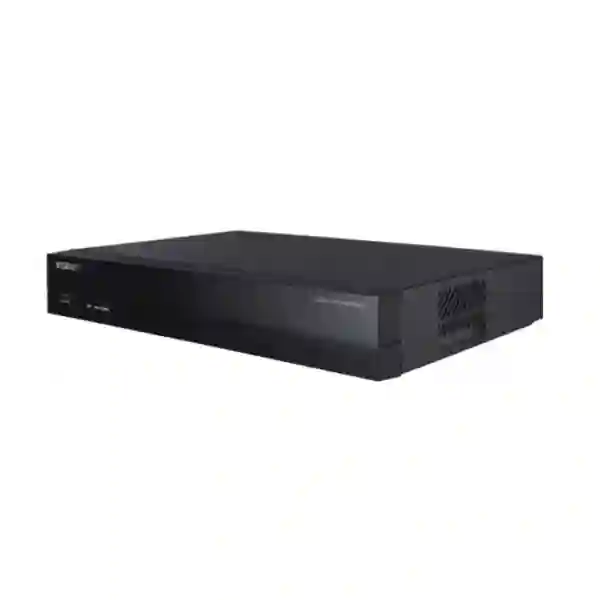
Hybrid CCTV recorder | Tanzania buyer guide
Hanwha HRX-434 4-Channel Pentabrid DVR
Keep compatible coaxial surveillance cameras in service while assessing a limited move toward IP video. The Hanwha HRX-434 supports AHD, HDTVI, HDCVI, CVBS and compatible network cameras, with four analog inputs and up to six supported channels overall. Its key value is flexibility in a small, carefully specified CCTV installation—not an unlimited expansion path.
At a glance: is this the right recorder?
A reasonable shortlist when
- You have up to four compatible coaxial cameras.
- You want selected IP integration within the stated limits.
- You can plan recording speed, bandwidth and retention.
- One supported internal HDD is enough for the design.
Consider alternatives when
- The site needs extensive IP expansion or built-in PoE.
- Several storage drives or RAID are required.
- High-frame-rate 8 MP recording is mandatory.
- The planned streams exceed recorder bandwidth.
Verified specification overview
Use these headline specifications to screen a proposed system, then validate exact camera models, firmware and the supplied configuration. Published specifications may change.
| Recorder type | 4-channel pentabrid DVR; AHD, HDTVI, HDCVI, CVBS and IP |
|---|---|
| Camera connections | 4 BNC analog inputs; up to 6 total channels in supported analog/IP configurations |
| IP interoperability | SUNAPI (Wisenet), ONVIF; exact camera and feature compatibility to be checked |
| Recording resolution | Up to 8 MP with format, stream, camera and throughput limits |
| Analog recording rates | 8 MP: 8 fps per channel; 5 MP: 12 fps; 4 MP: 15/12 fps; 2 MP: 30/25 fps (NTSC/PAL as applicable) |
| Compression | H.265, H.264, MJPEG |
| Recording bandwidth | Maximum 30 Mbps |
| Playback bandwidth | Maximum 32 Mbps |
| Storage | One internal SATA HDD bay, up to 6 TB supported |
| Local display | HDMI and VGA, simultaneous display capability |
| Network connection | RJ-45 Ethernet, 10/100 BASE-T |
| Physical interfaces | Coaxial camera control, 4 alarm inputs, 1 relay alarm output, USB and RS-485 PTZ control |
| Remote functions | Supported web/software/mobile viewing, event notification and QR-code P2P setup |
| Electrical | 12 V DC input; manufacturer states maximum 22 W with one 6 TB HDD |
| Operating environment | 0°C to 40°C; 20–85% relative humidity |
| Dimensions | Approximately 300 × 47 × 208.7 mm |
Source: Hanwha Vision HRX-434 official product specifications and support documentation. The specification table is not a statement of Tanzanian stock, included accessories or sale conditions.
A practical fit for an existing four-camera site
Many small premises already have coaxial cameras in useful positions but want better recording options or a gradual route toward network video. The HRX-434 addresses that decision without requiring a blanket replacement of every camera and cable on day one. Its four BNC inputs are intended for compatible analog formats, while network-camera capability adds flexibility within the recorder’s overall channel and bandwidth limits. This makes the buying question more specific than simply asking whether the product is a four-channel DVR: the important issue is whether the planned mix of cameras, stream sizes and recording settings fits the unit.
For a shop, office, reception area or small controlled-access facility, begin with a sketch of the existing camera positions and the evidence each position must capture. Check the signal standard printed on each camera, its usable resolution, the cable condition and the power supply. Then decide which views genuinely need higher detail or IP features. A successful upgrade keeps working equipment when it remains fit for purpose and replaces parts that cannot deliver the required result. The recorder is a component of that design, not a substitute for careful placement and lighting.
Understanding the five-in-one pentabrid format
Pentabrid refers to support for five families of video input: AHD, HDTVI, HDCVI, conventional composite CVBS and network IP cameras. Those labels describe different signal and transport methods, not five separate recording capacities that can simply be added together. The four physical BNC sockets are analog inputs; network cameras connect through the site network and count toward the supported total. Manufacturer documentation describes up to six camera channels overall, with a maximum of four analog inputs. An all-IP or mixed configuration must still respect the recorder’s channel allocation and total video throughput.
This distinction prevents a common purchasing mistake. A site with four analog cameras should not assume that another six IP cameras can be attached to create ten useful recording channels. Equally, a camera advertised with a matching megapixel figure is not automatically interoperable: its signal format, firmware and capabilities still matter. Ask the installer to list each proposed camera and the expected recorder channel before equipment is ordered. The best outcome is a verified working combination, rather than relying on a general phrase such as hybrid support.
Checking AHD, HDTVI, HDCVI and CVBS cameras
The Hanwha HRX-434 is useful where a property has a mixture of conventional and high-definition coaxial camera signals. AHD, TVI and CVI are high-definition analog technologies; CVBS is a legacy standard commonly associated with lower-resolution footage. Their inclusion supports a wider range of upgrade scenarios than a recorder dedicated to one analog signal family. However, actual support must be checked at the specific resolution and video mode in use. Older or specialized cameras may have output settings that need adjustment before the recorder displays a stable picture.
Before replacing an existing DVR, inspect one working camera from each family and document its output standard, resolution, frame rate and power arrangement. If a camera offers selectable output modes, record which one is enabled. Confirm any control functions such as on-screen menus or PTZ independently; a compatible picture does not guarantee every control command. Cable quality, connector condition and interference can also affect results even when both endpoint devices support the same signal. A short pilot test on the actual site is often more informative than comparing labels on packaging.
Adding network cameras without overpromising expansion
IP camera connectivity makes it possible to add a view that is difficult to reach with existing coaxial cabling or to introduce a compatible network camera into an otherwise analog installation. The recorder lists SUNAPI and ONVIF interoperability, which provides integration paths for supported devices. Compatibility remains feature-specific: successful live video does not establish that every camera event, microphone, analytic result or PTZ command will work. Request the exact camera model and firmware details and confirm the required functions before approving the final design.
Network cameras also introduce switch ports, suitable camera power, addressing, network isolation and bandwidth planning. The HRX-434 is not described as having built-in PoE switch ports, so do not expect it to power an IP camera directly from the recorder’s network connector. Verify the proposed PoE switch or injectors separately. If a deployment is expected to expand well beyond six views or to become primarily IP with demanding analytics, assess a purpose-built NVR instead of stretching a small hybrid DVR beyond its sensible operational role.
Resolution is not the same as recorded motion
An 8 MP headline describes supported image detail under applicable conditions, but it does not mean all supported 8 MP streams are recorded at 25 or 30 frames per second. Hanwha specifies an analog main-stream rate of 8 fps per channel at 8 MP, 12 fps at 5 MP, and 15/12 fps at 4 MP. At 2 MP, the listed rate reaches 30/25 fps depending on video standard. Input display rates and recording rates are different measurements; a monitor can show one update pattern while the stored recording uses another.
Frame rate matters wherever a customer wants to follow rapid movement, inspect a transaction, or review an incident involving a vehicle. Higher resolution can help with static detail, but fewer captured frames may leave larger gaps between successive positions of a moving subject. A good recording specification therefore states both image resolution and required recording frame rate for each important camera. Test night scenes and moving objects, not only a daytime still image. The right setting depends on the task, lighting and available system resources, not on the highest resolution number alone.
H.265, H.264 and MJPEG in daily use
The recorder supports H.265, H.264 and MJPEG compression. These codecs convert video into data that can be written to storage and delivered to viewing software. H.265 can offer storage-efficiency advantages over older coding under comparable settings, but the actual saving depends on camera content, stream profile, movement, lighting and configuration. A parking entrance at night may behave differently from a quiet office corridor because noise, activity and scene complexity can influence bitrate.
For deployment, confirm which codec the connected camera or recording path actually uses rather than assuming H.265 is always active. Test playback on the intended workstation and mobile app before relying on a chosen profile. Consider whether a low-bandwidth secondary stream is needed for remote viewing while a higher-quality stream is retained as evidence. In environments with limited internet capacity, remote-view settings deserve their own plan; lowering the live-view stream may be preferable to compromising the evidential recording of a critical entrance.
Recording throughput and real system capacity
Hanwha lists a maximum 30 Mbps recording bandwidth and 32 Mbps playback bandwidth for the HRX-434. These limits are central to a reliable system design. Adding nominal camera resolutions does not reveal the total bandwidth demand: a high-motion scene, high frame rate or image-quality setting can increase the data rate from an individual camera. Plan the expected main streams together and leave sensible headroom for scene changes. A configuration that fits on paper at average bitrate may behave less predictably when activity rises.
During commissioning, observe actual incoming and recorded stream rates while the premises operates normally. Repeat the observation in challenging conditions such as poor light or heavy movement. If a proposed camera mix exceeds available resources, review codec settings, resolution, frame rates and the need for another recorder architecture. The buyer should receive a simple channel-and-bitrate schedule that explains the compromise made for each view. This is much more useful than an unqualified promise that a given camera count will always work at its maximum specification.
Choose the hard drive for the retention requirement
The HRX-434 has one internal SATA drive bay with a stated maximum supported capacity of 6 TB. That is a supported capacity ceiling, not a promise of how many days every installation will retain. Retention is driven by the combined video bitrate, time spent recording, compression choices, event activity, usable disk space and any overwrite policy. A drive that provides a suitable window for low-motion cameras may retain substantially less when several high-detail streams are active continuously. Obtain a calculation based on the intended settings.
Confirm whether the specific quotation includes a compatible surveillance-rated hard drive; do not assume that a quoted HRX-434 base unit contains one. Ask the supplier to identify its exact drive model, usable capacity and compatibility status. A single internal drive also means there is no multi-drive recorder array in this chassis. If the footage is critical, discuss routine export, off-device retention and incident preservation practices. The correct procurement question is not simply ‘How big is the disk?’ but ‘Will we still have the required footage when we need it?’
Estimate recording days before installation
Start retention planning with a written policy: which cameras record continuously, which record on events, and how long footage should remain available before normal overwrite. Collect a realistic bitrate estimate for every channel at the selected profile. Multiply each stream’s data rate by its recording time and allow room for filesystem and operating overhead. Actual retained days will vary because many modern streams change bitrate with the scene. Ask for a range rather than a single guaranteed value when activity levels are uncertain.
Once installed, check the recorder’s actual oldest available recording after a representative period of operation. That observation can reveal a large gap between a rough design estimate and real footage. If the retained period is too short, review quality settings carefully, decide whether event-based recording is appropriate for less critical views, or reconsider recorder and storage capacity. Do not reduce the quality of footage from a critical camera merely to meet an arbitrary number of days without discussing the evidential cost.
Continuous, scheduled and event recording
Hanwha documents manual recording, scheduled recording, continuous or event schedules, and pre/post-event options for the HRX-434. These modes let an operator align recording behavior with the actual use of the premises. Continuous capture can be appropriate where missing a few moments would be unacceptable. A schedule may suit a noncritical room used only during set hours, while event recording can reduce unnecessary footage when triggering conditions are reliable. The safest choice depends on the incident types the business needs to investigate.
Event-based operation is never equivalent to a guarantee that every incident will be detected. Motion triggers can be affected by changing sunlight, shadows, insects, vehicles, foliage or a camera’s field of view. Confirm which event originates in the recorder and which is generated by a compatible network camera. Configure pre-event and post-event recording deliberately, then perform realistic tests. Owners should understand where gaps are possible and should retain continuous recording on priority cameras when their risk assessment calls for it.
Alerts, camera events and operator response
The specification includes video-loss, motion and tampering triggers for applicable analog inputs, plus supported network-camera events and analytics signals. Event responses can include configured actions such as email notification, buzzer, alarm output or PTZ preset. These are tools for an operational process, not a monitored security service by themselves. Someone must decide who receives an alert, whether it matters, and how to respond without creating an unsafe or excessive response to false alarms.
A useful deployment creates a small event matrix for the site: event name, originating camera, trigger condition, recipient, action, response owner and testing date. Test missing video, a normal intrusion scenario and a deliberately false trigger. If alerts are to be forwarded by email or a mobile service, verify the current service configuration and internet reliability. Document the procedure for checking whether a notification corresponds to usable footage. Avoid advertising AI detection as a built-in recorder guarantee when the function depends on a camera’s event capabilities.
Local screens, search and evidence review
The HRX-434 provides HDMI and VGA monitor outputs with simultaneous display capability. This makes it suitable for a local viewing desk as well as an equipment-room installation where a technician needs to configure the unit directly. HDMI supports high-resolution monitor modes, but that display capability should not be confused with the resolution or frame rate of recorded footage. Identify where operators will sit, whether they need a permanent monitor, and what footage they should be permitted to review.
The recorder supports searching and playback of recorded channels through supported local and remote interfaces, subject to interface-specific limits. Establish a routine for locating incidents by camera and timestamp. Keep system time correct and show operators how to identify the start and end of an incident rather than exporting an incomplete clip. A practical handover includes an example search, playback and export, plus a check that a separate computer can open the supplied evidence file. This exercise turns a recorder from a passive appliance into a useful incident-review tool.
Remote viewing for authorised users
The manufacturer’s feature list includes smartphone support, compatible viewing software and QR-code P2P setup. These options may simplify authorised viewing from outside the premises after the network and user accounts have been configured correctly. They do not remove the need for a reliable internet connection, correct account permissions or security maintenance. Confirm the currently supported mobile application, operating-system requirements and active service availability for the particular firmware and deployment.
Remote access should be granted only to people who have a genuine operational need. Separate accounts where the product supports them, use strong unique credentials, remove access promptly when roles change and review logs. Be cautious about sharing administrative credentials with casual viewers or leaving a recorder openly reachable from the public internet. For sites with variable mobile connectivity, test a substream at the actual off-site connection speeds and confirm how quickly operators can locate recordings. Live viewing success alone does not prove that remote playback will be acceptable.
Recorder and network security by design
A surveillance recorder may contain sensitive images, records of daily activity and information about a property’s layout. Treat it as a managed network endpoint. Hanwha lists security features including account and access controls, address filtering, access logs and encrypted functions, but the protection achieved depends on firmware, configuration and wider network practice. Keep the software version under review using the manufacturer’s documentation and have a nominated person responsible for maintaining credentials and authorised access.
For a business installation, use an appropriate isolated or segmented CCTV network where practicable. Change defaults during setup, avoid unnecessary port exposure, restrict administrative access and maintain a recovery record in a secure location. Set a trusted time source and review the system clock after power interruptions; incorrect time can make an otherwise good recording difficult to use. Decide who can copy images, how incident footage is transferred and when it should be deleted. Those operational controls often matter as much as the recorder’s technical feature list.
Coaxial camera control and PTZ planning
Coaxial control is listed among the HRX-434’s features, with applicable control support for CVBS, AHD, TVI and CVI environments. The unit also lists RS-485 connectivity for supported PTZ control protocols. These functions can help when an existing camera installation uses remote menu configuration or mechanical pan-tilt-zoom equipment. However, video compatibility and control compatibility must be verified separately. Some camera functions may depend on the specific brand, mode, firmware or coaxial-control protocol.
For a PTZ camera, document the required actions: manual pan and tilt, presets, patrols, zoom and incident positioning. Test each required function rather than accepting ‘PTZ compatible’ as a complete specification. Check the camera’s separate power demands and whether a legacy control cable or coaxial command path is actually being used. If the installation only has fixed cameras, complex PTZ integration is not a purchasing priority. Choose the recorder on evidence needs and compatibility first, then evaluate optional controls where they contribute genuine operational value.
Interfaces and third-party system integration
In addition to its camera inputs and display connectors, the manufacturer’s specification lists a 10/100 Ethernet connection, USB interfaces, alarm inputs and a relay alarm output. These connections can be useful for a controlled installation, but they should be mapped into a clear project design. For instance, an alarm signal requires an appropriate compatible source and configured action; the presence of a terminal does not imply an entire alarm system has been supplied. Likewise, an Ethernet port is not a built-in PoE output for network cameras.
If the recorder will be connected to existing management software, a guard desk or a larger security workflow, identify the exact required integration before ordering. Confirm whether the chosen client software version supports this model and which functions are accessible: viewing, playback, user management, export, alarms or camera configuration. ONVIF and SUNAPI support create possible interoperability routes, not universal feature parity. Ask the integrator to demonstrate the critical workflow on a representative device and record any functions that require a different model or software licence.
Power supply, ventilation and equipment location
Hanwha specifies a 12 V DC power input and a maximum consumption of 22 W with a 6 TB drive fitted. Its stated operating temperature is 0°C to 40°C, with relative humidity of 20% to 85%. These values should shape cabinet selection and placement. The recorder is an indoor electronic appliance; it should not be installed in a hot unventilated roof space, exposed outdoor enclosure or damp area without a suitable engineered environment. Leave room for cabling and airflow and protect the equipment against accidental disconnection.
A dependable CCTV installation also requires a plan for electrical interruptions. Check the correct power adapter and consider suitable UPS backup for the recorder, network equipment and any separately powered cameras. A recorder may remain active during a short outage while its cameras go offline if only the recorder is backed up. Confirm earthing, cable routing and the local electrical arrangement with a qualified installer. During handover, simulate a controlled outage and restoration to confirm automatic restart, correct time and normal recording recovery.
Deployment considerations for premises in Tanzania
For a Tanzania-based buyer, the most important local questions are often practical: whether existing cameras can be retained, what power protection is needed, whether the internet connection supports remote viewing, and how service access will be managed. The HRX-434 can be evaluated for the same kinds of small commercial and institutional premises found in many markets. No site-specific claim about Tanzanian stock, installation coverage or warranty should be inferred from the manufacturer’s global specifications. Obtain those details on the actual quotation.
Climate and installation conditions deserve particular attention. An equipment cabinet exposed to strong heat, dust or moisture can create avoidable failure risk. Network access may vary by premises and provider, so remote-view settings should be tested using the connection that staff will actually use. Where multiple people require access, define permissions and the responsibility for retaining or sharing incident footage. A good proposal separates verified product specifications from local commercial commitments and states exactly who will install, commission, train and support the system.
A small retail environment
A four-camera retail installation might need a view of its entrance, a transaction area, a stockroom approach and an exit. The recorder may be suitable if those positions are adequately covered by compatible cameras and the combined recording profile fits its limits. Choose lens positions around the information needed after an incident rather than around the easiest wall or ceiling points. For a transaction view, the ability to see what happened in sequence can be as important as raw pixel count.
Before installation, ask whether the counter view needs continuous recording, whether staff can easily find a clip by timestamp and whether owners require off-site viewing. If a legacy CVBS camera produces insufficient detail, replacing only that camera may be more valuable than replacing the whole system. Verify night or low-light performance with real footage. Set a retention target, export a test clip and ensure only authorised persons receive access. These checks create a more dependable result than buying a recorder on channel count alone.
A reception, clinic or professional office
An office or reception area often needs a modest number of cameras, restricted access to video and straightforward incident retrieval. The HRX-434 can be considered for a compatible small installation where privacy arrangements are clearly defined. Decide which public or shared areas actually require monitoring, minimise unnecessary recording of private spaces, and ensure signage and handling procedures follow the organisation’s applicable requirements. The recorder’s ability to capture footage does not establish that every proposed camera location is appropriate.
A reception operator may need local live view without permission to reconfigure the recorder or export files. A manager may need incident search, while a technician requires configuration access. Define these roles before accounts are created. Check that the proposed display, monitor position and access path fit normal work. If the installation includes network cameras, confirm that they use suitable networking and power rather than assuming a four-channel analog appliance provides all network infrastructure.
A workshop, store or small warehouse
Workshops and storage areas introduce challenges that are easy to overlook: movement near doors, widely different lighting levels, dust, equipment vibration and long cable routes. A surveillance plan may use fixed views of entrances, valuable storage and dispatch points. The HRX-434 can record a limited set of compatible cameras, but the camera lens, illumination, mounting and cable integrity determine whether useful detail reaches the recorder. Inspect the environment and schedule a night-time sample before final acceptance.
If staff want to identify rapid movement or vehicle activity, choose the recording frame rate carefully, especially for high-resolution analog cameras. Protect the recorder from excessive heat or dirt and consider who will inspect it after power interruptions. Define which events should generate alerts and which should simply be recorded for review. In a large warehouse with many zones, long-term expansion or heavy IP analytics needs, a higher-capacity NVR or distributed design may be a better starting point than this compact hybrid DVR.
An upgrade path that preserves useful cabling
An existing coaxial estate may represent significant installation work that remains serviceable. One reason to consider a pentabrid recorder is the possibility of retaining compatible cables and cameras while replacing an aging recording unit. Before committing, however, the installer should check physical connector condition, video loss, interference, grounding and camera power. Reusing a bad cable because it already exists can undermine the quality of a new recorder. Replace or remediate defective runs rather than treating the recorder as a cure.
Plan migration in stages. Document the old system, label each camera and export any footage that must be preserved before disconnection. Fit the new unit, connect one representative camera per signal family, then complete the remaining channels. Confirm each camera’s name, time, resolution and recording schedule. Introduce any IP camera after the analog baseline works, and test the new network path. A staged approach makes troubleshooting much easier than replacing cameras, cabling, switches and recording settings simultaneously without reference footage.
Installation and commissioning checklist
A competent handover should include a channel schedule, physical wiring map and an explanation of the selected storage plan. For each camera, record the model, signal standard, position, recording profile and whether a critical feature such as sound or PTZ has been tested. On the recorder, verify firmware, network addressing, time synchronisation, user permissions, recording schedule and alarm outputs. Label the supply and the network cable so future technicians can identify the system without interrupting unrelated equipment.
Commissioning is incomplete until real recordings have been reviewed. Ask for sample footage from the most difficult camera at night, a moving-person test, a video-loss alarm test and a recorded event that can be found and exported. Check that playback works locally and through any agreed remote interface, then review the actual storage usage. Record the installed HDD model and whether it was included in the supplied package. The final acceptance report should identify open issues and their owners rather than relying on an informal statement that the cameras appear on screen.
Routine maintenance and support expectations
A DVR is not a fit-and-forget device. Over time, camera focus can shift, outdoor lenses can become dirty, firmware may need review, hard drives can fail and passwords may need to be updated. Assign an owner for periodic checks of live image quality, the oldest available recording, storage health, clock accuracy and remote access. A quick monthly search for an older clip can reveal problems that an always-on live monitor would not show. Maintain a record of changes to cameras, viewing accounts and network settings.
Agree how an incident export should be requested and preserved. Avoid overwriting the only useful evidence while staff are still deciding how to proceed. Keep configuration backups where supported, and store them with suitable access controls. The exact warranty, replacement process, onsite support and spare-drive availability are commercial matters to confirm with the quoted seller in Tanzania; do not infer them from a generic product description. A maintenance arrangement is most useful when it specifies who acts when video disappears and how quickly a responsible person is notified.
When to choose a DVR and when to choose an NVR
The HRX-434 is especially relevant when a customer has a valuable base of compatible coaxial cameras and wants a measured transition toward IP video. An NVR, by contrast, is typically designed around network cameras and may offer different channel counts, internal drive configurations or PoE options depending on model. Neither category is inherently the best choice for every site. The right decision begins with camera estate, growth expectations, event requirements, evidence retention and management workflow.
If the present site has four working analog cameras, modest storage needs and limited expansion plans, this compact recorder is worth evaluating. If the project needs many IP cameras, higher aggregate throughput, multiple drives, RAID or more complex central management, investigate alternative systems from the outset. Avoid buying an undersized DVR because its channel count matches today while expansion is already planned. Equally, avoid replacing good coaxial infrastructure with IP equipment without demonstrating a real operational or image-quality benefit. Scope the whole surveillance system, not just the recording box.
Questions to resolve before requesting a quotation
A useful purchase enquiry should state the number and model of existing cameras, the required camera locations, the desired recording quality and frame rate, and the retention period. Include whether any camera needs audio, PTZ or network analytics. Explain who requires local viewing and whether authorised people need mobile or remote access. Identify the condition of the existing cables and whether power backup, display equipment, switches or a hard drive must be supplied with the recorder.
Ask for an itemised configuration that names the recorder model HRX-434, the HDD capacity and model if supplied, the compatible cameras, necessary accessories and the scope of installation and training. Request written confirmation of regional availability, commercial warranty, shipping or collection arrangements and any ongoing services; these cannot be established from product specifications alone. A clear quotation should also explain important exclusions, especially drive inclusion, network hardware, power protection and any software requirements. This reduces surprises after delivery and makes competing proposals easier to compare fairly.
Buying decision: what this model does and does not solve
The strongest reason to choose the Hanwha HRX-434 is its combination of four coaxial inputs, support for several analog signal families and controlled integration of compatible IP cameras. It offers mainstream recording codecs, one internal SATA storage position, local monitor outputs and supported remote-view workflows. For a clearly bounded small surveillance project, those are meaningful capabilities. The unit should nevertheless be evaluated against real motion requirements, stream bandwidth, supported channel allocation and the data-retention period, rather than on a simple 8 MP headline.
It does not create unlimited IP capacity, provide an internal multi-drive storage array or remove the need for separate camera power and network equipment. The unit also does not determine whether a particular camera angle is useful, whether footage handling meets the customer’s policy, or whether internet connectivity supports dependable remote viewing. Ask for a verified camera schedule and commissioning test. Where the operational requirements outgrow its specifications, consider an alternative recorder rather than reducing critical video quality without an informed decision.
Six details to send with an enquiry
- Existing camera models, signal standards and quantity.
- Any additional IP cameras, audio, PTZ or event functions.
- Required recording resolution and motion frame rate.
- Target footage-retention period and recording schedule.
- Remote viewing, network, monitoring and access needs.
- Whether the quote must include HDD, UPS, switch, installation and training.
Frequently asked buyer questions
These answers highlight the decisions that should be confirmed against the actual proposed cameras and installation, not assumptions made from a model name alone.
Is the HRX-434 a four-channel or six-channel recorder?
It has four physical BNC inputs for analog cameras. Hanwha also specifies configurations supporting up to six total camera channels when using supported network cameras, subject to the recorder’s channel allocation and throughput limits. Do not add four analog and six IP channels together as though it were a ten-channel recorder. Give the installer the exact proposed mix and ask for confirmation against the current model documentation before procurement.
Can the HRX-434 work with my existing analog cameras?
It supports the AHD, HDTVI, HDCVI and CVBS signal families. That is encouraging for mixed legacy installations, but it is not an unconditional compatibility promise for every camera within those categories. Check exact model, output mode, resolution, cables, connector condition and any required coaxial controls. A brief test with an existing camera is the best way to establish whether the intended upgrade will work without replacing that camera.
Does it record 8 MP footage at 30 fps?
No such blanket claim should be made. The manufacturer lists an analog main-stream recording rate of 8 fps at 8 MP and 12 fps at 5 MP per channel. Lower resolutions can support higher frame rates within the published limits. Recording frame rate also depends on the camera signal and configured profile. If smooth motion is critical, agree a target recording profile for that view and inspect a real test recording before sign-off.
Does the recorder include a hard drive?
The base model designation on its own does not establish what a Tanzania supplier will put in the box. Hanwha specifies one SATA HDD bay with support up to 6 TB, but drive inclusion can differ among quoted bundles and regional variants. Request the exact installed HDD model and capacity in writing, together with compatibility confirmation. The number of retained days still depends on bitrate, recording schedule and actual scene activity.
How many days can 6 TB store?
There is no universal number. Four low-bitrate cameras operating on limited schedules may retain a different amount of footage from four high-detail cameras recording continuously. First agree the cameras’ codecs, resolutions, frame rates, estimated bitrates and operating hours. Ask the installer to calculate a retention range and then check the oldest available recording after a representative period of use. A storage figure should be tied to an explicit recording configuration.
Can I view video on my phone?
The manufacturer’s feature list includes smartphone support and a QR-code P2P configuration option. Actual availability and behaviour depend on supported applications, firmware, network configuration, internet access and account permissions. Request a demonstration of live viewing and any required playback or alerts on the devices the authorised users will use. Use separate authorised access wherever supported, strong credentials and a controlled process for removing access when responsibilities change.
Does the HRX-434 power IP cameras through PoE?
Do not plan on an integrated PoE switch. The product lists an RJ-45 network interface, not built-in PoE camera outputs. Network cameras generally require an appropriate separate power source, such as a correctly rated PoE switch or injector, as supported by the camera. Include the network power hardware in the proposed bill of materials and ensure it is also covered by any required backup-power design.
Will all ONVIF cameras and analytics work?
ONVIF is an interoperability standard and the product also supports Hanwha’s SUNAPI integration. Neither label guarantees every third-party function. The ability to receive video does not prove that a specific analytics trigger, audio stream, PTZ operation or remote configuration control will be exposed. Ask for an exact model-and-firmware compatibility test covering the particular feature that the site needs. This is especially important where alarms depend on camera-generated events.
Can I connect HDMI and VGA displays?
The HRX-434 lists both HDMI and VGA local outputs with simultaneous display capability. Confirm the required monitor resolution and how the operator will use each screen. A high-resolution display mode does not raise the frame rate or detail of the recording itself. If a guard station needs more sophisticated multi-screen workflows, review the intended client software and operator requirements as part of the complete design.
Is the HRX-434 suitable for an outdoor cabinet?
Its published operating range is 0°C to 40°C, with 20–85% relative humidity, so placement needs attention. Do not treat this indoor recording appliance as weatherproof. A proposed outdoor or harsh-environment enclosure needs a properly engineered solution for temperature, humidity, dust, power and maintenance access. It is often better to put the recorder in a protected indoor room and route suitable camera cabling to it.
What happens during a power outage?
Recording depends on power to the DVR and to the connected cameras and networking equipment. A UPS for the recorder alone may not preserve video if camera power or a PoE switch fails at the same time. Plan the whole load and desired backup duration with the installer. After a test interruption, confirm that the system restarts, time remains accurate and recordings resume without avoidable configuration problems.
Can it trigger alerts from a video event?
The product supports applicable motion, video-loss and tamper event paths, along with supported network-camera events, and provides configurable responses. The specific result depends on connected cameras, event configuration and communication services. Test realistic incidents and expected false alarms before relying on notifications operationally. Assign a person to review each important alert; notification by itself is not equivalent to someone monitoring or responding to the site.
Should I use this instead of an IP NVR?
Choose on the whole system requirement. The HRX-434 makes sense for a small, constrained installation with compatible coaxial cameras and possibly a limited IP addition. A dedicated NVR may be more suitable for larger IP-only deployments, more cameras, additional storage positions or advanced management requirements. Compare actual channel capacity, aggregate bandwidth, storage design, software compatibility and future growth. There is little value in keeping an old architecture if it cannot meet the site’s evidence needs.
What should a Tanzania quotation confirm?
Ask for the exact HRX-434 model, whether the hard drive and power adapter are supplied, camera compatibility, any switch or PoE hardware, estimated storage days, installation scope and handover training. Confirm stock, price, regional warranty and support arrangements directly in the written offer. If remote viewing is required, include configuration and network testing. Do not assume import, delivery, installation or after-sales services are included simply because a supplier lists the model.
What evidence should be checked after installation?
Test live video, playback and export from each critical camera, including an example from difficult lighting conditions. Check movement at the specified resolution and frame rate, make sure timestamps are correct and confirm the recording schedule. Simulate an appropriate alarm and a controlled power interruption. Show an authorised operator how to retrieve and protect a clip, then record the oldest available footage after the system has run under normal conditions.
Request a configuration-specific HRX-434 quotation
Tell FourTeck Tanzania about the camera mix, storage-retention target, recorder accessories and site conditions. Ask for confirmation of compatibility, the exact supplied HDD, local availability, pricing, warranty and any installation or support scope. The best offer is one that documents how this recorder will meet your recording and retrieval requirements, not one that simply repeats the maximum resolution.
Contact FourTeck Tanzania for a tailored product and installation enquiry. No unverified purchase or contact link has been inserted.




Reviews
There are no reviews yet.