
CCTV DISPLAY • TANZANIA PRODUCT GUIDE
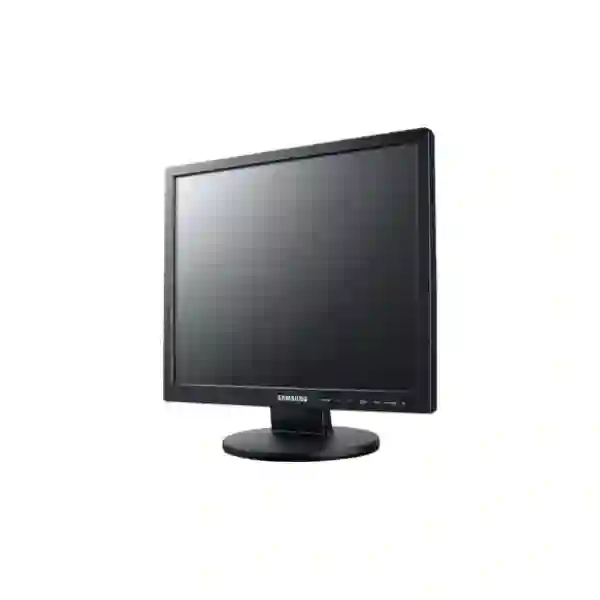
Hanwha SMT-1734 17-inch LED CCTV monitor
A compact legacy surveillance display with HDMI, VGA, composite BNC inputs and a protected screen. Hanwha Vision marks this model discontinued: confirm compatibility and discuss suitable supported alternatives before procurement.
The quick buying answer
Choose the SMT-1734 for evaluation only when its compact footprint and existing video connections match a real installation need. It is most relevant to legacy CCTV monitoring, service benches and selected indoor viewing positions; it is not a native full-HD screen, an IP video decoder or an outdoor monitor. Because the product is discontinued, the safest next step is a model-specific compatibility check and an alternative-product discussion, rather than assuming new stock or after-sales coverage.
Indoor counter, technician bench, existing DVR or compatible analogue feed.
Output format, display size, power, condition, mounting and lifecycle needs.
Technical specifications at a glance
| Model | Hanwha Vision / legacy Samsung Techwin SMT-1734 |
|---|---|
| Product class | 17-inch LED CCTV monitor; manufacturer lists it as discontinued |
| Native display | 1280 × 1024 pixels |
| Published aspect descriptor | 4:3 in manufacturer material; native pixel dimensions are 1280 × 1024 |
| Brightness | 250 cd/m² |
| Contrast and response | 1000:1; 5 ms |
| Video connectors | HDMI × 1, VGA × 1, composite BNC input × 2 |
| Video standards | NTSC / PAL for composite |
| Audio | Two stereo RCA input sets; 2 × 1 W speakers |
| Picture functions | OSD, picture-in-picture, freeze, noise reduction, 3D comb filter (mode restrictions may apply) |
| Power | 100–240 V AC, 50/60 Hz; 19 W specified |
| Operating environment | 0 °C to +40 °C; 20–90% RH, non-condensing |
| Mounting interface | VESA 100 × 100 mm |
| Dimensions with stand | Approx. 371.0 × 390.9 × 217.4 mm (W × H × D) |
| Display protection | Tempered glass |
| Suggested replacement | SMT-1935 per Hanwha Vision; check exact suitability |
Specifications summarise original manufacturer documentation. Check the exact physical unit and application before purchase or replacement.
Product overview: where a compact CCTV monitor makes sense
The Hanwha SMT-1734 is a compact 17-inch LED surveillance monitor intended for people who need to look directly at a camera or recorder output without allocating space for a large display. Its native 1280 × 1024 pixel panel, HDMI and VGA inputs, and two BNC composite video inputs make it relevant to mixed-generation CCTV installations. A protected glass front, built-in speakers, on-screen controls, and a desk stand add practical options for equipment rooms, monitoring counters, and service benches. This is a display device: it does not record footage, replace a network video recorder, or act as a camera.
Buyers in Tanzania considering this exact model should begin with their existing signal type and required viewing area. A narrow counter may suit a 17-inch panel, while a multi-camera wall or detailed investigation desk may benefit from a larger modern display. Hanwha Vision lists the SMT-1734 as discontinued, so a new procurement decision should include a condition check, spare-parts expectations, and a review of currently supported alternatives. Ask for confirmation of the exact unit and installation requirements before planning a purchase.
Understand the manufacturer discontinuation notice
Hanwha Vision’s product information identifies the SMT-1734 as discontinued and names the SMT-1935 as a suggested replacement. That notice describes the manufacturer’s product lifecycle; it does not independently establish whether any particular supplier in Tanzania has residual inventory, refurbished units, replacement parts, or a current offer. This page therefore makes no stock, lead-time, price, warranty, or local service promise. The appropriate commercial step is to confirm what can actually be quoted and supported for the intended installation.
A discontinued monitor may still be useful where an installed system needs a like-for-like viewing station, a particular BNC connection, or a familiar screen footprint. It can be a less suitable choice for standardising a new estate that requires predictable future replacement. During evaluation, compare connector availability, native resolution, mounting dimensions, power requirements, operating conditions, and after-sales support rather than treating a similar screen diagonal as proof that two models are interchangeable.
What 1280 × 1024 resolution means for surveillance
The specified native panel resolution is 1280 × 1024 pixels. This is the number of picture elements physically available on the display, not the capture resolution of a connected camera and not a promise of full-HD detail. The manufacturer’s literature labels the panel aspect ratio as 4:3, while 1280 × 1024 pixels have a mathematical ratio of 5:4. For a purchase decision, the native pixel specification and the actual picture-mode behaviour matter more than a loose aspect-ratio label.
A video source may transmit an image at a different resolution from the monitor’s pixel grid. When that happens, the display must fit the incoming picture to its panel, potentially introducing scaling, black borders, or a stretched appearance depending on its settings. Operators checking identification details should use the recorder’s original footage or a better-suited investigation display rather than assume every pixel in a high-resolution camera image can be resolved on this monitor. A pre-installation picture test is especially valuable for wide-screen recorder interfaces.
Which signal types can be connected
The SMT-1734 offers a useful combination of legacy and digital input options. Manufacturer documentation lists one HDMI input, one analogue VGA or D-sub input, and two composite BNC video inputs labelled Video A and Video B. The user manual also identifies two stereo RCA audio input sets. These are physical connections, not network interfaces. The monitor does not receive camera streams directly over an Ethernet cable, and the presence of HDMI does not mean the device can configure a recorder.
Before buying, examine the actual output panel of the camera, DVR, NVR, decoder, or computer that will drive the display. Note the exact connector, video standard, and output timing. A recorder with only a digital network connection cannot be connected directly merely because its video is accessible on a computer; an appropriate decoder or display-output device would be needed. Confirm cables, adapter direction, and equipment power separately instead of relying on connector appearance alone.
Using an HDMI output from a DVR or NVR
An HDMI connection is often the simplest way to attach a modern recorder with a local video output. The original datasheet lists accepted HDMI formats including 720p and 1080p at specified frame rates, but the panel itself remains 1280 × 1024 pixels. Therefore, accepting a 1080p input must not be represented as native 1080p display resolution. The recorder’s menus, camera grid and on-screen text should be tested for scaling and legibility at the intended viewing distance.
Check that the recorder can output a supported signal before deployment. Some recent recorders default to output timings that a legacy monitor cannot display, particularly higher-resolution modes. Use a compatible temporary display to adjust the recorder when necessary. Also remember that HDMI is a one-way video source connection in this setup; the monitor’s picture controls do not change the recorder’s camera settings. For an operator who needs comfortable reading of many camera tiles, a larger current display may provide a more practical workspace.
Connecting a legacy recorder through VGA
The analogue VGA input is valuable where a working DVR or workstation still presents video through a 15-pin D-sub connector. A secure, correctly seated cable and a supported output format are important. The published specifications provide a range of VGA display modes, including 1280 × 1024 at the relevant refresh rates. Matching an available output to the panel’s native resolution can be a useful starting point for testing menu sharpness and image proportions.
A VGA socket is not a guarantee of compatibility with every old computer or recorder. Confirm the source’s horizontal and vertical timing, test colour and text clarity, and ensure that any passive or active adapter handles conversion in the correct direction. VGA carries picture rather than the RCA analogue audio inputs described for this monitor, so sound requires its own deliberate connection if the installation uses it. Where a unit shows unstable pictures, rule out cable damage and unsupported timing before declaring the panel defective.
Using the two composite BNC video inputs
The user manual diagrams Video A and Video B as separate composite BNC inputs, and the manufacturer lineup records two video inputs with no loop-through outputs for this model. This is useful when the source is a compatible analogue CCTV device or a recorder’s standard composite output. It must not be confused with a universal input for every signal that happens to use a BNC connector. HD-over-coax systems can employ different video formats that are not equivalent to conventional PAL or NTSC composite.
Ask the technician to identify whether the source is actually CVBS composite video and to verify the signal standard. The model supports NTSC and PAL according to its manual. If a connected camera uses a newer coax format, it may require a compatible recorder or converter rather than a direct cable to this display. Do not plan daisy-chaining on an assumed BNC pass-through: the documented connection layout shows input A and input B, not an output that can be relied upon to feed another screen.
Choosing source selection and picture functions
The user guide shows an on-screen source list with Video A, Video B, VGA, and HDMI options. This lets an operator choose an attached source without changing the physical cable. The manual also lists picture-in-picture, freeze, under-scan, noise reduction, and a 3D comb-filter function. Such functions may be helpful during review or configuration, but their availability and behaviour can depend on the selected input mode and the supported source combination.
A freeze function should not be confused with recording or preserving evidence; it affects what the local screen shows. Similarly, picture-in-picture does not mean that all attached inputs can be simultaneously displayed in arbitrary combinations. Test the required layout with the actual signal sources. Staff should know which source name corresponds to each device, how to return to live pictures, and where recordings are actually stored. This keeps a useful convenience feature from creating confusion during incident response.
Interpreting brightness, contrast and response time
The published display figures include 250 cd/m² nominal brightness, a 1000:1 contrast ratio, and a 5 ms response time. These are product specifications rather than a claim that an operator will always see usable detail under every lighting condition. Reflections on the glass, sunlight through a nearby window, camera exposure settings, compression, source quality, and viewing position can all influence the image a person sees in practice.
A 5 ms response figure is not a measurement of end-to-end surveillance latency. A camera, encoder, network, recorder, decoder and screen can each contribute delay in a particular system. For reception or security-control use, place the display so routine viewing is comfortable and lighting is controlled. Compare the image with source recordings before adjusting picture settings to compensate for a camera problem. A display cannot recover detail that never reached its input.
What the protected front glass does and does not do
Hanwha’s product description includes a tempered-glass screen. That feature is relevant where routine cleaning, light incidental contact, or frequent use makes an exposed monitor surface undesirable. It should not be taken as a vandal-resistance rating, outdoor weatherproofing claim, impact certification, or guarantee against breakage. The SMT-1734 is still an electronic monitor whose cabinet, connections, air flow, and power inlet need a suitable indoor environment.
During inspection of a previously installed unit, check the glass for cracks, chips and scratches as well as any separation between the front surface and the picture beneath it. These checks matter because reflections and damage can affect usability at a monitoring station. Use a cleaning method consistent with the actual unit’s care instructions; do not spray liquids into the cabinet or connectors. The tempered-glass feature is helpful, but it does not remove the need for proper handling.
Desk placement, VESA fitting and access
The manufacturer’s datasheet specifies a VESA 100 × 100 mm mounting interface and gives approximate overall dimensions of 371.0 × 390.9 × 217.4 mm with the stand, expressed as width, height and depth. Without the stand, the listed measurements are about 371.0 × 330.6 × 59.3 mm. A mounting interface tells you the hole pattern; it does not confirm that every bracket, screw length, arm loading limit, or wall material is suitable.
Plan for connector clearance, reach to the on-screen controls, visibility from the operator position, and adequate ventilation. An articulated arm can change the load on a desk or wall, so the supporting structure and mounting hardware must be checked independently. Before choosing a display for a narrow counter, measure the real available width and depth rather than assuming that a 17-inch diagonal equals the unit’s physical width. Retain access for unplugging power safely and tracing the connected source cables.
Power supply and site electrical planning
The published electrical specification lists 100–240 V AC at 50/60 Hz and 19 W power consumption. This describes the monitor’s input range and stated consumption; it does not verify a particular building circuit, plug configuration, surge environment, UPS runtime, or local regulatory approval. A technician should verify that the supplied power lead and actual unit are suitable for the destination installation before energising equipment.
When placing a monitor on a CCTV desk in Tanzania, treat backup power as a system question. Keeping the screen powered has limited value if the camera, recorder, network switch, or decoder loses power first. Match any UPS selection to the total connected equipment load, required duration, operating condition, and manufacturer’s safety requirements. Avoid treating the 19 W figure as a guaranteed continuous reading under every picture setting. Secure the power cable so it cannot be pulled or crushed during daily desk use.
Temperature, humidity and indoor operating conditions
The user manual and published specification identify an operating range of 0 °C to +40 °C and 20–90% relative humidity without condensation. Those figures are relevant to indoor equipment rooms and surveillance desks, particularly when a room becomes warm, crowded, or poorly ventilated. They do not amount to an outdoor IP rating, protection from rain, resistance to dripping air-conditioning units, or suitability for exposure to salt spray or intense direct sunlight.
Assess the actual temperature where the display will sit, not only the temperature outside the building. Heat can build up beside network recorders or within an enclosed counter. Leave the ventilation openings clear and prevent cables from blocking air flow. If a site periodically experiences moisture, condensation or temperatures outside the stated operating range, consider a different protected installation or a display designed for those conditions. No location-specific environmental suitability is assumed simply because the intended buyer is in Tanzania.
Built-in sound and RCA audio connections
The monitor documentation identifies two stereo RCA audio input sets and speakers rated at 2 × 1 W. This can assist when a compatible recorder or other source supplies analogue audio for local listening. It is not evidence of an integrated microphone, network audio decoder, independent audio recorder, or a powerful public-address system. Whether sound arrives with a particular video connection depends on the source and how the monitor handles its selected input.
For installations where audio is operationally important, have a technician test the required feed and acceptable listening level before handover. Check left and right connectors, source selection, mute status, and volume. Do not assume that a camera’s video output automatically provides usable sound, or that every CCTV recording is licensed or configured to include audio. Separate legal and privacy requirements for capturing sound must be assessed by the system owner; the presence of speakers does not settle them.
A reception or security counter use case
A small security or reception counter may need one live view while leaving room for registers, access-control controls and ordinary customer interaction. In that setting, a compact monitor can be more practical than a wall-size panel. The SMT-1734’s source choices can help where a counter still has a legacy recorder or test feed. The most important question is not just whether video appears, but whether the person on duty can read the necessary labels and recognize the events relevant to that position.
Plan the display angle to reduce glare from entrances and windows. Determine whether the operator must see one entrance camera, a small recorder layout, or several camera feeds at once. A 17-inch panel can become crowded when too many images are shown. If staff must read number plates, identify faces, or inspect complex timelines, provide a suitable playback workstation and review method. A screen for situational awareness should not be specified as the only tool for forensic examination.
Back-office, retail and service-area monitoring
In a back office, a monitor might be used to view selected point-of-sale or service-area cameras without taking over an employee’s main computer. The model’s relatively small footprint and supported HDMI or VGA connection options make it a candidate to evaluate where an existing recorder has a compatible local output. It can also be useful in a service room where technicians occasionally check whether a camera feed is reaching its recorder.
The system designer should first determine what the viewer needs to do. Is the requirement to glance at one entrance, monitor queue movement, verify that a recorder is online, or actively investigate incidents? Those tasks call for different screen sizes, layouts and recording access. Confirm that sensitive camera feeds are not unnecessarily visible to visitors. Do not add surveillance screens merely because spare hardware is available; connect the screen to a defined operational need and a documented access policy.
Industrial offices, stores and warehouse desks
An indoor store-control desk or industrial office may contain older CCTV infrastructure alongside newer network cameras. The SMT-1734 may be relevant when a conventional composite source, VGA output, or standard HDMI feed must be displayed at a compact station. Its connection flexibility is the key consideration, not a claim that it can directly display every contemporary camera technology. Environmental conditions and visibility still need assessment.
Warehouse monitoring positions can be dusty, hot or brightly lit, and those factors may make a different enclosure or display more appropriate. Keep the screen away from direct mechanical impacts and liquid exposure, verify ventilation, and assess whether its 250 cd/m² brightness is adequate at the actual desk. If a workstation is unattended for long periods, plan a sensible power and screen-management policy. A monitor does not provide recording continuity, alarm dispatch or network resilience by itself.
Technician test bench and legacy system maintenance
A service bench is another possible use for a small display with several input types. During maintenance, a technician may want to examine a compatible recorder’s HDMI output, test a VGA feed from a legacy DVR, or verify the presence of standard composite video through BNC. Being able to select inputs from a single display can reduce desk clutter in an installation that still operates older technologies.
However, a picture appearing on screen is only one diagnostic result. It does not confirm correct camera recording, image quality at the stored resolution, network health, time synchronisation, or alarm processing. Label test cables, use known-working signal sources, and document which input mode produced the result. Treat adapters as potential fault points. If a newer system delivers an unsupported signal, use a suitable test monitor or converter rather than repeatedly changing settings without knowing the target input format.
Comparing the SMT-1734 with a modern widescreen monitor
A contemporary 16:9 full-HD or higher-resolution monitor may provide more space for NVR interfaces, camera mosaics and playback controls. The SMT-1734 instead offers a smaller 17-inch panel with 1280 × 1024 native pixels and useful legacy connectors. Neither description makes one choice universally better. An operator watching a single small source may value a compact unit, while someone inspecting several widescreen streams may gain more practical benefit from a larger panel with a matching layout.
Use an application-based comparison rather than only a headline resolution figure. Verify the source output, perceived text size, mounting space, viewing distance, power arrangements and available support. A higher-resolution monitor is not guaranteed to improve a low-quality analogue feed, just as a legacy screen cannot reveal all the original detail of a high-resolution recording. For new projects, review current product support and replacement planning before deciding that a discontinued model offers the best long-term fit.
Considering the manufacturer-suggested SMT-1935 alternative
Hanwha Vision’s discontinued-product notice suggests the SMT-1935 as a replacement to consider. This is useful guidance for starting a comparison, not confirmation that the products have identical dimensions, connections, features, operating conditions, or installation requirements. It also does not establish a verified quotation or current inventory for Tanzania. The buyer should request the exact alternative model and check the latest relevant datasheet before assuming a swap can be completed without other changes.
For a like-for-like replacement project, document the original monitor’s use: source device, required input, picture layout, bracket, workspace, cables and any critical operator controls. Compare these requirements against the candidate alternative one by one. If a cable converter or new mounting hardware is needed, include that in the scope and test plan. If the target is an important continuous monitoring position, a staged cutover with the old display retained until functional acceptance can reduce avoidable disruption.
Compatibility questions to settle before a quotation
The exact source equipment matters more than broad claims such as ‘works with CCTV’. Supply the recorder or camera model, its output connection, the signal format and resolution, the intended cable route, the number of views that need to appear, and whether sound is required. If a wall or arm mount is planned, include the bracket details and load rating. Tell the supplier whether the goal is replacement of a failed unit or design of a new desk.
Also identify the expected daily operating pattern, room conditions, operator distance, and whether a discontinued unit is acceptable under the project’s maintenance policy. A photograph of a connector panel can help a technician identify the interface, but it should not be a substitute for the source device’s manual. Request written confirmation of the product condition, package contents, commercial terms and any after-sales arrangements actually offered. This prevents later disputes based on assumptions that were never specified.
Installation and commissioning sequence
Begin with a safe physical installation on a stable desk or approved VESA-compatible mount. Position the screen where the operator can see it without prolonged awkward neck movement, and ensure that access and ventilation remain available. Connect the verified signal cable and the correct power lead before turning on the source and display in a controlled sequence. Use the monitor’s source selection to match the attached device.
Next, check that the picture is stable, properly proportioned and readable. Open representative recorder menus, a single-camera view and a multi-camera layout if these will be used in service. Where sound is needed, test the actual configured source. Record the successful connection type and source resolution, train the responsible users to select the correct input, and explain how to distinguish a blank feed from a powered-off recorder. Finish with an acceptance record rather than assuming that one visible image is a complete system test.
Troubleshooting a screen that shows no signal
A ‘no signal’ message often indicates a mismatch between selected input and connected source rather than a failed display. Confirm that the monitor has power, the recorder is running, the right cable is fitted, and the source menu is set to HDMI, VGA, Video A or Video B as appropriate. The user guide explicitly describes the signal selection menu and a no-signal message. Testing a known-working cable or source can help isolate the fault.
If the source is an NVR or DVR, review its output timing using a compatible screen. The SMT-1734 is not a 4K panel and must receive a format it can accept. If BNC is involved, confirm that the video is ordinary composite PAL or NTSC rather than a newer incompatible coax signal. A blank image also may originate in the camera or recorder. Do not reset security equipment casually: changing recorder output or camera settings may affect other displays and active operations.
Investigating distorted or disappointing pictures
A working connection may still produce stretched faces, cropped menus, soft text, unusual colour or interference. Start by separating the signal-source problem from the display problem. Check the same recorder output on another known-good monitor when possible, then inspect the SMT-1734 source selection and picture settings. Wide-screen sources deserve particular care because the monitor’s published panel proportions and native pixel grid differ from a standard 1920 × 1080 display.
For composite feeds, check that the source format is supported, that connectors are properly seated, and that cabling is appropriate for the signal. Noise reduction and a 3D comb filter are documented functions, but they cannot recreate missing detail from a weak or heavily compressed original. When picture quality affects security decisions, compare with stored footage and the camera’s native output. Avoid promising that any local display adjustment can turn a standard-definition feed into high-definition evidence.
Maintenance, cleaning and everyday handling
Routine maintenance should focus on visibility, cable security, ventilation and safe operation. Inspect the screen surface for damage, remove ordinary dust by a method approved for the unit, and make sure vents remain unobstructed. Check the stand or bracket periodically for movement and look for stressed connectors behind the display. A monitor at a busy security desk can be bumped, so tidy cables and maintain sufficient space around the controls.
If a screen flickers, develops persistent lines, smells abnormal, overheats, or shows signs of moisture entry, stop using it and refer the issue to qualified service personnel. Do not open the enclosure for improvised repair. For a discontinued model, confirm whether service and parts are realistically available before investing in a repair plan. Good housekeeping can reduce avoidable faults, but cannot guarantee the remaining life of an older panel or its electronic components.
Replacement planning and asset lifecycle
Where SMT-1734 monitors remain installed, create an asset record with the physical location, the recorder or source it connects to, the mounting method, and the required picture mode. Also record the equipment’s observed condition and the operating role it serves. A display on a rarely used service bench can have different replacement priority from the only screen at a security-control station.
The manufacturer’s discontinuation notice makes proactive planning important. Identify whether a supported current display can use the same source and whether a larger screen would require desk redesign. Budgetary discussions should cover possible cable and bracket changes, not only the display itself. For a critical station, test an alternative before retirement of the existing monitor. This approach helps prevent compatibility surprises and avoids keeping obsolete equipment in a role where a failure would interrupt important work.
How to specify the product responsibly in Tanzania
For a Tanzania procurement request, use the exact name ‘Hanwha SMT-1734 17-inch LED CCTV monitor’ and describe the expected connection and use. Specify whether a discontinued unit is acceptable and whether the requirement is for an existing-site match or a new system. Ask the quoting party to state actual supply status, product condition, included accessories, warranty terms if any, tax treatment, and installation arrangements in writing. This page does not assert those commercial details.
Site conditions should be verified locally rather than inferred from a national label. A temperature-controlled office and a hot unventilated security enclosure create different risks. Likewise, power continuity and connectivity depend on the actual facility. FourTeck Tanzania can use these technical details as the basis of a suitability discussion, but buyers should not interpret this content as a confirmation of stock, geographic installation coverage, regional certification, or a fixed purchase price.
The right next step: request a compatibility review
If your existing CCTV setup depends on an SMT-1734 or another compact surveillance display, collect the recorder model, a photograph of the source connectors, the intended mounting position, and your preferred display size. Explain whether you need analogue BNC input, VGA, HDMI, audio, or a combination. Include the required viewing layout and how critical the display is to daily operations. This short specification makes a product comparison more reliable than purchasing on model name alone.
Request a FourTeck Tanzania review of the exact requirement and a quotation only after the available product or alternative has been confirmed. Since Hanwha lists the SMT-1734 as discontinued, the review should explicitly address suitability of a replacement rather than assume new inventory. A clear answer can recommend retaining a functioning compatible monitor for a suitable role, sourcing a verified replacement unit if one is actually offered, or choosing a currently supported display for a new installation.
Frequently asked questions about the SMT-1734
Is the Hanwha SMT-1734 still a current model?
No. Hanwha Vision lists the SMT-1734 as discontinued and names SMT-1935 as a suggested replacement. Discontinued status is not a claim about any individual supplier’s stock. Confirm what can actually be quoted, supplied, and supported before committing to a purchase. For a new deployment, compare a currently supported alternative against your connection and mounting requirements.
Is it a 17-inch or 19-inch monitor?
The manufacturer’s SMT-1734 designation refers to a 17-inch LED monitor. Some reseller listings can contain inconsistent wording, so rely on the exact model number and original technical documentation rather than a headline that combines different sizes. The diagonal screen measurement also should not be confused with the width of the outer cabinet, which needs separate space allowance.
Does the SMT-1734 display full HD natively?
No. Its native panel resolution is 1280 × 1024. Published input-format information includes certain 1080p HDMI signals, but an accepted input timing is not the same as a 1920 × 1080 native display. High-resolution content may be scaled for presentation. Assess text and camera detail at the actual workstation before selecting it as an investigation screen.
Can I attach an NVR to its HDMI socket?
Possibly, provided the NVR offers a compatible HDMI output mode and the connected cables and source settings are correct. Check the recorder’s documentation and output resolution. A newer NVR that defaults to an unsupported format may need its display output adjusted using another compatible screen. HDMI supplies a local display connection, not direct access to an NVR over the network.
Can I connect an analogue CCTV camera by BNC?
The monitor has two standard composite BNC inputs identified as Video A and Video B in the manual. Direct connection requires an appropriate composite PAL or NTSC source. Not every coaxial CCTV signal is ordinary composite video; some newer HD-over-coax formats require conversion or a suitable recorder. Verify the camera’s output standard before ordering a cable.
Does it provide a BNC video loop-through output?
Do not assume one. The published manual shows Video A and Video B inputs, while a Hanwha lineup specification lists two video inputs and zero video outputs. If a project requires distributing one analogue signal to several displays, design that distribution separately with correctly specified equipment. A shared connector shape does not create a loop-through function.
Can I use it as a network or IP camera monitor directly?
Not without an appropriate device to turn network video into a compatible display output. The SMT-1734 is not presented as an Ethernet or PoE monitor. A network camera commonly sends video to a recorder, decoder, or viewing workstation; that device may then feed the screen via HDMI or another supported connection. Confirm the end-to-end signal path.
Does it have built-in speakers?
Yes. Manufacturer documentation lists two 1 W speakers and stereo RCA audio inputs. Confirm whether the intended video source actually delivers audio through a path the monitor can use. A speaker is not a microphone or recording function. For security applications, the system operator remains responsible for appropriate capture and playback policies.
Can it show multiple inputs with picture-in-picture?
The documentation lists a picture-in-picture function, but this does not guarantee every input combination or arbitrary multi-camera layout. Some functions are source-mode dependent. Test the exact input pairing required for your operation, and use a recorder’s multi-camera display where that is the better way to arrange several live views.
Is the SMT-1734 suitable for outdoor installation?
The published operating specification gives 0 °C to +40 °C and 20–90% humidity without condensation. No outdoor weatherproof rating is established here. Mount it in a suitable protected indoor location with ventilation and safe power. For exposed areas, choose equipment expressly designed for the environmental conditions rather than assume glass protection makes this monitor weatherproof.
Can it be mounted on a wall or arm?
The datasheet specifies a VESA 100 × 100 mm interface. That can guide bracket selection, but verify screw details, mechanical load, mounting surface, bracket clearance, and access to the rear connectors before installation. Do not equate a matching hole pattern with a complete engineering check. A qualified installer should assess the intended fixing.
What is its documented power use?
The manufacturer lists 19 W and a 100–240 V AC, 50/60 Hz power input range. This is a published equipment specification, not a validated UPS runtime or a guarantee of use with every local lead or circuit. Include recorders, network devices and any other equipment when estimating the backup power required by the complete CCTV station.
Why does the picture look stretched?
The connected device may be sending a widescreen image to a panel with different native pixel proportions. Check picture mode, input timing and source output. Try a verified supported source resolution and compare with a known-good monitor. Avoid mistaking a stretched preview for a change to original stored footage; assess the actual recording independently when accuracy matters.
Why does a connected recorder show ‘no signal’?
Common checks include selecting the correct input, verifying that the recorder is running, inspecting the cable, and confirming the source is sending a supported format. HDMI, VGA and BNC are not interchangeable. If a newer recorder outputs a format outside the old monitor’s range, adjust it through a compatible display rather than repeatedly unplugging or resetting equipment.
Is tempered glass a vandal-proof rating?
No such protection rating is established by the product information used here. Tempered glass is a published design feature, but it must not be represented as outdoor, impact-certified, or vandal-resistant without separate evidence. Place the display where it is protected from accidental knocks, moisture and excessive heat.
What should I provide when requesting a quote in Tanzania?
Provide the exact required model or an explanation that an approved substitute is acceptable, the recorder model, preferred input, intended installation location, mounting details, number of required views, and any audio needs. Ask for product condition, availability, price, tax details, warranty if offered, and replacement support to be confirmed specifically for the quotation. No local stock or price is asserted on this page.
Is the suggested SMT-1935 guaranteed to be plug-and-play?
No. Hanwha Vision’s suggestion is a starting point, not a statement of identical connectors, dimensions, mounting clearances, software behaviour, or current supply. Compare the alternative’s exact datasheet and test it with the source equipment. A suitable supported monitor may provide better long-term procurement value for new projects.
Should a security desk use this as its only investigation screen?
That depends on the operator’s task. A compact panel may serve basic situational viewing, but crowded camera mosaics or detailed playback can be harder to inspect on a small display. For evidence review, use the recorder’s original footage and a screen appropriate to the resolution and working distance. Define the operational requirement before choosing the display.
How do I maintain a discontinued CCTV monitor?
Keep the cabinet ventilated, cables secured, glass clean using appropriate methods, and mounting stable. Monitor for abnormal heat, flicker, physical damage or changes in picture quality. Where parts or service availability are uncertain, plan a tested replacement rather than assuming repair is possible. A spare-screen or staged migration plan may be warranted for critical stations.
What cannot this product do by itself?
It does not provide camera recording, network decoding, video management software, PoE power to cameras, internet connectivity, or a guarantee of compatibility with high-resolution modern coax formats. It is the final picture display in a larger system. Choose and verify the recorder, decoder, cables, power and operational procedures separately.
Request a CCTV monitor compatibility review
Tell FourTeck Tanzania which recorder, camera output or workstation you need to view, and whether the SMT-1734 must be matched exactly. Share the required inputs, mounting arrangement and intended operator use. Ask for current supply and replacement suitability to be confirmed in a specific quotation.
Discuss product condition, compatible alternatives and project requirements before committing to this discontinued monitor.




Reviews
There are no reviews yet.