
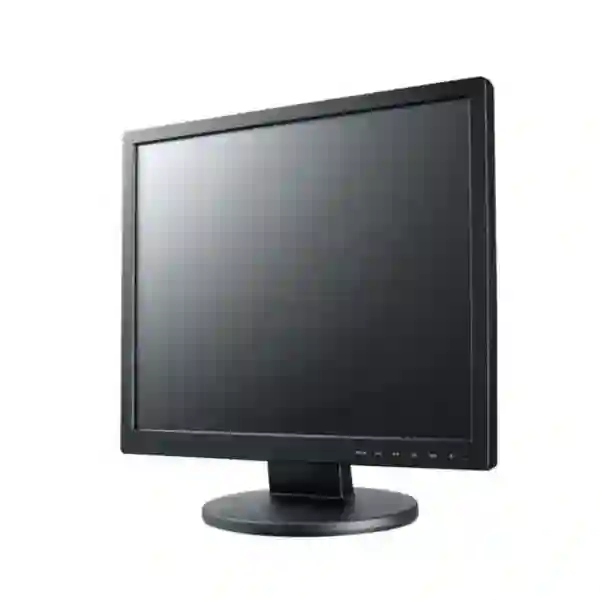
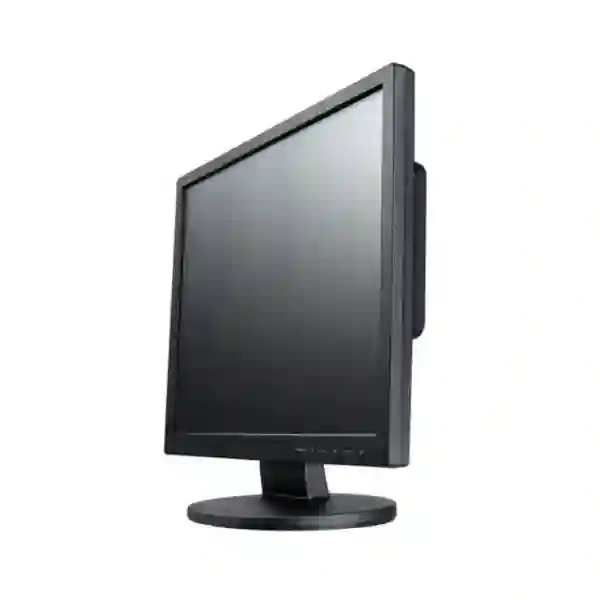
Hanwha SMT-1914 19-Inch CCTV Monitor
Need a compact screen for a VGA-based CCTV recorder or an exact replacement for an older surveillance station? The Hanwha SMT-1914 CCTV monitor combines a 19-inch LED panel, 1280 × 1024 resolution and protective glass in a traditional security-workstation format. Its principal buying consideration today is compatibility: the documented input is analogue VGA, not native HDMI.
Hanwha Vision’s Korean catalogue identifies this historical model as discontinued. FourTeck Tanzania can be contacted to confirm whether an exact-model unit can be sourced and whether a current digital-input alternative would be more appropriate. No local stock, price, delivery or warranty is implied.
SMT-1914 specifications at a glance
These are published historical model specifications, not a description of the condition of any individual unit currently offered. Confirm revision-specific details with the supplier when exact measurements or power figures affect installation.
| Screen type | 19-inch LED-backlit display |
|---|---|
| Published panel resolution | 1280 × 1024 pixels |
| Advertised display aspect | 4:3 (manufacturer description; check scaling) |
| Brightness / contrast | 250 cd/m² / 1000:1 |
| Response / viewing angle | 5 ms / 170° horizontal, 160° vertical |
| Display colours | 16.7 million |
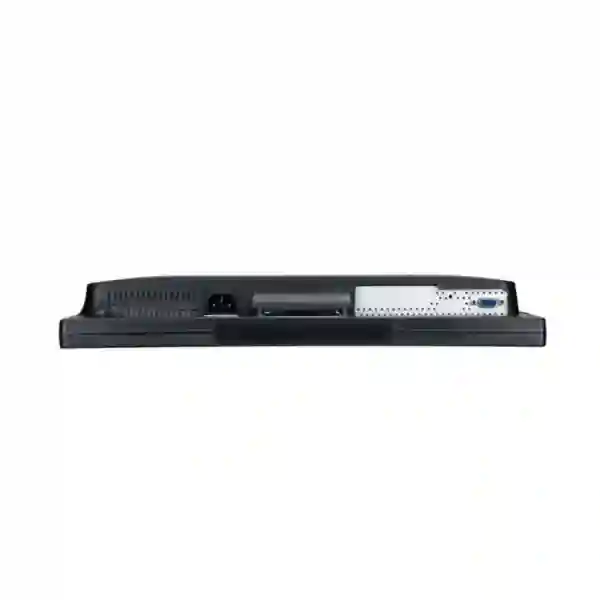
| Video input | 1 × analogue RGB VGA, 15-pin D-sub |
| Front protection | Protective LCD glass |
| Mount pattern | VESA 100 × 100 mm |
| Dimensions with stand | 412 × 406.5 × 217.4 mm (W × H × D) |
| Dimensions without stand | 412 × 347 × 59.4 mm (W × H × D) |
| Weight | Approximately 5 kg |
| Power input | AC 100–240 V, 50/60 Hz |
| Published power figures | Up to 35 W in original datasheet; 22 W in later quick guide |
| Operating limits | 0°C to +40°C; 20–90% RH, non-condensing |
Fast fit check: where this model makes sense
Potentially suitable
- A known VGA-equipped CCTV recorder or workstation
- An exact legacy-model replacement with confirmed sourcing
- A compact indoor single-view or limited-grid monitor
- A site with verified power, ventilation and mounting fit
Consider another display
- An HDMI-only source without a validated active converter
- A requirement for native 1080p or 4K screen detail
- A large multi-camera control-room video wall
- Outdoor exposure or a requirement for current-model support
Start with the recorder, not the monitor
When selecting a CCTV display, the first requirement is not the diagonal screen size. It is the output available from the recording or viewing device. The SMT-1914 is a practical candidate for workstations that already provide an analogue VGA video signal and need a compact, clearly defined monitoring position.
Check the make and exact model of the DVR, NVR, computer or video decoder before choosing this display. Look at its rear-panel video connectors and documented output modes. A matching physical connector is a good starting point, but successful use also depends on signal format and resolution.
A recorder that offers only HDMI does not connect directly to the monitor’s VGA socket. An appropriate active conversion device may bridge the difference, yet its capabilities, power needs and supported formats must be assessed separately. Avoid assuming a passive cable will translate digital HDMI into analogue VGA.
If the equipment room is being built from scratch, it can be more economical and straightforward to select a modern display that natively matches the recorder output. The Hanwha SMT-1914 CCTV monitor is most compelling when the project specifically calls for a known VGA-based screen or an existing installation replacement.
- Check the recorder’s documented video output
- Identify the required resolution and connector
- Include any active conversion equipment in the design
What the 19-inch display is designed to show
The SMT-1914 belongs to a class of compact surveillance monitors intended to display video supplied by another device. It is not itself a camera, a network video recorder, or a software video-management system. Its role is to present the picture delivered through its analogue RGB input.
This distinction matters in purchase discussions because terms such as IP camera monitor can be misleading. An IP camera ordinarily connects through a network and a compatible recorder, workstation or decoder. The SMT-1914 does not independently discover IP cameras or decode their network streams.
An existing PC with a compatible VGA output may use the monitor for live-view software, provided the graphics hardware and software can generate a supported mode. Similarly, a surveillance recorder equipped with VGA output can present its configured video view on the screen without the monitor needing its own storage.
Before ordering, decide whether operators need a single camera, a four-camera grid, playback, alarms or a dedicated live-view desktop. Those functions come primarily from the connected source. The monitor influences their visibility and presentation, but cannot add functions that the source lacks.
Understanding the 1280 × 1024 resolution
The published maximum display resolution is 1280 × 1024 pixels, often described as SXGA. This resolution may be adequate for a focused viewing point, basic camera status checks, menus and compact security desk layouts. Its appropriateness depends on what the operator must read rather than on the camera’s capture resolution alone.
A 4K camera does not become a 4K viewing experience when shown on this screen. The recorder or connected computer scales its output to the monitor’s supported format, reducing the number of pixels displayed. Recorded footage may still retain higher resolution if stored independently by the source device.
Always distinguish the pixel dimensions from the manufacturer’s advertised screen aspect description. Hanwha’s historical specification lists both 1280 × 1024 resolution and a 4:3 display description. Source-side scaling and aspect settings should therefore be checked with actual video, especially when faces, circles and objects must retain correct proportions.
Think about the number of simultaneous camera tiles. A single enlarged feed can be easier to examine than a crowded grid of many reduced images. If routine work involves reading fine details across numerous cameras, a higher-resolution modern monitor may offer a more suitable operator experience.
The importance of the VGA-only interface
Hanwha’s technical documentation specifies one analogue RGB 15-pin D-sub connector as the monitor’s video input. This is commonly called VGA. Unlike HDMI, it carries an analogue picture signal rather than a modern digital multimedia connection. The connector choice is the most consequential integration fact for many buyers.
Do not confuse a 15-pin VGA plug with a serial data port or a camera’s BNC video output. They are different interfaces. A recorder offering composite analogue video on BNC alone is not automatically compatible with a VGA screen, even though both may be described as analogue video technologies.
Check whether the video source has a genuine VGA output, not merely a connector on another accessory. A desktop PC may have a VGA port physically present but disabled by its graphics configuration. A recorder may let users choose an output resolution that must be adjusted before a stable image appears.
For replacements, photograph the existing monitor connectors and the source device label, with private network or account information kept out of the photograph. This allows a supplier to separate a simple like-for-like VGA replacement from a project that requires signal conversion or a different screen specification.
- Native video input: analogue RGB / 15-pin D-sub
- No native HDMI connection identified in the manufacturer datasheet
- No native network or PoE video input identified
HDMI-to-VGA conversion: when it can help
An active HDMI-to-VGA converter can sometimes allow an HDMI-only recorder to drive an older VGA monitor. It must actually convert the digital HDMI video to a compatible analogue signal; a cable with different plugs at each end is not sufficient unless conversion electronics are built into the product.
Compatibility depends on the converter’s accepted HDMI formats, supported VGA resolutions, output timing and sometimes its external power requirements. Protection mechanisms on some HDMI sources can also affect display, and not every adapter supports all scaling modes. Purchase decisions should not assume universal compatibility.
The safest process is to confirm the recorder’s selectable display modes, compare them with the monitor’s documented modes and test the intended converter before deployment. If the recorder is fixed at a high-resolution output and the adapter cannot scale appropriately, a blank picture or unstable geometry may result.
A conversion chain introduces an additional component, a cable junction and a possible failure point. For a permanently attended security station, those risks may justify buying a native-HDMI monitor instead. For a specific replacement where a converter has already been validated, retaining a VGA display may still be reasonable.
How brightness and contrast affect viewing
The original SMT-1914 datasheet specifies brightness of 250 cd/m² and a 1000:1 contrast ratio. These figures describe the panel’s published characteristics, not guaranteed picture quality under every lighting condition. Glare, viewing angle, source settings and the age of an individual unit can change the practical result.
Choose a location where direct sunshine or strong ceiling reflections do not wash out the display. An indoor security desk with controlled lighting is a more predictable environment than an exposed position next to a bright window. The protective front glass can help shield the panel, but it may still reflect light.
Contrast should be evaluated using a real scene that contains dark and light areas. Increasing brightness to its maximum may not reveal useful detail if the source has already compressed shadows or overexposed highlights. Camera exposure and recorder output settings remain critical to the image being examined.
Operators who review subtle facial or plate details should not rely on a nominal monitor specification as a forensic performance guarantee. Inspect representative recorded clips at the intended viewing distance, compare the output with an alternative display and choose based on the actual monitoring task.
Response time, colour and viewing angles
Hanwha lists a 5 ms response time and 16.7 million display colours for the SMT-1914. The published viewing angle is 170 degrees horizontally and 160 degrees vertically. These values describe the product’s panel specification and help buyers compare display behaviour, but do not indicate camera frame rate or recording quality.
Response time is only one influence on the perception of moving images. Camera shutter settings, recorder output frame rate, compression and network latency can all affect motion before the signal reaches the monitor. A 5 ms panel will not cure delays created elsewhere in the surveillance chain.
The viewing-angle figure is helpful when planning a workstation that may be approached from the side. However, an operator assessing image detail should sit close to the intended central viewing position. Colours and contrast may appear different when the display is seen from oblique angles.
During commissioning, compare text readability and moving subjects at the actual seat positions. If several operators must watch the same view from across a room, a larger screen or different panel technology might be preferable to a compact 19-inch desktop monitor.
Choosing a location for a compact security desk
The physical size of this monitor is valuable where space is restricted. The published overall dimensions with stand are 412 mm wide, 406.5 mm high and 217.4 mm deep. Verify these measurements against available counter depth, cable clearance and the operator’s comfortable viewing position before ordering.
A small screen can make sense at a reception desk, access-control window or secondary surveillance post. It can provide a persistent view without consuming the footprint of a large wall display. This benefit is strongest when the display has a defined purpose rather than serving as the room’s only high-detail monitoring screen.
Plan for sufficient space behind the equipment for the VGA connector and power lead. Avoid sharply bending cables against walls or trapping them beneath furniture. Cable routes should keep power and video connections supported and accessible for safe maintenance without tempting staff to pull the screen by its wires.
A monitor should not block sightlines to visitors or important exits. If placed on a public-facing counter, consider whether confidential camera feeds could be visible to unauthorised persons. Screen positioning, privacy sightlines and a practical operator workflow matter as much as the device’s dimensions.
VESA mounting and wall-bracket planning
The SMT-1914 is listed with a 100 × 100 mm VESA mounting interface. This offers the possibility of using a compatible bracket or arm rather than the desktop stand. Mounting hardware selection still requires confirmation of the mount’s supported load, fastener specification and installed cable clearance.
The published monitor weight is approximately 5 kg. Treat that value as the documented product weight and check the full load that the specific bracket must carry, including any mounting hardware. The surface behind the bracket also needs appropriate structural support; plasterboard alone may require a different fixing method.
Without its stand, the monitor’s listed dimensions are 412 × 347 × 59.4 mm. Those figures help with planning recesses and adjacent equipment but do not include the protrusion of a mounting plate, wall arm, cabling or any converter that may be installed behind the panel.
A site installer should confirm positioning before drilling. The best viewing height depends on operator seating and how long the screen will be watched. For long sessions, neutral posture, accessible controls and an unobstructed view often provide more value than a display mounted simply at the highest possible point.
Operating temperature and humidity
The manufacturer’s original technical sheet gives an operating temperature range of 0°C to +40°C and a humidity range of 20% to 90% relative humidity, non-condensing. These are device operating limits rather than permission to expose the monitor to rain, outdoor weather or persistent condensation.
For Tanzania-based projects, assess the specific indoor location rather than making assumptions from a city name. A ventilated office, an unconditioned security hut and an equipment cabinet can have very different temperature profiles. Heat produced by recorders, UPS units and sunlight may raise the temperature around the screen.
Allow airflow around the monitor, especially where equipment is grouped in a small enclosure. Avoid mounting it immediately above heat-producing appliances if that concentrates warm air around the panel. Keep the screen away from water ingress, wet cleaning sprays and places where moisture can collect.
If the installation is exposed to dust, humidity swings, heat or vibration, ask whether an enclosure or a display designed for harsher conditions is more appropriate. Do not treat the SMT-1914 as weatherproof, outdoor-rated or suitable for industrial extremes without specific manufacturer evidence.
Power planning and backup operation
The legacy datasheet identifies an AC 100–240 V, 50/60 Hz input and a maximum power-consumption figure of 35 W. A later quick-start document reports 22 W, so buyers designing a precise energy budget should confirm the hardware revision and actual unit specification before relying on one figure.
Plan the display as part of the complete viewing chain. Even if a monitor remains powered, it cannot display useful video when the recorder, network switch or source PC has stopped operating. Backup arrangements should therefore cover the devices required to create and deliver the picture.
For a security desk, define which live views are mission critical during a power interruption. Where continuity is required, a properly sized UPS and safe power distribution may be relevant. Battery capacity should be calculated from the actual connected equipment loads and required operating time, not from the monitor alone.
Use the appropriate power cord and electrical protection specified for the site. Keep mains leads away from areas where people can trip or where the cable could be crushed. Electrical work and any fixed wiring should be completed by qualified personnel under applicable local requirements.
Protective front glass and everyday handling
The datasheet identifies LCD protection glass on the SMT-1914. This can be helpful where the display is positioned in a busy workstation and may encounter normal handling. It should not, however, be interpreted as a claim that the monitor is impact-proof, vandal-resistant or certified for high-risk public locations.
Create a simple cleaning routine that does not depend on harsh chemicals or excessive pressure. Switch off and disconnect equipment as appropriate before cleaning, follow the manufacturer’s care instructions and use materials suitable for the display surface. Liquid should never be sprayed directly into seams or ventilation openings.
Front-glass reflections need consideration when the monitor faces a window or bright lobby. An operator may see the reflection of the room instead of dark camera detail. Repositioning the screen or controlling local lighting can produce a more useful improvement than changing image settings repeatedly.
If the unit is obtained as refurbished or legacy stock, inspect the panel for scratches, visible marks, uneven backlighting and stuck or damaged pixels before acceptance. Request photographs or an on-site demonstration where practical. A model’s original glass specification cannot establish the condition of a particular unit.
On-screen settings and operator handover
Manufacturer material describes on-screen display controls and power-management compatibility. The practical setup should begin with the source output mode and then move to the monitor’s picture settings. Record any agreed configuration so that a later operator can identify changes after a reset or service visit.
Test that menus and live images remain legible in the actual lighting used for the security shift. A brightly lit daytime desk and a dim night-time control room may require different comfortable brightness levels. Consistency is important when operators move between multiple screens used to judge the same live scene.
Do not use monitor settings to compensate for a camera that has been installed or focused incorrectly. If an image is soft at the source, extra monitor sharpness can emphasise artefacts without restoring missing information. First verify camera focus, recorder quality and output scaling before changing the display.
Handover documents should explain which source device feeds the screen, which cable carries the signal, how to switch on the monitor and where to report image faults. Clear ownership of routine tasks often prevents an avoidable screen problem from becoming an unnecessary security-system outage.
What 24-hour surveillance use does—and does not—mean
Security equipment is often expected to run for long periods, and third-party listings describe this monitor in continuous CCTV contexts. Still, a buyer should not interpret a generic surveillance label as proof of a current manufacturer-backed continuous-duty guarantee for every available SMT-1914 unit.
Historical documentation specifies a nominal panel-life figure, but that number is not a promised remaining service life for used or stored equipment. Actual condition depends on operating hours, environment, storage and maintenance. A long-held replacement part may have very different wear from a screen used daily.
For a new business-critical monitoring room, compare the operating-duty specifications and lifecycle status of current professional displays. Consider whether spares, warranty service and future replacement units can be obtained within the project’s maintenance plan. These questions can outweigh the apparent simplicity of a legacy screen.
If the SMT-1914 is an exact replacement for an established installation, test the candidate under normal shift conditions. Check power stability, image persistence, hot spots, screen uniformity and behaviour after a restart. Use those practical checks to support the procurement decision instead of assuming uninterrupted use.
Replacement planning for an existing SMT-1914
Owners replacing a failed SMT-1914 should first determine whether the monitor alone has failed. Test the recorder’s video output with a known-working compatible display when safe to do so, and verify cables and power. Replacing hardware without isolating the fault can leave the original display problem unresolved.
Record the old unit’s screen dimensions, mounting arrangement, connector type and operator expectations. A current 19-inch monitor might have a different aspect ratio, housing size, mounting position or depth. The diagonal measurement by itself does not guarantee a physical drop-in replacement.
Ask for the exact model and condition of any proposed replacement. Where a unit is described as new old stock, refurbished, used or equivalent, those classifications have different commercial implications. Request clear documentation of supply condition, included accessories and applicable seller terms before confirming the order.
Hanwha Vision’s Korean catalogue identifies the SMT-1914 as discontinued, while regional supply can vary. A replacement project should therefore have a fallback path. That could be a compatible current display, a validated adapter arrangement or a reviewed workstation redesign that preserves the required monitoring functionality.
When a modern HDMI monitor is the better choice
A display with native HDMI input is generally simpler for a recorder that provides HDMI output. It removes the need for HDMI-to-VGA conversion, can support modern digital display modes and may offer higher resolution. Those benefits are meaningful when the screen is being added to a new system rather than matching legacy equipment.
Consider a larger screen when operators must monitor many camera tiles at once, especially if text and detail are important. A higher pixel count provides room for more information, but camera stream settings and workstation performance still determine the final experience. Screen size and resolution should be evaluated together.
Modern screen selection should also include mounting, power consumption, expected duty cycle and service arrangements. A retail computer monitor is not automatically the best choice for every surveillance station. The objective is to select equipment with the interface, operating characteristics and support appropriate to the actual task.
The SMT-1914 remains relevant where a compact VGA display specifically solves a compatibility or replacement need. It should not be presented as a universal alternative to a high-resolution HDMI monitor. The sensible comparison is based on connection simplicity, useful image detail, deployment risks and lifecycle support.
Using the monitor at a reception or entrance desk
A front desk may need a persistent view of the entrance, loading bay or visitor area while staff perform other duties. A compact display can keep that image available without taking over the entire counter. The SMT-1914 may suit this limited viewing role when the incoming picture is delivered through compatible VGA.
Define exactly what reception staff are authorised to see and do. Some sites need only a live image, while others allow switching cameras or reviewing recorded events. The display hardware does not manage permissions; those controls belong to the connected system and the organisation’s security procedures.
Position the monitor so visitor sightlines do not reveal sensitive cameras or personal information. A front-desk workstation may be exposed to passing staff and customers. Privacy-aware positioning can be more important than wall-mount convenience, particularly when the source is a computer showing more than one application.
Operators should know how to distinguish an intentional camera change from signal loss. A brief guide describing normal screen appearance, the responsible contact and basic non-invasive checks helps a small team respond consistently. This is especially helpful where there is no dedicated technical staff member on every shift.
Using the monitor in a control or guard room
A guard room often combines live cameras, access control, alarms and incident communications. The SMT-1914 can be assigned to one clearly defined video function, such as an entrance feed, while other screens handle multi-camera overview or detailed investigation. Separating responsibilities can make a compact screen effective.
Create a workstation plan before attaching multiple displays. Identify which source sends which view, where each cable runs and how operators will recognise the correct screen during an incident. Labelling should be unambiguous, visible and consistent with the site’s operating procedure.
The 19-inch screen is unlikely to be ideal as the sole display for a large camera estate with many simultaneous tiles. It may be perfectly serviceable for a single focused task. Base the decision on viewing distance, camera count, operator needs and the importance of seeing fine details quickly.
Consider what happens during device failure. If a dedicated display goes blank, should the same view be available on another workstation or recorder output? Defining redundancy at system level is more useful than expecting any one monitor to prevent every type of video interruption.
For retail, storage and small office environments
Retail counters, stores and smaller offices often have limited room for security equipment. Where a compatible recorder provides VGA, a compact desktop monitor can keep a relevant camera view visible while leaving space for other work. The modest footprint is useful only if the person on duty can still interpret the image.
A shop may prioritise an entrance or cash-handling area, while a small warehouse may need to see the dispatch door. These are examples of viewing requirements, not claims that the product has special features for either sector. The connected cameras and recording system provide the surveillance functions.
Review lighting and work patterns at the proposed site. Glare near shopfront windows, dust in storerooms and heat around packed equipment shelves can make a technically compatible screen less satisfactory. A short demonstration with the real source signal can reveal issues before permanent installation.
Procurement staff should also plan for the product’s historical lifecycle. A low initial price is not necessarily low overall cost if obtaining a replacement later is difficult. For expanding sites, a standardised current display platform may offer simpler support than several different generations of monitors.
Commissioning checklist before the security team accepts it
Begin commissioning with the complete video chain connected: source device, approved cables, any required converter, monitor and power. Confirm the source is producing an expected display mode before evaluating the panel. This avoids misdiagnosing an incompatible output signal as a faulty screen.
Inspect the image for geometry, sharpness, colour consistency, motion and readable text. Test both bright and dark representative scenes. If the view is stretched, review the recorder or PC output settings and any available aspect controls instead of accepting distortion as normal.
Check practical operation after powering the system down and back up. A security display should return to a useful picture through the normal start sequence, without requiring a technician to reconfigure the source every morning. Document any dependence on an adapter, special timing or manual input selection.
Finally, have the intended operator view the screen from the normal working position. A display can pass a bench test and still be too small, too reflective or incorrectly positioned for daily use. Acceptance should confirm suitability for the job rather than only that an image appears.
- Verify source video mode and VGA connection
- Test live video, menu text and representative playback
- Restart the source and display to confirm recovery
- Record any adapters and settings used
Troubleshooting a blank or unstable screen
If the screen is blank, start with safe basic observations. Confirm that the device has power and that the source is switched on. Inspect the connector and cable for obvious damage or loose fastening, without opening the monitor housing or handling unsafe electrical connections.
A connected recorder might output a resolution or refresh setting the display cannot use. If a compatible test display is available, the source settings can be checked there. Change only known and documented parameters; random configuration changes may disrupt other operator screens.
Where an active HDMI-to-VGA converter is present, inspect its power arrangement and confirm that its input and output directions are correct. These devices are not necessarily reversible. A unit advertised as VGA-to-HDMI solves a different problem from one designed for HDMI source to VGA display.
Intermittent images can arise from worn connectors, cables, conversion equipment, source instability or the monitor itself. Isolate one component at a time and record the result. If the problem appears to be internal hardware failure, refer the unit to an appropriately qualified service provider rather than attempting improvised repairs.
Troubleshooting a soft, stretched or oddly coloured image
A picture can be present yet still unsuitable for surveillance decisions. Check whether fine text appears blurred or whether circular objects look oval. These symptoms can indicate an unsuitable source output mode, a scaling issue or image-adjustment settings that need review.
Analogue VGA can be sensitive to cable condition and electrical interference. A long or damaged connection may reduce clarity or introduce visible patterns. Use suitable cabling, secure connectors and sensible cable routing rather than assuming every picture defect comes from the LCD panel.
Compare the same recorded scene on a separate known-good display where practical. If the image is poor on both screens, examine camera focus, stream quality, recorder output or source software. If only the SMT-1914 shows the issue, concentrate checks on its local signal path and settings.
When judging colour, remember that surveillance cameras may use infrared night mode, automatic white balance or exposure changes. Those features can change the picture before it reaches the monitor. An operator needs a consistent workflow for determining whether an unusual image originates from the camera, recording source or display.
What to verify when buying legacy or refurbished stock
Since the exact model is an older product, supply condition deserves deliberate attention. A seller may offer unused historical inventory, a working pre-owned unit or a refurbished unit. Ask which description applies to the exact item and whether the package and accessories have been inspected.
Request a clear view of the model label and a powered-on photograph using a suitable input signal. These checks support model identification, but should not be treated as a substitute for functional testing. Where possible, have the unit demonstrate a stable image at the intended resolution.
Confirm whether the stand, power cable and any required VGA cable are included. A bare monitor may need additional parts before it is useful at the site. Also confirm whether wall-mount accessories, remote controls or other extras are included rather than assuming historic package lists apply to every present offer.
Ask the seller for actual warranty and return conditions in writing. Do not assume that a manufacturer warranty mentioned in an old specification sheet still applies to a particular unit sold today. The purchase decision should reflect verified condition, support and the cost of any additional parts.
Questions that produce a useful sourcing quotation
A clear enquiry reduces back-and-forth and helps compare the SMT-1914 with a viable replacement. Start by stating the project location in Tanzania, the number of screens required and whether the request is for an exact model replacement or a newly designed viewing station.
Include the model of the connected recorder or PC, the required output connector, the preferred mounting arrangement and the hours the screen is expected to be used. If there is an existing failed monitor, describe the fault and whether its stand or mount will be reused.
Ask suppliers to identify the condition and revision of the unit they propose, the included accessories and any converter requirements. Where an alternative is offered, request its native inputs, resolution, dimensions and mounting pattern so that the technical difference is clear.
Keep commercial terms separate from technical claims. Request written confirmation of current price, applicable tax treatment, availability, delivery arrangement, warranty and support for the actual quotation. No price, stock position, local authorisation or service coverage should be assumed merely from a product information page.
- Existing recorder or PC model and video output
- Exact replacement or alternative acceptable
- Quantity, mounting method and preferred use
- Written confirmation of availability and commercial terms
Evaluating total cost, not only purchase price
The monitor’s quoted price is only one part of a surveillance workstation purchase. Include cables, mounting hardware, possible signal conversion, safe electrical supply and any installation labour that the site requires. An existing VGA source may keep those costs modest; a new HDMI-only source may change the calculation.
Operational cost includes maintenance and downtime risk. If the installation depends on a discontinued model, determine how quickly a compatible replacement could be sourced. An alternative screen with native source compatibility and readily understood support may reduce later maintenance complexity.
Energy use should be considered alongside the complete recorder and display system, especially if UPS runtime is important. Historical documents contain differing power figures for the SMT-1914, so use the exact offered unit’s verified information for any formal electrical or battery calculation.
Compare options against the business need. A small desk that needs only one VGA picture does not automatically benefit from a large screen. Equally, a busy control room may incur operational costs by choosing a monitor on which operators struggle to interpret multi-camera detail.
Maintenance, records and end-of-life preparation
Every installed monitor benefits from an accurate equipment record. Note its model, location, source device, connection route, mounting method, purchase documentation and any special configuration. This information makes future faults easier to diagnose and reduces reliance on the memory of one employee.
Inspect visible cables and supports as part of routine site checks. Look for damage, unstable connectors, blocked airflow, excessive heat or obvious picture deterioration. The appropriate inspection frequency should be set by the organisation’s operating procedures and the installation environment.
For older equipment, keep a migration plan. Identify a current display model that matches the source signal or record the tested conversion arrangement required for replacement. A documented substitute helps avoid rushed purchases when a screen stops working unexpectedly.
Electronic equipment that has reached the end of useful service should be handled through an appropriate collection or recycling process. Avoid treating a legacy monitor as ordinary general waste. For commercially sensitive locations, also review whether labels or equipment documentation need to be removed before disposal.
Practical procurement guidance for Tanzania
The target market for this product page is Tanzania, but local availability cannot be inferred from an international datasheet. FourTeck Tanzania should confirm whether this exact older model can be sourced and under what conditions before the customer relies on a purchase timeline.
Site conditions should be part of the enquiry. Describe whether the screen will be installed in an air-conditioned room, a ventilated security post, a dusty storage office or another indoor environment. Such details help determine whether the published temperature and humidity limits are suitable.
Do not assume that a universal AC input specification settles all electrical installation questions. A qualified local installer should still review power distribution, protection, plugs, cables and any UPS configuration in context. The published voltage range is a product attribute, not a site electrical approval.
Ask for documented terms in Tanzanian shillings only when an actual Tanzania quotation is issued. The product page does not state a local price, tax position, warehouse location, delivery promise or installation coverage. Those details should come from a verified offer, not generic marketing language.
A simple decision framework
Choose the SMT-1914 primarily when three conditions align: a compact display is suitable for the viewing task, the video source provides compatible VGA output, and the condition and sourcing terms of the specific unit are acceptable. These requirements explain the product’s present-day role more clearly than a feature list alone.
Consider an alternative when the recorder is HDMI-only, the operator needs high-resolution multi-camera detail, the installation requires documented current-product support, or the physical environment is outside the monitor’s published operating range. None of these concerns automatically makes a conversion or replacement impossible, but each requires explicit evaluation.
Before committing to an exact-model procurement, compare the complete technical and commercial offer with at least one suitable modern screen. Include cables, conversion, mounting, energy planning and maintenance risk. The best overall fit may differ between a one-for-one replacement and an entirely new security workstation.
FourTeck Tanzania can use the source equipment details and intended viewing task to discuss the appropriate configuration. Request confirmation of exact SMT-1914 sourcing where necessary, and ask for an alternative recommendation when the project would benefit from native digital video input or a longer support path.
Frequently asked questions
Is the Hanwha SMT-1914 an IP camera or a recording device?
No. It is a 19-inch display intended to show video delivered by another device. A recorder, video decoder or computer performs the camera connection and video processing. The monitor’s analogue VGA input receives the resulting display signal. It does not provide independent IP camera discovery, video storage or network recording.
Can I connect the SMT-1914 directly to an HDMI NVR?
Not directly through a native HDMI socket, because the published hardware interface is VGA. Some HDMI sources can work through a correctly specified active HDMI-to-VGA converter, but compatibility is not guaranteed. Check output resolution, adapter direction, supported timing and the converter’s power requirements before selecting this arrangement.
Does it support 1080p, 4K or 8MP camera images?
A connected recorder or computer may display video captured by high-resolution cameras, but the SMT-1914 panel itself is specified at up to 1280 × 1024 pixels. The source must output a compatible display mode. It will not show the full native detail of a 4K image on its own panel.
Can this monitor connect to a camera using BNC?
The historical datasheet identifies a 15-pin VGA input, not a composite BNC camera input. A camera or recorder with BNC-only output should not be assumed to connect directly. Determine the exact source signal and use a suitable compatible device or display rather than relying on the broad term analogue.
Is the SMT-1914 still manufactured?
Hanwha Vision’s Korean product catalogue labels this model discontinued. That does not establish whether a particular Tanzania supplier has existing stock or an authorised replacement arrangement. Request current confirmation for the exact offered unit, including condition, accessories and support terms, before making a purchase decision.
Can it be wall-mounted or attached to a monitor arm?
The manufacturer lists a 100 × 100 mm VESA interface and a product weight of approximately 5 kg. A suitable bracket must support the installed load and fit the mounting arrangement. Confirm hardware, wall construction, viewing height, ventilation and connector clearance with the installer before mounting.
What are the size and resolution of the SMT-1914?
It has a nominal 19-inch screen and a published maximum resolution of 1280 × 1024 pixels. The product documentation describes a 4:3 display, so installers should verify source aspect and scaling with a real image. With the original stand, the listed dimensions are 412 × 406.5 × 217.4 mm.
Does it have an HDMI port, speakers or built-in recording?
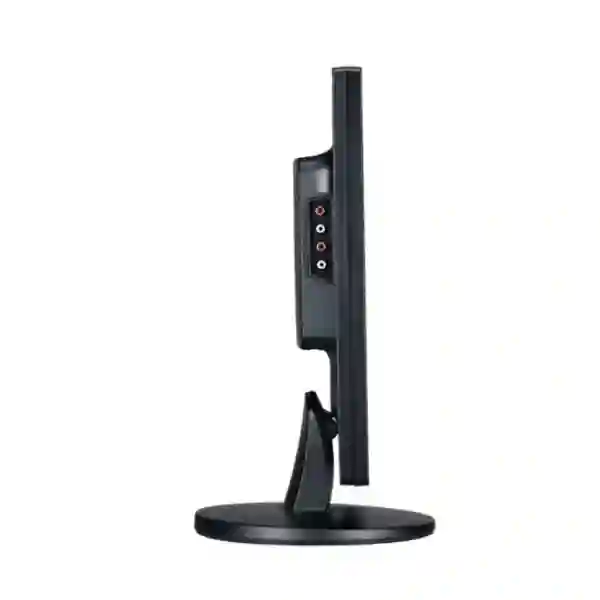
The manufacturer specification identifies a VGA video input. Do not assume HDMI, an audio input, integrated speakers or recording storage are present. Plan audio, playback and camera selection around the recorder or computer. Ask for an alternative display if native HDMI and multimedia features are required.
Can it operate in a hot outdoor guard post?
The published operating temperature is 0°C to +40°C and humidity is 20% to 90% non-condensing. This is not an outdoor weatherproof rating. A guard post may require enclosure planning, ventilation, dust control or a display rated for harsher conditions. Evaluate actual ambient conditions at the proposed mounting point.
How much power does the SMT-1914 consume?
An original datasheet lists up to 35 W, while a later quick-start document states 22 W. Because documents differ, verify the exact revision and current unit before making precise UPS or energy calculations. Remember that the connected NVR, PC, switches and converters may also need backup power.
What should I send to request a Tanzania quotation?
Provide the exact product model, quantity, project location, source recorder or PC model, required connection, mounting needs and expected operating pattern. State whether a current alternative is acceptable. Ask for written confirmation of unit condition, availability, price, warranty, delivery details and any extra conversion equipment.
What is the safest choice for a newly built control room?
Choose equipment after mapping camera count, recorder outputs, operator viewing distance and expected detail. A current HDMI-capable display may simplify a new high-resolution setup, whereas this older VGA unit may be sensible for a specific legacy replacement. The decision should favour operational fit and supportability over model familiarity alone.
Request an SMT-1914 sourcing and compatibility review
Tell FourTeck Tanzania whether you need this exact Hanwha model or a suitable replacement. Include the recorder or computer model, video-output type, number of displays and installation conditions. The right recommendation depends on those details, especially for a legacy VGA connection.
Ask for confirmation of current sourcing, item condition, accessories, warranty terms and a project-specific quotation before purchase. A native-HDMI alternative may be discussed when it better matches your equipment and long-term maintenance needs.




Reviews
There are no reviews yet.