
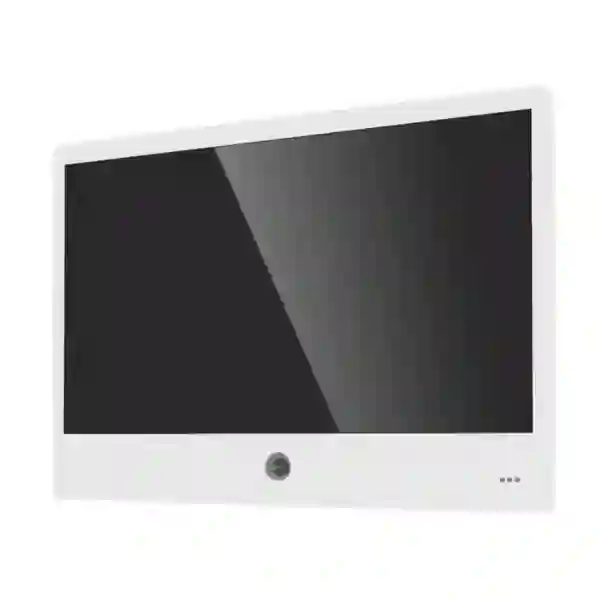
Hanwha Vision | Public-view security display
Hanwha SMT-2152PVM 21.5-inch Public View Monitor
White Full HD monitor with a built-in 2 MP network camera for security-conscious customer-facing spaces.
For Tanzania projects: confirm actual unit availability, lifecycle status, mounting, power and recorder compatibility before ordering.
Security visibility at the point people enter
Choose the Hanwha SMT-2152PVM when your security design calls for a visible public-view monitor and a discreet integrated IP camera in one wall-mounted unit. This white 21.5-inch Full HD display is designed to show people that an area is under observation while providing a camera image for a wider video-surveillance workflow. It is especially relevant to customer-facing entrances, service counters and other indoor positions where a conventional camera alone may not communicate the same visible security message.
The combination is practical but needs careful design. The monitor provides a local public-facing image, while the built-in two-megapixel network camera can be configured for appropriate recording or network use. Face detection can highlight detected faces on the display, and an editable on-screen message can make the monitoring purpose clearer. Before ordering for a Tanzania project, confirm unit availability, mounting hardware, power arrangements, network compatibility and whether this older model is supported in your intended deployment.
Request a technical suitability review or a current quotation for the exact model and project requirements.
Key specifications at a glance
The following details identify the model and help a technician compare the proposed purchase with the site requirements. They describe the product literature, not the stock condition or configuration of an individual unit.
| Model | SMT-2152PVM |
|---|---|
| Brand | Hanwha Vision (historically Hanwha Techwin / Wisenet) |
| Product type | Public-view monitor with integrated IP camera |
| Cabinet colour | White |
| Display | 21.5-inch LED, 16:9 |
| Maximum display resolution | 1920 × 1080 (Full HD) |
| Integrated camera | 2 MP network camera |
| Brightness / contrast | 250 cd/m² / 3000:1 |
| Viewing angle | 178° horizontal / 178° vertical |
| Display response time | 18 ms |
| Video codecs | H.265, H.264, MJPEG |
| Camera features | 150 dB WDR, face-detection display, motion detection |
| Local memory | microSD/SDHC/SDXC support, up to 256 GB |
| External display inputs | HDMI and VGA |
| Mount patterns | VESA 100 × 100 mm or 200 × 100 mm |
| Power and environmental suitability | Verify the exact supplied power configuration and indoor operating conditions before installation |
Important procurement note
Some independent distributors identify the SMT-2152PVM as discontinued. This page does not confirm local stock, price, a replacement model or a warranty. Request written confirmation before procurement, particularly for new long-term installations.
What a public-view monitor does
A public-view monitor, often shortened to PVM, is not simply a television showing surveillance footage. Its intended position is where visitors or customers can see that video monitoring is present. Displaying an immediate camera view can reinforce awareness of the security system, support staff observations and communicate that activities in a defined area may be recorded. The device therefore serves two audiences at the same time: the people viewing the screen and the security personnel responsible for managing the camera.
The SMT-2152PVM combines the display and camera in one enclosure. This can make the visual arrangement cleaner than placing a separately mounted camera next to a monitor, although cabling, power and IP configuration are still part of the job. It should be selected because the visible-monitor approach fits the site’s security plan, not because a PVM automatically prevents loss or eliminates the need for other cameras, recording or staff procedures.
Where the white 21.5-inch model fits
The white housing gives designers an option for light-coloured interiors and counters where the black SMT-2151PVM variant may be visually prominent. The 21.5-inch panel has a manageable footprint for smaller entry areas, waiting zones or near-counter installations. A person should be able to notice the image without the display occupying an entire wall. Actual visibility depends on installation height, approach direction, ambient brightness, viewing distance and the layout of shelves or signage.
Consider this model for shops, reception areas, checkout surroundings, shared-access corridors or similar controlled indoor environments after a site assessment. The integrated camera’s direction must coincide with the scene that operators actually need. Where a wide doorway, long aisle or multiple approaches need coverage, one screen-mounted lens may not be enough. Additional CCTV viewpoints can still be necessary to reduce blind spots and provide suitable evidence.
Display clarity and viewing experience
The Full HD 1920 × 1080 panel is intended to show a recognisable image at close-to-moderate viewing distances. A 16:9 widescreen format suits common security-video views, and the published 178-degree horizontal and vertical viewing angles help people approaching from either side see the panel. The published brightness is 250 cd/m², with a 3000:1 contrast ratio and an 18 ms response time. These figures describe the display, not a guarantee of image quality in every building.
Strong sunlight through a shopfront can wash out an image even when a camera has sophisticated image-processing features. Before fixing a screen in place, test it at the intended height during the brightest part of the day. Check reflections, nearby illuminated signs, viewing angles for both customers and staff, and whether facial details appear clear at the chosen distance. An informative public view should not create glare or block safe movement.
Integrated two-megapixel network camera
An integrated 2 MP camera is a defining difference between this product and an ordinary commercial monitor. It captures a scene from the monitor’s location and can participate in a networked security configuration. Hanwha’s manufacturer information identifies the built-in XNB-6001 camera platform, a useful detail for checking technical documentation or system compatibility. The camera is discreetly positioned in the PVM housing rather than presented as a separate visible dome or bullet camera.
The fixed camera perspective is both a benefit and a constraint. Mounting the screen determines the approximate camera viewpoint, so moving the display to improve public visibility can also change the recorded scene. A planning exercise should therefore consider head height, faces entering the space, occlusion from counters, and the areas excluded by the camera frame. Camera resolution alone cannot compensate for a poor angle, inadequate lighting or subjects positioned too far away.
Understand the face-detection display
The manufacturer’s feature list describes face detection with a coloured box shown around a detected face. This visual effect can make the public-view display more noticeable and communicate monitoring in real time. It is a deterrence-oriented presentation feature that might be useful in customer-facing settings when configured and disclosed appropriately. Staff should test the way the box appears under actual lighting, with multiple people in frame and at the expected viewing distance.
Face detection must not be confused with identifying a person by name or verifying their identity. A bounding box indicates that software has detected a face-like target; it does not establish who the person is, whether they have done anything wrong or whether the system can recognise them later. Do not advertise identity recognition, watchlist matching or automated enforcement on the basis of this feature alone. Evaluate any privacy impact before enabling visual analytics.
Wide dynamic range and difficult lighting
The built-in camera is specified with 150 dB wide dynamic range, or WDR. The reason this matters is straightforward: an entrance may have a bright outdoor background while people under a canopy or just inside the door are much darker. WDR processing is intended to preserve useful detail across such high-contrast parts of a scene. It can improve the chance of seeing subjects against bright windows or doorways compared with an unoptimised image.
Even a strong WDR specification cannot solve every lighting problem. The camera cannot recover detail from a completely obstructed lens, extreme motion blur or a scene with no useful illumination. Reflective glass, moving doors and uneven shop lighting can also affect results. Evaluate the intended field of view during both daytime and evening operations, and adjust mounting and exposure settings using the manufacturer’s guidance. Where identification-quality video is required, assess that goal separately.
Motion detection and event design
Motion-detection capability can help a security design identify changes in the camera scene, subject to its configuration and the abilities of the connected recording platform. Motion can include customers, carts, doors, changing reflections and other non-threatening activity. In a busy retail entrance, indiscriminate alerts can create more noise than value. Suitable regions, schedules and sensitivity levels should be tested rather than assuming every movement requires an alert.
A useful deployment decision is to separate what the public sees from what the security operator investigates. The PVM can provide an immediate deterrent image, while the connected video system follows a defined retention, event review and escalation process. Verify which motion settings operate in the integrated camera and which functions depend on a recorder or software version. Never treat a motion event as proof of a security incident without human review and supporting context.
Video compression and network streams
The manufacturer’s published codec list includes H.265, H.264 and MJPEG, with multiple streaming and multi-crop capabilities. These choices allow a system designer to consider video quality against bandwidth and storage requirements. H.265 may reduce data requirements in compatible environments, while H.264 can be useful when interoperability with older equipment matters. MJPEG serves different integration cases. Actual traffic depends on settings, content, frame rate and how the video is consumed.
A network-camera deployment should not assume that every recorder or video-management system supports each codec or advanced feature. Obtain an interoperability matrix for the exact software version and test a representative camera stream. Decide which stream serves recording, which serves live operators and whether remote viewing is needed. Review network security, capacity and reliability before commissioning; a locally visible PVM image does not automatically demonstrate that network recording is working.
Local memory and recording considerations
The SMT-2152PVM product literature lists a microSD, SDHC or SDXC card slot with support up to 256 GB. Local storage can be useful in a suitable design, but a slot is not equivalent to a complete retention or backup policy. A card’s real recording duration varies with encoded bitrate, frame rate, resolution, scene complexity and any event-based recording arrangements. Storage calculations need a practical workload, not only a headline capacity figure.
For business evidence, consider what happens when the card fills, is removed, becomes corrupted or the unit loses power. Memory cards have finite write endurance, and critical footage should not depend on a single unverified storage location. If footage must be retained centrally, confirm the relevant recorder or VMS configuration, time synchronisation, access controls and export testing. Confirm which cards and formats are supported under the device’s firmware and maintenance documentation.
HDMI and VGA inputs explained
HDMI and VGA inputs expand the ways the display can be used in an installation. Depending on the planned operating mode, an external device may be connected to the panel as a video source. This is different from accessing the integrated network camera stream. An HDMI connector on a monitor should not be mistaken for a guarantee that the built-in camera itself exports every supported video format over that physical input.
Before specifying an installation, draw a simple signal-flow diagram: integrated camera to network, external source to display if required, and recording destination to the chosen storage platform. Confirm cable types, distances, supported input resolutions, input selection and the intended behaviour after power is restored. Any plan to show third-party content or switch between sources should be tested on the actual product configuration rather than inferred from connector names.
Low-delay public viewing versus network latency
Hanwha describes the local viewing function as latency-free. This is useful language for a public-view display: visitors should not see an obviously delayed image of themselves that makes the presentation feel disconnected from the scene. The claim concerns the intended direct public-view experience. It should not be extrapolated into a promise that every remote operator, mobile app, network path or recorder will show video with no delay.
Network delay depends on encoding, switching, congestion, decoding and application behaviour. For installations that require a fast operator response, test end-to-end delay from the capture point to the screen the operator will actually use. Distinguish between the local display, remote live view and playback recorded by the VMS. Document acceptable performance for the project, especially if the system is intended to support active incident response rather than simply visible deterrence.
On-screen notices and communication
The product offers a configurable text overlay and a preconfigured recording-related on-screen display. A carefully worded notice can explain why video monitoring is taking place and reinforce the public-view purpose. Display copy should be readable at the actual viewing distance, contrast with the background image and remain understandable without blocking important details. Test the chosen text when the camera shows both bright and dark subjects.
Operators should distinguish between a message displayed on the screen and the actual operation of the recording system. A notice saying recording is taking place must reflect the site configuration and policy; a decorative message cannot prove retention or recording availability. Site owners should check applicable privacy, employment and surveillance requirements in Tanzania and seek local professional advice where necessary. Avoid displaying personally sensitive information or internal security instructions on a public-facing screen.
Network integration planning
Because this is an IP camera product as well as a monitor, networking deserves the same attention as display placement. Start with a structured network plan that includes camera addressing, permitted traffic, DNS and time settings, a secure administrator workflow and a recorder or VMS destination where required. Identify whether the security network is segmented from public Wi-Fi and ordinary office devices. A public-view monitor should never become an easy route into a business network.
Use supported firmware and unique credentials according to the manufacturer’s documentation. Restrict remote access to approved methods, keep an inventory of devices and avoid exposing camera management ports to the public internet. Validate clock accuracy so recorded events can be correlated with other systems. If an installer proposes cloud management, ask for the exact product support and hosting arrangement rather than assuming this legacy model integrates with any particular cloud service.
Compatibility with recorders and software
Knowing the camera’s brand and codec support is only the start of a compatibility assessment. Network video recorders and video-management software can differ in how they discover cameras, authenticate, record multiple streams, receive events and expose analytics. A basic live image might work even when a specialised face-detection overlay, event or configuration control does not. The buyer should state which functions are essential before committing to a recorder or license.
For an existing CCTV system, collect the recorder model, software version, firmware level, network topology and required retention period. Ask the technical team to verify the SMT-2152PVM against the actual environment and to test a spare unit if practical. Do not infer ONVIF profile support, plug-and-play integration, analytics interoperability or licensing terms without exact-model evidence. A written acceptance test covering live view, playback and recovery is more useful than a broad compatibility promise.
Choosing the camera position
A public-view monitor should be visible, but its integrated camera also needs an appropriate angle. A low wall position may suit a nearby viewer yet fail to capture usable faces, while a very high position may make the display less engaging. The right compromise depends on the use case, queue movement, reachability, risk of tampering and the kinds of activity the business needs to observe. Test an actual mounting location before drilling.
Plan for normal customer movement and special cases such as wheelchair access, children, people entering in groups and doors that swing across the lens. Avoid framing unrelated private areas. If the camera must capture people passing a doorway, position the display where faces are likely to be visible instead of relying on a side profile. Where detailed transactions, cash handling or vehicle areas must be recorded, specify separate purpose-built cameras rather than stretching one PVM beyond its practical coverage.
Wall mounting and physical safety
Published mounting patterns for this 21.5-inch model are VESA 100 × 100 mm and 200 × 100 mm. Hanwha’s mounting guidance describes a securely fixed unit and calls for correctly rated fittings; a desktop stand is not included in that described configuration. Choose brackets, fasteners and the installation surface based on the full load and local conditions. A display positioned above people must be secured by a competent installer.
Before fitting, confirm wall structure, service access, connector clearance, cable routing and ventilation. Avoid pulling network or power cables tight across moving brackets. Keep the lens unobstructed and consider whether a screen could be struck by trolleys or bags. A location with moisture, extreme heat or direct rain should not be treated as suitable merely because the equipment is part of a security installation. Check the manufacturer’s environmental limits for the exact unit.
Power supply, resilience and interruptions
The integrated camera is powered as part of the unit’s design, but the whole assembly still requires a verified power arrangement. Do not assume that a network cable alone can power the complete display. Confirm the correct adapter, voltage, connector, earthing and local mains arrangements for the supplied configuration. Electrical work should follow the applicable installation standards and site safety practices, with correct circuit protection and accessible maintenance procedures.
Security value is also affected by downtime. If a business expects monitoring through short utility interruptions, the recording device, essential switches and the display may each require an appropriately engineered backup power arrangement. A battery-backed recorder is not useful if the camera or its network path loses power first. Test restart behaviour after an outage, then check that time synchronisation, stream registration, recording and the intended public-view presentation recover correctly.
Heat, dust and routine cleaning
In a busy indoor commercial space, a monitor can collect dust, fingerprints and residue around its bezel and ventilation openings. Clean according to the manufacturer’s instructions and avoid unapproved chemicals. A blocked vent or poorly chosen enclosure can cause unnecessary heat build-up. Place the unit away from water exposure and high-heat sources; published operating limitations should be reviewed before installation in demanding environments.
For Tanzanian projects, evaluate the real indoor conditions rather than assuming every site has controlled temperature and humidity. A shopfront close to an open door may face dust and sunlight that differ greatly from a climate-controlled reception desk. Agree a practical inspection interval for lens clarity, screen operation, mounting integrity, cables and recorded image quality. Preventive maintenance is more effective when tasks have named owners and an escalation route.
Security and privacy by design
A camera with face-detection display can affect how visitors experience a space. Businesses should identify the legitimate surveillance purpose, decide which zones need monitoring and make appropriate notices available. Restrict camera views to areas relevant to that purpose. Keep administrator credentials protected, control staff permissions and review who can export or share footage. The ability to capture a face is not a reason to collect more information than the organisation needs.
Retention periods, access processes and requests concerning personal information require decisions based on the business’s legal obligations and policies. Consult qualified local guidance for the Tanzanian context rather than assuming a foreign privacy notice is sufficient. Avoid leaving public-facing menus or camera settings accessible to visitors. The on-screen warning should be accurate and respectful; it is not a replacement for an internal governance process or documented accountability.
How to size a complete surveillance solution
Start by listing the outcomes required: visible deterrence, an image of the entrance, central recording, incident investigation, queue oversight or remote supervision. A public-view monitor is a particularly direct response to the first of those needs, but it may contribute to several. Draw the physical zone, mark likely approach routes and add camera views that address each risk. Decide whether an operator needs live images continuously or only recordings after an event.
Then assess network and storage capacity, mounting and power, local access policies, maintenance responsibilities and total ownership cost. Ask who will verify that recording is active, who responds to a failed camera and what evidence quality is acceptable. Compare this plan with the alternative of separate camera and display components. The integrated unit may be visually tidy, but separable components can offer greater freedom when a future replacement or different camera angle is needed.
Typical shop entrance scenario
Imagine a small shop where customers pass a single reception point before moving into aisles. A visible screen can show the local scene as people arrive, while the integrated camera records the entrance if a compatible recording arrangement is configured. The display should be positioned so visitors notice it naturally without being distracted or forced to stop. A simple, truthful monitoring notice may support the intended deterrent effect.
The design still needs complementary views. A camera at the entrance cannot necessarily observe a remote aisle or cash drawer, and a person standing behind a sign may be hidden from view. Consider lighting changes when the front door opens, staff movement across the field of view and the privacy of nearby public spaces. Test the system during a realistic trading period, not only in an empty store before opening.
Reception and waiting-area scenario
In a reception environment, the white cabinet may suit a lighter interior and the screen can communicate the presence of monitoring to visitors. Position it where arriving people can see the public view, while preventing the camera from overlooking unrelated private workstations or confidential documents. The business may want a useful view of the entrance, waiting area or counter queue, but the chosen frame should remain proportionate to a defined security need.
Reception layouts can create competing requirements. The best screen viewing position may be poor for capturing faces, and a camera optimised for the entrance may show sensitive visitor information in the background. In those cases, a separate camera can be a better solution. Discuss where visitor notices are located, whether the display will be visible after hours and how staff report faults. Treat the PVM as part of the reception design, not a complete stand-alone security policy.
Multi-site or centrally monitored projects
For businesses evaluating several locations, repeatable installation standards can reduce variation. Define a preferred mounting height range after site testing, consistent naming, documented camera settings and a checklist for verifying local image, remote stream and recording. The identical product model does not guarantee that each site will behave the same way. Lighting, network quality, existing recorders, power resilience and customer movement can differ significantly.
Before expanding beyond a pilot, verify that the proposed VMS can accommodate the camera stream at every location and that responsible personnel can maintain firmware and access settings. Consider who owns device credentials after an installer leaves and how incidents are escalated across branches. If the exact model is no longer obtainable in the necessary quantity, redesign the standard around a supported alternative rather than purchasing mixed equipment without a compatibility plan.
Comparing integrated and separate solutions
An integrated public-view monitor offers a tidy physical presentation and a built-in camera aimed at the area in front of the display. A separate camera plus monitor allows more flexibility: the camera can be positioned for image quality while the display can be placed purely for audience visibility. The separate approach may require extra brackets, cabling and configuration, yet it can simplify changes when the viewing direction or screen size must be adjusted independently.
Compare solutions using five practical questions. Can the camera capture the necessary scene? Will people actually notice the display? Does the system integrate with recording and management software? Can the components be repaired or replaced on acceptable terms? And what is the cost of the full installation rather than the panel alone? Select the form factor against these outcomes, especially when older equipment may present support or replacement challenges.
SMT-2152PVM and SMT-2151PVM: what differs?
Both model references belong to the same 21.5-inch public-view monitor family. The key colour distinction in the manufacturer’s model-specific literature is that SMT-2152PVM is white, while SMT-2151PVM is black. This matters when a purchase specification, interior design or replacement order requires a particular cabinet colour. The model numbers are easy to confuse in quotations and project bills of materials, so check the last digits carefully.
Do not treat the alternative colour as a completely different screen size or camera class based on the product name alone. Instead, verify the exact part number, supplied accessories, firmware and revision shown on the proposed quote. If a different model is offered because the white version cannot be sourced, request written confirmation of functional differences. A substitute should meet the original project’s camera coverage, integration, mounting and visibility requirements.
Lifecycle status and procurement checks
Several independent distributors now mark this exact model as discontinued or report no direct replacement, while Hanwha’s public product information still describes its features. These observations do not establish what stock, service options or replacement arrangements exist for a particular Tanzanian order. Ask for written confirmation of product availability, physical condition, manufacturing or refurbishment status and any applicable support terms before you approve procurement.
Lifecycle planning is especially important in security installations. Check whether technical documentation and firmware are available for the proposed units; assess replacement parts and serviceability; and confirm how the system will be maintained if a device fails later. Avoid relying on a third-party catalogue’s warranty banner as proof of the terms for your own purchase. If the project needs a long supported operating life, consider a current equivalent only after comparing relevant requirements.
Questions to include in a quotation request
A useful RFQ should include the exact model SMT-2152PVM, white colour, required quantity and intended use. Add the city or project area if relevant to the quotation, but avoid assuming any particular fulfilment location or delivery service. Identify whether the offer must include a rated wall bracket, power accessories, network cabling, configuration, recorder integration and on-site testing. Separate product pricing from installation and other project services for clarity.
Also request a clear statement of unit condition, lead time, warranty scope if available, lifecycle status and what is excluded. Ask for supporting evidence of compatibility with the chosen recorder or VMS. If a substitute is proposed, insist on the actual model number and a comparison against camera resolution, display size, analytics, connection methods, mounting and future support. This makes quotations easier to evaluate on total project suitability rather than headline price.
Acceptance tests before handover
During commissioning, check the physical build first: bracket integrity, cable strain, enclosure condition, ventilation and a stable power connection. Confirm that the integrated camera sees the agreed zone and that the public-facing image is visible from normal approach paths. Test daytime and evening lighting, the on-screen notice, face-detection box behaviour and any relevant picture adjustments. Record the configuration and capture representative test images.
Then verify the IP functions separately. Confirm a secure administrator setup, time settings, access restrictions and successful network connection. Demonstrate live streaming and, if required, recording and playback in the actual platform. Test an interruption and recovery, an authorised export and the response to a storage fault. Handover should include manuals, configuration ownership, maintenance advice and a list of deviations from the approved design. A completed test checklist reduces later disputes.
Maintenance and operational ownership
Once installed, the unit needs an owner, not only a mounting location. Assign a person or service team to verify that the public-view image still operates, the camera stream reaches its recording destination and the lens is clean. Routine checks can also detect changed camera angles, damaged cables, loose mounts or clocks that have drifted. Consider a simple log showing when the system was inspected and any corrective action taken.
Make responsibilities clear when different contractors provide the network, recorder and display. A blank monitor could indicate a local power issue while missing recordings could originate elsewhere. Troubleshooting should follow the signal path from camera to network to recording platform rather than replacing hardware at random. Document approved credentials and recovery procedures securely. If the product reaches an unsupported state, plan a replacement with minimal disruption to the business’s broader monitoring requirements.
What this unit does not promise
The SMT-2152PVM is a specialised display-and-camera combination, not a promise of crime prevention, legal compliance, identity recognition, unlimited cloud storage or flawless recording. A face-detection box is not proof that a person’s identity was recognised. An integrated camera is not a substitute for every viewpoint in a larger site, and a visible security screen does not remove the need for staff training, incident procedures or other protective controls.
Likewise, codec support is not guaranteed integration with every current recorder or management application. A local memory-card slot is not an assured backup. A published WDR figure does not guarantee identification-quality pictures under all lighting. The most valuable purchasing decision is a documented match between the site’s objective, the device’s verified specifications and a tested end-to-end design. Where an important capability is unconfirmed, request a technical demonstration or choose a better-documented alternative.
Planning for a Tanzania deployment
The core technical decision is the same for a project in Tanzania as for any other market: the monitor, camera, network, power and recording system must fit the physical site and intended security process. In an indoor retail setting, investigate sunlight, ventilation, dust, reliable electricity and secure mounting before ordering. Check the exact power supply provided with any offered unit rather than assuming that overseas catalogue accessories match the installation.
Ask the quoting supplier to state availability, import or delivery arrangements, support and commercial terms explicitly. No Tanzania-wide stock position, local approval status, installation coverage, tax treatment or pricing is implied by this page. If local regulations or internal privacy rules apply, confirm them with appropriately qualified advisers. A properly specified, tested design will be more valuable than a product list that overlooks installation and ongoing responsibility.
Deciding whether to proceed
Proceed with this model only if a clear operational purpose justifies a public-view monitor, the white 21.5-inch format is suitable, the camera placement captures the required area and the proposed unit can be supplied with acceptable support. Verify all critical integrations on the actual equipment and do not assume that historical feature lists settle current lifecycle questions. Ask the seller for current written confirmation of what is included.
If the application needs flexible camera positioning, current vendor lifecycle support or capabilities outside the documented feature set, compare an alternative security camera and display arrangement. The right answer may involve multiple cameras with a separate public-facing screen. Use the technical requirements, acceptance tests and procurement checklist above to make that comparison. A careful pre-purchase review protects both the installation budget and the long-term usefulness of the surveillance system.
Frequently asked questions
Is the Hanwha SMT-2152PVM a monitor or a camera?
It is both: a 21.5-inch Full HD public-view monitor with a discreet, integrated 2 MP network camera. Its screen can communicate visible security monitoring while the camera provides a video stream for appropriately configured recording and management workflows. Whether it fits a particular project depends on camera placement, supported connections and the recording platform. A separate recorder or other system components may be needed for the overall security objective.
What colour is the SMT-2152PVM?
The SMT-2152PVM is the white-cabinet model. The similarly named SMT-2151PVM is associated with a black cabinet. Because part numbers differ by only one digit, confirm the precise model and colour on quotations, packaging and any substitute offer. Do not use a photograph from another model as proof of the supplied unit’s finish or revision.
Does the monitor support Full HD?
Yes. Hanwha specifies a 21.5-inch LED display with maximum 1920 × 1080 resolution and an integrated two-megapixel camera. The 16:9 screen also has published display characteristics including 250 cd/m² brightness and a broad viewing angle. Actual scene detail depends on lighting, camera angle and configuration; the display resolution does not establish evidence quality by itself.
Can it identify people using facial recognition?
The documented feature is face detection, including a coloured bounding box used for visual deterrence. Face detection identifies the apparent presence of a face in a frame; it is not the same as identifying a named person or matching identity records. Do not assume biometric recognition, search against a watchlist or identification accuracy from the face-detection description.
Does the SMT-2152PVM record on its own?
The published specifications list a microSD/SDHC/SDXC slot supporting cards up to 256 GB. That does not guarantee a particular recording mode, retention period or dependable backup without configuration. Determine whether local card recording or a compatible network recorder is needed, then test recording, playback, time settings and footage export on the deployed system.
Which video codecs are listed?
Hanwha’s product information lists H.265, H.264 and MJPEG, together with multiple streaming and multi-crop capabilities. Codec support can help accommodate different bandwidth and software requirements, but compatibility should be checked with the exact recording software or NVR. Not every connected platform will necessarily expose the integrated camera’s analytics or every advanced setting.
Can an external video source connect to the screen?
The model has HDMI and VGA inputs listed in the manufacturer’s product features. These connections are associated with the monitor side of the device and should not be confused with the camera’s IP stream. Confirm how input selection works, which resolutions are supported and whether the chosen operating mode is suitable before designing an external display workflow.
Does this model need a wall bracket?
Hanwha’s documentation lists VESA mounting patterns of 100 × 100 mm and 200 × 100 mm, with a fixed-installation approach. Check the supplied package and the bracket specification before purchase. Use appropriate mounting hardware and a suitable structural surface. A correctly fitted bracket is particularly important where people may stand or move beneath the display.
Can this public-view monitor be installed outdoors?
Do not assume outdoor suitability. The intended location should be assessed against the product’s published environmental limits and installation guidance, including temperature, moisture, ventilation and exposure to sunlight. A security camera can be weather-rated while an associated display is not; this unit should not be treated as weatherproof without exact-model confirmation.
Is the SMT-2152PVM still available?
Some current independent distributor catalogues label this model discontinued and report no direct replacement, but those listings are not evidence of inventory held by a particular Tanzania supplier. Request a current written quote confirming availability, unit condition, supplied accessories, applicable support and any proposed replacement. Avoid making an installation commitment based solely on old web listings.
Can I connect it to any NVR?
Do not assume universal compatibility. Verify the precise recorder, firmware, video-management software and relevant profiles or protocols before purchasing. At minimum, test live video, recording, playback, time synchronisation and restart recovery. If motion events or specialised analytics are central to the design, verify those separately. Basic video compatibility does not guarantee support for every feature.
What information should I send when requesting a quote?
Provide the exact model SMT-2152PVM, white finish, required quantity, indoor installation context and whether a bracket, recorder integration or installation work is required. Include existing NVR or software details if compatibility matters. Request written confirmation of lifecycle status, availability, lead time, warranty terms and alternatives. A clear scope helps compare offers without assuming stock or pricing.
Request a Hanwha SMT-2152PVM quotation
Share the intended application, required quantity, exact model, existing CCTV or recording platform and mounting needs. Ask for confirmed supply status, accessory details and current commercial terms. If an alternative is offered, compare it against the display, integrated-camera and integration requirements above.
Contact FourTeck Tanzania to discuss project suitability and request a current quote.




Reviews
There are no reviews yet.