
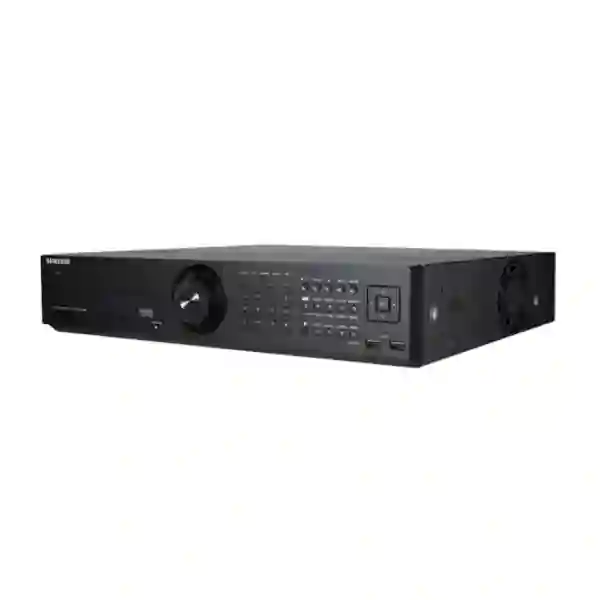
Hanwha SRD-1610D 16-Channel H.264 DVR
Evaluating a replacement recorder for an established analog CCTV system? The Hanwha SRD-1610D DVR supports sixteen composite camera inputs, H.264 recording, up to five internal SATA hard drives and DVD-RW backup. Check your existing camera formats and required footage quality before selecting this legacy model.
At a glance: what matters before you order
Existing conventional analog CCTV environments where compatibility and recording performance have been verified.
Aggregate frame rates, hard-drive support, software compatibility and usable footage retention.
PoE camera inputs, current mobile app support, HDMI or compatibility with modern HD analog formats.
The key buying question is not simply whether a DVR has sixteen channels. It is whether it can capture the footage your site needs from the actual cameras already installed, preserve it for the required period, and make it accessible when an incident occurs. The sections below connect the manufacturer’s verified technical information with practical checks for maintenance, replacement and upgrade planning in Tanzania.
Technical specifications
| Feature | Verified specification / qualification |
|---|---|
| Recorder type | 16-channel H.264 analog CCTV digital video recorder |
| Camera inputs | 16 composite-video inputs, PAL or NTSC |
| PAL recording rate | Up to 100 fps total at CIF; up to 25 fps total at 704 × 576 |
| NTSC recording rate | Up to 120 fps total at CIF; up to 30 fps total at 704 × 480 |
| Internal storage | Up to 5 SATA hard-drive positions; disk capacity compatibility must be checked |
| Backup | Built-in DVD-RW writer; USB backup support |
| Local display | VGA, main composite BNC, and spot composite BNC |
| Network | 1 × RJ-45 Ethernet, 10/100/1000 Base-T |
| Audio | 4 line-level inputs and 1 output |
| Alarm interfaces | 16 alarm inputs and 4 relay outputs |
| Control interfaces | RS-232 / RS-485, selected PTZ protocols |
| Electrical input | 100–240 V AC, 50/60 Hz |
| Operating environment | 0–40 °C; 20–85% relative humidity |
| Cabinet size | Approximately 440 × 88 × 426.8 mm |
Specifications are subject to hardware and documentation revisions. Frame rates refer to aggregate recording performance at the stated resolution. Confirm the exact installed unit and firmware before making operational promises.
Who this DVR is designed for
The Hanwha SRD-1610D DVR is a sensible subject to evaluate when an organisation already operates a conventional analog CCTV system and needs to understand its existing recorder, replace a like-for-like unit, or assess a carefully planned upgrade. It is not a modern network video recorder. Its sixteen camera inputs are intended for composite analog video signals carried over suitable coaxial camera connections. That distinction matters more than a generic sixteen-channel claim: a site with IP cameras, newer high-resolution analog formats, or a mixed estate should not assume that those cameras can be connected directly without further equipment or a different recorder. Buyers should identify the camera signal format before choosing a recording platform.
The model can be relevant to sites that value continuity with established cabling and cameras, including small commercial buildings, store rooms, workshop perimeters, reception areas, and legacy CCTV control points. Suitability depends on the existing installation, the required picture detail, how footage will be retrieved, and whether older remote-viewing software remains usable. Before purchasing, request confirmation of the exact SRD-1610D hardware condition, included accessories, disk configuration, and any available service documentation. No particular stock status, price, warranty, or installation package should be assumed simply from a product specification.
The importance of identifying the exact model
SRD-1610, SRD-1610D, and SRD-1610DC are related names, but they should not be treated as interchangeable. Manufacturer material distinguishes the SRD-1610D by its built-in DVD writer and support for up to five internal SATA hard drives. Documentation also associates coaxial PTZ control with the SRD-1610DC variant rather than automatically granting that feature to the SRD-1610D. If the need is to replace an existing chassis, read the actual model label instead of relying on an old quotation, a handwritten equipment schedule, or a photograph of a similar front panel.
Confirm both the front and rear connections before replacing a unit. Record the existing camera-input count, whether any loop-through outputs are used, the monitor connections, the serial-control cabling, and the audio or alarm wires. An equipment inventory is especially helpful when the site has undergone partial upgrades over time. A recorder with the same channel count may still differ in video formats, output capabilities, storage arrangements, software or control functions. A precise model match reduces avoidable downtime, incorrect assumptions and surprise compatibility costs.
Sixteen analog inputs and camera compatibility
The recorder provides sixteen composite-video inputs for analog cameras. These inputs suit conventional baseband analog video and should not be described as sixteen network-camera ports. Camera count is a physical connection consideration, but picture quality and format compatibility must be checked separately. Verify the output standard of each existing camera, the condition of the coaxial cabling and connectors, and whether the installation uses a supported PAL or NTSC signal. A modern camera may have a BNC connector yet output an incompatible high-definition analog signal, so matching connectors alone is not sufficient proof of a working video feed.
During replacement planning, have an installer identify one representative camera from every camera type installed on site and test the live image before committing to a full changeover. Note camera power supplies, grounding practices and signal losses on longer cable runs. This recorder is not documented as providing power-over-Ethernet switching or IP camera discovery. It should therefore not be presented as a plug-and-play recorder for PoE surveillance cameras. If a site intends to move toward IP cameras, plan the video-management architecture and network infrastructure separately rather than expecting analog BNC inputs to accept them.
Understanding PAL and NTSC recording performance
Recording performance is one of the most important specification checks for the SRD-1610D. Hanwha’s exact-model technical material states a maximum aggregate recording rate of up to 120 frames per second in NTSC or 100 frames per second in PAL at CIF resolution. At the larger 704 by 480 NTSC or 704 by 576 PAL frame size, the stated aggregate maximum is 30 or 25 frames per second respectively. These are system-wide recording figures, not a guarantee of that frame rate on each of sixteen channels. More recording detail and higher camera counts must be balanced against the available total throughput.
This distinction should be made explicit when designing a security system. A purchaser who reads ‘120 fps’ without the resolution and aggregate context may expect smooth full-resolution recording across every camera, which is not what the datasheet promises. Ask what level of motion smoothness is needed for cash-handling positions, vehicle entry, loading areas and low-activity corridors. Document the intended resolution, frame rate and schedule per camera and test the result against real scene activity. For current high-definition identification requirements, consider whether a modern recording platform is a better technical fit.
Live display is different from recorded evidence
The manufacturer’s specification separates live display capability from recording throughput. The live multiscreen system can show camera views in several layouts, including single-camera, four-camera, nine-camera and sixteen-camera arrangements, while the recording engine operates within its own aggregate limits. A sharp or fluid-looking live image does not by itself prove that archived footage retains the same apparent motion or level of detail. Evaluate sample playback from the intended configuration rather than relying only on how the cameras look on a monitor during commissioning.
Use a practical test: observe movement through a doorway or across a vehicle entrance, wait for recording to complete, and retrieve the relevant time period. Compare the archived frames with the original monitoring requirement. Can the operator follow the sequence of events? Is the image usable at the expected distance and lighting level? Can the evidence be found and exported without expert intervention? These tests are more meaningful than a single maximum-number headline because CCTV is ultimately judged by what it records when an incident occurs.
H.264 compression and what it does
The SRD-1610D uses H.264 video compression, a technology intended to reduce the amount of digital storage and network capacity needed compared with uncompressed video. Compression can help make multi-camera recording more practical, but it cannot add detail that the original analog camera and recording resolution do not capture. Image quality depends on several factors working together: the camera signal, lighting, lens, cabling, chosen recording resolution, frame-rate allocation and compression settings. Technical comparisons should therefore use recorded test footage rather than the codec label alone.
Compression also affects retention planning. A less active scene may produce different storage demand from a busy entrance or a continually moving industrial environment, depending on the system settings. The correct approach is to select acceptable evidence quality first and calculate disk demand from the resulting data rate and desired retention period. Reducing quality purely to increase the number of days stored may defeat the reason the camera was installed. Establish a documented quality baseline before adjusting recording settings to fit the available capacity.
Storage expansion with five SATA drive positions
The SRD-1610D supports up to five internal SATA hard drives according to the manufacturer. This describes the number of internal drive positions, not an unconditional guarantee that any currently sold disk size or disk model will be recognised. A legacy DVR may have firmware, interface, drive-capacity or reliability constraints that are not captured in a modern hard-drive catalogue. Verify the supported disks against the applicable service material and test recognition, recording and playback before deploying drives in a production CCTV system.
Disk planning should include more than the number of slots. Clarify how many drives are already installed, their health, remaining useful capacity and whether overwriting of older footage is configured. Determine how much recorded history the organisation actually needs and whether normal operations require longer retention for a particular camera. Record the installed disk serial numbers and settings for support purposes. When a replacement recorder is being considered, agree on how existing footage will be preserved or handed over; physically moving old disks to another DVR should never be assumed to retain readable recordings.
Plan a realistic footage retention period
A useful retention requirement is expressed in days of usable footage at an agreed recording quality, not simply in terabytes. First decide which cameras need continuous recording and which might reasonably use scheduled or event-related recording. Then assess scene activity, the active hours at the site, the intended frame rate and the chosen image settings. From those decisions an installer can estimate daily recorded data per channel and total storage demand. Retention must be verified by observing real disk consumption after the system begins recording.
Consider retention as an operational policy too. Decide who is authorised to request footage, how long ordinary recordings should remain available, and whether an incident requires copying a protected evidence set before routine overwriting occurs. A recorder can have substantial installed storage yet still fail operational expectations if a camera silently stops recording or the date and time become inaccurate. Include regular checks of disk status and recorded-date coverage in the maintenance routine. The precise policy should follow the site’s needs and any applicable obligations, not a generic marketing promise.
DVD-RW and USB export options
A defining feature of the SRD-1610D variant is its built-in DVD-RW writer. The manufacturer’s technical material also documents USB backup support and three USB 2.0 ports. These options may help a security operator transfer selected recordings when an event needs to be examined elsewhere. However, a physical export interface is only part of an effective evidence process. Check that the chosen media is readable, that enough space exists for the selected footage and that the export format can be opened on the receiving computer.
The exact-model specification lists formats including AVI and player-related backup formats. Before an incident happens, run a controlled sample export and verify video playback, timestamps and the intended camera selection on a separate workstation. Record who performed the export and preserve the original copy when it is evidence. DVD media, writable drives and compatible playback utilities can be harder to support on newer computers, so an organisation should check its current workstation environment. Never rely on an untested backup procedure as the only method of preserving important CCTV footage.
Searching, reviewing and retrieving incidents
The system provides date-and-time, event, motion and backup-oriented search functions, with playback controls for faster or slower review and stepping through footage. These tools matter because an operator often knows approximately when something happened but does not know which camera first captured the relevant activity. A practical search workflow begins by checking the recorder’s date, time and timezone settings, then selecting the camera or camera group, narrowing the event window and reviewing the resulting timeline.
Train the authorised operator to preserve context around an incident rather than exporting only a few isolated frames. Footage before and after the main event can explain movement, sequence and handover between cameras. Confirm that export timestamps match the site’s records. Keep a basic evidence log describing the camera, time range, person exporting the file and the storage location of the protected copy. These steps are operational good practice; the recorder’s feature list alone does not create a complete evidence-handling policy.
Monitor outputs and control-room viewing
The SRD-1610D technical specification includes VGA output as well as main and spot composite BNC outputs. This gives operators several legacy monitoring options, subject to the screens and distribution equipment installed. The VGA modes listed by the manufacturer reach 1280 by 1024 for monitor output; that figure is a display setting and must not be confused with the native resolution of footage captured from the analog cameras. Evaluate actual screen compatibility when replacing an older display with a modern monitor.
A site may need a local desk screen for investigations and a separate viewing position for selected cameras. Map the existing signal paths and ask whether they depend on the spot output, a monitor distribution system or another control-room device. If a current screen has only HDMI inputs, an appropriately selected interface solution or alternative recorder may be required; an HDMI connector is not listed in the exact-model output specification. Confirm the physical screen connections before ordering accessories or scheduling a maintenance window.
Network access and remote monitoring
The recorder includes an RJ-45 Ethernet interface documented as 10/100/1000 Base-T and supports several common networking protocols, including TCP/IP, DHCP, HTTP, NTP, DDNS, RTP and RTSP. Its historic monitoring ecosystem includes NET-i viewer, SmartViewer and a web-viewing option. These facts demonstrate that the model was designed for networked monitoring, but they do not establish compatibility with every modern browser, mobile operating system, corporate security policy or remote access service in current use.
Before enabling remote viewing, establish what authorised users actually need: occasional incident review, routine live supervision or full remote administration. Document the recorder’s network settings, credential ownership and support process. Avoid exposing an aging management interface directly to the public internet. Have the responsible network administrator assess a restricted, appropriately secured access method and compatibility with current systems. If the intended users cannot reliably view recordings on supported devices, that limitation should influence the purchase decision rather than being discovered after installation.
Legacy smartphone support needs verification
Hanwha lists smartphone support as a key feature of the SRD-1610D, and period documentation refers to Android and iPhone viewing. That capability was developed for a different generation of phones, applications and network practices. It should not be converted into a claim that the device works seamlessly with today’s mobile operating systems or all current app-store software. The compatibility of a particular app, handset, viewing method and firmware version must be established through a current test.
Where mobile access is an important business requirement, ask for a demonstration using the actual phone and authorised network connection intended for everyday use. Check that the user can authenticate, select a channel and receive a usable picture without compromising network security. If the old viewing method cannot be maintained securely or reliably, a newer recorder or carefully managed migration may be more appropriate. A legacy feature label is not a substitute for supported software, documented updates and a tested remote-access design.
Audio input and output capability
The manufacturer specifies four line-level audio inputs and one line-level audio output, with ADPCM audio compression. This is separate from the sixteen video channels. A buyer should therefore avoid assuming that every video camera can automatically be paired with its own independent audio input. Determine which locations actually require audio, what microphone or audio equipment is suitable, and how the installer intends to map audio channels to the relevant camera views and recordings.
Audio monitoring and recording can raise additional privacy, consent and operational questions. Define the legitimate purpose and check applicable requirements before enabling capture at a workplace, reception desk or other shared area. On the technical side, confirm signal levels, cabling and recorded playback rather than assuming that any microphone can connect without configuration. If audio evidence is critical, test an actual sample that includes both picture and sound. Do not treat an audio-input count as proof of lawful or fit-for-purpose recording in every setting.
Alarm inputs, relay outputs and notifications
The SRD-1610D specification provides sixteen alarm inputs and four relay outputs, alongside event-related recording functions and email notification capability. These connections can form part of a larger security design where contacts or other suitable devices trigger configured responses. They do not mean the DVR includes the sensors, sirens, access-control hardware or monitoring service itself. Integrations should be assessed for the appropriate electrical characteristics, operating logic and professional wiring requirements.
Before connecting existing alarms, document which input belongs to which zone and which relay is permitted to operate external equipment. Test the normal and alarm states, the recorded event markers and the actual notification path. Mail settings, authentication methods and network restrictions have changed since older CCTV equipment was designed; email delivery should not be assumed without an end-to-end test. Where an alarm action affects doors, safety functions or other sensitive systems, commission the integration with qualified personnel and verify the required safeguards.
PTZ control and serial interfaces
The recorder provides RS-232 and RS-485 interfaces and manufacturer-listed support for several established pan-tilt-zoom control protocols, including Pelco-D and Pelco-P. These interfaces may be useful where a legacy installation already has controllable analog cameras or a compatible system keyboard. However, support for a protocol family is not proof that every camera, controller and physical wiring arrangement will work. Match the actual camera protocol, address, baud rate, connector wiring and serial settings before expecting dependable movement commands.
An important model distinction is that the manufacturer separately identifies coaxial PTZ control as a feature of the SRD-1610DC variant. Buyers should not silently transfer that feature to the SRD-1610D because the names look similar. If a site uses PTZ control through the video coaxial cable rather than separate serial wiring, confirm the model and integration plan explicitly. During commissioning, test each required direction, preset and stop command and make sure the camera remains under predictable operator control.
User permissions and account management
Manufacturer material lists password protection and differentiated user authority. Access control is valuable in a shared CCTV environment because staff who merely need live monitoring may not need permission to change recording schedules, delete archives or alter network settings. A deployment should use named responsibilities and the least level of access required for each role. The person responsible for the recorder should keep secure records of administrator access and a documented handover process when personnel change.
Older CCTV systems require particular attention to account hygiene. Confirm that factory or shared passwords have been replaced and that unsupported remote administration routes are not left exposed. Keep a register of who can review or export footage and decide how access will be revoked when necessary. Review the available logging and configuration functions of the exact installed firmware. A password feature does not, by itself, guarantee modern identity controls, encryption standards or compliance with a company’s present cybersecurity requirements.
Power supply and electrical planning
The exact-model technical specification lists an auto-ranging 100 to 240 volt AC input at 50 or 60 hertz. This helps an installer evaluate the power connection, but it does not remove the need for correct earthing, surge protection and stable supply at the site. Recording continuity depends on more than the DVR: cameras, their separate power supplies, connected network equipment and any required viewing workstation may all need continuity during an outage.
If a site plans to use an uninterruptible power supply, calculate the combined power requirement from the actual installed equipment and the required battery runtime. Older manufacturer documents show differing power-consumption figures, so do not size a UPS from an unqualified value copied from an unrelated brochure. Confirm the rating applicable to the exact hardware and the number of installed disks. Test orderly recovery after a controlled power interruption, and verify that the clock, recording schedule and network connections return as expected.
Ventilation, humidity and equipment placement
Hanwha’s exact-model data lists an operating temperature range of approximately zero to forty degrees Celsius and a relative humidity range of twenty to eighty-five percent. The top end of that range deserves attention in warm equipment rooms, enclosed cabinets or locations exposed to heat from other electronics. A recorder that is technically compatible with the cameras can still deliver poor service if it is placed in a dusty, damp or poorly ventilated cupboard.
Provide adequate air movement around the chassis and avoid blocked vents, direct water exposure and unstable mounting. Check that the environment remains within the specified operating range during the hottest normal working conditions, not just during an early-morning inspection. Inspect for accumulation of dust and the condition of cooling components during maintenance. If the site faces frequent power fluctuations or high ambient temperature, design suitable protection and cooling with a qualified installer. No weatherproof or outdoor enclosure rating is claimed for this recorder.
Cabinet dimensions and installation access
The technical specification lists a chassis size of about 440 millimetres wide, 88 millimetres high and 426.8 millimetres deep. These are useful starting points when checking a desk shelf, equipment cabinet or rack arrangement. Leave additional space for coaxial connectors, power leads, network cables, serial connections and safe cable bends behind the chassis. A snug numerical fit inside a cabinet may still be impractical once the actual cable bundle and ventilation clearance are considered.
Check how the recorder will be physically secured, who needs access to the front controls and DVD writer, and how technicians can replace a drive without disturbing unrelated equipment. Photograph the existing rear-panel connections and label cables before removal. Where rack hardware is used, verify that the correct kit and fixings are actually included with the unit. A clean installation also provides a readable camera schedule and enough service access to troubleshoot a failed video input or backup device without unnecessary system disruption.
Common commercial CCTV scenarios
In a small retail or office installation, existing analog cameras may cover entrances, customer-facing areas, stock rooms and access points. The SRD-1610D can be evaluated as a recording platform only after checking that each camera supplies a supported composite signal and that the required archived-image quality is achievable. A store may care most about the ability to retrieve a short event window quickly; a workshop may place more emphasis on continuous coverage and durability of the recording installation.
In a larger site with several camera zones, the sixteen-input arrangement offers a useful way to organise an existing analog estate, but recording-rate allocation becomes increasingly important. High-motion entrances and low-motion corridors may deserve different settings. If the site instead requires clear high-resolution facial details, modern mobile integration, centralised multi-site video analytics or direct IP camera support, those requirements should lead the specification rather than a desire to reuse an older model. The right choice follows an agreed evidence and operations requirement.
A staged installation and commissioning checklist
Start by recording the installed camera inventory, video standards, cable routes and connection labels. Next, verify the proposed recorder’s exact model, drive compatibility, available monitors, recording modes and any required alarm or audio connections. Configure the clock and local time accurately, assign authorised user access and establish the recording policy for each channel. Then confirm stable live images, reasonable nighttime performance and correct event handling. This sequence exposes compatibility problems before the installation is treated as finished.
Commissioning should also test recorded playback and an independent file export. Review a representative busy scene and a low-light scene, verify network access only through an approved method, and exercise any alarm, PTZ or audio functions that the customer will use. Record the final configuration and document who holds administrator access, where exported footage will be kept and which checks should be performed routinely. Handover is complete only when the designated operator can use the system for a genuine incident without depending on a technician for every action.
Routine maintenance and health checks
A legacy DVR benefits from a deliberate maintenance routine. Regularly inspect whether all expected cameras are recording, whether the displayed time remains accurate, whether available disk capacity behaves as expected and whether the oldest accessible recording meets the agreed retention policy. Listen for unusual mechanical noise and check that vents are unobstructed. If a hardware fault occurs, make an appropriate backup of accessible evidence before performing disruptive repairs whenever the circumstances allow.
Review the manufacturer’s applicable documentation when considering firmware updates, because firmware versions, compatibility requirements and recovery procedures can vary. Do not install an unverified firmware file merely because its name resembles the model. Record changes to schedules, users, camera labels and network configuration so the site can investigate unexpected behaviour. Where replacement parts or software support are uncertain, include a migration contingency in the maintenance plan. The objective is to preserve usable recordings and predictable operation rather than simply keeping a front-panel indicator illuminated.
How to decide between maintaining and replacing
Keeping an analog DVR may make sense when existing cameras are satisfactory, the recorder is healthy, the site uses local monitoring and the required evidence standard can be met within the unit’s technical limits. A replacement decision becomes more urgent when storage health is uncertain, remote viewing depends on obsolete software, incident footage lacks the detail needed, or the system must integrate with newer cameras. Consider the total cost of safe operation, not just the purchase price of a recorder.
A planned transition can be staged. Begin with a camera and cable survey, define the most important scenes, agree on recording retention and evidence quality, and compare an analog-compatible solution with an appropriately designed IP system. Note that a new NVR generally needs supported network cameras and a suitable network, whereas an analog DVR accepts specified composite-video signals. Preserve existing footage according to the site’s policy before switching recorders. The buyer should choose a verifiable, supported outcome rather than assume that the word ‘digital’ means the device meets modern surveillance requirements.
Tanzania purchasing and verification guidance
For buyers evaluating the Hanwha SRD-1610D DVR for use in Tanzania, the practical first step is to specify the existing CCTV environment and the result required from the recorder. Provide the exact model name, number and signal type of cameras, installed hard-drive details if known, monitor connections and whether evidence must be exported to a current computer. Mention any requirement for existing alarm inputs, line-level audio or serial PTZ control. These details help distinguish a workable legacy replacement from a more appropriate modern upgrade.
Before placing an order, request written confirmation of availability, the unit’s condition, included hard drives, accessories, software requirements, delivery arrangements and any applicable warranty or support terms. None of those commercial details can be inferred from the manufacturer’s historical specification. Ask how compatibility will be verified and who will be responsible for commissioning and protecting any existing recordings. A clear quotation based on verified site requirements is more useful than an unsupported claim that every sixteen-camera CCTV system will work immediately.
Frequently asked questions
Is the Hanwha SRD-1610D an NVR or a DVR?
It is a sixteen-channel digital video recorder designed for conventional composite analog camera inputs. A DVR records digitised video from suitable analog cameras; a network video recorder normally receives video streams from supported IP cameras. Do not connect a network camera or a newer high-definition analog signal merely because the channel count sounds suitable. Confirm each camera’s actual signal and required interface before planning the system.
Does it record sixteen cameras at 25 frames per second each?
No such per-channel guarantee is made by the manufacturer. For PAL, the exact-model data states aggregate recording maxima of up to 100 frames per second at CIF and 25 frames per second at the larger 704 by 576 recording setting. A configuration should allocate the available total frame rate to the channels that need it and then be validated with archived test footage.
How many internal hard drives can be fitted?
Hanwha lists support for up to five internal SATA hard drives in the SRD-1610D. That is a drive-position specification, not a guarantee about the maximum capacity of a newly purchased disk. Confirm capacity and compatibility for the exact hardware and firmware. Also establish whether any disks are included in a proposed sale; do not assume a complete storage package from the recorder model name.
Can recordings be backed up to DVD or USB?
The SRD-1610D has a built-in DVD-RW writer, and the manufacturer documents USB backup support. The usability of an export depends on the media, available space, selected backup format and receiving computer. Test an exported file on a separate machine and verify timestamps and playback before relying on the procedure for incident evidence. A backup feature should be part of a documented evidence process.
Can it be viewed from a mobile phone today?
The original specifications identify smartphone support, including historic Android and iPhone viewing. That does not guarantee compatibility with currently supported mobile operating systems, modern application stores or secure remote access policies. Ask for a demonstration with the intended phone, installed firmware, viewer and approved network method. If dependable modern mobile access is a priority, compare newer supported recording platforms.
Does the recorder include Power over Ethernet or HDMI?
The manufacturer’s exact-model interfaces list sixteen composite-video camera inputs, VGA monitoring and composite BNC monitor outputs, plus an Ethernet network connection. They do not list integrated PoE camera ports or an HDMI monitor output. The Ethernet port is not the same thing as a sixteen-port PoE camera switch. Confirm connector requirements before purchasing a display, camera or cable adapter.
Can it control pan-tilt-zoom cameras?
The model documents serial interfaces and support for established PTZ control protocols. Working control requires compatible camera hardware, wiring and configuration. The related SRD-1610DC is specifically distinguished in historical manufacturer material by coaxial PTZ control. Do not assume that feature applies to the SRD-1610D. Ask the installer to verify the actual control method, protocol and commands with the cameras already installed.
Is this suitable for a new high-definition security installation?
It is an older analog recorder with documented recording resolutions and total frame-rate constraints. Whether those limits are sufficient depends on what the business needs to identify in its footage. For new high-resolution cameras, current app support, advanced analytics or easy integration with IP equipment, a properly selected contemporary system may be more suitable. Base the decision on test footage and operational requirements, not solely on channel count.
What should I provide when asking for a quotation in Tanzania?
Provide the exact SRD-1610D model reference, number and types of existing cameras, current monitor connectors, required retention period, whether drives are needed, and any alarm, audio, PTZ or remote-viewing requirements. State whether you need a replacement for an operating system or an upgrade. Ask the supplier to confirm product condition, compatibility, actual availability and quoted commercial terms before ordering.
What is the difference between SRD-1610D and SRD-1610DC?
Both belong to the same legacy family, but the manufacturer identifies the SRD-1610D as a DVD-equipped variant and separately notes coaxial PTZ control for the SRD-1610DC. Related models should not be treated as interchangeable on the basis of their names or photographs alone. Confirm the exact rear-panel features, control method and replacement goal before accepting a substitute unit.
Request a model and compatibility review
Tell the sales or technical team that you are evaluating the Hanwha SRD-1610D DVR. Share your existing camera types, channel count, recording-retention requirements, drive needs and preferred monitoring method. Ask for verified availability, product condition, support details and a written quotation for your Tanzania installation. A compatibility review is the most reliable next step when working with a legacy surveillance recorder.
No price, stock, warranty, or current mobile-app compatibility is implied by this information.




Reviews
There are no reviews yet.