
Enterprise video recording • Tanzania buyer guide
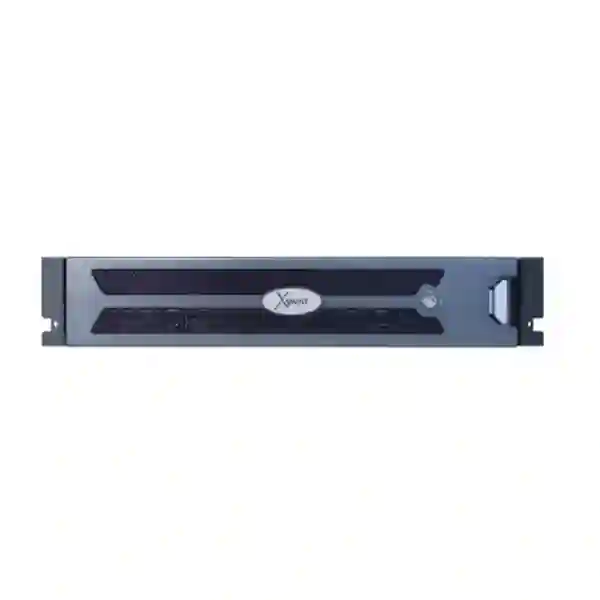
Hanwha SRN-64/72SEN-RS Enterprise Video Storage Appliance
Planning a large surveillance recording system or maintaining an established installation? The Hanwha SRN-64/72SEN-RS family combines a 2U rackmount design with 64/72-channel positioning, preconfigured RAID 5 and redundant power supplies. Hanwha Vision now lists this family as discontinued. Buyers should verify the precise unit, existing software and storage condition, and consider a current alternative before making a commitment.
Request a requirements review for an existing unit, a proposed replacement or a new project. Availability, warranty and support are not assumed.
Verified specifications at a glance
The following family-level details come from Hanwha Vision’s published model information. Actual hardware and software included with a specific unit should be inspected separately.
| Manufacturer | Hanwha Vision |
|---|---|
| Model family | SRN-64/72SEN-RS (also written SRN-64~72SEN-RS) |
| Product category | 64/72-channel enterprise video storage appliance |
| Mounting format | 2U rackmount |
| Processor | Fourth-generation Intel quad-core Xeon |
| Storage protection | Preconfigured RAID 5 |
| Power | Redundant power supply standard |
| Historical standard storage configurations | 8, 12, 15, 24, 32, 40 and 48 TB |
| Manufacturer lifecycle status | Discontinued |
| Local stock, price, software licences and support | Not verified; request written confirmation |
These are historical product configurations, not an offer, stock statement, active warranty or promise of camera compatibility. Storage options should not be confused with usable recording capacity.
Who should consider this appliance today?
This is a relevant reference point for organisations managing an established Hanwha or legacy Samsung Techwin surveillance estate, particularly when the original recorder has reached an age at which spare parts, software and drives need closer attention. A security manager might be trying to identify an installed unit, confirm whether an inherited rack server matches a documented model, or decide whether a like-for-like replacement is sensible. An integrator may need to estimate the work involved in migrating cameras and recordings from an old platform. In each case the first task is to identify the actual installed variant and its current operating condition, not merely match a catalogue family name.
Hanwha Vision identifies the SRN-64/72SEN-RS family as discontinued. That classification changes the buying conversation. A current installation can still warrant technical assessment, but a new project should not be planned around assumed availability, firmware support, spare parts or a manufacturer-backed warranty. A modern recording platform may offer a lower long-term operational risk. FourTeck Tanzania can use your project requirements to frame the decision, while the precise product supply and service scope must be confirmed separately.
Understanding the 64- and 72-channel variants
The manufacturer’s family designation refers to 64- and 72-channel enterprise video storage appliances. Channel count is an important starting point, but it is not a complete performance specification. In a security design, each required camera stream, recording profile and possible secondary stream affects how a platform is sized. Adding a camera into a management interface is not the same as verifying that the entire system can record continuously at the required image quality during busy periods. A channel headline should therefore be matched to the actual variant and workload.
Before approving a purchase or migration, list the cameras by location, make, model, encoding format and preferred resolution. State which cameras must record continuously and which may use scheduled or event-based recording. Check whether the required management software and channel licences are included with the exact unit. The channel number on a family page must not be treated as a promise that every configuration accepts every modern camera or video feature. Verify the final design with current compatibility documents and a controlled test where possible.
What the enterprise storage design offers
The verified hardware characteristics are a 2U rackmount form factor, a fourth-generation Intel quad-core Xeon processor, preconfigured RAID 5 and redundant power supplies. Together these identify a storage-focused platform intended for more substantial recording deployments than a small desktop recorder. They do not, however, specify an exact throughput limit, maximum camera resolution, supported codec matrix, live-view capacity or failover behaviour. Those details are dependent on the precise hardware and software build and should be confirmed from the unit and its documentation.
The most useful way to interpret the product is as one possible component of a larger video surveillance system. Cameras, network switches, time synchronisation, video management software, storage policy, operator access and maintenance procedures all influence results. A recorder cannot compensate for congested uplinks, inconsistent camera settings or an absence of operational support. Treat enterprise features as design inputs that may improve resilience, rather than a blanket assurance of continuous recording in every environment.
Historical storage capacities and actual usable space
Hanwha Vision lists standard historical configurations of 8, 12, 15, 24, 32, 40 and 48 TB. Those figures describe marketed configuration choices; they do not establish the free capacity of an individual used appliance or the volume of video that will remain available after array protection, formatting, operating-system requirements and management overhead. The physical disks in a second-hand or previously deployed unit may have been changed, degraded or repartitioned. Only an inspection can establish the current storage inventory and usable recording capacity.
A capacity comparison should use the same measurement basis for each option. Ask whether a quoted figure refers to installed drive capacity, usable array capacity or video retention allocation. Then apply the proposed camera recording settings and retention requirement. An array with a larger nominal number may still deliver fewer days of usable footage if the cameras record at higher bitrates or if the application reserves more space. Request a documented storage calculation instead of choosing solely from the capacity figures on a product headline.
RAID 5: valuable protection with defined limits
The manufacturer’s listing confirms preconfigured RAID 5. In a conventional RAID 5 array, data and parity are distributed across member drives so the array can normally continue operating after one member-drive failure, provided the remaining drives and controller are healthy. This can reduce the immediate disruption caused by a single disk fault, but it does not remove the need for monitoring and a replacement-drive process. Actual behaviour during degraded operation or rebuild depends on the controller, drive set, workload and system software.
Before relying on an existing RAID array, examine its health rather than assuming that an indicated RAID 5 label means it is safe. Review the controller event log, individual disk alerts, spare-drive strategy, rebuild status and any outstanding errors. Rebuilding can take time and places additional demand on the remaining drives. A second drive failure, a controller problem, accidental deletion, malware or a building-level incident can still cause serious loss. Storage protection is one layer of an evidence-preservation plan, not a substitute for that plan.
Why RAID is not a backup strategy
A redundant disk array is designed to tolerate certain hardware failures; a backup is designed to preserve another recoverable copy of important information. These solve different problems. If a file is deleted by mistake, a retention policy overwrites it, or an attacker gains administrative access, the RAID system may faithfully replicate that unwanted state across its active disks. A power or environmental incident can also affect every drive in the same enclosure. For critical investigations, a separate export and preservation workflow is necessary.
Define which recordings require independent retention and who may authorise an export. Decide whether the business needs protected copies at a separate location, immutable storage or a documented chain of custody. Validate that any backup and recovery method works with the chosen recording software and complies with the organisation’s own information-handling obligations. A recovery plan should be tested with sample footage, not judged only by whether a backup job reports success. The chosen approach should match the legal, operational and security significance of each camera view.
Redundant power supplies and the whole power path
Hanwha Vision lists redundant power supplies as standard for this family. The feature is useful because certain supply failures can be managed without immediately losing the entire appliance, but it does not mean the surveillance service is immune to site power faults. If both supplies depend on the same failed upstream feed, or if the rack loses cooling and networking during an outage, recording can still be interrupted. The exact power module arrangement, electrical input and replacement procedure should be checked on the actual configuration.
For a Tanzanian site, review the rack’s upstream power distribution, suitable uninterruptible power supply, generator arrangements if present and environmental monitoring. Determine how long the cameras, switches, recording server and management connections must remain operational during an outage; keeping only the server alive is insufficient if the network camera power fails. Maintenance should include periodic checks of power alarms and the condition of any backup power equipment. Redundant hardware delivers meaningful value only when it sits within a deliberately designed power architecture.
Planning a 2U rack installation
The confirmed 2U form factor makes rack planning more straightforward than guessing from product photographs, but it still leaves important site details to verify. Cabinet depth, rail compatibility, front and rear clearance, power connector access, total installed weight and service space cannot safely be inferred from the form factor alone. An existing security rack may contain switches, patch panels, backup power and networking equipment that restrict airflow or prevent drive replacement. Measure the available space and check the exact accessory and rail requirements before scheduling installation.
Where equipment rooms experience high ambient temperatures, cooling and air circulation deserve specific attention. A site survey should note inlet temperature, dust, ventilation direction, cable routing and whether the rack has sufficient access for maintenance. Document who owns the facilities-side obligations, including cooling, power and secure room access. Avoid transferring environmental limits from a similar-looking SRN appliance to this exact variant without a matching specification. A rackmount server still needs a suitable operating environment and serviceable infrastructure to perform reliably.
Understanding processor information without overstating performance
The official product listing identifies a fourth-generation Intel quad-core Xeon processor. That confirms a broad hardware generation and class, not an exact part number or a guaranteed number of frames per second. Real recording capacity depends on processor load, disk writes, network traffic, operating software, client activity and the camera streams being processed. An appliance with an impressive CPU headline may still have practical limits set by its video management configuration or a dated operating system.
When assessing an installed unit, review CPU and memory usage over a representative operating period, including periods of motion, searches and exports. Monitor whether the recorder remains responsive while video is being written and viewed. Where relevant, test simultaneous playback and incident export rather than only confirming that cameras appear online. The purpose is to identify bottlenecks that matter to the security team. Do not purchase on the assumption that the processor alone guarantees compatibility with contemporary high-resolution cameras or current video analytics.
Recording bandwidth and network sizing
Network video design begins with stream bitrates, not simply with the number of camera icons on a screen. A camera’s average and peak bitrate can change with scene movement, lighting, compression settings and resolution. The combined load determines how much traffic reaches the recording appliance, while live monitoring, software updates and remote users can create additional network demands. Uplink capacity should therefore be assessed against the busiest expected conditions, with room for normal operational variation and diagnostic traffic.
A practical design includes a camera inventory, network topology, switch uplink information and the recording server’s connection details. Review segmentation between camera networks and business systems, the expected path for remote access and how connectivity is restored after an outage. The presence of network connectors on a legacy server does not prove that the installed software supports every desired network feature. Confirm interface capability from the actual hardware build, and conduct throughput testing before expanding a production recording load.
Sizing video retention from actual camera settings
Retention is the number of days that required footage remains accessible before it is deleted or overwritten. The correct calculation accounts for the camera count, recording schedules, measured or reasonably modelled stream rates, motion activity, codec and compression settings, audio where applicable and the usable capacity after storage protection. Higher image quality may be necessary for recognition at an entrance, while other scenes may tolerate a different profile. A uniform assumption across every camera can therefore produce a misleading storage estimate.
Start by defining retention policy for each category of camera and identifying any cameras whose evidence must be preserved beyond routine overwrite. Run a model using both normal and conservative traffic assumptions, then compare it with a pilot recording sample. Confirm that the system can maintain its target retention without operating at the edge of available disk capacity. The SRN-64/72SEN-RS storage option list alone is not a retention guarantee. FourTeck Tanzania can evaluate the inputs to a proposed design once the site requirements and exact configuration are known.
Continuous, scheduled and event-based recording
Not every security scene has the same recording objective. A high-risk entrance might require uninterrupted recording, while a low-activity service area might have a business case for recording according to a schedule or a defined event. Such choices affect storage consumption, review effort and the availability of evidence. They must also be consistent with local operational policy and the actual recording software’s documented capabilities. Do not assume that every event trigger or analytic function is supported simply because the appliance can store video.
Document the required behaviour for each camera: continuous recording, authorised schedule, or event response; pre-event and post-event expectations; and the person responsible for checking gaps. Test day and night scenes because bitrate and image clarity can shift with changing light. If an older software environment cannot provide a required function reliably, redesigning the recording approach or selecting a newer recorder may be preferable to forcing an unsupported feature into service. The goal is predictable evidence, not the largest list of settings.
Camera and encoding compatibility checks
A 64- or 72-channel storage headline does not establish universal compatibility with IP cameras. The particular video management software, camera firmware, protocols, supported codecs and feature licensing determine what can be registered and recorded. A camera might provide a basic video stream while more specialised functions such as motion metadata, events, audio, panoramic controls or advanced analytics remain unavailable. Compatibility documentation for a different SRN recorder is not reliable proof about this specific enterprise storage appliance.
Build a test matrix before deployment or renewal. Record the make and model of each camera, its firmware version, stream settings, intended recording profile and the operator actions required. Validate live view, recording, search, playback, export, reconnection after a network interruption and any required alarm behaviour. If the system is already installed, avoid unplanned firmware changes that could disrupt its working configuration. A small controlled trial offers much better evidence of suitability than assuming interoperability from a shared brand name.
Video management software and licensing
A video storage appliance and the software that manages video are not necessarily the same commercial item. Confirm exactly which video management system, edition, operating environment and channel entitlements belong to the unit under review. Historical product families can have different licensing arrangements, and a second-hand appliance may be offered without transferable software rights or required installation records. No software licence or modern software compatibility is guaranteed by the manufacturer feature summary cited for this family.
Ask for a current software inventory, proof of entitlement where relevant and a clear statement of support for the precise application version. Identify the server roles used for recording, live monitoring, central management, alarm handling and export. Check what happens if a licence expires, hardware is replaced or the system needs reinstallation after a failure. Treat an unexplained software dependency as a procurement risk. A well-documented upgrade path is more valuable than a low equipment price that leaves the business unable to manage or retrieve footage.
Operating-system and cybersecurity review
Because Hanwha marks this family discontinued, a cybersecurity and lifecycle assessment is particularly important. An operating platform may have unpatched components, unsupported applications, old credentials or no defined route to secure recovery. Do not assume that an older recorder can receive current security updates or that a particular operating-system version applies to every variant in the family. Confirm the installed operating system, firmware, management software and vendor support positions directly from the actual appliance and relevant documentation.
Where continued operation is temporarily necessary, minimise exposure through approved network segmentation, least-privilege accounts, controlled remote access and monitoring. Remove unnecessary services only after checking their effect on the recording workload. Record how backups of configurations are protected and where recovery credentials are held. Create a remediation plan with accountable owners and dates. Security controls cannot magically restore manufacturer support; if an unacceptable vulnerability or unsupported dependency remains, replacement should be considered as part of the risk decision.
Access control, credentials and auditability
Surveillance recordings may contain sensitive information about employees, visitors, vehicles and commercial activities. Administrative access should therefore be limited to people who have an operational reason to use it. Separate everyday viewing tasks from privileged changes to cameras, retention settings, storage arrays and export procedures wherever the chosen software permits. Use named accounts rather than shared credentials when supported, and establish an approval process for exporting or deleting footage. Exact audit features must be verified for the application in service.
Document how accounts are created, changed and disabled when staff roles change. Check clock synchronisation because inconsistent timestamps can make incident review difficult even when the recorded images are intact. Periodically review users with elevated privileges and ensure credentials are stored through an organisation-approved method. Consider the practical controls around physical access to the equipment rack and removable storage as well. These controls are not optional extras for an evidence system; they are part of maintaining trustworthy footage.
Monitoring, alerts and day-to-day operations
Storage appliances can fail gradually rather than in one visible event. A degrading disk, nearly full volume, disconnected camera, overheating rack or missed backup may produce warning signs before a major incident. The operational plan should specify who checks system health, which alerts are acted on and how quickly each class of problem is escalated. Where the installed software exposes useful health data, verify that the notifications reach the right people and that they are intelligible enough to support a response.
Create a short daily or weekly review routine that includes camera recording status, time accuracy, storage health, free capacity trends, power alarms and successful playback from representative cameras. Record failures and corrective actions in a maintenance log. Periodically test footage export using the method the security team would follow during an actual investigation. A server that is powered on is not proof that every required stream is being preserved. Monitoring should measure the outcome: accessible footage at the expected time and quality.
Choosing a practical deployment environment in Tanzania
Tanzania projects range from single-building installations to geographically dispersed industrial and commercial sites, but the necessary environmental checks are site-specific. Begin with the actual facility: electrical reliability, equipment-room cooling, dust exposure, secure rack space, network cabling and access for maintenance. A campus or factory may face very different conditions from a controlled office equipment room. Do not infer that the discontinued SRN family has any special climate rating or local certification merely because it is being discussed for a Tanzanian buyer.
Before procurement, document the rack location, available power infrastructure, cable distances, required camera availability during outages and any constraints on equipment deliveries or scheduled service. If a deployment will involve more than one site, determine which systems record locally and how staff access footage when an inter-site connection is unavailable. Commercial matters such as local supply, taxes, delivery, installation coverage and warranty terms must be established from an actual quote; none are asserted by this informational listing.
Single-site versus multi-site surveillance architecture
A single-site recorder can be evaluated against a relatively clear network and maintenance boundary. Multi-site systems introduce additional questions: whether each location retains its own footage, how remote operators search across recorders, who manages permissions and what happens when a wide-area link fails. The presence of a high channel count does not show that this specific legacy unit provides a complete central-management architecture. Software roles, network capacity and control-room workflows need their own design and compatibility assessment.
Where an organisation operates several locations, start with the required incident workflow. Determine whether security staff must see live camera feeds, retrieve historical recordings centrally or only request exports from local teams. Evaluate how network interruptions affect those operations, and avoid making central storage dependent on an unreliable link without an explicit resilience design. A modern distributed recorder architecture may offer a cleaner operational approach than increasing the responsibilities of an ageing appliance. Select architecture from the evidence and business requirements, not from an old server family label.
Commissioning and acceptance testing
An installation should be accepted against a written checklist rather than the fact that the first camera appears on screen. Inspect the exact appliance identity and configuration, rack installation, power connections, disk health, software licensing and camera inventory. Confirm that the channel quantity purchased or inherited matches the intended recording plan. Document network addresses, time settings, storage policies and administrator handover materials in a controlled record. Resolve alerts before the system is treated as the primary evidence platform.
Run a test that includes ordinary recording, representative peak activity, playback, authorised export and recovery from a controlled network interruption. If RAID or redundant power procedures are to be tested, use a safe, vendor-approved procedure rather than pulling components from a production system without preparation. Capture results, exceptions and owners for corrective work. A clear acceptance record helps future technicians distinguish a new fault from an old configuration issue and gives the customer a practical baseline for ongoing maintenance.
Preventive maintenance and spare-parts planning
A discontinued appliance needs more attention to component supply and recovery planning than a currently supported model. Inventory installed drives, power modules, rails, interfaces and application media, but do not assume compatible replacements will remain obtainable. Disk models and firmware should be checked against the actual controller and any manufacturer-supported compatibility guidance. A physical spare with the right connector is not necessarily an appropriate drive for a protected recording array under sustained write load.
Maintenance plans should balance inspection with the risk of unnecessary disturbance. Schedule checks for storage alarms, dust, fans, firmware records, time settings and UPS condition. Keep a documented procedure for failed-drive identification, approved replacement and rebuild verification. Confirm whether a vendor or competent integrator can actually support the unit before committing the business to a long additional service life. If critical components cannot be sourced or recovered safely, make a planned migration the main remedy instead of depending on emergency repairs.
What to ask before buying a used or remaining-stock unit
If a seller presents a unit described as new old stock, refurbished or previously deployed, require unambiguous identification. Request photographs of the rating plate and configuration labels, the exact 64- or 72-channel variant, installed drive details, serial information for private verification and a description of the included software. Ask whether the machine boots reliably, whether the RAID reports healthy, whether the operating environment can be legally used and whether any export or management licences are transferable. Obtain written answers rather than relying on an unqualified product title.
Pricing must be evaluated against the whole restoration effort. A low equipment figure may exclude replacement drives, installation, compatible software, support, data migration, security hardening and a suitable power system. Clarify the inspection or return terms, any warranty actually offered by the seller and the way faults would be handled in Tanzania. No current price or local availability is implied by this page. The safest purchase decision is one that anticipates both the first installation and the cost of a failed component months later.
Modern alternatives and replacement planning
For a new surveillance project, a currently supported recording appliance or server-based video management solution will usually deserve evaluation before a discontinued platform. Replacement selection should begin with the application: required channels, resolutions, retention days, operator seats, camera protocol support, storage resilience, cybersecurity needs and acceptable downtime. A newer unit with fewer nominal storage terabytes can still be a better fit if it supports the required cameras, update policy and recovery process more predictably.
Ask for a documented comparison rather than declaring a modern product compatible without checking. A useful comparison includes up-front hardware, licensing, storage, power, support, migration effort and future expansion. If keeping the older equipment is necessary for a transition, define its temporary role and end date. Replacing an appliance can also be an opportunity to correct weak access controls, inconsistent camera settings and undocumented recording policies. The objective is a maintainable surveillance service, not merely a different server in the rack.
Planning a low-risk migration
A migration from an older video recording platform should protect both ongoing recording and access to historic evidence. Start by documenting the existing cameras, storage, software dependencies, network paths and retention rules. Identify which stored footage must remain accessible and for how long, and which exports need an auditable custody record. The new system should be validated against actual camera models rather than relying on generic compatibility statements. Allocate time for operator training and for changing the incident retrieval workflow.
Where feasible, use a phased commissioning plan with a short, controlled overlap between old and new recording paths. Verify time settings, footage quality and retrieval from the replacement system before switching the main operational responsibility. Check whether legacy archives can be read after the old application is decommissioned, and retain any legally required evidence through an approved method. Record a rollback plan for failed testing and clearly assign acceptance authority. A migration is complete only when the security team can find and use the footage it needs.
Total cost of ownership and risk
Security teams often compare recording hardware by channel count and storage capacity because those numbers are easy to place in a table. They are not enough to describe total ownership cost. Operating expenditure can include electricity, cooling, drive replacement, application support, administration, secure remote access, troubleshooting and planned capacity expansion. For a discontinued unit there may also be heightened costs from scarce spare parts or a need for specialised skills. These risks should be assessed without inventing a fixed failure rate or remaining service life.
A structured business case can compare three paths: maintain an existing appliance for a defined period, procure a verified replacement unit, or migrate to a supported current platform. For each path, document likely operating tasks, unresolved support gaps, expected transition effort and the consequences of losing recordings. Keep costs and service guarantees tied to actual supplier proposals. This approach makes the recommendation intelligible to both technical managers and purchasing teams, especially when equipment decisions must be justified across multiple facilities.
Evidence retention, privacy and governance
Recorded footage should be managed against documented organisational requirements, not retained forever simply because a larger disk array is available. Define who may view recordings, what circumstances justify an export, how long routine footage should remain and how an investigation hold prevents important material from being overwritten. Confirm applicable legal and contractual obligations with qualified local advisers; this page does not assert a universal retention period for Tanzanian surveillance systems. Technical settings should implement the approved policy as closely as the software permits.
Good governance also requires accurate timestamps, a clear naming convention for exported files and traceable handling when footage moves outside the recording environment. Review whether users can overwrite or delete footage without an independent check and whether a separate preservation copy is needed for investigations. If legacy software lacks adequate access logs or export controls, document compensating procedures or plan to replace the platform. Privacy, security and operational usefulness are not competing goals when evidence handling is deliberately designed.
Troubleshooting existing SRN-family installations
An existing recorder that has stopped showing one camera may have a camera-side, network, permission, software or storage issue. Begin by narrowing the symptoms rather than replacing equipment blindly. Confirm whether the camera is powered and reachable on its designated network, whether a live stream exists, and whether the recording service reports a specific error. For system-wide gaps, review time synchronisation, disk health, recording schedules and recent configuration changes. Keep a record of findings so remedial actions can be evaluated.
Avoid improvised firmware upgrades, array reconfiguration or drive removal on a system that contains valuable footage. Those steps can make recovery more difficult and should follow vendor-supported guidance and an evidence preservation decision. If the operating system or management application is obsolete, assess network exposure as part of the incident response. Where the unit cannot be restored reliably, the next step may be a controlled export or professional recovery followed by a migration. The objective is to preserve evidence while finding the actual failure cause.
What a useful quotation should include
A quotation for a project involving this model should specify whether the proposal concerns an existing-unit assessment, a verified used appliance, a remaining-stock unit or a new replacement platform. The scope should state channel count, usable recording capacity, software and licensing, camera compatibility assumptions, installation labour, configuration, acceptance testing and any training. It should also identify exclusions and the exact support terms being offered. This prevents buyers from comparing a bare chassis price with a complete surveillance deployment.
Provide the supplier with a camera schedule, preferred retention period, network overview, rack and power details, site access constraints and the deadline for operational handover. Indicate which recordings are critical and whether service interruption is acceptable during migration. The procurement outcome should include a realistic proposal for fault handling and future expansion. FourTeck Tanzania can discuss the documented requirements and recommend the next evaluation step; availability, commercial commitments and service coverage require explicit confirmation rather than assumptions based on this informational page.
Frequently asked questions
Is the Hanwha SRN-64/72SEN-RS still a current model?
Hanwha Vision marks the SRN-64/72SEN-RS as discontinued. That does not by itself reveal the condition of an installed unit or whether a third party has remaining stock. Buyers should verify any proposed unit, support arrangement and alternative before placing an order. New deployments should include a lifecycle comparison with current recording platforms.
Does the name mean every unit records 72 cameras?
No. The published family description covers 64- and 72-channel variants. Identify the exact supplied configuration, associated software rights and intended recording workload. A channel designation is not a universal statement about every camera model, codec, frame rate or function. Ask for evidence that the specific system can handle the planned streams.
What storage sizes did the manufacturer advertise?
The manufacturer lists 8, 12, 15, 24, 32, 40 and 48 TB historical standard configurations. These numbers are not a statement of current inventory, usable RAID capacity or guaranteed retention days. Inspect the physical disks and array in any individual appliance. Retention should then be calculated from the cameras’ recording profiles and actual usable storage.
Does RAID 5 keep footage safe from every failure?
No. RAID 5 can tolerate certain single-drive failures when the rest of the array is healthy, but it does not defend against all multi-drive, controller, power, deletion or security incidents. Critical footage may need separate preservation and recovery arrangements. A healthy RAID status should be monitored and recovery procedures tested under controlled conditions.
Do redundant power supplies eliminate downtime?
No. Redundant supplies reduce some power-module risks, but both can be affected by upstream faults, cooling failures and site outages. Cameras, network switches and storage must all have an appropriate power and recovery plan. The actual installed modules and electrical design should be verified before relying on the feature for a critical service.
Can this model work with today’s IP cameras?
Compatibility cannot be assumed from the family name. The actual video management software, licences, camera models, codec profiles and firmware versions determine whether live view, recording, events and exports operate as needed. Test required cameras against the exact system or evaluate a currently supported replacement.
Is the advertised capacity enough for 30 days of recording?
That cannot be determined from terabytes alone. Required capacity depends on camera count, bitrate, resolution, codec, frame rate, recording schedule, scene activity and RAID overhead. A storage calculation should be based on the site’s requirements and validated with sample recordings. A promised retention period should appear only in a verified project design.
Does the appliance come with video management software licences?
The verified manufacturer feature summary does not establish what licences are included with a specific unit being offered. Request the exact application name, edition, version, entitlements and transfer or reinstatement terms in writing. This is especially important for second-hand or discontinued equipment.
Is there a published Tanzania price or availability?
No verified Tanzania-specific price, stock position or delivery commitment is provided here. Commercial availability may depend on the exact variant and a supplier’s written offer. Request a quotation that identifies condition, configuration, support and any installation or migration work, without assuming the manufacturer still supplies the model.
What should I send to request an assessment?
Share your camera schedule, target retention days, known model and software details, available storage, rack and power information, and whether you are repairing an existing installation or planning a new one. Indicate any restrictions on downtime and evidence preservation. This allows an informed assessment of the legacy appliance and suitable alternatives.
Request a legacy recorder assessment or replacement quotation
Tell FourTeck Tanzania whether you need help identifying an existing Hanwha SRN-64/72SEN-RS, evaluating a specific offered unit or designing a replacement surveillance recorder. Supply the camera count and models, target retention, existing software details, available rack and power infrastructure, and any operating constraints. A requirements-led review can establish the questions that must be answered before selecting hardware or arranging a transition.
Ask for confirmation of the exact product variant, stock position, price, proposed warranty and after-sales support before purchase. No unverified availability, local service commitment or direct checkout link is implied.




Reviews
There are no reviews yet.