
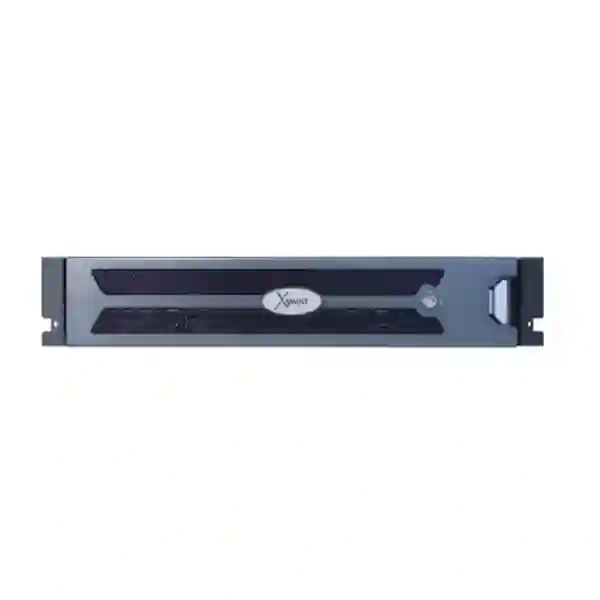
Hanwha SRN-64SEN 64-Channel Video Storage Appliance
Identify, assess or plan the replacement of a 2U rackmount recording server originally supplied in standard 8 TB and 12 TB raw-storage configurations. Know its actual capabilities and limitations before selecting equipment for a security-critical deployment.
Key details at a glance
The standard SRN-64SEN is not the same as related RAID 5 and redundant-power enterprise variants. Verify exact hardware and software before requesting a quote.
Verified historical specification summary
| Product identity | Hanwha Vision SRN-64SEN; historically Samsung Techwin branding |
|---|---|
| Class | 64-channel video storage appliance |
| Form factor | 2U rackmount |
| Processor | Intel Quad-Core Xeon E3-1225V3, 3.2 GHz (historical datasheet) |
| Memory | 4 GB DDR3 (historical standard configuration) |
| Original standard raw storage | 8 TB or 12 TB, depending on variant |
| Data drives | Four hot-swappable 3.5-inch bays |
| System drive | One internal 2.5-inch SSD drive position |
| Network | Two Gigabit Ethernet interfaces |
| Display | DVI, VGA and HDMI hardware outputs |
| Operating system | Windows 7 Professional for Embedded Systems in original specification |
| RAID on standard model | Not listed; do not confuse with enterprise variants |
| Power supply | 510 W rating in historic hardware specification; not measured power draw |
| Environment | 0–35 °C, 5–95% relative humidity, non-condensing |
| Lifecycle | Discontinued according to Hanwha Vision |
Historical specifications describe original configurations and may not match an individual used or modified unit. Verify the full model suffix, drives, software, licensing and installed components.
Understanding the Hanwha SRN-64SEN
The Hanwha SRN-64SEN is a legacy rackmount video storage appliance developed for surveillance installations requiring as many as 64 recording channels in a central equipment room. Its appeal was a server-style architecture rather than a small desktop recorder: a 2U chassis, four hot-swappable data-drive positions, a dedicated operating-system drive and dual Gigabit Ethernet interfaces. It is relevant when an organization needs to identify, maintain or assess an existing Samsung Techwin or Hanwha Vision recording installation.
For buyers in Tanzania, the essential starting point is to confirm the exact model and actual storage configuration rather than order from the family name alone. The SRN-64SEN was supplied in standard 8 TB and 12 TB raw-storage variants. The manufacturer now marks the family discontinued, so this page is designed to support careful specification checks, replacement planning and qualified sourcing discussions; it does not promise current new-unit availability. Ask for an equipment assessment if your project requires a supported new recording platform.
What the 64-channel designation means
The number 64 describes the appliance’s intended channel class, not a guarantee that every possible group of 64 IP cameras will record at any resolution, frame rate and bitrate. A real recording system depends on the camera streams, compression settings, network path, recording software, storage condition and available processing resources. A project using modest historical camera settings is a different workload from one using modern high-resolution streams with detailed analytics or aggressive retention targets.
When planning a deployment, document each camera’s model, codec, resolution, frame rate, target bitrate and whether recording is continuous or triggered. Then calculate the total inbound video load and confirm it against the exact recording application and appliance capability. The original documentation illustrates configurations based on 1.3-megapixel cameras at 15 frames per second. That design reference is a useful historical context, not permission to assume modern 4K capacity or unlimited upgrade headroom. Treat 64 channels as a system-design boundary that still needs engineering validation.
Core hardware and chassis layout
The standard SRN-64SEN is a 2U rackmount appliance built around an Intel Xeon-class processor. The legacy hardware specification identifies an Intel Xeon E3-1225V3 processor at 3.2 GHz, 4 GB DDR3 memory and a GeForce GT730 graphics component. Its internal system-drive position is separate from the four 3.5-inch hot-swappable data-drive bays. This separation can help administrators distinguish operating-system faults from video-storage issues during service work.
The chassis is designed for a suitable equipment rack, with clearance, mounting support and airflow planned around the actual installation. A rackmount form factor does not remove environmental constraints or create additional recording capacity. If assessing a used unit, ask for photographs of the front and rear panels, installed drive trays, rails if required, service history and a boot or hardware-health report. Verify the precise configuration on the label before ordering spares. The standard appliance should not be described as an eight-bay enterprise recorder; different related model suffixes represent different configurations.
Storage configurations: 8 TB and 12 TB
Hanwha lists 8 TB and 12 TB as the standard original configurations for the SRN-64SEN. These figures refer to raw installed capacity in the named configurations, not a guarantee of that much usable footage storage after formatting, reserved space and recording application overhead. A unit offered today might have fewer drives, changed disks, failed storage or a different configuration than its original label suggests. Always obtain a current inventory of installed disks and their health.
Before committing to any retention requirement, ask the installer to distinguish three numbers: physical raw disk capacity, usable capacity recognized by the recording software and estimated retention under the intended camera workload. These numbers are not interchangeable. If the offer simply states ’12 TB’, request written confirmation of whether that means total raw capacity or expected usable capacity. Do not presume that larger modern hard drives are supported by this historic platform without checking drive compatibility, firmware and actual application behavior on the specific unit.
The difference between raw storage and recording days
Recording duration depends mainly on how much video data arrives and what capacity is actually usable. A useful estimation workflow starts with the bitrate of every camera, adds the bitrates together, converts that total into data per day and divides available recording storage by the resulting daily consumption. Allow a margin for metadata, variable bitrate peaks, operational overhead and storage that should not be filled completely. Results are estimates until validated on a live system.
Two sites with the same 64 cameras may have drastically different retention. One might record at a restrained frame rate only when activity occurs; another might retain continuous higher-bitrate streams day and night. Motion recording can save space, but savings depend on actual scene activity and the recording rules. In a crowded warehouse entrance, for example, motion-based footage can resemble continuous recording. For a commercial quotation, state the camera assumptions and the retention objective in days. Do not advertise a fixed number of recording days for the SRN-64SEN without a workload-specific calculation.
Recording quality and camera profile planning
When evaluating this platform, capture a sample of video under the lighting and movement conditions that matter for evidence. Image quality is shaped by the camera, lens, exposure, compression, network delivery and stored-stream settings. Increasing the camera resolution does not automatically produce useful identification footage if the lens, angle or lighting is unsuitable. Increasing frame rate or bitrate may improve certain recordings while consuming storage and network capacity faster.
A practical design sheet should record the required evidence objective for each camera: broad scene awareness, vehicle observation, doorway identification, cash-desk monitoring or another defined task. Match the chosen stream to that task, and avoid setting every channel identically merely for convenience. This historical recorder should be assessed against the planned workload and the software platform that receives the streams. Seek explicit compatibility confirmation for newer codecs and cameras. Features available in modern camera datasheets must not be mistaken for features supplied by the SRN-64SEN appliance.
Processor, memory and operating-system considerations
The original standard SRN-64SEN documentation describes an Intel Xeon E3-1225V3 platform, 4 GB DDR3 memory and Microsoft Windows 7 Professional for Embedded Systems. Those details matter when judging software support, spare parts, cybersecurity and recovery planning. They also underline why a discontinued appliance may be a poor choice for a new long-life surveillance rollout. A processor name alone cannot establish the recording throughput of an installed system.
For maintenance work, record the current operating-system build, application version, drivers, storage configuration and approved vendor support status before changing anything. Do not assume that a contemporary Windows release can simply be installed, or that a newer client application will remain compatible. Preserve authorized installation media and recovery information where legally and technically appropriate. Where critical security recording is involved, a supported replacement with current security maintenance may be more prudent than extending a legacy server. Ask for a migration plan before changing a working system.
Hot-swappable drives do not equal RAID protection
The appliance has four hot-swappable 3.5-inch data-drive positions, but the base SRN-64SEN specification does not identify RAID support. Hot-swappable describes drive-access hardware; it does not guarantee the recording application can survive a disk failure or continue writing without interruption. Staff should never remove a live disk casually on the assumption that another disk contains a complete duplicate of its contents.
Some related enterprise models with suffixes such as RS were designed with RAID 5 and redundant power arrangements. Those features must not be imported into the standard SRN-64SEN product description. When reviewing a purchase offer, request the full model suffix and verify disk layout, controller type and recovery procedure. For an operational system, maintain documented evidence-export processes and separate backups where the security policy requires them. RAID itself is not a complete backup strategy, and a hot-swappable tray is not proof of resilience. The distinction is especially important for sites where missing footage has financial or safety consequences.
Network interfaces and site topology
Two Gigabit Ethernet interfaces are identified in the historical standard hardware specification. These ports allow the system integrator to plan connectivity, but they should not be described as an automatic two-gigabit aggregate pipe or as built-in fault tolerance. Link aggregation, separation of camera traffic and management traffic, routing and network failover all depend on the operating system, drivers, switch configuration and recording software.
For a Tanzanian site, begin by mapping camera switches, uplinks, the recording appliance, workstations and any remote access path. Check the total incoming camera bitrate under realistic peak conditions. Review switch port utilization, cable condition, addressing and segmentation. Keep camera traffic from needlessly competing with general office applications where practicable. A network diagram with labeled ports and IP ranges is much more valuable for maintenance than an undocumented set of switch connections. Record any firewall rules and do not expose legacy services directly to the public internet simply to make remote viewing convenient.
Video outputs and local administration
The SRN-64SEN hardware specification lists DVI, VGA and HDMI video outputs. These are physical display connections for the server environment; they should not be interpreted as a promise about the number of simultaneous surveillance tiles, maximum decode resolution or functions of a particular viewing application. Actual monitoring capabilities depend on the installed software, graphics configuration and client workstation.
During commissioning or maintenance, determine whether users will operate directly at the rack, from a control-room computer or through a managed remote desktop process. Each arrangement has different security and operational implications. A local console should be restricted to approved staff and connected to a suitable display when needed for diagnostics. If the equipment is installed in a locked rack or a remote communications room, plan a secure support method before trouble occurs. Document credentials in an approved password manager rather than leaving passwords on a note attached to the recorder.
Software licensing and application compatibility
The SRN-64SEN is an appliance and should not be treated as proof that all desired video management software, camera licenses or client rights are included in a second-hand offer. Legacy installations can depend on particular versions of Samsung Security Manager or other software supplied under an integrator’s project. Entitlement, upgrade eligibility and license-transfer terms must be verified for the exact deployment before a procurement decision.
Ask the seller or system owner to identify the installed recording application, version, number of licensed channels, ownership records and supported camera integrations. Test live viewing, recording, search, playback and evidence export with representative cameras. Confirm whether camera additions require further entitlements and whether the original vendor can still provide legitimate activation or recovery assistance. Avoid describing the server as universally ONVIF-compatible or supporting every Hanwha camera merely because of the shared brand. Compatibility is a specific combination of camera, firmware, VMS version, protocol and feature set.
Power design and UPS planning
The historical standard specification identifies a 510-watt power supply, which is a component rating and must not be advertised as constant electricity consumption. Actual power draw depends on hardware configuration and load. A site power plan should use measured consumption or trustworthy equipment documentation rather than treating the power-supply nameplate as a daily energy estimate. Check that rack power distribution, sockets, grounding and protection match the installed equipment.
For offices, stores, factories and other facilities that experience power interruptions, consider a correctly sized uninterruptible power supply and a controlled shutdown policy. Confirm the battery autonomy required to retain recording during short outages, and identify how the server will restart after power returns. A UPS cannot compensate for a deteriorated hard disk or unsupported operating system, but it can reduce avoidable interruption and abrupt-shutdown risk. Verify electrical design with the local qualified installer; do not imply that a particular UPS model or service is supplied with this legacy appliance.
Temperature, humidity and rack ventilation
The historical specification lists an operating temperature range of 0 to 35 degrees Celsius and relative humidity of 5 to 95 percent, non-condensing. These limits require attention in equipment rooms exposed to heat, dust, humidity or poor ventilation. A rack can become substantially warmer than the surrounding room when multiple switches, UPS units and storage devices are operating together. Check intake and exhaust pathways, adjacent equipment heat output and room cooling.
In Tanzania, project teams may need to assess ambient conditions carefully before choosing a rack location; conditions differ by building, season and equipment-room design. Avoid placing the recorder where condensation, water leakage or direct sun could affect it. Use monitoring and maintenance practices suited to the site rather than assuming a 24-hour recording duty removes the need for environmental control. If the installed temperature consistently exceeds the appliance limit, solve the environmental problem or select more suitable supported equipment rather than treating thermal shutdowns as routine behavior.
Security and cybersecurity of a discontinued platform
Hanwha now marks the SRN-64SEN discontinued, and the historically specified embedded Windows 7 environment raises support and security questions that modern buyers should examine. Discontinued does not automatically mean a particular unit is defective, but it does mean lifecycle diligence should come before any new mission-critical deployment. Confirm the exact operating system, application support, network services, user accounts, patch state and recovery options.
A sensible legacy security posture uses least-privilege accounts, controlled physical access, network segmentation, restricted outbound communication and managed remote-support procedures. Avoid exposing old management interfaces directly to the internet. A virtual private network or other approved controlled-access mechanism may be preferable where remote access is necessary, subject to the organization’s security policy. Remove unused accounts, review logs and test incident-recovery steps. Where security updates or support cannot be established, document the residual risk and evaluate migration to a currently supported recorder or VMS server. Do not promise that legacy software can be made fully secure through configuration alone.
Where the appliance may still fit
The SRN-64SEN can still be relevant to an organization documenting an existing surveillance installation, sourcing a like-for-like component for a controlled maintenance project, or collecting configuration information before a planned migration. It may also be useful for a non-critical legacy lab where compatibility with historic software matters more than obtaining the newest features. Every such use should remain subject to equipment condition, entitlement and security review.
For a fresh commercial installation, the discontinued product status, historic operating system and limited original storage configurations are substantial decision factors. Today’s buyer may require larger retention, higher camera resolutions, improved security maintenance and centralized management across many premises. Those requirements call for a current platform comparison rather than automatically returning to the older SRN-64SEN. This is not a statement that a specific new model is a drop-in replacement. Migration paths depend on camera compatibility, software, licenses, retention policies and the customer’s infrastructure.
Retail and commercial premises scenario
In a retail environment, recording priorities often differ between the entrance, checkout, sales floor, loading area and staff-only access points. A site may be particularly concerned with clear playback of short incidents, reliable time stamps and authorized evidence export. The SRN-64SEN channel class suggests a historically centralized approach, but a buyer should verify whether the actual installed streams and software meet those tasks today.
A useful review begins with the incident questions the business needs footage to answer. Can staff find the relevant clip quickly? Is the time synchronized? Does export retain adequate quality and associated metadata? Can a failed disk be detected before extensive recordings disappear? Are account privileges separated? These questions reveal operating gaps that a simple hardware-channel count cannot capture. For a new store or expansion, do not select an obsolete recorder merely because the count of cameras is less than 64. Evaluate lifecycle support, evidence workflow and the right storage capacity first.
Warehouses, factories and logistics scenario
Warehouses and industrial locations may need recordings from yard gates, receiving bays, loading lines, equipment corridors and restricted areas. Operational conditions can complicate the system: long cable routes, mixed lighting, dust, temperature variation, frequent movement and cameras distributed across multiple switches. The recording server is only one part of this environment. It cannot correct an out-of-focus camera, saturated network link or unstable power supply upstream.
For a legacy SRN-64SEN installation, document the camera groups, camera-to-switch relationships and critical evidence priorities. Review whether the streams arriving at the recorder are consistent at peak activity, and monitor dropped frames or recording gaps if the application exposes such information. If replacement is considered, allow for future cameras, new compression formats and realistic growth in retention requirements. Design the migration around minimizing footage interruption and preserving necessary historical records. Do not assume that existing drive trays, licenses or archives can be transplanted into a new platform.
Offices, institutions and multi-building sites
Office complexes, institutions and multi-building campuses often rely on a central control point and a mixture of camera generations. The most important questions are not simply how many cameras connect, but who is permitted to view them, whether network links can carry the streams, how footage is retained and how operations continue when equipment needs service. A 64-channel server may once have been a practical fit for a centralized project, yet the original architecture may not align with current governance and support needs.
Review access permissions by role, such as operator, security supervisor, system administrator and incident reviewer. Provide controlled access to footage rather than sharing a single administrator account. Document retention and deletion practices under the organization’s applicable policies. For multiple buildings, identify network single points of failure, onsite power dependencies and the procedure when a building uplink is lost. The Hanwha SRN-64SEN should be evaluated as part of the complete security system, not as a standalone answer to campus surveillance.
How to inspect an existing SRN-64SEN
Start with the exact chassis label and any model suffix, then compare it with the installed operating system and software inventory. Capture the unit’s serial number privately for support identification, but do not include it in public product copy. Record disk count, disk capacity, disk-health information, memory, network interface status and a basic hardware diagnostic. If drives have been replaced over the years, confirm their type and behavior rather than assuming they match original specifications.
Next, test typical user workflows: live viewing, searching for footage from a specified time, playing it back and exporting a clip that another authorized workstation can read. Check clock synchronization, user-account permissions and audit capabilities offered by the installed software. Finally, review the rack environment, UPS, logs, backup arrangements and available recovery material. A unit that powers on is not necessarily an effective recording system. Record deficiencies and their business impact before deciding to repair, replace or continue operating it.
Before buying a used or refurbished unit
For a discontinued model, a used-unit quotation should state the complete model, configuration, condition, included components and what tests were actually performed. Ask whether installed drives are part of the sale, whether any media has been securely wiped, whether operating-system recovery is possible and whether required software activation can legally be supplied. Clarify the presence of rails, power cables, drive caddies and any accessories specifically required by the installation.
Request written evidence of drive health, boot completion, video recording and playback where feasible. Confirm the seller’s stated returns or service terms instead of assuming original manufacturer warranty protection still applies. Do not treat a low purchase price as an overall cost comparison; commissioning, storage replacement, downtime, security risk and support limitations can outweigh hardware savings. For mission-critical security footage, the procurement team should explicitly sign off on the use of legacy equipment or move to a supported modern alternative.
Installation and commissioning checklist
A deliberate commissioning sequence reduces avoidable failures. Confirm rack fit and airflow, stable electrical supply, UPS coordination and approved network connections before introducing production camera streams. Record the exact application and camera firmware versions, and verify licensing and user-access requirements. Establish secure administrative credentials, time synchronization, logging and any permitted remote-support process. Create a baseline configuration backup only using supported software procedures.
After connecting cameras, observe recording behavior under real working conditions. Verify that expected channels record at the intended quality and schedule. Check the oldest footage accessible after the system has run long enough to build a realistic retention history. Export representative evidence and confirm integrity and playback. Test alert escalation and power recovery to the extent safe for site operations. Finally, provide a handover pack: network diagram, configuration summary, authorized contact details, account ownership, incident export procedure and a maintenance schedule. A signed functional test is more useful than a checklist that merely says ’64 channels supported’.
Migrating from the SRN-64SEN to a current recorder
Migration should start with an inventory, not with the removal of the old rack unit. Identify every camera and its firmware, the current recording application, licensing position, camera credentials, stream settings, retention policy and network dependencies. Confirm which cameras can be retained on the proposed new platform and which may need replacement. Document the evidence that must remain accessible from the historical system after switchover.
Plan a controlled transition with a clear window for testing and a rollback decision if essential recording fails. For critical sites, consider overlapping recording where technically and contractually possible so that the move does not create an unexpected evidence gap. Establish how authorized staff will retrieve archived footage once the older unit is retired. Drives from the SRN-64SEN should not be assumed readable in a replacement unit. After validation, sanitize retired storage according to the organization’s data-handling policy and document disposal or reuse. A planned migration protects operations better than an emergency replacement after a disk or operating-system failure.
Maintenance and operational checks
Legacy surveillance systems benefit from short, repeatable checks that establish whether the system is still performing its job. Daily or shift-based review may include critical camera visibility, active recording status and recent alarm indications. Periodic technical review should check drive errors, available capacity, retention depth, system clock, network interfaces, fan behavior, environmental readings and any supported application logs. The schedule should reflect the site’s risk and resources.
An operator should know whom to contact when a camera stops recording or the retention window becomes unexpectedly short. Define escalation levels and keep a fault log with date, symptoms, investigation and resolution. Check that spare parts and recovery media actually exist before they are urgently required. Never perform uncontrolled software updates or disk swaps on a security server that contains irreplaceable records. For an unsupported platform, document what can and cannot be maintained reliably and revisit the replacement decision at regular intervals.
Data retention, access and incident handling
A recording appliance supports a broader evidence and privacy process; it does not define that process by itself. The organization should set who may view footage, what events justify export, how long data should normally be retained and how access is logged. Retention requirements may differ by operating environment, contract and applicable law, so do not apply a generic number of days to every Tanzanian organization without legal and operational review.
Incident handling should preserve the original record where possible, record the time and channel of extraction, control copies and restrict distribution to authorized recipients. Synchronize clocks so exported footage can be interpreted accurately against other business records. Check whether the existing application can provide the required export format and audit information. When a legacy system cannot meet the organization’s evidence or access-control requirements, that may be as important a replacement reason as limited storage or an unsupported operating system. Treat deleted, overwritten or corrupted footage as a significant operational risk, not merely an IT inconvenience.
Comparing the standard and enterprise variants
Product-family naming can create confusion. The standard SRN-64SEN has a 2U chassis, four hot-swappable data-drive bays and original 8 TB or 12 TB raw configurations. Related enterprise 64/72-channel SRN-SEN-RS versions are listed separately by Hanwha and have features such as RAID 5 and redundant power supplies. Larger capacities and eight-bay layouts shown for specific enterprise variants should never be assigned to the base model by implication.
When an advertisement says only ‘SRN-64’, ask for the entire suffix, storage designation and label image. Different generations and variants can have different operating-system environments and maintenance requirements. A quote should identify the configuration being offered, what has been tested and which functions are actually enabled. If RAID protection or redundant power is mandatory, do not mark the standard SRN-64SEN as compliant without independent confirmation of an exact appropriate alternative. Even an enterprise model requires verified licensing, support status and an evidence-based capacity design.
Total cost and procurement decisions
A responsible purchasing comparison looks beyond the initial hardware price. Include the available lifespan, replacement disks, qualified labor, software entitlements, safe remote access, UPS capacity, rack space, cooling, maintenance effort and cost of losing recorded evidence. A discontinued server can create higher uncertainty around recovery components and software support. These factors may make a current supported system preferable even when legacy hardware appears inexpensive.
FourTeck Tanzania product content does not state an unverified price, current stock status, delivery date, installation coverage or warranty for this unit. Ask for a configuration-specific quotation and a written explanation of what is included. The offer should identify whether it is a used, refurbished, remaining-stock or modern replacement proposal, if such an option is actually available. For larger deployments, request separate figures for hardware, software, storage, implementation and ongoing maintenance so that alternatives can be assessed fairly. Never infer today’s Tanzanian shilling price from a historical overseas listing.
Questions to send with a quotation request
A useful request names the complete model and states whether the purpose is repair, spare sourcing, configuration advice or migration. Include the number of existing and planned cameras, camera models, stream settings, intended recording schedule, retention target and approximate site network topology. Note the current application and license position, and whether any drives or accessories must be retained or replaced. If asking about a used unit, request condition and test evidence.
Explain any operational requirements, such as essential camera groups, allowed downtime, authorized remote viewing, evidence export, alert handling and UPS backup. For a new project, state your willingness to consider a currently supported replacement instead of an exact legacy unit. Supply contact details only through the site’s normal private inquiry process. This information helps an adviser avoid proposing a server that fits the channel count but fails the practical recording and maintenance requirements. No quotation should be interpreted as confirmed stock or a vendor authorization until explicitly verified.
What FourTeck Tanzania can help you evaluate
This product information is intended to make discussions about the Hanwha SRN-64SEN more precise. Buyers can use it to prepare a model-identification request, document the conditions of an installed system or describe requirements for an alternative recording solution. The most valuable outcome is a clear technical brief that distinguishes the customer’s desired number of channels from the full demands of storage, compatibility, resilience and support.
Before making a purchasing decision, request verification of the precise hardware configuration, software rights and lifecycle suitability. If you are maintaining an existing system, explain its current symptoms and evidence-retention requirements. If your organization is expanding surveillance, outline your planned camera workload and ask about supported modern options. This page does not assert that FourTeck Tanzania holds this discontinued product in stock or provides installation at any particular location. Use the normal FourTeck inquiry process to discuss an assessment or configuration-specific quotation.
Choosing a supported replacement instead
A replacement evaluation should start with the outcomes the customer wants rather than assuming the legacy chassis must be duplicated. Specify the number and type of cameras, acceptable recording quality, retention target, evidence workflow, expected growth and the availability of secure vendor maintenance. Consider whether a dedicated NVR, a modern VMS server or a distributed recording design best fits the operational requirements. A system with fewer channels but better support may be more suitable than an older 64-channel appliance.
Ask for documented compatibility, appropriately sized storage and a clear resilience design. Redundancy, if needed, should be engineered deliberately across power, recording and networking; it is not automatically delivered by a familiar model name. The selected system should also have a manageable update path, defined access controls and a credible recovery procedure. Compare total lifecycle costs and migration effort as well as upfront price. The appropriate current model cannot be determined from the SRN-64SEN name alone, so a camera and site inventory remains an essential next step.
Final buyer assessment
The Hanwha SRN-64SEN remains recognizable as a 64-channel, 2U legacy surveillance storage appliance. Its original 8 TB and 12 TB standard configurations, four hot-swappable data bays and dual Gigabit interfaces describe the hardware class but not a complete modern performance or support promise. The manufacturer’s discontinued designation and historical embedded operating system must be evaluated before use in a new security-critical environment.
For an existing installation, focus on proof of recording health, software ownership, retention reality, network stability, evidence export and the availability of a safe recovery path. For a purchase, confirm exact suffix, condition, included components and commercial terms; do not assume base-model RAID or enterprise features. For a new project, prioritize a supportable replacement with documented camera compatibility and appropriately calculated storage. The next action is to request a configuration assessment using your camera list, retention goal and existing hardware details so that a realistic recommendation can be prepared.
Buyer questions and practical answers
Is the Hanwha SRN-64SEN still a current product?
No. Hanwha’s product information marks the SRN-64SEN as discontinued. That does not tell you whether an individual reseller may hold used or remaining inventory, and it does not establish that such inventory is available in Tanzania. Confirm condition, support status and commercial terms for any specific offer before committing. For a new security deployment, compare currently supported recording platforms.
How many cameras can the SRN-64SEN record?
It belongs to the 64-channel appliance class. Real camera performance still depends on the recording software, licensing, resolution, frame rate, compression, total bitrate and storage workload. The original example configuration was based on 1.3-megapixel streams at 15 frames per second, not an unconditional specification for 64 modern high-resolution cameras. Request a workload assessment with your exact camera models.
Does the standard SRN-64SEN include 12 TB of storage?
Not every unit. Original standard configurations were available in 8 TB and 12 TB raw-storage versions. A generic listing without a specific suffix does not establish which capacity is installed now. Check the model label, disk inventory, current health and usable recording capacity. Do not assume that all raw capacity is available for footage retention.
Does it support RAID 5?
RAID 5 should not be claimed for the standard SRN-64SEN. The legacy standard specification lists no RAID support, while certain separately named enterprise versions include RAID 5. The existence of hot-swappable bays does not change that distinction. Check the complete model suffix and actual controller configuration if redundant disk protection is required.
Are the disks hot-swappable?
The standard chassis has four 3.5-inch hot-swappable data-drive bays. However, physical hot-swap support does not guarantee recording continuity or protection against the loss of footage. Follow the actual software and storage service procedure, confirm backups and avoid removing disks during live operation without an approved maintenance plan.
Can the SRN-64SEN record 4K IP cameras?
Do not assume so from the 64-channel designation. Current camera compatibility and recording capability depend on exact stream requirements, application versions, codec support and total system performance. The historic specification used much more modest camera settings. A tested integration or supported compatibility statement is required before promising 4K operation.
What is the maximum recording retention?
There is no single reliable fixed number of days. Retention changes with camera count, bitrate, frame rate, recording schedule, scene activity and usable disk capacity. Provide your required days of footage and camera profiles to calculate a provisional storage plan, then verify the estimate in the actual recording application. Raw terabytes alone are not a retention guarantee.
What operating system does the original model use?
The historical standard configuration lists Microsoft Windows 7 Professional for Embedded Systems. Check the exact installed build on a specific used unit, since ownership and maintenance history may vary. This legacy environment makes cybersecurity and application support particularly important. Do not presume that an unsupported operating-system upgrade can be performed safely.
Does it have two network ports?
The original hardware specification identifies two Gigabit Ethernet interfaces. Those connections can support a designed network topology, but they should not be advertised as automatically providing aggregation or failover. Confirm the configuration of the operating system, switches, addressing and software before relying on either feature.
Does the appliance come with camera or VMS licenses?
The model name alone does not establish license entitlements or the legal transferability of software. Request the installed application’s identity and version, the licensed-channel count and written evidence of entitlements. A hardware-only offer and a complete functioning video management system are not the same thing. Include licensing verification in the quotation.
Can I connect newer Hanwha Vision cameras?
Compatibility must be checked by exact camera model, firmware, protocol and recording software version. The shared Hanwha brand is not proof of support for modern video codecs, analytics or every camera function on a legacy appliance. Ask the installer to test representative cameras and document the features that work before planning a fleetwide connection.
Is it suitable for a new business CCTV system in Tanzania?
It may not be the best first choice because Hanwha marks it discontinued and the original platform uses legacy software technology. A new deployment should be assessed for secure maintenance, available support, recording requirements, storage growth and power conditions. A currently supported NVR or VMS system is usually worth evaluating alongside any legacy proposal.
What should I check before purchasing a used unit?
Verify the full model identifier, condition, disk count and health, power operation, drive trays, rack accessories, installed application, licenses and evidence-export functionality. Ask what tests the seller performed and what commercial protection is offered. Account for data sanitization, support limitations and the cost of bringing a used recorder into reliable operation.
How can I prepare for migration away from the SRN-64SEN?
Create a camera inventory and list software versions, licenses, storage requirements and network dependencies. Confirm how long archived recordings must remain available. Test candidate cameras with the new platform, plan a controlled transition and document evidence retrieval after the old system is retired. Do not presume that archived drives will work directly in a new recorder.
Can FourTeck Tanzania confirm stock and price?
This page does not make a claim about current stock or price. The model is discontinued, and an accurate commercial response requires verification of the exact configuration and condition. Request a configuration-specific quotation or discuss a supported replacement. No delivery time, warranty or local installation commitment is implied by the information on this page.
What information should I include in my enquiry?
Provide the model and full suffix if known, whether you need repair or replacement, the number of cameras, their resolutions and codecs, required recording days, recording schedule, software version and any existing storage or network issues. Describe your site environment and acceptable downtime. These details make it possible to compare a legacy option with a modern system against actual needs.
Request a configuration assessment
Tell FourTeck Tanzania whether you need information about an installed SRN-64SEN, a possible legacy unit or a supported recording-system replacement. Include the full model, camera inventory, intended recording quality, required retention and any known software or hardware issues.
Current availability, pricing, delivery, installation service, warranty and performance are not implied.




Reviews
There are no reviews yet.