
Legacy video management hardware | Tanzania buying guidance
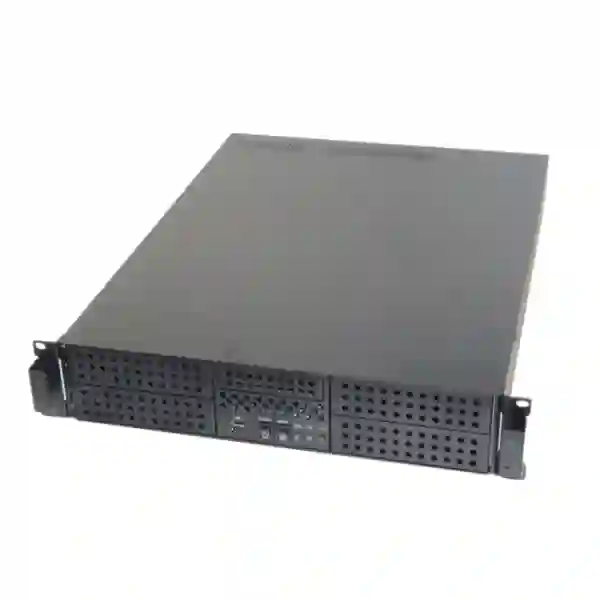
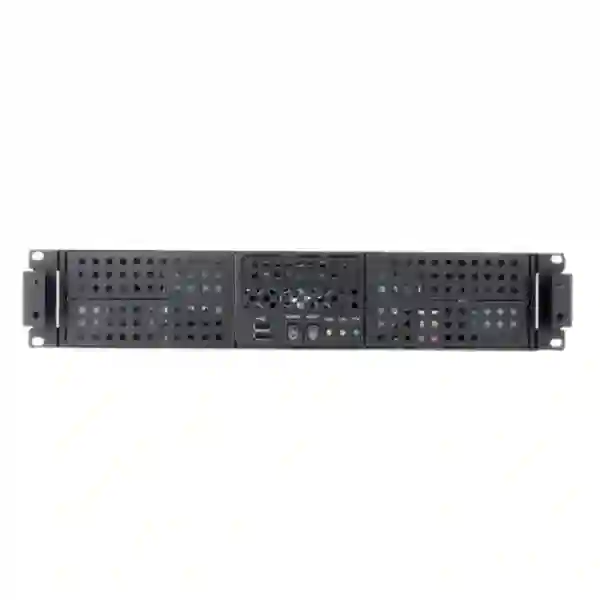
Hanwha SRN-SENCMS-CTLS Central Video Management Server Enterprise
A historical 1U central management appliance for SSM-based surveillance systems. Best evaluated as a legacy maintenance or migration requirement—not a default new-installation choice.
Read this before purchasing or replacing
Hanwha Vision marks this product discontinued. The original Windows Server 2012 platform has passed its security-update lifecycle. Original technical documents describe hardware capabilities, not current stock, warranty, licence entitlement, channel capacity or guaranteed interoperability. For a Tanzanian project, confirm the actual legacy configuration and request an appropriately supported alternative where needed.
Original product specification at a glance
| Attribute | Historical specification / buying note |
|---|---|
| Model | SRN-SENCMS-CTLS |
| Product family | Legacy Samsung Techwin / Hanwha Vision central management |
| Lifecycle | Discontinued — confirm individual availability |
| Historical intended software | SSM System Manager / Media Gateway; licensing separate |
| Processor | Intel Xeon E3-1220 v3, 3.1GHz (original specification) |
| Memory | 8GB DDR3 ECC unbuffered (original specification) |
| Internal storage | 1TB SATA 7200rpm (original standard specification) |
| Drive arrangement | Up to four hot-swap 3.5-inch SAS/SATA drives; verify supplied configuration |
| RAID | RAID 1 option, not assumed standard |
| Network | Dual 1GbE; optional expansion in original documentation |
| Form factor | 1U rackmount; approximately 438 × 44.5 × 554 mm |
| Power | 350W 80 Plus Silver PSU; redundant-power option |
| Original operating system | Windows Server 2012 — no longer receiving security updates |
| Operating environment | 0–35°C; 5–95% RH, non-condensing |
| Software licence | Not included in original hardware offering |
| Tanzania stock and price | Not verified; request individual confirmation |
Specifications describe the historical enterprise model and may not match a modified, refurbished or repaired individual server. The manufacturer-facing product page contains conflicting processor and drive details compared with the original enterprise specification; the original CTLS technical sheet is used here and hardware should be checked before quotation.
Product overview and buying context
The Hanwha SRN-SENCMS-CTLS is a legacy enterprise central video management server associated with Samsung Techwin and Hanwha Vision surveillance environments. It was designed to coordinate multiple recording servers and cameras through central management software, including historical Samsung Security Manager (SSM) roles. This is not an IP camera, an all-in-one recorder with an advertised camera-channel capacity, or a modern cloud subscription. It is a rackmount computer intended to run suitable management functions within a broader surveillance architecture.
For buyers in Tanzania, the first decision is whether the requirement is to maintain a known legacy installation or to design a new security system. Hanwha Vision identifies the model as discontinued. A new deployment should not be planned around assumptions of current software support, future operating-system security patches, or local stock. Ask for an assessment of the actual installed system, the required management functions, and any available replacement architecture before committing to procurement.
What central video management means
In a distributed CCTV design, cameras generate video, recording appliances retain footage, and operators use client interfaces to view or investigate events. A central management server can coordinate selected management functions across those components. Its purpose is organisational: maintain a management layer for approved software, services, and connected systems rather than independently create a recorded-video archive simply because a hard drive is fitted.
The original SRN-SENCMS-CTLS documentation positions this appliance for SSM System Manager and Media Gateway duties and related central management applications. The precise function available on any installed unit depends on its licensed software, supported release, installed services, and configuration. Describing it as a central server does not establish that every network recorder, every IP camera brand, or every current Hanwha application is compatible. A system diagram and software inventory are therefore more valuable than a generic promise that one server will connect everything.
Why the enterprise version matters
The CTLS variant was documented as the enterprise configuration in the historical product family, distinct from the separately named SRN-SENCMS-CTL control server. The older enterprise specification describes a Xeon-class processor, 1TB disk, 1U rack format and hot-swap drive arrangements, whereas references to the non-S model describe different hardware. The added letter in the model code is material: a quotation or parts request should preserve the exact SRN-SENCMS-CTLS identifier.
This distinction becomes important when replacing a failed chassis, matching disk carriers, reviewing operating-system images or deciding whether a software installation can be restored. A visually similar server or an adjacent model does not automatically qualify as a drop-in replacement. Check the actual hardware identification, service tags, installed storage configuration and deployed SSM modules. Historical marketing specifications are a starting point; they cannot substitute for inspection of the device that is currently operating.
Processor and memory specifications
The original SRN-SENCMS-CTLS technical sheet lists an Intel Xeon E3-1220 v3 processor at 3.1GHz in an S1150 platform, alongside 8GB DDR3 1333MHz ECC unbuffered memory. These specifications describe the original historical configuration, not a guarantee that an individual refurbished or modified unit has every listed component. Repairs and upgrades may have changed its memory or storage over time.
For an evaluation, review the actual CPU, installed RAM, firmware revision and system health instead of sizing a deployment from model identity alone. Server management loads depend on the applications and services in use, the number of connected recording systems, event volume and the way operator workflows are distributed. No reliable maximum camera count, concurrent user count or guaranteed throughput should be inferred from processor speed or RAM. Application-specific sizing must be established using supported documentation for the exact software release.
Local disks and their proper role
The historic configuration specifies a 1TB SATA 6G 7200rpm 3.5-inch hard disk, and the technical sheet describes support for up to four hot-swap 3.5-inch SAS/SATA drives. Those bay arrangements do not mean that four recording-grade disks were installed as standard. They also do not establish video retention capacity, camera count, or recording days, because this unit was intended primarily for central management functions.
A storage review should distinguish the operating-system volume, application data, logs, configuration backups and any other data the installed software actually writes. Before reusing old disks, inspect drive health and data-recovery requirements. Failed or aging spinning disks can create outages even if the surveillance cameras and NVRs continue operating. The safest procurement question is not only how much storage exists, but what each volume does and whether its data can be backed up and recovered appropriately.
Optional RAID and recovery expectations
The manufacturer-era specification describes optional RAID 1 requiring an additional matching hard drive. Optional means the redundancy was not necessarily supplied or configured in every appliance. Do not advertise mirrored storage as standard without checking the physical disks, controller and present RAID state. A refurbished appliance could contain one disk, two differently sized disks, or a software configuration unlike the original quote.
RAID 1, when properly configured, is not a substitute for backups. It may reduce interruption after a single drive failure, but it cannot reverse mistaken configuration changes, ransomware, database corruption or the loss of the whole chassis. Before maintenance, identify boot volumes, preserve application installers and licences, and confirm how settings and secrets are restored. For a legacy system, a verified backup and an achievable recovery procedure can matter more than a nominal redundancy feature listed in an old datasheet.
Network interfaces and topology
The original specification lists dual Gigabit Ethernet connections, with optional PCIe network expansion possibilities. Dual network ports can help designers separate duties or connect to an approved architecture, but they do not establish automatic failover, bonding or segmented security. Those behaviours depend on the operating system, interface configuration, network switches and application design.
Assess where cameras, NVRs, management servers and viewing clients actually exchange traffic. Record switch locations, VLANs, IP address assignments, DNS dependencies and routing rules. Estimate traffic from documented software functions rather than assuming that a management appliance forwards every camera stream. If management and live viewing cross remote links, the resilience and capacity of those links should be reviewed separately. Two physical ports alone cannot compensate for a missing WAN connection, unsupported software or poor network design.
Rack space, physical access and power
The SRN-SENCMS-CTLS was specified as a 1U rackmount appliance, approximately 438 × 44.5 × 554 mm in width, height and depth. The historical sheet identifies a 350W 80 Plus Silver power supply and mentions redundant power as an option. The wattage identifies a power-supply rating, not a verified continuous electricity draw. A buyer should confirm chassis depth, rails, electrical connectors and the exact power-supply configuration before reserving cabinet space.
Plan for ventilation at both ends of the rack, safe cable access and maintenance access to the drive carriers. A 1U server is not necessarily suitable for every shallow wall-mounted networking cabinet. Check installation clearances and the current condition of its cooling fans. A UPS and well-managed shutdown procedure may help protect the installation during power interruptions, but backup duration must be calculated from measured system loads, not from the power-supply label.
Operating environment and thermal checks
The historic datasheet gives an ambient operating-temperature range of 0°C to 35°C and relative humidity of 5% to 95% non-condensing. These are equipment limits, not a claim that the unit is weatherproof or intended for an unventilated enclosure. A server cabinet in a hot plant room may exceed the acceptable inlet temperature even when the air temperature outside the cabinet seems moderate.
In Tanzania, evaluate the actual installation room, heat-producing neighbouring equipment, dust exposure and continuity of cooling. Verify that air pathways are unobstructed and inspect fans, filters where fitted, and thermal alarms. Server health checks should include observed temperatures during normal site operation, not only a quick inspection when the room is cool. A legacy hardware investment is particularly vulnerable when environmental stress combines with aging disks and fans.
Video management software is separate
The SRN-SENCMS-CTLS hardware did not include a video management software licence according to the original product material. Its suitability therefore depends on separately held rights to the correct SSM or other supported management software, including any modules and licences required for the intended functions. Do not treat the server model number, a Windows user count or an existing disk image as proof of licence entitlement.
Before requesting a quote, identify the installed application, its exact release number, licence information available to the lawful system owner, relevant installation media and the systems it manages. Determine whether the software vendor still permits installation, transfer, recovery or activation in the proposed scenario. License agreements can differ by product and era. A hardware-only replacement is of limited value if the required software cannot be lawfully installed or supported on the replacement hardware.
Windows Server 2012 lifecycle warning
The original server design used Windows Server 2012. Microsoft’s ordinary extended support ended in October 2023, and the final year of Windows Server 2012 Extended Security Updates ended in October 2026. As of November 2026, the original operating system must be treated as an unsupported security baseline. Continuing to operate an unpatched legacy server introduces risks that should be explicitly accepted and mitigated by the organisation responsible for the system.
An operating-system upgrade is not a simple checkbox. The old server firmware, drivers, application build, dependencies and licence mechanisms may not support a newer Windows Server edition. Never promise that Windows Server 2025, a new hypervisor, or an in-place upgrade will run the original SSM stack. Where ongoing operation is unavoidable, minimise exposure, restrict administrative access, monitor activity and prioritise an approved migration plan. Such controls reduce some risk but do not restore vendor support.
Discontinued status and product availability
Hanwha Vision currently marks this exact model discontinued. Discontinued is a lifecycle classification, not a real-time inventory statement and not proof that every installed unit has failed. A company may still own a functioning appliance, or third parties may advertise historical inventory. However, manufacturer discontinuation materially changes procurement risk, spare-part planning, software compatibility decisions and expectations for long-term support.
The listing should never imply that FourTeck Tanzania has stock, authorised replacement parts, new manufacturer warranty or a guaranteed delivery time without separate commercial verification. If a buyer is maintaining an existing installation, confirm serial and hardware condition, intended use and available support options before making any purchase decision. If a new design is being specified, ask for a currently supported video management platform and documented migration route rather than assuming the legacy model remains a normal enterprise procurement choice.
SSM System Manager and Media Gateway duties
The original documentation explicitly associates the server with SSM System Manager and Media Gateway applications. In a legacy Samsung Techwin surveillance environment, this can make the appliance relevant to investigation of an existing central-management deployment. The terminology describes intended duties, not universal feature entitlements or permanent support for every subsequent software revision.
When troubleshooting, identify which services actually run on the appliance. An installation may use only some available applications, with other roles assigned to recording servers or operator workstations. Document service names, accounts, dependencies, databases, inter-server communications and application logs before rebuilding the operating system. An old control server should not be repurposed by guessing which service packages are necessary. Restore procedures need to come from authorised documentation matching the installed version and the organisation’s valid software rights.
Do not confuse management with recording capacity
Some customers search for a central CCTV server expecting a single device to replace a set of recorders. This model should not be represented that way. Its original function was management of recording systems and cameras within a larger environment. The presence of a 1TB internal disk does not prove a dedicated video archive, multichannel recording licences or a published retention period.
If the real requirement is to store footage, begin with the recording architecture: supported cameras, stream profiles, resolution, frame rate, recording schedule, motion policies, retention requirement and resilience. Then determine whether a current NVR or recording server is needed. If the requirement is central control of multiple systems, examine software modules, site links and workstation needs separately. Separating these roles early prevents buying an obsolete management appliance for a job it was not specified to fulfil.
Compatibility assessment before procurement
A compatible system is more than a collection of products carrying the Hanwha name. The relevant questions concern exact firmware versions, camera and recorder generations, application build, network protocols, supported operating system and licence entitlements. A current Hanwha video platform should not be assumed compatible with legacy SSM configurations simply because both originate from the same manufacturer.
Compile a version matrix from the installed environment. Record model and firmware for connected NVRs and cameras, the operating-system version on each server, operator-client software and any integration gateways. Then ask the responsible vendor or qualified integrator to verify supported combinations. Where support records are missing, a controlled lab test with backups may be safer than an on-site change. No cross-version guarantee or specific channel limit is provided for this legacy appliance on this page.
Planning capacity and avoiding false camera limits
Server sizing must consider real functions. Management database activity, alarms, authentication, configuration updates, event correlation, remote viewing and media gateways may impose very different loads. Some traffic is processed by NVRs, while other traffic may reach viewing workstations or central services. The model’s 8GB RAM and dual Gigabit ports do not justify publishing a fixed supported camera count.
For a sizing review, document the number of sites, recorders and cameras; expected simultaneous operators; event rates; desired video workflows; and network-link constraints. Confirm whether management operations are local to each site or dependent on central infrastructure. Use the precise software version’s sizing documentation where available. If that information cannot be confirmed, flag the capacity as unverified rather than inferring support from a generic CPU benchmark or a different server model.
Multi-site businesses and head-office visibility
A multi-site organisation may want an operations team to see events from several buildings or business locations. The historical role of this central-management server explains why a legacy system designer might have installed it in such an environment. It could have been part of the coordination layer while the individual sites performed their own recording.
A modern review should map every site link, local NVR, operator location and failover expectation before assessing the central server. Can each site keep recording if the central management service becomes unavailable? Which functions depend on a working wide-area link? Who authorises remote viewing, and where are user accounts administered? These questions determine the right future design. Do not infer that the discontinued CTLS offers a specific multi-site scale, cloud connection or guaranteed continuity without the installed software and documented architecture.
Campus and multi-building installations
Campuses can present a mixture of long cable runs, separate security desks and a central control room. The legacy SRN-SENCMS-CTLS may be encountered where several recording units were coordinated as a larger system. In that context, maintenance planning should distinguish recording reliability inside each building from central event visibility across the campus.
Review the fibre and Ethernet backbone, switch resilience, operator permissions, time synchronisation and server-room availability. If one building loses connectivity, determine which local recording and alarm processes continue. Consider the consequences of losing the central server during a security incident. A replacement design may separate management, storage and operator access in ways the older installation did not. The right answer depends on measured needs and supported product capabilities, not on retaining an identical hardware topology purely for familiarity.
Warehouses, logistics and industrial facilities
Security operations in a warehouse or industrial facility often depend on dependable event history, protected access to footage and clear response procedures. A legacy central-management server may still sit in the infrastructure even though the cameras and recorders have changed. Before replacing components, identify whether the central service is used for monitoring, alarm workflows, administration or other tasks critical to an incident response.
Special attention belongs to physical conditions, network segmentation and maintenance windows. Industrial environments may expose a server room to dust, heat, electrical disturbance or restricted after-hours access. Those conditions can create operational failures that look like application problems. Confirm server health and backup status before changing software. Do not assume the device is intrinsically industrial-rated; its documented operating limits still apply. For expansion projects, establish a supported platform for the required new integrations.
Hotels, retail groups and office portfolios
Hotels, retail operators and organisations with several offices can have similar management problems even when their camera counts differ. They need to know who can view which locations, whether recorded evidence remains available, and what happens when one site is disconnected. A central server can be part of an architecture serving those needs, but the appliance itself does not prove a complete solution.
If a legacy SRN-SENCMS-CTLS is already present, inventory the connected recorders, approved users, scheduled tasks and escalation rules. Review staff changes and access rights as part of lifecycle assessment. If the project is new, focus on security outcomes and a supportable software environment rather than on sourcing a discontinued server. No claim is made here that the old product includes hotel-management, point-of-sale, access-control or cloud integrations; each such capability would require separate verified software and compatibility evidence.
Tanzania deployment considerations
For a Tanzanian installation, the practical questions are physical conditions, internet and private-network reliability, power continuity, local service arrangements and the organisation’s own security policies. The correct design may operate largely over an internal network, or it may rely on links between geographically separated facilities. These are project-specific matters and cannot be confirmed from a model datasheet.
Before committing to any legacy hardware, verify the electrical environment and UPS design, connectivity between sites, cabinet cooling and access to technical documentation. Confirm who is responsible for backups, incident response and replacement planning. Do not assume a particular city has guaranteed coverage, that a specific telecommunications provider supports the configuration, or that spare parts and software licences are readily available locally. Commercial availability and service scope should be confirmed directly for the individual project.
Security isolation for unsupported infrastructure
A device running an operating system outside its security-update lifecycle deserves stronger network controls than a currently supported server. Reduce unnecessary inbound connectivity, block direct internet exposure where it is not needed, restrict administrative interfaces and isolate management traffic to approved networks. Ensure the design does not leave old services accessible to guest, public or unrelated business networks.
These controls are risk mitigations rather than evidence that the system is secure. Review account privileges, password and credential handling, remote support access, antivirus or endpoint tooling compatibility and logs. If the original platform cannot meet organisational security requirements, a documented retirement or migration may be preferable. Conduct changes carefully: aggressive vulnerability scanning, untested firewall rules or forced updates can disrupt old surveillance applications. The right strategy is a staged change plan with a recoverable backup and clearly assigned responsibility.
Health monitoring and maintenance
Legacy appliances can fail gradually through fan wear, hard-disk errors, degraded power supplies and ageing components. An inspection should combine physical checks with logs, hardware diagnostics, disk health indicators and observation under representative workloads. Record the current configuration before swapping drives or applying firmware changes. On an old server, apparently routine maintenance can reveal unavailable drivers or specialised application dependencies.
Develop a fault-response worksheet covering storage failure, network-port failure, database errors, unavailable management services and loss of remote connectivity. Identify the location of a tested backup, the process for contacting a qualified specialist and the decision point for retiring the unit rather than attempting another repair. Maintenance guidance should distinguish actions that site IT staff can safely perform from work requiring surveillance software expertise. Never replace a system disk before preserving recoverable configuration and licence information.
Questions to ask before buying a used unit
If someone offers a previously deployed SRN-SENCMS-CTLS, ask for photographs of its actual labels and condition, proof of lawful ownership, an accurate component inventory and a clear description of what is included. Request evidence that it boots, that storage is healthy and that the network interfaces and power supply operate. Determine whether the disks contain data that must be securely erased by their lawful owner.
Ask separately about operating-system installation media, licences, application installers, documentation, rails and any optional hardware. A working second-hand chassis does not guarantee that proprietary software can be reactivated or that original support rights can be transferred. Verify suitability for the existing environment before considering price. Do not assume that an advertisement describing the model as new, refurbished or in stock proves availability for the Tanzanian market.
Restoring an existing installation
A recovery project should start with evidence. Confirm which services failed, which recorders and cameras remain operational, whether recent backups exist and whether operators can still retrieve necessary footage through alternative approved paths. Preserve logs and configuration files before making changes. A failed central management server does not automatically mean that all recorded video has been lost, but this must be checked against the actual architecture.
Rebuild only against a documented and authorised software baseline. Record network settings, service accounts, certificates, application versions, database connection information and licence entitlements, handling secrets securely. Test one management function at a time before returning the system to production. If critical installation media or supported licensing is unavailable, avoid promising full recovery. A decision to replace the central role with a supported platform may be safer than repeatedly rebuilding an unsupported operating system.
Migration planning for a supported future
A sensible migration begins with a current-state diagram and a clear list of functions the business still needs. Separate essential recording and evidence retrieval from optional convenience features. Identify the cameras and recorders that can remain, which integrations must change and where software or firmware compatibility prevents a simple transition. Budget time for end-user training and acceptance testing.
Plan a controlled cutover that preserves required records, permissions and operational procedures. Test new services on approved hardware before disconnecting the existing management unit. Define rollback requirements and an owner for each migration step. A newer video management system may offer a more maintainable platform, but feature parity, old-device compatibility and transfer of historical data must be verified. The discontinued CTLS should be treated as a legacy dependency to understand, not a default foundation for the next phase of investment.
Evaluating replacement choices
Replacing a central management role is not necessarily a one-for-one hardware purchase. Depending on the current surveillance environment, options can include a supported on-premises management server, a vendor-approved recorder and management combination, or another architecture selected after system design. Each option has different implications for networking, storage, access controls and ongoing software obligations.
Build a comparison around outcomes: supported operating system, documented camera and recorder compatibility, required licences, operator workflows, cybersecurity support, backup and restore processes, hardware resilience and total lifecycle cost. Ask for written evidence for requirements that matter. A device with a newer processor is not automatically a valid replacement for an old SSM role. Nor should a current product’s marketing claims be applied retroactively to the SRN-SENCMS-CTLS. The best alternative is the one documented to support the actual environment.
Optional features versus included components
The older technical documentation lists a hot-swap drive arrangement, possible additional network interfaces, optional RAID 1 and optional redundant power. The word optional is significant. An individual appliance may have been supplied without those additions, and changes made during its operating life could further alter its current configuration. Sales copy should not convert optional features into universal specifications.
A configuration audit should record power-supply count and status, fitted disk quantity, RAID state, expansion cards, installed memory and mechanical accessories. If a quote refers to a specific option, confirm its exact part and suitability for this server revision. A server advertised with multiple bays is not evidence that additional enterprise disks are included. Likewise, two Ethernet ports do not prove high availability, and a redundant PSU option does not prove dual input feeds. Procurement decisions should reflect the actual unit, not a best-case accessory list.
Software access, administrators and user counts
Historical material refers to Windows Server 2012 with five users. That wording should not be interpreted as proof of five concurrent video operators, five camera licences or a present-day Microsoft licensing entitlement. Operating-system access rights and video management user licensing are different matters, and the exact terms must be checked against the original agreements and deployed software versions.
For a support review, create an inventory of authorised users, account owners, privileged roles and inactive accounts. Confirm whether operator clients authenticate against local accounts, a directory or an application-specific user database. Preserve only the information required for lawful recovery, and protect personal and security-sensitive data. When replacing the environment, design a clear identity-management process that can be maintained by the customer’s current IT team. No particular single-sign-on or directory integration is promised for this legacy model.
Network outage and continuity planning
Central management availability and local recording availability are related but not identical. Depending on the architecture, individual NVRs may continue recording during a management-server outage, while central monitoring or administrative functions are affected. This must be tested or verified from the installed product documentation before it is included in a resilience claim.
For multi-building or multi-site environments, document what happens when the main server, a core switch, an internet connection or a single remote link fails. Identify the local operator process for each situation and the conditions required to restore normal operation. Review time synchronisation, event handling and reconnection behaviour. A continuity plan should avoid relying on undocumented failover features. In a legacy system, an observed and rehearsed incident procedure may be more reliable than assumptions made from a hardware brochure.
Backups, retention and evidence integrity
Surveillance environments contain both application configuration and recorded evidence, and the two may live on different devices. The SRN-SENCMS-CTLS model name does not establish video retention duration or evidence-storage capacity. Start by identifying where video actually resides, who may export it, and how access to the exported material is logged and controlled.
Back up management configuration and databases according to verified application guidance, then test recovery in a controlled environment. Consider encryption, offline or otherwise isolated backup copies and clear retention responsibilities in line with the organisation’s policies and applicable requirements. Do not assume that mirroring a server disk is the same as an application-consistent backup. If an operating-system or database upgrade is planned, preserve the ability to recover the pre-change state. Accurate records and clear handling procedures are essential during both security incidents and hardware failures.
Physical installation and commissioning checklist
Before commissioning, check that the rack supports the chassis depth and weight, that suitable mounting hardware is available, and that cooling and cable access are adequate. Verify the intended electrical feed, UPS capacity and protection arrangement. Match each Ethernet port to its documented switch connection; label cables and record addressing before introducing the server to production networks.
During commissioning, confirm the installed firmware and operating-system versions, storage health, clock settings and the availability of tested backups. Install only software and licences authorised for the environment. Check that application services start correctly and that operators can perform the exact required workflows. Test recovery from a controlled service restart and validate monitoring alerts. These checks are a planning guide, not a substitute for installation instructions from the software vendor or a qualified integrator familiar with the deployed legacy system.
Assessing technical support and service scope
The historical datasheet contains legacy warranty wording, but that does not establish a new warranty or any current local service entitlement. Manufacturer support policies, replacement-part availability and legal remedies can change, especially after discontinuation. A buyer should request written confirmation of the exact unit’s condition, commercial terms and available technical assistance rather than relying on the age-old product specification.
For Tanzania projects, ask who will maintain the server, how faults will be triaged and whether critical spare parts or verified replacement architectures are obtainable. Consider recovery time, backup responsibilities and the accessibility of qualified administrators. If the central management function is essential to security operations, unsupported infrastructure may create more lifecycle risk than its initial purchase cost suggests. The decision should account for operational consequences over several years, not simply the price of a used chassis.
Selecting the right path for your organisation
There are two very different buying cases. The first is continuity: the organisation already owns a surveillance environment that relies on a legacy central management role, and it needs to assess, recover or replace a known component. In that case, exact model identification, installed software, licences and data recovery are decisive. The second is expansion or new construction, where a supported video management design is typically the more responsible starting point.
Neither case should assume the discontinued server is immediately available in Tanzania. The practical next step is to share the existing system diagram, recorder models, management software version, operating requirements and any urgent fault symptoms through an approved quotation or support channel. An informed review can then determine whether the SRN-SENCMS-CTLS remains relevant to a limited legacy repair or whether a supported modern alternative should be specified.
A structured quote and technical assessment
A useful enquiry contains the model number SRN-SENCMS-CTLS, whether the requirement is repair or replacement, how many sites and recording systems are involved, and what the operators need to accomplish. Include existing software versions and the results of any recent diagnostics if they can be shared securely. Clearly separate must-have requirements from functions that could change in a migration.
Do not include passwords, live security-system credentials or private keys in ordinary email or public web comments. Request a secure method for sharing sensitive configuration information if needed. Ask for confirmation of commercial availability, scope of supply, licensing assumptions, supported interoperability and warranty or service terms before committing. A credible solution should make unknowns visible. The aim is to protect existing surveillance operations while avoiding unsupported claims about a discontinued platform.
Frequently asked questions
Is the Hanwha SRN-SENCMS-CTLS still a current product?
No. Hanwha Vision identifies the exact model as discontinued. This does not indicate real-time local inventory, and it does not confirm whether a particular used unit is serviceable. For new installations, evaluate a currently supported management platform after checking compatibility with existing cameras and recorders. For repairs, verify the installed software, licence rights and hardware condition before sourcing legacy components.
What is the SRN-SENCMS-CTLS designed to do?
It was designed as an enterprise central video management server for managing multiple recording servers and cameras through appropriate management software. Original documentation names SSM System Manager and Media Gateway roles. It is not automatically a complete recording solution. Actual functions depend on the installed application, its configuration, the licensed modules and the connected equipment.
Does the server include a video management licence?
No video management software licence was included with the original hardware, according to the manufacturer-era documentation. A valid software entitlement, compatible application version and any required modules must be verified separately. An installed copy of software or an old system disk is not evidence that a licence can be transferred or reactivated for a different owner.
What CPU and RAM were originally specified?
The original enterprise technical sheet specifies an Intel Xeon E3-1220 v3 at 3.1GHz and 8GB DDR3 ECC memory. Some online listings confuse this enterprise CTLS model with the non-enterprise CTL version, which has different specifications. Inspect the actual machine and confirm its hardware rather than relying on a generic reseller page or a similar-looking model code.
How much storage does the server have?
The historical standard configuration describes a 1TB SATA hard drive, with an enclosure supporting up to four hot-swap 3.5-inch drives. This is not a published surveillance retention capacity. Optional RAID 1 was described in the original specification but must be verified on the individual appliance. Storage included with any proposed supply requires separate written confirmation.
How many cameras can SRN-SENCMS-CTLS support?
A reliable maximum camera count cannot be established from the chassis specification alone. Capacity depends on the specific management application version, licensing, recorder design, event volume, operator workload and network layout. Request application-specific compatibility and sizing evidence. Do not assume the number of cameras is determined by the size of the internal hard drive or processor alone.
Can I install a newer version of Windows Server?
An upgrade should not be assumed possible or supported. The original appliance used Windows Server 2012, whose security-update lifecycle has ended. A newer operating system could require different drivers, application versions and licences, and the historic surveillance software may be incompatible. Assess the replacement architecture and take recoverable backups before any change.
Is SRN-SENCMS-CTLS the same as SRN-SENCMS-CTL?
No. The model numbers identify different historical configurations. The CTLS enterprise datasheet specifies a Xeon processor, 1TB drive and 1U chassis. Information about the CTL model should not be substituted for CTLS specifications. Preserve the full model identifier when requesting parts, reviewing photographs or preparing a quotation.
Does it have redundant power and RAID?
The original technical documentation lists redundant power and RAID 1 as optional configurations, not guaranteed standard equipment. Verify the actual power-supply modules, disks and RAID controller settings on the individual appliance. Neither an optional component listed in a brochure nor a pair of physical network ports proves that a complete high-availability system has been installed.
Can it work with current Hanwha cameras or software?
Compatibility must be confirmed for the specific software and firmware versions involved. An old Samsung Techwin or SSM server is not automatically supported by current Hanwha Vision cameras, recorders or modern video management software. Prepare a product-and-version inventory, then request verified support or test a proposed transition under controlled conditions.
Can the server be used for a new project in Tanzania?
Because the exact model is discontinued and the original operating system is unsupported, it should not be the default foundation for a new deployment. Assess current surveillance management products against the actual site requirements, supported device list and lifecycle expectations. No Tanzania-specific stock, price, delivery commitment or installation coverage is asserted by this listing.
What should an organisation do if its existing unit fails?
First determine whether the underlying NVRs still record and whether needed evidence remains retrievable. Preserve logs, configuration and backups before replacing disks or reinstalling software. Identify the installed management application, licences and recovery method. A controlled restoration or a migration to a supported system may be appropriate depending on the environment and available software rights.
Can it be deployed without an internet connection?
The appliance’s original description concerns management within a surveillance network, but the connectivity required by any particular software build, licensing process or remote viewing workflow has to be verified. Do not presume that all functions work offline or that cloud connectivity is included. Design the site network around the actual application and operational requirements.
Does a legacy warranty statement mean new units are covered?
No. An old datasheet’s warranty line describes a historical offering and does not prove that any current seller, refurbished machine or Tanzanian transaction has an active manufacturer warranty. Ask for explicit commercial terms for the exact hardware being offered. Avoid comparing an old warranty period with current support entitlements unless independently confirmed.
What details are useful for a technical quotation?
Provide the full model number, whether the project is repair or replacement, current management software and recorder versions, number of sites, expected operator workflows and any reported faults. Request separate confirmation of hardware condition, licence requirements, compatibility, support and delivery. Share passwords, licence keys and private network details only through a verified secure process.
Request a legacy-system assessment or replacement quote
Tell FourTeck Tanzania which recording systems, cameras and management software are in use, and whether your aim is recovery, replacement or expansion. Ask for confirmation of availability, compatible licensing and an appropriate supported migration option. Do not share system passwords or private keys through an unsecured enquiry.
Enquire about Hanwha SRN-SENCMS-CTLS assessment and supported alternatives.




Reviews
There are no reviews yet.