
Hanwha WRT-5301 Dual-Purpose Wisenet WAVE Network Video Recorder
Build a properly sized IP-camera recording system with a compact server and local viewing client. The WRT-5301 combines Wisenet WAVE software, four manufacturer-specified Professional licences, up to 470 Mbps recording throughput and a maximum of 32 TB raw data storage.
Ask for the installed disk configuration, licence verification and supported software status before purchase.
The buying answer in brief
The Hanwha WRT-5301 is worth evaluating when a Wisenet WAVE installation needs a compact recording server that also supports local viewing. Its manufacturer-stated recording rate, raw storage ceiling and four included Professional licences offer a clear starting point, but actual camera count, retention and suitability must be engineered for the site. Crucially, RAID support is not identified for this model, and its original Windows 10 IoT platform requires a current software-support check.
For a Tanzania installation, the most helpful next step is a written requirement and a quote that confirms the exact drive population, recording entitlements, operating-system and WAVE version, compatible cameras, power protection and handover plan. The sections below explain each major decision so buyers can compare a proposed unit with alternative surveillance architectures.
A recorder and viewing workstation in one
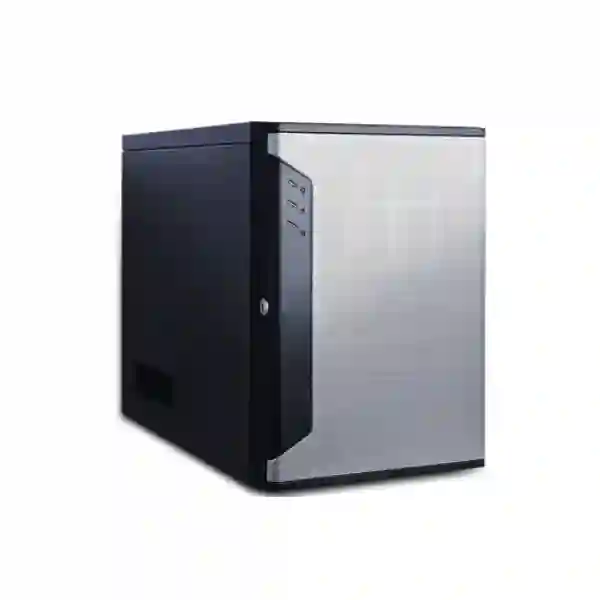
The Hanwha WRT-5301 is a dual-purpose Wisenet WAVE Network Video Recorder intended to host recording services and provide a local desktop client for surveillance operators. Its mini-tower design makes it relevant where a dedicated recording computer is preferred but a full rack installation is not the starting point. It can form the core of a single-site system or contribute to a larger Wisenet WAVE environment. The practical buying decision is whether this particular hardware generation, storage configuration and licensing arrangement satisfy the cameras, retention period and support expectations of the proposed installation.
The manufacturer specifies Wisenet WAVE preconfigured on the platform, four included Professional recording licences, up to 470 Mbps recording throughput and capacity for up to 32 TB of raw data storage. Those are different measures: bandwidth describes incoming recording traffic, raw capacity describes potential drive space, and licences determine how many recorded camera streams are authorised. None of them alone establishes a guaranteed camera count or recording duration. A project should evaluate all three together before a purchase is made.
Who should consider this model?
The WRT-5301 may suit organisations that already use Wisenet WAVE and want a matching mini-tower recorder, buyers planning a modest IP-camera system with local viewing, or teams evaluating a replacement for a comparable installed appliance. The format can be convenient for a reception security room, building operations desk or small dedicated equipment area. It is also worth examining when an organisation needs a clearly defined recording host rather than relying on an ordinary employee computer for continuous video capture.
It is not automatically the right answer for every new surveillance project. The original Windows 10 IoT Enterprise platform and older processor generation warrant a current software and security review. The manufacturer does not specify RAID support on this model, so an application demanding resilient local storage may need a different architecture. A buyer seeking redundant power supplies, rack mounting as a standard requirement, a very large archive or a modern lifecycle commitment should compare current alternatives rather than assuming that the WRT-5301 meets those requirements.
Start with the surveillance outcome, not a headline number
Before selecting any recorder, define the evidence the system must produce. A site entrance might need recognisable faces and vehicle movements; a stock area may require a longer archive; a monitoring desk may need several live views at once. These goals translate into camera placement, image resolution, frame rate, recording schedule, compression, retention and access permissions. They should be documented independently of the recorder specification so that the selected hardware is measured against an actual operational need.
A practical scope records how many cameras are already installed, how many will be added, whether every camera records continuously, how long footage must remain searchable, and how quickly an authorised operator needs to retrieve it. Also decide which views will be watched locally, which staff members can export evidence and whether loss of a recording drive would be acceptable. These questions expose limits early and prevent a purchase based on capacity figures that may not represent the finished system.
Understanding the four included Professional licences
Hanwha’s specification lists four Wisenet WAVE Professional licences preloaded with the WRT-5301. In the WAVE licensing model, recording an individual IP-camera stream generally requires a recording licence. Four included licences therefore provide an initial recording entitlement for four standard camera streams, subject to the precise software version and licence state. They do not mean that the hardware can never work with a larger licensed system, nor do they convert the server into a recorder with a universally fixed four-camera maximum.
An installation with additional recorded cameras must account for the corresponding additional licences and their compatibility with the deployed WAVE version. During procurement, request confirmation that the four manufacturer-specified licences are present, valid and transferable or activatable as required for the actual unit. This matters particularly for older, refurbished or previously installed hardware. Do not assume that software appearing on the machine proves that all advertised recording entitlements are available to the new owner.
What 470 Mbps recording throughput actually means
The advertised recording throughput is up to 470 megabits per second, based on manufacturer testing of this appliance running Wisenet WAVE. It is an upper recording-bandwidth specification, not a promise that every camera configuration will perform identically. Real deployments are influenced by incoming streams, disk behaviour, network overhead, concurrent playback, video export and other workloads. The safe design approach is to calculate the expected combined bitrate and leave sensible headroom rather than choosing a camera quantity by dividing 470 by a single optimistic bitrate.
For example, a high-resolution stream recording busy outdoor scenes may consume more data than a lower-resolution indoor stream, even when both use the same video compression family. Variable bitrate also changes as scene complexity changes. Request measured or estimated bitrates for the actual cameras, with allowances for peaks and future expansion. The recorder’s network ports and storage subsystem must handle the traffic consistently; a fast headline rate cannot compensate for inadequate disks, poor switching or an overcrowded shared network.
Four drive bays and up to 32 TB raw capacity
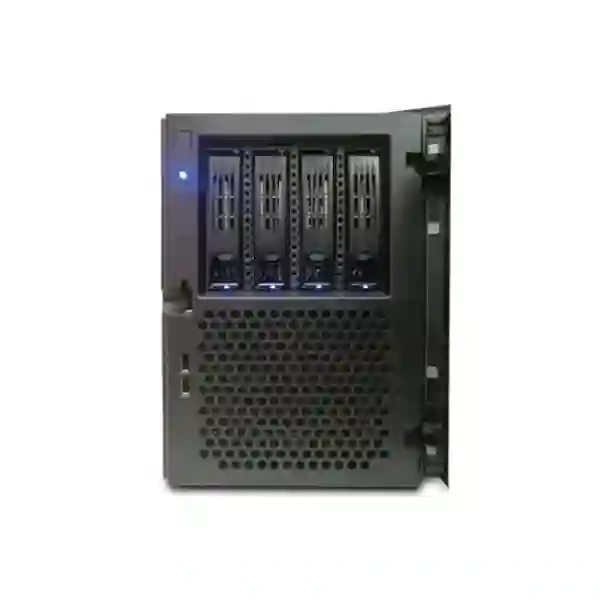
The chassis has four front-accessible 3.5-inch data-drive bays, with the manufacturer’s stated raw-storage ceiling of 32 TB. The operating system is specified on a separate internally mounted 256 GB solid-state drive. Separating operating-system storage from recording data is useful because it gives the surveillance archive dedicated disk locations. However, the phrase ‘up to 32 TB’ does not identify which hard drives are installed in any particular item offered for sale.
Confirm the exact number, size, condition and manufacturer support of supplied drives before interpreting the capacity. A bare chassis, a partial set of drives and a fully populated 32 TB variant are materially different purchases. Raw capacity is also not the same as a guaranteed usable recording archive: file-system formatting, software allocation, reserved space and operating practices can reduce the amount available for video. Request a written storage breakdown showing installed raw space, estimated usable space and the assumptions behind retention estimates.
Calculate retention using the actual camera workload
Recording duration depends on total bitrate and the usable archive size. As a planning illustration, one continuous 4 Mbps camera stream creates roughly 43 GB of data in a day before allowance for overhead and unit differences. Ten such streams would therefore consume roughly 430 GB each day, and a thirty-day archive would require about 13 TB before margin. This example is mathematics, not a performance guarantee or a statement that this recorder includes the licensing or installed storage for ten cameras.
For the real installation, build a spreadsheet with each camera’s expected average bitrate, planned operating hours, retention target and recording mode. Use measured values where possible, not just the maximum resolution printed on a camera box. Include a buffer for motion-heavy scenes, future cameras and investigations that may temporarily retain exported clips elsewhere. If evidence must survive a drive failure, introduce an appropriate resilient or external archive design separately; simply increasing the raw capacity number does not resolve continuity risk.
No RAID support: an important architecture decision
The manufacturer datasheet lists RAID support as not applicable for the WRT-5301. That makes this a critical question for sites where a storage drive failure could lead to lost recordings or an interruption in evidence collection. Multiple physical bays are not, by themselves, a RAID array, and four installed drives should never be described as redundant unless a separately validated storage architecture provides that property.
Organisations with demanding continuity requirements can assess backup, replication, central archival policies or an alternative recorder with documented supported redundancy. The correct approach depends on the retention policy, acceptable recovery time, budget and sensitivity of the footage. A separate copy of footage may provide a different kind of protection than live disk redundancy, so discuss both needs explicitly. If uninterrupted recording is a contractual or safety requirement, obtain an engineered solution and tested recovery procedure rather than relying on assumptions about this mini-tower.
Wisenet WAVE software and deployment fit
Wisenet WAVE is the video management system associated with this recorder. It brings camera organisation, live viewing and archive access into a software-managed environment, subject to the installed edition and version. A WAVE-based approach can be attractive where operators need to work with multiple camera views or where a site plans to join an existing WAVE deployment. The software layer also means that system planning must include licences, supported versions and administrative credentials, rather than treating the appliance like a simple plug-in storage box.
The product documentation describes Wisenet and ONVIF-conformant IP camera support. That is a strong starting point for mixed-camera evaluation, but it should not be read as a guarantee for every model, firmware revision or advanced event feature. Validate exact cameras, stream settings, audio requirements, motion analytics and recording profiles before deployment. In an established WAVE environment, also check server-version compatibility and the consequences of attaching an older recorder to a newer shared system.
Operating system and long-term support checks
The original WRT-5301 datasheet specifies Windows 10 IoT Enterprise, while the similarly named WRT-5301L identifies a Linux Ubuntu variant. Do not confuse the two when ordering hardware or reviewing technical requirements. The Windows model’s exact build, licensing state, patch availability and manufacturer-supported upgrade path should be confirmed for the actual unit. An operating system name on an old datasheet is a historical product specification; it is not a statement that every currently shipped configuration receives ongoing security updates.
Hanwha’s current WAVE support guidance also distinguishes supported application versions and operating systems from the legacy software originally shipped with appliances. An equipment review should therefore ask for the existing WAVE version, the supported update pathway and confirmation that this processor, memory and graphics configuration can run the intended release. Where a procurement policy requires a supported operating system for a defined number of years, obtain that commitment before purchase. Do not treat a fresh software installation as a substitute for proven hardware compatibility.
Security, accounts and network exposure
A recorder stores potentially sensitive footage and should be configured as an infrastructure asset, not a casual office computer. Plan strong unique administrator credentials, individual operator accounts, permissions based on job responsibilities and controlled physical access. Review whether the proposed remote-viewing method actually requires exposing any recorder services to the public internet. A managed firewall, network segmentation and a carefully documented access path can reduce unnecessary exposure, but configuration should follow the verified capabilities of the selected WAVE release.
Security maintenance is a continuing process. Keep a record of software versions, operating-system patch status, administrator changes and relevant incident procedures. Disable unused functions where supported, protect exported evidence and review access rights when employees change roles. Remote access must be tested against the site’s internet link and authentication requirements. Because this hardware platform dates from an earlier product generation, lifecycle and patch verification deserve special attention before it is placed on a production network.
Dual Gigabit Ethernet and practical networking
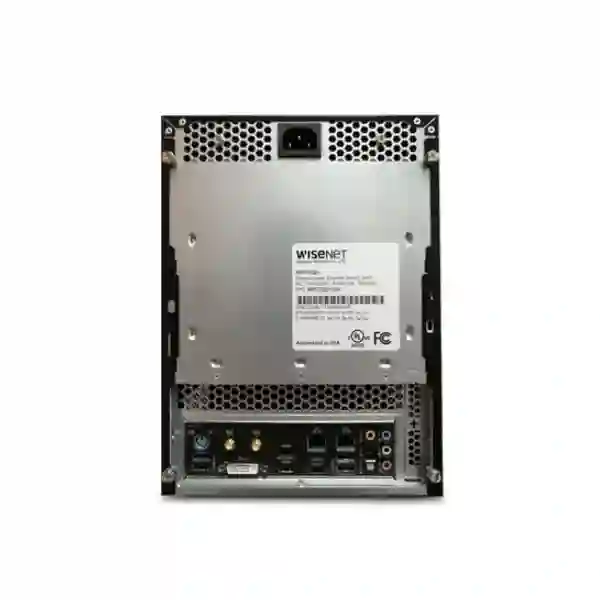
The WRT-5301 includes two RJ-45 Gigabit Ethernet interfaces. Those ports give the installer options when integrating the appliance into an IP-camera network and a viewing or management environment. Their presence does not automatically mean that ports are bonded, that one provides guaranteed failover, or that the recorder supplies power to connected cameras. A proposed topology must identify the switches, VLANs, IP addressing and network roles explicitly.
Check the uplink capacity of camera switches, the sum of incoming camera streams, concurrent client traffic and the path used for video exports. Avoid assumptions that wireless connectivity can replace a properly designed wired path for sustained recording. The product also specifies IEEE 802.11ac Wi-Fi, but wired Ethernet is usually the clearer starting point for predictable camera traffic. If network separation is desired, verify the intended routing and firewall rules before the recorder is commissioned.
Local viewing, display outputs and operator workflow
The mini-tower can act as a local WAVE client as well as a recording server. Its original specification identifies two HDMI outputs and one DVI output, together with a supplied keyboard and mouse. That makes it possible to plan a local monitoring desk without assuming a separate workstation is always necessary. Nevertheless, available display connectors are not a promise that every combination of screen count, resolution and live camera layout will run at the same frame rate.
Before choosing monitors, describe the operator’s typical work: a few priority cameras, rotating views, occasional archive searches or multiple high-resolution feeds displayed continuously. The application, graphics resources and operating-system settings will affect the usable experience. Test representative layouts, playback and exported clips at the proposed display resolution. If recording performance and local viewing loads compete for resources, consider a separate client workstation or an adjusted viewing design rather than compromising the recording requirement.
Camera interoperability deserves a real test
Hanwha specifies support for Wisenet and ONVIF-conformant IP cameras. ONVIF alignment may help with discovery and basic streaming, yet compatibility can differ across device firmware, supported ONVIF profiles and optional camera functions. For mixed brands, record the exact model number and firmware version of every proposed camera. A test should verify stable live video, recorded playback, time synchronisation and the intended codec or stream profile.
More advanced features need individual confirmation. Audio recording, event-triggered actions, analytics metadata, edge storage interaction and PTZ controls may depend on the camera, software version and integration path. If these functions are central to an investigation or operations workflow, prove them with the intended camera rather than relying on a broad compatibility label. A successful laboratory test using representative equipment can prevent frustrating surprises after the recorder is installed at a working site.
Plan commissioning as a controlled process
A good installation sequence starts with a network plan, electrical checks and an inventory of cameras and disk drives. Confirm the recorder’s physical condition and boot behaviour, inspect storage health, record the original software versions and establish properly controlled administrator access. Configure camera streams and recording schedules to the approved design, and then verify that footage is actually retained and searchable for the intended period. The installer should document every assumption that affects performance.
After initial recording tests, perform a realistic retrieval exercise: select a camera, locate an event by time, play it back, export an authorised copy and check the result on a separate viewing device. Also test recovery after a normal power interruption and document how the system reports storage errors. Handover should include a clear list of licences, configuration backups where applicable, administrator ownership and a maintenance schedule. A live camera picture alone does not prove that the recording system is ready.
Recording policies and evidence handling
The value of surveillance equipment is often judged when an incident has already occurred. Decide beforehand who can search footage, who can export it, how timestamps will be checked and where exported files are stored. Synchronise device time with an approved time source and confirm the correct time zone. A mismatched recorder or camera clock can make otherwise useful evidence difficult to interpret, especially when several viewpoints are combined during an investigation.
Define retention in operational terms rather than saying only that storage is large. For each camera group, state whether recording is continuous or event-based, how long footage must be kept, and what happens when the archive reaches its configured limit. If particular evidence needs a longer preservation period, create a separate procedure for approved exports and access controls. Review legal and organisational obligations independently; no general product specification determines an appropriate retention period for every Tanzanian business.
Power, temperature and physical installation
The original hardware specification gives a 100–240 V AC power input, a 250 W power-supply rating and an operating temperature range of 0°C to 50°C. It lists operating relative humidity from 5% to 85%. The chassis measures approximately 200 × 270 × 310 mm and weighs about 7 kg without hard drives. These figures are helpful for equipment-room planning, but the power-supply rating should not be mistaken for a fixed measured running consumption.
Place the recorder in a secure, ventilated location with adequate clearance for airflow and front-drive access. Consider dust control, room temperature, cable management and protection against accidental disconnection. For installations where electricity interruptions occur, a correctly sized UPS and controlled shutdown procedure deserve consideration; sizing depends on the real load of the recorder, switches and any other connected equipment. Avoid sealed cupboards that trap heat, and do not assume that the published maximum operating temperature eliminates the need for environmental management.
Practical planning for installations in Tanzania
For a Tanzanian office, retail environment, accommodation property or storage facility, the same engineering questions apply: how stable is the local power at the equipment location, how are cameras connected, what happens when the internet fails, and who has responsibility for the recorded evidence? These are deployment considerations, not claims that a particular supplier has stock, engineers or service coverage in any city. The requirement for local viewing and local recording should be identified separately from optional remote monitoring.
If remote access is required, assess the site’s actual uplink performance, permitted access method and cybersecurity policy. External network conditions should not be allowed to undermine local recording without a documented reason. Agree on who maintains the equipment, who authorises future camera additions and how the business will respond to disk or software problems. Request confirmation of current local availability, exact configuration, warranty terms and any applicable delivery arrangement through a verified quotation rather than treating generic product information as a local commercial promise.
Example scenario: a small business with four cameras
Consider a business starting with four IP cameras covering an entrance, reception, sales floor and storage access. The four included WAVE Professional licences are relevant to the initial recording plan, assuming all four entitlements are valid for the chosen software configuration. But the business must still size the disks for its frame rates and retention policy, and confirm that the cameras can be integrated successfully. Even a modest camera count can generate substantial data if streams record continuously at high bitrates.
The most useful proposal would identify exact camera models, expected average bitrate per stream, a calculated archive duration and an access plan for managers. The installer should test retrieval of an event from every camera and provide the buyer with a documented process. If the business intends to add more cameras, the proposal should separately account for further licences, recording capacity and the possibility that a newer recorder may offer a better support horizon.
Example scenario: offices with a dedicated monitoring desk
An office building may have security staff who watch selected entrances and shared areas while the recorder continuously stores video. The dual-purpose design is attractive because it offers a local client and recording server in the same mini-tower. Here, the buyer should focus on whether the planned monitor layout remains usable while several cameras are recording, how staff permissions are structured and how incidents are exported.
A sensible acceptance test includes ordinary day-to-day live viewing, archive searches during active recording and power-recovery checks. The solution must be evaluated against the desired uptime and evidence policy, especially because RAID is not listed for this appliance. Where uninterrupted service or a larger security control room is essential, separate recording and client equipment may be a more appropriate architecture.
Example scenario: warehouses and longer archives
Warehouse surveillance often raises a different question: can footage be preserved long enough to investigate a missing shipment or disputed movement of goods? In that situation, retention can be more important than the number of live monitors. The four-drive layout and up-to-32-TB raw ceiling provide a defined storage framework, but a calculation based on real stream bitrates is necessary before promising any number of days.
Camera placement, lighting and scene complexity affect the information captured and the resulting files. Define the retention policy by area, estimate archive use, and determine how approved incident footage will be preserved outside the normal overwrite cycle. If the required archive cannot fit comfortably within the usable capacity, revise the recording design or compare a higher-capacity solution instead of advertising the raw maximum as a guaranteed retention result.
Example scenario: expansion of an existing WAVE estate
An organisation already running Wisenet WAVE may explore the WRT-5301 as an additional recording host or replacement appliance. The manufacturer describes the product as suitable for a single site or as an addition to an existing WAVE system. That general capability does not establish compatibility with every current server release, licence arrangement or distributed-system design.
The project team should document existing WAVE versions, camera ownership, licence allocation, network topology, archival policy and software migration requirements. Verify how the proposed appliance joins the environment and whether historic licences or server identifiers create constraints. If the planned upgrade requires newer operating systems or features, compare the cost and risk of adapting this older platform against procuring a current supported WAVE appliance.
How this mini-tower differs from a simple camera recorder
A traditional standalone NVR is often bought by channel count and built-in features. The WRT-5301 is better understood as a computer-based Wisenet WAVE recording server with local client capability and separately managed recording entitlements. That makes licence planning, operating-system support and software administration more important. The four included licences are valuable for an initial configuration, but they should not be confused with the performance capacity of the CPU, disks and network interfaces.
The platform may be a good fit when WAVE is already standardised, a mini-tower enclosure is acceptable and the buyer can support a software-managed system. A more contemporary embedded recorder may be simpler where a fixed set of cameras and minimal desktop administration are the priorities. A larger server may be preferable when redundancy, centralised management, greater expansion or extended support expectations dominate. Evaluate the job to be done rather than treating all products labelled NVR as interchangeable.
What to verify about the exact unit offered
Because WRT-5301 describes a model family and sellers may offer different hard-drive configurations, request an exact written bill of materials. It should specify whether hard drives are installed, their total raw capacity, their condition, the operating-system edition and build, the WAVE application version and the included licence evidence. Ask whether the keyboard, mouse, required cabling and any other accessories are part of the specific offer. These details should match the delivered equipment and acceptance checklist.
Also confirm the item’s warranty or support terms for the proposed destination, the manufacturer-recognised software path and the physical condition if it is not new. Do not rely on a supplier photograph as evidence of drive capacity or licence ownership. Clarify the difference between the Windows WRT-5301 and the Linux WRT-5301L, and distinguish the mini-tower WRT naming from similarly numbered rack-server products. The model number, platform and configuration should all appear consistently in a quotation.
Compare the total project cost, not just the appliance
A recorder quotation may omit several important pieces of the project: surveillance-grade data drives, extra WAVE licences, network switches, cameras, a display, a UPS, installation, testing, future software work and procedures for exporting footage. Compare offers against a single written system design so that different configurations are not mistaken for equivalent alternatives. Do not equate a high raw-storage number with the same usable capacity or resilience across products.
The purchase decision should also include future maintenance effort. Older equipment can appear attractive if its current capabilities match a small deployment, but the cost of verifying software compatibility and securing an ageing platform may offset the initial benefit. For a long-term installation, ask vendors to identify an upgrade path and explain what happens when the site adds cameras or its retention requirement changes. Commercial terms, availability and Tanzania-specific pricing must be confirmed separately for the exact offer.
Checklist for a useful quotation request
A meaningful quote begins with the number and model of IP cameras, desired recording resolution and frame rate, continuous or event recording policy, required retention, planned expansion and the preferred viewing arrangement. Include whether the system will connect to an existing WAVE deployment. State any need for remote access, roles for security operators, regular evidence export and alarm integration, without assuming those functions are supported in the desired configuration.
Ask the supplier to confirm the exact WRT-5301 configuration, licensed recording-stream count, installed usable storage estimate, software and operating-system status, network design, power and UPS requirements, warranty terms and testing responsibilities. Request a retention calculation that names its bitrate assumptions and confirms how much spare capacity remains. An answer that addresses these items gives the buyer a defensible technical basis for comparison and reduces the likelihood of unexpected extras after installation.
When to choose a different platform
A different recorder may be better if the project demands documented RAID protection, dual redundant power supplies, a newer supported operating system, substantially larger local archives or a dedicated rack form factor. Those are not minor details that can be inferred from a general NVR description. They may be core requirements for business continuity, a regulated environment or a site with limited maintenance access. The WRT-5301’s original specification should be treated as a defined set of capabilities and limitations.
Similarly, the recorder should not be chosen solely because its rated throughput appears high. A deployment with only a few cameras might still require stronger resilience, while a larger licensed installation may perform acceptably only after detailed testing of disks, CPU and concurrent clients. Match recording performance, support status, storage protection and operational workflow to the site’s risk profile. Request a supported alternative whenever any essential requirement cannot be demonstrated for this model.
A practical handover and maintenance plan
An installation should end with more than a powered-on recorder. The customer needs a documented inventory of the appliance, hard drives, cameras, WAVE licences and monitor connections; a record of software versions; a secure approach to administrator ownership; and a tested procedure for retrieving footage. The service team should explain how disk capacity, recording health and time synchronisation will be checked. Responsibility for responding to failures must be clear.
Schedule periodic reviews of available storage, alerts, user permissions and the continued supportability of the software environment. Test the recovery plan under controlled conditions and keep authorised copies of critical configuration information. If the business changes cameras, shifts retention policy or increases live-view demands, revisit sizing rather than assuming that the original design has unlimited headroom. Good operations help preserve the value of the evidence the system was installed to capture.
Frequently asked questions
Short answers to the practical questions that often determine whether this model is the right fit.
Is the WRT-5301 a recorder or a workstation?
It is described as a dual-purpose Wisenet WAVE network video recorder and local client workstation. The recording service and viewing function can operate within the mini-tower platform, subject to software configuration and available hardware resources. An external client workstation may still be desirable for demanding live-view workloads or operational separation.
Does the WRT-5301 support four cameras only?
No fixed four-camera hardware maximum should be inferred from the licence package. The manufacturer lists four included Professional recording licences. Additional recorded streams ordinarily need additional compatible licences, while actual system size must also be checked against throughput, storage, workload and supported software conditions.
How much storage does the model include?
The manufacturer specifies support for up to 32 TB of raw internal data storage across four front-accessible 3.5-inch bays. That is a maximum specification, not confirmation that an offered unit has 32 TB installed. Ask for the exact populated drive configuration and available usable archive capacity.
Can it keep recordings for 30 days?
Thirty-day retention is possible only if the real amount of usable storage, stream bitrates, schedule and overhead support it. No universal 30-day guarantee follows from the model number. Calculate required capacity for each camera and confirm the result with actual recordings and reasonable operating margin.
Does it provide RAID drive protection?
The manufacturer datasheet lists RAID support as not applicable. If loss of a storage disk must not cause interruption or loss of archive material, request a designed solution with documented resilience or a recorder that explicitly supports the required redundancy and recovery objectives.
Which operating system is associated with the WRT-5301?
The manufacturer’s original specification identifies Windows 10 IoT Enterprise for WRT-5301. The separately named WRT-5301L is associated with Ubuntu Linux. Confirm the exact software build, hardware revision and currently supported upgrade path on the unit being offered instead of assuming all similarly named versions are identical.
Are Hanwha and other ONVIF cameras compatible?
The product documentation states support for Wisenet and ONVIF-conformant IP cameras. Practical interoperability depends on the exact model, firmware, recording profile and feature set. Test essential live, archive, audio, event and PTZ functions with the intended devices before approving the full system.
Can users view cameras from another location?
Wisenet WAVE offers client-based viewing workflows, but a secure remote-access design depends on the installed version, network architecture, internet conditions and organisation policy. Verify supported access methods and authentication settings; do not assume that publishing the recorder directly to the internet is required or advisable.
Does the recorder power PoE cameras directly?
The published WRT-5301 specification identifies dual Gigabit Ethernet interfaces but does not identify integrated PoE camera ports. Plan suitable PoE switches or other approved camera power arrangements, and confirm power budgets for all connected equipment rather than treating an RJ-45 socket as a camera-power output.
What should a Tanzania buyer confirm before ordering?
Confirm the exact supplied configuration, drive capacity, licence status, current operating-system and WAVE compatibility, intended camera list, archive calculation, warranty terms, price, taxes where applicable and delivery arrangements. Request an itemised quote and acceptance test. Availability, local service coverage and pricing are not established by a global datasheet.
Is this the same as the WRR-5301?
No. The WRT-5301 discussed here is a compact mini-tower dual-purpose recorder. The similarly numbered WRR-5301 is a rack-server product with different mechanical and storage characteristics. Verify the full model prefix in every quotation and technical document.
What happens if the system needs to grow?
Recalculate recording-stream licences, aggregate bitrate, usable storage and client workload when adding cameras. Check supported software versions and hardware limits before expanding. If the requirement exceeds what can be reliably demonstrated on the older mini-tower, a newer or higher-capacity recorder may be the more sustainable option.
Request a WRT-5301 configuration and quotation review
For the right equipment decision, share the camera count, models, desired recording retention, site network and whether you already use Wisenet WAVE. Ask for confirmation of installed drives, software support, recording licences and warranty on the exact offered appliance. A configuration-led quotation makes performance, archive capacity and long-term operation easier to evaluate.
No price, stock, delivery, warranty or Tanzania service coverage is assumed in this product overview. Specifications require confirmation for the exact unit offered.




Reviews
There are no reviews yet.