
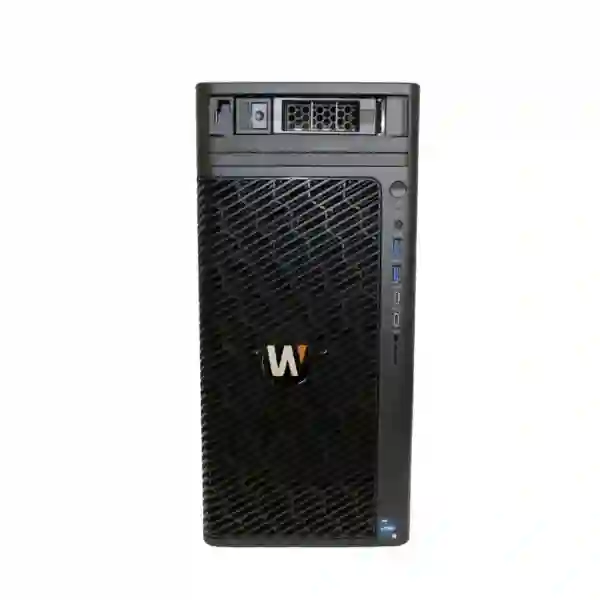
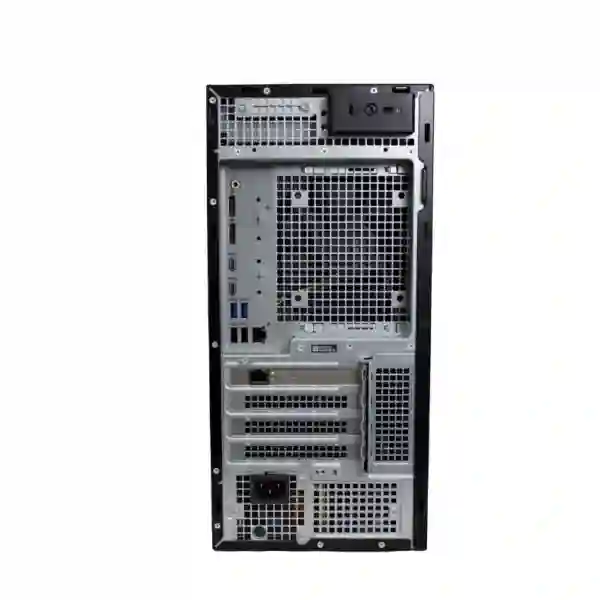
Hanwha WRT-P-3104L Wisenet WAVE Recording Server
For Tanzania-based buyers planning reliable IP-camera recording, the WRT-P-3104L offers a Linux-based WAVE platform with four included Professional licenses. Match the right disk configuration and license schedule to your actual camera workload before ordering.
Start with your surveillance requirements
This product is relevant when a business needs centrally managed IP-camera footage, controlled operator access and room to plan a structured recording deployment. Hanwha WRT-P-3104L is a Wisenet WAVE server, not an all-in-one promise of cameras, cabling, PoE power, unlimited licenses and guaranteed storage days. The recording design should start with the real job: what events must be captured, how quickly operators must retrieve them and how long the footage should remain available.
The family specification gives a clear starting point: four included Professional licenses, up to 170 Mbps recording throughput, an Ubuntu Linux environment and up to 16TB raw storage in capacity-specific configurations. Those attributes are useful only when matched with the project’s camera inventory and retention plan. For an accurate Tanzania quotation, provide the expected video workload and request the exact disk suffix, accessories and commercial scope in writing.
Technical specifications at a glance
| Product family | Hanwha Vision WRT-P-3104L, Wisenet WAVE recording server |
|---|---|
| Operating system | Ubuntu Linux 22.04 LTS |
| Video management software | Wisenet WAVE preconfigured |
| Included software licenses | Four Wisenet WAVE Professional licenses |
| Recording throughput | Up to 170 Mbps |
| Processor | 14th-generation Intel Core i3 |
| System memory | 16GB DDR4 |
| Operating-system drive | 256GB M.2 SSD |
| Video storage | Up to 16TB raw across available configurations; installed capacity must be confirmed |
| Data drive bays | Three 3.5-inch SATA bays on the series datasheet |
| Network interfaces | Two 1GbE RJ45 interfaces |
| Display connections | Two DisplayPort outputs; DisplayPort-to-HDMI adapter listed |
| Form factor | Compact tower / mini-tower |
| Input power | 100–240V AC |
| Operating environment | 10–35°C; 20–85% relative humidity, non-condensing |
| Included peripherals | USB keyboard and mouse |
| Camera interoperability | Wisenet and ONVIF-conformant IP cameras, subject to model-level checks |
These are family-level, manufacturer-documented characteristics rather than a promise about the contents of an unspecified local sales configuration. The suffix identifying installed hard-drive capacity, accessory revision, current software build and final availability must be confirmed in the quotation. Raw disk capacity is not identical to usable recording space.
Who should consider this recorder
The Hanwha WRT-P-3104L is intended for an organization that needs a purpose-built computer-based recording platform rather than a basic consumer surveillance kit. It brings a Wisenet WAVE video management environment and recording hardware into one tower appliance, so a buyer can plan cameras, network connections, storage and viewing stations around a defined platform. The most relevant settings include business premises with multiple IP cameras, a dedicated security desk, facilities with an existing WAVE system, or a location where the security team expects the installation to evolve over time.
It is not sensible to choose a recorder on its model number alone. A good match depends on the number of video streams, expected bitrates, required retention, the way staff will view footage, and the resilience expected when power or connectivity is interrupted. The WRT-P-3104L offers a documented upper recording throughput of 170 Mbps and up to 16TB raw storage, but those ceilings are not a promise that every combination of cameras, frame rates and storage policies will perform equally well. A proper sizing exercise remains essential.
- Best fit: a professionally planned, network-based CCTV project with central recording.
- Check before ordering: exact installed disk capacity, intended channel licensing and recording load.
- Use a current written configuration, not a family datasheet alone, to approve the final order.
What makes a WAVE recording server different from a simple NVR
A conventional plug-and-play recorder is often assessed mainly by its fixed camera ports and a menu of recording settings. The WRT-P-3104L is better understood as a video management server. Wisenet WAVE coordinates connected cameras, recordings, access permissions and operator clients within software. This approach can be useful when a project involves a combination of supported cameras, several viewing devices, defined operator roles or an eventual connection to a larger WAVE installation. The benefit is organizational flexibility, not an automatic guarantee of extra channels or unlimited system size.
The distinction also changes the questions a buyer should ask. In addition to the number of cameras, discuss network topology, the operational ownership of the Linux appliance, license allocation, supported camera features and the available resources for live viewing. A security desk displaying many simultaneous streams can impose different demands from a server simply writing footage to disk. The WRT-P-3104L should be treated as part of a complete surveillance design, with cameras, PoE infrastructure, client workstations and operating procedures selected deliberately rather than assumed to be bundled.
What is included and what still needs confirming
Manufacturer material for the WRT-P-3104L family identifies a preconfigured Wisenet WAVE environment, four WAVE Professional licenses, a dedicated operating-system SSD, two network interfaces and included keyboard and mouse. It also describes a DisplayPort-to-HDMI adapter. These details help an IT team prepare a basic deployment plan, but they do not establish the capacity or accessories of every seller-specific package. The product name supplied here does not include a 4TB, 8TB, 12TB or 16TB suffix, so the installed recording disk cannot be stated as a definite number.
Before purchasing, request a line-by-line bill of materials that identifies the actual storage variant, number and capacity of installed hard drives, WAVE license entitlement, operating-system image and relevant hardware revision. Confirm whether a monitor, video cameras, PoE switch, network cabling, power backup or rack accommodation are required separately. The tower form factor should also be checked against the chosen equipment room or desk. A precise configuration statement reduces the risk of comparing unlike offers or discovering at installation that a necessary accessory or license was not included.
How to interpret the four included WAVE Professional licenses
Four Professional licenses are included with the recorder family. That is a meaningful starting entitlement, but it should not be confused with the recorder’s entire technical capacity or an assertion that the server can only recognize four cameras. In a normal licensed WAVE recording deployment, camera and device license requirements need to be evaluated for each recording source and feature. A project involving more than the included entitlement may need additional licenses even when the server still has enough computing, networking and disk resources.
An accurate license schedule should list each camera, its intended recording function, and any special integration or future expansion requirement. Do not assume that one physical camera always equals one license in every possible arrangement without checking the current licensing rules for the actual WAVE release and camera type. Conversely, purchasing additional licenses does not increase the recorder’s 170 Mbps throughput ceiling or its physical storage limit. Licensing, performance and disk retention are separate planning constraints, and a good quote makes all three visible so that a buyer can compare the real total solution cost.
Understanding the 170 Mbps recording specification
The stated recording throughput of up to 170 Mbps concerns the aggregate video data the server is designed to ingest for recording under the manufacturer’s test conditions. It is not the internet speed requirement for remote users, the maximum throughput of an individual camera, or the maximum display rate of the operator workstation. It also does not remove the effect of other demands such as playback, concurrent client activity or different camera codecs. A designer must translate the actual camera schedule into expected sustained and peak recording traffic before deciding how much headroom remains.
For example, ten cameras each averaging 6 Mbps create approximately 60 Mbps of sustained inbound recording traffic before considering normal variability and overhead. That illustrates the type of calculation required, not a recommended camera count or a certification of performance for this product. Cameras that switch to higher bitrate scenes, raise frame rates or send several streams can change the effective load. Plan with realistic profiles, allow spare capacity, and test worst-case conditions. Check the network uplinks and storage write performance as well as the published recording ceiling.
Storage options and the difference between raw and usable capacity
The WRT-P-3104L family is described with up to 16TB of raw data storage. Manufacturer listings identify storage-specific configurations, while the family datasheet describes three 3.5-inch SATA data-drive bays and a separate M.2 operating-system SSD. The independent SSD is intended for the software environment and should not be counted as a promise of additional video-archive space. Most importantly, the unspecified base model name does not tell us which recording drive has been fitted in the unit being offered.
Raw capacity is an engineering starting point, not the number of gigabytes available for saved footage. Formatting, file systems, reserved space and any configured data-protection approach can alter usable capacity. A buyer should also not assume a particular RAID arrangement or recording redundancy simply because there are multiple drive bays. Ask for an explicit explanation of the installed disks, proposed recording volume, usable capacity and failure-recovery plan. If footage is important evidence, the question is not only how much the recorder holds but how the organization can protect, retrieve and retain the relevant recordings.
Calculate retention before committing to a disk size
Retention planning begins with camera count, average recording bitrate, hours recorded each day and usable disk space. As a rough planning conversion, a stream averaging 1 Mbps continuously for 24 hours creates about 10.8 decimal gigabytes of video per day before storage overhead. A camera averaging 8 Mbps for the whole day would therefore produce around 86.4GB per day under that simplified assumption. Multiply by the number of streams, then compare the estimated daily volume with genuinely usable disk space to establish an approximate retention window.
Real installations are less tidy than a single formula. Variable bitrate, scene movement, night lighting, event-based schedules, codec choices, audio recording, metadata and changing resolution can all affect archive size. Motion-triggered recording may reduce typical use, but the chosen safety or evidence requirements must permit it. Build in an allowance for unexpected busy scenes and test the achieved retention after commissioning. If the organization requires a defined number of days, write that requirement into the design and procurement schedule rather than relying on a round raw-disk figure.
Select camera settings with evidence needs in mind
Camera resolution is only one factor in useful surveillance footage. A higher pixel count can help identify details in a suitable scene, but lens choice, installation height, motion blur, lighting, frame rate and compression can matter just as much. A recorder cannot recover detail that the camera never captured. For a reception desk, customer counter or vehicle access point, discuss the real identification task with the installer before assigning a recording bitrate. The resulting quality target can then be measured against the WRT-P-3104L storage and recording-performance budget.
Different areas may warrant different profiles. A quiet corridor, busy warehouse door and exterior vehicle lane are not necessarily best served by identical settings. Consider whether continuous recording is required, how incidents will be searched, and whether a lower-resolution secondary stream is useful for certain operator views. Preserve a sample of day and night footage during acceptance testing. Do not reduce bitrate only to fit a smaller disk if it compromises the purpose for which the cameras were purchased. Balance retention economics against the quality needed for actual review.
Compatibility with Wisenet and third-party IP cameras
Hanwha documents support for Wisenet and ONVIF-conformant IP cameras in this recorder family. This creates useful options for new builds and mixed estates, but ONVIF conformity by itself does not establish that every device feature will behave exactly as it does in its original camera interface. Recording, audio, event handling, motion metadata, analytics, two-way communication and configuration controls can have different compatibility requirements. A successful connection test is therefore more useful than treating the presence of an ONVIF logo as an all-features guarantee.
Make a compatibility schedule identifying the manufacturer, exact camera model, firmware version, required stream configuration and every event or analytic the security team expects to use. Verify support against current WAVE documentation and test representative cameras when practical. For older cameras, inspect available codecs and security features before promising continued use. For new cameras, confirm not only the video stream but also whether the planned detection, search or export workflow is possible. This avoids discovering after installation that a camera streams correctly but lacks a feature the customer considered essential.
Network design: separate the cameras from general office traffic
The WRT-P-3104L series has two 1GbE RJ45 network interfaces. They offer useful connectivity options, but a pair of Ethernet sockets is not automatically a ready-made secure network topology. The exact role of each port should be defined by the installation design. A typical professional project may place surveillance equipment on a dedicated logical segment and provide carefully controlled routes to authorized client devices, while maintaining appropriate access to system management and updates. The available switches, VLANs, IP addressing and firewall policies determine what can be deployed.
Cameras commonly depend on separately planned power and network infrastructure. Do not assume the server’s network interfaces supply Power over Ethernet to cameras; specify a suitable PoE switch or injectors where cameras require them. Record the total PoE power budget, cable runs, expected link speeds and uplink capacity. Choose fixed, documented device addresses or managed reservations according to site policy, and keep a network diagram with the commissioning record. If surveillance and business traffic share equipment, plan how a link failure or heavy backup operation could affect recording and viewing.
Security of the recorder, users and remote connections
A security recorder stores sensitive operational footage, so protecting it is as important as collecting video. Define named user accounts, role-based access and strong authentication in the WAVE environment. Give live-view-only users different permissions from administrators who can change recording settings or delete material. Keep an accountable process for granting temporary access, exporting footage and disabling departing staff accounts. Check whether the chosen camera firmware and network configuration allow protected communication, and document any exceptions that the organization is knowingly accepting.
Hanwha support material explains that WAVE has secure connectivity options and WAVE Sync for remote connections. These capabilities should be implemented according to the customer’s IT security policy, not treated as permission to expose a recorder directly to the public internet. An IT team should review available update procedures, access logs, firewall rules, device credentials, time synchronization and backup of configuration records. Where remote viewing is planned, verify client versions, user permissions and available bandwidth. A secure implementation is a coordinated process involving software configuration, network controls and people, not just a feature printed on a datasheet.
Viewing, playback and operator workstation requirements
The same surveillance project can have very different viewing demands depending on who uses it. A small reception screen may show a handful of cameras, while a security room may display multiple high-resolution feeds alongside archived playback. The WRT-P-3104L provides video output connections, but an installation should not assume every requested display layout will be practical on the local appliance at every resolution. The load generated by decoding and presenting live streams needs separate consideration from the load of ingesting them for recording.
Identify how many staff will view video at once, from what devices and at which locations. Specify whether they need live monitoring, historical search, incident export or remote access. Test everyday operations such as locating an incident by time, reviewing simultaneous camera views, and exporting a clip with a verifiable timestamp. Plan the monitor, client software and workstation resources accordingly. If a larger wall display or dedicated investigation station is required, consider an appropriately sized client computer and any associated software entitlement instead of assuming a tower recorder alone satisfies the whole viewing requirement.
Working with an existing Wisenet WAVE environment
One reason to consider a WAVE-based server is the opportunity to plan it as a defined component of an existing WAVE system rather than a stand-alone recording island. The manufacturer describes the family as suitable for a single site or as an addition to a WAVE installation. However, joining a new server to an established environment still requires a compatibility check across software releases, licensing arrangements, network reachability and administration. It should not be assumed that every past server version and every new appliance revision can be combined without planning.
Start by recording the current WAVE version, server inventory, license ownership, camera count and storage policies. Decide whether the new unit is intended to add recording resources, support another site, or replace an older device. Establish a documented migration procedure that protects footage and minimizes gaps as far as the project allows. Test user sign-in, camera discovery and playback on the actual software build. Ask how administrators will monitor server health, record faults and keep licensing records. Growth is easiest when configuration decisions are documented before more devices are added.
Power continuity, heat and installation location
The family datasheet specifies a 100–240V AC input and an operating temperature range of 10–35°C with non-condensing humidity limits. Those figures matter in Tanzania where equipment may be placed in a warm office, a small security room or a space with unpredictable cooling. The operating range refers to the equipment environment, not a guarantee that any unventilated enclosure is suitable. Provide airflow around the tower, assess dust exposure and avoid positions where accidental unplugging, spills or tampering are likely.
Video recording is continuous work, so a power interruption can create an evidence gap even if cameras and software function correctly when electricity returns. Review the complete power path, including network switches, any PoE equipment, the recorder and relevant links. A UPS should be sized from measured or verified equipment load and the required shutdown or bridging objective; do not treat the recorder power-supply rating as its constant draw. Plan safe restart behavior and a routine test of backup power. Keep the recorder physically protected but accessible for authorized maintenance, cleaning and hardware inspection.
Scenario: office entrances, reception and staff areas
An office deployment may need an overview of entrances, reception points, corridors and carefully selected restricted areas. The security goal is often to reconstruct a sequence of events rather than watch every screen throughout the day. The WRT-P-3104L can be considered where a managed IP camera environment and central WAVE recording are preferred. Begin with the purposes of each camera and the organization’s privacy rules, then calculate recording profiles and the retention policy. Placement should avoid unnecessary intrusion while still capturing the relevant activity.
For a mixed office, plan a practical workflow: a receptionist might require only certain live views, a facility manager may review historical incidents, and an administrator may manage server settings. These need different rights and possibly different client devices. Test whether staff can find footage without needing full system privileges. The most useful deliverable is a documented installation where users know which camera covers which area, how long recordings remain available and whom to contact when a view fails. Hardware selection should reinforce that workflow, not replace it.
Scenario: retail counters, stock rooms and customer movement
Retail environments are busy, and video bitrate can rise when numerous people or objects are moving. A camera aimed at a counter may have different detail requirements from a broad stock-room overview. The WRT-P-3104L’s WAVE platform gives the project designer a way to organize the recorded views, but the actual camera selection and archive performance must be tested. Work out what footage is needed for loss review, operational questions and incidents, then select positions, retention periods and permission groups aligned to those use cases.
Retail operators should also consider the way footage is shared or exported. A supervisor may need to locate a short incident quickly without being able to change system-wide recording configuration. Document any requirement to correlate footage with transaction data, and verify the specific integration before promising it. Do not assume that the recorder automatically supplies point-of-sale analytics or transaction search. For stores with multiple shifts, build a simple process for checking camera status at opening and closing. Practical reliability depends on good camera coverage, an appropriate network and people who know what to do.
Scenario: schools, institutions and shared facilities
Schools and institutions may need cameras across entrances, selected corridors and shared spaces while applying stricter access and privacy considerations. A Wisenet WAVE installation can be planned around authorized security and administration roles, but the organization should determine the lawful, proportionate purpose of every camera before installation. Avoid placing cameras where they intrude on areas that require privacy. Decide who can view recordings, whether incident exports need an approval step, and how access will be reviewed periodically.
Video requirements often vary by area. An exterior gate can require low-light and weather considerations, while an interior corridor may prioritize a clear sequence of movement. Plan the number of streams, estimated bitrates, recording schedules and archive policy from those differences rather than selecting a disk size arbitrarily. For any site with children or sensitive information, pay particular attention to user permissions and data-handling procedures. The server is one part of the system; policies, camera placement and trained operators are necessary for responsible operation.
Scenario: warehouses, loading areas and industrial premises
Warehouses and logistics sites can involve large open spaces, moving vehicles, high shelves, changing light and long camera cable runs. Those physical conditions can dominate the success of a CCTV project. A professional design should identify the exact incidents to investigate, such as access to a loading bay, movement through a gate or handling around a storage point. The WRT-P-3104L may be an appropriate recording platform for a suitably sized WAVE system, but it does not determine camera field of view or solve coverage gaps by itself.
In industrial settings, survey power stability, cable protection, dust and equipment-room temperatures before specifying the server location. Choose outdoor and indoor cameras according to environmental and image requirements, then establish the required bandwidth across network links. Consider how staff will obtain footage when a loading incident spans more than one camera. Test timestamp consistency and event search procedures, especially when multiple devices must be reviewed together. Treat system expansion as a planned resource decision involving throughput, disk space and licenses, not merely adding another camera to a switch.
A sensible installation and commissioning sequence
Good commissioning starts before the tower is powered on. First produce a camera schedule with site locations, lens intent, anticipated bitrate, network connection and recording requirement for each device. Confirm the exact WRT-P-3104L hardware variant and license package. Then assign the recorder to a suitable secure location with adequate cooling and protected power. Prepare network addressing, camera credentials and switch capacity in advance. This makes the installation repeatable and reduces unexpected compromises made during a rushed handover.
After connecting the equipment, verify the software build and configured time zone, discover or add cameras, apply the approved recording profiles and confirm user roles. Use controlled test recordings in daylight and darkness where relevant. Simulate basic faults, such as a camera disconnect, and confirm that administrators know how to recognize an alert. Test playback, export and retention estimates with the actual storage allocation. Finish with a signed acceptance record: installed equipment, license information, network diagram, user-role schedule, sample footage, backup procedures and support responsibilities.
- Design: camera schedule, retention target, network and license estimate.
- Configure: protected power, OS and WAVE settings, camera connection and operator roles.
- Accept: sample footage, playback, export, fault response and written handover.
Daily operation and preventative maintenance
A video system should not be judged only on its first day. Cameras can lose focus, network connections can deteriorate, passwords and staff responsibilities change, and disks can become unhealthy. Establish a simple inspection rhythm that checks online cameras, usable recording capacity, video quality at important scenes and alerts requiring action. Confirm periodically that exported clips can still be played by the authorized team and that recorded timestamps are correct. The maintenance plan should state which checks are performed by site personnel and which require an experienced technician.
Keep firmware and VMS updates within a controlled change process rather than applying changes blindly during business hours. Read the relevant release notes, confirm compatibility and plan a rollback approach where feasible. Protect configuration and licensing records, since a lost spreadsheet or unknown administrator account can make a hardware replacement much harder. If a disk begins showing problems, act according to the documented recovery plan before valuable evidence is lost. Ask the supplier to explain the local support route and applicable warranty terms in writing rather than presuming regional service from a global brochure.
Plan for future cameras without overbuying today
Expansion is a common reason for choosing a flexible video management platform, but it needs a practical budget. Write down the cameras planned now and the likely additions within the next procurement cycle. Estimate both the total sustained recording bitrate and the storage required under the final number of streams. Check WAVE Professional license requirements for the expanded system and the supported camera models. If the projection approaches the recorder’s documented bandwidth or storage ceiling, compare a larger server or a revised system architecture before purchase.
The WRT-P-3104L name can be a useful match for current needs without being the best answer to every future scenario. Additional cameras may increase network load, disk usage, decoding pressure and administration work. A larger retention target can make storage the binding constraint long before throughput is exhausted; high-quality streams can create the opposite situation. Design headroom deliberately and be clear about what can be expanded by a license, a storage change or a different hardware platform. A transparent future-growth plan is more valuable than an unsupported promise of unlimited scaling.
Choosing between this Linux model and another recorder
The letter L identifies the Linux-oriented WRT-P-3104L configuration, and manufacturer material identifies Ubuntu Linux 22.04 LTS for it. A Windows-based sibling or newer Hanwha recorder family may have different operating systems, SSD sizes, connectors, power supplies and software details. Avoid transferring specifications from a similarly named model simply because the enclosure looks alike. For organizations with an established IT policy, the operating system can affect update responsibilities, security approvals, support procedures and the skill set required for management.
Compare options using a consistent checklist: camera compatibility, included and additional licensing, validated ingest throughput, required retention, usable capacity, operator viewing needs, network interfaces, planned fault tolerance, and current manufacturer support. A smaller conventional NVR may be sufficient for a simple fixed installation. A larger recording server may be warranted when the camera bitrate or retention requirement exceeds the WRT-P-3104L design. The preferred choice is the one that supports the actual project with clear operating obligations, not the one with the most impressive isolated headline number.
What Tanzanian buyers should confirm before requesting a quote
For a Tanzania procurement, prepare a short project brief rather than asking for a price against an ambiguous model alone. State the installation type, current and proposed camera count, approximate resolutions and frame rates, hours of recording, retention target, network topology and viewing requirements. Specify the preferred WRT-P-3104L drive-capacity variant or ask the supplier to recommend it from the calculated recording load. Identify whether the scope includes cameras, switching, cabling, a UPS, configuration, training or after-sales support.
Ask for commercial terms that can actually be confirmed for the target sale: exact part number, installed storage, additional license quantities, current orderability, applicable software version, warranty provider, service process, taxes and delivery arrangements. None of those Tanzania-specific commercial details should be inferred from a price or warranty shown in another country. Buyers comparing quotations should keep the complete system scope consistent across proposals. This also helps distinguish a low hardware-only figure from an offer that includes deployment, acceptance testing and the resources required for reliable daily operation.
Questions to ask the installer or system integrator
A competent proposal should explain how the selected recorder will meet the project, not only reproduce a datasheet. Ask how the total camera bitrate was estimated, what peak-load allowance was applied, and how much usable archive space is expected after formatting. Request the projected retention under both normal and busy scenes. Ask whether every camera, codec and feature has been checked against the WAVE version being supplied. Confirm whether the four included licenses cover the intended devices and what extra licensing is needed.
Follow with operational questions: who administers the Linux appliance, how are user roles assigned, what happens after a power interruption, how will faults be detected and how is evidence exported? Request a clear list of work included in installation and a documented acceptance test. Clarify who is responsible for software updates and what local warranty or support arrangement actually applies. If a supplier cannot explain the answers, postpone the final hardware decision until the underlying design assumptions are visible. These questions protect the usefulness of the entire surveillance investment.
Common procurement mistakes worth avoiding
The first mistake is buying a drive-capacity variant without a retention calculation. The second is treating 170 Mbps as a blanket guarantee for any imaginable camera arrangement. A third is assuming the four included professional licenses automatically cover an unlimited future estate. Other common gaps include forgetting PoE equipment, underestimating remote viewing bandwidth, selecting camera locations before deciding what detail must be captured and overlooking the need for protected power. Each omission can add cost or reduce reliability after the purchase has been approved.
A final mistake is comparing prices without matching the full specification and service scope. An offer for a bare tower should not be treated as equivalent to an installed and tested CCTV system, and a listing for a 16TB version should not be compared with an unspecified base model as though the disk configuration were identical. Keep the manufacturer model, storage suffix, license schedule, peripherals, installation deliverables and commercial terms together in a single review sheet. The result should be a decision that technical staff, finance and daily security users can all understand.
A practical handover checklist
At handover, the buyer should receive the exact model identification and installed-drive details, current WAVE version, the camera and license schedule, supported maintenance contacts and a copy of the agreed network design. The responsible administrator should know how to perform daily login, find footage by date and time, export a clip and verify recording health. All administrator credentials should be transferred through an approved secure process rather than shared in ordinary email or left on a label attached to the recorder.
The organization should also receive an explanation of the retention policy, user permissions, time synchronization, storage alarms and routine maintenance intervals. Test footage from a representative set of cameras in demanding conditions, not just a single indoor view. Where a site has a defined incident-response process, practice retrieving footage during the acceptance session. Record any limitations that remain outside the purchased scope. This evidence-based handover gives the surveillance system a much better chance of being useful when an actual incident needs investigation.
Request the right WRT-P-3104L configuration
The useful next step is a configuration-specific quotation. Provide your planned camera count, typical stream settings, required retention and preferred installation scope, and ask the supplier to identify the appropriate WRT-P-3104L storage variant. Confirm whether the supplied unit includes the stated four Professional licenses and request a separate price for any additional licenses the system requires. A complete proposal should make its performance assumptions clear rather than simply repeating the family maximum of 170 Mbps or 16TB raw storage.
For procurement through FourTeck Tanzania, request confirmation of the exact part number, current availability and local terms before placing an order. No local stock, delivery commitment, price, import arrangement or country-specific warranty is asserted on this page. If the project may expand, share the likely future camera and retention requirements so the selected recorder is evaluated against that growth. A well-scoped enquiry helps the sales and technical teams compare available options and prepare an accurate bill of materials.
Frequently asked questions
Is the Hanwha WRT-P-3104L a Linux recorder?
Yes. The WRT-P-3104L is the Linux-oriented version of the WRT-P-3104 family. Manufacturer materials identify Ubuntu Linux 22.04 LTS. Confirm the software image and current version in the exact unit offered.
Does this model include Wisenet WAVE licenses?
The manufacturer lists four Wisenet WAVE Professional licenses with the WRT-P-3104L family. The licenses included do not establish that every additional recording camera is automatically covered. Review the project’s device count and licensing needs before ordering.
How many cameras can it record?
An accurate number cannot be determined from the four included licenses alone. Supported deployment size depends on licensed streams, camera configurations, aggregate recording bandwidth, storage, and concurrent workload. Use the published 170 Mbps figure as one sizing limit, then validate the design.
Does every WRT-P-3104L ship with 16TB?
No such assumption should be made. The series supports up to 16TB raw storage and is associated with capacity-specific variants. The base model name provided here does not identify the installed video hard drive. Request the exact storage suffix and bill of materials.
What does 170 Mbps mean for this recorder?
It is the documented maximum recording throughput for the family, not a guarantee of remote internet speed, monitor decoding capacity or retention length. Calculate realistic camera bitrates and allow headroom for operational variation.
Can it work with cameras from another manufacturer?
Hanwha specifies compatibility with Wisenet and ONVIF-conformant IP cameras. However, feature-level behavior varies. Verify each model and the required recording, event, audio or analytics functions against the deployed WAVE software.
Does the recorder itself power PoE cameras?
Do not assume that it does. The documented RJ45 interfaces are network connections. Plan a suitable network switch or PoE injectors for cameras requiring Power over Ethernet and check the complete power budget.
How long will footage be retained?
Retention is not fixed by the recorder model. It depends on actual usable disk space, the number and bitrate of streams, recording hours, codec behavior and the retention policy. Obtain a calculation and verify it using real footage after commissioning.
Can staff view recorded video remotely?
Wisenet WAVE has remote-connectivity capabilities, including WAVE Sync described in Hanwha support documentation. Practical access requires approved user permissions, secure configuration, suitable client devices and sufficient connectivity.
Is it suitable for a school, shop or office?
It can be evaluated for these types of professional IP surveillance projects when the camera schedule, privacy policy, bandwidth, licensing and storage requirements fall within a tested design. Site type alone is not enough to confirm suitability.
Can it be added to an existing Wisenet WAVE installation?
The manufacturer positions the family for a standalone site or addition to an existing WAVE environment. Before connecting systems, verify software-release compatibility, license arrangements, network reachability, administrative permissions and migration procedure.
Is a Tanzania price or local warranty confirmed?
No. The product information here does not verify a Tanzania price, current stock, delivery period or locally applicable warranty entitlement. Request a written quotation that names the exact configuration and commercial terms.
Should I choose the Linux or Windows version?
Choose according to the verified device variant, your organization’s IT support approach, compatibility, software needs and lifecycle policy. Do not assume differently suffixed or newer models share the same SSD, display outputs or electrical specification.
What information is needed for an accurate quote?
Provide camera model and count, recording bitrates where known, retention days, site/network conditions, operator viewing needs, expansion plans, and whether installation, switching, UPS and additional licenses are required. This makes the proposed capacity and scope meaningful.
Request a configuration-specific quote in Tanzania
Share your camera count, preferred recording quality, target retention, site environment and viewing requirements. Ask for an itemized WRT-P-3104L offer identifying the exact installed storage variant, Professional license quantities, supporting network and power equipment, commissioning scope and confirmed local commercial terms. A matching camera and storage design is more useful than an unqualified hardware price.




Reviews
There are no reviews yet.