
Hanwha Vision · Network video recording
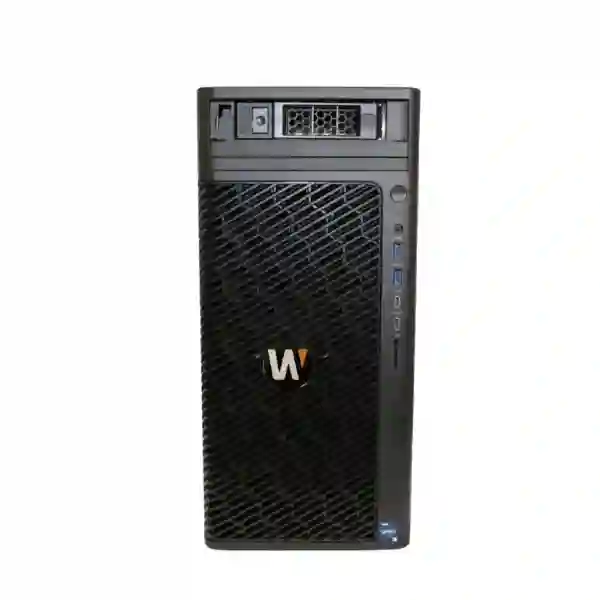
Hanwha WRT-P-3104W Wisenet WAVE Recording Server
Built for IP video recording projects that need Wisenet WAVE software, a carefully sized archive and clear licence planning. The Hanwha WRT-P-3104W offers up to 170 Mbps published recording throughput and four included WAVE Professional recording licences. Choose the exact storage and operating-system variant for your project, then confirm availability and support for Tanzania.
Quick product specification
| Product family | WRT-P-3104W, original Wisenet WAVE recording server |
|---|---|
| Software | Wisenet WAVE video management system, preinstalled |
| Included software licences | 4 Wisenet WAVE Professional licences |
| Published recording throughput | Up to 170 Mbps |
| Processor and RAM | 14th-generation Intel Core i3; 16 GB DDR4 |
| Operating-system drive | 256 GB M.2 SSD in original series datasheet |
| Data storage | Up to 16 TB raw, depending on exact ordered configuration |
| Data drive bays | 3 × 3.5-inch SATA bays in original series datasheet |
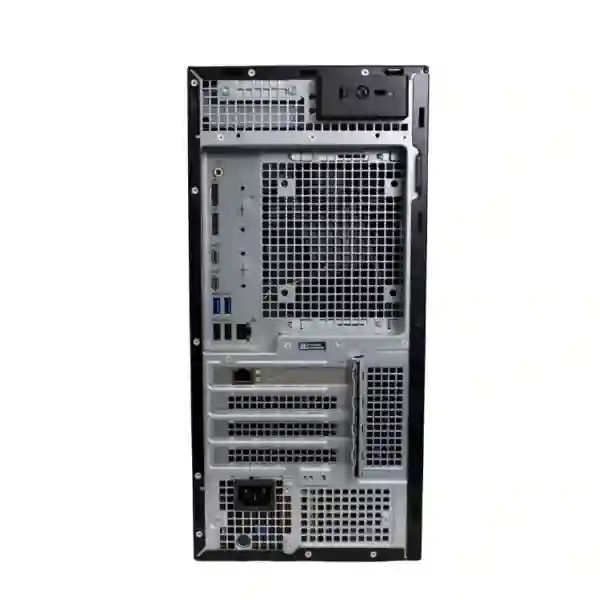
| Networking | 2 × 1 GbE RJ45 interfaces |
| Display connectivity | 2 × DisplayPort; one DP-to-HDMI adapter listed |
| Operating system | Confirm exact Windows IoT edition of the quoted W variant |
| Enclosure | Mini-tower chassis; indoor installation |
| Included peripherals | Keyboard and mouse listed in series datasheet |
Specification note: These are original WRT-P-3104-series values. Confirm the complete part number, revision, installed storage, operating system and current lifecycle status before purchase. Figures from W1 or later WRT-P-3105 variants should not be substituted silently.
What the WRT-P-3104W is built to do
The Hanwha WRT-P-3104W is a compact, computer-based network video recording server designed around Wisenet WAVE video management software. It is appropriate for organisations that want a more flexible security-video workflow than a basic fixed-function recorder, while avoiding the effort of specifying every server component separately. Wisenet WAVE is preloaded, and the original series documentation identifies four included WAVE Professional recording licences. In a new installation, those licences are the starting point for recording authorised camera streams, not a blanket promise that every technically supported camera is licensed without additional purchases.
The server can support a self-contained site or join a larger Wisenet WAVE arrangement, subject to the installed software version, networking and licensing. Its published recording-throughput rating is up to 170 Mbps, and the original series supports raw storage configurations up to 16 TB. Those two numbers answer different questions: throughput concerns the incoming video data the recorder is designed to process, whereas storage determines how much footage may be retained. Neither number, by itself, tells a buyer how many days of evidence will be available or how many cameras a specific project can record continuously.
Who should consider this model
Security integrators planning a modest commercial installation can use the WRT-P-3104W as a starting point when the customer needs centralised recording, live viewing, recorded-video search and room for carefully planned expansion. Typical settings to evaluate include shops with several critical entrances, office floors, warehouses, reception areas and hospitality properties. These are examples of deployment requirements, not promises of suitability for every building. A site with heavy analytics workloads, many high-bitrate cameras or stringent resilience requirements may require a different server architecture after workload sizing.
For an existing WAVE environment, the relevant question is not simply whether another recording box can be added. Establish which software version the customer already uses, how users authenticate, which camera licenses are assigned and which archives need to remain accessible. The WRT-P-3104W can then be assessed as a site recorder, an additional recording node or a replacement device. Where an old server is being retired, make a separate plan for video exports, licence transfer, database settings and safe handling of stored evidence rather than treating a hardware swap as a routine plug-and-play task.
Hardware and software at a glance
The original WRT-P-3104 series datasheet identifies a 14th-generation Intel Core i3 processor, 16 GB DDR4 memory, a 256 GB internally mounted M.2 operating-system drive, two 1 GbE RJ45 network interfaces and two DisplayPort video connections with a DisplayPort-to-HDMI adapter. It also identifies three 3.5-inch SATA data-drive bays and a compact metal tower enclosure. A keyboard and mouse are listed as included. This combination is designed for a recording server that may also serve as a local viewing client, although camera workloads and monitor arrangements must still be sized.
Buyers should distinguish a family specification from the exact bill of materials on an offered unit. Storage varies with the suffix attached to the model, installed drives may differ by configuration, and operating-system descriptions have changed across sales literature and product generations. The original series datasheet describes Windows 10 IoT Enterprise LTSC for the W suffix, while later commercial descriptions may refer to Windows 11 IoT variants. Request the exact complete part number, storage option, installed operating-system edition and revision when quoting. Do not assume a W1 or a 3105-family unit is identical to WRT-P-3104W.
Four included WAVE licences: what they cover
The four included Wisenet WAVE Professional licences are an important commercial benefit because they give the buyer a defined starting point for recorded streams. However, licence count and theoretical hardware capacity are not interchangeable. Under the standard WAVE recording model, recording a camera stream generally requires an appropriate recording licence. If a project needs more licensed recordings than the four included, additional WAVE licences should be priced and verified for the proposed software deployment. Live viewing behaviour and special stream types may follow different rules, so confirm the actual use case rather than assuming each connected device consumes the same entitlement.
Prepare a camera schedule before approving the final configuration. Record each camera model, sensor count, stream requirements, whether recording is continuous or event-based and any existing licences the customer intends to reuse. Some devices generate multiple streams or have distinctive integration requirements, and these should be confirmed against current WAVE licensing guidance. The number of cameras shown in software is not proof that all are authorised to record. A quotation should clearly separate included licences from additional licences, future expansion allowances and any software services that are purchased separately.
Understanding the 170 Mbps recording specification
The published up-to-170-Mbps recording bandwidth is a planning ceiling, not a promise that every combination of cameras, frame rates and analytics will work at the same time. Each camera consumes network and recording resources according to actual compressed bitrate. Resolution, codec, frame rate, image complexity, motion, encoding profiles and day-versus-night scenes all influence that load. Before ordering, estimate the sustained aggregate recording bitrate and allow capacity for peaks, additional cameras and operational changes. Keep the calculator assumptions with the project paperwork so future expansion can be checked against the original design.
A simple way to judge capacity is to add the expected recording bitrates of all streams entering the server, then review the total against the recorder rating with appropriate headroom. A handful of demanding high-resolution streams can consume more throughput than a larger group of low-bitrate cameras. Playback, remote viewing, exports and software overhead may also matter when selecting a practical deployment. Avoid translating 170 Mbps directly into a fixed camera count. A figure expressed as channels elsewhere in marketing does not replace a camera-by-camera bandwidth and licence assessment.
Storage options and retention planning
The original series documentation supports up to 16 TB of raw data storage and identifies three 3.5-inch SATA drive bays. Raw capacity means the nominal capacity before formatting and other overhead, not a guaranteed amount available to store video. The actual unit may be supplied in a smaller storage configuration. Before agreeing to a purchase, ask for the exact suffix, installed hard-drive quantity and capacity, usable archive space and any supported upgrade method. Physical drive-bay count should not be read as a promise of unrestricted drive compatibility or a particular RAID configuration.
Retention depends on average recorded bitrate, daily recording hours, recording schedules, motion-trigger policies and reserve space. A busy loading bay recorded continuously may use far more storage than a quiet corridor recording selected events. Privacy rules and internal evidence policies may also limit appropriate retention. Request a retention calculation for the actual camera plan, not an arbitrary promise of thirty, sixty or ninety days. If the result falls short, consider reducing nonessential recording bitrate, changing camera settings where appropriate or selecting another storage configuration that still meets evidentiary requirements.
Recording quality versus archive duration
High-quality footage is valuable only if it answers the customer’s security questions. Identify the detail that must be visible: a person approaching a doorway, goods moving through a loading area, an overview of a stock room or an incident route through a premises. Camera selection and positioning determine whether those details will be captured; the recorder cannot restore information absent from the original stream. Establish appropriate resolution, exposure, frame rate and bitrate together, then test sample recordings under realistic lighting before a system is accepted.
Longer retention can be achieved by using less data, but reducing bitrate too aggressively may undermine incident review. Consider whether different cameras deserve different profiles and whether continuous recording is needed across all operating hours. A point-of-sale entrance may merit a higher-quality continuous archive while a low-traffic peripheral zone may follow an approved event-based policy. Keep an agreed balance between detail, storage consumption and the organisation’s evidence obligations. The right goal is footage that remains both useful and retrievable for the required period.
Camera compatibility and integration checks
Wisenet WAVE can work with supported Hanwha Vision cameras and many third-party IP cameras using supported integration methods. Hanwha’s current guidance describes automatic detection for relevant ONVIF Profile S devices and manual addition of certain RTSP or HTTP streams. That is valuable for mixed-camera estates, but it does not guarantee that every advanced function on every camera will work. Confirm the exact camera model, firmware and integration type, particularly when the project needs metadata, audio, special event triggers, PTZ functions or multiple sensors.
Before installation, produce a compatibility worksheet that pairs each camera with its intended WAVE software version and required functions. Test a representative camera for stable recording, timestamp accuracy, event delivery, playback and exported files. An ONVIF label alone should not be treated as full feature equivalence across brands. For existing IP cameras, check access credentials and stream availability; for new cameras, request manufacturer-supported network settings. This avoids the common mistake of completing the cabling and storage work before discovering that a critical camera feature is unsupported.
Network architecture for dependable recording
Two 1 GbE network interfaces are listed in the original series specification. They provide useful connectivity options, but the design of the camera network must be decided by the installer. Separate camera and business traffic where appropriate, apply sensible addressing and routing, and ensure switches and uplinks have enough sustained capacity. The interfaces do not automatically create redundancy or network isolation merely because two sockets exist. Those functions depend on supported configurations, switch design and the way WAVE services are deployed.
Calculate link utilisation through the entire path rather than only at the server. Several cameras connected to an access switch can overload a weak uplink before video reaches the recorder. Check PoE switch capacity independently; the WRT-P-3104W should not be assumed to power cameras directly. If cameras span buildings, factor in fibre paths, surge protection, distribution equipment and network latency. Define who manages VLANs, addressing and firewalls before installation. A straightforward, documented network plan makes later faults far easier to diagnose than an ad hoc arrangement.
Local monitoring and user workflows
The WRT-P-3104W is described as a dual-purpose WAVE server and client, allowing its computer hardware to play a part in video management and local monitoring. The original series lists two DisplayPort outputs and an included adapter, but the supported visual layout still depends on display specifications, rendering load and the selected software. For a security desk, decide whether operators need a small live view, periodic playback or multiple high-resolution layouts. Do not promise a particular number of simultaneous visible streams solely from the number of physical display connectors.
Consider the daily tasks before deciding where the recorder should be placed. An operator may need to locate a camera quickly, compare adjacent views, review footage around an alarm and export evidence for an authorised supervisor. These workflows should shape account permissions, naming conventions, monitor placement and training. A recorder locked in a secure equipment room may need a separate client workstation for convenient operation. For sites with multiple shifts, clear procedures and correctly configured user roles often have as much effect on practical usability as hardware specifications.
Security, access permissions and evidence control
A video-management system stores sensitive operational information, so security configuration belongs in the deployment scope from the beginning. Assign individual user accounts where supported, limit privileges by job role and use the authentication features available in the installed WAVE version. Restrict access to the recording server and management interfaces from unnecessary networks. Change default device credentials, protect administrative passwords and record who is authorised to export footage. These measures reduce avoidable exposure without relying on unverified security claims about the appliance.
Agree on an evidence-handling process for search, export, sharing and deletion. Keep accurate device time settings and use a dependable time source so footage from different cameras can be correlated during an investigation. Determine who may change recording schedules, remove cameras or alter archive settings, and review those privileges when staff roles change. When a software update is proposed, confirm compatibility and backup arrangements before deploying it. Security policy should follow the organisation’s legal and operational obligations rather than treating long retention or broad remote access as automatic benefits.
Power, cooling and environmental suitability
The original WRT-P-3104 series specification lists a 100–240 V AC input range and an indoor operating temperature range of 10–35°C. Those values guide early design but should be confirmed against the exact hardware revision and power supply on the delivered unit. A recording server should be positioned in a ventilated, access-controlled space with enough clearance for airflow. Avoid treating a general office cupboard as suitable if heat, dust, moisture or poor ventilation could reduce reliability. The manufacturer rating does not remove the need for site inspection.
For deployments in Tanzania, assess the actual electrical installation, power fluctuations and the expected duration of outages. A suitably specified UPS can help protect the server, network switches and cameras against short interruptions, but runtime must be calculated for the entire connected load. If a site uses a generator, examine transfer behaviour and power quality. Define the intended safe-shutdown and restart process and verify surge protection according to the local design. Do not assume continuous recording through an outage unless every relevant component has sufficient backup power.
A practical Tanzania installation checklist
Before equipment is ordered, document the premises, critical views, camera locations, expected number of recording streams, required image quality and how many days of footage must be retained. Check that the camera network, switching and power arrangement are already planned or will be included in the project. Verify that the selected WRT-P-3104W storage variant is suitable, that WAVE recording licences cover the initial scope and that additional licences are included when required. Agree on who provides onsite configuration, end-user training and operational acceptance testing.
Next, verify the complete manufacturer part number, operating-system image, storage drive details, network ports, display needs and lifecycle status for the exact quoted unit. Request confirmation of availability and service terms for the intended transaction, since manufacturer documentation from another region is not proof of Tanzanian stock or warranty eligibility. Arrange an agreed commissioning checklist covering live view, continuous and event recording, playback, export, loss-of-network recovery and time synchronisation. Hand over passwords and configuration records securely rather than emailing administrative credentials in ordinary project correspondence.
Five questions to settle before requesting a quote
First, how many cameras must be recorded from day one, and how many are expected in the next expansion phase? Second, what combination of resolution, frame rate and scene complexity will drive the actual recording bitrate? Third, how long must different camera groups retain usable evidence? Fourth, will the server work alone or as part of an existing WAVE installation with established users and licences? Fifth, which operating-system and storage variant is actually being supplied? These answers establish a meaningful specification instead of a brand-and-model-only shopping list.
The quotation can then separate the recording server, data-storage configuration, additional recording licences, IP cameras, PoE/network components, monitors, UPS and installation work. Items not included should be clearly marked to avoid later misunderstandings. Where a component is customer-supplied, identify the party responsible for interoperability checks. If the requirement exceeds the published recording-throughput ceiling or requires specialised resilience, ask for a revised architecture rather than simply increasing the hard-drive capacity. Greater storage does not solve a recording-bandwidth or software-licensing shortfall.
How to size a small site example
Imagine a location planning twelve camera views, with four streams already covered by the recorder’s bundled professional licences under the standard one-stream-per-licence model. The buyer should investigate the additional licences needed for the remaining eight recordings, subject to current product-specific WAVE licensing rules. Then estimate the average recorded bitrate for all twelve streams. If some views require higher detail than others, create a per-camera bitrate schedule rather than multiplying one arbitrary value by twelve. Compare the resulting network load with server capacity and allow project-specific headroom.
Repeat that exercise for storage. A site operating day and night may require more archive space than a daytime-only business using an approved schedule. Cameras facing moving trees, crowded corridors or vehicle headlights can generate different compressed bitrates even with similar nominal settings. Confirm that the proposed hard-drive configuration offers enough actual usable capacity for the retention plan. This example is a sizing method, not a claim that twelve cameras are automatically supported, licensed or guaranteed to achieve a particular archive duration on this recorder.
Expanding an existing Wisenet WAVE deployment
A business that already operates WAVE may want a second recording server for another floor, branch or security zone. Start by inventorying camera assignments, server versions, licensed streams, remote-client requirements and current bandwidth. Identify which users need visibility across sites and whether WAN links are dependable enough for the proposed administration and viewing workflow. Consult current vendor guidance on supported versions and any licence-transfer process. A familiar software interface is helpful, but a shared product family does not make unplanned mixed-generation deployments automatically compatible.
Expansion also raises governance questions. Decide whether each location should retain its own recordings, which personnel may access other locations, and how video will be obtained if an internet connection is unavailable. Test the behaviour of live viewing and archived playback across the expected network paths. If site links are unstable, prioritise reliable local recording and define remote access as a separate operational service. Preserve configuration backups and build a rollback plan for major changes, especially when an older recorder is being combined with newer cameras or software.
Comparing a WAVE server with a basic standalone NVR
A standalone NVR with a fixed camera interface may suit projects where a simple hardware appliance and limited operator workflow are the priorities. A Wisenet WAVE recording server can be more appropriate where the organisation values flexible client access, software-managed cameras, mixed integrations and a potential route to multi-server operation. That does not make the server the better option in every case. The wider software environment brings licence management, computer maintenance, network planning and configuration decisions that a simpler appliance may reduce.
Compare the total working solution instead of only the recorder purchase price. Include camera licences, compatible drives, network and power equipment, deployment labour, user training, ongoing patching responsibilities and replacement planning. If the organisation needs only a few fixed cameras and minimal administration, the simplest supportable design may win. If it expects changing layouts, cross-site operation or diverse supported cameras, WAVE’s architecture could be valuable. The correct choice follows the operational brief and a validated bill of materials, not the highest headline specification.
Newer family names and model verification
Model suffixes are unusually important with computer-based video appliances. WRT-P-3104W, WRT-P-3104W1 and WRT-P-3105W1 should not be treated as interchangeable catalogue names. They may refer to different product generations, operating systems, internal components, physical connectors or availability status. Some newer W1 manufacturer listings show hardware and operating-system details that differ from the original WRT-P-3104W series datasheet. If a supplier proposes a substitution, request a side-by-side technical comparison covering the exact recording, storage, licensing and client requirements.
For a customer replacing an older WRT-P-3104W unit, document the installed WAVE version, archive requirements, connected camera list, software entitlements and operating-system support expectations before accepting another model. Ask whether existing licensed functions and exported evidence workflows will continue to operate as planned. Do not use an older technical sheet to promise the features of a newer revision. Similarly, do not assume a historic model remains available, is supported locally or has identical warranty coverage today. Confirm these matters against the quoted item and current manufacturer guidance.
Operational acceptance testing
Once installed, check live streams and recorded footage from every intended camera. Compare actual incoming bitrates with the design calculations and observe them at busy times, not only during a quiet afternoon. Check that motion and event recording follow the agreed rules, that storage reporting matches expectations and that playback can locate an incident promptly. Record the result of exporting an example clip and verify that it is readable by the intended recipient. Confirm system clocks and camera clocks are aligned so evidence from different scenes can be placed on the same timeline.
Next, test realistic faults in a controlled manner. Consider how the system reports a disconnected camera, a network outage, depleted storage or a server restart. Establish who receives alerts, what action the operator should take and what information support staff require. Test the approved backup-power process if applicable, without risking active evidence or live site safety. An acceptance record should state remaining limitations plainly. The goal is not to prove that failures can never occur; it is to confirm that operators can recognise problems and recover using a documented procedure.
Ongoing maintenance and capacity review
After handover, schedule periodic checks of available storage, recording continuity, camera health and server resource use. Repeat the capacity assessment whenever additional cameras are proposed or existing cameras receive higher-bitrate settings. Review whether archive duration remains consistent with the agreed retention policy. Changes to a single camera can influence overall storage consumption, while a group of new cameras may change the need for extra licences and switching capacity. Keep an up-to-date camera and licence inventory to make those decisions easier.
Maintenance should also include checking vendor advisories, supported software versions and the condition of associated networking and backup-power equipment. Apply changes through an approved window with suitable recovery arrangements. Maintain configuration records and identify replacement responsibilities before a component fails. Periodically test whether authorised staff can still find and export footage. A recording server should be judged by the dependable evidence service it provides over time, not just by whether its power indicator is illuminated on the day of installation.
Common deployment scenarios
These examples show how to ask the right project questions; they do not represent verified installations, local service coverage or an assurance that one configuration suits every workload.
Retail entrances and customer circulation
Plan cameras for entrances, service counters and back-of-house access points. Prioritise footage detail that supports incident review, while measuring busy-hour bitrates and deciding who is authorised to view customer footage. Allow for additional licences if the number of recorded views is greater than the four bundled entitlements.
Offices and shared workplaces
Separate normal operational viewing needs from restricted investigations. Identify reception, circulation routes and controlled areas, create meaningful camera names and align retention with internal policies. Consider whether the recorder will sit in a communications room while staff use authorised client workstations elsewhere.
Warehouses and loading areas
Account for changing light, vehicle motion and scenes with high image complexity. Protect network runs and confirm that access-switch capacity, uplinks and backup power serve the whole camera system. Compare daytime and overnight recording requirements, especially where goods must be traced across multiple cameras.
Hospitality and multi-zone buildings
Map the building into manageable groups such as public circulation areas, authorised service zones and entrances. Plan who can review footage by role and where local monitoring is required. Avoid assuming a multi-building or multi-site viewing arrangement will work reliably without testing the underlying network.
From project brief to tested recorder
A dependable video system is specified in stages. The checklist below helps buyers and integrators agree on what is included before equipment is delivered or commissioned.
1. Define coverage
Identify every camera view, recordable stream and required detail level.
2. Calculate workload
Estimate aggregate recording bitrate and server capacity headroom.
3. Size archive
Set target retention, recording schedule, usable capacity and export needs.
4. Confirm licences
Separate the four included professional entitlements from extra licences.
5. Verify exact variant
Confirm W suffix, installed OS, drive capacity, connectors and lifecycle.
6. Commission and train
Test recording, playback, export, power recovery and user permissions.
Frequently asked questions
These answers distinguish manufacturer-published product attributes from configuration-dependent design choices. For a purchase decision, the exact model suffix and proposed camera schedule remain essential.
Does the WRT-P-3104W include recording licences?
Yes. The manufacturer’s original WRT-P-3104 series documentation specifies four Wisenet WAVE Professional licences. These are included recording entitlements, not a licence for an unlimited number of cameras. Projects needing additional recorded streams should have the appropriate extra licences identified in the quotation. Verify special camera types and multi-sensor arrangements against current WAVE rules.
Does four included licences mean the recorder supports only four cameras?
No. Four is the number of bundled recording licences, not a definitive statement of total technical camera capacity. Any additional recording workload must satisfy both software licensing and the recorder’s system resources. There is no responsible universal camera-count promise without details of stream bitrates, camera compatibility, configuration and required functionality.
What recording bandwidth is published for this model?
The original series datasheet specifies up to 170 Mbps of recording throughput. This is a manufacturer rating and should be evaluated against the total incoming stream load for the actual deployment. Leave room for variation in real scenes and review concurrent viewing and server activity when designing the system.
How much video can it store?
The original WRT-P-3104 series supports raw storage configurations up to 16 TB, but an individual unit may be supplied with less. Usable formatted capacity and recording duration depend on the installed drives and video settings. Ask for an archive estimate based on your own camera schedule and retention requirement.
Can the server be used with non-Hanwha cameras?
Wisenet WAVE supports a broad range of IP devices using supported integration methods, including selected ONVIF and RTSP workflows. Compatibility is not identical across cameras or software versions. Check the exact third-party device, firmware and functions needed, and test a sample when events, audio, PTZ or specialised metadata are important.
Can it join an existing WAVE system?
The WRT-P-3104W series is described as suitable for a single installation or an addition to an existing WAVE system. Before integrating, confirm software-version compatibility, account permissions, camera assignments, network access and licensing. Plan any migrations or archive transfers separately from the physical installation.
Which operating system comes installed?
The original series datasheet describes Windows 10 IoT Enterprise LTSC for the W model. Other literature and later variants may cite different Windows generations. Request confirmation of the operating-system edition, software image and support status of the exact offered part number rather than assuming a later W1 specification applies.
Does the recorder supply power to IP cameras?
Do not assume it does. The published series specification describes network interfaces rather than a bank of built-in PoE camera ports. Camera power should be planned through suitable PoE switches, injectors or separately specified supplies. Include their electricity demand in the site’s UPS and electrical calculations.
Can I connect local monitors?
The original series documentation identifies two DisplayPort outputs and an adapter. Display connections permit a local viewing arrangement, but practical stream counts and display performance depend on client settings and workload. Check monitor resolution, cabling, software layout and simultaneous server load before specifying an operator desk.
Is this suitable for areas with unreliable electricity?
The server can be part of a protected installation, but uninterrupted recording depends on the entire site design. Evaluate power quality, UPS runtime, network-switch backup, camera power and safe shutdown arrangements. Confirm the delivered hardware’s electrical and environmental ratings and provide adequate ventilation.
Is pricing or stock in Tanzania confirmed?
No price, local stock level, delivery commitment or Tanzania-specific warranty has been verified for this listing. Ask for a current quotation specifying the full part number, installed storage, licence entitlements, service coverage and supplied accessories. Do not rely on prices or warranties published for other countries.
What details should I provide when requesting a quotation?
Share the number and models of cameras, expected recording bitrates or resolutions, target retention days, operating hours, preferred storage capacity and whether the unit will join an existing WAVE system. Mention the site environment, local monitoring needs, network design and power-backup requirements. These details let a supplier identify the correct configuration and any additional licences.
What if the supplier offers WRT-P-3104W1 instead?
Treat WRT-P-3104W1 as a different revision, not a spelling change. Compare hardware, operating system, video outputs, power supply, storage drive configuration and manufacturer support information against the original requested unit. Confirm whether it meets your WAVE deployment requirements before approving a substitution.
Request a WRT-P-3104W configuration quote
For a Tanzania project, specify your camera quantity, average recording bitrates, required retention, existing WAVE licences, preferred storage capacity and site power conditions. Ask for the exact product revision, its current supply status and a clear breakdown of any additional licences, installation materials and service terms. This ensures the quotation reflects the system you need rather than assuming every WRT-P-3104W configuration is the same.
Next step: Contact FourTeck Tanzania to request a technical configuration review and written quotation. Availability, price, warranty and service terms must be confirmed for the specific offer.




Reviews
There are no reviews yet.