
FourTeck Tanzania buying guide
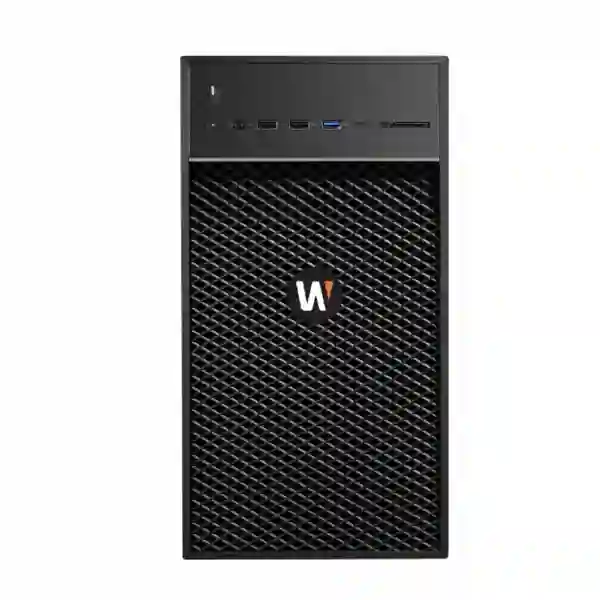
Hanwha WRT-P-5202L Wisenet WAVE Recording Server
A dual-purpose Linux video recording and local viewing appliance. Evaluate recording bandwidth, storage, licences, ONVIF camera compatibility and product lifecycle before maintaining or buying this discontinued server.
Original published specifications
| Item | Detail |
|---|---|
| Video management | Wisenet WAVE |
| OS | Ubuntu Linux 20.04 LTS |
| Original included licences | Four WAVE Professional |
| Recording throughput | Up to 470 Mbps |
| Raw storage | Up to 36 TB, configuration dependent |
| System SSD | 256 GB |
| Data bays | Three 3.5-inch SATA |
| Processor | 12th-generation Intel Core i5 |
| Memory | 16 GB DDR4 |
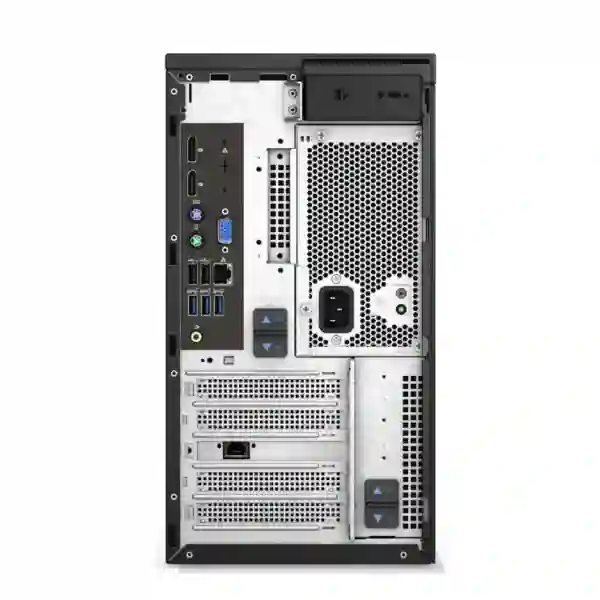
| Interfaces | Two Gigabit Ethernet ports |
| Monitor outputs | Two DisplayPort |
| Power | 100–240 V AC, 550 W supply |
| Operating temperature | 5°C to 45°C |
| Status | Discontinued |
Published specifications describe the original model, not the fitted drives, condition, current licences, warranty or regional availability of a particular offered unit. Verify the exact configuration before procurement.
Product purpose and decision
The Hanwha WRT-P-5202L is a dual-purpose Wisenet WAVE video recording server and local client designed to receive streams from compatible IP cameras. It provides the computing environment for recording, searching and reviewing surveillance video. It is not a complete CCTV installation, camera, PoE switch or network design. The surrounding infrastructure must be planned separately.
Hanwha Vision currently marks this model discontinued. That does not automatically make an existing unit unusable, but it changes buying decisions. For a new Tanzania installation, compare a current supported recorder. For an existing system, assess the precise unit’s condition, software maintenance, licence status and supportability before investing in expansion.
During a technical review, record how this topic affects camera continuity, archive retention, authorized viewing and the practical response to a failure. Identify the person who will verify it and the evidence needed at handover. This converts a general product claim into a site-specific decision that can be accepted or rejected based on measured results.
Original hardware architecture
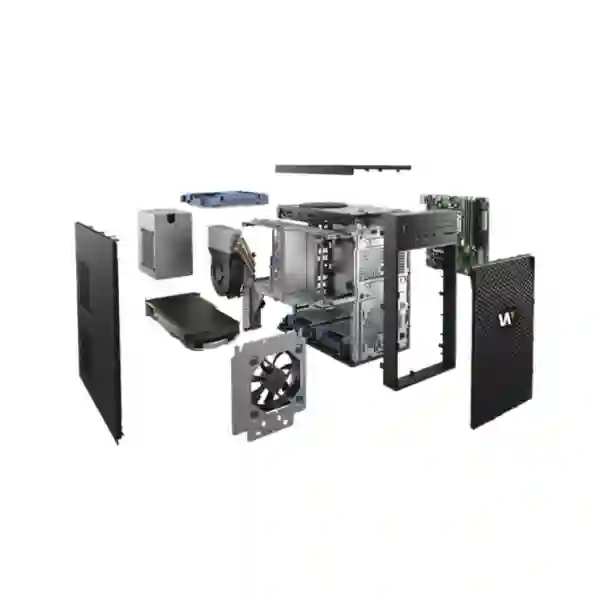
The series information identifies a mini-tower with a 12th-generation Intel Core i5 processor, 16 GB DDR4 memory, an internal 256 GB system SSD and three 3.5-inch SATA data-drive bays. These are published original specifications rather than a guarantee about the actual storage fitted or the health of a used appliance.
Processing power is only one part of a recording system. Sustained disk writes, network load, software behaviour, simultaneous playback and heat all affect reliability. Inspect physical hardware, drive errors, fans and configuration before assuming a legacy unit can perform to its original specification.
For procurement, ask the supplier to separate confirmed manufacturer specifications from details about the individual unit being sold. Model-level figures cannot establish disk condition, actual licences or the seller’s warranty. Require a configuration record and clear acceptance criteria so that the technical and commercial commitments can be evaluated independently.
The Linux operating environment
The WRT-P-5202L originally shipped with Ubuntu Linux 20.04 LTS and preloaded Wisenet WAVE. Its operating environment differs from a Windows WRT model. Confirm the installed version rather than assuming a product label identifies the current software state after years of maintenance or previous ownership.
Ubuntu 20.04 standard security maintenance ended in April 2025. Extended options may exist, subject to conditions and compatibility. Do not install an arbitrary new Linux version without confirming Hanwha and WAVE support, backups, licence effects and a recoverable installation procedure.
Before commissioning, make a short test plan covering the relevant connections, configuration, access rights and normal user actions. Record outcomes at representative system load, not just at initial power-on. Any unsupported function or operational limitation should be documented before staff depend on the system in a real incident.
What Wisenet WAVE manages
Wisenet WAVE provides camera connectivity, live viewing, recording, searches and playback. The appliance can combine server and local client roles under suitable conditions, making it useful for locations that need both recording and direct operator access. Software alone does not replace good naming, access-control and evidence-handling practices.
Acceptance should include finding a specified incident, reviewing different camera angles and exporting an authorized clip that is readable elsewhere. Test actual camera events and advanced functions with the installed WAVE version. Features described in newer WAVE materials may not behave identically on an older image.
During a technical review, record how this topic affects camera continuity, archive retention, authorized viewing and the practical response to a failure. Identify the person who will verify it and the evidence needed at handover. This converts a general product claim into a site-specific decision that can be accepted or rejected based on measured results.
Professional licence entitlement
Hanwha originally specified four Wisenet WAVE Professional licences with the recorder. This is a starting licence description, not a promise of unlimited recording channels. Additional cameras or functionality may require further entitlements, depending on the installed version and the types of sources being recorded.
For an existing or previously deployed server, verify current legitimate activation and ownership. Before software reconstruction or hardware migration, confirm approved transfer steps. A disk image does not demonstrate that licences can automatically be reused after changing the underlying platform.
For procurement, ask the supplier to separate confirmed manufacturer specifications from details about the individual unit being sold. Model-level figures cannot establish disk condition, actual licences or the seller’s warranty. Require a configuration record and clear acceptance criteria so that the technical and commercial commitments can be evaluated independently.
Why camera count needs calculation
An up-to 470 Mbps recording-throughput figure does not establish a universal number of IP cameras. Compression, resolution, frame rate, motion, lighting and recording schedules influence the bitrate of each stream. Two cameras with the same megapixel rating may contribute very different loads during busy scenes.
Create a camera schedule covering average and peak bitrates, recording hours and viewing streams. Sum the proposed load, preserve engineering headroom and consider drive-write performance. Validate the design with sustained recording while users search and export footage; a simple maximum-Mbps division is not reliable.
Before commissioning, make a short test plan covering the relevant connections, configuration, access rights and normal user actions. Record outcomes at representative system load, not just at initial power-on. Any unsupported function or operational limitation should be documented before staff depend on the system in a real incident.
Recording throughput under peak demand
Video traffic can change when a busy entrance fills with people, vehicles arrive at a gate, night lighting changes or rain adds image complexity. A quiet-hour bitrate measurement may understate the busiest recording period. Audio and multiple profiles may add further operational demands.
Monitor representative busy periods and check for dropped frames, incomplete recordings, excessive disk queues or sluggish playback. Document the actual software version, camera mix, peak traffic and concurrent operator activity. Such evidence is more valuable than an unsupported guarantee of performance in every installation.
During a technical review, record how this topic affects camera continuity, archive retention, authorized viewing and the practical response to a failure. Identify the person who will verify it and the evidence needed at handover. This converts a general product claim into a site-specific decision that can be accepted or rejected based on measured results.
Raw storage and usable capacity
Up to 36 TB is the supported raw internal storage ceiling for the model family, not the installed capacity of every unit. Formatting, reserved space and storage configuration affect usable archive space. Individual drive configurations can be smaller, so the exact disks and their health must be confirmed before a quote or upgrade.
Do not confuse a large storage figure with a particular number of retention days. Usable archive duration depends on how many streams record, their bitrates and the recording schedule. Storage also needs a failure plan, because raw capacity does not establish redundancy or independent backup.
For procurement, ask the supplier to separate confirmed manufacturer specifications from details about the individual unit being sold. Model-level figures cannot establish disk condition, actual licences or the seller’s warranty. Require a configuration record and clear acceptance criteria so that the technical and commercial commitments can be evaluated independently.
Calculating retention days
One continuous megabit per second generates approximately 10.8 gigabytes of data per day before overhead. Ten cameras averaging four megabits per second would generate about 432 GB daily, or roughly 13 TB over 30 days. These figures illustrate arithmetic, not a promised server configuration.
Use actual or representative camera bitrates and the requested archive period to size usable storage. Make allowances for scene variation, recording schedules and system overhead. Define a separate process for preserving evidence that must outlast the normal rolling archive.
Before commissioning, make a short test plan covering the relevant connections, configuration, access rights and normal user actions. Record outcomes at representative system load, not just at initial power-on. Any unsupported function or operational limitation should be documented before staff depend on the system in a real incident.
Disk health and replacement risk
A storage drive can be large but unreliable, particularly on an ageing appliance. Inspect drive model, temperature, error history, operating hours and the way video is arranged across disks. Identify who will investigate storage alerts and whether compatible replacement components can still be obtained.
A capacity upgrade on discontinued hardware needs more than available drive bays. Verify supported drive configuration, thermal capacity, application behaviour and backup processes before modifying storage. If failures threaten critical footage, compare the risk of continuing the appliance with a supported replacement.
During a technical review, record how this topic affects camera continuity, archive retention, authorized viewing and the practical response to a failure. Identify the person who will verify it and the evidence needed at handover. This converts a general product claim into a site-specific decision that can be accepted or rejected based on measured results.
Wisenet and ONVIF cameras
Hanwha documents support for Wisenet and ONVIF-conformant IP cameras. ONVIF compatibility is useful, but it does not ensure every vendor-specific analytic, audio, event, authentication or PTZ function is supported. Exact camera firmware and WAVE software versions affect the result.
Test one representative camera of each planned family before buying many units. Confirm discovery, video profiles, sustained recording, timestamps, reconnect behaviour and any essential advanced features. Document unsupported functions rather than assuming basic video compatibility covers every operational need.
For procurement, ask the supplier to separate confirmed manufacturer specifications from details about the individual unit being sold. Model-level figures cannot establish disk condition, actual licences or the seller’s warranty. Require a configuration record and clear acceptance criteria so that the technical and commercial commitments can be evaluated independently.
Network interfaces and architecture
The recorder has two Gigabit Ethernet RJ45 interfaces. Those ports offer topology options but do not automatically aggregate traffic, provide failover or isolate networks securely. Uplinks, switches, routing, cable condition and packet loss affect whether video reaches the recorder consistently.
Create an address plan, port map and routing policy for camera, management and viewing traffic. Separate networks where practical and supported, and verify firewall rules. Test camera recovery after planned network interruptions; a recording server cannot store streams that upstream equipment does not deliver.
Before commissioning, make a short test plan covering the relevant connections, configuration, access rights and normal user actions. Record outcomes at representative system load, not just at initial power-on. Any unsupported function or operational limitation should be documented before staff depend on the system in a real incident.
Remote access and cyber protection
A surveillance recorder holds potentially sensitive footage. Do not expose its administration services directly to the public internet merely to provide convenient viewing. Use a controlled remote-access design supported by the application and site security policy, with strong unique credentials and distinct roles.
Review user permissions as staffing changes and protect configuration and licence records. Record who can view, search, export and modify settings. On discontinued equipment, software maintenance and unnecessary network exposure require particular attention because the current security-support path must be verified.
During a technical review, record how this topic affects camera continuity, archive retention, authorized viewing and the practical response to a failure. Identify the person who will verify it and the evidence needed at handover. This converts a general product claim into a site-specific decision that can be accepted or rejected based on measured results.
Local client and monitor outputs
The server was designed for dual-purpose use and has two DisplayPort video outputs. This supports local viewing arrangements under appropriate conditions, but does not prove that every multi-monitor control-room layout or high-resolution tile count is feasible. Check cables, adapters, software and actual display demands.
Viewing many streams while recording can place different demands on the machine from writing streams alone. Test a realistic operator layout during busy recording. If the server sits in a locked technical room, a separate authorized client workstation may offer better physical security and working conditions.
For procurement, ask the supplier to separate confirmed manufacturer specifications from details about the individual unit being sold. Model-level figures cannot establish disk condition, actual licences or the seller’s warranty. Require a configuration record and clear acceptance criteria so that the technical and commercial commitments can be evaluated independently.
Power supply and UPS planning
The original series specifies 100–240 V AC input and a 550 W power supply. The supply rating is not the measured typical energy consumption of every configured system. Electrical capacity and backup-power selection should reflect actual hardware load and the operating environment at the project site.
If footage must continue during a short outage, include relevant switches, camera power equipment and uplinks in the UPS assessment, not just the recorder. Verify runtime, orderly shutdown and restart behaviour with appropriate technical personnel. A powered recorder cannot capture video from cameras that have lost their own power.
Before commissioning, make a short test plan covering the relevant connections, configuration, access rights and normal user actions. Record outcomes at representative system load, not just at initial power-on. Any unsupported function or operational limitation should be documented before staff depend on the system in a real incident.
Temperature and physical location
Hanwha’s series information gives an operating ambient range of 5°C to 45°C. The mini-tower needs suitable airflow, cable management, access for maintenance and protection against dust, liquid and physical tampering. A hot cabinet may reduce drive reliability even when the surrounding room seems acceptable.
Measure operating conditions near the unit under representative load and check fan and drive health. Label network interfaces and power feeds to reduce accidental disconnection. Secure the equipment while allowing responsible technicians enough access for inspection and controlled service.
During a technical review, record how this topic affects camera continuity, archive retention, authorized viewing and the practical response to a failure. Identify the person who will verify it and the evidence needed at handover. This converts a general product claim into a site-specific decision that can be accepted or rejected based on measured results.
Product discontinuation and service
Hanwha Vision currently labels WRT-P-5202L discontinued. This does not define the warranty of an individual unit, but original product descriptions should not be treated as proof of current Tanzania service. Specific warranty terms depend on the seller, serial number, region and relevant transaction conditions.
Hanwha’s lifecycle guidance distinguishes qualifying hardware under warranty from out-of-warranty products and includes software-version requirements. Request written clarity about parts, repair options, software maintenance and any offered support. Avoid assuming an archived regional warranty description applies to a new local purchase.
For procurement, ask the supplier to separate confirmed manufacturer specifications from details about the individual unit being sold. Model-level figures cannot establish disk condition, actual licences or the seller’s warranty. Require a configuration record and clear acceptance criteria so that the technical and commercial commitments can be evaluated independently.
Commissioning and field acceptance
A proper acceptance plan lists camera models, locations, bitrates, frame rates, recording schedules, retention days, required user privileges and evidence-export steps. Before production, verify installed drives, licence status, network paths, software release, cooling and power protection.
Conduct a sustained load test with normal playback and export activity. Check video quality at busy times, timestamp accuracy, reconnection after a controlled interruption and completeness of archived footage. Record what passed and what remains limited rather than signing off solely because cameras appear online.
Before commissioning, make a short test plan covering the relevant connections, configuration, access rights and normal user actions. Record outcomes at representative system load, not just at initial power-on. Any unsupported function or operational limitation should be documented before staff depend on the system in a real incident.
Retail surveillance scenarios
A retailer may need footage from entrances, service counters and stock areas for incident review. Camera placement should answer clear operational questions. Busy trading conditions can affect stream load and the practical retention target; user access needs to respect the sensitivity of customer footage.
Train authorized managers to locate a time, review surrounding cameras and export only the clip required. Check that recordings remain continuous during ordinary store activity. Consider whether a discontinued server is appropriate for a new site that needs a predictable long-term maintenance programme.
During a technical review, record how this topic affects camera continuity, archive retention, authorized viewing and the practical response to a failure. Identify the person who will verify it and the evidence needed at handover. This converts a general product claim into a site-specific decision that can be accepted or rejected based on measured results.
Warehouse and logistics scenarios
Loading gates, long aisles and outdoor zones can produce busy scenes and demanding network routes. Camera bitrates may change with vehicle movement and lighting. Video reliability depends on switch uplinks, camera power and accurate timestamping as well as the recorder itself.
Plan the full path from each camera to storage and test during active delivery periods. Build camera names around real site locations and verify evidence retrieval. Where short power interruptions are possible, check the complete critical path and UPS needs instead of protecting only the server chassis.
For procurement, ask the supplier to separate confirmed manufacturer specifications from details about the individual unit being sold. Model-level figures cannot establish disk condition, actual licences or the seller’s warranty. Require a configuration record and clear acceptance criteria so that the technical and commercial commitments can be evaluated independently.
Office and multi-building scenarios
An office or campus may need department-specific viewing permissions and camera streams traveling across multiple switches or building links. Identify whether central recording creates a business-critical single point of failure and whether staff need viewing workstations away from the server.
Document link dependencies, administrator roles and how local recording behaves when a wider-area connection is unavailable. A single appliance is not automatically the correct architecture for every multi-building project. Compare serviceability and upgrade options against the intended operating period.
Before commissioning, make a short test plan covering the relevant connections, configuration, access rights and normal user actions. Record outcomes at representative system load, not just at initial power-on. Any unsupported function or operational limitation should be documented before staff depend on the system in a real incident.
Replacement and migration planning
Before replacing an installed WAVE recorder, inventory camera settings, user accounts, licence ownership, archives and the current software version. Clarify what recordings must remain available and which parts of configuration can migrate. Do not promise that old archives, device settings or licences transfer automatically.
Compare a supported successor on actual throughput, storage, operating-system maintenance, physical dimensions, network interfaces, power demand and operator workflows. Plan an accepted migration window, pilot cameras and a rollback procedure. Confirm recorded footage after the change rather than relying on installation completion alone.
During a technical review, record how this topic affects camera continuity, archive retention, authorized viewing and the practical response to a failure. Identify the person who will verify it and the evidence needed at handover. This converts a general product claim into a site-specific decision that can be accepted or rejected based on measured results.
Tanzania procurement requirements
A useful quote request explains whether the buyer wants maintenance, a replacement legacy unit, WAVE expansion or a new surveillance platform. Supply camera counts and models, retention targets, network design, local viewing needs and electrical conditions. Ask for a technical comparison rather than a price based solely on a model number.
For any discontinued unit offered, require written information about actual disk configuration, condition, legitimate licences, software release, accessories and support terms. The original specification does not confirm Tanzania stock, price, delivery or warranty. Include commissioning, network equipment, UPS and user training in total-project comparisons.
For procurement, ask the supplier to separate confirmed manufacturer specifications from details about the individual unit being sold. Model-level figures cannot establish disk condition, actual licences or the seller’s warranty. Require a configuration record and clear acceptance criteria so that the technical and commercial commitments can be evaluated independently.
Operations after handover
Keep a maintenance schedule for camera connectivity, recorded playback, drive health, capacity trends, timestamps and software notices. A camera can appear online while the useful footage has gaps, so periodic playback verification is necessary. Assign a person responsible for investigating warnings and documenting remedial work.
Audit user accounts, protect backups and practise evidence export. Keep the camera inventory, network diagram, licence records and recovery contacts current. For discontinued equipment, define an eventual supported replacement plan so a drive or motherboard failure does not become an unplanned long-term surveillance interruption.
Before commissioning, make a short test plan covering the relevant connections, configuration, access rights and normal user actions. Record outcomes at representative system load, not just at initial power-on. Any unsupported function or operational limitation should be documented before staff depend on the system in a real incident.
Frequently asked questions
What is the product?
It is a dual-purpose Wisenet WAVE network video recording server and local client, not a standalone camera. It receives video from compatible IP cameras and manages live and recorded footage with the WAVE software environment.
Is it discontinued?
Yes. Hanwha Vision marks the WRT-P-5202L discontinued. Existing installations may still work, but a purchaser should verify condition, software, service, licences and supported alternatives before relying on it.
Does it contain 36 TB?
Not necessarily. Up to 36 TB is the model family’s raw storage capacity ceiling. Installed disks vary, and usable video archive space is less than the raw number after system overhead and storage configuration.
What does 470 Mbps mean?
It is an up-to manufacturer recording-throughput figure, not an unconditional guarantee. Actual performance depends on camera streams, drives, network paths, software version and simultaneous user activity. Test the intended workload.
How many cameras are supported?
A reliable answer requires camera bitrates, licence entitlements, recording schedules and storage performance. Do not convert the headline throughput into a guaranteed channel count without a camera-by-camera design and acceptance test.
Are four WAVE licences included?
The original specification lists four Professional licences. For any actual unit, verify activation, ownership and whether further entitlements are needed. Historic included licensing does not prove current transferability.
Can I connect ONVIF cameras?
Hanwha documents Wisenet and ONVIF-conformant camera support. Advanced audio, analytic and event capabilities can vary. Test actual models and firmware against the installed WAVE release.
Does the server provide PoE?
The two published Ethernet interfaces are network connections, not documented integrated PoE camera outputs. Provide suitable camera power and switching separately and include essential components in any UPS plan.
Can I use two monitors?
Two DisplayPort outputs are specified. The actual display arrangement depends on accessories, software and performance needs. Test the required viewing layout while recording at realistic load.
How do I size thirty days of storage?
Approximately one continuous Mbps produces 10.8 GB per day before overhead. Sum average camera bitrates and multiply by recording days, then allow for schedules, variable load, usable storage and reserve.
What is the Ubuntu support concern?
Ubuntu 20.04 standard security maintenance ended in April 2025. Extended security options may exist, but compatibility and eligibility need verification before updating an embedded WAVE appliance.
Is a Tanzania warranty included?
This information does not confirm a Tanzania warranty. Verify specific serial-number-based terms, purchase conditions and the appropriate authorized support channel. Do not apply a historical warranty statement from another region automatically.
Can it join an existing WAVE system?
The product was positioned for standalone or additional-server use, subject to system compatibility. Check WAVE versions, licences, network reachability and administrative ownership before integrating it into production.
What should be checked on a used unit?
Inspect fitted drive capacity and health, cooling, ports, installed software, account access and licence state. Test sustained recording, playback and export. Obtain written condition and service details.
Is it suitable for new projects?
Because the model is discontinued, compare it with currently supported WAVE hardware. Include cybersecurity maintenance, camera load, retention, licences, parts, power and total operating cost in the decision.
What if network connectivity fails?
The outcome depends on the topology. Test local camera-to-recorder delivery separately from remote access. Do not assume mobile or cloud functions remain available without external connectivity.
How should evidence be preserved?
Define who can export recordings, verify exported files and store approved copies outside a rolling archive when necessary. The storage capacity itself does not establish permanent evidence preservation.
What should handover include?
Request a camera schedule, system inventory, network diagram, licence records, secure recovery details, administrator ownership, maintenance plan and a demonstration of playback and export.
Implementation note: Product purpose and decision
The key buying question is not whether a feature appears on a datasheet, but whether the proposed installation can demonstrate it under realistic conditions. Ask for documentation of the installed configuration, responsible operator, intended workload and acceptance test. If any material fact is unknown, record it as an item to verify rather than treating it as guaranteed.
For product purpose and decision, Hanwha Vision currently marks this model discontinued. That does not automatically make an existing unit unusable, but it changes buying decisions. For a new Tanzania installation, compare a current supported recorder. For an existing system, assess the precise unit’s condition, software maintenance, licence status and supportability before investing in expansion.
Implementation note: Original hardware architecture
A responsible project also needs to consider what happens when equipment ages or the site’s requirements change. Document expansion headroom, recovery procedures, permissions and the consequences of a major update. The most valuable outcome is footage that authorized staff can retrieve when needed, not a large number in an unqualified product description.
For original hardware architecture, Processing power is only one part of a recording system. Sustained disk writes, network load, software behaviour, simultaneous playback and heat all affect reliability. Inspect physical hardware, drive errors, fans and configuration before assuming a legacy unit can perform to its original specification.
Implementation note: The Linux operating environment
For Tanzania deployment planning, use the actual facility’s electrical, network and environmental conditions. Do not infer stock, regional service, installation coverage or regulatory status from the technical model name. A written comparison of the proposed equipment and a supported replacement should identify technical assumptions and commercial matters that require seller confirmation.
For the linux operating environment, Ubuntu 20.04 standard security maintenance ended in April 2025. Extended options may exist, subject to conditions and compatibility. Do not install an arbitrary new Linux version without confirming Hanwha and WAVE support, backups, licence effects and a recoverable installation procedure.
Implementation note: What Wisenet WAVE manages
The key buying question is not whether a feature appears on a datasheet, but whether the proposed installation can demonstrate it under realistic conditions. Ask for documentation of the installed configuration, responsible operator, intended workload and acceptance test. If any material fact is unknown, record it as an item to verify rather than treating it as guaranteed.
For what wisenet wave manages, Acceptance should include finding a specified incident, reviewing different camera angles and exporting an authorized clip that is readable elsewhere. Test actual camera events and advanced functions with the installed WAVE version. Features described in newer WAVE materials may not behave identically on an older image.
Request a technical suitability review
Share the proposed camera models and quantities, average and peak bitrates, required archive days, network and power conditions, and any existing WAVE version or licence details. Ask for a clear comparison of the discontinued WRT-P-5202L with a currently supported recording platform. A project recommendation should address actual evidence needs, system maintenance and verified configuration rather than unconfirmed stock or performance promises.
Ask FourTeck Tanzania for a recording-system configuration discussion.




Reviews
There are no reviews yet.