
Tanzania · Network video recorder guidance
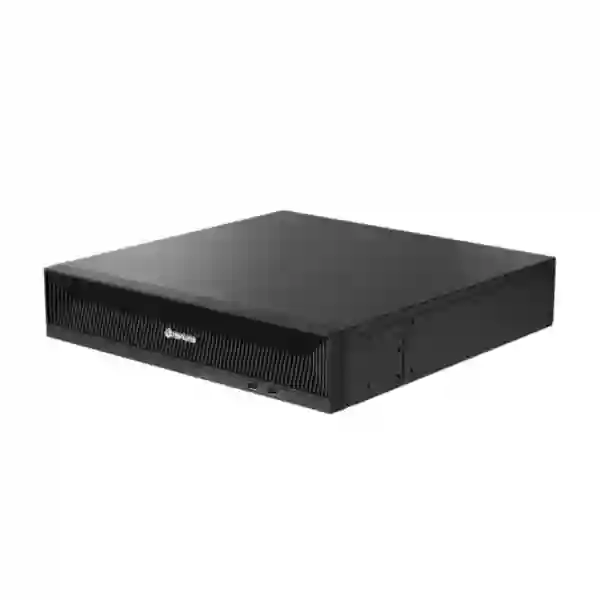
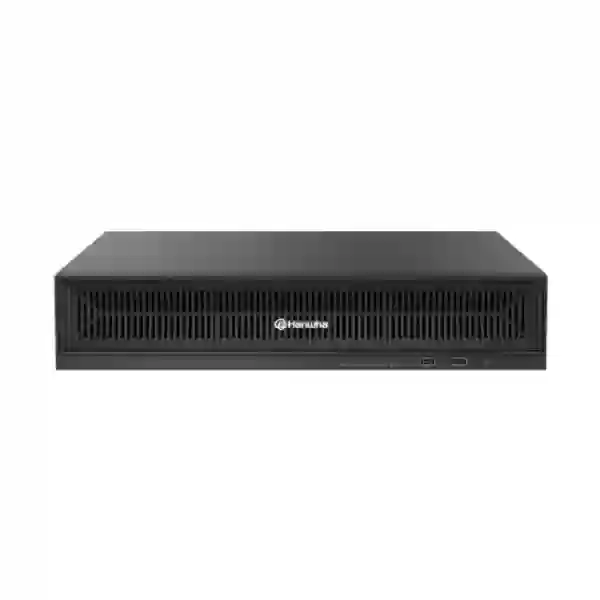
Hanwha XRN-6420B2-60 64-Channel NVR with 60TB Nominal Storage
The Hanwha XRN-6420B2-60 64-channel NVR supports centralized recording, multi-camera monitoring and structured investigation workflows for compatible IP surveillance installations. Evaluate the exact supplied storage configuration, camera bitrates, retention targets and network design before purchase.
Important: Hanwha documents the B2 family as non-RAID. A nominal 60TB capacity designation does not establish disk fault tolerance or guarantee a particular recording period.
Specifications at a glance
Further manufacturer-documented features include H.265, H.264 and MJPEG recording, dual HDMI display, SUNAPI and ONVIF support, schedule and event recording, compatible viewer tools and an integrated Trusted Platform Module. Recording, playback and display limits should be evaluated independently. Consult the actual seller configuration and supported drive information before using published platform figures as procurement specifications.
Technical specification reference
| Exact model | Hanwha Vision XRN-6420B2-60 |
|---|---|
| Device type | 64-channel IP network video recorder |
| Storage configuration | 60TB nominal; verify installed disks |
| Drive capacity | 8 SATA bays; up to 80TB platform maximum |
| Input resolution | Up to 32MP |
| Recording formats | H.265 / H.264 / MJPEG |
| Recording bandwidth | Up to 520Mbps distributed; 300Mbps normal |
| Playback bandwidth | Up to 200Mbps |
| Network camera interfaces | SUNAPI and ONVIF |
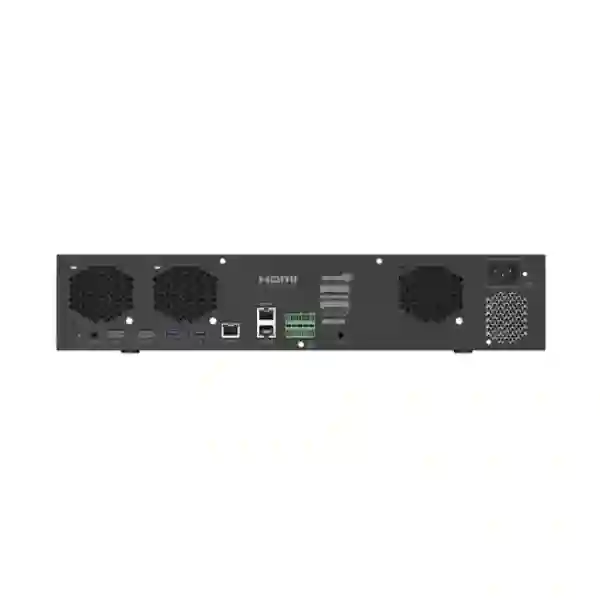
| Network ports | 3 Gigabit RJ-45 |
| Local HDMI | 4K 30Hz and 1080p 60Hz maximum outputs |
| RAID | Non-RAID B2 family |
| Power | 100–240V AC, 50/60Hz |
| Power draw | Up to 143W with eight HDDs |
| Operating environment | 0–40°C; 20–85% RH |
| Dimensions | 438 × 86 × 434.9mm approximate |
These platform characteristics are based on Hanwha’s product information. Configuration-dependent features should be checked for the offered model and firmware. No Tanzania inventory, local approval, selling price or commercial service terms are implied.
Why choose the XRN-6420B2-60 for a camera network?
The Hanwha XRN-6420B2-60 64-channel NVR is built around the need to collect IP camera recordings in a centrally managed system. It can be evaluated for premises with several entrances, warehouses, production areas and other points where security staff need a coordinated record. Instead of treating every camera as an isolated video source, a recorder organizes streams, search, live views and event workflows. That can make incident review more consistent when the camera network and staff procedures are properly designed.
The value of a central NVR comes from its fit to a real requirement. Count the planned cameras, establish what each camera must show, decide which staff require access and estimate the recording workload. Sixty-four input channels give expansion potential, but the design also needs sufficient recording bandwidth, storage and dependable networking. A product with spare channels may still be incorrectly sized if those other constraints are ignored. Request a project layout and recording calculation rather than choosing by input count alone.
What the 60TB model designation means
The exact -60 configuration is identified with 60TB nominal storage in model-specific references. That is a capacity designation, not a verified statement that a particular local seller has specific drives installed or that all 60TB will be free for video data. Filesystem overhead and recorder management reduce available space. Before purchasing, ask for written confirmation of the supplied drive quantity, capacities and supported models. Distinguish the complete factory or distributor configuration from any later storage modifications.
The XRN-6420B2 platform provides eight SATA hard-drive bays and a published maximum of 80TB with compatible drives. An 80TB platform ceiling does not mean the offered 60TB package has 20TB of immediate empty space; expansion depends on the actual disk population and drive compatibility. A buyer should check how the supplied capacity is arranged and whether future changes are supported. Avoid assuming that a large nominal figure provides storage redundancy, a fixed recording duration or an included long-term backup service.
Start with the security task, not the equipment size
A good surveillance specification begins with what the organization needs to observe and later prove. A loading entrance may need usable detail of arriving vehicles, while a corridor may only require a reliable record of movement. The camera resolution, lens, location, recording period and image quality should follow the evidence task. Once the camera schedule is clear, the recorder can be assessed against channel capacity, combined bit rate, playback needs and available storage. This process avoids paying for impressive but irrelevant technical maxima.
Consider the people who operate the site as well. A security guard may need live alerts, a supervisor may require access to selected cameras and an investigator may need controlled export of footage. Those tasks affect display layout, permissions and software. The best-fitting recorder is one that supports a workable daily routine. When requesting a quote from FourTeck Tanzania, include a short description of camera groups, operator roles, retention targets and expected expansion rather than simply asking for a sixty-four-camera device.
64 inputs do not guarantee unlimited recording quality
The recorder supports up to 64 network camera channels, but recording workload also depends on the resolution, codec, frame rate and bit rate of each stream. Sixty-four cameras watching static indoor scenes can demand a very different aggregate bit rate from sixty-four cameras observing moving vehicles. Even cameras with matching megapixel ratings may generate different video loads. Build a camera-by-camera estimate that includes real operating scenes and expected bitrate peaks. Leave engineering headroom instead of planning exactly at a theoretical ceiling.
Channel headroom is valuable for future growth but does not create more disk space or network capacity. Adding cameras can reduce the footage retention period even when the channel total stays within sixty-four. A site should therefore calculate both current and proposed future recording profiles. If the planned workload is unusually high, compare alternative recorder configurations or a multi-recorder architecture. The final decision should account for recording performance, concurrent investigations, monitoring arrangements and an agreed number of days of retained footage.
Understanding the 520Mbps and 300Mbps figures
Hanwha identifies up to 520Mbps recording bandwidth in distributed mode and up to 300Mbps in normal mode for the XRN-6420B2 platform. These are distinct operating conditions. The higher value should not be applied to every possible configuration without checking the selected mode. Include all intended camera recording streams in the estimate, and ask the system integrator how peak traffic and expected changes are handled. A clear recording-mode statement belongs in the design, not as an assumption discovered only after installation.
Recording bandwidth is also different from playback and viewing capacity. Hanwha lists up to 200Mbps playback bandwidth, so an investigation involving many recorded channels needs to be considered separately from live ingest. Camera traffic must reach the recorder through switches and uplinks that are sized correctly. If an operator views high-resolution streams remotely, that creates additional network considerations. A written bandwidth worksheet with the intended operating mode, camera profiles and realistic safety margin helps buyers distinguish a supported deployment from one relying on marketing shorthand.
Video codecs and the storage tradeoff
The XRN-6420B2 recorder supports H.265, H.264 and MJPEG. Codec choice affects the amount of data sent across the network and written to storage, but it does not guarantee a fixed compression ratio. Video containing frequent motion, rain, image noise or changing light can behave differently from a quiet office scene. Camera implementation, quality settings and frame rate also matter. Select a recording profile that preserves the evidence needed from the location rather than simply minimizing file size.
A sensible proposal lists codec, resolution, frame rate and target bit rate for every camera group. H.265 may allow lower bandwidth at comparable visual quality in suitable implementations, although compatibility and actual results must be checked. Where a camera supports multiple streams, a lower-bandwidth live-view profile may be useful for crowded monitoring layouts while the required recording profile remains intact. Verify that live streams, search and exports function correctly with the selected codec. Storage savings are only beneficial when footage remains fit for its intended purpose.
How to estimate recording days from nominal storage
No responsible supplier can promise a universal number of recording days solely from a 60TB label. As a rough planning rule, a continuous 1Mbps stream uses about 10.8GB per day before overhead and real-world variations. Multiply this value by the total average camera bitrate to estimate daily recorded volume. For example, forty cameras averaging 4Mbps each consume roughly 1.73TB each day before practical allowances. Dividing a nominal capacity by this figure produces only an illustration, not a verified operational retention promise.
Real usable space can be lower than raw drive capacity and camera bit rates fluctuate over time. Event schedules, multiple recorded streams, metadata and recording policies can alter the result. Set a minimum retention target by camera group, then calculate against usable disk space and expected load. Review whether critical entrances need continuous recording while lower-risk areas can use tested event policies. After commissioning, inspect the oldest available footage and verify actual storage consumption under representative conditions. Retention should be rechecked whenever cameras or settings change.
Storage is not the same as redundancy
The XRN-6420B2 family is described by Hanwha’s support information as non-RAID. Therefore this model should not be promoted as having RAID 5, RAID 6, mirrored drives or automatic parity-based disk protection. A buyer who needs recording continuity after a hard-drive failure should treat that requirement separately from the nominal 60TB capacity. Check a verified RAID-capable alternative when redundancy is essential, and account for the reduction in usable space introduced by its chosen disk-protection method.
Protection also requires power continuity, secured equipment, monitoring, operating procedures and an appropriate evidence-copy policy. Neither a large disk total nor RAID alone ensures that critical events cannot be lost. Establish the expected recovery time after a recorder problem, the acceptable evidence-loss window and the method for preserving footage. Drive-health checks and clear response responsibilities are especially important with a non-RAID recorder. Ask the supplier to state exactly what is included in the resilience design rather than accepting a broad description such as enterprise-grade protection.
Automatic recovery and failover need planning
Hanwha’s wider XRN-6420B2 documentation lists Automatic Recovery Backup support and N+1 failover capability. These are useful features to investigate, but their benefits depend on a supported system arrangement and correct configuration. They should not be described as automatic protection of every installation by default. A single recorder without a configured partner or compatible camera-side recovery process cannot be assumed to meet an organization’s full business-continuity objective. The design must explain the prerequisites and the behaviour expected during an outage.
Determine which failure matters most: a camera losing network access, a failed hard disk, a stopped recorder or a power interruption. These events require different controls. If failover or recovery recording forms part of the proposed solution, insist on an acceptance test showing the expected footage and restoration procedure. Document any delays, limitations and operating responsibilities. Avoid confusing recovery functions with RAID, cloud backup or immutable archives; those are different storage and continuity concepts requiring separate verification.
32MP camera inputs and real viewing limits
The recorder supports network camera inputs at resolutions up to 32MP. Higher detail can be helpful in wide scenes or places where a recorded image must be enlarged, but that does not guarantee the same frame rate or local display decoding across every camera. Hanwha publishes resolution-dependent decoding combinations, including conditions for 32MP H.265 streams. Check the precise intended mix of cameras and display layouts. A channel count and a resolution maximum should not be multiplied together as though there were no processing limits.
Camera placement often matters more than headline megapixels. An unsuitable lens, excessive distance or difficult lighting can reduce usable identification detail even when the sensor has many pixels. Choose cameras around real evidence questions such as which doorway was used or what happened at a loading point. Review daytime and nighttime samples, motion, backlighting and exposure settings. If a multi-view display uses lower-resolution secondary streams, ensure that a detailed recorded stream remains available for investigations. Treat recording, decoding and display quality as related but separate design decisions.
Dual HDMI monitors and a practical security desk
The recorder offers two HDMI connections, with manufacturer-listed limits of 3840 × 2160 at 30Hz for HDMI 1 and 1920 × 1080 at 60Hz for HDMI 2. Its dynamic layouts and virtual-channel viewing features can help operators organize a changing collection of scenes. A security desk might keep priority entrances on one view while using another for a selected incident or rotating group. This is more useful than filling every display with tiny camera tiles that staff cannot interpret.
Plan the human workflow before purchasing monitors. Decide which views must remain visible, how an alarm brings attention to a scene and how a user moves into playback. Review monitor dimensions, desk arrangement, viewing distance and any separate management workstation requirements. Two HDMI outputs do not mean unlimited independent display decoding, so the camera mix and local layout still need validation. When several operators or sites need simultaneous access, a compatible software-based monitoring architecture may be preferable to simply adding larger screens.
IP camera switches and PoE power
The 64 camera inputs are network channels, not sixty-four dedicated PoE connectors on the recorder. Cameras normally connect through Ethernet switches and receive their own appropriate power. If Power over Ethernet is used, specify the PoE standard, per-port requirements and total switch power budget. A site may need several switches distributed across its buildings rather than one unit near the recorder. Include switch uplinks and power supplies as part of the overall system estimate, not as assumed contents of the NVR package.
Under-sized switching can cause missing images, unstable streams or unexpected latency even when the recorder is operating correctly. Plan uplink bandwidth for the full group of camera streams and any required viewing traffic. Outdoor cameras may require appropriate cabling, surge protection and environmental equipment. Document how the network is segmented from general office traffic where appropriate. Ask the installer to provide a simple topology with switch positions, uplinks, network addresses and the physical path used to reach the recorder. Test connectivity under normal and peak conditions.
Network ports and multi-building connectivity
The Hanwha XRN-6420B2 platform lists three Gigabit RJ-45 interfaces. These provide connectivity options, but they do not remove the need for careful routing, network isolation and link sizing. A campus with cameras spread among buildings can require fibre links, protected outdoor pathways and switches with adequate uplink capability. The resulting traffic is shaped by camera configurations and the network architecture. Simply counting physical ports does not establish aggregate recording throughput or guarantee that a given topology is suitable.
A good project drawing identifies each camera network, the recorder interfaces, management paths and any inter-building connection. Review possible single points of failure and decide how faults will be detected. Ensure consistent camera addressing and reliable time synchronization. Where remote viewing crosses other business networks, involve the organization’s IT team in the access design. Test network latency, packet loss and reconnection behaviour under realistic load. A robust recorder will still miss video if its upstream switching or cable infrastructure is unreliable.
ONVIF and SUNAPI camera integration
The recorder supports ONVIF and SUNAPI camera connectivity. These interfaces can make it easier to use supported IP camera equipment, but an ONVIF connection does not establish universal feature compatibility. Some cameras may provide ordinary live video while their advanced events, PTZ controls, audio or metadata require additional support. The camera make, exact model, firmware and stream profiles should be documented. For mixed-brand installations, the proof should come from testing the actual features the customer needs rather than from a generic compatibility claim.
Create a small matrix covering each camera family, supported video codec, selected resolution, frame rate, event type and intended user action. Test at least one representative unit when practical, especially during upgrades from older equipment. Check that camera clocks agree with the recorder and that the correct streams are selected for recording. If the site has an existing video management platform, verify whether required integrations are supported. The goal is to preserve operational capability, not merely display pictures from newly connected devices.
AI search is conditional on compatible cameras
Hanwha lists an AI search capability associated with compatible Hanwha AI cameras. That does not mean the NVR automatically performs every advanced analytic function on footage from any ordinary network camera. Analytics depend on the camera model, supported metadata and the software workflow in use. If the purchasing decision relies on filtering footage by objects or attributes, request a demonstration with the intended cameras and representative scenes. The acceptance criteria should identify exactly what users must be able to find.
Security projects sometimes overvalue AI labels without examining usefulness. An alert or search result matters only if it fits the task and can be reviewed by an operator. Specify whether the organization requires people or vehicle attributes, a particular event trigger or a faster investigation method. Confirm camera support, firmware and search behaviour before promising an outcome. For ordinary video evidence, proper camera placement, resolution and recording integrity remain foundational. AI-assisted search should be viewed as a specific supported workflow rather than a universal substitute for surveillance planning.
Continuous, scheduled and event recording
The recorder supports continuous recording, scheduling and event-driven modes, including configurable recording around events. Continuous video may be appropriate for entrances and other critical zones because it avoids relying entirely on a detection trigger. Event recording can be useful in lower-activity locations, but it must be tested for missed incidents and unwanted alerts. A schedule may align with operational patterns, yet the customer should consider what happens outside regular business hours. Select policies based on risk, evidence requirements and measured storage demand.
Define what happens after an alarm is received. Some events need immediate attention while others are maintenance notifications. Establish who acknowledges alerts, how the incident is logged and whether recorded footage must be preserved. Incorrect alarm settings can overwhelm operators or allow important activity to pass unnoticed. Test motion events, video loss and any required camera analytics in realistic conditions, including darkness and busy scenes. Review settings when premises or staffing change. Recording rules should be part of a written operating plan, not left as unexamined defaults.
Playback, searching and incident review
Time-based and event-based search, playback and supported export options help turn recorded video into a usable investigation resource. Design the workflow around how staff identify an incident: where it occurred, when it began, which cameras cover the route and who is authorized to review it. Consistent camera names and accurate clocks make searches faster. Recording may continue while an investigator is reviewing earlier footage, so the proposed design should consider playback bandwidth, client resources and the number of simultaneous users.
An incident workflow should specify how footage is exported, labelled and handed to an authorized recipient. The organization may need an audit trail recording who made the request, what footage was provided and where the original remains. Check that the export format can be opened as intended and preserves useful timing information. Test retrieval of a multi-camera incident before accepting the system. A recorder’s search features are valuable only if staff can reliably locate the right event and preserve evidence before the ordinary recording cycle overwrites it.
Evidence retention is not a permanent archive
Video stored in a cyclic recording system is commonly overwritten when available space is needed for new footage. A nominal retention target therefore should not be treated as a permanent archive. If footage becomes relevant to an investigation, staff need a defined process to preserve it promptly through an approved export or storage workflow. Decide who is permitted to preserve footage, how long it should be retained and how unauthorized distribution will be prevented. These policies should follow the organization’s requirements and applicable obligations.
A business may need separate storage for important incidents or a procedure for secure external copies. These choices should not be assumed to be included with the NVR. Plan evidence handover, access review and deletion or retention decisions. For a facility with occasional serious incidents, it may be more practical to preserve selected clips than to retain all camera footage indefinitely. Confirm the site’s approach with responsible management and assess whether the proposed hardware, software and staff procedures support it. Storage calculations and evidence governance should be reviewed together.
Trusted Platform Module and system security
An integrated Trusted Platform Module forms part of the Hanwha XRN-6420B2 security design. Hanwha also documents features such as signed firmware, access logs and network security mechanisms in the product family. These are useful controls but do not mean the finished installation is secure without configuration. Assign individual users, keep administrator accounts limited, apply strong credentials and review permissions for viewing, export and system changes. Make account administration part of project handover, not an informal task left to the first operator.
Surveillance video can be sensitive. Keep recorder management interfaces away from unrestricted public internet exposure, use approved remote-access paths and separate camera traffic where appropriate. Maintain an inventory of connected equipment, firmware and configured users. Review security updates through official manufacturer processes, considering compatibility before changing production systems. Remove unused accounts and preserve configuration backups securely. A TPM provides a security component; the surrounding network architecture and regular administration determine whether the organization maintains that protection over time.
Remote access and mobile viewing
Hanwha supports compatible web, desktop and mobile viewing workflows for this recorder family. Remote viewing can help supervisors respond to incidents or review selected areas outside the local security room, but it must be configured around actual permissions and available connectivity. Not every remote user needs full access to every camera. Define which staff can watch live streams, search recordings or export evidence. Test the client applications and supported device versions expected to be used rather than relying on an assumed universal compatibility statement.
For Tanzania deployments, the relevant connectivity question is the real upload capacity, latency and availability at the specific site. Internet packages and mobile connections can behave differently under sustained video use. An individual remote preview may work well while multiple high-quality streams strain the link. Consider lower-bandwidth viewing profiles where appropriate without changing required recording quality. Work with the customer’s IT team on authentication and network security. Do not promise that footage will always be available remotely under all site, power and network conditions.
Power consumption, UPS and safe shutdown
The XRN-6420B2 platform uses 100–240V AC at 50/60Hz. Hanwha publishes a maximum power figure of approximately 143W for an eight-HDD configuration. That is not the total load of a complete video surveillance network. PoE cameras, Ethernet switches, fibre equipment, screens and workstations also need power. Calculate the actual combined demand and select suitable backup power if continuity is required. The size of the UPS should reflect the desired run time and approved shutdown behaviour, not only the recorder specification.
Confirm what the site should do when power is lost and restored. A short interruption may affect camera switches before it affects the recorder, resulting in missing footage even when the NVR stays online. Document power circuits, surge considerations and which devices are protected by backup equipment. A facility with critical entrances may require different continuity measures from an ordinary monitoring site. Test the installation’s restart and recovery behaviour during commissioning under an approved procedure. Power design is an important part of recording integrity.
Temperature, humidity and cabinet layout
Hanwha specifies operating temperatures from 0°C to 40°C and operating humidity between 20% and 85% RH for the XRN-6420B2 platform. These limits should be evaluated against the conditions inside the equipment cabinet rather than only the ambient room temperature. Heat from drives, switches and other devices can accumulate in enclosed racks. Dust, poor airflow and inaccessible installations can create maintenance problems. Choose a protected equipment location with appropriate ventilation and controlled access.
The chassis measures approximately 438 by 86 by 434.9 millimetres, without accounting for all cable clearance and service space. Confirm the cabinet depth, mounting arrangement and access to drive compartments and ports. Label power feeds, cables and recorder connections so that technicians can diagnose problems safely. Where a location is warm or exposed to dust, the enclosure and cooling plan deserve extra attention. Verify the actual temperature under normal full-load operation. A recorder’s electrical and environmental specifications are practical installation requirements, not decorative numbers on the catalogue.
Typical settings where this product may fit
A warehouse can use a centrally managed recorder to track loading areas, controlled entrances and internal movement, provided the cameras capture useful detail. An office site may require reception, access-control points and shared passages to be viewed by different authorized roles. An industrial facility may prioritize perimeters, equipment zones and events occurring outside office hours. These examples illustrate possible use cases rather than claims that the recorder is deployed at any named organization or approved for a particular facility.
Each environment creates different design criteria. Warehouse movement may raise bit rates and storage demand. A multi-building campus may require fibre infrastructure and more complex network management. A hotel or public-facing premise may place greater emphasis on access permissions and responsible footage handling. The recorder should be evaluated against these facts, including the number of planned cameras and retention requirements. If the workload is small, a lower-capacity system may be sufficient. If fault tolerance is mandatory, a different recorder family may be more appropriate.
Procurement checks before ordering
Ask for the exact product identification XRN-6420B2-60 and a written specification of the offered nominal 60TB drives. Supply the camera list, required recording period, intended resolution and bit rate, operator locations and remote-access needs. Request confirmation of recording mode, compatibility and usable capacity assumptions. If the project requires RAID, flag that clearly because the B2 family is documented as non-RAID. Do not accept a vague statement that a 60TB recorder must automatically meet the retention or redundancy objective.
Ask the supplier to identify separately required switches, PoE power, UPS equipment, displays, cabling, client software and commissioning work. Local price, taxes, delivery time, stock, warranty and installation coverage must be confirmed on the actual offer rather than invented in product copy. A clear bill of materials should distinguish included items from optional components. The approved proposal should also name the acceptance tests. This approach lets the buyer compare full systems that can perform the intended work instead of comparing isolated recorder prices with different exclusions.
Commissioning, training and maintenance
During commissioning, confirm drive capacity and health, supported firmware, camera settings, network connectivity, clock synchronization and user permissions. Test recording under the expected full camera load, and confirm that storage use corresponds to the retention worksheet. Demonstrate alarms, local display layouts, search, playback, export and approved remote access. Where recovery or failover functions are proposed, test the specific supported configuration. The final handover should include an as-built diagram, camera schedule and written operating procedure.
After deployment, assign responsibility for checking failed-camera alerts, storage status, account access and firmware maintenance. Changes to scenes, frame rates or camera count can alter the bit rate and reduce retention, so revise calculations after significant updates. Test incident export periodically and verify that staff know how to preserve important recordings. For a non-RAID model, keep drive-health monitoring and an evidence-preservation plan visible. An NVR investment performs best when it comes with practical maintenance, clear ownership and training rather than ending at the first successful live image.
Frequently asked questions
Is XRN-6420B2-60 the 60TB configuration?
The exact -60 model is associated with 60TB nominal capacity in model-specific references. Verify the supplied drive arrangement on the seller’s written quotation. The amount available for stored video can be lower after formatting and system use.
How many cameras will it support?
The recorder allows up to 64 IP camera channels. Actual design capacity also depends on aggregate recording bitrate, the selected operating mode, available storage and display requirements.
What recording formats can it use?
Hanwha lists H.265, H.264 and MJPEG. Choose compression with the intended cameras and verify that quality, playback and retention meet the operational requirement.
Does it record every camera at 32MP?
The platform supports input resolution up to 32MP, but simultaneous recording and local decoding are subject to processing and bandwidth constraints. Check the specific camera combination.
How long can 60TB hold footage?
There is no reliable universal figure. Calculate retention using camera count, recording bitrates, schedules and usable storage, then validate the oldest available video after commissioning.
Does the B2 model have RAID?
Hanwha’s product support describes the XRN-6420B2 family as non-RAID. If disk redundancy is required, request a verified RAID-capable alternative.
What is the difference between 520Mbps and 300Mbps?
Hanwha specifies up to 520Mbps in distributed recording mode and up to 300Mbps in normal mode. Select and document the correct mode in the project design.
Can it be used with ONVIF cameras?
The recorder supports ONVIF and SUNAPI. Individual camera functions can vary, so test video, events, audio, PTZ and metadata compatibility for the chosen models.
Does it provide Power over Ethernet to 64 cameras?
Do not assume that. Cameras normally require properly specified network switches and PoE power supplies separate from the NVR.
Does the NVR have two display outputs?
Yes. The product family lists dual HDMI outputs with different 4K and Full HD refresh-rate limits. Confirm decoding and layout requirements for the proposed monitors.
Can staff watch footage remotely?
Compatible Hanwha viewing tools and supported access methods can provide remote viewing. Actual performance depends on network capacity, software compatibility and secure configuration.
Will AI search work with any camera?
No. Hanwha associates AI search with compatible Hanwha AI cameras and supported metadata. Confirm the exact analytical workflow before purchasing.
Can it survive a recorder failure automatically?
The product family documents recovery and failover capabilities, but these require supported equipment and configuration. They are not a guarantee that a single recorder installation is fault tolerant.
What local price or warranty is offered?
No Tanzania price, stock level, delivery period or warranty term is verified in this guide. Obtain current terms for the exact model from the supplier.
What details are needed for a FourTeck quotation?
Provide the exact model, camera schedule, resolution and bitrate targets, required retention, viewing requirements and site conditions. Request a drive-configuration and compatibility review with a complete bill of materials.
Request a configuration review
Contact FourTeck Tanzania with the camera list, preferred retention period, recording profiles, monitoring needs and project location. Ask for a written quotation confirming the exact XRN-6420B2-60 drive package, compatibility and any separately needed network equipment. If disk redundancy is mandatory, request a separately verified RAID-capable option. The final commercial terms should come from the actual supplier quotation.
Ask FourTeck Tanzania for a project-specific quote and storage-sizing review.




Reviews
There are no reviews yet.