
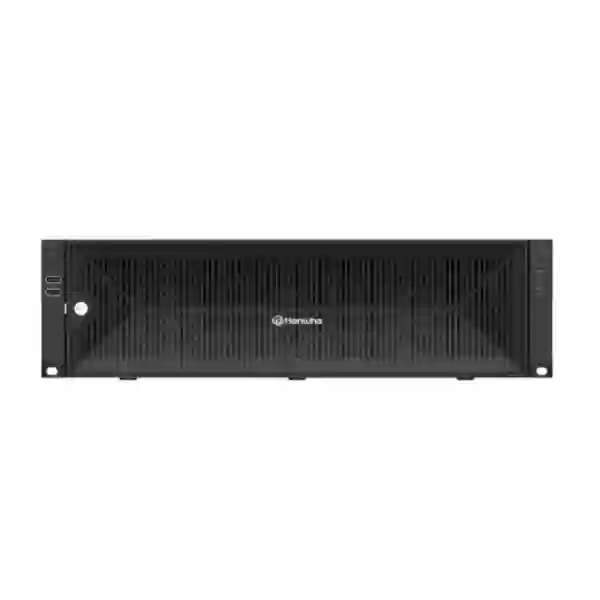
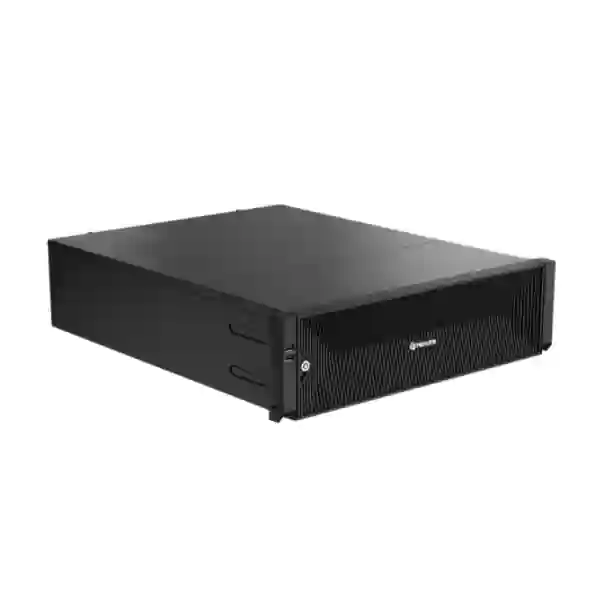
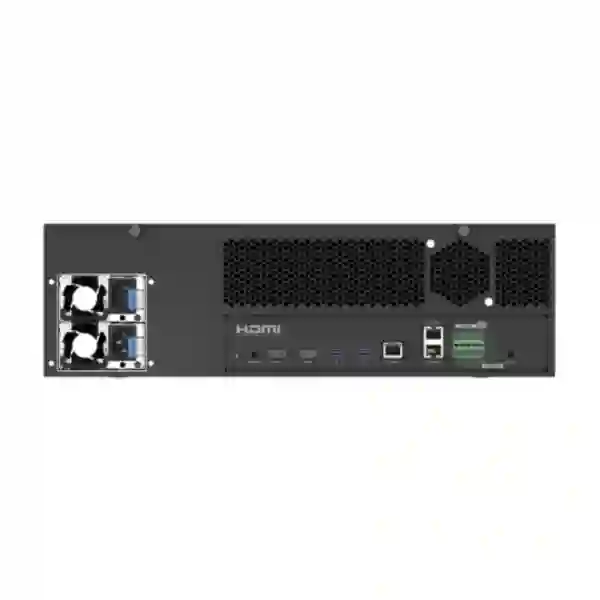
Hanwha XRN-6420DB4-60 64-Channel Network Video Recorder
Need a central recorder for a growing commercial IP surveillance system? The Hanwha XRN-6420DB4-60 offers up to 64 camera inputs, 16 SATA drive bays, RAID 5/6 support and dual power supplies. Plan it around your actual camera bitrates, retention target and operations—not headline limits alone.
For a project-specific quotation in Tanzania, provide the camera schedule, desired retention period and preferred recording setup so the full system can be assessed.
At a glance: what buyers should verify
The recorder’s published 160 TB is a non-RAID raw-capacity ceiling, not guaranteed included storage or net usable space. The maximum 520 Mbps recording figure depends on the stated operating mode. Object-attribute AI search requires compatible Hanwha AI cameras. Confirm all disks, RAID settings, camera models, software and commercial inclusions in the final quotation before ordering.
Verified technical specifications
These are published family specifications from Hanwha Vision. Confirm the supplied XRN-6420DB4-60 configuration and any firmware-dependent details before ordering.
| Camera inputs | Up to 64 network-camera channels |
|---|---|
| Camera resolution | CIF to 32 MP |
| Recording throughput | Up to 520 Mbps distributed mode; up to 300 Mbps normal mode |
| Playback throughput | Up to 200 Mbps |
| Video codecs | H.265, H.264, MJPEG |
| Drive configuration | 16 SATA bays, up to 10 TB per supported drive, 160 TB raw non-RAID ceiling |
| Redundant storage | RAID 5 and RAID 6 options; array design affects usable capacity |
| Power | Dual AC inlets and dual SMPS |
| Video displays | HDMI 1: up to 4K at 30 Hz; HDMI 2: up to 1080p at 60 Hz |
| Network ports | 3 RJ-45 connections, 1 Gbps |
| I/O | 8 alarm inputs, 4 alarm outputs, 4 USB ports |
| Operating environment | 0°C to +40°C; 20% to 85% relative humidity |
| Dimensions | Approx. 440 × 132 × 571.1 mm |
| Weight | Approx. 15.1 kg without HDDs |
| OS and security | Embedded Linux; integrated TPM and manufacturer-listed security features |
Is this the right 64-channel NVR for your project?
The Hanwha Vision XRN-6420DB4-60 is intended for organisations that need to record, review and manage a substantial number of IP security cameras from a central appliance. Its stated capacity is up to 64 network-camera inputs, with support for camera resolutions from CIF to 32 megapixels. That makes it a candidate for facilities where a small eight- or sixteen-channel recorder would require multiple separate devices. The final choice still depends on actual video bitrates, storage retention, event requirements and the software used by operators.
For a buyer planning a CCTV system in Tanzania, the practical question is not simply whether a recorder says 64 channels. Ask whether it can capture your chosen cameras at the required quality while allowing security staff to review incidents and export footage. The XRN-6420DB4 family provides a useful high-capacity foundation, but the record mode and storage configuration must be designed before procurement. Request a configuration review covering channel count today and realistic expansion.
Understand the exact model before placing an order
The requested designation is XRN-6420DB4-60. Hanwha Vision identifies that designation in its product-lineup material, while its detailed global technical documentation describes the XRN-6420DB4 family. This page uses the manufacturer-verified family specifications to explain the specified unit, rather than assuming the suffix proves a particular country warranty, bundle or accessories. Confirm the exact commercial part number and package contents in the supplier quotation before approving a purchase order.
The DB4 variant is important because Hanwha distinguishes it from the XRN-6420B4. Both are 64-channel family members, but the DB4 has two AC power inlets and dual power supplies, whereas the B4 lists one AC inlet. If you require power-supply redundancy, ask for the DB4 designation explicitly and verify it on the quotation and packaging. Do not treat a similar-looking single-supply model as interchangeable simply because its camera count matches.
64 channels: plan the actual camera mix
A 64-channel limit describes the maximum number of network cameras accepted by the recorder; it is not a promise that every camera can record at its highest possible bitrate simultaneously. Create a camera schedule naming every entrance, corridor, yard, perimeter line, loading bay and cash-handling point that the system must cover. Beside each camera, record the proposed resolution, frame rate, compression type, approximate scene complexity and intended recording schedule. These values form the basis of a realistic recorder and storage design.
Allow for future additions rather than consuming all available inputs immediately. A business with forty cameras today may plan a new warehouse, extra gates or a second shift that requires better coverage. Reserving channels is useful, but do not reserve so much unused capacity that the project pays for unsuitable equipment. Where a site will exceed 64 cameras, assess multiple recorders and the management architecture rather than expecting an undocumented channel expansion.
Recording bandwidth: 520 Mbps needs context
Hanwha lists up to 520 Mbps recording bandwidth for distributed mode and up to 300 Mbps for normal mode. The manufacturer also states up to 520 Mbps in the described RAID operating conditions. These are mode-specific figures, not a single universal promise for every profile or installation. A proposal should name its intended mode and compare the sum of simultaneous camera streams with the correct documented limit. Include reasonable design headroom for changing scenes, higher motion and operational adjustments.
For example, a camera may use less bandwidth when a corridor is quiet and more when activity, rain, foliage or moving vehicles appear. Treat bitrate as a measured or properly estimated engineering input, not an immutable property of a camera’s megapixel count. The recorder also has a listed transmission-bandwidth figure, but remote viewing patterns and network design matter separately. Ask your integrator for a channel-by-channel bandwidth worksheet rather than relying on a camera-count brochure.
Picture quality and decoding limits
The recorder accepts IP camera streams with supported resolutions up to 32 MP. Hanwha’s local decoding specification is more detailed: examples include a 32 MP stream at 15 frames per second with H.265, four 8.3 MP streams at 30 frames per second, or sixteen 1080p streams at 30 frames per second. Those examples describe decoding capability and do not mean the same camera count can be displayed at every resolution and speed.
Separate three questions when specifying the system: what each camera can capture, what the recorder can write to storage and what the local monitors can decode simultaneously. A warehouse investigation may depend on high-quality recorded footage even if a live display uses lower-resolution substreams. Good commissioning verifies live viewing and recorded playback independently. Ask for a demonstration using the intended camera profiles, because a simple desktop preview cannot reliably predict performance with a full 64-camera deployment.
H.265, H.264 and MJPEG compatibility
The XRN-6420DB4 supports H.265, H.264 and MJPEG recording. H.265 can be useful when compatible cameras and viewing systems are configured to reduce video data for a given visual objective, but savings vary with scene, profile and encoder settings. H.264 remains a common interoperability choice, while MJPEG has different bandwidth and storage implications. Do not change codecs solely to chase a storage figure without checking playback and export requirements.
During system design, align each camera’s supported encoding profile with the recorder’s capabilities. Document any smart compression or camera-specific setting that affects motion detail. Confirm that investigators can view the exported footage using an acceptable format and permitted workstation. The objective is footage that remains useful when an incident occurs, not simply the smallest possible file. Test faces, vehicle movement and poorly lit areas under conditions representative of the actual site.
Sixteen drive bays and raw capacity
Hanwha specifies sixteen SATA hard-drive bays, with a documented maximum of 10 TB for a supported drive and 160 TB total in non-RAID mode. This is a raw-capacity ceiling, not the amount of usable footage storage under every configuration. RAID parity, formatting, operating overhead and the required retention period change the effective result. Compatible surveillance HDD models and approved capacities must be checked against the manufacturer’s current compatibility list.
Do not assume drives are included simply because the chassis can accept sixteen. Manufacturer product information for the family includes a no-HDD configuration, so the final Tanzania quotation should identify the actual disk count, model, capacity and installation scope. A system built with a few drives may have a very different retention period from a fully populated recorder. Ask for the retention calculation in days, based on realistic stream bitrates and recording schedules, before signing off.
RAID 5 and RAID 6: protection with tradeoffs
The recorder supports RAID 5 and RAID 6, with manufacturer documentation describing arrays of up to eight disks each and two arrays. RAID uses capacity for redundancy and can help an array continue operating through certain disk failures, depending on the selected level. It is not a substitute for an evidence-backup process, secure access controls or a separate disaster-recovery plan. RAID design also affects usable capacity and the number of disks needed to establish an array.
A buyer should decide whether drive-failure tolerance matters more than maximizing raw storage. Discuss rebuild behaviour, spare-drive procurement, drive-health alerts and maintenance access with the installing team. A local security operation with limited after-hours technical staffing may value clear disk-replacement procedures as much as headline capacity. Make sure the final handover states the RAID level, the physical drive-to-array map, monitoring contacts and a recovery procedure that staff can follow.
Hot-swap disks are not a maintenance policy
Hanwha describes hot-swap support, and its product information specifically links hot swapping to RAID mode. That feature can simplify planned drive replacement in a correctly configured system; it should not be interpreted as permission to remove any drive at any time. Disk selection, array health, failure identification and the vendor’s maintenance procedure remain essential. An incorrect removal can increase the risk to recordings that the organisation needs to preserve.
Create a simple log of hard-drive serial numbers, installation dates, capacity, health checks and authorised replacements. Before maintenance, confirm which physical bay is affected and what the recorder reports about array status. Train technicians to distinguish a failed disk from a network-camera fault. If a security team depends on footage every day, define how recording continuity will be checked immediately after any service activity. These practical controls turn storage redundancy into a useful operational benefit.
Design retention before buying drives
Retention is a policy and engineering calculation, not a fixed number printed on the NVR. Identify how many days of footage you need for each camera group and why. A loading dock, reception desk and low-activity equipment room may have different risk profiles. Retention settings should follow the organisation’s needs, applicable obligations and access practices. The number of cameras, average and peak bitrate, event frequency and recording schedule all affect the resulting capacity.
Request estimates for continuous recording and for any proposed event-based schedule. Then test them using actual camera streams where possible. State whether the calculation assumes H.265, H.264, particular frame rates or reduced-quality secondary streams. Build in headroom for seasonal scene changes and new cameras. Specify how the recorder behaves when available storage is exhausted, and agree who is authorised to retrieve footage before an overwrite cycle removes it.
A practical storage-sizing workflow
Start with the camera schedule and a target retention period. Group cameras that share similar resolution, frame rate and scene activity, then estimate the bitrate for each group. Multiply each stream’s average bitrate by recording hours and days to obtain approximate data volume, then sum the results. This gives an initial sizing estimate rather than an assurance of exact performance. Apply the planned RAID scheme to calculate usable capacity, and account for drive and system overhead.
Next, validate estimates against sample recordings. An entrance with frequent vehicle movements may differ markedly from a quiet indoor hallway even when both cameras use the same nominal settings. Add headroom and document assumptions in the proposal. If the result is close to the recorder’s practical storage capacity, reduce unnecessary recording volume through justified profile changes or reconsider architecture. Do not cut essential image detail merely to meet an arbitrary hard-drive budget.
Dual power supplies and business continuity
The DB4 model provides two AC power inlets and dual power-supply hardware. This reduces dependence on a single internal supply, but the deployment must still consider how external power is delivered. Connecting both inlets to the same unprotected circuit will not address every upstream failure. Power redundancy should be designed as a complete path, including suitable distribution, surge protection and uninterrupted power where needed.
For Tanzanian sites planning a security-control room, investigate expected electrical conditions at the actual facility rather than assuming they match another location. Ask the electrical team to assess the network switches, cameras, recorder and monitors together. A recorder can remain powered while the system still loses video if its PoE switches or network links fail. Commissioning should simulate appropriate fault scenarios and confirm that operators receive clear alerts. Never describe dual power supplies as a guarantee of uninterrupted recording.
Network ports and segmentation
Hanwha lists three RJ-45 Ethernet ports at 1 Gbps for the XRN-6420DB4 family. Those physical interfaces support network design options, but they do not automatically make every topology appropriate. The security network should be planned around camera traffic, management access, viewing workstations, uplinks and any remote connectivity. Good network design is particularly important when many cameras generate simultaneous streams.
Consider separating camera traffic from general office devices through the network architecture and access policies approved for the site. Verify IP addressing, switch capacity, VLAN requirements if used, and cabling quality. Use network diagrams that show exactly where the recorder, switches and authorised viewers connect. If cameras are located in separate buildings, review fibre or wireless-link capacity and resilience before deployment. A recorder with strong published specifications cannot correct congested or unreliable links elsewhere in the system.
Camera compatibility: SUNAPI and ONVIF
The manufacturer identifies SUNAPI and ONVIF support on the recorder. These interfaces can support integration with compatible IP cameras, but the existence of a standard does not establish that every camera-specific function will work. Recording, motion events, PTZ control, audio, analytics metadata and firmware-dependent settings may have separate compatibility considerations. For a mixed-camera project, prepare a model-by-model compatibility assessment rather than assuming all ONVIF devices are identical.
Confirm the firmware versions proposed for both camera and recorder. Test discovery, authentication, time synchronisation, recording, event triggers and playback for representative devices before the full rollout. If the project depends on Hanwha-specific AI search, verify supported Hanwha AI camera models and metadata rather than expecting equivalent results from third-party cameras. A pilot test is especially valuable when replacing an older recorder while keeping existing cameras in service.
AI search depends on compatible cameras
Hanwha lists object-attribute AI search for the recorder when compatible Hanwha AI cameras are used. This capability can help operators narrow investigations using supported metadata, but the NVR should not be represented as creating every AI attribute from arbitrary video streams on its own. The accuracy and availability of searchable attributes depend on the relevant cameras, firmware, scene conditions and settings.
Ask which attributes are needed in your environment and test them against real situations. Vehicle types, clothing descriptions or other supported tags may help reduce manual searching, yet staff should still review original footage and verify relevant results. Avoid promising identification accuracy or treating a search filter as proof of an event. Where analytics is a priority, select the camera and recorder as a validated combination, and document what information will actually be stored and searchable.
Security features and responsible configuration
The XRN-6420DB4 family includes a Trusted Platform Module and manufacturer-listed features such as signed firmware, TLS, device certificates, IP address filtering, user-access logs and 802.1X support. These capabilities provide foundations for a better-controlled deployment, but secure operation requires configuration and ongoing administration. A feature in a datasheet does not replace a current firmware policy, sensible passwords or staff awareness.
Assign unique user accounts where appropriate, restrict administrator privileges and review how remote access is authorised. Disable unused services when permitted and ensure time settings are accurate for audit logs. Treat the recorder as a security-sensitive network asset: document its owner, update procedure, backup settings and incident response contact. The manufacturer’s description of NDAA compliance relates to its published product claim; it should not be misrepresented as a separate approval or certification issued by Tanzanian authorities.
NDAA claims and local procurement
Hanwha markets this X-series NVR family as NDAA-compliant. Buyers working under particular contractual or public-sector procurement policies may find that designation relevant. However, an international manufacturer’s NDAA statement does not itself prove compliance with every tender, deployment rule or local procurement requirement. The organisation purchasing the equipment remains responsible for checking requirements that apply to its project and the exact model supplied.
For a tender submission, keep a record of the model designation, supporting manufacturer documentation and the requested commercial configuration. Ask the supplier to explain any required declarations without claiming approvals that are not evidenced. If the purchase has special security, data-handling or acceptance conditions, have the responsible project team review those separately. This product page is a technical guide for selection and should not be used as a substitute for contractual or regulatory assessment.
Dual HDMI and monitoring-room layout
The recorder provides two HDMI outputs. Hanwha specifies HDMI 1 at 3840 × 2160 up to 30 Hz and HDMI 2 at 1920 × 1080 up to 60 Hz, with clone and expanded display modes. Dynamic layouts and virtual channel view can help operators organise camera views. These functions are useful for a control room that monitors entrances, gates, reception and critical equipment from one recorder.
Design the screen layout around operator tasks rather than filling every window with footage. A large grid can be useful for overview, but an incident review often needs selected cameras at meaningful size. Confirm which monitor will be used for recorder setup and which layouts are supported for simultaneous viewing. Test switching between live monitoring, event review and playback so staff know what appears on each display. The published decoding limits still govern how many high-resolution streams can be displayed together.
Playback and evidence review
Hanwha specifies playback bandwidth up to 200 Mbps and supports multiple search modes, including time, event, text, bookmark and smart search. These are useful for a security team that must find an incident quickly while maintaining ongoing monitoring. Playback capability should be evaluated separately from the maximum recording-channel count, because different operators and applications may place different demands on the system.
Define a retrieval workflow before the equipment goes live. Staff should know how to choose the correct camera and date, inspect neighbouring time periods, export required segments and record who handled the evidence. Validate local and network export formats with authorised investigators. If footage may be required after an incident, test playback under normal operational load and practise retrieving a sample without changing unrelated recordings. A straightforward documented procedure often saves more time than adding extra controls nobody has been trained to use.
Event rules, alarms and notifications
The recorder supports event inputs such as alarm signals, camera events, video loss and supported analytics triggers. Hanwha lists actions including email, push alerts, PTZ presets, alarm output and other configured responses. The value of these features depends on sensible rules and contact management. Too many irrelevant notifications can overwhelm operators and cause genuine incidents to be ignored.
Start with a short list of high-priority conditions: a critical camera is offline, a protected entrance changes state, a storage problem develops or an approved analytics rule is triggered. Define the responsible recipient and escalation process for each alert. Test whether messages arrive, whether operators can identify the camera and whether alerts can be acknowledged. Document maintenance windows so planned work does not look like an emergency. Review event rules after commissioning as the site’s activity patterns become clearer.
Automatic Recovery Backup and failover planning
Hanwha lists Automatic Recovery Backup and N+1 failover support for this recorder family. These terms describe supported resilience functions, but successful use depends on compatible components and system configuration. A business should not assume that a single recorder automatically delivers complete disaster recovery. Ask the integrator to demonstrate the exact design, its prerequisites and how recording is restored after a simulated fault.
Plan for both equipment failure and operational mistakes. Decide who responds when the recorder becomes unavailable, whether spare hardware is part of the project and how service events are logged. Recovery procedures should distinguish an individual camera going offline from a recorder failure or a network outage. Test restored footage and timestamps, not just whether an indicator returns to green. Clear ownership, documented topology and rehearsed procedures make resilience features more meaningful than an untested checklist of capabilities.
Remote access, web viewer and mobile use
The recorder supports a web viewing environment and software in the Hanwha ecosystem, including Wisenet Viewer and Wisenet mobile. Manufacturer documentation lists supported browser and operating-system combinations; these should be checked against the software versions used during deployment. Remote viewing can help authorised staff review footage without remaining at the recorder, but the security policy should specify who can connect and from where.
Assess the connectivity available at the actual Tanzania site before promising smooth off-site viewing. Available upload speed, network congestion, security controls and client-device performance can influence the experience. Use properly managed access methods rather than casually exposing recorder interfaces to the public internet. Test live view, event notifications and playback independently, because they may use different data volumes. Establish a process to remove access promptly when an employee or contractor no longer needs it.
Audio and two-way communication
Hanwha specifies network audio support and two-way communication capabilities for the XRN-6420DB4 family. Whether these functions can be used at a particular camera depends on the connected device, configuration and operational requirements. A project involving gates, reception points or controlled access may find audio useful, but audio does not belong in every surveillance scenario.
Identify the legitimate purpose of each microphone or speaker, obtain necessary organisational approvals and make the recording configuration explicit in the system schedule. Confirm codec compatibility and test audio clarity under real background-noise conditions. Ensure investigators know whether video and audio are captured together and how exported files should be reviewed. Do not assume audio is activated automatically on every camera channel. If the project has privacy or policy restrictions, configure the system to respect them before acceptance.
The physical installation environment
The manufacturer’s stated operating range is 0°C to +40°C with relative humidity from 20% to 85%. The chassis measures approximately 440 × 132 × 571.1 mm and weighs about 15.1 kg without installed HDDs. These values matter when choosing a rack, cooling arrangement and service location. A recorder packed tightly into a poorly ventilated cabinet may encounter conditions outside its published operating limits.
For a site in Tanzania, assess the actual room temperature, dust exposure, humidity, ventilation and rack depth. Check the weight of the populated unit and ensure the cabinet, mounting hardware and shelf support are appropriate. Leave adequate access for cabling and maintenance according to the installation instructions. Consider physical security: only authorised personnel should reach the recorder and its drives. Good site preparation protects the investment and simplifies future servicing.
Electrical load, cooling and UPS sizing
Hanwha lists a 100–240 VAC input range, 50/60 Hz, and maximum power consumption of 265 W with sixteen HDDs. That is a reference for planning, not a complete site power budget. The selected UPS or backup arrangement must account for the recorder, connected network equipment, other necessary security devices and the intended runtime. Actual load should be measured after installation, and electrical work should follow the applicable site’s requirements.
Power and heat planning belong together. The recorder consumes energy and releases heat into the equipment room, while a densely populated disk configuration can increase the need for ventilation. Ask a qualified engineer to assess thermal conditions and electrical distribution. The commissioning record should state how the two power inputs are connected, which circuits support them and how a failure will be reported. Do not confuse redundant internal power supplies with an independent backup-energy source.
Built-in ports and integration points
In addition to the network connectors and two HDMI outputs, Hanwha specifies eight alarm inputs, four alarm outputs, a 3.5 mm audio output and four USB ports on the family device. These interfaces create options for local administration and integration with suitable external devices. They do not imply that every third-party panel, sensor, speaker or keyboard is compatible without configuration work.
List the proposed connections in the technical schedule. Show which alarms are normally open or closed if relevant, what each output is intended to operate and which devices require independent power. Keep unused ports and external media under the site’s security policy. Test alarms end-to-end rather than merely checking that a cable is present. A signed interface schedule makes future troubleshooting easier because technicians can distinguish a configuration issue from a wiring fault.
Software ecosystem and management options
The manufacturer lists Wisenet Viewer, Wisenet mobile, web viewing, WAVE and SSM among related software options for this NVR family. Software selection affects how users monitor cameras, manage sites and investigate events. Support may vary by software version, licence, integration route and deployment architecture, so a quote should describe the actual software package, not just list every possible product name.
Decide who needs a local monitor, who needs access from an office workstation and whether multiple sites must be supervised centrally. Test representative permissions and workflows in the chosen client. A small local security room might require different management than an organisation integrating many buildings. Include training and support responsibilities in the project plan. Where an external VMS is proposed, verify the supported integration interface and feature scope for the exact recorder firmware instead of assuming full feature parity.
When a 32-channel recorder may be enough
A 64-channel appliance is not always the most economical or appropriate choice. If the project has fewer cameras, predictable expansion and modest retention requirements, a smaller recorder may be sufficient. Hanwha also has a 32-channel X-series family member, but an appropriate comparison must include power-supply arrangement, storage bays, bandwidth, resilience and the site’s operator workflow. The cheapest hardware price alone will not reveal the full project cost.
Conversely, if a 32-channel design would require two appliances almost immediately, evaluating the 64-channel unit may simplify management. Compare the total cost of drives, installation, racks, monitoring software, maintenance and future growth. Define the maximum practical camera load rather than selecting a model just above today’s count. Ask the supplier to explain the tradeoffs in writing. The decision should reflect operational fit, not a belief that more channels automatically mean a better installation.
When a different architecture is preferable
The XRN-6420DB4-60 suits many central recording scenarios, but it should not be assumed to fit every large surveillance estate. Sites with cameras across distant campuses, demanding analytics requirements, unusual retention obligations or a centralised video management strategy may need a different architecture. Some may benefit from multiple distributed recorders, dedicated recording servers or a carefully designed failover arrangement.
Consider failure domains, network distances, how incidents are investigated and who maintains the equipment. A single high-capacity recorder can simplify one equipment room, but concentration of recording functions also makes resilience planning more important. Review the design with stakeholders before committing. Compare realistic costs over the expected life of the system, including disk replacement, infrastructure, power and software. Choose the architecture that makes evidence reliably available to the people who need it.
Practical scenarios: warehouses and logistics
A warehouse may need continuous coverage of goods-receiving areas, loading docks, storage aisles, external gates and secure rooms. The 64-channel capacity can be relevant where many indoor and outdoor IP cameras report to a central equipment room. What matters most is whether the selected images provide usable detail at the points where goods, vehicles and people move. Consider lighting changes, high shelves, moving forklifts and outdoor weather while selecting the camera profiles.
Create a map showing camera names and recorded views, then test typical incident paths across several cameras. Agree a footage-retention period based on how long it usually takes the business to discover discrepancies. If operations continue beyond normal office hours, plan alert escalation and access permissions accordingly. Storage, bandwidth and disk resilience should all be calculated from the resulting camera schedule. The recorder is one component of a successful warehouse-security design, not a substitute for good camera placement.
Practical scenarios: offices and multi-floor buildings
An office or multi-floor commercial building may require coverage of entrances, reception points, service corridors, parking areas and selected shared facilities. Central recording can make it easier for authorised security staff to review incidents consistently. The system should be designed around legitimate security purposes, including clear rules about where cameras are appropriate and who may see footage.
When cameras span floors, document switch locations, network uplinks and power arrangements. A fault in one floor’s switch should be easy to identify without manually inspecting every stream. Design monitor layouts around response priorities, such as a staffed reception desk or emergency exit. The recorder’s event and virtual-channel functions can support a structured workflow, but commissioning must confirm the actual configuration. Provide staff with simple instructions for retrieving time-stamped clips and logging requests without sharing administrator credentials.
Practical scenarios: manufacturing and critical areas
Manufacturing sites may use cameras to review access to production lines, storage yards, material handling areas and restricted equipment. Such environments can have demanding lighting, dust, vibration and network conditions. Camera housing, placement and industrial networking must be specified for the location; the recorder’s own environmental rating does not extend automatically to cameras installed on the factory floor.
For critical areas, define what an operator must be able to see and what kind of incident needs to be reconstructable after the fact. Choose recording profiles accordingly and protect network routes where appropriate. Alert rules should support real operational priorities rather than generating thousands of routine motion events. Confirm that maintenance teams can service the recorder without disturbing production unnecessarily. The entire system should be accepted against a written test plan, with evidence samples from representative shifts and lighting conditions.
Practical scenarios: institutions and larger compounds
A school, healthcare facility or other large compound may operate multiple camera zones with different access requirements. A 64-channel recorder can be relevant where a central security team has a legitimate need to supervise an extensive IP camera network. The project should set boundaries around sensitive spaces, restricted viewing rights, retention and the handling of requests for footage. The recorder’s technology does not by itself determine appropriate surveillance policy.
Create access roles that match responsibilities and review those roles periodically. Operators who monitor gates may not need broad administrative rights. Some stakeholders may need an authorised process to request evidence rather than direct access to live cameras. Document how footage is stored, protected and ultimately overwritten. If the project involves special contractual or regulatory conditions, assess them independently. A well-governed deployment is easier to operate and less likely to create unnecessary privacy and security risks.
Procurement checklist before requesting a quote
A complete quote should identify the exact XRN-6420DB4-60 designation, recorder quantity, whether hard drives are included, proposed HDD models and capacities, RAID arrangement and required mounting accessories. It should also name the cameras, switches, monitor arrangement and any software or integration work included. Without this information, two proposals may appear comparable while supplying very different finished systems.
Ask the supplier to separate hardware, installation, configuration, testing and training so scope gaps are easy to see. Request confirmation of compatibility against current manufacturer resources and document any assumptions about existing equipment. Commercial terms such as price, lead time, warranty coverage and delivery are specific to the actual offer and must be confirmed rather than inferred from a product page. A well-written bill of materials and commissioning schedule are more useful than a one-line recorder model and a total price.
Installation and commissioning sequence
Start by confirming site readiness: rack space, cooling, reliable power, network addressing and approved camera locations. Install compatible disks according to the manufacturer’s instructions and apply the chosen RAID configuration. Next configure recorder access, time synchronisation, channel naming and recording schedules. Add cameras in logical groups, verifying both live streams and stored footage before moving to the next stage.
When every camera is online, test event rules, viewing layouts, user roles, backups and export procedures. Check all configured camera profiles against the bandwidth and retention plan. Revisit performance with a representative level of activity; an empty building at commissioning is not always a meaningful test of peak conditions. Record firmware versions and configuration details in the handover. Security staff should demonstrate that they can find, play and export a sample incident without assistance before the project is accepted.
Camera naming, timestamps and evidence integrity
A security recording system becomes difficult to use when channels have vague names or incorrect timestamps. Establish a naming convention based on site, building, floor and camera purpose. Choose names that remain understandable after staff change or facilities expand. Synchronise time according to the organisation’s approved network design and confirm how time zones appear in live view, playback and exported files.
Review the handling of daylight-saving settings if any external systems are involved, even where the local site does not change clocks. During acceptance, compare a real event with the timestamp shown in a retrieved clip. Document the chain of responsibility for evidence export and retention. The recorder supports search and backup functions, but the organisation must define its own audit and evidence-handling processes. Consistency in these small details can materially improve investigations.
Ongoing maintenance and health monitoring
Plan periodic checks for disk health, recording continuity, camera availability, software updates and warning notifications. The recorder provides status indicators and logs, but those signals are only useful if somebody is responsible for reviewing them. Name an owner for routine monitoring, define which faults require immediate escalation and make a record of the actions taken. Avoid leaving a functioning display as the only evidence that recordings are healthy.
Test playback of recent footage from a rotating sample of cameras. Inspect retention against the promised number of days and review whether new cameras or profile adjustments have changed data usage. Maintain current configuration backups where supported and appropriate. Check firmware releases through the manufacturer’s official support resources and plan updates using a controlled process. Good preventive maintenance reduces the likelihood that a silent problem is discovered only when important video is requested.
Tanzania deployment considerations without assumptions
A recorder chosen for a Tanzania project should be assessed against the actual premises, not a generic national checklist. Investigate mains reliability, equipment-room temperature, local network quality, camera distances and the organisation’s support resources. If the site needs off-site viewing, examine available connectivity and security policy. The product’s published operating temperature, power and interface specifications provide useful boundaries, but they do not verify conditions at the intended building.
Avoid making purchasing decisions based on unconfirmed assumptions about local stock, import arrangements or warranty entitlement. Ask for those items in the written commercial offer. Confirm who will perform installation, commissioning, future drive replacement and troubleshooting. Where a facility includes remote camera areas, evaluate cable protection and network resilience in the project design. These practical decisions determine whether the recorder performs reliably after installation, not merely on the day it is delivered.
What should be included in the handover pack?
A useful handover pack starts with the final bill of materials, camera schedule and clear network diagram. It should record camera names, intended views, recorder model, drive configuration, RAID level, firmware versions, management software and monitor layouts. The administrator should receive credentials through an approved secure handover method, not as plain text in a broadly circulated document. Include contact details for authorised maintenance teams and an escalation path for critical incidents.
Add copies of acceptance-test results showing live video, stored recordings, evidence export, alarm responses, storage health and fault handling. State the agreed retention assumptions and identify any deviations from the original design. Provide concise operator instructions with screenshots prepared from the actual installed interface if needed. Training should cover both routine monitoring and unusual situations, including video loss and urgent footage requests. A complete handover makes ownership clear and prevents dependence on a single technician’s memory.
Questions to settle during technical review
Before approving the design, ask the integrator to explain the camera profiles that will be used, the recording mode selected and the number of terabytes actually available after RAID configuration. Ask whether sample footage demonstrates the required image detail at night and in movement-heavy scenes. Confirm the number of operators, their viewer software, the expected remote-access pattern and the mechanism used to protect privileged accounts.
Then examine resilience: what happens if a drive fails, a power feed drops, a network link is lost or the recorder requires maintenance? Which issues raise alerts, who receives them and how are they resolved? Verify the supported camera models and what AI attributes, if any, will really be searchable. Finally, confirm that pricing and package contents refer to the exact DB4-60 variant. A supplier that can answer these questions can present a more defensible and maintainable proposal.
A balanced purchasing decision
The XRN-6420DB4-60 combines a high channel count, substantial drive-bay capacity, RAID options, dual power supplies and professional viewing functions in one recorder. These are useful capabilities for the right project, but none removes the need for good design. Maximum raw storage is not a guaranteed retention period, headline bandwidth is mode-dependent and AI search relies on compatible camera equipment. Buyers should look for evidence of system-level suitability rather than focusing on a single specification.
If your organisation already has a documented camera schedule, ask for a proposal that matches it. If the system is still being planned, begin with coverage, recording quality, retention and operational requirements. FourTeck Tanzania can be asked for a configuration-specific quotation and compatibility review; any offer, availability, service scope and commercial terms must be confirmed directly. The next step is a verified bill of materials, not a guess about the final system from model numbers alone.
Frequently asked questions
How many IP cameras does the XRN-6420DB4-60 support?
The manufacturer’s specification for the family is up to 64 network-camera channels. Actual project suitability also depends on the selected recording mode, aggregate video bitrate, display and playback needs, storage and device compatibility. A 64-channel specification does not mean all cameras can use every maximum setting at once.
Does this unit include 160 TB of hard drives?
No such included-drive bundle is established by the supplied listing information. The 160 TB figure is the maximum stated raw capacity for sixteen supported 10 TB drives in non-RAID operation. Request a quote that explicitly names the installed disks and shows expected usable capacity after the chosen storage configuration.
Does the DB4 model have redundant power supplies?
Yes, Hanwha identifies the DB4 family with dual power supplies and two AC inlets. The related B4 is described with a single AC inlet. Actual site-level continuity also depends on upstream power feeds, UPS design, networking and cameras, so the dual-supply feature should be evaluated as part of a larger resilience plan.
Can I use non-Hanwha IP cameras?
SUNAPI and ONVIF support are listed, and integration may be possible with compatible cameras. However, support for specific recording profiles, events, PTZ functions and metadata must be checked by model and firmware. Request a compatibility test, especially for mixed-camera installations or systems that depend on advanced analytics.
Does AI search work with every connected camera?
No. Hanwha lists object-attribute AI search in connection with compatible Hanwha AI cameras. Confirm the exact cameras, supported attributes and firmware before relying on that feature. Standard video recording should not be confused with camera-generated analytics metadata or a guarantee that every attribute will be searchable.
What is the difference between 300 Mbps and 520 Mbps?
Hanwha distinguishes normal recording mode, listed up to 300 Mbps, from distributed recording mode, listed up to 520 Mbps. Its RAID-mode specifications also describe 520 Mbps operating conditions. The integrator should identify the mode in the design and size each camera’s stream against the corresponding limit rather than quoting 520 Mbps without qualification.
How many days of video can this recorder retain?
Retention cannot be determined from channel count alone. It depends on the number of recording cameras, their average bitrates, operating schedules, codec choices, installed drives and RAID overhead. A proper proposal calculates expected storage from those variables and then verifies results with representative recorded footage.
Can this NVR display video on two monitors?
Yes. Manufacturer information lists two HDMI outputs, with one supporting 3840 × 2160 at 30 Hz and the other 1920 × 1080 at 60 Hz. Supported clone and expanded layouts provide flexibility, subject to the system’s documented simultaneous decoding capabilities.
Can staff use a phone or workstation to check cameras?
Hanwha lists web and compatible viewer software, including Wisenet mobile, for this NVR family. The project should verify current software versions and the organisation’s authorised access methods. Remote experience depends on networking and security controls; internet exposure should not be enabled without an approved design.
Does RAID remove the need for backup?
No. RAID can provide resilience against specified drive failures but does not replace evidence exports, secure backup processes, incident handling or disaster recovery. Choose the RAID level based on usable capacity and failure tolerance, and document a tested plan for drive faults and critical footage preservation.
Is the NVR suitable for a hot equipment room?
Only when its environmental requirements can be maintained. Hanwha lists a 0°C to +40°C operating-temperature range and 20% to 85% operating relative humidity. Assess the actual rack and room, including heat created by the installed disks and other equipment, before confirming suitability.
Is it approved for use in Tanzania?
This page does not claim a separate Tanzanian regulatory approval. The manufacturer publishes international product information, including an NDAA-related statement, but any project-specific approval, regulatory, tender or contractual requirement must be verified independently for the exact equipment and intended use.
What should I send when requesting a quotation?
Provide the required camera count, the main camera models or desired resolutions, recording schedule, retention period, number of monitoring stations, expected remote users and site conditions. State whether RAID, dual power feeds, installation, training, software and disks must be included. Ask that the quotation explicitly identifies XRN-6420DB4-60.
How can I reduce unnecessary storage consumption?
Review whether every camera needs the same resolution, frame rate and recording schedule. Compatible compression profiles and carefully designed event recording may reduce data, but changes must be tested against incident-review quality. Prioritise usable footage and validated retention instead of simply choosing the smallest files.
Is the XRN-6420DB4-60 the same as the XRN-6420B4?
They are related 64-channel products, but not the same power-supply configuration. Hanwha describes the DB4 with dual power supplies and two AC inlets, while the B4 has one inlet. Verify the exact designation when comparing quotes or seeking replacement hardware.
What happens after I request a technical quote?
The next useful step is a requirement and compatibility review: camera schedule, storage sizing, RAID plan, power arrangement, network topology and desired software. A supplier can then specify an appropriate package and commercial terms. This page does not promise a response time, stock, price or installation coverage.
Request a configuration-specific quotation
Discuss Hanwha XRN-6420DB4-60 for your Tanzania CCTV project. Share your camera count, expected bitrates, required recording days, storage redundancy, network architecture and software requirements. Ask for confirmation of the exact model, disks and final commercial scope before purchase.
Contact FourTeck Tanzania to request a technical assessment and formal quotation. Pricing, availability, delivery, installation scope and warranty terms are subject to confirmation.




Reviews
There are no reviews yet.