
Network video recording · Tanzania buyer’s guide
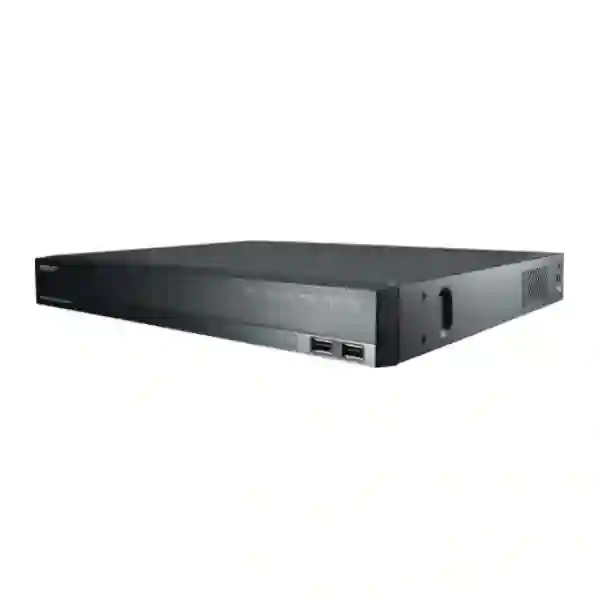
Hanwha XRN-810S — 8-Channel PoE Network Video Recorder
Planning an eight-camera IP surveillance system or maintaining an existing Wisenet installation? The Hanwha XRN-810S combines 8MP camera support, eight PoE/PoE+ ports, H.265 recording and two internal hard-drive positions in one recorder. The critical purchasing questions are camera compatibility, 100 Mbps aggregate recording capacity, storage retention, secure access and the model’s discontinued lifecycle.
The manufacturer identifies the XRN-820S as the successor. Ask for a verified quote, an exact-unit condition check and a compatibility review before purchasing legacy stock or planning an upgrade.
Key specifications at a glance
| Camera channels | Up to 8 IP camera inputs |
|---|---|
| Supported camera resolution | Up to 8 megapixels |
| Recording bandwidth | Up to 100 Mbps aggregate camera recording |
| Compression | H.265, H.264, MJPEG; WiseStream support |
| Integrated camera connections | 8 PoE/PoE+ ports |
| Internal storage | Up to 2 HDDs; verify approved disks and capacity |
| Local video output | HDMI up to UHD 4K; VGA |
| Interoperability | Wisenet and ONVIF; verify each camera |
| Recorder lifecycle | Manufacturer lists discontinued; replacement XRN-820S |
Published capabilities are model-level guidance. Exact hardware revision, compatible drives, camera profiles, installed firmware and active remote services must be confirmed before deployment.
Important availability and lifecycle note
Hanwha Vision marks this model discontinued and names XRN-820S as its replacement. This page does not claim that the XRN-810S is locally in stock, covered by a particular warranty, or available at an assumed price. Confirm supply, condition and support for the specific unit quoted.
Who should consider this recorder?
The XRN-810S is best understood as a compact recording centre for a small, defined IP surveillance installation, not as a camera or an all-in-one security guarantee. It receives video from network cameras, records configured streams to internal hard drives and offers ways to inspect footage locally or through supported network viewers. Its eight-channel limit gives a clear initial design boundary. A shop with a manageable number of entrances, an office floor with carefully chosen coverage positions or a reception-and-corridor installation may fit within that boundary, subject to engineering checks.
A buyer should first ask what footage will be needed after an incident, how many views are essential and who is responsible for checking the recordings. These questions matter more than the largest megapixel number printed on a box. A successful installation needs suitable cameras, functioning storage, consistent power, useful camera placement and a routine for reviewing alarms. Because the model is discontinued, an existing-system owner may have a different buying decision from somebody specifying a completely new installation. The latter should also evaluate its named successor before committing.
Lifecycle status and the meaning of discontinued
Hanwha Vision’s product information labels the XRN-810S as discontinued and identifies the XRN-820S as its replacement. Discontinued does not by itself tell you whether a particular reseller still holds a unit, whether a used recorder is suitable or how long a given firmware package will receive maintenance. Those are separate questions. The sensible position is to treat this as a legacy model while verifying the exact item offered, rather than presenting it as a newly launched recorder or promising that it is readily available in Tanzania.
For a replacement purchase, ask whether the quoted device is new old stock, refurbished or previously deployed. Request the serial and configuration details through a secure business process, confirm accessories and drive contents, and examine the vendor’s applicable support information. For an existing installation, assess whether the unit still meets retention, security and camera requirements before spending money on additional disks. The replacement designation is a useful starting point for a migration discussion, not proof that every cable, configuration, feature and hard drive will transfer unchanged.
Eight channels: design the views before choosing the box
An eight-channel recorder can receive up to eight camera feeds, but eight cameras do not automatically produce eight useful views. Make a site plan that maps each camera to a purpose: identification at an entrance, situational awareness in a sales area, observation of stock movement or monitoring of a controlled doorway. The quality of the result depends on lighting, lens selection, height, field of view and camera exposure settings. Two overlapping cameras may answer a question better than a single wide-angle image, even though they use more channels.
Allocate channels to the views that support actual operational decisions. If the location expects to add a new wing, parking area or several extra entrances, leave room for growth or select a recorder with more inputs from the start. Also distinguish the number of registered cameras from aggregate recording capacity: a design with eight high-bitrate streams can be more demanding than a design with fewer modest streams. The NVR’s limits must be respected simultaneously, including channel count, resolution, supported protocols, available power and recording throughput.
What 8MP support really means
The manufacturer’s stated camera resolution support reaches 8 megapixels on the XRN-810S. This describes a supported input class, not a promise that every 8MP camera can use every encoding mode, frame rate and feature combination without testing. A higher-resolution scene may provide more detail across a wide area, but motion blur, backlighting, incorrect focus and excessive compression can still make a face or object hard to interpret. Resolution should be chosen against the purpose of the image, not simply the headline number.
The recorder also supports HDMI output up to UHD 4K and provides a VGA connection for local monitoring. Display resolution and camera recording resolution are separate specifications. A 4K monitor does not increase the detail that was captured, while a lower-resolution live layout does not necessarily mean that the stored stream has been downgraded. Review live and recorded playback under the lighting and motion conditions expected on site, particularly at entrances where people move quickly or strong outdoor light enters through doors.
Eight built-in PoE/PoE+ ports
Integrated PoE/PoE+ networking can reduce the number of separate power adaptors needed near compatible cameras. Where the camera and cabling meet the relevant electrical and network requirements, one Ethernet run can supply data and power between camera and recorder. This makes a small installation easier to understand and service. However, an eight-port label is not a guarantee that eight power-hungry cameras can all draw their maximum load simultaneously. Per-port allowances and the recorder’s aggregate PoE budget must be checked for the exact hardware revision.
Before installation, list each camera’s normal and maximum consumption, especially if infrared illumination, heaters or other accessories may operate. Then check the network cable type, route, terminations and distance against the applicable equipment specifications. Poor terminations can produce intermittent video or night-time power problems that are mistaken for recorder faults. Document which camera is connected to each PoE port and label both ends of every cable. If cameras require other network arrangements, validate the supported registration and routing method rather than assuming every topology works identically.
Understanding the 100 Mbps recording limit
Hanwha specifies a maximum 100 Mbps network camera recording bandwidth for this model. That number is an aggregate recording design limit, not 100 Mbps available for every camera individually. Add the expected recorded bitrates of all connected cameras and allow reasonable headroom for variable scene complexity, changing lighting and motion. For example, an installation with eight cameras must consider their combined recording traffic, not merely whether every camera can be added to the device list. Do not confuse the recording limit with the speed printed on a LAN port.
Bitrate depends on resolution, codec, quality target, frame rate, scene complexity and whether the stream is variable or constant bitrate. A busy road scene may use more data than an empty hallway with otherwise similar settings. During commissioning, measure what the cameras actually produce over representative periods rather than treating a manufacturer test setting as a permanent guarantee. A design that works only when the building is quiet may experience dropped frames or unexpected retention changes when activity increases. Reassess bitrate when camera profiles are changed.
H.265, H.264, MJPEG and WiseStream
The XRN-810S supports H.265, H.264 and MJPEG recording formats and Hanwha’s WiseStream technology. Compression determines how efficiently video information is represented, so codec choice affects storage consumption, network load, playback compatibility and potentially the behaviour of third-party viewers. H.265 can be attractive for suitably supported modern cameras, but it should not be assumed to produce a fixed saving percentage in every scene. Results depend on camera implementation, settings, subject movement and lighting.
WiseStream is intended to optimise video transmission and storage under supported conditions. It is not a substitute for choosing a useful camera position or sensible image quality. Confirm that the camera, firmware, recorder and management client support the intended profile; then compare sample clips for detail at the moments that matter. Where an older client has trouble decoding a stream, compatibility may be more important than maximum compression. Keep a written record of the chosen codec, frame rate and quality parameters so that future servicing does not unintentionally shorten retention.
Storage bays and hard-drive suitability
The recorder supports up to two internal hard drives. This tells you the number of drive positions, but it does not establish which capacity, model or firmware combination is safe to deploy today. Historical specification sheets and compatibility lists can differ by revision, so the supported capacity should be checked against Hanwha’s relevant HDD compatibility guidance and the actual recorder firmware. Avoid assuming that any available desktop disk will offer suitable continuous video-writing behaviour or that a unit offered for sale automatically includes installed storage.
When considering a used or retained unit, ask for the current disk condition and recorded hours where available through the management interface. A disk that powers on is not necessarily healthy, and footage should not be considered protected merely because a storage menu lists a capacity. Review SMART-related status, recording alerts, overwrite behaviour and the possibility of exporting essential clips. Storage is an ongoing operating responsibility: the right drive specification, periodic checks and a documented response to failure are as important as the initial hardware purchase.
Estimate retention from the real workload
Retention planning starts with a requirement stated in days and in evidence quality, not by choosing a disk size at random. Estimate the bitrate for each camera under its intended recording schedule, translate combined data rates into daily storage use and allow for the overhead and variability of the system. Continuous recording, motion-based recording and mixed schedules can produce very different storage demands. Event recording is not automatically the lowest-risk choice if an important incident might begin before a detection condition has been triggered.
A useful calculation sheet records camera name, resolution, codec, typical bitrate, operating hours, capture mode and requested retention. Run more than one scenario: ordinary activity, busy periods and higher-than-expected movement. Then validate the estimate during a trial by checking the oldest accessible footage, not simply the remaining capacity displayed in the user interface. If the retention target is mandatory, factor in periods when cameras disconnect, disks degrade or someone changes settings. Revalidate after adding cameras or increasing quality.
Continuous, scheduled and event recording
The XRN-810S supports recording modes including normal, scheduled and event-based operation. These are operational tools rather than a universal setting that suits every premises. A critical entrance may benefit from continuous recording so that context before and after an incident remains available. A low-traffic storeroom might use scheduled or event-driven capture if its risks and review requirements allow that choice. A mixed design can prioritise sensitive views while controlling storage use elsewhere.
When choosing a recording policy, determine who can change it and how a change is logged. Event recording depends on inputs or camera functions that must be correctly configured and tested. Detection zones, sensitivity and pre/post-event settings should reflect what happens in the scene, including shadows, headlights and unusual after-hours activity. A schedule should account for weekend operations, holidays and shifts rather than assuming that the business always closes at the same time. After setup, confirm a recording exists through a real playback test.
Video events, inputs and alert handling
Manufacturer specifications describe camera-related events and alarm connectivity, making the recorder suitable for workflows where footage is reviewed following an event rather than only by date. Events might relate to motion, video loss or supported analytics produced by connected cameras. The available trigger and action combinations depend on the specific camera and configuration. An alarm notification should help a person decide what to inspect, but it should not be treated as verified evidence that an incident occurred without checking the associated video.
Design the alert workflow around the staff who will receive it. Decide which events deserve an immediate response, which are simply logged and which could create excessive false alarms. Test alerts during realistic day and night operation and ensure contact recipients are current. If the installation uses any external alarm contacts, confirm wiring, state conventions and equipment compatibility before making those signals operational. Periodically check that messages and event searches still work after firmware, network or mail-service changes.
ARB and gaps caused by network interruptions
The manufacturer lists ARB support as a capability of the XRN-810S. In practical planning, this belongs in the discussion of footage continuity when communications between a supported camera and the recorder are disrupted. It does not justify claiming that all video loss can be recovered automatically or that every third-party camera offers identical recovery behaviour. The precise operation depends on device capabilities, configuration, storage at the camera where relevant and the specific interruption being handled.
Treat any recovery function as a resilience feature that must be tested, not as a reason to neglect cable quality or power stability. Ask the installer to demonstrate a controlled connection loss, restoration and subsequent inspection of the recording timeline using compatible equipment. Record any visible gap and determine whether it falls inside the organisation’s risk tolerance. Essential views may still require a stronger architecture, redundant recording strategy or a different system design. A feature name on a datasheet is only the beginning of a continuity assessment.
ONVIF and mixed-brand camera compatibility
Hanwha lists ONVIF support for the XRN-810S, which can help when assessing compatible IP cameras from different manufacturers. Nevertheless, ONVIF does not mean that every camera feature is transferred or that all devices with an ONVIF logo will interoperate perfectly. Basic discovery and video may work while specialised analytics, audio, event metadata, smart search or remote configuration behave differently. Firmware variations on the recorder and camera can also change what works.
When reusing installed cameras, prepare a device-by-device compatibility record. Include exact model, firmware, supported protocol, stream codecs, resolution, authentication arrangement, event requirements and power needs. Test registration, live view, continuous recording, playback and any required alerts before buying additional equipment. If a feature is essential, verify it in an end-to-end test with the intended recorder rather than inferring support from a broad industry standard. A small test bench can prevent an expensive mismatch across an entire site.
Local monitor operation and incident playback
HDMI and VGA outputs allow the recorder to be operated with a local display, which is valuable where staff need access to live camera images without depending on a separate viewing computer. The HDMI output can support a 4K UHD display, subject to compatible equipment and settings. Decide whether the monitor is meant for permanent multi-camera observation, occasional management checks or incident investigation. Those purposes call for different screen layouts, access permissions and expectations of detail.
An incident playback procedure should let a responsible user find a date and time, choose the correct channel and export the relevant period without disturbing routine recording. The XRN-810S supports multi-channel playback and event-oriented search functions, though the exact interface and available features should be confirmed on the installed software. Train more than one authorised person to perform basic searches. If the clock is wrong, a technically perfect recording can still be difficult to use; validate time and time-zone settings during commissioning.
Evidence export and responsible access
Video export is not the same as live viewing. When footage is needed for an internal investigation, a customer complaint or an authorised request, the organisation should know how to select the time window, preserve an appropriate copy and verify that the exported file can be opened. Manufacturer documentation describes local backup methods and network-accessible functions, but the chosen format and workflow should be tested with the actual recorder and intended playback equipment.
Assign responsibility for initiating exports and recording why a clip was produced. Limit access to authorised staff, keep a record of transfers and consider how long copies should be retained under the organisation’s own policies and applicable requirements. A strong procedure avoids sharing recorder passwords or leaving video on an unsecured shared device. When footage must be supplied to another party, confirm that the exported format, time stamps and explanatory details are understandable. Good evidence management depends on people and process as much as device capability.
Remote viewing and mobile access
The XRN-810S is described by Hanwha as supporting P2P service with QR-code connection and network-based remote monitoring. That capability may be useful to an authorised manager who needs to review an event away from the site. It is not a promise that remote access will work through every router, internet provider, firmware version or current mobile operating system. Before promising a particular app experience, confirm the supported software, service availability, authentication and real-world network conditions.
Remote access also introduces security questions. Use unique credentials, restrict roles and avoid exposing a recorder directly to the public internet when a more secure supported method is available. Ask whoever manages the business network to review firmware status, device access, logging and remote support procedures. Test connections from an authorised external network with the intended client, not only from a phone connected to the same local Wi-Fi. Establish a way to disable access promptly when a staff member changes responsibilities.
Wisenet Viewer and software integration
Hanwha’s November 2026 compatibility information lists XRN-810S among NVR models supported by Wisenet Viewer. That is useful for organisations already using compatible Hanwha monitoring tools, but it should not be interpreted as a guarantee that every historical operating system, advanced search feature or firmware combination works the same way. An organisation with existing viewing workstations should compare the model’s supported functions with the actual client version it intends to deploy.
For integration planning, identify whether the requirement is live viewing, playback, event review, user management or a more advanced video-management workflow. These functions may involve different permissions and client capabilities. Run a documented acceptance test on the intended workstation and network. If the project requires analytics or a multi-site command centre, ask whether the overall architecture and licensed software meet those requirements; do not assume an eight-channel NVR by itself provides enterprise-scale functionality. Keep compatibility notes with the site’s configuration documents.
Network separation and connection planning
A reliable NVR installation uses deliberate network design even when cameras appear to connect directly to a built-in PoE switch. Plan the recorder’s connection to the business LAN, how administrators will reach it and which external systems, if any, need access. Camera traffic and ordinary office activity should not compete unpredictably on poorly planned network equipment. The correct configuration depends on the installation, router, switches, addressing and any organisation-wide security policy.
Document IP addresses, camera names, cabling locations and network ownership without publishing sensitive connection details. Make sure authorised users know which equipment needs power and how faults will be escalated. When remote access is part of the scope, check uplink reliability and security rather than only download speed from an internet test. During commissioning, disconnect and reconnect one noncritical camera under supervision to see whether operations recover cleanly. Monitor video and network status after the system has been placed under normal daily load.
Power continuity and environmental conditions
Recording depends on a stable supply of electricity to the NVR, disks, network devices and cameras. Integrated PoE simplifies some wiring but does not remove the need to plan power capacity. For a site subject to interruptions, review whether an appropriately selected UPS or other approved power arrangement is needed and whether supporting network equipment is included. Do not quote a backup runtime without testing the actual combined load and battery condition. A power budget is a site-specific calculation.
Place the recorder in a dry, secure and ventilated location consistent with the manufacturer’s operating limits. Keep airflow paths unobstructed, prevent casual cable disconnection and provide controlled physical access. High ambient temperatures, dust and poor ventilation can reduce reliability, especially around mechanical hard disks. Do not put an NVR into a tightly sealed cabinet merely because it fits. Confirm the exact input power, ambient temperature limits and ventilation clearances using the appropriate hardware documentation, then check conditions during representative busy and warm periods.
Installation sequence for a clean handover
A sensible commissioning process starts with identifying the recorder hardware and checking its permitted software and drive configuration. Next, install compatible storage according to the manufacturer instructions, connect the display and management interface, and complete the supported setup process. Register cameras one at a time so that each feed can be associated with a labelled cable and planned view. Confirm the recorder’s time, access rights, recording schedule and storage behaviour before enabling remote viewing or making the system operational.
After the basic setup, record a short sample on every channel. Test day and night image quality, camera disconnection, event handling, playback, export and any authorised mobile or workstation viewing. Save a configuration inventory that the operator can maintain without exposing passwords. Handover should include a concise guide for viewing footage, finding an event, recognising a disk warning and escalating faults. A system that records impressive demonstration images but lacks a practical handover can become unreliable through ordinary staff changes.
Acceptance testing against the stated requirement
Before sign-off, write acceptance checks that connect each camera to an expected outcome. An entrance camera might need a clear view under strong daylight and after dark, while a warehouse aisle camera may be judged on whether movement can be followed. Check the recorded stream rather than only the live image. If the recorder uses H.265 or variable bitrate, review footage from active periods to establish that clarity and retention are acceptable. Inspect the recording timeline for unexpected gaps.
The acceptance document should also show that the NVR can handle all intended channels simultaneously while recording, that disk health is visible, and that a trained user can find and export a clip. Verify event notifications, remote access where commissioned, and the response to controlled power or network interruption without endangering production systems. Note any incomplete features as outstanding items instead of assuming they will work later. Keep the results available for future troubleshooting and for comparing a proposed replacement recorder.
Routine maintenance and ownership
The most important surveillance check is not whether the recorder’s front light is on; it is whether the footage the organisation expects can actually be retrieved. Assign a recurring review of camera status, disk warnings, time synchronisation, recording gaps, event delivery and the age of the oldest available video. Keep the checklist short enough to be performed consistently. A monthly review may reveal issues that otherwise remain hidden until an incident, although each organisation should select a frequency appropriate to its risk.
Maintenance should also include a controlled process for firmware assessment and changes, backed by the manufacturer’s applicable documentation. Updating a legacy unit without understanding dependencies can create avoidable problems, while leaving known security issues unreviewed may also be risky. Preserve a record of camera changes, passwords managed through secure procedures, disk replacement history and any unusual reboot events. If the recorder becomes difficult to maintain or no longer meets its retention target, reassess the business case for replacement rather than relying on repeated temporary fixes.
Examples of practical small-site use
In a small retail location, useful coverage could include the principal entrance, point-of-sale approach, stock access and key circulation areas, while leaving privacy-sensitive spaces outside the plan. In a compact office, cameras might focus on reception and controlled access points rather than covering every desk. For a storage area, entry movements and loading procedures may matter more than a uniformly wide shot. These are design illustrations, not claims that any particular premises will fit the recorder without a survey.
Each scenario needs an agreement on who can watch footage, why recording is necessary, what happens when an alert appears and how long evidence must remain accessible. Check camera locations against the building’s actual light, power and network constraints. An eight-channel system can be efficient when the required views are well chosen; it is a poor fit when future expansion is certain to exceed eight inputs. The right decision balances installation simplicity with adequate capacity, privacy, operational discipline and maintenance over the expected life of the system.
Buying and verification questions for Tanzania
A buyer evaluating the Hanwha XRN-810S for use in Tanzania should request a quote tied to a specific unit and an agreed list of accessories rather than assuming an advertised model name includes cameras, hard drives, monitors or installation. Confirm whether it is legacy stock, its condition, the firmware position and whether its power arrangement suits the proposed site. Ask for the exact drive model that will be installed and the documented compatibility basis. If a project is starting from scratch, request an alternative proposal using the manufacturer’s replacement family.
The commercial offer should spell out the camera count, recording schedule, retention target, cabling responsibility, commissioning tests, support scope and any applicable warranty terms without assuming standard regional promises. Delivery arrangements, taxes, prices and stock status need their own verified quotation; this information is not determined by the manufacturer’s technical specification. For local operating conditions, plan stable power, secure mounting and serviceability without claiming that a particular city or site is covered. A clear written scope protects both the customer and the installer.
How to evaluate the XRN-820S replacement
Hanwha Vision identifies XRN-820S as the replacement model for the XRN-810S. The successor’s published feature summary describes an eight-channel NVR with higher stated camera-resolution support and 120 Mbps recording bandwidth, plus newer event and search capabilities in supported configurations. Those comparisons help frame an upgrade conversation, but they do not establish plug-and-play migration, camera compatibility, feature parity, drive reuse or pricing. Compare the intended workloads and official compatibility guidance before changing equipment.
For an existing XRN-810S site, start with the reasons for replacement: device failure, storage restrictions, unsupported client requirements, cybersecurity concerns or a new camera that no longer fits the old platform. Then record the current camera models, settings, storage expectations and important playback workflows. Ask the proposer to demonstrate the replacement against those specific needs. If more than eight channels are required, simply moving from one eight-channel model to another does not solve the growth issue. A qualified replacement decision looks beyond the model number.
What to include in a camera and recorder quote
A useful recorder quotation is a small system design document. It should identify the exact recorder model and lifecycle status, number of camera licences or channels where relevant, camera makes and models, hard-drive specification, cabling, networking, commissioning and user training. It should state whether the customer expects continuous recording or a defined event schedule and how retention will be tested. This prevents a later dispute about whether the quoted hardware alone was supposed to provide the complete CCTV system.
Ask the proposer to separate optional services from mandatory components. For example, remote access may need network and cybersecurity work, while an existing monitor might be reusable only after checking its connections and image requirements. If an offer includes support or a warranty, obtain the actual terms rather than inferring them from a brand name. A well-defined quote lets a buyer compare the older XRN-810S with an XRN-820S-based or other appropriately sized system on operational value, not just on a single headline price.
Avoiding common specification mistakes
Several statements can be technically true in isolation but misleading in a purchasing decision. Eight channels does not mean unlimited combined bitrate. Eight PoE ports does not mean every high-power camera can be connected without checking the power budget. A 4K HDMI output does not convert low-quality incoming footage into evidence-quality images. Two disk bays do not automatically mean a specific drive is included or that every disk capacity is supported. An ONVIF-compatible recorder does not ensure the same functions with every third-party camera.
Another frequent mistake is assuming remote viewing is permanently guaranteed because a past brochure mentions QR-code setup. Client software, firmware, network configuration and external service availability all need confirmation. Likewise, a discontinued designation should not be confused with a verified lack of stock at a particular seller. Use these distinctions to evaluate claims on any quotation or listing. If a requirement affects security, retention or legally important footage, insist on an explicit acceptance test rather than relying on a generic feature list.
A practical decision checklist
Before committing, answer six connected questions. First, will eight channels remain sufficient over the planned service period? Second, are all proposed cameras compatible for recording and for the specific functions that matter? Third, can the combined stream settings fit safely within the NVR’s 100 Mbps recording limit? Fourth, can compatible drives provide the required retention under real activity? Fifth, can staff reliably view, search and export footage using their intended tools? Sixth, is the lifecycle position acceptable for the organisation’s maintenance and cybersecurity responsibilities?
If any answer is uncertain, resolve it before treating the system as specified. An installer may need a camera test, storage calculation, firmware review, network survey or newer NVR proposal. If the device is already installed, the same questions create a useful audit checklist rather than an immediate instruction to replace working equipment. A disciplined review is particularly valuable when an older product appears attractively priced but hidden integration or maintenance work would make the overall solution costly.
Frequently asked questions
These answers address the points most likely to affect specification, maintenance, replacement and purchase decisions. Where the answer depends on an individual unit, camera or local commercial offer, request verification rather than relying on a generic product description.
Is the Hanwha XRN-810S still a current model?
Hanwha Vision’s product page marks the XRN-810S as discontinued and names XRN-820S as the replacement. That does not independently confirm availability or condition of any specific unit offered in Tanzania. Ask for the exact unit details and a current quotation. For a new installation, compare the successor’s suitability before accepting legacy hardware.
How many IP cameras can the XRN-810S record?
The specified maximum is eight camera channels. Every installed camera still has to meet codec, protocol, resolution and bandwidth requirements. A plan using eight streams must fit within the recorder’s aggregate 100 Mbps recording limit. If the business expects to expand beyond eight cameras, review a recorder with more channels rather than relying on unused ports or assumptions.
Does it support 8MP and 4K?
Hanwha lists camera input support up to 8 megapixels and an HDMI monitor output that can reach UHD 4K. These are different measurements. Actual recorded detail depends on the camera, lens, stream profile and lighting; the HDMI display does not improve the original footage. Confirm the intended camera’s configured video settings during testing.
Can the eight PoE ports power any eight cameras?
No general guarantee should be made from the number of sockets alone. The XRN-810S has eight integrated PoE/PoE+ ports, but total budget, per-port limits, cable quality and individual camera requirements matter. Higher consumption during infrared operation can change the result. Check the exact power figures and test the selected camera set together.
How many hard drives can be installed?
Hanwha states a maximum of two internal HDDs. Permitted drive models and capacities need checking against the relevant compatibility information and recorder software revision. Do not assume that the recorder includes drives or that two arbitrary high-capacity disks will work. Verify disk health and actual recording after installation, not just the displayed capacity.
Will H.265 double recording time?
No fixed retention multiplier is assured. H.265 can improve compression efficiency with supported devices, but storage use depends on resolution, frame rate, scene movement, lighting and quality settings. WiseStream may also help in compatible configurations. Estimate and then measure daily recording consumption for the actual cameras and determine whether the oldest footage meets the required retention period.
Does it work with cameras from other brands?
The recorder supports ONVIF-related interoperability, but third-party support must be verified for each camera model and firmware. Basic live video may work even if analytics, event metadata or advanced configuration features do not. Test camera registration, recording, playback and any required alerts before assuming a mixed-brand installation is fully compatible.
Is remote mobile viewing available?
Hanwha documents P2P QR-code and remote monitoring capabilities for the model. Availability and operation depend on firmware, supported clients, internet access and secure configuration. Confirm which app and connection method still work for the actual unit, and restrict access to authorised people. A listed capability is not a guarantee of unrestricted remote connectivity.
What happens when the internet connection fails?
Local recording may continue where cameras, power, storage and the local network remain functioning, but remote viewing may be interrupted. A failure between a camera and recorder presents a different risk. The model lists ARB support, yet recovery depends on compatible equipment and configuration. Test outage scenarios safely and inspect the recovered recording timeline before making resilience claims.
Can I view the recorder using Wisenet Viewer?
Hanwha’s compatibility information updated in November 2026 includes the XRN-810S among supported NVRs for Wisenet Viewer. The precise viewing and search capabilities should still be tested with the intended software version and recorder firmware. Confirm needed workflows on the actual workstation rather than assuming every advanced function is present.
Is the XRN-820S a direct swap?
Hanwha identifies the XRN-820S as the replacement, but an official successor designation is not proof of identical configuration or effortless migration. Compare cameras, storage, supported events, clients and site network design. Obtain a migration plan and conduct acceptance tests. If the site requires more than eight channels, consider the wider system requirement as well.
What should a Tanzania buyer ask before ordering?
Ask for the specific unit’s status and condition, exact camera and HDD compatibility, required retention, commissioning scope, software support and whether a newer recorder would be more suitable. Request written confirmation of any offered price, stock, warranty, delivery and installation terms. No such commercial details are established by the recorder’s technical specifications alone.
Does the NVR replace a UPS or secure network?
No. Recording still depends on stable electricity, functioning storage, camera connections and appropriate network security. A UPS, secure access arrangement and maintained network may be appropriate depending on site risks. These are separate design decisions with their own capacity and cost. Test the finished system under realistic power and communications conditions.
Should I retain an existing XRN-810S?
A working installed recorder may still suit a tightly defined eight-camera workload if its footage, storage, cybersecurity position and support arrangements remain acceptable. Check actual recordings, hard-drive health, client compatibility and required retention. If the unit is failing, difficult to support or unable to meet revised requirements, compare a modern replacement against a documented migration checklist.
Can it record all day and still send alerts?
Manufacturer documentation lists continuous, scheduled and event-oriented recording options together with supported alarm and camera events. Whether a specific alert is available depends on the connected camera and configuration. Set a recording policy that protects the footage needed for investigation, then test event notifications. Avoid relying solely on detection when continuous context is important.
Is this a complete CCTV kit?
No. The XRN-810S is a recorder with integrated PoE/PoE+ ports, not a promise that cameras, suitable hard drives, cables, a monitor or installation services are included. The package and regional supply arrangements require confirmation. Request an itemised system specification so it is clear which parts, setup tasks, testing and user training are part of the offer.
Request a model and system compatibility review
Provide the intended number of cameras, exact camera models, required retention days, recording schedule, existing network arrangement and whether this is an existing installation or a new project. Request confirmation of the particular XRN-810S unit’s condition and support, or ask for an XRN-820S alternative based on the same requirements. Pricing, local inventory, drive compatibility and any services must be confirmed in a written offer.
Next step: request an itemised quotation and an acceptance-test plan from FourTeck Tanzania.




Reviews
There are no reviews yet.