
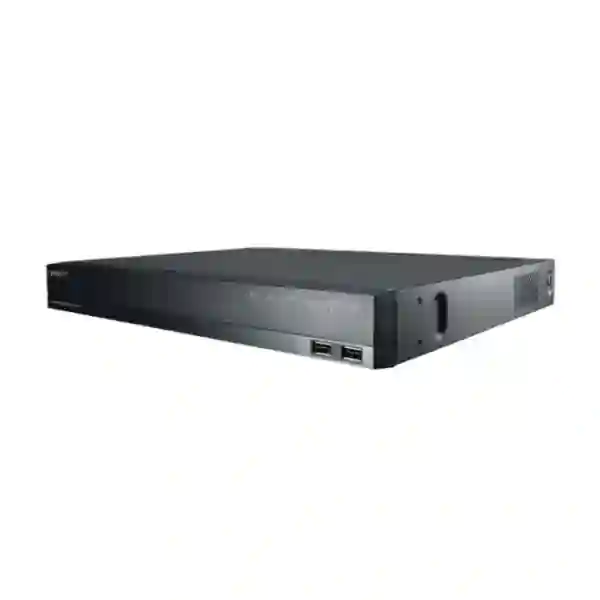
Hanwha XRN-820S-4T 8-Channel 4TB PoE NVR
A practical recording centre for carefully planned IP CCTV systems in Tanzania.
Choose the Hanwha XRN-820S-4T when your site needs organised local recording for up to eight IP cameras, with a 4TB storage configuration, integrated PoE connectivity and practical video review. It is intended for security teams that want clear evidence, manageable camera administration and an installation designed around actual network and power requirements.
This product guide explains what the recorder does, how its limits affect a real CCTV project and the checks that should happen before a quote is accepted. For the exact XRN-820S-4T regional listing, use the manufacturer’s 100 Mbps recording-bandwidth figure rather than a higher figure advertised for some other XRN-820S variants.
Technical specification at a glance
| Model | Hanwha XRN-820S-4T |
|---|---|
| Product category | IP network video recorder |
| Camera inputs | Up to 8 channels |
| Storage configuration | 4TB variant; verify delivered HDD |
| Recording input bandwidth | Up to 100 Mbps for this variant |
| Camera resolution | Up to 32MP, subject to system limits |
| Compression | H.265 / H.264 / MJPEG; WiseStream ecosystem support |
| PoE power | 8 ports, 100W total budget |
| Disk slots | 2 SATA positions, up to 12TB combined |
| Video outputs | HDMI UHD and VGA display options, depending on mode |
| Camera protocols | SUNAPI, ONVIF |
| AI searching | With compatible Hanwha Vision AI cameras |
| Power input | 100–240V AC, 50/60Hz |
| Maximum power consumption | 160W platform rating |
| Operating environment | 0°C to 40°C; 20%–85% RH |
| Approximate chassis size | 370 × 50.7 × 324.3 mm |
The model-specific 2026 catalogue is the basis for the 100 Mbps figure. Verify the ordered regional hardware and current manufacturer documentation when finalising the specification.
Is this the right recorder for your CCTV project?
The Hanwha XRN-820S-4T is an eight-channel network video recorder for organisations that want to keep IP camera footage on premises and review incidents from a dedicated recording system. The 4TB configuration is a practical starting point for a small-to-medium camera layout, while the recorder’s eight PoE camera ports simplify cabling for compatible network cameras. It suits a buyer who values predictable local recording, a monitor-based security desk and an organised path to playback rather than relying exclusively on a computer left running.
Choosing an NVR should begin with the actual camera plan, not a headline resolution. Count every camera that needs an independent recording channel, list its intended bitrate and identify the period for which video must remain available. The XRN-820S-4T is built around a maximum of eight camera inputs and a model-specific recording-bandwidth figure of 100 Mbps. This is an aggregate limit to respect, not a promise that eight cameras can all run at every possible resolution and frame rate simultaneously.
For a Tanzania-based buyer, the sensible next step is to ask for a configuration review that matches camera positions, power requirements, recording priorities and operating conditions. A well-specified eight-camera system for a reception, store, office or small facility can be easier to operate than an oversized recorder with unplanned settings. Camera models, storage retention, network access and any additional power protection should be agreed before the recorder is purchased or installed.
Why the eight-channel design matters
Eight channels means the recorder can accept up to eight network camera streams as recording inputs. A channel is not the same as a PoE outlet, a monitor window or a software user. If your site requires six cameras today and may need two more later, the channel count may fit. If the project already requires nine cameras, even if some share a physical location, this is not an appropriate single-recorder choice without redesigning the system.
Map the intended coverage before allocating channels. A public entrance may need a wide overview and a narrower identification angle, which are two separate streams and normally two separate cameras. A loading area might require another viewpoint for vehicle movement, while interior corridors may need different lenses or lighting. The recorder does not determine the quality of these images by itself; the camera sensor, optics, placement, illumination, encoding and chosen recording profile do that.
Allow for future needs deliberately. An eighth channel used from day one leaves no simple room for an extra camera. When growth beyond eight cameras is plausible, compare a larger-channel NVR or a wider surveillance architecture rather than promising expansion that the hardware channel limit cannot provide. A requirement such as recording every entrance, stairwell and parking lane should be converted into a numbered camera schedule before selecting the recorder.
Camera resolution versus monitor resolution
The device family supports network cameras up to 32 megapixels, subject to the supported formats and overall recorder constraints. That camera input capability is distinct from the output resolution of the local display. The XRN-820S platform can send UHD video to a compatible HDMI monitor, while its VGA connection offers an alternative full-HD display path. A 32MP camera stream does not turn an ordinary 4K monitor into a 32MP display.
High camera resolution can be useful for capturing detail across a larger scene, but it also raises questions about bitrate, processing, playback and the practical number of images a viewer can inspect at once. A camera recording at a high resolution may need a different playback profile or frame rate from a lower-resolution camera. Match the camera to the distance and task first, then confirm the exact video profile is supported by the recorder.
The local display and recording paths should be tested separately during commissioning. Check the live mosaic, single-camera playback, selected frame rate and export results using the actual cameras. Some display combinations or high-resolution decoding modes are more constrained than the theoretical maximum supported input resolution. Buyers should not interpret the phrase up to 32MP as a guarantee of eight simultaneous 32MP full-frame-rate local playback windows.
Recording bandwidth: plan for 100 Mbps, not guesswork
Hanwha Vision’s model-specific 2026 catalogue lists 100 Mbps for the XRN-820S-4T recording configuration. Other regional pages for the broader XRN-820S family display 120 Mbps, which is why the exact regional model matters when comparing specifications. For this product variant, use 100 Mbps as the conservative stated aggregate recording figure until the ordered unit’s official variant documentation confirms any alternative.
Add the planned video bitrates for all cameras, including the main stream that will be recorded. As a simple illustration, eight streams configured around 4 Mbps would use about 32 Mbps of continuous incoming video before considering variations or other system needs. Eight streams averaging 10 Mbps would already represent about 80 Mbps. These examples show why the count of connected cameras alone cannot establish bandwidth suitability.
Leave capacity for busy scenes, changes in lighting, higher motion, codec behaviour and future reconfiguration. Variable-bit-rate cameras can rise above an observed quiet-scene average, so sizing to an optimistic sample risks missed expectations. Keep the camera profiles documented and test the combined load under representative operating conditions. Playback, remote viewing and network switching also need consideration, even though they are not interchangeable with the published recording input limit.
Eight PoE ports and a shared 100W power budget
The integrated eight-port PoE interface can reduce the amount of separate camera-power equipment required for a compatible IP camera installation. Its published shared power budget is 100 watts. That number describes the total available PoE allocation, not 100 watts for each camera. The cameras also need to use supported power and connection arrangements; camera compatibility should never be assumed from the presence of an RJ-45 socket alone.
For example, eight cameras with an actual peak requirement of 12 watts each would account for 96 watts, leaving almost no shared margin. Infrared illumination, heaters, motorised lenses and PTZ movement may increase consumption beyond ordinary daytime figures. Read each camera’s maximum power requirement rather than its idle power, and add the totals before deciding to connect all eight devices directly to the recorder.
Long cable runs, damaged terminations and incorrect cable grades can lead to unstable power or unreliable video. Plan cable routes and network protection to suit the site, and use suitable separate PoE switching or power where a camera exceeds the recorder’s port or aggregate power capabilities. The integrated ports are convenient, but they do not remove the need for a documented camera power schedule, clean installation practices and testing after dark.
What the 4TB configuration actually means
The XRN-820S-4T is identified by Hanwha Vision as the 4TB version of this NVR line. For purchasing, confirm that the quotation and delivered unit both describe the same 4TB configuration, and ask whether the specified drive is already fitted and initialised. The advertised storage figure is a nominal capacity; capacity shown within the recorder may differ because of filesystem formatting and the difference between decimal and binary storage units.
Hanwha lists two SATA hard-drive positions with a maximum combined supported capacity of 12TB for the referenced configuration. That gives a route to review storage expansion, subject to supported hard drives, firmware, installation and the recorder’s actual drive configuration. It should not be taken as a promise that every 12TB disk is compatible or that any arbitrary drive combination can be inserted without checking the manufacturer’s approved HDD list.
Storage planning must distinguish total disk capacity, usable recording space and the retention policy. Video quality, stream count, continuous versus event recording and scene activity determine how quickly space is consumed. When footage reaches the recorder’s overwrite threshold, old recordings may be replaced according to the configured policy. A 4TB label therefore describes the starting storage class, not an assured number of days of history.
Estimate footage retention before purchase
A useful first approximation is to convert the combined average recording bitrate into daily storage consumption. One megabit per second, recorded continuously for a full day, represents approximately 10.8 gigabytes per day using decimal units. Multiply that figure by the number of megabits per second across all recorded streams. This is a planning calculation, not a substitute for the recorder’s actual storage estimator or real-world recording tests.
Consider an eight-camera system averaging 2 Mbps per camera. That is about 16 Mbps in total, or around 172.8GB of raw video data in 24 hours. Dividing a nominal 4,000GB by that data rate suggests roughly 23 days before accounting for capacity differences, overhead and operating variation. At an average 4 Mbps for each of the eight cameras, the daily figure roughly doubles to 345.6GB, bringing the nominal estimate to about 11.6 days before those deductions.
Actual history can be materially shorter or longer because the average bitrate changes with movement, lighting, frame rate, codec settings and scene complexity. Scheduled recording and event-based recording change the calculation again. Agree the required retention first, test representative camera settings, then size storage with a practical allowance rather than advertising a fixed number of days that may not be achieved in the customer’s installation.
H.265, H.264 and WiseStream: choose a suitable encoding profile
The recorder supports H.265, H.264 and MJPEG handling, and the Hanwha Vision family documentation also identifies WiseStream support. H.265 can reduce the data needed for comparable imagery under suitable circumstances, which may help storage retention and network efficiency. The degree of saving depends on the camera, scene and encoding configuration; there is no responsible single percentage that applies to every installation.
H.264 may remain useful where a camera, client, export workflow or third-party system has compatibility requirements. MJPEG is supported but has a different efficiency profile and should be selected for a concrete reason rather than by default. WiseStream is an ecosystem feature whose practical benefit depends on supported camera-side implementation and settings. The NVR does not magically improve an unsupported camera’s compression method.
Decide whether the most important objective is facial detail at an entrance, a wide contextual view, a lower storage rate or smoother motion during investigation. These choices influence resolution, frames per second, compression, key-frame interval and bitrate controls. Configure the recording stream for evidence requirements, then check a real exported clip. Storage efficiency should not be gained by degrading the details investigators or operators actually need.
AI-assisted search depends on the cameras
The product line supports AI-assisted object attribute searching when paired with compatible Hanwha Vision AI cameras. This is a valuable distinction for buyers sorting through large amounts of recorded footage: useful camera-generated metadata can make a supported search more focused. The recorder should not be described as an independent AI camera or as a device that automatically adds object recognition to every generic stream.
Before promising an AI workflow, verify the exact camera model, its analytics and metadata capabilities, the relevant firmware versions and how those attributes are exposed in the recorder’s search interface. A non-AI camera may still record normal video, but it should not be sold on the expectation of identical advanced filtering. Even compatible AI analytics are subject to scene quality, placement, lighting and the camera’s detection limits.
Clarify the investigation use case. Searching for people or vehicles with specific supported attributes is different from live intrusion alarm logic, license plate recognition, facial identification or guaranteed detection of a particular event. Those functions should not be assumed simply because the words AI search appear in a brochure. Agree one or two representative search tasks and demonstrate them using the proposed cameras before accepting the design.
Continuous, scheduled and event-based recording
The XRN-820S platform offers normal recording, dual-stream options, schedules and event-linked recording modes, including pre- and post-event handling in supported configurations. These choices let a security team balance continuous evidence coverage against the storage used by lower-priority scenes. A high-traffic entrance may justify uninterrupted recording, while a less critical area may use a defined schedule or a properly configured event workflow.
An event recording strategy needs particular care. Motion and other camera events can miss activity if detection zones, sensitivity or lighting are poorly configured. A parked vehicle, a moving tree and a person at a doorway produce different patterns. Security-critical scenes should not rely on untested triggers merely to achieve a longer advertised retention estimate. Record settings should reflect actual risk and the need to reconstruct incidents.
Test event time stamps, lead-in and follow-up footage, alerts and playback navigation. The recorder supports event handling and dynamic event concepts within its ecosystem, but the specific camera determines many possible event types. If alarm input or output wiring is part of the project, document the trigger source and intended response. A camera event, an audible buzzer, an email alert and a retained clip are separate behaviours to configure.
Finding, reviewing and exporting evidence
A recorder is valuable only when staff can retrieve the right footage after an incident. The XRN-820S family provides time-and-date and event-based searching, playback controls and local or network backup methods. In a busy retail or facility environment, this may support practical questions such as when a delivery arrived, which doorway was in use or what happened immediately before an alarm.
Decide who may view live video, who may inspect recordings and who may export files. A controlled evidence workflow includes checking the device clock, confirming the correct camera name, recording the incident time and preserving the original clip according to the site’s policy. A screenshot alone may not capture the sequence needed to understand a disputed event; export a suitable interval with context before and after the moment of interest.
Before accepting the system, perform a complete retrieval exercise rather than only watching a live image. Select an earlier recording, play it back, locate a specific event, export a supported file and open it on an appropriate review workstation. Confirm that the selected export format, file handling and permissions meet the organisation’s requirements. A storage capacity specification does not demonstrate that evidence management has been set up properly.
Local monitoring, operator workflow and display setup
The recorder supports local monitor connectivity using HDMI and VGA in the XRN-820S documentation, with a high-definition display workflow and UHD HDMI output. This can suit a staffed security point where an operator needs a quick view of entrances, corridors or perimeter cameras. The video output capability and viewing layout are different from camera input resolution and recording bandwidth, so these limits should be evaluated individually.
Plan the number of screens and their tasks. One screen might present a camera mosaic, while another is reserved for targeted review where the supported display arrangement permits it. The practical arrangement depends on the firmware and selected output mode; full-HD dual display and UHD single-display behaviour appear in the manufacturer’s family documentation. Do not assume every monitor combination is simultaneously available at maximum resolution.
Operator usability deserves attention. Camera titles should match actual locations, screen layouts should put high-priority views where they are visible, and staff should know how to acknowledge events or access playback. Physical monitor placement, viewing distance and the presence of a keyboard or mouse can matter more in daily use than another line on a specification table. Include operator instruction and a written handover checklist.
Mobile viewing and remote access without overpromising
Hanwha Vision documents web and mobile viewing options for the XRN-820S family, along with network configuration features. These can be convenient for an authorised owner or security manager who needs to review a camera feed away from the control room. Remote access, however, is a deployment outcome that depends on supported software versions, network conditions, security settings and the customer’s own connectivity.
A remote viewer needs stable upstream internet service from the recorder’s site, suitable permissions and an access arrangement that does not unnecessarily expose the system. Multiple live streams can use significant data, especially when high-resolution profiles are selected. Configure a lower-bandwidth viewing profile when appropriate while keeping the evidence recording profile aligned with the retention and image-quality objectives.
Confirm the actual phone platform, app support, firmware compatibility and authentication process at installation. Demonstrate both local and remote viewing rather than assuming that scanning a QR code guarantees working connectivity in all networks. No claim about free mobile data, unlimited cloud storage, automatic offsite backup or permanent remote availability should be attached to the recorder merely because remote viewing is supported.
Compatibility: Hanwha cameras, SUNAPI and ONVIF
Hanwha Vision lists SUNAPI and ONVIF among the recorder’s network camera protocols. This creates integration possibilities for supported cameras and video-management environments, but an advertised protocol is not a guarantee that every feature on every manufacturer’s camera will work. Basic video, motion events, audio, PTZ controls and advanced metadata may have different compatibility requirements even when an image can be displayed.
For a system using mixed camera brands, conduct a compatibility check by exact camera model and firmware. Verify stream discovery, stable recording, correct frame rate, event support and a full playback test. For Hanwha cameras, the manufacturer’s ecosystem can enable additional coordinated functions, but those still depend on the individual product series. A camera advertised as ONVIF-compatible may expose a narrower feature set than a native integration.
Prepare a short integration schedule that lists each camera address, model, firmware version, stream profile, power type and special feature needed. This reduces the risk of purchasing a recorder based on an incomplete checkbox list. If the planned system also includes a video-management platform, establish who will manage users, time settings, remote access and evidentiary export so that the NVR and any external software do not conflict.
Automatic Recovery Backup and failover considerations
Hanwha Vision’s XRN-820S family documentation references Automatic Recovery Backup, commonly abbreviated ARB, and N+1 failover capabilities. These are resilience-related features that may be relevant to a supported multi-device deployment. They should not be interpreted as a complete disaster-recovery plan, nor as proof that this single 4TB recorder is fault tolerant without additional equipment and correct system configuration.
An N+1 arrangement generally requires a designed relationship between primary recording units and a suitable backup unit. Likewise, ARB behaviour depends on compatible cameras and a supported recovery workflow. A procurement discussion should identify whether these features are needed, what other hardware or software is involved, and how recovery will be demonstrated. The feature labels do not replace a test of the complete installed architecture.
For a standalone small site, routine monitoring of disk status, accurate event logging and an agreed method of preserving critical incident clips may be more immediately useful. If recording must survive drive failure, loss of site power or a building incident, request an explicit resilience design rather than assuming that a two-bay chassis automatically provides every form of redundancy. Backup, storage mirroring, recorder failover and export are different controls.
Security and firmware management
Network video recorders connect cameras, staff workstations and sometimes remote users, so access control needs a deliberate plan. Establish unique administrator credentials, use separate day-to-day accounts where supported and restrict network access to users and systems that need it. Do not leave default settings, undocumented port forwarding or shared passwords as the foundation of the installation.
Hanwha Vision maintains firmware and cybersecurity guidance for supported products. After confirming the exact delivered variant, check the official product support information for the appropriate firmware and follow the manufacturer’s upgrade instructions. Updates should be planned so that recording and evidence processes are not unexpectedly disrupted. Keep a record of firmware versions and review security guidance periodically during the system’s useful life.
Physical protection matters too. Keep the recorder in a controlled location with ventilation and prevent casual access to its drives, monitor and cables. Consider network separation for CCTV equipment, account logging and a defined response when a staff member leaves or a device is replaced. Security design should cover the cameras and switches as well as the recorder, because a compromised endpoint or stolen credential can undermine a well-configured central unit.
Site conditions and power planning in Tanzania
The specified recorder family accepts 100 to 240 volts AC at 50/60 Hz. That broad input range does not eliminate the need to assess the actual power environment at the site. A network recorder should be supported by appropriate electrical protection and a power plan for interruptions, especially when it also supplies electricity to multiple cameras through its PoE ports.
Hanwha Vision states a maximum consumption of 160 watts for the referenced platform and a 100-watt PoE budget. These are equipment planning inputs, not a full-site energy forecast. Include the recorder, all separate network equipment, monitors, routers and any external camera power supplies when sizing a UPS or other continuity solution. Backup runtime depends on the connected load, the battery system and its condition.
The published operating environment for the XRN-820S family is 0°C to 40°C, with 20% to 85% relative humidity under the manufacturer’s stated conditions. In a warm equipment room, enclosed cabinet or dusty location, airflow and maintenance can decide whether the system remains reliable. Keep vents clear, protect cable entry and avoid installing the unit where water, direct heat or unsuitable environmental conditions could affect the electronics.
A practical commissioning checklist
Commissioning should begin with a physical check: compare the delivered model and 4TB storage configuration with the quotation, inspect the casing and power accessories, check the disk status, confirm cable labels and record the final camera schedule. The recorder should be installed in a location that remains accessible to authorised maintenance personnel without leaving it exposed to tampering. Establish the system clock and time zone before the first evidence test.
Next, add cameras one at a time and verify stable live images and recording status. Check the combined recording bitrate and PoE consumption against planned values. Inspect both daylight and low-light scenes, because IR and increased image noise can change camera power demand or data rate. Configure recording schedules, overwrite behaviour, alerts and permissions. Confirm that the display arrangement works with the intended monitors.
Finally, carry out an end-to-end acceptance test: create a recognisable event, find its recording, play it back, export it and review the exported result. Verify whether any planned AI search is actually available with the chosen cameras. Test remote access only through the approved secure configuration and record every administrator handover item. Written acceptance criteria make the system’s usable capabilities clearer than a simple power-on demonstration.
Where this recorder fits best
An office may use this NVR to record entrances, a reception desk, selected corridors and a restricted storage area. A small retailer might focus on entrances, transaction areas and deliveries. A warehouse office or modest commercial facility may want visible camera coverage at vehicle and personnel access points. These are examples of possible camera layouts, not promises that a particular building can be covered adequately by eight cameras.
The best fit is a project with no more than eight required IP camera channels, a manageable aggregate recording load and retention needs compatible with the selected storage plan. It also suits installations where PoE wiring from the recorder is practical and the shared 100-watt budget is sufficient. A buyer with compatible Hanwha AI cameras may also value camera-assisted search when the relevant analytics are supported.
The fit becomes weaker where the customer needs many more channels, unusually long retention at high bitrates, heavy PTZ power demand, complex centralised recording or specific advanced analytics not available in the proposed camera set. In those cases, investigate another recorder capacity or a revised network architecture. The objective is not to make every job fit a single model; it is to select equipment that meets clearly defined surveillance requirements.
Eight-channel recorder versus a larger NVR
An eight-channel NVR can be attractive because the purchase scope, rack space, camera management and user training are relatively contained. For a straightforward single-site installation, the integrated PoE connections may avoid a separate powered switch for suitable cameras. Yet a lower channel count does not automatically mean lower long-term cost if the deployment will soon outgrow the recorder.
Compare growth plans, not only today’s camera count. A 16-channel design may be more appropriate if a second floor, additional entrances or future perimeter coverage is already on the roadmap. Similarly, a customer expecting to retain high-quality recordings for many weeks might need larger supported storage or a different storage strategy. Recorder selection should be based on channels, bitrates, retention, resilience and operation together.
Where a quote includes several possible Hanwha recorders, ask for a side-by-side explanation of the proposed camera count, network load, disk capacity, PoE requirements, monitor arrangement and supported analytics. A careful comparison prevents both underbuying and unnecessary overspending. The correct choice is the unit that can deliver the desired evidence and operating workflow under realistic site conditions.
What to confirm when requesting a quotation
Begin by providing the exact requested model, Hanwha XRN-820S-4T, and indicate that the proposal should address the 4TB configuration and eight camera channels. Ask the supplier to identify the delivered regional variant and the official specification sheet applying to it. This is especially useful because broader XRN-820S material from different regions shows differing recording-bandwidth figures. The quote should not silently substitute a similar-looking part number.
Share a camera schedule with model numbers, expected bitrates, maximum PoE loads and approximate cable routes. State the required number of recording days, whether footage must be continuous and which incidents need more detailed review. Indicate whether the organisation expects local monitor use, phone viewing, AI search, alarm integration or remote support. Specific requirements produce a more meaningful quotation than requesting an eight-channel recorder by name alone.
Before confirming an order, ask for the full bill of materials, storage configuration, required accessories, support arrangements, availability and any site-specific delivery or installation terms. Pricing, stock, warranty and service coverage must be confirmed in the actual quotation rather than inferred from a general product description. A documented plan protects the buyer from assuming that cameras, cabling, UPS equipment or extra storage are included when they have not been listed.
Ownership, upkeep and a useful handover
After installation, assign responsibility for checking that recording is actually taking place. A live screen can be reassuring while a hard drive problem or incorrect schedule goes unnoticed. Agree simple routine checks for recorder status, date and time, disk health, camera connection and remaining recording history. These checks may be performed by trained staff or a contracted maintenance provider, depending on the buyer’s arrangements.
Retain a private asset register listing the recorder model, installation date, camera map, disk information, relevant software versions and designated administrators. Passwords and recovery information should be stored securely rather than printed on the recorder or circulated in an uncontrolled chat. If an exported clip is required for an investigation, use a defined handling process and keep access limited to authorised personnel.
Revisit storage calculations when cameras are added, resolutions change or a new retention rule is introduced. A minor change to frame rate or compression can alter the number of days preserved, and an added IR camera can raise night-time PoE demand. Periodic review helps the original recording design remain useful. The ongoing objective is dependable, searchable evidence, not simply equipment that continues to show live pictures.
Questions buyers ask about the XRN-820S-4T
Does XRN-820S-4T record eight cameras at once?
It supports up to eight network camera channels. Whether the selected resolutions, frame rates and codecs can be recorded together depends on their aggregate bitrate and the device’s processing limits. For the exact 4T catalogue entry, plan around 100 Mbps maximum recording bandwidth. Test the actual combined camera configuration.
Is the 4TB storage enough for thirty days?
No fixed retention period can be promised from capacity alone. Eight cameras averaging 2 Mbps each use approximately 172.8GB per day of continuous raw video, before overhead and operating variation. An accurate estimate requires the installed camera profiles, recording schedule, usable storage and a real-world test.
Do I need Hanwha cameras?
The family documents SUNAPI and ONVIF support, but interoperability differs by camera model and feature. Standard recording may work with compatible third-party cameras; advanced Hanwha metadata or AI search requires the appropriate supported camera integration. Verify models, firmware and required functions before purchase.
Does this NVR have built-in AI object detection?
Do not assume it generates AI analytics for every video stream. Supported object-attribute searches depend on compatible Hanwha AI cameras that provide the relevant metadata. Ask to see the exact search workflow using the camera models included in your planned system.
Can eight PoE cameras connect directly?
The recorder has eight PoE camera ports and a shared 100W budget. Verify the maximum power demand of each camera, especially IR and PTZ models, and check port-level compatibility. A camera count of eight does not prove that all eight can be powered directly within the available budget.
Can I increase the disk capacity later?
Hanwha’s model-family documents specify two SATA positions and a maximum combined capacity of 12TB. Expansion must use manufacturer-compatible storage and the correct configuration. Confirm the physical disk arrangement, supported drive list, installation method and treatment of existing recordings before making changes.
Can I watch cameras on a phone?
The recorder family supports compatible mobile and web viewing functions, but actual availability depends on firmware, supported applications, internet service and secure network configuration. Verify the proposed access method during commissioning. Mobile viewing does not imply cloud recording or guaranteed remote connectivity.
What display resolution should I expect?
The platform supports a UHD HDMI output and documented local display modes, with full-HD VGA options in family specifications. Monitor output resolution is not identical to the maximum camera recording resolution. Confirm the intended single- or dual-monitor mode and test playback with the selected cameras.
What happens if the power fails?
Without suitable continuity equipment, recording can be interrupted when power is lost. The unit’s broad AC input range does not provide battery backup. Size an appropriate UPS or other power solution for the recorder, powered cameras and essential network devices according to the site’s required runtime.
Is the recorder suitable for a growing business?
It may be a practical choice for up to eight IP cameras, but it cannot be treated as an expandable sixteen-channel recorder. If expansion beyond eight inputs is expected, compare larger NVR options early. Storage, network bandwidth, monitoring and the planned AI workflow also affect future suitability.
Are cameras and installation included?
The model name describes the recorder configuration; it does not establish what a particular Tanzania sales quotation includes. Ask for an itemised bill of materials covering cameras, cabling, storage, power accessories, commissioning and any support services. Confirm availability and commercial terms directly before ordering.
What model number should I put on the RFQ?
Specify Hanwha XRN-820S-4T, 8-channel 4TB NVR. Ask the supplier to confirm the exact regional part number and specification sheet because other XRN-820S variants and similarly named models may have different published figures. The target listing SKU has not been provided and should not be guessed.
Request an XRN-820S-4T configuration and quotation review
For a useful proposal, share the site camera count, each camera model, required days of recording, expected PoE demands and whether remote viewing or compatible-camera AI search is needed. Ask FourTeck Tanzania to confirm the exact 4TB variant, supporting equipment and the applicable commercial terms before ordering.




Reviews
There are no reviews yet.