
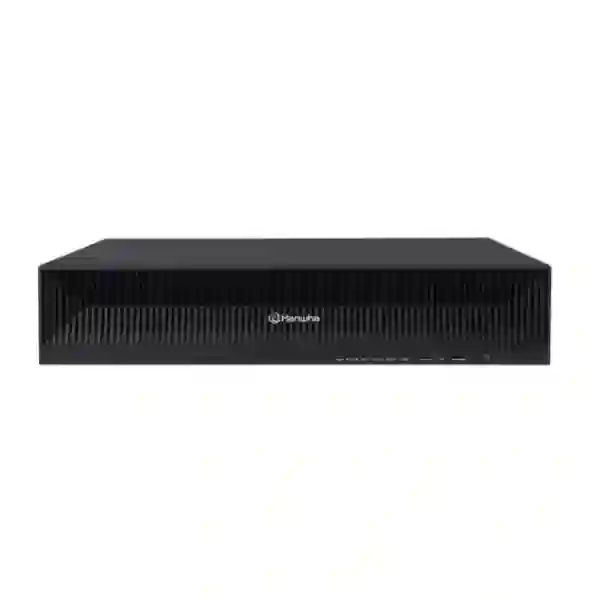
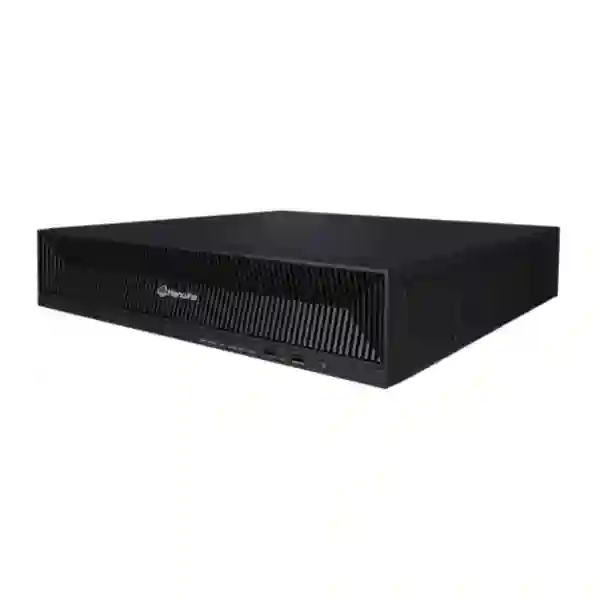
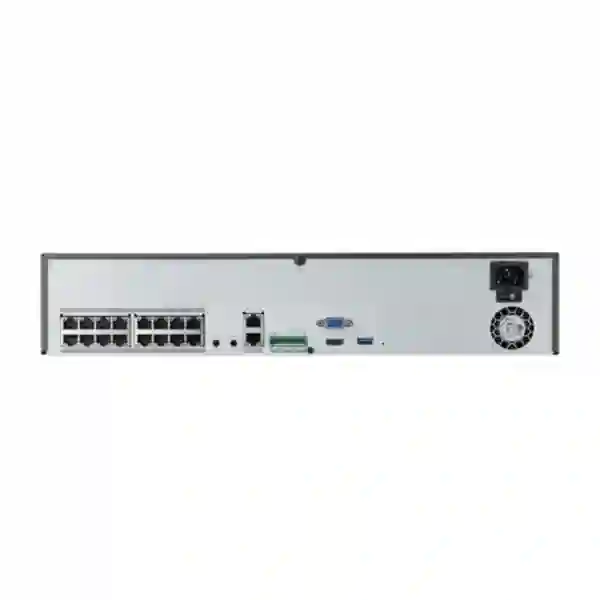
Hanwha Vision XRN-K1620SB-12: 12TB PoE Network Video Recorder
Plan a sixteen-camera CCTV system around dependable recording, usable evidence and realistic power and storage limits. The Hanwha XRN-K1620SB-12 includes 12TB of factory-installed raw disk capacity, a 140Mbps recording ceiling and sixteen PoE+ ports with a shared 200W power allowance. Confirm the exact regional firmware and language before buying for Tanzania.
Specifications at a glance
| Manufacturer / model | Hanwha Vision / XRN-K1620SB-12 |
|---|---|
| Recorder type | Embedded Linux IP network video recorder |
| Camera channels | Up to 16 |
| Supported camera resolution | CIF to 32MP, subject to codec/decoding limitations |
| Maximum recording bandwidth | 140Mbps incoming |
| Maximum playback bandwidth | 32Mbps |
| Video compression | H.265, H.264, MJPEG; WiseStream listed |
| PoE camera connections | 16 × 10/100 RJ-45 PoE+; combined 200W budget |
| Network interfaces | 2 × Gigabit RJ-45 |
| Factory storage | 2 × 6TB installed; 12TB raw |
| HDD configuration | 4 SATA bays; up to 24TB total supported |
| Video outputs | HDMI up to 3840×2160 at 30Hz; VGA |
| Alarm connections | 4 inputs, 2 outputs |
| USB | 2 front USB 2.0, 1 rear USB 3.0 |
| Electrical | 100–240VAC, 50/60Hz; maximum consumption 310W |
| Operating range | 0–40°C; 20–85% relative humidity |
| Dimensions | 440 × 89.8 × 428.4mm |
| AI-assisted search | Only with compatible Hanwha AI camera functions |
Manufacturer specifications for the exact Korean-market model. Confirm any variant-specific settings and regional suitability before procurement.
Quick buying decision
Best fit
Sites needing up to sixteen compatible IP cameras, a built-in PoE arrangement and local recording with planned evidence retrieval.
Check first
Combined camera bitrate, camera peak power, installed drive configuration, realistic retention and supported firmware language.
Consider alternatives
More than sixteen channels, substantially more storage, additional aggregate throughput or verified English-language/regional support requirements.
Start with the surveillance requirement, not the recorder label
The Hanwha XRN-K1620SB-12 is designed to collect, record, display and retrieve video from as many as sixteen compatible IP cameras through one network video recorder. The practical buying question is whether sixteen camera channels, a maximum incoming recording bandwidth of 140 Mbps, and the installed disk configuration meet the customer’s evidence and monitoring requirements. A site with twelve modest-bitrate cameras may have comfortable capacity, while another with sixteen high-resolution cameras can exhaust bandwidth or storage despite having the same number of channels. The right specification starts with a camera schedule, selected streaming profiles, expected recording hours and a defensible retention objective.
This exact model is particularly relevant when a buyer wants a multi-camera wired installation with PoE connections at the recorder, local display outputs, and a built-in recording platform rather than an entirely cloud-dependent architecture. Its 12 TB factory disk configuration can simplify an initial bill of materials, but raw disk capacity is not a promise of any particular number of retained days. Local software language, firmware, support and availability are especially important for a Korea-designated model being considered for Tanzania. An informed quotation should state all those assumptions rather than relying on a broad claim that a sixteen-channel NVR suits every sixteen-camera site.
What the exact model provides
Hanwha Vision identifies the XRN-K1620SB-12 as a sixteen-channel network recorder supporting camera input resolutions from CIF through 32 megapixels. The manufacturer’s technical information lists embedded Linux operation, recording compression formats H.265, H.264 and MJPEG, WiseStream support, and up to 140 Mbps incoming recording bandwidth. It also lists a maximum playback bandwidth of 32 Mbps. These are different limits: the incoming figure governs aggregate recording traffic, while playback performance affects how footage is retrieved and reviewed. A practical system assessment must consider both rather than treating the highest recording figure as a guarantee of unlimited live viewing and concurrent searches.
The unit includes sixteen 10/100 PoE+ camera-facing Ethernet ports and two Gigabit RJ-45 network interfaces, one HDMI interface capable of 3840 by 2160 at 30 Hz, a VGA output, and four alarm inputs with two alarm outputs. Hanwha lists three USB ports, an audio output, and network audio and two-way communication capabilities subject to the camera and deployment design. These specifications describe interfaces, not a promise that every attached camera or third-party platform supports every advanced function. Final compatibility must be established against camera firmware, stream profile, event capability and site networking choices before purchase.
Where a 16-channel system makes sense
A sixteen-channel recorder may suit a shop with several entrances and aisles, a warehouse covering loading areas and internal traffic, an office with reception and circulation spaces, or a residential compound using multiple wired camera positions. These are planning examples rather than claims about any particular completed installation. The deciding factor is whether the number of camera viewpoints captures useful evidence without creating excessive blind spots, and whether the proposed camera resolution and frame rate remain within the recorder’s aggregate recording limits. Outdoor areas, wide entrances and moving vehicles may demand different optical designs from controlled indoor corridors.
Consider a premises that initially requires ten cameras but expects to add four more. The available channel margin is useful, yet planning should also reserve recording bitrate, PoE power, storage capacity, switch capacity and review time. If the site needs more than sixteen camera inputs, large numbers of viewers, or greater storage resilience, a different recorder class or a multi-recorder architecture may be more appropriate. A well-scoped site survey should identify locations, lighting conditions, distances, mounting constraints and network paths before treating the recorder as the entire CCTV solution.
Select cameras by scene and evidence need
The stated 32MP input capability is a maximum supported camera resolution, not a recommendation to use the highest resolution at every position. An entrance intended to recognise faces under changing daylight may require careful lens selection, dynamic range, mounting height and lighting. A large yard may need a different field of view and infrared strategy, while a store aisle may be adequately covered at a lower resolution. Camera selection should begin with the size of the object that must be recognised in the recorded scene and the light available at the point of interest. Merely increasing pixels cannot recover detail lost to motion blur, glare or poor placement.
Compatibility is as important as image quality. Hanwha lists SUNAPI and ONVIF in its network camera protocols, but support for basic video does not automatically establish full support for analytics, alarms, PTZ control or all camera configuration functions. Where possible, record the complete manufacturer model and firmware version for each proposed camera. Test recording, synchronised time, audio where required, motion events and playback before final acceptance. If a camera has multiple streams, confirm which stream is recorded and which is used for viewing; a low-bandwidth secondary stream can improve multi-screen responsiveness without replacing the quality needed for forensic evidence.
Understand the 140 Mbps recording budget
Every camera sends a video stream that consumes part of the recorder’s recording allowance. Sixteen cameras averaging 4 Mbps each produce approximately 64 Mbps of incoming video, before design allowances for changes in image complexity, concurrent events and any additional recorded streams. A nominal 8 Mbps average across sixteen cameras would be about 128 Mbps, leaving far less margin below the listed 140 Mbps ceiling. Those examples are simple arithmetic, not guaranteed achieved rates. Actual camera bitrates vary with compression, resolution, frame rate, scene movement, lighting, noise, codec settings and whether recordings are continuous or event-driven.
Specify a target and a maximum bitrate for each camera, then add the total against the manufacturer’s ingress limit. Do not confuse the 140 Mbps camera recording ceiling with the speed of either Gigabit network interface, and do not assume network port capacity removes the recorder’s processing limits. A busy car park with frequent motion may compress less efficiently than a quiet corridor. Integrators should test a representative high-motion period, especially where several cameras use advanced compression or event processing. Recording and playback should be verified simultaneously when investigators or guards may need to review evidence while the site is operating.
Use the built-in PoE ports carefully
Sixteen built-in PoE+ ports simplify a straightforward camera topology because supported cameras can receive both network connectivity and electrical power over suitable Ethernet cabling. Hanwha lists a total PoE power budget of 200 W. This is an aggregate figure, not 200 W per camera. If every port were occupied, the simple arithmetic average would be 12.5 W per port, although real camera requirements differ significantly. Cameras with heaters, high-power infrared, motors or other accessories can demand more than compact fixed cameras. Count each camera’s maximum supported draw rather than relying only on typical idle consumption.
A design that exceeds the combined PoE allowance may require a separately powered PoE switch, a different camera mix or a different recorder. Before allocating ports, verify the camera’s PoE standard, startup behaviour, peak consumption and any limitations of the NVR’s individual ports. Keep a reasonable power margin for cold starts and night-time infrared switching. Ethernet cable quality, correct terminations and permitted installation lengths matter too. A camera that appears stable during daytime commissioning may become unreliable when accessories activate after dark, so power testing should include the expected worst-case operating state.
Plan the network topology before installation
A small installation can connect supported PoE cameras directly to the recorder, while larger or physically dispersed premises may need a dedicated camera network and correctly sized upstream switching. The XRN-K1620SB-12 lists two Gigabit network connections in addition to its sixteen camera-side PoE interfaces. That does not automatically mean both connections should be bridged into the customer’s main office network. The topology must reflect manufacturer guidance, cybersecurity policy, camera discovery needs, remote viewing arrangements and the physical placement of equipment. Keep an accurate network diagram showing each camera, port, address, switch and patch-panel label.
For Tanzanian sites with multiple buildings or distant camera positions, plan any fibre uplinks, surge protection, grounding, outdoor cable routes and network cabinet capacity as independent engineering requirements. The recorder’s own PoE ports do not solve distance or environmental limitations. Avoid unreviewed changes to a working business network, especially where voice, payment terminals or other sensitive services share infrastructure. An installer should document IP addressing, VLAN or subnet plans where appropriate, time synchronisation, firewall rules and recovery procedures so that a replacement camera does not become a trial-and-error exercise later.
Understand the included 12 TB storage
Hanwha’s exact-model documentation lists two factory-provided 6 TB hard drives, creating 12 TB of raw installed disk capacity. The enclosure has four SATA bays and a manufacturer-stated maximum of 24 TB using supported drive sizes. Raw installed capacity is not identical to usable recording capacity: formatting, recorder allocation, any redundancy configuration and operating overhead can reduce space available for video. Furthermore, a twelve-terabyte label does not establish a fixed retention period. The actual outcome depends on camera count, combined bitrate, recording schedule, audio, event conditions and how old footage is overwritten.
Before approving the order, ask the supplier to identify the exact drives supplied and to confirm their compatibility and configuration. The manufacturer’s product information lists RAID-1, while some third-party documentation for this Korean-market family differs on RAID availability; therefore the firmware and exact offered configuration must be checked before any storage-protection promise. Do not assume that a two-disk factory shipment is configured as a mirror. Where disks are to be expanded, confirm supported drive capacities, installation procedure, compatibility lists and whether an expansion changes serviceability, recording continuity or available space.
Estimate retention with real camera settings
Retention calculations are best performed from planned average recording bitrates rather than a simple count of hard drives. For illustration, sixteen continuously recording cameras averaging 4 Mbps represent 64 Mbps in total. Using a purely theoretical 12 TB of available storage, that is roughly seventeen days before allowances for disk formatting, metadata, variable bitrate and other operational factors. At the same camera count and 2 Mbps average, the corresponding theoretical figure is roughly thirty-five days. These are calculation examples, not promises that the supplied recorder will deliver those retention periods in the field.
If storage is allocated to a mirrored configuration or other reserved capacity, practical retention can be substantially shorter. A site with a thirty-day requirement should therefore begin by specifying its retention objective, then measure realistic average and high-motion recording rates, confirm usable capacity and allow for overhead. Event-triggered recording can extend retention in some environments, but it also raises the risk of missing context before or after a trigger. Where incidents must be investigated weeks later, favor a conservative design and review actual recorded-day statistics after commissioning instead of relying only on a spreadsheet estimate.
Compression is useful, but it is not magic
The recorder supports H.265, H.264 and MJPEG, with WiseStream listed among the supported video technologies. Efficient compression can reduce storage and network demand for a given quality target, although the result is strongly scene-dependent. A fixed view of a quiet reception area may compress much more effectively than a busy entrance in rain or a poorly lit yard with sensor noise. Select the codec supported by both camera and recorder, and verify how it behaves with the chosen frame rate, exposure settings and image detail requirements. Some older cameras or third-party software may require a more conventional stream profile.
Plan for diagnostic flexibility. If an advanced compression setting causes playback or interoperability problems, installers should have a validated fallback profile available. Changing codec settings can also affect viewing performance, evidence export and the rate at which disks fill, so record the final camera configuration in the handover documents. WiseStream should not be marketed as a fixed storage-saving percentage because savings vary. The correct target is a recognisable recorded image under difficult conditions, achieved within the recording and retention budget, rather than the smallest possible file under ideal test scenes.
AI search depends on the cameras supplying it
Hanwha Vision advertises AI-based object search when this NVR is paired with compatible Hanwha AI cameras. This distinction matters: the recorder should not be described as converting any standard IP camera into an AI camera or offering every possible analytics feature on every channel. Search usefulness depends on the information produced by supported cameras, the NVR’s firmware and the compatibility of the selected event or metadata workflow. Confirm the exact camera models, available object categories and supported search conditions for the intended installation. Demonstrations should use the planned cameras rather than an unrelated showcase system.
A practical use case is narrowing the review of a busy entrance, delivery bay or perimeter after an event. The value lies in reducing the amount of footage an operator must inspect, not eliminating human verification. Lighting, camera angle, distance, occlusion and the object category all influence analytic results. False positives and missed events remain possible. For high-stakes evidence, operators should review the actual video and retain relevant context, including footage before and after the located event. Ask for a trial search against representative scene recordings before treating AI-assisted search as a purchasing requirement that has been met.
Events, bookmarks and alarms support investigations
The recorder’s published functions include scheduled and event recording, dynamic event support, bookmarking, alarm inputs and outputs, and searching by date and time or event information. Those tools can make incident review more manageable when they are configured deliberately. For example, a service door may use a camera event to help direct an operator toward a time window, while a bookmarked segment can make internal follow-up easier. However, a digital event is not proof of an incident by itself. Event quality, clock accuracy and operator procedure remain essential, particularly when footage may be used in staff reviews or formal investigations.
Build the event plan around questions that investigators actually ask. Which entrance was used? When did an object arrive? Which camera has the clearest view before the person moved out of frame? Who is authorised to export the clip? A system with more event notifications than staff can reasonably evaluate may become less useful, not more. Set priorities, document how each event is generated, confirm alert destinations and periodically test them. If an external alarm panel or third-party platform is involved, verify the specific integration; the presence of alarm terminals alone does not establish compatibility with every system.
Local displays and operator workflow
Hanwha lists HDMI output up to 3840 by 2160 at 30 Hz and a VGA output for this NVR. The manufacturer’s display specifications allow dual-monitor operation in supported modes, while 4K operation is listed for a single HDMI display. Display capability should not be confused with unlimited simultaneous decoding of sixteen maximum-resolution streams. Local split-screen performance depends on selected layout, source resolution, codec and frame rate. During commissioning, test the layouts that guards will actually use, including the most important live views and a typical search or replay task.
A useful control-room layout often prioritises a few high-value viewpoints rather than making every camera equally small. An entrance camera, cash handling position or loading zone may deserve prominent placement; other views may rotate or remain available on demand. Confirm whether monitors, mouse, keyboard, cables and mounting accessories are included in the quotation, since the recorder specification alone does not answer that. Label camera names in plain language and ensure that timestamp overlays are readable. Staff should know how to switch layouts, locate a date, mark a clip and export evidence without needing to change recorder administration settings.
Remote access must be planned securely
Hanwha’s published interface information includes browser viewing and mobile connectivity options, with P2P QR-code configuration listed among the features. These describe potential functions of the recorder family, but the exact regional firmware, supported application version and network environment need validation for this Korean model. Remote access should not be promised merely because the NVR has internet connectivity. Test access using the actual service connection, mobile devices and user roles expected at the premises. A connection that works on the installer’s local network is not necessarily a proven solution for off-site management.
Where remote viewing is required, the customer should decide who may see live streams, who may review recordings and who may export or change settings. Use the manufacturer’s supported secure access mechanisms, unique accounts and strong credentials; avoid unnecessary direct exposure of administrative interfaces to the public internet. The site owner should understand that mobile viewing can consume data and depends on an available upstream internet connection. Connectivity quality, authentication settings and remote application support must be included in acceptance testing, with a local viewing fallback for outages that interrupt internet access.
Protect footage and recorder administration
A CCTV recorder becomes a repository of sensitive operational images, so cybersecurity deserves the same planning attention as image quality. Hanwha lists features such as HTTPS, IP address filtering, access logging, 802.1X authentication, device certificates and signed firmware for this model. The availability or behavior of each security option should be checked against the installed firmware and network design. These controls do not replace disciplined administration. Use named accounts where feasible, least-privilege roles, controlled recovery credentials, a documented change procedure and routine review of who can export recordings.
Separate routine operators from system administrators and restrict changes to recording schedules, camera registration and storage settings. Establish a firmware review process using manufacturer-approved packages for the exact model and regional variant, with configuration backup and a maintenance window where necessary. Avoid assuming firmware for the similarly named XRN-1620SB1 is interchangeable with XRN-K1620SB-12. Check event logs and recorder time regularly. Set an evidence export procedure that records who requested a clip, why it was exported, the date range and how it was transferred, while respecting the organisation’s privacy and retention obligations.
Tanzania operating conditions are part of the specification
The manufacturer’s hardware information lists a 100–240 VAC, 50/60 Hz input and maximum power consumption of 310 W, with a total camera PoE power budget of 200 W. The listed operating temperature is 0 to 40 degrees Celsius with 20 to 85 percent relative humidity. These figures are important when selecting a cabinet, room ventilation and backup supply. They do not mean that the recorder can be installed directly in sun, exposed to rain, or operated reliably in a sealed cabinet that traps heat. Choose an indoor, secure position with ventilation and room for service access.
For a Tanzania deployment, check the actual site’s power quality, outage frequency, cooling and dust exposure rather than assuming every premise has the same conditions. Specify a suitable UPS or backed-up electrical circuit for the recorder and any separate switches, and calculate load and runtime from the full system, not from the recorder chassis alone. Where lightning or electrical transients are a concern, use appropriately designed earthing and surge protection. A monitored location that loses recording during power interruptions may fail its purpose even if camera placement and image quality are otherwise excellent.
Regional language and support need explicit confirmation
The exact XRN-K1620SB-12 appears in Hanwha Vision’s Korean-language product materials, and the listed system language on its Korean product specification is Korean. Customers in Tanzania should therefore not assume the supplied unit has an English-language interface, English documentation, locally eligible firmware or a particular regional service route. Clarify the language of the actual quoted product, its operating menu, accessible documentation and firmware support before ordering. This is especially important when the recorder will be operated by security staff or handed over to an external facilities team that requires English-language instructions.
The manufacturer also notes that product supply can vary by region. A Tanzania-facing listing is not evidence of in-country stock, manufacturer-authorised regional distribution, a specified warranty, importer support or delivery time. Ask the seller to identify the source and exact suffix of the offered unit, confirm any permitted regional variation, and state the after-sales arrangements in the formal quote. The model’s Korean TTA public-sector security quality certification is a product-specific Korean-market fact, not an assertion of Tanzanian regulatory approval or a substitute for any local procurement compliance requirements.
Procurement comparison: channel count is only one filter
When comparing 16-channel NVRs, list requirements in a consistent order: supported camera models; number of powered ports; aggregate PoE budget; incoming recording bandwidth; maximum supported camera resolution; practical local decoding; installed raw and usable disk capacity; maximum storage expansion; retrieval workflow; and supported applications. The 16-channel XRN-K1620SB-12 combines built-in PoE, 12 TB factory-installed storage and the manufacturer’s supported AI-search workflow with compatible cameras. Its advantages are most relevant when those capabilities match an actual project, not simply because they appear in a feature table.
A different Hanwha recorder or another architecture can be better if the customer needs more than sixteen channels, higher aggregate throughput, larger disk arrays, distinct storage redundancy, a different application ecosystem or regional language support confirmed in advance. An eight-channel NVR can be more economical when the camera requirement is genuinely small and stable. Conversely, a larger system may avoid replacing the recorder after a planned building expansion. The purpose of the comparison is to prevent a false economy: saving on the recorder while underestimating power, disks, network equipment or service needs often shifts cost to future remediation.
Commissioning should prove the whole installation
An appropriate commissioning sequence begins with inventory and bench checks. Record the unit’s exact model and firmware, inspect the drives and power accessories, establish administrative credentials, configure time and network settings, and confirm every camera’s intended channel and stream profile. Next verify the sum of camera bitrates, peak PoE demand, live display layouts and continuous or event-based recording schedules. Storage tests should include the overwrite behaviour and the actual days currently retained once representative footage exists. These checks are more meaningful than a screen showing sixteen green camera icons on the first day.
Complete acceptance with a practical incident exercise. Choose a test time, identify the relevant camera, locate the video, play it at normal and accelerated speeds, export a short clip, and verify that the recipient can open the evidence using approved tools. Check user permissions, clock alignment, power recovery after an outage, and the behaviour of notifications if they are part of the deployment. Record open issues with owners and deadlines. A handover package should contain the camera map, configuration summary, user roles, drive configuration, firmware information and operational instructions without disclosing sensitive passwords in an insecure document.
Ongoing maintenance protects the investment
Network recorders require periodic checks even when they operate without obvious alarms. Review camera connectivity, recording status, drive health, storage utilisation, event history and timestamps. Inspect cabinets for dust buildup and blocked ventilation, and confirm that all power and data connections remain secure. Reassess storage retention whenever more cameras are added or resolution, frame rate and bitrate settings change. A new high-resolution camera can significantly alter the recording budget even though the recorder still has an available channel. Maintenance reports should record measured findings rather than just the statement that the system is working.
Test the evidence export process at agreed intervals and confirm that relevant staff retain the skills and permissions to retrieve video. Review access accounts when employees or contractors change roles. Apply firmware updates only after checking the exact model, release guidance and the plan for restoring configuration if something goes wrong. If a drive reports trouble, respond according to the manufacturer’s supported service procedure rather than casually removing it during recording. A well-maintained NVR is not simply one that is powered on; it is one that can produce reliable, timely footage when an actual incident must be reviewed.
Specify a quotation that can actually be evaluated
A useful quote request should give the site type, number of cameras now and later, each camera’s exact model or desired scene, expected recording hours, retention target, approximate cabling distances, available power arrangement and whether local or off-site access is required. The seller can then assess sixteen-channel capacity, the 140 Mbps recording allowance, the 200 W total PoE budget, storage choices and accessories. If an existing system is being upgraded, include camera firmware and current recording configuration. This reduces the chance of buying a recorder that meets a headline channel count but does not meet the operating brief.
Ask the quotation to distinguish the recorder, preinstalled disks, any additional storage, cameras, cabling, network switches, monitor, rack accessories, electrical protection, commissioning, training and post-sale support. Require confirmation of exact model suffix, delivered firmware language, compatible camera functions, genuine regional support arrangements and the intended storage redundancy configuration. Pricing, lead time, stock and warranty should appear only in the seller’s verified proposal, not be inferred from overseas listings. The purchasing decision becomes clearer when all vendors are asked to price the same camera count, retention period, environmental assumptions and acceptance test.
Before you decide: a practical suitability test
This NVR is a candidate when a site needs no more than sixteen compatible IP camera inputs, its combined recording traffic fits comfortably below 140 Mbps, its cameras’ combined PoE demand fits the 200 W budget, and the storage design can satisfy the desired retention period. It is also useful when local HDMI/VGA viewing and supported event investigation workflows matter. The presence of up to 32MP camera support is an additional capability, but that figure alone does not prove the selected camera mix will fit bandwidth, display decoding or storage expectations. The entire system should be checked against a single commissioning plan.
Pause the purchase if the proposed cameras cannot be verified with the recorder, the expected PoE total is too high, the retention requirement has no capacity calculation, the buyer assumes all cameras gain AI capabilities, or English-language operation is a firm requirement that the exact unit has not been proven to meet. Equally, do not rely on an unconfirmed Tanzania warranty or regional delivery claim. The most productive next step is a model-specific, configuration-based quote and a list of unresolved compatibility questions, not an order based exclusively on the recorder’s advertised maximum numbers.
Frequently asked questions
Is the Hanwha XRN-K1620SB-12 a 16-camera recorder?
Yes. Hanwha lists up to sixteen network camera inputs for this exact model. That means sixteen recording channels, not a guarantee that every combination of sixteen IP cameras will work without further planning. Before purchasing, check the camera models, ONVIF or SUNAPI support, maximum recording bitrates and the intended stream settings. Additional channels cannot simply be unlocked beyond the stated sixteen-channel maximum. If future expansion is likely, include the long-term camera count when choosing the recording platform.
Does the product include 12 TB of storage?
The manufacturer lists two supplied 6 TB hard disks, giving 12 TB of factory-installed raw capacity. Raw disk space is not the same as usable recording capacity, and it does not translate directly into a specified number of recording days. Ask the supplier to confirm the shipped disks, installed firmware, disk health and active storage arrangement. Any mirroring or reserved capacity can change the usable figure. The four SATA bays have a manufacturer-listed total maximum of 24 TB with supported drives.
How many days can 12 TB record?
There is no universal answer. Retention depends on total average bitrate, recording schedule, codec, motion in the scene, file overhead and usable storage. As a theoretical example, sixteen cameras averaging 4 Mbps while recording continuously generate about 64 Mbps; 12 TB of wholly available capacity would represent roughly seventeen days before real-world reductions. A mirrored arrangement could reduce usable space. For a reliable target, ask for a written storage calculation using the proposed camera settings and then confirm real retention after commissioning.
Are the 16 PoE ports enough for 16 cameras?
The recorder has sixteen PoE+ camera-facing network ports, but their combined power allowance is 200 W. Sixteen cameras may fit if each camera’s peak power requirement and the complete aggregate fall within the supported limits. A camera with powerful infrared, a heater or a motorised accessory may consume more than a small fixed camera. Port count and total power budget must both be checked. Where the power demand is too high, use an appropriately specified separately powered network design rather than exceeding the recorder’s budget.
Can this recorder record 8K or 32MP video?
Hanwha states support for IP camera streams up to 32 megapixels, subject to the supported codec and decoding conditions. That does not mean every live split-screen layout displays sixteen 32MP streams at full frame rate. The manufacturer’s output and decoding specifications impose different operating limits depending on layout, resolution, codec and display mode. Check the proposed camera stream profiles and demonstrate the operator’s required view and playback arrangement before purchasing. Appropriate lens, light and mounting decisions remain essential for usable evidence.
Does it have AI detection built into every camera?
No. Hanwha describes AI-assisted object search when the recorder is used with compatible Hanwha AI cameras. It should not be presented as a device that adds AI image recognition to ordinary non-AI cameras. The available object categories, search features and metadata depend on the specific camera, NVR firmware and supported integration. Request a compatibility list for the proposed camera models and, where possible, a demonstration using representative footage from the real deployment scene.
Can it connect to other camera brands?
The published protocols include ONVIF and SUNAPI, which may help with interoperable IP camera streams. However, basic video compatibility is not the same as full feature interoperability. Motion events, audio, PTZ, smart search, camera settings and firmware-related functions may vary significantly between devices. Provide the exact third-party camera model and firmware when requesting compatibility confirmation. Ideally, test live video, recording, playback, time alignment and required events before accepting a mixed-brand system.
Can I view footage on a phone or from another site?
Manufacturer documentation identifies mobile viewing and remote connectivity capabilities, including P2P configuration. The specific application, firmware, supported region and network conditions need to be checked for this Korean-market model. Remote viewing also depends on internet availability and securely managed accounts. A supplier should demonstrate the exact off-site workflow and explain its data usage and access restrictions. Do not expose recorder administration to the open internet simply to make mobile access convenient.
What monitor connections are included?
The listed video outputs include HDMI and VGA. Hanwha specifies HDMI capability up to 4K at 30 Hz and supported dual-monitor operation in the relevant display modes, with a 4K single-display configuration described separately. The number and resolution of streams visible at once depend on the selected layout and decoding limits. A monitor is not assumed to be part of the recorder package. Ask the supplier to demonstrate the planned live-view layout and specify any display hardware, cables or installation accessories needed.
Is the recorder suitable for a hot or dusty room?
The published operating range is 0 to 40 degrees Celsius and 20 to 85 percent relative humidity. Those limits do not make it an outdoor-rated device. Install the recorder in a secure, ventilated indoor environment, with attention to dust, rack airflow and electrical supply. In warm premises, a closed cabinet may trap heat beyond the ambient room temperature. A site survey should consider cooling, physical access, lightning and power interruptions and should include the load of any separately powered network devices.
Is this model approved and supported in Tanzania?
Its manufacturer page identifies a Korean TTA security quality certification, which is not the same as proof of Tanzanian regulatory approval. Regional supply and service terms have not been established for this listing. Buyers should ask for written confirmation of the actual regional version, interface language, firmware support, local compliance responsibilities, warranty arrangements and delivery conditions. No Tanzania stock, regulatory approval, authorised-distributor status or warranty promise is made in this product description.
What information is needed for a useful quote?
Send the intended camera count and models, location types, desired recording quality, approximate days of footage to retain, estimated cable runs, expected monitoring arrangement and whether mobile access is required. Include any special cameras that need higher PoE power and note power backup requirements. Request that the quote identify the exact XRN-K1620SB-12 model, supplied hard drives, usable storage assumptions, supported firmware language, accessories, commissioning and support arrangements. This creates a basis for comparing a working solution instead of comparing only recorder boxes.
Request a configuration-based Tanzania quote
Share your camera schedule, preferred models, power and cabling needs, target retention period and viewing requirements. Ask FourTeck Tanzania to confirm the exact unit, regional support, firmware language, installed drives, compatible functions and a complete installation scope before ordering.
Request a Hanwha XRN-K1620SB-12 quotation with a technical compatibility review.




Reviews
There are no reviews yet.