
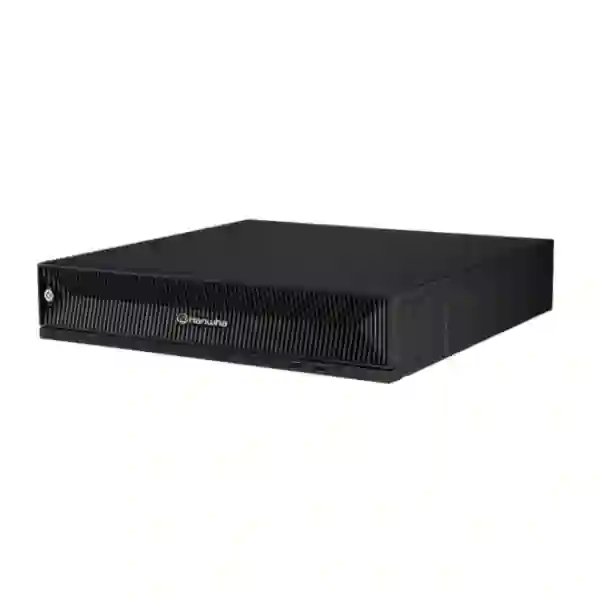
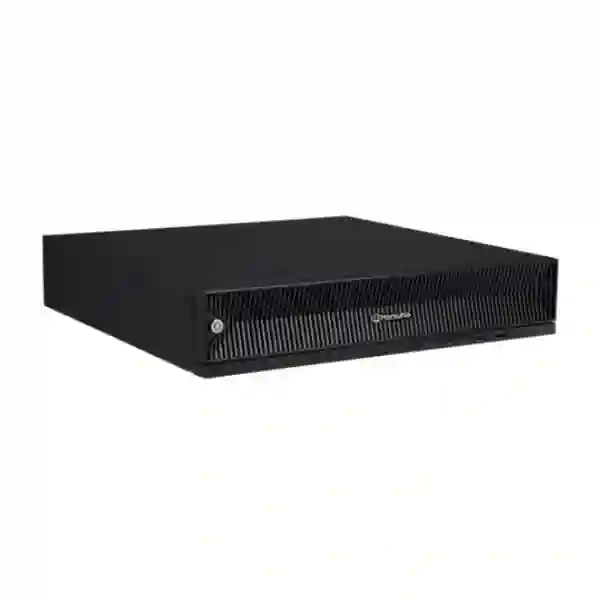
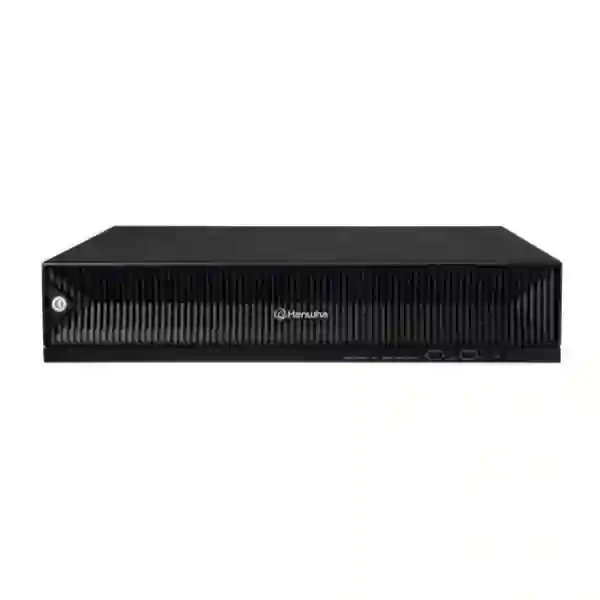
Hanwha Vision | Network video recording
Hanwha XRP-4110G2 36-Channel SSM Recorder
A server-style IP video recorder for organisations evaluating a managed surveillance platform. Understand recording capacity, SSM workflow, storage planning and the certified variant’s important limitations before requesting a Tanzania project quotation.
Key manufacturer specifications at a glance
These are model-level specifications, not a promise of the drive package, availability or installation service in a particular quotation. Engineering limits and operational fit must be checked together.
| Item | Published specification or buyer note |
|---|---|
| Network camera inputs | Up to 36 channels |
| Supported camera resolution | CIF to 32 MP |
| Recording / playback bandwidth | Up to 400 Mbps / up to 150 Mbps |
| Compression | H.265, H.264, MJPEG and WiseStream |
| Storage bays and RAID | 8 SATA bays; RAID 1, 5, 6, 10 |
| Manufacturer-listed supported HDD capacity | Up to 16 TB; confirm approved drives and included quantity |
| Camera protocol families | Wisenet and ONVIF |
| Video outputs | Two HDMI, one 4K and one Full HD |
| Network ports | Three Gigabit RJ-45 Ethernet |
| Operating system | Windows 10 IoT Enterprise LTSC; SSM installed |
| Operating environment | 0°C to 40°C; humidity at or below 80% |
| Power and chassis | 100–240 V AC, 50–60 Hz; 205 W; 438 × 86 × 434.9 mm |
| Important certified-variant exclusions | Clustering, failover, configuration backup/restore, Virtual Matrix and named third-party integrations |
Important product-fit note
This is a TTA-certified variant. Hanwha lists clustering, failover, configuration backup and restore, Video Wall Virtual Matrix, and certain third-party integrations as unavailable. It also restricts arbitrary SSM updates. The cited TTA status must not be described as a Tanzanian certification. Regional supply and the exact quoted configuration remain subject to verification.
Who should consider this recorder?
The Hanwha XRP-4110G2 is designed for organisations that need a server-style network video recorder and a managed video monitoring interface rather than a basic camera-by-camera recording box. It supports up to 36 network camera inputs and is supplied with Hanwha Vision SSM software installed. A buyer considering this model should already have, or be planning, a documented IP-camera architecture with a defined recording policy, operator workflow, and storage requirement. The right purchase decision begins with those site requirements, not simply the headline number of channels.
For a Tanzanian buyer, the first conversation should identify the cameras, locations, security operations, network design, expected footage-retention period, and technical support arrangements. A solution with thirty cameras could be suitable on channel count but unsuitable if its total incoming video bitrate exceeds the recorder’s rated capacity or the buyer needs excluded high-availability features. Conversely, a smaller installation may benefit from structured monitoring if its evidence handling and event review are complex. Request an application-specific configuration review before treating the appliance as an exact match.
What the 36-channel figure means
The published maximum of 36 network camera inputs is a simultaneous camera-channel capability, not a promise that every possible camera configuration performs identically. Each channel still contributes video traffic, recording workload, storage demand, and potentially analytics events. A design with thirty-six modest-bitrate streams is different from one with thirty-six very high-resolution, high-frame-rate streams. Camera count should therefore be tested together with codec, resolution, frame rate, scene complexity, and whether a camera sends multiple streams.
Prepare a channel schedule listing the planned camera at each entry point, aisle, loading area, lobby, perimeter, or other authorised observation position. Mark which cameras are business-critical and which can operate with different profiles. Keep spare-channel capacity visible for possible changes, but do not assume the certified appliance can simply be clustered to accommodate future expansion. The manufacturer excludes clustering for this exact variant. If an estate is expected to grow beyond the verified input limit, evaluate a different architecture before purchasing.
Recording throughput and practical headroom
Hanwha states a maximum recording bandwidth of 400 Mbps for this model. That figure is a recorder capability, not the same thing as the site’s internet speed and not a guaranteed bitrate for each camera. The relevant design quantity is the sum of the actual recording streams entering the appliance, including periods of elevated activity. Bitrate behaviour varies with camera configuration, image movement, illumination, compression and the recorded scene. A configuration that is comfortable during a quiet test can become more demanding during a busy operational period.
Estimate the video load with camera-side bitrate settings and test representative daytime and nighttime scenes. Reserve sensible operating headroom rather than designing permanently at the published ceiling. Check switching capacity, uplink utilisation, segmentation, and any traffic carried from remote branches. The recorder’s 150 Mbps maximum playback bandwidth is a separate planning figure: many simultaneous reviewers or exported streams may change the operator experience. Ask the integrator for a written bandwidth schedule and a commissioning test that measures the resulting load.
Resolution is not the same as display output
The recorder accepts camera resolutions from CIF up to 32 megapixels, which the manufacturer describes as recording up to 8K-class video. Its local live-view and playback capabilities have separate display constraints. Two HDMI connections are specified, one associated with 4K and the other with Full HD. The manufacturer notes dual-monitor operation with Full HD monitors and single-monitor operation with a UHD monitor. These details matter when a control room wants to show many live views and review high-resolution footage at the same desk.
Do not read the 32 MP input specification as a guarantee that every pane of a split-screen view will display the full original camera resolution. Operators should test the intended monitor size, number of panes, client configuration, and review tasks. Very high-resolution cameras may be justified for specific identification requirements but can consume substantially more storage and transmission capacity. Plan recording quality around useful evidence, realistic scene geometry, and the ability to find and export an incident quickly.
Understanding the preinstalled SSM platform
SSM is Hanwha Vision’s video-management software environment included on the XRP-4110G2. Its role is to help operators view configured cameras, follow events, review recorded footage and perform supported device-management tasks. This differs from buying a generic Windows server and separately deciding which video software to deploy. The appliance approach can simplify the initial component list, provided the certified product’s actual functionality matches the site brief. SSM Client is identified by the manufacturer as its viewer application.
The procurement team should ask to see routine tasks demonstrated rather than relying on a generic VMS feature sheet. Examples include locating a particular camera, switching layouts during a shift, searching a known event, reviewing evidence, and recording a maintenance action. Training should reflect the software build approved for the device. Importantly, this certified SSM appliance does not allow arbitrary SSM version upgrades. A future feature described for another SSM version should not be assumed available on this specific system.
Event-led surveillance workflows
An effective recording system helps an operator move from an event to the relevant footage without losing context. Hanwha lists scheduled and continuous recording modes, event-based recording, pre- and post-event recording, event profiles, bookmarks and dynamic events among this model’s functions. These capabilities can support a review process in which staff first identify the event, then follow an appropriate time window and collect supporting clips. Configuration determines whether this is useful in practice.
A site should map its real incident types before programming alerts. Camera disconnects, motion in restricted zones, after-hours activity and tamper conditions have different urgency levels. Decide who responds, when they respond, and what an alert should include. Too many alarms make genuine events harder to spot. Validate each event source, recording rule and time setting during commissioning. Review an incident end to end, including what happens when a camera goes offline, because a clever alarm interface cannot replace reliable footage capture.
AI-assisted search: know the dependency
Hanwha describes AI-based object search for the XRP-4110G2 when used with compatible P-series AI cameras. The qualification is central: the recorder’s existence alone does not turn any connected camera into an AI analytics device. The camera must deliver the suitable intelligence and associated metadata, and integration must be supported in the deployed configuration. Buyers should confirm exact camera model, firmware, event types and tested search workflow before putting an AI search requirement into a contract.
For example, a security team may want to narrow a review by objects rather than watching an entire shift. That can be valuable only when camera placement, image quality, analytics configuration and metadata transfer are suitable. Compare the intended task with a real demonstration using representative scenes. The system should never be sold as guaranteed automatic identification of people or vehicles, nor as a substitute for trained verification. The review process must account for missed events, false detections and local privacy requirements.
Camera and protocol compatibility
The official product specification lists Wisenet and ONVIF network-camera protocols, with ONVIF Profile S also appearing in the network interface information. This is useful when evaluating a mixed IP-camera installation, but a supported protocol label is not a blanket guarantee that every third-party feature will function. Basic video reception, PTZ control, events, metadata, audio, playback and analytics can have different interoperability conditions. Verify the exact manufacturer, firmware and stream settings for any camera outside the primary supported family.
Before reusing existing cameras, obtain a live integration test and a documented acceptance matrix. Include the main stream, secondary stream where applicable, event delivery, clock synchronisation and recovery following a power or network interruption. If an important function depends on vendor-specific metadata, ask for confirmation rather than assuming generic ONVIF covers it. Budget for possible camera changes if compatibility testing fails. The result should be a system with predictable behaviour, not merely a list of cameras that appear once in the discovery interface.
Compression options and video quality
The specified recording compression options include H.265, H.264 and MJPEG, with Hanwha WiseStream noted for H.264 and H.265. Compression is important because recording the same scene at different settings can create very different network and storage demands. However, selecting a more efficient codec does not automatically make an image good enough for a particular security objective. A clear overview image, a usable face image and a readable vehicle detail can require different lens positions, lighting and video profiles.
Set camera profiles according to measurable requirements: subject distance, likely movement, lighting transitions, evidence needs and retention targets. When testing compression, examine moving subjects, foliage, rain, low-light noise and changing headlights, not only still daylight images. Keep a record of the selected settings and do not change them casually after storage sizing has been approved. If the user requires older viewing software, confirm codec compatibility rather than assuming all video clients decode every stream in the same way.
Storage capacity starts with a retention policy
The unit has eight SATA HDD bays, and the manufacturer lists supported HDD capacity up to 16 TB. These are hardware planning figures, not a statement of installed disk capacity. Storage is not specified as included in the manufacturer’s general listing, so the exact quoted drive package needs confirmation. A recording estate should define its required retention period, the cameras covered, their average and peak bitrates, continuous versus event recording, and operational reserve before choosing drives.
Estimate storage using actual recorded bitrate over time, then adjust for RAID layout, file-system overhead, planned utilisation and the possibility of higher than expected scene activity. A rough calculator can help compare options, but a site survey and an acceptance test should settle the purchase specification. Avoid promising a particular number of days from only the channel count or the raw drive size. Evidence retention can also depend on organisational policy, contractual requirements or applicable legal obligations, which the customer must determine for their use case.
RAID protection and what it cannot do
Hanwha lists RAID 1, 5, 6 and 10 support for this recorder. RAID choices affect usable storage, disk-failure tolerance and recovery behaviour, but they do not create an independent backup of evidence. A failed drive, a mistaken deletion, a destructive incident and a system-wide hardware fault are different risks. The correct design should be tied to the importance of the footage and how quickly the organisation must restore normal recording following a problem.
Ask the system designer to show raw capacity, estimated usable capacity, reserved capacity and the intended replacement procedure for each proposed RAID layout. Agree how the system will alert the responsible person to a degraded array and how a replacement drive is selected and fitted. Test a controlled fault or health-alert scenario where practical. Most importantly, distinguish disk-level redundancy from the excluded SSM clustering and failover functions. RAID support does not remove the product’s limits on system-level high availability.
Evidence export and audit trail
The manufacturer lists SEC as a backup file format and supports manual backup, scheduled backup, one-time scheduled backup and privacy-masking backup functions. Evidence-export requirements should be validated against the site’s actual investigation and handover workflow. A useful security system must not only retain footage; it must help an authorised employee locate the right interval, preserve it appropriately and explain how it was handled. Exported evidence may need compatible software or documented viewing procedures.
Agree an incident numbering convention, review authorisations, export logs and a storage location for files outside the recorder. Check timestamp consistency and whether the exported clip includes sufficient context before and after the event. Restrict who can retrieve sensitive video and define when a copy should be deleted. During acceptance testing, perform a complete evidence exercise: find an event, mark it, export it, open the result on an authorised review computer and document what was transferred. This prevents discovering workflow gaps only after an actual incident.
Playback planning for busy control rooms
A system can record correctly yet frustrate users if video review becomes slow at the moments it matters most. Hanwha specifies a maximum playback bandwidth of 150 Mbps, separate from the 400 Mbps recording figure. Review tasks may involve several cameras, different timestamps, scrubbing, repeated playback and exporting clips. The required behaviour depends on client configuration, camera resolution, network design and the number of users accessing the system concurrently.
Ask operators how many simultaneous views they normally need while an incident is being investigated. Then design and test the workflow under realistic operational load. A single smooth playback demonstration is not enough when a site expects multiple guards, supervisors or investigators to review footage at once. Use the supported client and an appropriately specified workstation. Document acceptable response times for ordinary activities without promising a manufacturer-unsupported user-count figure. If the project needs far more concurrent investigation throughput, revisit the platform and architecture before finalising the quote.
Why this certified version has limitations
The XRP-4110G2 is not simply interchangeable with every other Hanwha server recorder. The official listing explicitly excludes clustering, failover and settings backup or restore functions. It also excludes certain third-party emergency-bell, elevator, ANPR and logistics integrations, as well as Video Wall or Virtual Matrix integration. The manufacturer’s statement that arbitrary SSM version upgrades are unavailable for certified appliances is another significant lifecycle constraint. These limitations should appear in purchasing discussions, not as fine print discovered after commissioning.
A security project that depends on automatic failover between recording nodes, centrally managed multi-server growth, virtual-matrix wall control or a specified third-party integration may require a different product. Do not assume those functions can be added with a software purchase or configuration change. Ask for a feature-by-feature comparison with any proposed substitute. TTA certification cited by the manufacturer concerns its stated certification scheme; it is not evidence of a Tanzanian approval, a FourTeck authorisation or suitability for every local procurement requirement.
Network structure and traffic separation
A well-designed surveillance network separates predictable camera traffic from general business usage where appropriate. The XRP-4110G2 lists three Gigabit Ethernet RJ-45 ports, but the intended use of each port should be designed and tested rather than assumed. Camera switches, uplinks, IP address allocation, time services, monitoring workstations and external links all affect the final experience. An unmanaged network can create intermittent losses that look like recorder faults even when the recorder is operating within its own specification.
Record the logical topology and give each camera a stable addressing and naming plan. Consider VLANs, controlled routing, firewall rules and management access in line with the organisation’s network policy. Keep camera-to-recorder pathways measurable, and review peak traffic during testing. Remote cameras may require a resilient wide-area connection and careful bandwidth allocation. Video should not be exposed directly to public networks merely for convenience. If remote access is a requirement, select a secure, supported design approved by the customer’s IT and cybersecurity teams.
Multi-building and branch deployment decisions
A business may have cameras across several buildings or branches but only one primary recording room. In such a deployment, the number of available channels is only one constraint. Link stability, aggregation bandwidth, latency, local network resilience and operational response also matter. If a branch loses connectivity to the recording site, live and recorded video delivery can be affected. The proper solution may include local recording or a revised network architecture, but those features must be specified independently rather than assumed to be included.
Prepare a map of camera locations and their connection paths. For each branch or building, identify the maximum expected video traffic, how outages are detected, how long connectivity may be interrupted and who restores service. Consider whether sensitive evidence should cross a WAN, and how it will be protected in transit. The manufacturer’s supported ARB function should not be confused with the excluded appliance-level failover feature. Confirm the exact recovery behaviour with approved cameras and the deployed configuration during commissioning.
Operator display and monitoring desk
The recorder includes two HDMI outputs, with the manufacturer identifying one 4K and one Full HD connection. This does not imply support for an unrestricted multi-screen video wall. In fact, Virtual Matrix video-wall integration is specifically excluded for this variant. A monitoring desk should be planned around the supported local displays and SSM Client workflow. Display choices affect how rapidly a guard can distinguish an alarm from an ordinary live scene.
Define the number of operators per shift, the typical camera layouts, and the incidents requiring immediate visual confirmation. Test font legibility, playback controls and alert visibility from the normal desk position. If the customer needs wall-sized public-area displays or extensive distributed control rooms, make those needs explicit during model selection. Include monitor and workstation requirements in the overall bill of materials rather than assuming the recording appliance is the entire control-room solution. The outcome should be a usable operating station, not simply a technically connected screen.
Access control for video operators
Hanwha documents security mechanisms including HTTPS authentication, digest authentication, IP filtering, connection logging and a device certificate. These mechanisms can contribute to a controlled deployment, but the organisation must still define its own access policy and test how accounts are administered. Recording valuable footage without limiting access creates operational and privacy risks. A common deployment mistake is sharing one privileged login among guards, contractors and managers because it appears simpler during installation.
Create role-based procedures for monitoring, review, export, configuration and administration to the extent supported by the installed build. Keep privileged accounts separate from routine viewing and agree a formal process for granting and revoking access. Review logs periodically, use strong credential practices and protect management interfaces through the approved network architecture. Where the organisation has its own identity and security requirements, validate integration rather than assuming availability. An account review at handover is as important as a camera image-quality check.
Cybersecurity and update governance
The product uses Windows 10 IoT Enterprise LTSC with SSM preinstalled, according to Hanwha’s current product specification. That platform detail should prompt a lifecycle conversation rather than an assumption about how ordinary desktop Windows updates apply. The manufacturer’s certified version has restrictions on arbitrary SSM upgrades, and the supported update procedure should be obtained from the vendor for the exact hardware and certified software combination. Changes made without checking compatibility could affect functionality or certification conditions.
Record the supplied software build, approved firmware versions, administration process and security responsibility at commissioning. Decide who monitors vendor advisories, who authorises maintenance and how changes will be tested. Provide a controlled way to restore service after a failed intervention without claiming the excluded configuration backup or restore facility exists. Apply least-privilege network access, approved remote support arrangements and an incident process for suspected compromise. A secure recorder is the result of its configuration, surrounding network and maintenance discipline, not only a product specification line.
Operating environment and heat management
The manufacturer specifies an operating temperature range from 0°C to 40°C and humidity of 80 percent or less. These limits matter in equipment spaces where ambient temperature and moisture can rise. They should be treated as operating constraints, not as a guarantee that a closed cabinet will remain suitable in warm weather. Heat produced by the recorder, hard drives, network switches and power equipment can accumulate even when the surrounding office feels comfortable.
Plan a dedicated, ventilated and access-controlled equipment location that remains inside the specified environmental range. Measure the expected temperature at the unit’s air intake during busy operation and allow clearance according to the installation guidance. If the customer has a dusty, humid or poorly cooled room, consider protective infrastructure and maintenance procedures appropriate for the site. Do not place the system where water ingress, direct sunlight, vibration or unplanned handling is likely. The installation proposal should make any cooling or cabinet requirements explicit.
Power supply and continuity planning
Hanwha lists a 100–240 V AC, 50–60 Hz supply range and a 205 W power-consumption specification. The final power design must consider the entire recording system: recorder, installed disks, switches, cameras, monitoring workstation, displays and network equipment. A UPS selected solely from the recorder’s headline wattage may not provide the intended surveillance uptime. Running time also depends on battery condition, actual system load, battery sizing and whether attached camera switches remain powered.
Ask how the site expects the surveillance system to behave during a utility interruption, a short voltage disturbance and an extended outage. Specify appropriate protection and a controlled shutdown or recovery procedure. Test that recording and time synchronisation return correctly after restoration. If standby generation or another power arrangement exists, verify its transfer behaviour. Do not imply that the XRP-4110G2 has a redundant power supply: the official interface listing identifies one AC power input, and the product’s failover limitation remains relevant.
Dimensions, rack allocation and handling
The published chassis dimensions are approximately 438 by 86 by 434.9 mm, with a listed weight of about 9.1 kg excluding hard disks. These figures help an installer check cabinet dimensions and expected load but should not replace the manufacturer’s mechanical installation instructions. The full assembly will weigh more once storage is fitted, and cabling space must also be reserved behind the unit. Cabinet design should accommodate power, cooling, network cables and maintenance access.
Include the recorder in a rack or cabinet drawing before materials are ordered. Check depth, shelf or rail compatibility, outlet orientation, cable management, service clearance and secure access for storage replacement. The manufacturer notes a front HDD key lock, which can help manage physical access but does not replace room-level controls. Label power and network circuits, and keep a documented record of the drive layout. A tidy installation makes routine maintenance and an urgent fault investigation safer and faster, particularly when an external service technician must understand the system.
Site survey before ordering
A practical survey should begin with what the cameras must achieve, not merely where they can be mounted. Record entrances, operating areas, lighting, subject distance, environmental exposure and the specific question each camera must answer. A site might need an overview of a yard, detailed observation at a cash-handling point or reliable confirmation of after-hours activity. These needs influence camera and lens selection, which in turn affect bitrate and recording capacity on the XRP-4110G2.
The survey should also identify pathways for network cabling, PoE budget, switches, recorder location, operator desks and safe electrical supply. Include the IT team early if the recorder will connect to an existing business network. Confirm who owns the footage and who may authorise exports. The resulting deliverable should be a camera schedule, topology sketch, preliminary storage calculation and a list of assumptions. Without that groundwork, a recorder quote can appear complete while omitting essential elements of the working solution.
Commissioning and acceptance testing
Commissioning should prove the exact functions the customer expects to use. Start by checking the installed recorder model and software build, the camera inventory, time synchronisation, recording schedules, storage health and operator access. Test every camera at the intended recording profile. Confirm event rules under controlled conditions and verify that alarm outputs or notifications work as configured. A successful live image alone does not establish that footage is being retained and can later be retrieved.
Next, perform representative playback and evidence-export exercises while recording continues. Test response to a disconnected camera, a restored network path and an authorised restart. Check recorded image quality at night and during busy periods. Compare measured traffic with the accepted bandwidth budget and verify usable disk capacity. Record exceptions, corrective actions and final acceptance criteria in writing. This helps buyers distinguish a completed installation from equipment that is merely powered on. Avoid signing off on advanced functions that the certified variant officially excludes.
Maintenance and recorder health
A recording system needs a named owner after handover. Routine checks should include camera connectivity, recording continuity, drive status, event processing, time accuracy, network utilisation, equipment temperature and access logs. The exact monitoring views and notifications available depend on the deployed version and configuration. An administrator should know not only that an alert exists but also who receives it and how quickly it must be assessed under the organisation’s own operating policy.
Create a manageable maintenance calendar with daily operator checks, periodic technical review and documented incident escalation. Keep a log of drive changes, camera replacements, configuration modifications and approved software maintenance. Make sure spare storage and service procedures have been discussed before a failure occurs, without claiming that replacement parts or support are locally available. Review data-retention performance after camera profiles change. Maintenance should preserve evidential reliability and minimise unnoticed gaps rather than merely keep the dashboard looking healthy.
Planning for future expansion
Expansion planning should address the physical camera count, aggregate recording traffic, storage, available switch ports, monitoring workload and management architecture. The XRP-4110G2’s 36-channel specification offers a clear starting boundary. If a buyer expects to move from one facility to a much larger camera estate, the correct path may be a different appliance or system design, because this certified model excludes clustering and failover. Future scale cannot be safely inferred from the broader capabilities of unrelated SSM installations.
Write a phased growth plan with expected additional cameras, probable resolution changes and resulting retention needs. Recalculate network and storage budgets for each phase, not only at initial handover. Compare the expense of selecting a larger architecture now with a later redesign, taking account of operations and training. Avoid buying beyond confirmed requirements purely for a speculative feature. The useful question is whether the purchased system will remain supportable under realistic growth while continuing to meet its evidence and security obligations.
Comparing this appliance with a basic NVR
A basic NVR may be entirely appropriate for a straightforward, smaller surveillance installation. The XRP-4110G2 instead centres on a server-style platform with integrated SSM software, a 36-channel network-camera limit, eight SATA bays and structured event and review capabilities. Those characteristics can matter where operators need a more organised monitoring workflow. They do not automatically make the product a better purchase for every site. Complexity, administration, storage design and staff training all have associated costs.
Compare products using the same written scenario rather than headline specifications alone. Ask each option to demonstrate the required camera connections, recording retention, alert review, evidence export, cybersecurity controls and routine maintenance. Identify required integrations and specifically check for excluded functions on this certified variant. A smaller recorder could be more economical for a modest operation; a larger or more resilient system could be essential for a critical multi-site environment. Suitability should be demonstrated with requirements and test results, not branding alone.
Comparing alternative Hanwha models
Model numbers that look similar can still represent different capability sets or certified variants. Buyers evaluating the XRP-4110G2 against other Hanwha server recorders should request current, exact-model documentation for each candidate. Compare channel limit, recording bandwidth, drive capacity, display options, licensed software capabilities, high availability, supported integrations, environmental limits and update conditions. Do not copy a general family brochure feature onto this unit without confirming that it applies to this certified configuration.
A useful comparison sheet separates mandatory requirements from preferences. For a control room that needs a Video Wall Virtual Matrix, an option without that function is not equivalent even if it supports the required number of cameras. For a buyer demanding automatic failover, RAID alone does not satisfy the requirement. For a site with manageable review needs and a fixed 36-camera ceiling, this model may remain a candidate if all restrictions are accepted. Keep the comparison anchored to the actual work that the recording system must perform.
Considering third-party integrations
Security projects sometimes call for links between cameras, access systems, alarm panels, building controls and other operational software. A generic statement that a VMS can integrate with third parties is not enough for this model. Hanwha explicitly excludes some third-party emergency-bell, elevator, ANPR and logistics integrations in the XRP-4110G2 certified version. The fact that a camera can generate an ANPR-related event should not be confused with support for an external ANPR solution or a broader integrated workflow.
List each proposed integration by exact device, software version, protocol, event direction and operational outcome. Ask the vendor or qualified integrator to confirm support for the precise appliance configuration and demonstrate any critical transaction. State the result as supported, unsupported or pending verification in the design schedule. If an excluded integration is essential to the customer, select a different architecture instead of leaving a vague integration allowance in the quote. This protects the buyer against costly changes after the building systems are installed.
Data privacy and video governance
Surveillance recording creates responsibilities beyond hardware ownership. A buyer should define why footage is collected, which areas are covered, who can view or export it and how long it should be retained. Local legal advice may be needed for the intended deployment, especially where employees, visitors or members of the public are recorded. The presence of built-in security options or a manufacturer’s overseas certification does not establish compliance with Tanzanian law or a customer’s sector-specific obligations.
Document access permissions and a process for responding to evidence requests. Place notices where appropriate after reviewing the relevant requirements. Avoid directing cameras into unnecessary private areas and limit recordings to the legitimate security purpose. Secure exported copies and keep a chain of custody when material is needed for an investigation. Determine disposal rules for expired footage and old drives. These are governance decisions made by the organisation, not automatic benefits supplied by the model name or recording resolution.
Operational training and shift handover
Technology becomes useful when people know how to operate it consistently. Training should cover finding cameras, using supported layouts, interpreting alarms, checking recording status, searching the timeline, exporting evidence and reporting faults. Different responsibilities may require different permissions and training depth. Guards should not need to improvise an administrative procedure during a live incident, and technicians should not have to discover undocumented camera names when diagnosing a failure.
Create short, task-based instructions with the actual screens from the installed software build. Include what operators should do when a camera stops recording, when an incident occurs outside normal hours or when a drive-health alert appears. Record how shifts hand over open issues. Test the training with a realistic scenario, then correct confusing labels or steps before acceptance. The customer’s organisation should keep a copy of the final camera map and authorised support contacts. A successful installation is one the operations team can use without relying on memory of a demonstration.
Total project cost and quotation scope
The recorder is one component of a surveillance solution. A complete quotation may need to account for compatible cameras, appropriate hard drives, switches, network infrastructure, protective power equipment, cabinet space, monitors, installation, commissioning, training and maintenance arrangements. The right bill of materials depends on existing equipment and confirmed project scope. No Tanzania price, stock position, warranty period or delivery commitment is confirmed by the information used for this description.
Request a quotation that explicitly names the XRP-4110G2 and lists every included and excluded item. Ask whether the supplied package contains hard drives, which drive models are approved, what usable capacity is expected and which service responsibilities are included. Separate equipment cost from deployment and ongoing operation. Require evidence for any claimed software entitlement or integration. This prevents a low initial recorder price from obscuring missing infrastructure, support, storage or operator training that will be necessary to achieve the stated security objective.
Suggested documentation package
A good handover package should enable the customer to operate and maintain the system without recreating the original design. Ask for a final camera schedule, logical network diagram, IP plan kept securely, software and firmware versions, storage layout, retention calculations, operator roles, key configuration settings and acceptance results. Include instructions for exporting evidence and responding to common alerts. Sensitive credentials should be transferred using a secure agreed method, not embedded casually in a public document.
Keep a clear record of known product limitations, including its disabled clustering, failover and settings backup or restore features. Record any integration tests and the precise camera models accepted. The documentation should identify who is authorised to change recording profiles, because such changes may invalidate storage estimates or surveillance objectives. Schedule an agreed review after operational use to check that the system performs as intended. This creates accountability and makes future troubleshooting substantially easier.
Questions to resolve before purchase
Before committing to this server-based recorder, ask for written answers to the following: How many cameras will be live on day one? What is the planned maximum channel count? Which resolutions and recording profiles are required? What is the measured or calculated incoming bitrate? How many days of retention are needed and what usable capacity results from the selected disks and RAID level? Which alerts must operators act on? How many users need concurrent playback, and how will evidence be exported?
Also ask: Are all cameras confirmed compatible? Does object search depend on selected P-series AI cameras? Does the project require clustering, failover, Video Wall integration or third-party controls that this variant excludes? Who will maintain the certified software within manufacturer restrictions? Where will the appliance operate, and how will power and cooling be protected? What is actually included in the Tanzania quotation? The answers should form a signed requirements baseline. If an essential answer remains uncertain, resolve it through the manufacturer or integrator before ordering.
A decision path for Tanzania project teams
A sensible purchasing process starts with a requirements brief, then checks product fit, then confirms deployment and commercial details. First, document the security objective and camera schedule. Second, verify the 36-channel limit, 400 Mbps recording ceiling, 150 Mbps playback figure and storage configuration against the proposed cameras. Third, confirm the certified software’s excluded features and the dependency of AI object search on suitable camera models. Fourth, test network compatibility, local monitoring workflow and evidence export. Finally, request a complete equipment and services quotation.
For Tanzania projects, the quoted supplier must independently confirm regional supply eligibility, local terms and implementation responsibility. Do not infer these from an overseas product page or another retailer’s listing. Ask for current manufacturer-approved documentation for the exact shipped version. If the evaluation finds that a critical need is outside the product’s supported scope, a different recorder may be the more economical and reliable decision. A well-scoped proposal should be easy for both procurement and the technical team to audit.
Frequently asked questions
Is the Hanwha XRP-4110G2 a 32-channel or a 36-channel recorder?
The manufacturer’s exact-model page states a maximum of 36 network camera inputs. Some reseller directories show a different shorthand channel label, so the primary manufacturer specification should take precedence. Final suitability still depends on the aggregate camera bitrate, camera compatibility and project configuration. Obtain confirmation for any unusual camera mix before purchase.
Does it record 8K video and display 8K?
The device supports recording camera inputs up to 32 MP, which Hanwha describes as 8K-class recording. That should not be interpreted as an 8K local monitor output. The specified HDMI arrangement is one 4K and one Full HD connection, with monitor-use restrictions identified by the manufacturer. Test the actual playback and viewing workflow.
Are hard drives included?
The presence of eight SATA bays does not confirm which disks are supplied with a specific commercial offer. Ask the quoting party to list the exact drive quantity, capacities, models, RAID configuration and expected usable storage. Do not assume a particular storage package or retention period from the base model name.
Can I connect another brand of IP camera?
The specification lists Wisenet and ONVIF support, but this does not establish universal support for every third-party camera feature. Test the exact device and firmware for video, events, audio, PTZ and any metadata that matters. Critical functions should appear in the project’s acceptance criteria.
Does the recorder provide AI object search on its own?
Hanwha qualifies AI-based object search by reference to compatible P-series AI cameras. The required event metadata and supported integration must therefore be verified for each intended camera. Do not expect ordinary non-AI cameras to gain all AI search features simply because they connect to this appliance.
Can the device be clustered or configured for automatic failover?
No. Hanwha explicitly excludes clustering and failover in this certified XRP-4110G2 variant. RAID support is a different type of protection and does not change that limitation. If the organisation needs recorder-level high availability, evaluate another supported product and architecture.
Can I freely upgrade the preinstalled SSM software?
The manufacturer states that arbitrary SSM version upgrades are not supported for its TTA-certified SSM appliances. Any maintenance or update should follow the approved process for the exact shipped version. Confirm current support and permitted procedures before procurement, especially if future integrations or features are critical.
What storage capacity and retention period should I expect?
Eight SATA bays and the manufacturer’s supported-drive figure describe configuration possibilities, not a fixed usable storage guarantee. Actual capacity depends on supplied disks and RAID selection. Retention depends on recorded bitrate, operating hours, scenes, recording mode and reserved capacity. A site-specific capacity worksheet and test are needed.
Is the manufacturer’s TTA certification a Tanzania approval?
No such equivalence has been established. Hanwha describes a TTA certification for the stated product scope, but that alone is not evidence of local Tanzanian regulatory approval or procurement eligibility. Any applicable project, sector or import requirements should be checked independently with appropriate authoritative parties.
How do I request a suitable quotation?
Provide the camera count and models, recording profiles, intended retention period, site and network layout, operator requirements, monitoring displays, and any compulsory integrations. Ask for confirmation of the exact XRP-4110G2 configuration, included drives, available software functions, service scope and market-specific commercial terms. A detailed brief makes the comparison more useful and avoids unsupported assumptions.
Request an XRP-4110G2 configuration and quote review
Share your camera list, planned number of recording channels, image quality objectives, target retention period, network design, and required monitoring or integration features. Ask for a written confirmation of compatible components, included hard drives, supported software functions and market-specific commercial terms. This is a quotation request, not a claim that the model is currently stocked or available for delivery in Tanzania.
Contact FourTeck Tanzania to discuss the exact project requirements.




Reviews
There are no reviews yet.