
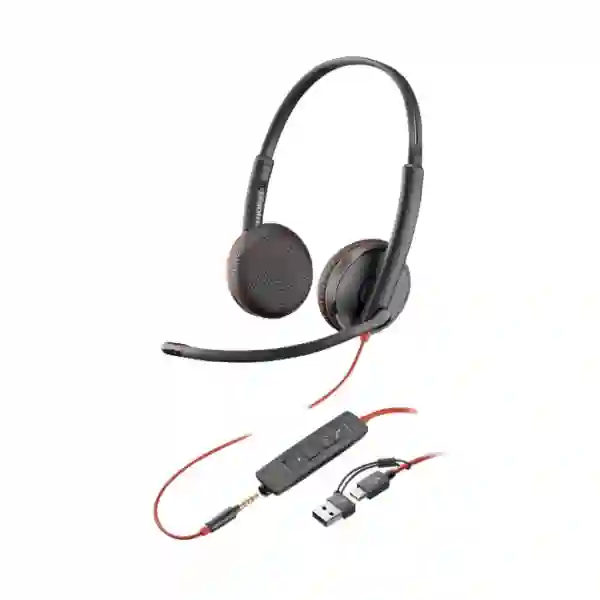
HP Poly Blackwire 3225 Stereo USB-C Headset with 3.5 mm Connector
The Poly Blackwire 3225 USB-C headset is designed for a straightforward business requirement: hear colleagues and customers clearly, speak through a dedicated boom microphone, and move between compatible devices without relying on a wireless connection. It combines a two-ear, on-ear wearing style with a wired USB-C connection and a separate 3.5 mm audio option. For teams evaluating communication headsets in Tanzania, that mix makes it worth considering wherever staff regularly use softphones, online meetings, training sessions, or voice calls.
This page explains what the headset can do, where its connection choices matter, and which details need checking before a purchase. It also identifies limitations that are easy to overlook, including differences between microphone noise cancellation and active noise cancellation for the wearer. Ask FourTeck to confirm the precise supplied configuration, current commercial terms, and suitability for your devices; no local stock, price, delivery date, or service entitlement is implied here.
Why consider the Blackwire 3225?
Stay focused on conversations
Two earcups and a dedicated boom microphone make this a practical headset for routine computer calls and collaborative work.
Work with different ports
USB-C, a model-specific USB-A adapter, and a compatible 3.5 mm audio path address several common workstation setups.
Keep call handling simple
Inline USB controls put frequent actions nearby, with behavior subject to support from the computer and calling application.
Specification snapshot
The details below describe the manufacturer-identified stereo USB-C version. They are technical reference points, not local inventory, pricing, or a verified FourTeck stock code.
| Type | Wired, on-ear stereo headset |
|---|---|
| Computer connection | USB-C; USB-A via supplied adapter for the identified retail configuration |
| Other connection | 3.5 mm analog audio to compatible headset sockets |
| Microphone | Flexible, noise-cancelling boom; 100 Hz–10 kHz listed bandwidth |
| Speakers | 28 mm; 32-ohm impedance; stereo listening |
| Sound processing | Dynamic EQ; HP SoundGuard |
| Controls | USB-side inline mute, volume and call actions; app-dependent |
| Reference configuration | HP manufacturer part 8X229AA; verify exact offered variant |
A business headset designed around everyday calls
People who spend much of the day on calls need a headset that does not complicate their workflow. The Blackwire 3225 uses a familiar over-the-head design and a wired connection, reducing the need to manage Bluetooth pairing or a separate headset battery. In a shared office, customer-service position, or home working space, that can simplify the start of a meeting. Connect the supported device, choose the correct audio input and output, and position the microphone for speech.
The model belongs to HP Poly’s Blackwire 3200 family, a range of corded communication headsets. The 3225 is the stereo member with the additional 3.5 mm connection option. Stereo means there is an earcup for each ear, not that every call will use a stereo signal. Its business focus is practical voice communication with the flexibility to listen to training, presentations, and other computer media between calls.
It is useful to separate the manufacturer’s capabilities from what happens inside a particular application. A headset can deliver sound and pick up speech even when a meeting application’s special call buttons do not operate as expected. Teams buying many units should therefore check their chosen softphone, conferencing application, USB policies, and device mix before committing to a rollout. The correct decision balances connection convenience, wearing preference, background noise, and software behavior rather than the connector name alone.
Understanding the three physical connection options
The primary computer connection uses USB-C, the small reversible connector fitted to many laptops and desktops. HP’s identified stereo USB-C configuration also includes a USB-C-to-USB-A adapter, allowing the same USB headset connection to fit an older rectangular USB-A port. This helps where an organization has a mixed generation of computers. The adapter is a change of plug shape, not a promise that every operating system or application provides identical call-control features.
The 3.5 mm connector gives the wearer an additional analog audio path for a suitable phone, tablet, or computer headset jack. Check that the receiving socket supports both listening and microphone input if two-way calling is required. A socket described only as a headphone output may allow listening without transmitting microphone speech. Do not assume that a device with no 3.5 mm socket can accept an arbitrary third-party adapter; microphone and audio compatibility must be confirmed.
These connections should not be confused with simultaneous multi-device conferencing. The headset is a wired accessory, not a mixer that combines two live calls or transfers audio automatically between a laptop and telephone. Choose the connection appropriate to the active device and use that device’s normal call controls. If the user’s workstation requires switching between several live audio sources, assess whether a dedicated switching solution or another headset class would be more appropriate.
USB-C on a laptop or office computer
USB operation is generally the most natural starting point for computer-based work. A compatible computer recognizes a USB audio device, and the employee can select it for microphone and speaker output in system settings and individual meeting applications. The cable also provides the connection needed for the headset’s USB-side control module. This arrangement is appropriate for frequent voice calls, online training, and virtual meetings where the computer is the principal work device.
Before deployment, check that the intended USB port is available and not reserved for a charging dock, security key, display adapter, or another peripheral. Shared-desk workers may rely on a docking station, but docks and operating-system policies can affect audio enumeration. Testing one representative workstation is more reliable than assuming that every machine with a matching port will behave identically. For an organization with both USB-A and USB-C machines, confirm that the adapter is included in the purchased package.
Audio quality also depends on the software configuration and network path beyond the headset. A noisy call can be caused by a poor network connection, an incorrect microphone selection, aggressive application processing, or a distant microphone boom. The Blackwire 3225 supplies the local input and listening hardware; it does not repair insufficient bandwidth or conferencing-service problems. A short test call with the exact computer setup remains the simplest acceptance check.
Using the 3.5 mm connector sensibly
The 3.5 mm option is valuable where a compatible phone or tablet still has an integrated headset jack. It can also be useful on some computers with a combined microphone-and-headphone port. Because this is an analog connection, device capability matters more than the appearance of the socket. Two plugs or sockets may look similar while supporting different combinations of audio output and microphone input. Buyers should confirm the host’s audio specifications rather than treating every 3.5 mm connection as interchangeable.
Many current mobile devices no longer include a physical headset socket. In that situation, an adapter may be needed, and not all adapters carry microphone audio correctly. The accessory must be suitable for the phone’s operating system and intended type of headset. The existence of an analog connector on the Blackwire 3225 does not mean it can connect directly to every smartphone, desk phone, radio, or telephony appliance. These are distinct categories with different audio and control interfaces.
The inline USB module’s call-handling features should not be assumed to work through the analog path. A connected phone or tablet may require volume adjustments, mute, and answer or end actions on the device itself. During procurement, test both speech directions and user controls with the actual host. This prevents disappointment when a headset plays sound but cannot be used for hands-free conversation in the expected way.
Microphone quality and background speech
A flexible boom places the Blackwire 3225 microphone closer to the mouth than a built-in laptop microphone would normally be. HP specifies a noise-cancelling microphone, intended to help make the speaker’s voice clearer relative to surrounding noise. This is especially relevant for customer service, internal support, sales calls, and meetings from rooms that are not acoustically perfect. Positioning remains important: the microphone should be close enough for speech but not directly in the path of breath.
Noise cancellation in the microphone is different from active noise cancellation in the earcups. The former concerns the audio being transmitted to other people; the latter would actively reduce some sounds heard by the person wearing the headset. The Blackwire 3225 should not be marketed as an active-noise-cancelling listening headset. Its two earcups may provide some passive separation, but an especially loud room can still distract the wearer and affect conversations.
The microphone’s specified frequency response spans 100 Hz to 10 kHz, a useful technical indicator for speech pickup rather than a guarantee of perfect audio. Actual clarity depends on speaking technique, room noise, conference processing, device configuration, and call bandwidth. For staff working near strong fans or frequently speaking colleagues, evaluate the headset in the real environment. A brief recorded sample and a live call with another employee are more informative than relying on marketing descriptions alone.
Listening performance for speech and media
The stereo earcups let users hear meeting participants through both ears and also listen to computer content between calls. HP lists 28 mm speakers, 32-ohm impedance, and different speaker bandwidth figures for speech and media modes. Those figures describe the product’s audio design; they should not be interpreted as promises that a compressed voice call will sound like a studio recording. Remote-call quality still depends on the source application and connection.
Dynamic EQ is a notable feature of the Blackwire 3200 family. HP describes automatic adjustment between voice communication and richer media listening, so users do not have to approach every computer sound as if it were a phone call. This matters in workplaces where the same headset handles voice meetings, recorded tutorials, presentations, and short training videos. It is not an equalizer that guarantees identical sound on every host, particularly when the analog connection is in use.
For buyers comparing devices, the correct question is whether the headset’s audio profile matches daily tasks. The Blackwire 3225 prioritizes communication and practical media listening, not specialized music production, gaming surround effects, or high-isolation hearing protection. If a worker’s main task is critical audio editing, specialized monitoring headphones may be better. If their main task is frequent two-way speech with occasional training content, the combination of boom mic, stereo output, and wired connection is more relevant.
Stereo wearing style versus one open ear
The Blackwire 3225 uses a binaural, or two-ear, on-ear design. This can make it easier to focus on a remote speaker because audio arrives at both ears and the headset covers both sides of the head. It is useful for employees handling detailed customer questions or participating in long virtual workshops. However, the earcups do not provide the complete environmental isolation of sealed hearing-protection equipment, and they should never be treated as industrial safety earmuffs.
A stereo model also changes how aware the wearer is of colleagues and nearby activity. Some reception or front-desk roles require an employee to hear a visitor while participating in a call. Those workers may prefer a monaural alternative that leaves one ear uncovered. The stereo choice is therefore about the job, not a universal upgrade. Evaluate whether focus or environmental awareness has greater value for each team, and avoid issuing a one-size-fits-all rule across very different roles.
For staff who alternate between calls and face-to-face discussions, introduce a simple wearing practice. Remove or adjust the headset when speaking with someone nearby, keep the microphone away from unnecessary contact, and observe the organization’s privacy rules. The headset supports communications, but it cannot determine whether a conversation is confidential or whether sound leakage might disturb others. A suitable physical workspace and staff guidance remain part of effective communication.
Comfort, fit, and portability
HP describes a lightweight metal headband, adjustable fit, and soft artificial-leather ear cushions. The design aims to support routine office wear without the bulk of a wireless headset with integrated batteries. Its microphone boom can be positioned for an individual user, and the headset can be stored when not required. For people who change workstations, a wired headset is easier to keep ready when its cable and connectors are protected during travel.
Comfort varies with head shape, glasses, hairstyle, temperature, and the length of a work session. An on-ear cushion rests against the ear rather than surrounding it completely, so pressure sensitivity can differ between employees. Procurement teams should arrange a practical wearing trial for staff who make calls continuously. Asking whether the headset is comfortable after ten minutes is not enough to predict a full workday; examine fit over the actual pattern of use.
Cables create their own ergonomics. Route the lead away from chair wheels, moving desk mechanisms, and walkways, and leave enough slack to turn toward a screen naturally. The manufacturer lists a total USB-to-headset cable length of approximately 2.27 metres for the identified USB-C configuration. That is useful for many desks, but not a substitute for measuring workstation layout. Repeatedly pulling on the cable is avoidable wear, and a safe cable path improves both comfort and equipment life.
Inline controls and what they actually do
The USB-side inline module places common communication actions close to the user. HP lists controls for call answer or end, call ignore or hold, redial, mute, and volume adjustment. These physical controls are more convenient than searching for an on-screen mute icon during a discussion, particularly when a worker is using several windows. Visible call and mute indications also help users understand what the headset is attempting to do during normal operation.
Button support depends on the collaboration application, operating system, selected audio device, and management configuration. Basic sound and microphone operation do not automatically establish that every call command is supported in every version of every platform. Test the specific actions that matter to the team, such as mute and answer, before documenting them in staff procedures. The safest training material explains the user’s on-screen fallback action if a headset button has no effect.
Controls should also be checked after a software update, docking change, or migration to another calling service. These are ordinary interoperability considerations, not evidence that the hardware is defective. When analog 3.5 mm audio is used, call handling is even more dependent on the connected device. Where predictable one-touch controls are a firm purchasing requirement, obtain an explicit compatibility demonstration for the exact intended software and connection.
Meetings, softphones, and collaboration platforms
The Blackwire 3200 family was developed for unified communications, often abbreviated UC. In a typical office, this includes a desktop softphone, a video-meeting application, or a browser service used for customer conversations. The Poly Blackwire 3225 USB-C headset can serve as the selected microphone and speaker device in a compatible computer workflow. That is a realistic benefit for businesses standardizing audio accessories without making every user learn a new wireless pairing procedure.
HP positions the family for major collaboration environments, but certification labels can vary by exact variant and over time. Do not infer that a generic claim such as works with meetings means every advanced button, telemetry feature, or certification requirement has been met. IT teams should compare the exact model or manufacturer part number against the application’s current device guidance if formal certification matters. Ordinary USB-audio functionality and official platform certification are related but different questions.
For a productive pilot, run the organization’s standard actions: join a meeting, choose the microphone, receive a call, mute, unmute, switch speakers, and finish the call. Repeat while the laptop is docked if that reflects daily use. Document the application version and any relevant security permissions so employees have a consistent setup. This approach creates clearer expectations than trying to solve every support ticket solely by replacing headsets.
Customer support and service desk use
A customer-facing agent may spend most of the day listening to a caller, checking a record, and speaking while typing. A wired stereo headset keeps the microphone near the mouth and avoids using a laptop microphone across the desk. That helps maintain a consistent working position when agents have to read long case notes or follow a support script. A dedicated mute control can also be valuable for brief internal consultations, provided it works with the deployed calling software.
In a busy support area, distinguish between speech clarity for the caller and quietness for the agent. The boom’s noise-cancelling design addresses transmitted speech, while the on-ear cushions offer only limited physical isolation. If there is continuous shouting, loud machinery, or several adjacent calls, test whether the environment exceeds what this headset can handle comfortably. Room layout, speech volumes, acoustic treatment, and staffing density all influence the result.
Standardization offers administrative benefits when employees use similar equipment and settings. A support lead can establish one microphone-positioning guide, one quick-start process, and one set of audio checks. Before purchasing for an entire floor, however, test with the real softphone and sample employees. Do not assume the same model is ideal for agents with hearing needs, specialized accessibility requirements, or unusual workstation equipment. Accessibility and comfort feedback should influence final selection.
Hybrid work, remote training, and shared desks
Hybrid staff often move between an office workstation and a home laptop. A corded headset with familiar USB connectivity can reduce the steps needed to start a video meeting on each computer. The optional USB-A adapter is particularly relevant where an older desktop exists alongside a newer USB-C laptop. Because the headset itself is not wireless, there is no Bluetooth pairing history to manage as employees move between locations. Users still need to select the correct audio device.
Training teams may use the same headset for a live workshop, a recorded presentation, and follow-up one-to-one feedback. Stereo playback and a flexible microphone support that mixed audio workload. In a shared-desk setting, organizations should decide whether each person retains their own headset for hygiene and fit, rather than circulating a single device without cleaning and inspection. Keeping a headset assigned to its user can also simplify identification of wear and cable damage.
A home environment adds different constraints from a structured office. Traffic outside a window, household conversations, fans, and unreliable internet can all affect calls. The microphone is one part of the solution; employees should also choose a quiet location, use stable connectivity, and test their application settings. The headset does not include mobile data, Wi-Fi service, or a backup power supply. These wider operating conditions deserve attention in any remote-work plan.
Education, administration, and everyday professional use
An administrative worker might participate in a morning briefing, speak with a client, and then watch an internal training module. The Blackwire 3225 supports this ordinary mix without requiring a change from a separate microphone to another pair of headphones. For training, the stereo wearing style can help keep audio intelligible while the user follows content on screen. For live participation, the boom microphone provides a more intentional speaking position than a computer’s built-in mic.
In education or staff-development settings, equipment should be chosen around both instructor and participant tasks. An instructor who must remain aware of a classroom may prefer a single-ear design, whereas a participant joining a remote lesson may appreciate audio in both ears. The 3.5 mm option can help with compatible teaching devices, but a shared room’s audio system or a computer without a combined headset socket may require another solution. Physical connector checks prevent avoidable errors.
Professional environments with sensitive information should adopt appropriate procedures for screen sharing, microphone mute, and call privacy. A headset does not encrypt a conversation by itself and cannot substitute for the security controls of the meeting platform and endpoint. For workers handling client records, a predictable mute habit and a suitable private location can matter as much as the choice of audio accessory. Technology and working practice need to reinforce each other.
Initial setup on Windows or macOS
Start with a supported USB connection and allow the computer to detect the headset. Open system sound settings and select the Blackwire device, or the relevant USB audio entry, for both output and input. Next open the meeting or calling application and confirm that its microphone and speaker selections match. Applications can remember an older audio device, so successful connection at operating-system level does not automatically guarantee that a specific call uses the intended headset.
Make a short test call or recording before a live customer conversation. Confirm that speech reaches the other person, listen for distortion, adjust the headset and boom, and set a comfortable playback level. Use the physical mute and volume controls, then verify their effect on the active application. If a button is not recognized, continue with the application controls while IT checks software support. Do not assume that reinstalling unrelated drivers is necessary for a routine audio selection problem.
For managed business computers, follow the organization’s approved software and update process. If headset management or firmware tools are permitted, use the manufacturer’s supported guidance and the IT team’s deployment policy. Avoid installing unknown utilities from unofficial sites. A written setup checklist covering USB port, selected input, selected output, microphone test, volume, and application permissions is usually enough to help a new employee begin work confidently.
Analog setup and mobile-device checks
For analog use, connect the 3.5 mm plug to a compatible headset socket and select the appropriate audio path on the phone, tablet, or computer. Check that the port supports microphone input as well as headphone output. On some devices, a connection symbol or test recording helps confirm that an external microphone has been detected. If speech remains on the device’s internal microphone, the socket, adapter, or audio settings may not support the required headset function.
An adapter from a modern phone connector to 3.5 mm must be capable of handling the headset’s microphone, not just music playback. Some charging adapters and generic audio dongles do not provide the necessary two-way behavior. Because devices and software change, assess the actual phone and adapter combination before promising compatibility. The fact that a plug fits physically does not demonstrate that its electrical signaling or application controls are suitable.
Remember that the USB inline controls are designed around USB call management. When connected through 3.5 mm, expect to use the host device’s ordinary call screen and volume controls unless that specific device has been verified to behave otherwise. If users need to jump between a mobile call and a computer meeting, they should end or manage each call properly rather than expecting the headset to merge conversations. This prevents avoidable interruptions and privacy mistakes.
Care, cleaning, and storage
A business headset is handled frequently, so modest daily care matters. Keep ear cushions and headband surfaces clean in accordance with the manufacturer’s current instructions and the organization’s equipment policy. Avoid soaking the headset, forcing liquid into the microphone or inline module, or applying aggressive chemicals without confirmed material compatibility. Shared-use equipment needs a hygiene routine that respects both the ear cushions and the electrical parts. Never clean while the unit is connected to a powered device if the procedure requires disconnection.
Protect the cable from tight bends and sustained tension, especially near the connectors and control module. When packing a headset, guide the lead loosely instead of winding it hard around the microphone boom. Do not use the boom as a handle or force it beyond its intended adjustment range. If the package includes a travel case, it offers a more orderly place to keep accessories. Confirm the actual included case for the exact retail configuration purchased.
Regular inspection can identify worn cushions, intermittent audio, damaged connector shells, or frayed cable insulation before they interfere with a call. Report defects through the organization’s approved support process and keep clear records of the affected unit. Warranty and replacement arrangements depend on the exact product, seller, region, and purchase documentation. HP’s published manufacturer warranty information should not be interpreted as an unverified local service promise for a particular Tanzanian order.
How it compares with nearby Blackwire models
The Blackwire 3215 is a useful comparison for buyers who prefer one ear covered rather than two. HP identifies it as a monaural model with USB and 3.5 mm device options within the same broader series. It can be preferable where an employee must hear the office or greet walk-in visitors while taking calls. The 3225 instead favors stereo listening and a more focused wearing style. Neither configuration is universally superior; the role determines the value of keeping one ear free.
The Blackwire 3220 is also a stereo model, but HP’s series comparison identifies the 3225 as the version that adds mobile or tablet access through 3.5 mm. If a user works only with a computer over USB, the extra analog option may not be necessary. If they frequently move between a laptop and a compatible 3.5 mm device, the 3225’s flexibility is more relevant. Compare the exact regional model, connectors, and bundled accessories rather than relying only on the family number.
More specialized headsets may add wearer-side active noise cancellation, wireless mobility, different ear-cushion designs, or advanced call-center features. Those capabilities serve different needs and may bring additional cost, setup, or charging considerations. The Blackwire 3225 occupies the practical wired communication category. It should be chosen when dependable connectivity and a clear buying fit matter more than wireless movement or specialized noise isolation.
Technical details worth knowing before ordering
HP’s published specifications for the identified Blackwire 3225 stereo USB-C configuration describe an on-ear headset in black with a noise-cancelling microphone, 28 mm speakers, 32-ohm headphone impedance, and SoundGuard acoustic protection technology. The microphone bandwidth is listed as 100 Hz to 10 kHz. These are model-level specifications, not evidence of what a particular retail seller has in stock or which regional accessories will accompany every box.
The stated speaker bandwidth is 200 Hz to 6.8 kHz for speech mode and 20 Hz to 20 kHz for media mode. HP also lists a microphone boom length of 130 mm and rotation of 270 degrees for the identified configuration. These figures help IT staff compare accessories, but they do not replace human factors such as comfort, intelligibility, or tested application behavior. It is appropriate to keep a technical reference sheet while evaluating a pilot unit.
The manufacturer also lists Windows and macOS among supported operating systems and describes mobile-device support through a compatible 3.5 mm connection. Individual platform versions, security restrictions, and device-specific audio pathways should still be tested. Do not assume a manufacturer’s generic device-compatibility statement guarantees advanced telephony integration. In procurement records, distinguish verified technical specifications from the separately negotiated commercial information such as price, local warranty handling, and shipment contents.
Purchasing checklist for Tanzanian organisations
First identify which people need the headset and which devices they will use. Note whether their computers have USB-C, USB-A, or a shared docking arrangement. Record whether the 3.5 mm connection is a genuine requirement or just a possible future use. Then ask whether stereo listening suits the role. A help-desk agent, a receptionist, and a workshop facilitator may have different priorities even if all make voice calls during the day.
Next test the chosen communication software, taking particular care with call answer, mute, and volume actions. If a particular platform certification is mandatory, confirm it for the exact manufacturer configuration and relevant application version. Request confirmation of the supplied USB-A adapter, any travel case, and other box contents. For mobile use, specify the actual device and adapter rather than assuming compatibility from the presence of a 3.5 mm plug.
Finally confirm the commercial and operational details through FourTeck’s established enquiry process. Ask for the current quotation, availability, exact supplied model or manufacturer part number, applicable warranty information, and fulfilment terms for the intended destination in Tanzania. Do not substitute international web-store prices for a local quote. Where multiple units are required, consider a pilot with representative users before approving an organization-wide purchase. This limits avoidable compatibility and comfort surprises.
Rollout planning for IT and procurement teams
A small pilot should represent the variety of devices in the organization rather than only the newest laptop on one manager’s desk. Include any older USB-A desktop, USB-C notebook, docked workstation, and compatible analog device that will actually be used. Record the operating system and calling application versions. Ask participants to evaluate microphone clarity, listening level, inline controls, cable reach, and comfort after their normal work sessions.
Create a brief acceptance standard with actions that matter: audio must be heard in both ears where expected, a spoken test must reach the other participant, mute must work through a documented method, and connectors must fit without unsafe strain. Distinguish a functional headset with unsupported call-control shortcuts from one with defective audio. This prevents IT teams from treating every application-integration limitation as a hardware failure and makes supplier discussions clearer.
For a larger deployment, plan user assignment, cable management, hygienic handling, spares policy, and basic troubleshooting ownership. Retain the exact purchase documents needed for support claims. Local service, stocking, shipping, and warranty fulfilment must be confirmed in the commercial quotation rather than inferred from the manufacturer brand. A standardized procedure is often more valuable than adding unnecessary technical complexity to a simple wired accessory.
Troubleshooting the most common audio problems
If a colleague cannot hear the user, begin by checking that the boom microphone is positioned correctly and that the intended input device is selected. Verify the physical mute state and the application’s software mute. For USB calls, reconnect the supported plug if organizational policy allows and recheck the selected microphone. For analog calls, confirm that the socket or adapter actually supports microphone input. A working headphone signal does not prove a working microphone path.
If the wearer hears nothing, check the selected output device, system sound level, application sound level, and any available inline volume adjustment. Try a known working meeting or audio sample rather than troubleshooting with an unknown media file. If the problem occurs only through a dock or adapter, test a permitted direct connection for comparison. Avoid making configuration changes that bypass a company security policy, and contact IT when the workstation is centrally managed.
If speech is distorted or distant, reduce unnecessary background noise, reposition the boom, and check whether the application is applying competing audio enhancements. A weak internet connection may produce dropouts that resemble headset failure, while cable damage can create intermittent local audio. A controlled comparison on a second approved workstation can help separate host, network, and accessory problems. Document the symptoms before seeking a replacement or initiating a warranty enquiry.
What to confirm in the supplied package
HP’s identified USB-C retail specification lists the headset, user guide, USB-C-to-USB-A adapter, and travel case. These details are useful for preparing an equipment checklist, but buyers should verify that the offered listing corresponds to that exact retail configuration. Bulk packs and other regional variants can have different ordering codes and packaging arrangements. The manufacturer’s part number is not automatically the SKU assigned by a particular retailer.
For a mixed-computer environment, the USB-A adapter may be important enough to include explicitly in the quotation. For employees carrying a headset between work locations, the case may matter as well. If neither accessory is required, procurement should still understand what is included rather than assume the box will always match an image. Written confirmation of the exact variant protects both the requester and the supplier against avoidable misunderstandings.
The package does not add capabilities that the base headset lacks. It does not turn the wired Blackwire 3225 into a Bluetooth headset, a standalone telephone, or a device with wearer-side active noise cancellation. It also cannot create a 3.5 mm socket on a phone without a separately compatible adapter. Confirm both the physical contents and the expected connection behavior before placing the order.
Frequently asked questions
Is the Blackwire 3225 a wireless headset?
No. The Blackwire 3225 is a wired business headset. It connects to a compatible computer through USB-C, or USB-A when the correct included adapter is used, and offers a 3.5 mm analog option for suitable devices. It does not pair through Bluetooth, does not provide cordless movement around the room, and should not be purchased by someone who needs a wireless headset away from the desk.
Does it cancel noise for the person wearing it?
HP describes a noise-cancelling boom microphone, which is aimed at improving transmitted speech. That is not the same as active noise cancellation inside the earcups. The stereo cushions can provide some passive separation, but this model should not be presented as an ANC listening headset. In a very noisy office, compare the real listening experience against the team’s requirements before a bulk order.
Can I connect it to a USB-C laptop?
Yes, a supported USB-C computer is a principal intended connection. Select the headset as microphone and speaker in both system audio settings and the calling application. Confirm that the port is available, and perform a brief call test before the first important meeting. A working physical connection does not guarantee that every application-specific call-control button is supported.
Will it work with a desktop that has USB-A only?
HP identifies a USB-C configuration with a USB-C-to-USB-A adapter. That permits connection to an appropriate USB-A port when the adapter is supplied. Check the actual package contents and test the organization’s computer and calling software. If the adapter is critical to your deployment, request it explicitly in the commercial specification instead of relying only on photographs or a shortened product title.
What is the purpose of the 3.5 mm connector?
It gives the headset an analog audio option for devices with a compatible headset socket. This is useful for some phones, tablets, and computers. For two-way calls, the host must support microphone input as well as audio playback. A headphone-only jack may let you listen but not speak. Verify the exact device and any required audio adapter before making compatibility assumptions.
Does it work with current smartphones?
It can be used with a smartphone that supplies a suitable 3.5 mm headset connection. A phone without a headphone socket may need a separately compatible adapter that passes microphone audio. Not every USB-C or Lightning audio accessory works the same way. Check the exact phone model and connection path, and do not assume the USB inline controls will operate while using analog audio.
Is the headset suitable for customer support staff?
It can be a good candidate for computer-based service desks because it has a boom microphone, stereo earcups, and wired connectivity. Suitability depends on the calling application, office noise, comfort requirements, and any accessibility needs. Pilot the headset with real agents and complete their normal call tasks, including mute and answer, before deciding on a large-scale purchase.
Can staff use it with video-meeting applications?
The headset is designed for computer communications and can act as a microphone and audio output device in compatible meeting software. Advanced button behavior and formal certification are separate matters that depend on the exact variant and application. Where an organization requires certified equipment or one-touch call controls, verify the specific configuration against its current IT standards and test a live meeting.
What is the difference between the 3215 and 3225?
The 3215 is the single-ear, or monaural, option in the family with USB and 3.5 mm connectivity, while the 3225 covers both ears. Choose the 3215 when hearing nearby coworkers is particularly important, and the 3225 when stereo listening and greater focus are preferable. The final decision should reflect job tasks and individual comfort, not the assumption that two earcups are always better.
How is the Blackwire 3225 different from the 3220?
Both models are available in stereo configurations, but HP’s Blackwire family comparison distinguishes the 3225 by its 3.5 mm mobile or tablet connection option. A computer-only USB user may not need this extra connection, while a person using a compatible analog device may benefit from it. Check current variant-specific details and package contents rather than comparing model numbers alone.
Does the headset require charging?
No separate headset battery-charging routine is involved in its normal wired use. The connection is through a compatible USB or 3.5 mm device. This can simplify daily readiness at a fixed desk, although it also means the user remains attached by a cable. Someone who needs to walk around during calls should consider a different, appropriately supported wireless design.
Are the inline mute and call controls always supported?
The manufacturer lists mute, volume, and call-handling controls for the USB configuration. Actual behavior depends on the computer, software, and integration. The analog 3.5 mm path should not be assumed to provide the same button behavior. Test the important commands on the intended application, and teach users how to manage the call on screen if a hardware shortcut is unavailable.
Does it come with a USB-A adapter and travel case?
HP identifies both in the package for the named stereo USB-C retail configuration. However, different regional and bulk packaging codes exist, and a vendor’s shortened listing title may not describe every item in the box. Confirm the specific manufacturer configuration and written package contents before ordering. Do not treat a manufacturer’s general list as a guarantee about an unverified local retail listing.
Can I get a price or warranty commitment for Tanzania here?
This product description does not establish a Tanzanian price, available stock, delivery promise, or seller warranty. Those are commercial details that must be confirmed for the exact configuration and order. Ask FourTeck for a current quotation and applicable terms, including the documented warranty process. Avoid using prices from foreign online stores as if they represent a verified local offer.
Which technical specifications are most useful?
For a typical buyer, the most useful specifications are wired USB-C connectivity, availability of a USB-A adapter, the 3.5 mm option, stereo on-ear fit, noise-cancelling boom microphone, and the actual application compatibility. HP also lists 28 mm speakers, a 32-ohm headphone impedance, and SoundGuard technology. Numeric specifications help comparison, but a pilot call and wearing trial should carry greater weight in the purchase decision.
Request a configuration and quotation check
For an individual workstation or a team deployment in Tanzania, ask FourTeck to verify the exact HP Poly Blackwire 3225 variant, required connectors, quoted package contents, availability, and commercial terms. Include the computer type, calling software, any need for 3.5 mm mobile connectivity, and the number of users. A clear enquiry makes it easier to confirm fit before purchasing.
This is a non-linked call to action because no exact approved Tanzania destination was verified. No stock, delivery, price, or warranty promise is made.




Reviews
There are no reviews yet.