
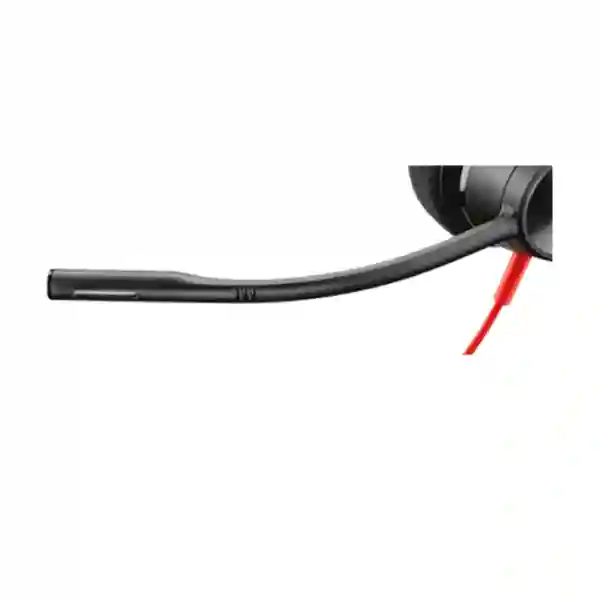
Wired business audio • USB-A • Stereo
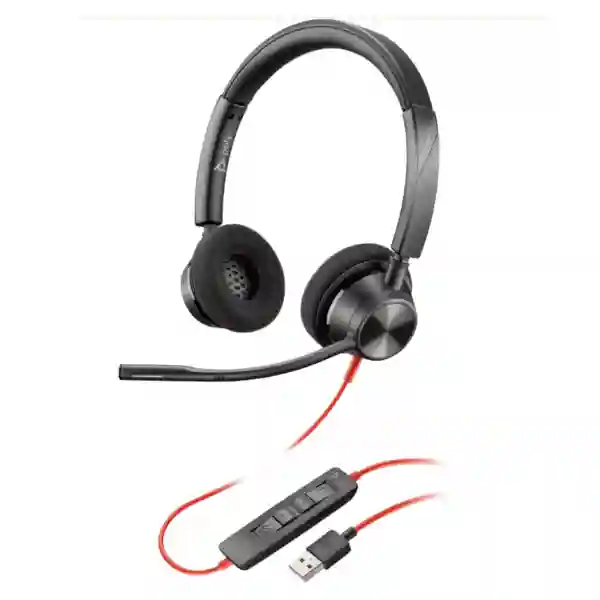
HP Poly Blackwire 3320 Stereo USB-A Headset
A dependable computer headset for desk-based conversations, video meetings, and business learning. The Blackwire 3320 pairs stereo on-ear listening with a flexible noise-cancelling boom microphone, adjustable fit, and easy-to-reach call controls. Check that your computer has USB-A and confirm the precise configuration before ordering.
Quick answer: who should choose this headset?
Choose this version when employees use compatible Windows or Mac computers, work primarily at their desks, and need reliable computer-call audio through a direct USB-A lead. It is especially useful for online meetings, customer communication, training, and shared office workflows with clear device-setup policies. It is not the correct choice when wireless mobility, a native USB-C connector, direct analog phone use, or certified platform features are mandatory unless those exact requirements are separately addressed.
For procurement, begin with the computer’s available ports and the user’s preferred calling software. Confirm the exact headset variant on the quotation and test the microphone, speakers, and controls on a representative workstation. Price, local availability, delivery, and warranty arrangements require an up-to-date Tanzania-specific quote.
Verified specification snapshot
The following technical points describe the USB-A computer-headset configuration using HP’s official support information and related manufacturer materials. They are specifications, not claims about current local stock or a particular quotation.
| Product | HP Poly Blackwire 3320, standard USB-A stereo variant |
|---|---|
| Wearing style | On-ear, over-the-head, two-ear stereo |
| Computer connection | Wired USB Type-A |
| Microphone | Flexible noise-cancelling boom |
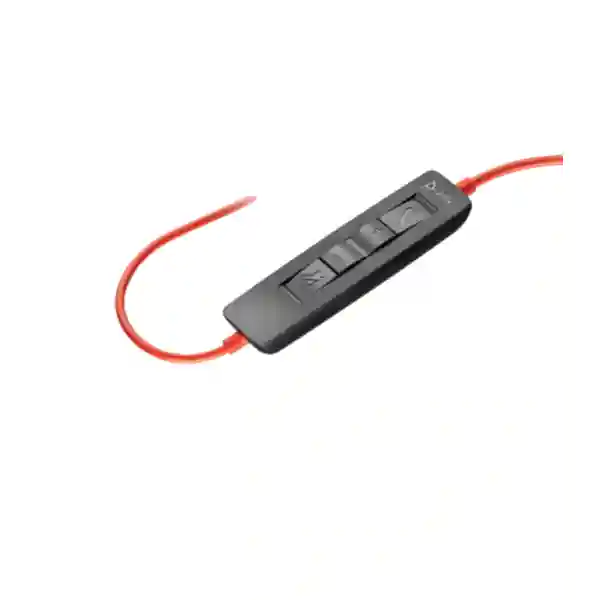
| Basic inline controls | Call answer/end, mute, volume up/down |
| Speaker size | 32 mm |
| Microphone bandwidth | 100 Hz–10 kHz |
| Speaker bandwidth | 200 Hz–6.8 kHz for speech; 20 Hz–20 kHz for media |
| Cable length | About 218 cm overall |
| Acoustic technology | SoundGuard Digital, as listed by HP |
| Software fit | Compatible Windows and macOS computers; app functions require testing |
| Box contents | Headset and user guide, per HP USB-A product specifications |
Important: different Blackwire 3320 variants can use different connection arrangements and carry different software certifications. Ask the supplier to identify the exact offered part number.
A wired headset for daily computer conversations
The Blackwire 3320 is designed for people whose work involves conversations through a computer rather than a traditional telephone handset. It combines two on-ear speakers with a flexible boom microphone and a permanently attached USB-A connection. For a buyer, that means a direct cable connection to a compatible computer, clear access to essential call controls, and no headset battery to monitor. It is suitable for evaluating as a personal work headset or as a consistent model across multiple desks.
Think about the applications that employees use each day before choosing a headset. A service adviser may move between customer calls and a browser-based case system, while an accounts employee may join meetings and listen to training. Both benefit from a separate microphone positioned close to the mouth. The stereo arrangement can also make recorded demonstrations and multimedia more pleasant between calls, although it does not turn a shared office into a silent room.
What the noise-cancelling microphone actually does
The flexible boom microphone is intended to prioritize the speaker’s voice while reducing some background sound picked up during a call. This is different from active noise cancellation in the earcups. Colleagues talking nearby, fans, traffic outside a window, and typing can still affect the call depending on distance and the room. The most reliable improvement comes from pairing the microphone’s design with sensible placement and a quieter speaking position whenever possible.
Ask staff to position the boom close to the corner of the mouth rather than directly in front of it, then make a short test recording. If the microphone is too far away, the user’s voice can sound quieter relative to the room. If it points directly into the breath stream, plosive sounds can become distracting. A brief recording provides more useful evidence than assuming a specification alone guarantees perfect speech isolation. This guidance is especially valuable when preparing many headsets for a customer-service team.
Stereo listening and on-ear design
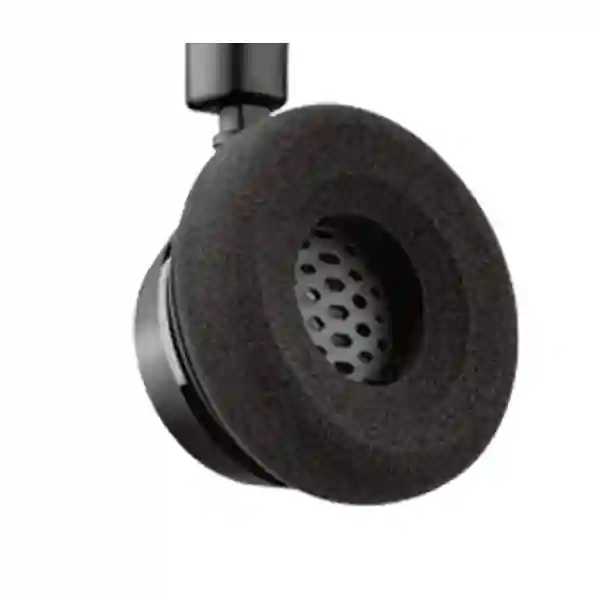
Two earcups provide stereo output so users can hear sound in both ears rather than leaving one ear uncovered. That arrangement can help listeners focus on computer audio and can provide a more balanced experience for presentations, recorded instruction, and background music during permitted work periods. It does not mean that every meeting service sends spatial stereo speech, and it should not be described as complete sound isolation. External noise may remain audible through the on-ear cushions.
The earcups sit on the ears, not around them. Some wearers prefer this smaller, lighter contact area; others find that a different wearing style is more comfortable after extended use. Fit is personal, so a small trial with representative employees is useful before a larger purchase. A person who must regularly hear announcements or nearby colleagues may prefer a single-ear model, while someone who mainly follows a computer conversation may appreciate having sound in both ears.
Comfort and adjustment during a workday
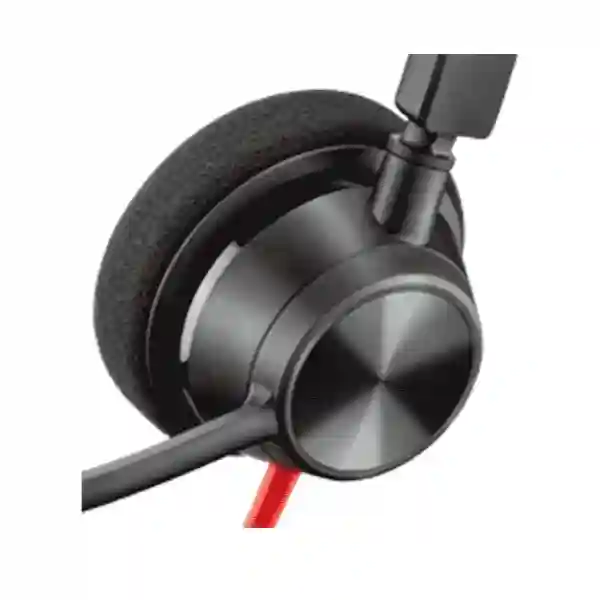
HP describes the Blackwire 3300 family with a padded headband, soft ear cushions, and adjustable wearing components. The Blackwire 3320 uses pivoting speakers and a flexible microphone boom to help the wearer find a practical position. The on-ear shape is compact compared with many larger over-ear headsets. Proper adjustment matters because even a headset with soft cushions may create uncomfortable pressure when it is worn incorrectly or used for an unusually long period without breaks.
Before assigning a unit, adjust the band so both earcups contact the ears evenly. Move the microphone to a position that captures speech without touching the face, glasses, or clothing. Ask users to assess comfort during typical tasks rather than for only a few seconds. If an employee frequently takes off the headset to hear colleagues, this may indicate that a mono model fits their role better. Comfort, awareness, and communication style are legitimate procurement criteria, not minor preferences.
USB-A connectivity without a wireless pairing step
The specified version is wired and uses a USB Type-A connector. It is intended for computers with a functioning USB-A port and an operating system that recognizes a USB audio device. Users avoid Bluetooth pairing, rechargeable headset batteries, and wireless radio management. In return, they remain physically connected to the computer by a cable. A reliable audio experience still depends on the computer, software permissions, application settings, and the quality of the call’s network connection.
Check the actual ports on laptops and desktop computers before ordering. Some newer machines provide mostly USB-C connections, in which case a separately validated adapter or the appropriate USB-C headset variant may be preferable. Do not assume that a USB-A headset will plug directly into a mobile phone or analog desk phone. The Blackwire 3320 USB-A should be chosen for its defined connection, not because all members of the Blackwire product family share identical plugs.
Understanding the included cable and desk layout
Manufacturer specifications for the USB-A version give an overall cable length of approximately 218 centimetres. This can provide useful reach from a computer or dock to a seated user, depending on desk arrangement. It should not be interpreted as unlimited movement: a wired headset cannot be used freely across a room in the way a wireless model can. Cable positioning should be reviewed on desks with under-table computers, adjustable monitor arms, and standing-height workstations.
Route the cable so that it does not cross a rolling-chair path or become trapped by drawers. Leave enough slack to turn the head naturally while speaking. Position the inline controller where the wearer can reach it without tugging on the headset. For desks that move between seated and standing positions, test the full movement range before fixing the cable in place. Good routing reduces interruption, avoids unnecessary strain on the connector, and makes the workspace more comfortable and orderly.
Using the headset with Windows computers
Windows users should connect the USB-A plug to an available computer port and allow the operating system to detect the audio device. They can then select the Poly headset as the microphone and speaker device in system sound settings. Collaboration applications often maintain their own audio selections, so the app may require a separate choice. Users should confirm that the microphone input meter responds when they speak and that a test sound is heard through both earcups.
If the computer plays notifications through its built-in speakers while calls use the headset, review the system’s default output and the communication application’s output settings. On managed corporate computers, an administrator may control permissions or preferred devices. A successful USB connection does not prove that every call-control button will behave the same in every application. Conduct a short incoming and outgoing test with the actual meeting or softphone platform used by the organization.
Using the headset with macOS computers
On a compatible Mac with a USB-A port or an appropriately tested connection arrangement, the headset can be selected through the operating system’s sound input and output controls. Open the intended calling application and check its own microphone and speaker selection as well. A common setup problem is to use the headset for listening while the application continues to capture speech from the Mac’s internal microphone, which may collect more room sound.
Users working from multiple computers should verify audio choices whenever moving the headset between machines. macOS updates, application permissions, and device-management policies can influence what users see. Microphone permission may need to be granted to the calling application before other tests are meaningful. If a remote participant cannot hear the user, check the selected input device, system permission, application mute state, and physical inline mute control in that order rather than immediately assuming the headset is faulty.
Inline call and volume controls
The cable incorporates an inline control module for core functions such as answering or ending a call, muting the microphone, and changing volume. These physical controls are useful when a user is reading an order, navigating a support system, or sharing a screen and does not want to search for a small on-screen button. However, application integrations vary. Some functions may depend on the softphone’s support, operating system, and configuration, so behavior should be confirmed in practice.
Train employees to distinguish between headset controls and application controls. A person can be muted in the meeting software, through the cable controller, or by both depending on the setup. Repeatedly pressing buttons without checking the active state can cause confusion. A straightforward onboarding test is to answer a test call, change playback volume, mute, speak, unmute, and end the call. This verifies the complete user workflow rather than merely checking that the headphones make sound.
Microphone mute and privacy etiquette
A dedicated mute control is especially helpful for customer conversations, internal meetings, and situations where several people share the same room. Users should activate mute before discussing confidential information with someone nearby. The headset cannot, by itself, control who can hear a conference, where a recording is stored, or whether a meeting platform has transcription enabled. Those are application and workplace-policy matters, distinct from the physical hardware.
Organizations should establish simple call habits: confirm the microphone state at the start of a meeting, use mute for side conversations, and avoid assuming that removing the headset automatically silences the microphone. A quick test also helps users become familiar with any audible or visible mute indications that their specific configuration provides. Good practices make the headset more effective while reducing avoidable interruptions during customer support, finance discussions, and internal collaboration.
Audio protection and realistic expectations
HP lists SoundGuard acoustic protection for this headset family, with manufacturer materials describing limiting of sudden sound exposure. This is an important design consideration for people who spend time listening through headphones, but it should not be described as an absolute prevention of hearing damage or a replacement for workplace hearing-safety practices. Volume selection, exposure time, call-source quality, and personal sensitivity remain relevant.
Encourage users to begin at a moderate playback level and increase only when necessary. If they routinely turn the headset volume very high to overcome room noise, evaluate the surrounding environment as well as the audio device. Sudden loud sounds, distorted calls, and uncomfortable listening levels should be reported and investigated. Where organizations have hearing-conservation policies, the headset should form one part of a broader approach that includes training, safe volume habits, suitable workspaces, and attention to individual needs.
How voice and multimedia playback differ
Manufacturer materials describe a speaker bandwidth tailored for speech and a broader range for media playback, alongside dynamic audio equalization. The practical point is that this is not only a device for hearing spoken words. Employees may use it for web meetings, recorded product demonstrations, tutorials, and everyday computer audio. The stereo speakers help present music and video playback more naturally than a single-ear call-only configuration.
Audio quality depends on the source and the task. A compressed telephone conversation will not automatically become studio-quality sound because the headset has a broad media-response specification. Similarly, a good headset cannot repair a poor internet connection or an excessively quiet speaker on the other end. Evaluate real customer calls and approved media content rather than judging the device exclusively with a music track. This produces a purchasing decision that reflects the team’s actual work.
Why microphone placement matters more than many settings
The microphone’s physical position often has a large effect on intelligibility. A boom placed consistently near the user’s mouth can produce a clearer voice-to-background balance than a laptop microphone several hand spans away. If the boom is moved during a conversation, the listening party may hear a change in loudness. Users should learn a repeatable position that does not scrape against hair, collars, or a face mask.
Start with a normal speaking voice and avoid speaking much louder to compensate for poor positioning. Test with the actual software in use, because automatic gain control and noise reduction in communication apps may change the result. When troubleshooting, record a short sample in a quiet room and then in the usual workspace. Comparing the recordings helps separate microphone placement and environmental noise from software routing or network issues. This is more informative than simply increasing microphone gain to maximum.
A practical option for customer-facing teams
Reception, help-desk, sales-support, and customer-service roles often require employees to listen carefully, respond clearly, and operate a computer while talking. A wired stereo USB headset can provide a repeatable setup at a designated workstation. The adjustable microphone gives employees more consistent speech pickup than relying only on distant laptop microphones. Inline controls can reduce the need to leave a work screen to handle basic calls.
Suitability still depends on the communication software. A service desk using a browser-based dialer may need different call-control testing from a team using a desktop unified-communications app. For high-volume operations, select a sample of ordinary calls and assess speech clarity, interruptions, comfort, and call-button behavior. Managers should also consider how the cable fits each workstation and whether employees must stand, move around, or hear nearby supervisors while speaking. The best solution follows the workflow.
Meeting-heavy office and hybrid-work roles
Employees who attend frequent computer meetings may value a device that stays ready on the desk and does not depend on a wireless charge cycle. The stereo design supports listening to colleagues from both sides of the headset, and the boom microphone places speech capture close to the speaker. For hybrid workers, the headset can move between compatible workstations, provided the operating system and calling application are configured correctly at each location.
A home environment introduces its own considerations. Family activity, fans, pets, and outside noise can still reach the microphone or remain audible to the wearer. Choose a reasonably quiet location and tell meeting participants if unexpected noise is likely. The headset’s wired design also means the user should not walk away from the computer while connected. When a role requires freedom to move around during long meetings, compare wireless models rather than trying to force a corded unit into an unsuitable task.
Training, learning, and recorded demonstrations
The Blackwire 3320 can also serve staff who complete web-based training, participate in virtual classrooms, or watch recorded demonstrations on a work computer. Two speakers make it practical to follow stereo media, while the boom microphone is available for questions and discussion. For supervised classrooms or computer labs, a wired connection can simplify account changes because it does not rely on remembering a particular Bluetooth pairing between each learner and a shared computer.
In shared learning environments, hygiene and storage become especially important. A unit used by one learner should not automatically be passed to another without following the organization’s cleaning procedure. Training coordinators should evaluate the headset with the learning platform, especially where microphone access is managed through a browser. Some activities may require listening only, while others require reliable simultaneous speech. Matching the device to course activities avoids unnecessary help-desk requests.
Open-plan offices: benefits and limitations
An open office can involve many simultaneous conversations. The stereo earcups may offer a degree of passive separation from the room, and the noise-cancelling boom microphone is designed to improve the outgoing voice signal. Neither feature should be interpreted as total isolation from surrounding speech. A person seated very close to another caller may still hear that colleague, and the remote participant may still pick up some shared-room sound.
For busy floors, compare performance at realistic desk distances rather than in a silent demonstration area. Seat employees facing sensible directions, use appropriate workspace acoustics, and discourage speakerphone use near colleagues on calls. Ask the intended user to rate both listening comfort and the ability to remain aware of necessary announcements. A headset purchase can support better audio, but it does not replace thoughtful room layout, scheduling, or basic noise-management rules.
IT deployment across multiple workstations
IT teams often prefer devices with simple, consistent connection and setup requirements. A wired USB headset does not need battery replacement or wireless pairing to begin basic operation. Standardizing on one model may also simplify instructions, spare stock planning, and first-line support. However, standardization should follow a hardware audit because not every computer or docking station provides the same ports, and not every softphone offers identical integrated controls.
Before a broader deployment, pilot the headset on the actual operating-system builds, managed laptops, virtual desktop arrangements, and calling applications in use. Document how employees select the microphone and speaker and how they verify mute. Assess any organization-specific software-management requirements separately; optional device-management capabilities may vary by platform and environment. The success measure should be that employees can complete routine calls without confusing controls, inconsistent devices, or repeated support tickets.
Choosing quantities and configurations for a team
A procurement team should first separate roles that require stereo listening from those needing constant awareness of nearby staff. It should then establish the plug type, required call controls, compatible software, and workplace conditions. For a mixed fleet, an exclusively USB-A purchase may create unnecessary adapter requirements on devices that primarily use USB-C. Buying a consistent model is valuable only when that model suits the computers and users who will receive it.
Request a clearly written quotation that names the USB-A stereo variant, its exact manufacturer identifier where available, supplied accessories, warranty terms, and delivery conditions for the offered stock. Avoid accepting a description that says only Blackwire 3320, because the family includes different connector types and Microsoft Teams-oriented versions. Ask for a sample where a large order will be deployed across diverse departments. A controlled evaluation can reveal fit or integration problems before they affect a larger group.
Distinguishing USB-A from USB-C variants
USB-A refers to the familiar rectangular computer connector, while USB-C is the smaller reversible shape commonly found on newer laptops and mobile devices. Both can carry digital audio when supported, but they are not physically interchangeable without an appropriate connection arrangement. Some Blackwire 3320 packages are based on USB-C with a USB-A adapter; the product requested here is the USB-A version. Buyers should verify the exact item rather than assuming every advertisement describes the same lead or included adapter.
The correct choice depends on the real equipment. A USB-A desktop environment may benefit from a direct plug and straightforward setup. A fleet of modern USB-C-only laptops may be better matched to a USB-C option. Where adapters or docking stations are involved, test a complete workstation, including wake-from-sleep behavior and reconnection after docking. The microphone, playback, and inline controls should all be checked, not just whether the operating system displays a headset name.
Standard version versus Microsoft Teams variants
HP offers both standard and Microsoft Teams-certified versions within the Blackwire 3320 product family. A generic USB-A stereo description should not be presented as proof that the exact unit carries Microsoft Teams certification or a dedicated Teams control. Certification and dedicated functionality are configuration-specific. Employees may still use a supported communications application with a standard headset, but procurement should not equate general use with certification for a particular product variant.
If Teams certification is a formal requirement in a tender or company device policy, request the exact certified variant and manufacturer confirmation. If the requirement is simply reliable computer audio for meetings, test the specified USB-A unit in the organization’s calling application and document the result. Confirm whether answer/end and mute functions integrate as expected. Distinguishing these questions reduces ordering errors and helps the business avoid paying for an assumption that the proposed listing does not actually establish.
How this compares with a mono headset
A mono headset uses one earpiece and leaves the other ear uncovered. It can be useful at a front counter, reception desk, or workplace where a user must frequently hear colleagues or visitors. The stereo Blackwire 3320 instead places speakers over both ears and can make digital audio easier to follow without dividing attention between the headset and nearby room conversation. The preferred style is not a universal rule; it depends on how the employee works.
When choosing between mono and stereo, watch how people perform their duties. Someone who repeatedly lifts an earcup to hear a coworker may be better served by mono. Someone who primarily handles computer calls and training may appreciate the two-ear format. Both styles still depend on microphone quality, correct setup, and room conditions. Avoid using speaker count alone as a substitute for a practical trial or assuming that stereo automatically makes every spoken call sound twice as clear.
When a wireless headset would be more appropriate
A corded headset is a sensible option where the user remains near a computer and values a simple connection without charging routines. It is less appropriate when the job requires walking between rooms, reaching shared equipment away from the desk, or regularly leaving a workstation while remaining on a call. A longer USB cable does not provide the freedom of a wireless system and can become a safety concern if stretched through a walkway.
Managers should identify how far employees actually travel during calls before comparing products. A sales representative who takes calls while checking stock shelves may need mobility; an adviser who reviews cases at a fixed screen may not. Wireless devices also introduce charging, battery, pairing, and radio-environment considerations that are absent from this wired design. Both approaches have legitimate uses. Choosing the right one minimizes frustrating workarounds after installation and reduces avoidable support issues.
Cases where this model is not the right purchase
The standard Blackwire 3320 USB-A is not an analog 3.5 mm headset for a phone’s headphone jack. It should not be described as a Bluetooth headset, a standalone speakerphone, or a headset with confirmed active noise cancellation in its earcups. It is also not a substitute for specialist protective hearing equipment. Someone whose role requires direct connection to a proprietary desk telephone should check whether that telephone supports this particular USB audio device before ordering.
Similarly, a person who requires a highly isolating headset for a very loud environment may need a different design. Employees who must monitor conversations in the room while taking calls may prefer a single-ear model. New laptops with no USB-A port need an appropriately verified connection solution. Making these boundaries clear is part of selecting the correct device; it prevents a purchase driven by familiar brand names rather than by the user, port, software, and environment.
First-day setup checklist for employees
Start by inspecting the cable and USB plug for visible damage, then connect the headset directly to a suitable USB-A port. Adjust the headband and earcups, position the microphone, and choose the headset in the computer’s input and output settings. Open the intended calling application and check that it uses the same devices. Conduct a short test call or recording at a normal speaking volume rather than assuming a system notification means everything is ready.
During the test, listen for audio in both ears, make a small volume adjustment, and verify the microphone’s mute and unmute behavior. Check that the inline controls work with the chosen application where that functionality is required. Put the cable away from moving desk components and keep the controller easy to reach. If the workplace uses approved device-management or update tools, follow its IT guidance. A few minutes of disciplined setup can prevent recurring confusion during important calls.
Troubleshooting when others cannot hear you
First confirm that the microphone is not muted at the headset controller or inside the application. Next check that the meeting or softphone program is using the correct input device. Review operating-system microphone permission and speak while observing the input-level indicator. If another microphone is selected, the application may capture a laptop microphone rather than the boom attached to the headset. A system update or newly connected device can sometimes change audio routing.
If the input level is still absent, try a different working USB-A port where permitted by IT policy, and inspect the lead for physical damage. Test with a simple voice recording, then compare results in the calling application. A clean local recording alongside a poor remote call suggests investigating application processing or network conditions as well. Do not insert unauthorized drivers or management software on a corporate computer; escalate through approved support procedures when basic settings do not resolve the issue.
Troubleshooting weak, distorted, or one-sided sound
If playback is unexpectedly quiet, check the computer’s volume level, the application’s volume, and the headset’s inline controls. Confirm that the headset is the selected output and that the earcups sit correctly. Also consider the remote source: a caller using a distant microphone may sound quiet no matter which headset the listener wears. When speech is distorted or intermittent, compare a local audio file with a live call to establish whether the problem is limited to the communications service.
If sound appears in only one ear, test stereo playback from a known source and check computer balance settings before assuming a hardware fault. Inspect the cable for kinks or damage and avoid pulling on the wire while troubleshooting. On shared machines, reset the application to the approved default device after testing so the next user receives a predictable setup. Persistent problems should be recorded with the computer model, software version, and steps already tried.
Cleaning and caring for a shared headset
Headsets are close-contact equipment, so cleaning matters wherever devices are passed between employees. Follow the manufacturer’s current care instructions and the workplace’s hygiene procedures for the exact ear-cushion and microphone materials. Avoid soaking the earcups, spraying liquid directly into electronic openings, or pulling the connector from the port by its cable. When the headset is not in use, store it where the boom and wire will not be crushed by other desk items.
Inspect cushions periodically for wear, especially in high-usage environments. A damaged cushion can change comfort and fit even if the electronics continue to function. Keep the cable routed away from sharp corners and hot equipment. If a unit develops a persistent microphone fault or damaged insulation, remove it from service and consult the applicable repair or replacement process. Routine care is more useful than assuming that a business headset requires no maintenance.
Maintaining consistent audio quality in a team
An organization can improve call consistency by standardizing how users position the microphone and select devices in their software. Provide a short, visual quick-start guide at each workstation and let employees know where to report intermittent sound or uncomfortable fit. A headset with a capable microphone cannot overcome every problem caused by a noisy room, weak network, or incorrectly configured application. Training and suitable workspace conditions remain important parts of the overall communications experience.
Supervisors can periodically conduct sample test calls or listen to permitted recordings under the organization’s privacy rules. Feedback should focus on intelligibility, background noise, consistent volume, and whether the employee can use controls comfortably. Avoid making conclusions from a single poor call without checking the source. When evaluating new devices, compare them with the current setup under equivalent conditions. This turns general impressions about sound quality into practical, repeatable purchasing evidence.
Procurement considerations for Tanzanian organizations
For an office, educational institution, contact centre, or distributed team purchasing for use in Tanzania, the principal technical question is still fit with its computers and calling workflow. Confirm available USB ports, operating systems, software and role requirements before comparing quotations. If a business operates across several offices, assess whether the same hardware suits all locations. Staff responsibilities, desk layouts, environmental noise, and equipment age may differ even within one organization.
Commercial details require separate verification. Do not infer local inventory, price in Tanzanian shillings, delivery dates, regulatory status, or the coverage of a particular seller’s warranty from a manufacturer feature sheet. Request these terms for the exact quoted unit. A good order confirmation should identify model and connector, quantity, included items, support path, and relevant delivery arrangements. This approach makes the product easier to assess without pretending that overseas catalogue data proves an offer in Tanzania.
What to verify before approving a quotation
Before purchase, confirm that the quote specifically identifies a stereo Blackwire 3320 with the required USB-A connection. Verify the manufacturer’s part number for the exact supplied package and ask whether it is the standard version or a Microsoft Teams-certified configuration. Check for a headset and user guide, and ask about any other accessories rather than assuming that the package includes an adapter or carry case. Confirm that the chosen version matches the computers used by employees.
Review applicable warranty conditions, support responsibilities, and commercial terms separately from the technical specification. Where the purchase covers multiple workers, agree on a sample-test method and acceptance criteria: recognizable audio input and output, suitable comfort, expected application behavior, and good cable routing. Keep procurement records for the exact offered configuration so replacement orders do not accidentally substitute a USB-C, mono, or different certified variant. Clear specifications protect both the buyer and the supplier.
An easy way to assess suitability before ordering
The shortest useful test is to connect the headset to a representative computer, select it inside the actual calling application, and complete a normal conversation. Have the wearer speak quietly and at typical volume, use mute, move the head naturally, and listen to recorded speech where permission permits. Repeat the test at the desk during an ordinary working period, not only in a silent room. Observe whether the user remains comfortable and can reach the inline controller.
Then compare what happened with the purchasing criteria. Did the computer provide a native USB-A connection? Was the microphone intelligible without excessive gain? Could the person hear the caller while remaining appropriately aware of the workspace? Did the call controls perform as expected in the preferred platform? For broader rollouts, collect results from different roles and devices. This practical evaluation creates confidence without relying on unsupported promises about universal compatibility, total noise isolation, or employee productivity.
A clear decision for the intended buyer
Choose the HP Poly Blackwire 3320 Stereo USB-A Headset when the user’s main work happens on a compatible computer, they want two-ear on-ear listening, and they prefer wired simplicity with a flexible noise-cancelling boom microphone. Its practical advantages are a straightforward USB-A connection, convenient inline controls, adjustable fit, and suitability for a variety of computer-call and media tasks. It is particularly relevant where employees spend much of their day at an assigned desk.
Choose a different model if direct mobile-phone analog connectivity, USB-C-only hardware, verified Teams-specific certification, wireless mobility, or specialist isolation is essential to the role. Before committing to a quantity, test a sample in the actual environment and request a quote that identifies the exact variant and current commercial terms. The purpose of the decision is not to buy the most features, but to match the headset’s verified capabilities with the users who will depend on it.
Frequently asked questions
These answers address the most common pre-purchase and first-use questions for the specified wired USB-A headset.
Is the Poly Blackwire 3320 USB-A a wired or wireless headset?
It is a wired headset that connects through USB Type-A. It does not depend on Bluetooth pairing or a rechargeable wireless headset battery. The cable keeps the user connected to the computer, so it is well suited to a desk-based workflow. Anyone who needs to move around a room while remaining on a call should compare wireless alternatives before choosing.
Will it work on a Windows laptop or desktop?
HP lists compatibility with PCs via USB-A and support for contemporary Windows versions. The actual computer must have a usable port and the calling application must select the headset as its audio input and output. For corporate devices, access rules and app integrations may also matter. Test the device on the team’s managed computer image before a large deployment.
Can Mac users use the same USB-A headset?
The manufacturer includes macOS among the supported operating systems for this product line. A compatible Mac needs a suitable physical connection, and the user should select the headset in system sound preferences and in the intended communication application. Newer Macs may not provide a direct USB-A port, so the connection arrangement should be checked before purchase.
Does noise cancelling mean I cannot hear background noise?
No. The microphone is designed to reduce unwanted background sound reaching the other party, while the on-ear cushions may offer some passive separation for the wearer. This is not a promise of complete acoustic isolation or confirmed active noise cancellation in the headphones. Room design, microphone placement, and the level of nearby conversations still influence the experience.
Is the standard USB-A version certified for Microsoft Teams?
Microsoft Teams-certified Blackwire 3320 configurations exist, but certification must be verified for the exact product variant. The phrase Blackwire 3320 USB-A alone does not establish that the quoted unit is a Teams-certified edition. If certification or a dedicated Teams button is required, ask the supplier to confirm the precise model and manufacturer’s documentation.
Can I plug it into a phone’s 3.5 mm headphone socket?
Do not assume so. This specified Blackwire 3320 is the USB-A computer-headset version. The 3.5 mm option appears on other Blackwire family variants, including the Blackwire 3325. A mobile phone or desk phone must specifically support the chosen USB audio connection before compatibility can be claimed. Match the physical connector and device requirements first.
Does it have controls for answering calls and muting?
HP lists inline answer/end, microphone mute, and volume controls. Exactly how call-answer features interact with a particular softphone or meeting platform may depend on its software integration and settings. Test the controls with the real application rather than assuming identical behavior across every service. Microphone mute should also be confirmed during an actual test call.
How long is the USB-A headset cable?
HP’s USB-A product information lists a total length of about 218 centimetres from connector to headset. Actual usable reach depends on the computer’s location, cable routing, and where the inline control sits. Leave slack for normal movement and keep cable away from chair wheels, drawers, and walking paths. A cable should never be stretched across a route used by other workers.
Is a stereo headset better than a mono headset for every job?
Not necessarily. Stereo covers both ears and is useful when the employee primarily follows computer calls and media. Mono leaves an ear open, which can help at reception or in roles where nearby conversations must remain audible. Employee preference, comfort, and the working environment should determine the choice. A short pilot is more informative than a general claim that one design is always superior.
Does this headset require software installation for basic calls?
USB audio devices are commonly recognized by compatible operating systems without a special pairing procedure. Users still need to select the correct speaker and microphone in system and application settings. Optional device-management software and particular call-control integrations may have their own requirements. Follow organizational IT policy before installing software, and verify the complete call workflow after setup.
What comes in the box, and is a carrying case included?
HP’s published USB-A specifications list the headset and user guide. Package contents may vary by the exact part number and market, so request confirmation for the quoted unit. Do not assume that a carrying case, USB-C adapter, replacement ear cushions, or other accessory is included solely because images or descriptions of a different Blackwire variant display one.
Can a business buy this headset in quantity for Tanzania?
A business can request a quotation for the exact model and quantity, but local stock, pricing, delivery arrangements, warranty coverage, and seller terms must be confirmed for the actual offer. For a sizable order, first validate the USB-A ports, preferred calling software, microphone performance, comfort, and user roles. Provide those requirements when requesting a quotation to avoid a mismatched configuration.
Request a configuration check and quotation
Ask for the HP Poly Blackwire 3320 Stereo USB-A Headset by its full description and provide the number of users, computer-port type, operating systems, and calling applications. State whether a Teams-certified variant is mandatory, and request confirmation of the supplied package and applicable Tanzania commercial terms before placing an order.
Contact FourTeck Tanzania to confirm the exact configuration and obtain a quote.




Reviews
There are no reviews yet.