
Business IP telephony | Tanzania buying guide
HP Poly Edge E320 IP Desk Phone
A wired SIP desk phone for people who need fast access to calls, contacts and everyday features without sacrificing the familiar feel of a handset.
Before you choose
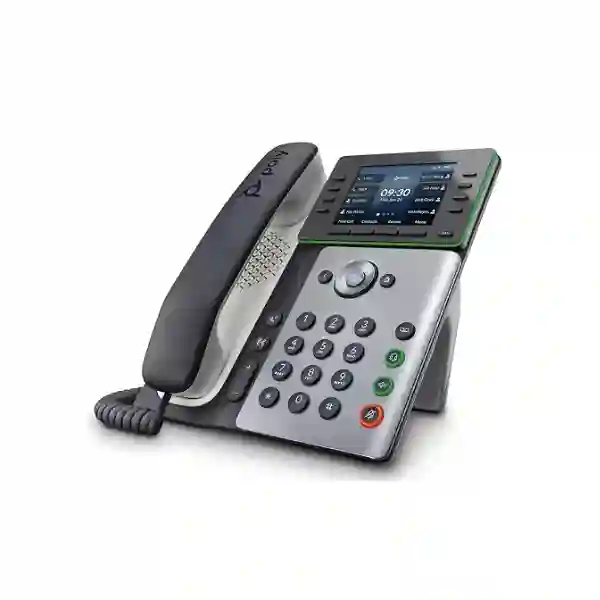
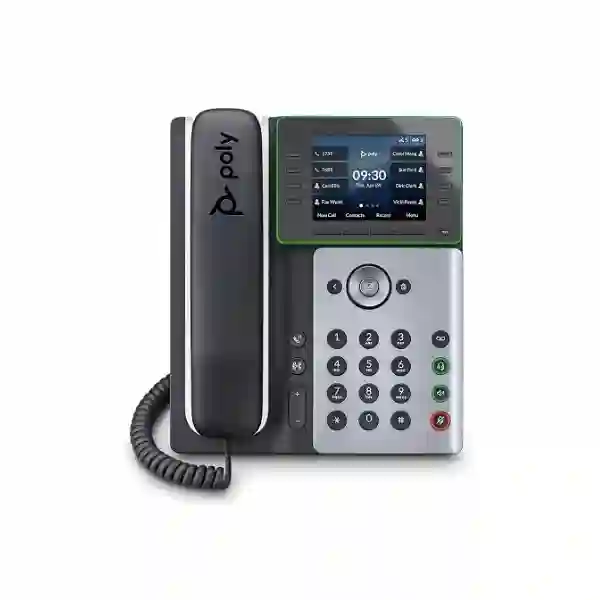
The HP Poly Edge E320 IP Desk Phone gives an office user a full-featured, wired SIP telephone without replacing familiar keys with an all-touchscreen workflow. It combines a bright 3.5-inch colour display, eight programmable line keys, Bluetooth headset support and business audio tools in one desktop device. For organisations planning a new phone system or replacing older handsets, the useful first question is not simply whether the phone looks modern: it is whether the network, call platform, user roles and accessories are ready for it.
This page explains where the E320 fits, what its hardware can do, which capabilities depend on the service provider, and what a buyer in Tanzania should verify before requesting a quotation. It is guidance for evaluating the device rather than a promise of local stock, compatibility with a particular PBX, or a specific price.
Request a model-specific quote and a SIP compatibility check for your existing phone service.
Key verified specifications at a glance
| Device type | Wired SIP/VoIP IP desk phone |
|---|---|
| Display | 3.5-inch colour IPS LCD; 320 × 240 pixels |
| Line controls | 8 physical line keys with pagination; up to 32 SIP line appearances |
| Network | 2 × 10/100/1000 Mbps Ethernet ports |
| Power | IEEE 802.3af PoE, Class 3; external adapter optional and sold separately |
| Wireless | Bluetooth 5.0 for supported pairing; no built-in Wi-Fi |
| Headset interfaces | Bluetooth, RJ-9, USB-C and EHS with compatible optional adapter |
| Audio | Poly HD Voice, Acoustic Fence and NoiseBlockAI |
| Administration | SIP provisioning and supported Poly management options |
| Manufacturer product identifier | 82M88AA; not a verified FourTeck listing SKU |
Platform-dependent features and commercial package details must be confirmed for the intended deployment.
Who the E320 is designed for
The E320 is a sensible candidate for employees who spend part of the day on the telephone and want immediate access to more than a simple dial pad. A regular desk user may need a direct extension, a shared departmental line, a colleague’s monitored status and a shortcut to a common contact. Reception support staff and team coordinators may also appreciate the additional line-key capacity, provided their call volume and workflow do not require a purpose-built operator console.
A purchasing decision should begin with the tasks performed at each desk. For a user who handles only occasional calls, fewer dedicated keys could be enough. For a high-volume receptionist juggling a large number of simultaneous callers, the organisation should review attendant-console needs and test queue workflows rather than assume the E320 alone replaces specialist reception software. The best fit comes from matching hardware controls with actual calling patterns.
A colour interface that makes everyday actions visible
The 3.5-inch colour IPS LCD has a stated resolution of 320 by 240 pixels. It is intended to present calling information, line appearances, contacts, menu options and feature shortcuts. Physical navigation buttons and context-sensitive soft keys mean the user does not need to rely on a touchscreen. This matters in environments where employees want tactile, repeatable controls and a clear indication of the action they are taking.
A phone display becomes especially useful when calls are arriving from more than one source. Users can check the presented information before answering, see which function is assigned to a key and review on-screen status. The surrounding status light adds another visual signal. Actual screen labels, language, line appearance and programmed shortcuts are determined by the configuration supplied to the phone, so a live demonstration with the intended PBX is valuable.
Eight line keys and what thirty-two lines really means
The manufacturer specifies eight physical line keys with pagination to support up to 32 SIP line assignments or appearances. Those assignments can be used for lines, contacts and functions, according to configuration. Pagination exposes additional items beyond the visible first set. It is useful for staff who need quick access to multiple extensions or shortcuts without installing a separate keypad for every option.
The figure of 32 must not be read as a guarantee that one employee can hold 32 simultaneous conversations. Call capacity, registrations, shared-line handling and conferencing are subject to the phone system, licences, service configuration and operational design. When preparing a deployment, map each key to a genuine user action: a primary line, a monitored colleague, speed dial, pickup group or other supported function. That exercise prevents a misleading specification from becoming an unrealistic expectation.
Straightforward call handling for business routines
The E320 includes familiar controls for hold, transfer, mute, volume, voicemail and speakerphone use. HP’s feature information also identifies functions such as call forwarding, pickup, park, redial, waiting and local three-way audio conferencing. Four context-sensitive soft keys and the navigation cluster help users reach actions appropriate to the current screen. These are practical tools for a desk-based conversation that may need escalation or handover.
The important qualification is that many software-enabled functions require corresponding support from the hosted VoIP provider or IP PBX. A telephone can display or offer a control without every service supporting the same result. Test the exact workflow your team needs: blind and attended transfer, departmental pickup, voicemail notifications and conference behaviour. A short user-acceptance checklist is more reliable than a generic feature claim in a catalogue.
Poly HD Voice and real-world intelligibility
Voice clarity is central to the purchase. HP identifies Poly HD Voice, Acoustic Clarity, echo cancellation and full-duplex conversation support among the E320’s audio features. The supported codec list includes G.711, G.722, G.729AB, iLBC, Opus and G.722.1. These options provide technical flexibility, but the audio actually negotiated on a call depends on the service provider, peer endpoint, codec settings and available network conditions.
A useful listening test goes beyond asking whether a dial tone is present. Have two users speak naturally, interrupt one another and switch between handset, speakerphone and any planned headset. Verify that volume is comfortable and that words remain intelligible when the caller is using a different network or mobile connection. Codec names are not substitutes for an end-to-end assessment of delay, jitter, packet loss and the acoustics of the workplace.
How its noise-reduction technologies help
Poly Acoustic Fence is designed to reduce background sound when the phone is used with the handset or an appropriate wired headset. Poly NoiseBlockAI addresses unwanted noise in speakerphone use. These are distinct audio paths, so the benefit a user experiences varies with speaking position, noise source, room characteristics and accessory choice. They are useful aids for focus, not an assurance that every nearby conversation will disappear.
In a reception area, for example, a staff member may speak while customers or colleagues are nearby. In a shared office, keyboard activity and side conversations can compete with the caller’s voice. Compare the headset and hands-free modes during a realistic demonstration. If confidentiality or very high ambient noise is a concern, consider desk placement, acoustic treatment and headset microphone design alongside the phone’s onboard processing.
Bluetooth 5.0: useful mobility without Wi-Fi
The E320 includes Bluetooth 5.0 for compatible wireless headset use and mobile-phone pairing. A member of staff who takes calls regularly may appreciate a headset that lets them move a short distance from the desk while remaining connected to the telephone. HP also describes the ability to answer mobile-phone calls from the desk phone and synchronize mobile contacts, with the experience dependent on supported devices, configuration and software behaviour.
Bluetooth does not make the E320 a wireless network phone. The E320 has no built-in Wi-Fi, a distinction confirmed in HP’s Edge E-series connectivity guidance. The telephone still needs its wired Ethernet network connection for SIP service. Teams outfitting locations without network cabling should factor that requirement into their plan or evaluate an alternative model that explicitly supports their preferred network connection.
Headset choices across several interfaces
For headset connectivity, HP lists Bluetooth, a USB Type-C interface, an RJ-9 headset port and an Electronic Hook Switch connection for an optional adapter. That range helps buyers consider different working styles: a conventional wired headset, a compatible Bluetooth unit or certain professional headset configurations that support remote answer and end functions. The selected headset and its required accessory parts should be checked against current compatibility documentation.
The existence of a port does not mean every headset using the same connector is supported, or that all call-control buttons will behave identically. The optional EHS adapter and Poly headsets are sold separately in the manufacturer’s product notes. Ask for a tested phone-and-headset combination, including any base station, adapter, cable or firmware requirement. Pilot the combination with the actual phone service before ordering headsets for an entire department.
Two Gigabit Ethernet ports and the desktop network
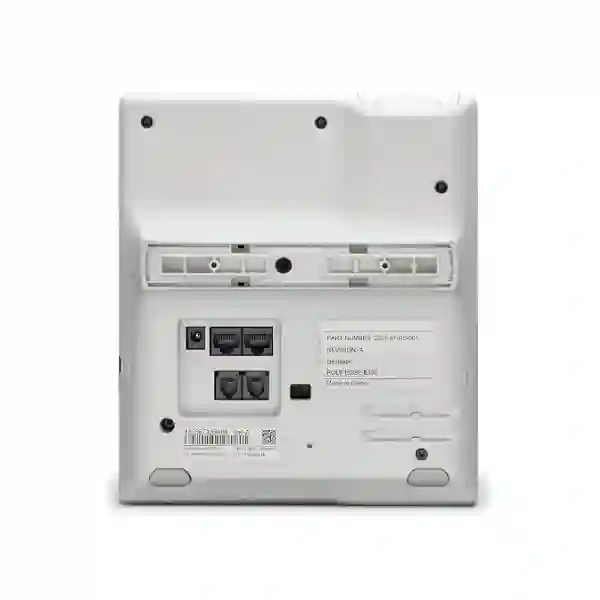
The E320 provides two 10/100/1000 Ethernet ports. One connects the phone to the office LAN; the other can provide a passthrough connection to a desk computer. This may reduce the need for a separate switch port immediately next to each workstation and can simplify a standard cable route from a wall outlet to the phone and then to the PC.
However, a pass-through arrangement is still part of the office network design. Administrators should examine link speed, VLAN separation, switch configuration and whether the PC must remain connected during any phone maintenance or power event. The presence of two Gigabit interfaces does not by itself guarantee application performance. Plan voice and data policies, test the switch configuration and label cables so that support staff can distinguish the uplink from the computer connection.
Power over Ethernet and what to purchase
HP specifies built-in IEEE 802.3af Power over Ethernet, Class 3, with stated maximum device power of 13 W. For a suitable network switch or injector, PoE allows power and data to reach the phone over the network cable. That can make a row of office desks more orderly because a separate plug-in adapter is not needed at every telephone.
A crucial purchasing detail is that the external 5 V DC, 3 A power adapter is sold separately in the manufacturer’s documentation. If your switch does not provide compatible PoE, account for that accessory in the quotation. For larger deployments, check the aggregate PoE budget of every switch, not merely the number of available physical ports. A UPS supplying the network equipment may also be part of a business-continuity design, but resilience depends on the entire calling chain.
Why wired connectivity matters
A wired desk phone is usually deployed at a predictable desk position, where a managed switch can offer stable connectivity and administrators can apply voice-specific network settings. The E320 supports network functions identified by HP such as DHCP, VLAN discovery, LLDP-MED, IEEE 802.1p/Q and QoS-related signalling. These features allow the telephone to participate in a properly planned business network; they do not configure the infrastructure automatically.
For a new office fit-out, identify the required number of drops, switch capacity, cabling route and locations where staff may move between desks. Confirm whether the telephone and computer will share an outlet through the pass-through port. The right time to decide between an Ethernet-only E320 and a Wi-Fi-capable alternative is before furniture layouts and cabling quantities are fixed, not when devices arrive on site.
SIP service and PBX compatibility: check before ordering
The E320 supports SIP signalling, including IETF SIP protocols documented by HP, and is intended for VoIP endpoint environments. That makes it a candidate for use with compatible SIP-based business telephone systems. It does not mean every hosted voice service, cloud PBX or on-premises system will provide certified support for every feature. Some providers restrict approved device models, firmware versions, provisioning methods or remote-management capabilities.
Ask the intended provider to confirm the exact model, software version and supported provisioning approach in writing. Test account registration, incoming and outbound calls, caller identification, transfer, call park, BLF, voicemail and emergency-dialling arrangements as applicable. Do not infer compatibility with 3CX, Microsoft Teams, Zoom or any other named platform merely from the presence of SIP. If the provider offers a supported-device list, use its current edition-specific and region-specific guidance.
Planning a rollout rather than a single handset
Buying one device for evaluation is different from deploying fifty desks. A fleet plan should cover extension allocation, user names, device inventory, network cabling, switch PoE capacity, headset choice and the method for loading configurations. Set up a sample desk that represents a typical working area and let the people who actually handle calls perform everyday tasks on it.
Record decisions before rollout: which button corresponds to which team, whether missed-call alerts are needed, how users reach voicemail and who handles faults. A small approved standard for line-key layout and directory labels reduces inconsistency across departments. Users can learn one familiar operating pattern while administrators gain a clearer picture of what must be supported when people change roles or relocate their desks.
Provisioning and fleet administration
HP’s E320 documentation identifies provisioning approaches including server-based configuration and management tools such as Poly Lens and Poly Zero Touch Provisioning. This is valuable in a managed environment because administrators can consider consistent settings instead of relying solely on manual setup at each desk. Availability of particular cloud features, tenant access and licence arrangements should be verified for the organisation’s service model.
For a manageable deployment, document a baseline firmware version, the provisioning source, recovery procedure and the person authorised to modify phone settings. Include a process for reassignment when an employee moves. Device management should also protect confidential credentials, retire stale registrations and maintain an inventory that maps serial numbers to desks. Central management reduces repetitive effort only when responsibilities, access controls and change procedures are established.
Network quality and successful voice calls
IP telephony shares the network with other traffic, so the quality of the user experience depends on more than the handset. Packet loss can make speech sound broken; excessive latency can make conversation awkward; jitter can interrupt natural timing if not adequately managed. Voice-capable network design may use appropriate VLAN and quality-of-service policies, but these must be configured end to end rather than merely enabled on the phone.
Before deploying a batch, measure network behaviour during normal office peaks rather than only on an empty connection. Consider upstream internet service, site-to-site paths, router performance and the hosted PBX destination. Test what happens when large file transfers or video meetings occur alongside telephone calls. Document the minimum acceptable performance for the business and decide who investigates a problem: the internal IT team, network provider or voice service operator.
Security and responsible configuration
HP documents security capabilities for the E320 that include TLS, SRTP media encryption, HTTPS provisioning, digest authentication, signed executables and 802.1X authentication support. These controls give administrators options for protecting signalling, media and configuration, but their effectiveness depends on how the phone system and network are configured. A feature being supported is not the same as a security control being active.
For deployment, use strong individual administration credentials, restrict management access, protect provisioning information and keep approved software updated. Verify what certificates, encryption settings and credentials the service provider expects. A secure phone also depends on secure network switches, an appropriately managed PBX and careful handling of user accounts. Ask the service provider how it will support software maintenance and what its incident-response process covers.
Directories, status indicators and team coordination
HP lists LDAP corporate-directory access, Busy Lamp Field functions, speed dial, shared-line appearances and visual status information among the phone’s available capabilities. Used together, they can help a department route enquiries quickly: an employee may find a colleague, observe a configured line status or select a preassigned contact without manually dialling every number. The exact directory and monitoring experience varies with the service platform.
Before promising these functions to a team, check directory integration, privacy permissions, user naming and the visibility of colleague status. A useful test is to have an administrator add a new employee, then verify how that change appears on several desk phones. Keep speed-dial entries current and assign ownership for directory hygiene. Outdated contacts and unexplained line labels reduce the value of an otherwise capable interface.
Reception, sales and service-desk scenarios
At a reception-support desk, the E320’s programmable keys may simplify routine transfers to a small set of departments, while a caller can be handled through the handset, speakerphone or supported headset. In a sales team, the same layout could prioritise a personal extension, a shared enquiry line and frequently used colleagues. A service-desk user might value fast access to call-hold and status functions while consulting a ticketing system.
These examples illustrate potential workflows, not built-in business applications. The telephone itself is not a CRM, ticketing tool or call-centre reporting platform. Where call queues, recording, analytics, wallboards or CRM screen pops are required, review the capabilities of the underlying telephony service and any integration software. Test handovers during busy periods so that the phone’s controls complement, rather than complicate, the process.
Hot desks and changing users
The E320 is part of a business desk-phone family designed for modern office patterns, including shared workplace arrangements. The manufacturer documents configurable line appearances and phone management features; specific login, logout or guest-user experiences depend on the platform and provisioned firmware. That is particularly important where shifts share desks or employees work at multiple sites.
If hot desking is essential, ask for a demonstration of an entire user journey: sign in, receive calls on the expected extension, access voicemail, sign out and leave no personal contacts exposed to the next person. Verify what happens if a user forgets to sign out. An organisation should not purchase a fleet on the assumption that a general ‘hot desk’ marketing phrase guarantees its particular identity, privacy or licensing requirements.
Accessibility and daily comfort
HP’s Edge E320 feature description includes text-to-speech support, colour adjustments intended to help with certain colour-vision needs and larger font settings. The handset has hearing-aid compatibility features documented by the manufacturer. Physical buttons, display prompts, a speakerphone and a range of headset options can give teams more than one interaction style, depending on individual preference and workplace accommodation.
Accessibility should be evaluated with the intended users rather than inferred from a feature list alone. Check whether important labels remain readable, whether an employee can reach controls comfortably, and whether the chosen headset is suitable for their hearing or mobility needs. Organise desk position and screen angle appropriately. Accessibility functions may also depend on software settings, so ensure any adjustments can be preserved through reprovisioning or device replacement.
Desk ergonomics, cleaning and durability considerations
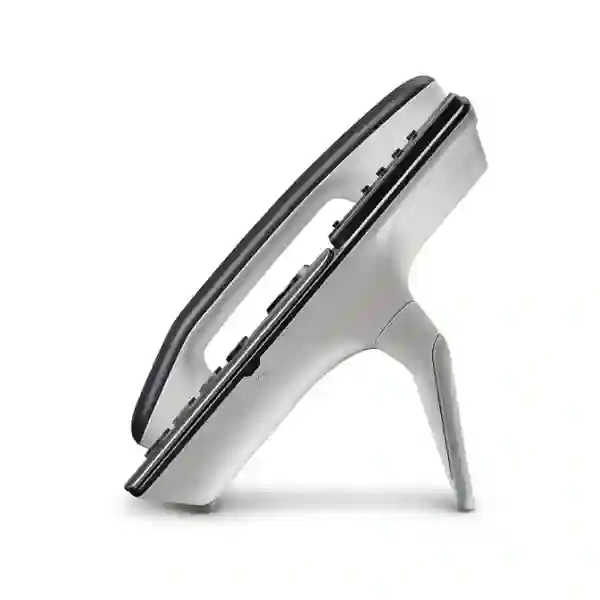
The phone includes a two-position adjustable desk stand and is wall-mountable according to the manufacturer’s specification. That provides useful placement flexibility for a normal workstation or a shared service area. The handset and console feature Microban antimicrobial protection in HP documentation, but this is a material property rather than a substitute for a cleaning schedule or infection-control procedure.
A practical installation should leave space for the handset cord, headset wiring and display visibility. Avoid cable strain at the rear connections and keep the phone where accidental spills are less likely. Follow the manufacturer’s cleaning instructions instead of treating antimicrobial protection as permission to use any chemical or cleaning method. For shared desks, agree on a simple device-care routine and provide an accessible way for staff to report faulty keys or worn cords.
E320 versus simpler and more connected alternatives
A buyer who only needs basic calling should compare the E320 with lower-key-count desk models instead of paying for capability that will remain unused. The value of the E320 lies in its larger set of configurable line keys, colour interface and Bluetooth options for an employee who uses voice communications regularly. A more advanced device may be appropriate for staff whose role demands a different key layout, integrated wireless networking or specialist reception functions.
One particularly relevant distinction is between the Edge E320 and E350: HP’s connectivity documentation lists Bluetooth on both, but Wi-Fi on the E350 rather than the E320. That is not a recommendation to change models automatically; a wired Ethernet desk can be the preferred design. Compare the complete workflow, supported accessories, physical installation needs and provider approval before selecting a family member or another brand.
Total cost is more than the telephone price
For a project budget, start with the devices but also identify PoE switching or separate power adapters, appropriate Ethernet cabling, headsets, any EHS accessory and the cost of configuring the telephone system. Ongoing items might include hosted calling subscriptions, PBX licences, support arrangements and management responsibilities. The relevant costs depend on the existing infrastructure and should be requested as separate quotation lines.
Do not treat the inclusion of business call-handling buttons as a promise that advanced PBX features carry no subscription cost. Likewise, a network with many switch ports may still lack adequate PoE capacity. Check the number of devices, what comes in each box and what spare units or accessories are desirable for continuity. A transparent bill of materials makes comparison between suppliers more useful than a headline unit price alone.
What comes in the box and what may not
HP’s product specification lists the phone console, handset, handset cord, desk stand, network cable and setup sheet. Those components provide the physical starting point for a conventional Ethernet-connected desk installation. The exact commercial package, regional variant and supplier bundle should be reconfirmed on the quotation, particularly for a multi-unit order.
Do not assume that a headset, Bluetooth accessory, electronic hook switch adapter or external DC power supply is included. Manufacturer notes identify several accessories as separate purchases. A device may arrive ready for connection to a PoE-equipped desk but still need extension credentials and approved PBX configuration before calls work. Ask the supplier to distinguish the standard package, optional accessories and any professional setup services in writing.
Checklist for a successful pilot
Use a pilot to answer business questions before committing to a quantity. Confirm successful SIP registration, incoming and outgoing calling, caller identification, speakerphone audio, a preferred headset and any required hold or transfer workflow. Check BLF or shared-line behaviour if staff rely on it. Test the display after applying your intended line-key template, and verify that a user can find contacts without consulting an administrator for every task.
Then test the less convenient situations: loss of network connectivity, a restart during office hours, a user moving desks, a password reset and a call placed while internet use is high. Record which party owns each fault, because the remedy could be in the handset, switch, router, PBX or provider account. Sign off on the tested configuration, not just the model number, before extending the installation to more desks.
Questions to settle in the quotation
A useful enquiry includes the exact product model, quantity, intended phone platform and whether the site has PoE-capable switches. State the working roles for which the phones are intended, the number of lines or speed-dial functions needed, the headset type preferred and any non-negotiable requirements such as call pickup, directory access or encrypted calling. This helps the responding supplier distinguish a simple hardware order from a deployment requiring technical validation.
For Tanzania-based purchasing, ask for a quotation that clearly identifies current availability, local pricing in the quoted currency, the precise package, any separate power accessories, delivery terms and applicable warranty or support conditions. These items cannot be assumed from global manufacturer literature. The most useful next step is a model-specific quote and a compatibility check against the actual telephone service, rather than relying on a general claim that all SIP phones work everywhere.
Frequently asked questions
Does the HP Poly Edge E320 require an internet connection?
It requires a suitable Ethernet network connection to its VoIP or SIP calling service. Whether calls traverse the public internet or an organisation-managed private route depends on the telephony setup. A working cable link alone is not enough; the device needs the correct service configuration, network reachability and authentication. Ask your administrator to confirm what network service is required at the desk.
Does the E320 have Wi-Fi?
No. HP’s connectivity matrix identifies Bluetooth support but no built-in Wi-Fi on the Edge E320. Connect it by wired Ethernet. If cable-free network access is essential, compare a model specifically documented as Wi-Fi capable and check the intended service provider’s approval. Bluetooth pairing with a headset or mobile phone does not replace the Ethernet connection used for SIP calling.
How many lines can the E320 manage?
HP specifies eight physical line keys with pagination for up to 32 SIP line appearances or configurable assignments. This is a way to organise lines, contacts and functions across pages of keys. It does not promise 32 concurrent calls or unrestricted registrations. The real working setup depends on your PBX, service provider, user permissions and programmed key behaviour.
Can the Poly Edge E320 be powered by PoE?
Yes. The device supports IEEE 802.3af Power over Ethernet, Class 3. Check the PoE standard and available power budget on the connected switch or injector before installing it. If compatible PoE is not available, an appropriate external 5 V DC power adapter is needed and is listed by HP as a separately purchased item. Confirm the package and power plan on the order.
Does it work with any SIP PBX or hosted provider?
SIP support is a starting point, not a certification for every platform. Service providers may require specific firmware, provisioning settings or approved-device models. They may also implement shared lines, call transfer, voicemail or BLF differently. Obtain confirmation from the actual PBX or hosted-service provider and test the functions that matter to your organisation before buying in quantity.
Can I use a Bluetooth headset?
The E320 has built-in Bluetooth 5.0 and is designed to work with compatible Bluetooth headsets. Compatibility, remote call control and pairing behaviour should be confirmed for the chosen headset model and firmware. Headsets are not automatically included with the phone. For a busy user, test comfort, microphone quality and call handling in the actual workplace before standardising the accessory.
Can I connect my computer through the phone?
Yes. Two Gigabit Ethernet ports provide LAN connectivity and a pass-through connection for a computer. The surrounding network still needs correct switching, cabling, security and VLAN design. Ask the IT team to check whether the telephone and PC traffic should be separated and how connectivity behaves during power changes or device restarts. The second port is useful, but it does not replace network planning.
Does it reduce office background noise?
HP lists Acoustic Fence for the handset or suitable wired headset and NoiseBlockAI for speakerphone use. These technologies are designed to reduce unwanted noise, but their effectiveness varies with room acoustics, microphone positioning and noise conditions. A practical speaking test in the intended area is more valuable than assuming every background sound will disappear. For noisy desks, headset design and room layout also matter.
Is the E320 suitable for reception?
It can suit reception-support or departmental desks with a manageable set of lines and regular transfer tasks. Eight line keys and configurable shortcuts may be useful. A high-volume switchboard, complex queue operation or integrated customer-service desk may need a different phone configuration or separate attendant software. Review simultaneous call patterns, queue handling, reporting and provider support before choosing the E320 as a primary operator station.
Does the E320 include a power adapter or headset?
HP identifies the external power adapter and optional headsets and EHS accessories as separately sold items. The manufacturer’s standard package includes the console, handset, handset cord, stand, network cable and setup materials. Supplier bundles can vary, so the commercial quotation should specify every included accessory. If your desks do not have adequate PoE, request an adapter line item rather than assuming one arrives in each carton.
Can it support shared desks or staff changes?
The device has configurable line assignments and provisioning capabilities that can help administrators manage changing desk allocations. A particular hot-desk login experience, personal directory sync or extension mobility function may depend on the phone platform and firmware. Pilot the sign-in, sign-out and account reassignment steps. Make sure confidential contacts or credentials are not left visible for the next user of a shared workstation.
What should a Tanzania business confirm before purchasing?
Confirm the exact model, quantity, compatible voice service, PoE readiness, required headset accessories and the functions users expect each day. Request locally applicable pricing, stock confirmation, the contents of the supplier bundle, delivery terms and warranty or support details. Do not assume that an international product page establishes any of those terms locally. A short pilot and a clear itemised quotation are the strongest basis for a purchasing decision.
Is the phone ready to call as soon as it is plugged in?
Not necessarily. A phone may power up over Ethernet and still lack a configured extension, network policy or reachable SIP server. Setup can involve provisioning credentials, firmware, server addresses and approved security settings. The correct procedure depends on the organisation’s telephony provider. Include configuration and acceptance testing in the deployment plan rather than equating successful power-on with a ready business extension.
Are the security features switched on automatically?
The E320 supports technologies including TLS, SRTP, HTTPS provisioning and authentication controls, but the final protection depends on configuration and PBX or provider support. Administrators should verify actual encryption use, firmware maintenance, certificate handling and account permissions. Buyers should ask who owns ongoing security updates and how compromised credentials or retired devices are handled.
Request an HP Poly Edge E320 quotation
For a business in Tanzania, the next step is to confirm the number of phones required, SIP system compatibility, wired network and PoE availability, preferred headset accessories and the quotation package. Ask for itemised commercial terms rather than assuming an international specification sheet defines local availability, price, warranty or delivery.
Ask FourTeck Tanzania for a model-specific quotation and compatibility review.




Reviews
There are no reviews yet.