
Business IP desk phone | Wired Ethernet | Tanzania buying guide
HP Poly Edge E500 IP Desk Phone
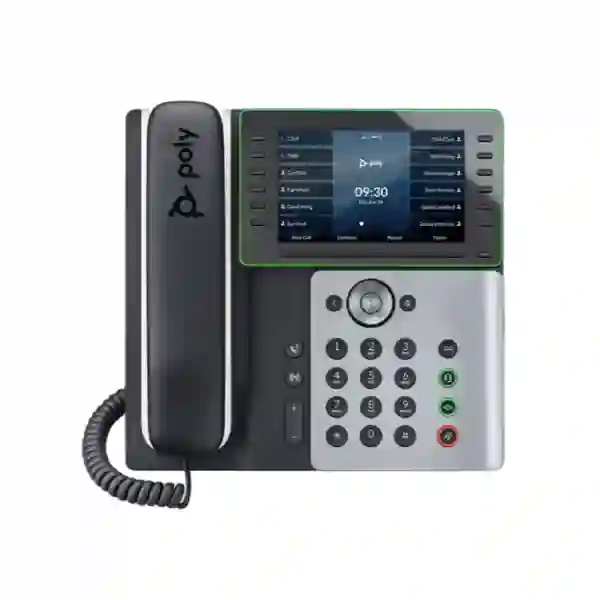
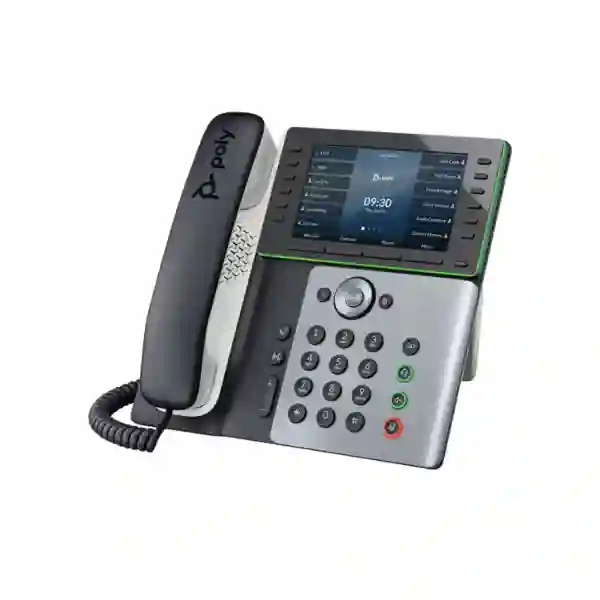
A capable wired business telephone for desks that handle important calls, frequent transfers and many colleagues. The HP Poly Edge E500 IP Desk Phone combines a five-inch colour display, twelve line keys, Poly voice processing, Gigabit Ethernet and room to expand with optional key modules. Choose it for the call handling your team needs, then verify SIP/PBX compatibility and accessories before requesting a quote.
The essentials before you order
Start with the right desk-phone decision
The Poly Edge E500 is designed for people who handle important calls at a dedicated workstation and want more control than a basic office handset provides. Its five-inch colour screen, twelve line keys and flexible feature assignments help users see contacts, call appearances and functions without navigating deeply through menus. It is particularly relevant when a manager, assistant or reception employee regularly places calls on hold, transfers a caller, checks colleagues’ availability or moves between separate business lines. These benefits are most useful when the connected phone system supports the intended functions.
Choosing this model starts with three questions. Is a wired Ethernet connection available at the desk? Does the chosen SIP phone system support the desired Poly Edge E features? Will the user benefit from numerous visible line or contact assignments? A yes to all three makes the E500 a practical candidate. If Wi-Fi or direct Bluetooth connectivity is required, compare the E550 instead. Before purchasing for a business in Tanzania, ask for the exact phone model, accessories and provisioning requirements to be confirmed against the proposed telephone environment.
Who benefits from the E500
The E500 is a strong fit for roles in which a desktop telephone remains a working tool rather than an occasional accessory. Examples include an executive who must reach colleagues quickly, an administrative coordinator fielding several incoming enquiries, a receptionist directing callers to different departments, or an operations supervisor monitoring shared lines. The handset provides familiar physical controls for staff who prefer a dedicated phone instead of conducting every conversation through a computer. Its larger display can also make active call information easier to review while attending to another task.
Fit is determined by call patterns, not job titles alone. A worker making only a few internal calls may be better served by a simpler IP phone; someone answering a large queue may also need a suitably configured attendant application or contact-centre platform. The E500 is not a substitute for a PBX, trunk service or queue-management system. It is the endpoint through which supported services become accessible. Assess call volumes, the number of colleagues needing speed dial, whether callers require transferring or parking, and the amount of desk space available before deciding on a deployment quantity.
A five-inch screen that helps reduce searching
The main display is a five-inch colour IPS LCD with a listed resolution of 800 by 480 pixels. That gives the phone room to present call information, menus and feature labels more clearly than a small monochrome device. The colour interface is especially useful when a user needs to select between a live call, a stored contact and a phone-system function under time pressure. The surrounding light indicator adds a visible status cue, although the precise behaviours can be influenced by configuration and software. It should be considered an operational aid rather than a substitute for call training.
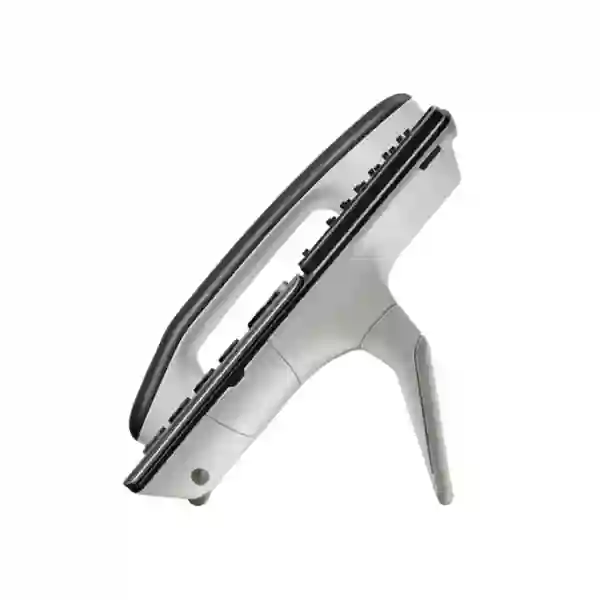
Consider visibility in the actual workspace. A desk under strong sunlight, a narrow reception counter and a manager’s private office place different demands on screen positioning. The E500 has an adjustable two-position desk stand, allowing a useful degree of angle choice without buying a specialised mount. Review whether the phone can be reached comfortably with one hand and whether the display can be read while seated. For shared workstations, choose an arrangement in which the handset cord, power and network cables do not obstruct other equipment.
Twelve keys, with room for paginated assignments
The E500 provides twelve physical line keys and supports as many as forty-eight paginated assignments for lines, contacts and features. Those forty-eight assignments should not be interpreted as forty-eight simultaneous calls or a guarantee of forty-eight SIP accounts. They are configurable key positions that can support the way an organisation handles calls. A receptionist might dedicate the first visible set to frequently contacted teams, while a department manager might place shared lines and important colleagues on the primary page. Pagination makes further assignments available without crowding every task onto a single screen.
A good key layout is deliberate. Begin with the few functions a user must reach immediately, such as primary line appearances, important transfers and regularly called extensions. Put less frequently used contacts on later pages and use consistent labels that colleagues can recognise. If different staff use identical workstations, maintaining the same layout can reduce training time. The connected PBX and provisioning template determine which advanced functions can actually be assigned. Verify support for busy-lamp fields, shared appearances or other preferred key types with the system administrator before presenting them as live capabilities.
Practical call controls for busy workdays
Beyond programmable line keys, the phone includes four context-sensitive soft keys, a navigation cluster and dedicated controls for common tasks. Hold, transfer, mute, speakerphone selection, headset selection and voicemail access are examples of the physical shortcuts available. They matter during a real conversation because a user can reach for an obvious control rather than interrupting a caller to locate a function. The E500 supports functions such as call waiting, forwarding, call park or pickup and local three-way audio conferencing, with actual availability depending on the telephone service and its configured permissions.
Design your call-handling process around the calls people really receive. A reception team may need to place callers on hold briefly, perform an attended transfer and recover the call when a colleague does not answer. An executive assistant may use speed dial and a shared line rather than a general queue. Provide a short training sheet covering the exact buttons and service features configured on that installation. Demonstrating the real sequence of operations is more useful than assuming that every feature listed in a datasheet will be enabled by the chosen communications provider.
Poly audio technologies and their practical limits
HP lists Poly HD Voice, Acoustic Clarity, Acoustic Fence and NoiseBlockAI capabilities for the Edge E500. Together, these technologies are intended to support clearer conversations, including full-duplex speakerphone use and the reduction of distracting sounds. Acoustic Fence relates to the handset or a wired headset, while NoiseBlockAI addresses unwanted background sound in speakerphone operation. The phone also supports several established voice codecs, including G.711, G.722, G.729AB and OPUS. Codec negotiation and the resulting listening experience still depend on the remote endpoint and the voice service.
Noise processing is helpful, but it is not a guarantee that a caller will hear no background activity. A crowded entrance, an open-plan office or a desk beside a noisy machine may still need a more suitable physical location or headset. Audio quality is also affected by network congestion, headset fit, microphone positioning and the other party’s equipment. Test the device with realistic speech levels and the intended PBX during a pilot. A brief demonstration using both handset and speakerphone is an effective way to establish whether the E500 suits the acoustic conditions of a specific workplace.
Handset, speakerphone and working style
The E500 lets users choose between the supplied handset, the integrated speakerphone and compatible optional headsets. That flexibility is helpful in offices where some calls are private and others involve a colleague seated nearby. The handset offers a familiar way to concentrate on a conversation; the speakerphone can free both hands for taking notes or consulting documents. Dedicated illuminated selection controls help make the active audio mode visible. Switching between supported modes should become part of user training, especially where staff alternate between short internal calls and longer customer conversations.
Match the audio method to the situation. Use the handset or a headset for a confidential discussion, and consider the speakerphone only where surrounding people should reasonably hear the conversation. Speakerphone operation in a shared office can create privacy and distraction concerns even with effective sound processing. For personnel who spend long periods on the telephone, assess ergonomics, cable routing and whether they need to stand or move around their desk. A headset choice should be confirmed against the exact connection method supported by this model rather than selected only by appearance or brand.
Wired headset choices and accessories
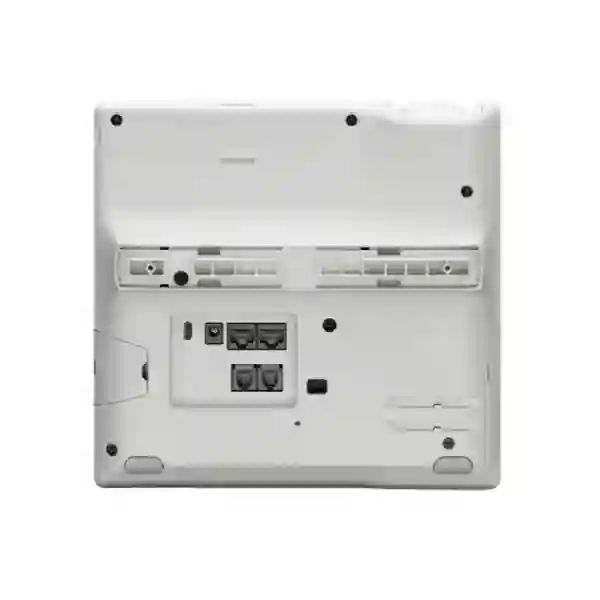
The E500 provides wired headset connectivity options that include an RJ9 connection, USB Type-C and an electronic hook switch interface. These interfaces create several practical routes for attaching compatible headset equipment. An electronic hook switch solution may help a supported headset manage call answering or ending without lifting the handset, but the adapter and headset combination must be checked. HP identifies optional headset and EHS accessories separately from the base phone. The availability of a connector does not mean every headset marketed for business telephony will work with every firmware or PBX configuration.
Create a small compatibility list before purchasing headsets in quantity. Record the headset model, connection cable or adapter, expected call-control behaviour and the firmware versions being used. Test mute, incoming ring indication, call answer, call release and audio in both directions. This matters for reception and customer-facing roles where small compatibility failures become frequent interruptions. The standard E500 does not include integrated Bluetooth pairing for wireless mobile phones or Bluetooth headsets. Teams requiring that functionality should evaluate the E550 model and confirm the chosen accessory and system pairing workflow.
Dual Gigabit Ethernet ports at the desk
The E500 offers two 10/100/1000 Ethernet ports, generally allowing the phone to connect to the office network and a computer to be connected through the phone’s pass-through port. This can be useful where a desk has one suitable network outlet but needs both a telephone and a workstation connection. A wired connection also provides a predictable starting point for business voice networking. The phone should still be deployed according to the organisation’s switch configuration, network access rules and equipment policy; a pass-through port is not a reason to bypass approved security controls.
Check the physical environment before ordering. The desk needs a reliable cable route to the switch, a suitable port configuration and enough space for the phone’s network and handset leads. If a PC is connected through the phone, verify how network segmentation and authentication are handled for both devices. Review the actual throughput and policy needs of that workstation rather than assuming a phone will perform the same network role as a dedicated switch. For a newly built office, involve the network team in planning voice VLANs and desk outlets before furniture placement makes cabling difficult.
Power over Ethernet and backup planning
Power over Ethernet is an important part of this desk phone’s deployment design. With an appropriately equipped and configured PoE network, the E500 can receive power along with its wired network connection. HP also describes an external power supply as an optional accessory. Check the exact power requirements, approved accessories and switch power budget for the supplied hardware rather than relying on a generic adapter or assuming that a non-PoE network socket will power the phone. The network link and power supply should be treated as separate items on the installation checklist.
Businesses that need phones available during short power interruptions should evaluate backup capacity for the entire calling path. A protected phone is not enough if the access switch, router, firewall, local PBX or internet equipment goes offline. Decide which roles are critical, how long they need phone service during an outage and which devices require appropriately maintained backup power. That conversation is especially valuable when replacing older telephones with IP endpoints, because the dependence on network and electrical infrastructure can change. Never present a UPS or spare power adapter as guaranteeing uninterrupted calls.
How the E500 fits into a SIP phone system
The Poly Edge E500 is an IP voice endpoint that uses SIP-based telephony infrastructure; it is not a self-contained telephone exchange. It requires a compatible call-control service, suitable network settings and any applicable telephone accounts or licences. In a typical business deployment, a PBX or hosted voice platform determines extension numbers, outbound dialling rules, transfer permissions and the handling of incoming calls. The desk phone provides the user’s interface to those services. Some familiar features depend on the PBX, service provider, account entitlement and firmware rather than on the device hardware alone.
Before specifying the phone for an existing system, obtain the platform name, version and vendor compatibility information. Confirm the precise provisioning method, registration requirements, supported audio codecs, security settings and the functions needed by the user. A SIP-capable device is not automatically verified for every SIP platform or every service-provider configuration. The safest procurement process includes a small configuration test with the intended environment. Document successful registration, internal calling, outbound and inbound calling, transfer behaviour, voicemail and any special key functions before the deployment is scaled.
Compatibility questions that prevent expensive surprises
Compatibility is a broader question than whether the phone can make a basic SIP call. An organisation might need a corporate directory, a busy-lamp field for colleagues, shared appearances, a call park workflow, or a particular authentication policy. HP documents support for several of these functions on the E500, but real operation varies with the PBX and service settings. It is therefore sensible to make a feature matrix containing the required function, the telephone platform, the firmware version and evidence from a test or supported integration document.
Do not rely on a statement that a system supports ‘IP phones’ in general. Ask whether the platform explicitly supports the E500 or the relevant Poly software family, what happens during upgrades and who is responsible for provisioning files. If your existing handset fleet uses a different vendor, verify whether dial plans and key templates can be translated before promising a simple swap. Where a provider supplies a managed service, its approved-device list and support procedures may be decisive. Resolve these matters before purchasing multiple units for reception, executive or branch-office teams.
Security controls that should be planned, not assumed
HP’s specifications identify capabilities such as 802.1X authentication, TLS, SRTP media protection, encrypted configuration files and secure provisioning. These capabilities are useful because an IP desk phone is also a managed network endpoint. They do not make the installation automatically secure. Encryption must be supported and enabled throughout the relevant call path, credentials must be managed appropriately, and provisioning arrangements need to match the organisation’s security policy. A phone that has been left on default settings may not deliver the security outcomes that its supported technologies make possible.
Create a practical security baseline for deployment. Include unique authorised credentials, approved provisioning locations, controlled administrator access, supported firmware, network separation where appropriate and procedures for employee departures or desk reassignment. Assess whether certificates, authentication methods or remote access are required by the intended platform. Never put real SIP passwords or privileged configuration details in public product enquiries. For larger offices, the IT team should document ownership of certificate updates and device resets. The goal is repeatable security configuration, not merely a list of security acronyms on the purchasing specification.
Provisioning and fleet management
HP lists Poly Zero Touch Provisioning, Poly Lens and service-provider management options among the E500’s management technologies. These tools can help administrators manage phone settings across a fleet when the chosen environment supports them. Centralised provisioning is particularly useful where several offices need consistent line-key layouts, firmware policy and dial plans. The important operational benefit is not an impressive dashboard; it is fewer manually entered settings and clearer accountability for device configuration. Management service access and functionality may depend on platform, account and deployment arrangements.
For a deployment involving more than a handful of handsets, prepare a standard configuration template and a small acceptance checklist. Decide how each device will receive an extension, how user-specific keys will be assigned, who updates firmware and how a replacement phone will be prepared. Keep a record of the location, responsible team, assigned extension and configuration owner without exposing sensitive credentials. Test what happens after a factory reset and after a service-provider change. A well-planned provisioning process can reduce differences between workstations and make troubleshooting more predictable when staff report problems.
Shared desks and flexible workstations
HP positions the Edge E family for modern flexible working, including shared or hot-desk environments. A physical phone can be helpful in this setting because staff do not need to connect a personal computer merely to answer ordinary business calls. However, the availability and behaviour of hot-desking or user sign-in are defined by the connected telephone platform and its supported workflow. Do not assume that every E500 installation permits users to sign in, inherit all personal key settings and sign out automatically without additional configuration or licensing.
Shared desks introduce operational details that single-user desks can overlook. Consider how users identify the correct extension, protect voicemail access and ensure the previous user’s information is no longer active when shifts change. Provide a short sign-in or assignment procedure and a support route when someone cannot receive calls. Position the phone where the keypad and display can be seen without sharing confidential information with visitors. The equipment’s built-in Microban antimicrobial product protection is an additional material feature described by HP, not a replacement for normal workplace cleaning and hygiene practices.
Reception and front-desk scenarios
At reception, telephone usefulness is measured in seconds. A caller may need a transfer to accounts, a check on whether a manager is available, or a return to the original conversation if the destination does not answer. The E500’s visible keys, pagination, dedicated transfer control and potential integration with a configured busy-lamp field can help support those routines. The value comes from designing the key arrangement around the organisation’s real call destinations and giving reception staff the authority and training needed to use the available PBX functions.
For a small front desk, the twelve immediately accessible line keys may be sufficient for the busiest contacts and services. A busier desk could benefit from further paginated contacts or an optional expansion module. First map the call flow: which departments receive enquiries, what happens outside business hours, how urgent calls are escalated and where unanswered transfers return. Confirm any queue or shared-line logic with the phone platform. If staff handle complex queues, screen pops or reporting dashboards, assess the wider contact-centre solution as well; the desk phone does not create those services on its own.
Executives, managers and personal assistants
Managers often need quick access to a small set of important people while also handling outside calls and confidential discussions. The E500’s larger colour display and configurable keys can bring those workflows into one familiar desk device. A manager might assign immediate access to a primary line, an assistant, departmental colleagues and commonly used business contacts. Where the PBX supports shared appearances or monitored extensions, those features can simplify collaboration between an executive and an assistant. This should be demonstrated on the proposed platform rather than promised universally.
Consider how a senior employee actually prefers to work. Someone who spends much of the day in video meetings may need only a dependable voice endpoint, while an assistant handling calls for several people may need a richer attendant arrangement. Review privacy rules for shared lines and any requirement to avoid displaying sensitive caller information to unauthorised users. If a headset is preferred, test the exact wired model and any electronic hook switch adapter. A practical pilot can reveal whether the phone’s physical controls improve the user’s daily routine or whether another communications interface would be more suitable.
Operations, administration and multi-line work
Back-office teams may have different call needs from reception. They may answer calls from suppliers, move between internal extensions and external partners, or keep a shared service line available while working on documents. The E500’s key assignments and built-in call controls can support this type of desk-based work when the PBX is configured accordingly. Having a dedicated telephone also separates voice interactions from applications running on the computer, which some teams find useful when screens are filled with forms, spreadsheets or line-of-business software.
Plan the visible keys according to operational responsibility. A purchasing employee may need common supplier contacts; a service coordinator may need engineers or supervisors; an administrator may need billing, management and reception. Avoid giving every user a large, identical set of features that they rarely touch. Focus first on reducing the time required to place a common call or perform a transfer. Test call pickup or forwarding workflows if they form part of the team’s responsibilities. The strongest deployment is the one that reflects actual responsibilities and uses a configuration that the technical support team can maintain.
Expansion modules for higher contact counts
The E500 can support up to two optional Poly Edge E expansion modules, allowing a wider attendant or high-contact arrangement. HP describes additional contact capacity through the expansion modules, but the actual way keys and contacts behave depends on the configured system. This option is relevant when a reception or coordination desk needs ready access to far more people than the base phone can present conveniently. Expansion modules are accessories, not a standard part of every E500 package. They should be included explicitly in a quote where required.
Before choosing modules, ask whether the user really needs immediate access to many extensions or whether a searchable directory is more efficient. A large bank of keys is useful when people know which colleague they need and frequently check availability; it may be less valuable when callers require specialised routing or an integrated customer database. Verify the precise module model, physical desk footprint, connection requirements, firmware and PBX feature support. A short desk-layout mock-up can show whether two modules fit comfortably beside the handset and the computer without becoming an obstruction.
E500 versus E550: choose connectivity correctly
The distinction between the Poly Edge E500 and E550 matters when selecting equipment. Both belong to the same executive-class desk phone family and share a focus on call handling and the five-inch colour interface. The standard E500 is a wired Ethernet desk phone without built-in Wi-Fi or integrated Bluetooth connectivity. HP identifies the E550 as the variant providing Wi-Fi and Bluetooth capabilities. Therefore, do not order the E500 expecting to connect it wirelessly to an office network or to pair an ordinary Bluetooth headset directly.
If a workstation has reliable structured cabling and staff use the handset or a compatible wired headset, the E500 may deliver the desired experience without paying for connectivity that will not be used. If cable-free network placement is a hard requirement, review the E550 along with the organisation’s wireless coverage, security and power arrangements. Bluetooth availability should also be matched with the required accessory and call-control behaviour. Where the quotation refers simply to the ‘E500 Series’, request an explicit confirmation of whether the supplied unit is E500 or E550. Model suffixes make a practical difference.
How to compare other desk phone options
The E500 is not automatically the best choice for every employee. Someone who needs only a few extension keys and routine calling may find a smaller Edge E model more proportionate to the job. A high-contact receptionist, by contrast, may benefit from the E500 plus an expansion module or a separate attendant application. Purchasing decisions should consider screen size, the number of useful direct keys, required headset type, desk space, connectivity and verified phone-system support. Comparing only the number of advertised features can obscure whether those features matter in daily work.
Build a simple role-based comparison before buying a fleet. Identify ordinary staff, team leaders, executive assistants and front-desk employees, then decide which tasks differ between them. Use the same real calling script to evaluate each candidate: answer a call, transfer it, locate a contact, return to a missed call and handle a second incoming call. Include the user experience for someone unfamiliar with the device. Standardising one model has administrative benefits, but it should not outweigh a clear mismatch between the phone’s capabilities and the needs of each role.
Accessibility and readable controls
Accessibility is one of the practical reasons to examine the Edge E500 interface closely. HP documents options such as text-to-speech, adjustments for colour-vision requirements and larger font settings. Combined with the physical keypad and illuminated call-control buttons, these options may help people who find smaller displays or touch-only interfaces difficult to use. They should be tested with the actual software configuration and the user’s preferred settings. A published feature description is not a guarantee that every accessibility need will be met without adjustment.
During a workplace trial, invite users to perform the tasks that matter to them: identify an incoming caller, select a colleague, find a voicemail notification and place a call on speakerphone. Check the viewing angle, contrast, menu labelling and button feedback. For users who rely on specific assistive technologies or hearing aids, review the documented compatibility requirements with the relevant specialist and perform a practical test. Avoid assuming that one setting will suit everyone. A thoughtful configuration can make the device more useful without introducing unnecessary complexity for other staff.
Tanzania office installation considerations
An organisation specifying IP desk phones for a Tanzania office should assess its existing communications infrastructure before choosing device quantities. The key questions are familiar to business IT teams: which locations have wired network outlets, what phone system serves each site, whether voice and computer traffic share the same switches, and how internet or private-network connectivity reaches the PBX. These are planning questions rather than claims about any particular telecom provider. A phone will perform only as reliably as the complete voice path supporting it.
For each workplace, record the intended desk location, local network port, switch capabilities, extension assignment and the criticality of incoming calls. Confirm that a compatible SIP calling service or PBX is available and that the relevant network access policies allow the device to operate. Businesses with multiple branches should determine whether provisioning will be managed centrally and how service interruptions are escalated. Do not assume a listed phone includes a local telephone number, an operator subscription, installation labour or regulatory approval for a specific project. Those commercial and compliance questions need separate verification.
Call reliability, bandwidth and network quality
Voice conversations are sensitive to packet delay, jitter and loss. The E500 includes mechanisms associated with VoIP operation, but the experience still depends on how the underlying network treats traffic. A switch that is heavily oversubscribed, an unstable internet path or a poorly configured voice VLAN can undermine good hardware. Coordinate with the network administrator on quality-of-service policies, addressing, VLAN discovery, DNS, time synchronisation and any firewall or SIP traversal requirements imposed by the platform. These requirements are not one-size-fits-all; the correct settings depend on network architecture.
A useful acceptance test includes more than placing one quick call when the office is quiet. Test at normal peak usage and from the desk positions where phones will be installed. Verify internal calls, external calls, transfer, voicemail and call recovery after a network interruption. Check whether voice remains usable when computers perform ordinary business tasks on the same local infrastructure. For sites dependent on an internet-hosted voice platform, include WAN reliability and provider support responsibilities in the rollout plan. Document observed issues before installing additional phones so that scaling does not multiply the same fault.
A practical deployment sequence
Begin with a discovery stage: identify user roles, confirm the PBX or hosted voice service, examine available network outlets and decide which headset or expansion accessories are required. Next, obtain one E500 with the correct model designation for a pilot. Provision a test extension and confirm the basic audio, calling and administrative functions. Then create a key layout for the selected role, configure any security requirements and validate the necessary telephone platform features. This sequence is more reliable than purchasing a full set of handsets and only afterward discovering an unsupported call flow.
During the pilot, let actual users work through a short set of realistic tasks under supervision. Include receiving a call, putting it on hold, forwarding or transferring it, using a saved contact, changing audio modes and reviewing a missed-call notification. Record which tasks need training and which need a configuration change. Once accepted, prepare a repeatable deployment template for the remaining desks. Number and label network connections, keep inventory records and provide a clear support contact. Close the rollout with documented configuration ownership, an appropriate backup plan and a procedure for handling replacement devices.
Operational ownership after installation
Desk phones often work well for years when the surrounding systems are managed properly, but they should not be treated as equipment that never needs attention. Firmware, server compatibility, security settings and user requirements can change. Assign responsibility for monitoring HP’s relevant support information and for evaluating updates in a controlled manner. The exact support life cycle and available updates should be checked for the product and software release in use; do not infer a future maintenance commitment from the name of the model alone.
Plan common support events in advance. A user may change departments, a phone may move to another desk, or a damaged handset may need replacement. Keep configuration records that enable a properly authorised administrator to reassign the device without exposing credentials. If an update is required, test it with the intended phone system before deploying it widely. Schedule cleaning and cable inspections according to workplace procedures, particularly in high-traffic shared areas. A documented handover to the internal IT team or voice service provider helps ensure the phone remains part of a supported service rather than an isolated piece of hardware.
What is supplied and what may be extra
HP’s product datasheet lists the base phone console, handset, handset cord, two-position desk stand, network cable and setup material among the supplied components for the documented E500 configuration. Packaging can vary with the exact regional offer or bundle, so the quotation should identify what is included. The base product is a wired IP desk phone, not a complete telephone system. Headsets, electronic hook switch equipment, expansion modules and an optional external power adapter should not be assumed to be present unless the seller explicitly includes them.
Separate the purchase into the phone hardware, optional accessories and any surrounding services. An organisation may also need suitable PoE switching, structured cabling, a working SIP platform, extension licences, a calling service and technical configuration. Some of these resources may already exist on the premises; others may require additional procurement. Confirm the exact unit colour and accessories if presentation matters at a reception counter. Do not use another retailer’s product number as the local inventory SKU. Request a quotation that identifies the intended model and gives clear line items so reviewers can compare like with like.
Information to include in an accurate quote request
A precise enquiry helps a supplier or internal purchasing team evaluate the E500 without guessing. State the number of phones required, the telephone platform and version, whether the desks have PoE-capable network access, and whether users need wired headsets or expansion modules. Indicate the kinds of calls users will manage: executive calls, shared lines, reception transfers or general office extensions. Explain which software features are mandatory and which are optional. If a business already uses Poly endpoints, mention the managed provisioning system and the existing support arrangements.
Also ask the responding team to confirm the exact E500 model, accessory contents, commercial terms, local availability and any offered support or warranty terms for the specific transaction. No stock status, Tanzania-shilling price, delivery promise or local approval should be inferred from this descriptive page. If the organisation requires installation, integration or configuration services, request a separate scope of work. For a fleet purchase, include an evaluation or pilot requirement where feasible. An itemised answer will be more useful than a broad assurance that the handset is compatible with ‘all VoIP systems’.
A buyer’s final suitability checklist
The E500 is worth considering when the desk has suitable wired Ethernet, a compatible calling platform, and a user who benefits from a generous colour display and numerous configurable keys. Check the need for busy-lamp fields, shared lines, directories, voicemail access and any other phone-system-dependent feature. Verify power arrangements, optional headset compatibility, security policy and how a device will be provisioned. For a high-contact role, decide whether paginated keys will be enough or whether one or two expansion modules should be evaluated.
The main reasons to reconsider the model are equally important. It is not the appropriate standard configuration for someone who requires built-in Wi-Fi or Bluetooth; the E550 should be assessed for those needs. It cannot replace a missing SIP subscription or PBX, and it cannot independently solve weak network connectivity. A compact endpoint may suit users who rarely need line keys. Ask for a model-specific demonstration and confirm the procurement scope before approval. That approach puts the actual workday and the entire communications system ahead of marketing labels.
Verified hardware and feature snapshot
Features that rely on a telephone platform, service-provider configuration, optional accessory or separate licence require verification for the proposed deployment. This snapshot is descriptive, not a local stock, price, regulatory approval or compatibility guarantee.
Frequently asked questions
Does the Poly Edge E500 have Wi-Fi?
No. The standard E500 is intended for a wired Ethernet connection and does not provide built-in Wi-Fi. The Edge E550 is the related model with wireless networking capability. Before ordering, confirm the precise model on the quotation, because product-family descriptions sometimes discuss both devices together. A wireless-capable phone still requires suitable power, network security and a compatible voice service.
Can the E500 pair directly with a Bluetooth headset?
No. The standard E500 does not include integrated Bluetooth pairing. It offers wired headset connection choices, including RJ9, USB Type-C and an electronic hook switch interface for compatible arrangements. Check headset and adapter support with the equipment supplier and the phone-system administrator. If Bluetooth headset pairing is essential, compare the E550 and test the intended headset before purchasing a fleet.
What do twelve line keys and forty-eight assignments mean?
There are twelve line keys, with pagination supporting up to forty-eight assignments for lines, features and contacts. This describes the flexible key interface, not a guaranteed number of simultaneous calls or registered SIP accounts. Your PBX configuration determines which keys can monitor an extension, represent a line or trigger another service. An administrator should arrange the first page around the user’s most important tasks.
Does the E500 work with any IP PBX?
The device supports SIP-based calling, but universal interoperability cannot be assumed. Confirm the exact phone-system platform, release, provisioning method, security requirements and feature compatibility. Basic calling may function while busy-lamp fields, shared lines or advanced transfers behave differently. A pilot on the actual PBX is the most useful way to validate the functions your users expect.
Does the phone need a separate power adapter?
Not necessarily. The E500 supports power through an appropriate Power over Ethernet connection. An external power adapter is described as an optional item and should be specified only after checking the exact hardware requirement. Confirm the switch’s available PoE capacity and the power arrangements at the chosen desk. For important extensions, consider what backup power protects the switch, network and phone service together.
Can the E500 serve as a receptionist’s phone?
Yes, it can be suitable for a reception desk that needs programmable contacts, dedicated call controls and supported transfer or monitoring features. It also supports optional Edge E expansion modules for additional contact access. Reception performance depends on the configured PBX and the organisation’s call-routing design. A busy contact-centre workflow may require additional software or a dedicated attendant system rather than relying on the telephone alone.
Is an expansion module supplied with the phone?
Do not assume so. The E500 can support up to two compatible optional Poly Edge E expansion modules, but they are separate accessories unless specifically included in the purchased bundle. Decide whether additional keys solve a real need, verify the module model and confirm physical space and platform support. A phone with a thoughtful key layout may be more practical than adding modules solely to increase the number of visible contacts.
Is the E500 a video conferencing device?
No. The Edge E500 series is an IP desk phone for audio calls. It provides a handset, speakerphone and supported headset interfaces rather than an integrated video-meeting camera. If a workstation also requires video meetings, choose that capability separately within the organisation’s collaboration system. Do not confuse general phone-series compatibility with a promise that a particular cloud meeting or calling service is enabled on the purchased handset.
What should businesses in Tanzania verify before purchase?
Confirm the actual E500 model, the wired network and power environment, the planned SIP platform and the features required by staff. Request clarity on accessories, warranty terms for the specific offer, local availability, any configuration work and the commercial quotation. Do not assume that a listed desk phone includes a telephone number, SIP trunk, installation or regulator approval. Ask for a limited pilot where integration with an existing PBX is important.
What is the best first step for a multi-phone rollout?
Start with a role-based requirement list and a single correctly identified test device. Configure it on the intended network and calling platform, test the critical daily workflows and confirm how security and provisioning will be managed. Use the outcome to create a standard configuration for each user group. Purchase the required quantity only after important compatibility questions and accessory needs have been resolved.
Request an E500 compatibility and purchase quote
Describe your calling environment, the number of desks, your PBX or hosted voice platform, and any required headsets or expansion modules. Ask for confirmation of the standard E500 model, configuration fit, accessory contents and the exact commercial terms relevant to your Tanzania project. If your team needs built-in Wi-Fi or Bluetooth, request a comparison with the E550 rather than assuming the E500 provides them.
Use the FourTeck Tanzania contact or quotation process to share your requirements. The next step is to confirm compatibility and scope before committing to a multi-phone purchase; no local price, availability, installation commitment or delivery time is implied by this guide.




Reviews
There are no reviews yet.