
Business IP calling · Tanzania buying guide
HP Poly Edge E550 IP Desk Phone
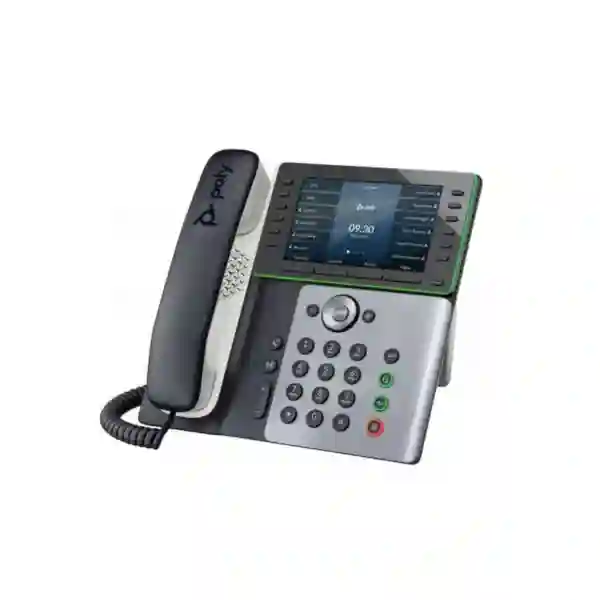
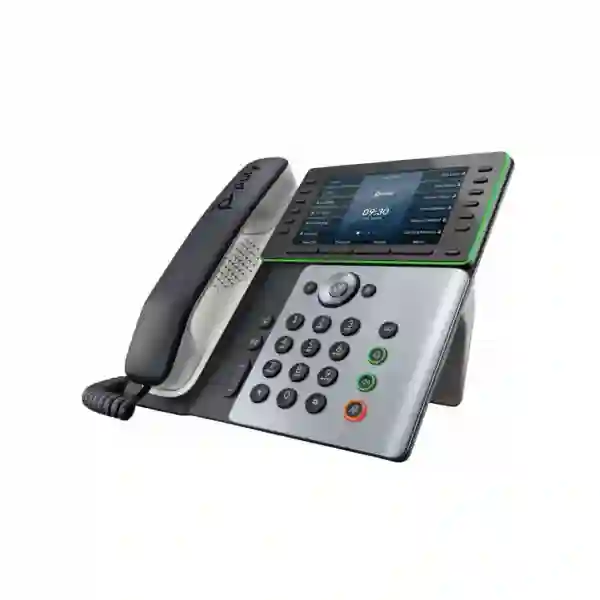
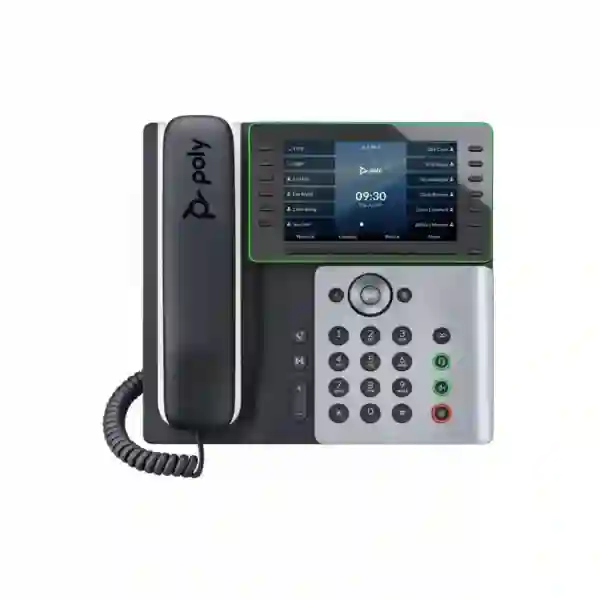
The HP Poly Edge E550 IP Desk Phone is a high-capacity, SIP-oriented business desk phone for people who handle multiple calls and need fast access to contacts and call features. Its 5-inch colour display, 12 line keys, Bluetooth 5.0, integrated Wi-Fi, and Power over Ethernet options make it relevant to reception, administration, executive, and shared office desks. Optional expansion modules can further extend contact access.
For organisations in Tanzania, the most useful buying question is whether this exact phone matches the existing voice platform and workplace infrastructure. Confirm the IP PBX or hosted SIP service, wired or wireless connectivity, headset requirements, and power source before ordering. Not all advanced calling functions are enabled by every service provider. A configuration-based quote is the sensible next step.
Key features at a glance
| Display | 5-inch colour IPS LCD, 800 × 480 resolution |
|---|---|
| Controls | 12 line keys; up to 48 line, contact and feature assignments with pagination |
| Wireless | Built-in Wi-Fi and Bluetooth 5.0; NFC capability |
| Wired network | Two Gigabit Ethernet ports; PoE support |
| Audio | Poly HD Voice, Acoustic Fence and NoiseBlockAI |
| Expansion | Up to two optional Poly Edge E expansion modules |
| Headset options | RJ-9, USB Type-C, Bluetooth and optional EHS route |
| Calling platform | SIP / IP PBX or hosted voice service; verify exact interoperability |
| Power caveat | External adapter may be needed when PoE is unavailable |
Specifications describe manufacturer-supported hardware capabilities. Advanced telephony functions, accessories and package contents should be verified for the selected calling platform and commercial offer.
Where the E550 fits best
Reception and administration
Monitor important contacts, work with call-transfer processes and plan expansion modules for demanding desks.
Executives and managers
Keep a familiar handset interface, personal extension, headset options and relevant shortcuts within reach.
Hybrid and shared workplaces
Use integrated network options while planning secure registration, correct power and sensible user handover.
A business desk phone designed for demanding call roles
The HP Poly Edge E550 IP Desk Phone is most relevant when a worker needs persistent access to several contacts, line appearances, or telephony functions from a single desktop device. Rather than asking an employee to navigate every call through a computer window, it provides physical keys, a sizable display, a handset, and speakerphone controls. Those capabilities are useful at a reception point, an executive desk, a shared administration station, or a supervisor’s workspace. The right deployment still depends on the organisation’s calling platform and the features that platform supports.
For a Tanzania-based organisation evaluating office telephony, the commercial decision is less about the number of buttons alone and more about how staff actually work. Count the extensions or shared appearances a person must monitor, whether a headset is essential, and whether the workstation has reliable wired networking. Review desk space, office noise, future expansion, and how frequently users change seats. These considerations help determine whether the E550’s capabilities will be used or whether a simpler IP phone would be more economical.
An IP desk phone should be selected as one part of a voice system, not as a standalone substitute for an active calling service. Before requesting a quote, establish which IP PBX, hosted voice service, or SIP configuration the organisation intends to use and ask for a compatibility check against the exact deployment.
The everyday calling experience
The large colour interface places on-screen information alongside physical call controls, which can reduce the effort required to identify active calls and move between common tasks. A four-way navigation cluster with a central selection key, context-sensitive soft keys, dedicated hold and transfer controls, and illuminated audio keys make the handset approachable for staff accustomed to traditional office telephones. Busy reception environments benefit from predictable actions; users should nevertheless receive training on the specific dial plan and call routing that the administrator configures.
Supported call functions in HP’s technical documentation include holding, transferring, forwarding, parking and retrieving calls, call pickup, redial, call waiting, do-not-disturb settings, and local three-way audio conferencing. Voicemail access, directories, shared lines, and busy lamp field indicators are also described. Each workflow has a business purpose: a receptionist may transfer a caller, a manager may monitor a shared line, and an administrator may use directory search to find a colleague.
The important qualification is that these are device capabilities, not guarantees of identical behaviour on every hosted service or PBX. Certain functions depend on provisioning, server permissions, licensed features, or provider implementation. A short call-flow demonstration using the intended platform is worth more than assuming that every menu item will work immediately after connection.
The 5-inch colour display and visual status
The Edge E550 features a 5-inch colour IPS LCD with an 800 by 480 resolution according to HP’s product datasheet. This screen gives a desktop user room to identify labelled keys, review caller information, and follow menu prompts without relying entirely on an application on the computer. An RGB surround light status indicator adds a visible cue that can be helpful in an active office. The screen and physical key layout are particularly relevant to roles that juggle calls while also using other business software.
An interface is valuable only when its assignments make sense. During setup, give high-priority contacts clear names, group frequently used functions logically, and avoid filling every available appearance before employees understand the arrangement. Use the phone’s navigation and pagination features to make more assignments accessible while keeping the first set of actions uncluttered. Labels and layout should match the customer’s real call-flow design.
Buyers should not confuse screen size with a promise of touchscreen control, video meetings, or a full computer operating environment. This is a dedicated SIP-oriented business voice endpoint. A conventional desktop voice workflow, not a general-purpose tablet, is the relevant comparison. The larger display helps operational readability, while platform capabilities and permissions determine which information can be shown.
Understanding 12 line keys, 48 assignments, and SIP lines
HP describes 12 physical line keys supporting up to 48 assignments across lines, contacts, and features through pagination. This is one of the Edge E550’s distinguishing characteristics, but the wording matters. Forty-eight assignments are not the same as forty-eight independent simultaneous conversations, nor does every assignment represent a separate SIP account. The manufacturer datasheet separately refers to support for up to 34 SIP lines, a different technical measure that must be interpreted in the context of the planned configuration.
For a receptionist, assignments might include direct access to colleagues, monitoring indicators, a shared departmental appearance, or a call feature. For a manager, they might represent a personal extension, an assistant’s line, frequently called departments, or other approved functions. The ideal allocation should emerge from a documented call-handling requirement rather than a maximum-number marketing claim.
Ask an administrator to map physical keys to roles before ordering multiple phones. Decide which functions should always be visible, which can appear on another page, and which should remain available through menus. On shared desks, consider whether those mappings should follow the employee or stay with the workstation. The PBX or service provider must support the relevant assignments and permissions.
Call transfer, shared line, and directory workflows
An organisation typically buys a multi-line IP phone to make a sequence of tasks easier: answer, identify the caller, consult, transfer, and return to other waiting work. The E550 offers physical and software-supported ways to handle those stages. A team can plan a process for attended transfers, blind transfers where appropriate, held calls, and call pickup without relying on a handwritten extension sheet. Consistency is important because poorly understood transfer behaviour can frustrate callers even when the hardware itself is capable.
Corporate directories via LDAP, busy lamp field indications, and shared or bridged line appearances appear in HP’s published feature list. These can be valuable in an environment where employees need visibility into colleagues’ status or rapid access to departmental contacts. However, directory permissions, naming conventions, and the ability to subscribe to presence or line events depend on the underlying system configuration.
Before rollout, document how the organisation handles calls that go unanswered, how voicemail is used, whether supervisors may monitor certain appearances, and what happens during a queue overflow. Configure and test these processes with the intended server. The phone should reinforce a deliberate service experience rather than become a collection of unlabelled programmable buttons.
Voice quality and background noise control
HP specifies Poly HD Voice, Poly Acoustic Clarity, Poly Acoustic Fence, and Poly NoiseBlockAI among the Edge E550’s audio capabilities. The technologies address different aspects of a business conversation. Full-duplex audio helps two parties speak naturally; echo and background-noise handling are intended to reduce distractions; and noise-processing features target particular sound pickup paths. HP describes Acoustic Fence for handset or wired-headset use, while NoiseBlockAI addresses background sound during speakerphone operation.
That distinction helps an organisation plan its workspace. A receptionist who works beside a frequently opening door may prefer a suitable headset. A manager taking occasional hands-free calls at a private desk may value the speakerphone. A crowded office might require acoustic changes, a wired headset, or better room layout rather than relying on software noise processing to remove every disruptive sound.
Voice clarity is also shaped by the network, codec negotiation, microphone position, endpoint settings, and the other party’s equipment. HP lists common telephony codecs including G.711, G.722, G.729AB, iLBC, OPUS, and G.722.1. A sound pilot should include realistic office background noise and real call routes, not only a short internal test call made in a quiet room.
Choosing between handset, speakerphone, and headset
The E550 supports conventional handset conversations and hands-free speakerphone use. It also offers several headset connection approaches: an RJ-9 headset connection, USB Type-C headset support, Bluetooth, and an electronic hook switch path that may use an optional adapter. This range lets a buyer design for different working habits without assuming that every user needs the same accessory. A frequently moving administrator may choose a compatible wireless headset, while an employee at a fixed desk may prefer a reliable wired option.
Compatibility needs to be verified at the headset-model level. A connector that physically fits is not proof that answer and end-call controls, mute indicators, ring alerts, or remote hook-switch functions will all behave as expected. Bluetooth pairing and electronic hook switch integration can involve device software, accessory requirements, or configuration. Ask for a test with the exact headset that the user will wear.
For shared workplaces, also consider cleaning procedures, personally assigned versus communal headsets, cable placement, and whether users must switch quickly between handset and headset. Employees should know how to select the active audio path and verify mute status. Small usability decisions often have more practical effect than simply purchasing the most expensive available accessory.
Bluetooth 5.0 and mobile-call convenience
Integrated Bluetooth 5.0 distinguishes the E550 from some simpler wired-only desk phone choices. HP positions it for compatible Bluetooth headset use and for handling mobile phone calls from the desk phone after appropriate pairing. In practice, that can be useful to an employee who wants a more consistent desktop call experience while remaining accessible through a mobile device. It does not mean that the office IP phone itself contains a SIM card or operates as a cellular handset.
Before adopting Bluetooth widely, decide whether mobile call pairing is permitted under the organisation’s communications policy. A business may want personal mobile calls isolated from work records, while another may need consistent customer-call documentation. The workflow should be assessed for privacy, desk sharing, and the risk of a device remaining paired to a workstation used by another employee.
Bluetooth is also a radio technology and can be influenced by the surrounding environment, accessory behaviour, pairing profiles, and nearby equipment. Pair the exact headset model, try typical movement around the desk, and test reconnection after a restart. If remote call control is critical, confirm it instead of assuming that every compatible Bluetooth audio device provides identical controls.
Integrated Wi-Fi for flexible placement
HP describes the Edge E550 as Wi-Fi capable, with wireless connectivity for supported office or home networks. This can be useful when adding a phone to an existing workspace where a dedicated data cable is inconvenient. The datasheet lists operation in the 2.4 GHz and 5 GHz wireless bands, but an IT team still needs to validate the specific security configuration, access point behaviour, and radio environment before using Wi-Fi as the primary voice path.
Wireless voice endpoints deserve more planning than a casual web-browsing device. Evaluate signal at desk height, access-point density, roaming expectations, interference, authentication method, and congestion at busy periods. A phone may show a Wi-Fi connection while still experiencing intermittent packet loss or unstable latency that affects conversation quality. Network staff should perform actual two-way call tests at the intended desk positions.
Wi-Fi also does not supply electrical power. A wireless-connected phone needs a suitable external power adapter unless power is supplied through a wired PoE connection. HP notes that the adapter is a separately ordered option for the PoE-enabled configuration. Confirm the exact box contents and power arrangement before the purchase order, particularly for locations where the Ethernet network is not present.
Gigabit Ethernet ports and desk connectivity
Two 10/100/1000 Ethernet ports are specified for the Edge E550. They support a standard wired phone connection and a convenient pass-through arrangement where appropriate, such as a desktop computer sharing the available network point. This can simplify cabling at a fixed desk, but the network should be designed intentionally. Segregating voice and data traffic, managing switch capacity, and providing a suitable PoE budget remain the responsibility of the infrastructure plan.
A wired connection is often the simplest first choice for a permanent reception or executive station when reliable network cabling already exists. It can offer predictable connectivity and a straightforward way to power the phone from an appropriate switch. The decision should be based on the physical workspace, the organization’s voice VLAN design, and the quality of the existing cables and switches rather than an assumption that wired always solves every problem.
If a computer uses the phone’s pass-through connection, check the intended security policies and any network access-control requirements. Document which port goes to the wall or switch and which port connects to the computer. During acceptance testing, verify both voice registration and the computer’s data connectivity so the desk works as expected after installation.
Power over Ethernet and external power planning
Power over Ethernet, commonly abbreviated PoE, can reduce desk clutter because a suitable Ethernet connection provides both data and electrical power to the phone. HP documents integrated PoE support for the E550 and lists a maximum phone power figure of 13 watts. The actual switch and installation must support the device’s specified power requirements, especially when many phones or accessory modules are connected in one office.
A practical purchase checklist should identify which desks connect to PoE-enabled switches, whether the switch has sufficient aggregate power available, and what happens during an electrical interruption. If continuity during a power outage matters, a network and power-backup design may be needed for the phone, access switches, router, and calling platform. Keeping only the phone powered is not enough if the rest of the voice path goes offline.
For Wi-Fi installations or desks without usable PoE, confirm the availability and suitability of the external adapter for the exact ordered variant. HP identifies an optional 5 V DC, 3 A supply in its documentation. Do not infer that it is included in every package or that any generic adapter is interchangeable. Plan the electrical supply and protected cable routing before a deployment date is set.
Expansion modules for high-contact roles
The E550 can support up to two optional Poly Edge E Expansion Modules. HP describes 22 keys and three pages on each module, offering up to 66 additional contact assignments per module, or up to 132 additional contacts when two supported modules are used. This is particularly interesting for reception staff, executive assistants, and departments that need frequent visual access to numerous colleagues. Expansion should answer a real workflow problem rather than be treated as a mandatory accessory.
Before selecting one or two modules, count the contacts that must be visible at one moment and identify which assignments belong on which page. A busy administrative station may benefit from grouping people by department, shift, or operational role. Ask the platform administrator whether the intended busy lamp field, presence, speed-dial, and shared-call functions can be provisioned on the expansion layout.
The modules are separate accessories, so the complete solution cost should reflect their availability, mounting and desk-space requirements, compatibility with the selected phone software, and any power considerations specified in the applicable guide. A pilot with the actual module is advisable for large or complex deployments. More keys are useful only when employees can recognise their labels and operate them reliably.
Reception and front-desk deployment example
A reception team often needs to answer a public number, identify the correct department, transfer a caller, and return to another incoming call. A single E550 workstation can be configured with selected line appearances and shortcuts so staff have a consistent physical interface. Adding an approved expansion module may make sense when the receptionist regularly transfers calls among many colleagues. The value is speed, familiarity, and reduced dependence on memory, not a claim that the phone alone creates a telephone queue.
Before procurement, map the actual call path from the public number to a ringing group, queue, or receptionist extension. Decide what should happen during lunch breaks, peak traffic, and after-hours operation. Consider whether employees need voicemail, shared pickup, supervisor assistance, or monitored contacts. The phone’s call features should then be checked against the chosen IP PBX or voice service.
During a pilot, ask a receptionist to handle representative situations: a caller requesting an unavailable person, two calls arriving closely together, a warm transfer, and a call returned after hold. Record which steps are unclear, adjust key assignments, and provide a one-page desk reference. A successful front-desk deployment is defined by how calls are completed, not how many features appear on a specification sheet.
Executive and management workspaces
An executive desk typically has a different requirement from a reception point. The manager may want fast access to a personal line, assistant, key teams, a headset for private calls, and a reliable speakerphone for short discussions. The E550’s larger screen, physical controls, and connectivity options can meet that pattern when paired with a supported business calling system. Some executives may use only a small number of keys and still value the clearer interface.
A sensible setup starts with the user’s main calling activities: personal extension, delegated coverage, call forwarding when away, voicemail, and quick contact access. If an assistant handles calls on the manager’s behalf, confirm that the server can provide the necessary shared appearance or delegation behaviour. Do not assume every provider exposes exactly the same executive-assistant workflow.
Desk planning matters as well. Confirm handset reach, headset storage, display visibility, and privacy when the speakerphone is active. Where a user is regularly away from the desk, evaluate the companion mobile or softphone offering of the same business service separately. The physical desk phone should complement, not be mistaken for, a complete mobility or unified-communications strategy.
Hybrid working and home-office considerations
For a person working across office and home environments, a consistent desk phone can reduce the need to learn different controls. The E550’s integrated Wi-Fi, Bluetooth, and wired Ethernet options give administrators flexibility in physical placement. That said, a home installation introduces questions that may not arise on an office LAN, including router configuration, limited upstream bandwidth, household internet congestion, and who is responsible for troubleshooting.
Before sending a phone to a remote worker, confirm how it will register securely to the organisation’s supported SIP service, how the administrator can provision or update it, and what network prerequisites the service provider specifies. Some systems need approved remote-access arrangements or specific provisioning profiles. The presence of Wi-Fi and SIP support does not independently guarantee registration to any hosted platform.
Document where the device will be powered, whether a compatible headset is needed, and how the employee should report connectivity problems. Test a real outside call, internal calling, hold and transfer behaviour where applicable, and recovery after an internet interruption. If the employee relies on a backup connection, that should be tested as part of the full voice service rather than assumed from the desk phone’s hardware capabilities.
Shared desks and user handover
Hot-desking environments challenge IT teams because the same phone may be used by several employees at different times. HP documentation describes the Edge E Series in shared-workspace and hoteling contexts, with NFC-related device information available for supported third-party applications. This does not by itself guarantee tap-to-login, automatic employee identification, or identical hot-desking behaviour across every PBX. Such workflows depend on software, services, and configuration.
For a shared-desk project, define the desired behaviour before purchasing: should the extension follow a person, should speed dials remain tied to the desk, and what happens when a user leaves without signing out? Consider access to caller histories, voicemail indicators, saved contacts, and Bluetooth pairing information. These issues have operational and privacy consequences in a busy office.
A pilot should include two or more representative users signing in and out, changing call settings, and handing over the workstation. Confirm what is cleared between sessions and who can restore a default configuration. Where NFC is proposed, verify the specific application and workflow; do not present the phone’s NFC capability as a complete authentication solution without that supporting system.
SIP telephony and platform compatibility
The Edge E550 is a business IP phone with SIP support, and HP’s administrator material covers OpenSIP and VoIP endpoint environments. A compatible SIP interface is a starting point, not a blanket promise that the phone will support every feature on every cloud PBX or locally managed system. Before purchasing, identify the server software or service, its version, the telephone firmware requirements, and any vendor provisioning or device-registration policy.
The distinction is especially important when buyers compare an IP desk phone with a proprietary phone designed for one particular unified-communications platform. A general SIP phone may offer excellent core voice service while some presence, directory, call-control, or account-provisioning functions remain unavailable on an unapproved system. Ask the supplier and calling-platform administrator to confirm support for the intended functions in writing.
If the organisation already has extensions and numbers, do not assume that replacing the physical handset automatically transfers service or preserves every personalised setting. A migration plan should cover registration credentials, routing, voicemail, caller identification, emergency-call arrangements where applicable, and staff training. New deployments need the same planning before the first test call.
Internet, LAN, and voice traffic readiness
A phone can have advanced audio features and still deliver poor conversations on a congested or unstable network. Voice quality depends on a coherent path from endpoint to calling server and, where external calls are involved, through the chosen telephony service. IT teams should examine latency, jitter, packet loss, routing, DNS, and quality-of-service practices. HP lists VLAN discovery, QoS support, IPv4 and IPv6, RTP and RTCP, SIP, and other enterprise-network capabilities for the series.
For a Tanzania office using a network connection for business calls, plan for peak-period traffic rather than only an idle-day speed test. Consider how many simultaneous calls the organisation expects, whether other applications contend for the same link, and how network or electricity outages are managed. These are deployment questions, not claims about any specific local service provider’s coverage or quality.
Run calls between two internal extensions and between an extension and the intended external call service. Check audio in both directions, including while a computer on the same desk uploads data or joins a meeting. If there are multiple sites, test representative site-to-site routes. Document the findings before approving a large order.
Security controls and administration
HP’s E550 documentation lists security-related functions including TLS, SRTP media encryption, 802.1X authentication, encrypted configuration, password access, and secure provisioning. These are important building blocks, but their presence on a specification sheet does not mean that a particular deployment is automatically encrypted end to end. The server, network, certificates, policies, and service provider must support and correctly configure the relevant security measures.
IT administrators should use strong administrative credentials, restrict access to provisioning interfaces, and follow a defined firmware-update process. Decide which staff may change call settings and which changes are controlled centrally. Remote devices may need a different access plan from those on a trusted office network. Keep a register of assigned devices and manage user changes when an employee moves desks or leaves the organisation.
Treat stored contacts and call history as business information. Shared workstations deserve particular attention because a subsequent user should not inherit another employee’s unnecessary access or personal Bluetooth connections. An organisation with regulatory or contractual obligations should review the complete communications service and data flow; a product’s individual encryption features are not proof of compliance with a specific local legal requirement.
Centralised provisioning and fleet operations
A single IP desk phone can be configured manually, but consistent deployment of multiple units benefits from a provisioning plan. HP identifies management and provisioning technologies in the Poly ecosystem, including central configuration methods and supported management services. The exact tooling available to an organisation depends on its service arrangement, software, and administrative access. This matters when an IT team must keep the same button definitions and policies across a growing estate.
Create a standard configuration for each staff role and record exceptions rather than configuring each desk independently. Common settings may include time zone, language, directory integration, network parameters, security policy, programmable keys, and permitted user changes. Keep the tested firmware version in the project record and validate updates before applying them widely.
A practical acceptance checklist should include successful registration, correct caller display, incoming and outgoing calls, transfer, voicemail access where enabled, headset operation, recovery after restart, and the intended provisioning behaviour. Document who owns ongoing support and how users report faults. Administrative clarity can reduce disruption when a new employee joins, an extension changes, or an entire department moves.
Accessibility and inclusive operation
HP highlights accessibility-related functions for the E550, including text-to-speech, larger font settings, and screen-colour adjustments intended to assist users with colour-vision differences. The datasheet also describes hearing-aid compatibility characteristics and support for suitable TTY adapter equipment. These capabilities can make the device worth evaluating for organisations that want to accommodate different visual, hearing, or interaction needs.
Accessibility must be assessed with the actual user and the actual configured calling workflow. A large screen does not solve every visibility issue, and an accessible feature may require enabling, adjustment, or training. If a worker depends on a particular assistive device, verify the combination with the phone, accessory, firmware, and service rather than relying on the general presence of a compatibility statement.
Physical factors matter as much as software. Position the phone to avoid glare, ensure that the handset and commonly used controls are within comfortable reach, and select appropriate audible or visible alerts for the working environment. Consider whether a headset can reduce strain during long call periods. The procurement process should leave room for user testing and reasonable individual adjustments.
Desk space, mounting, and workplace environment
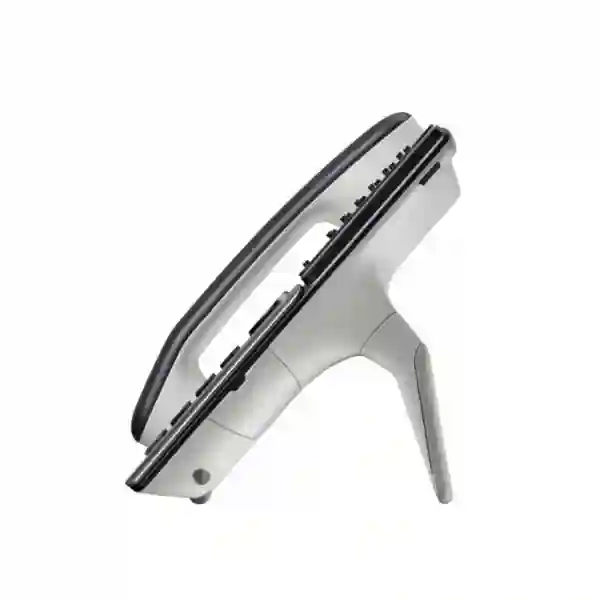
The E550 is a physical desktop endpoint, so a buyer should plan for the handset, display, keypad, cable exits, and possible expansion modules. HP specifies an adjustable desk stand with two positions, while a wall-mount option is identified as an accessory. Desk placement should allow the display to remain legible and the handset cable to reach naturally without crossing other equipment. A crowded counter might benefit from an intentional mounting or cable-management decision.
The manufacturer’s published operating temperature range is 0 to 40 degrees Celsius. That does not establish fitness for outdoor kiosks, direct rain exposure, industrial dust, or an unventilated enclosure. In a hot or demanding environment, review the full environmental requirements and use equipment suited to the actual installation conditions. Avoid placing the phone where power cables or public movement could cause accidental disconnection.
Where several units are deployed, plan their physical locations and asset labels in advance. A tidy installation also needs correct network-port identification, enough PoE capacity, and safe routing of optional adapter leads. Such details are easy to overlook when comparing phone specifications, yet they influence reliability and day-to-day usability.
Choosing E550 over a simpler Edge E phone
The Poly Edge E family contains different sizes and control layouts. The E550 is most compelling when its 5-inch display, 12-line-key arrangement, wireless options, and potential for two expansion modules match a real user requirement. A staff member who mainly answers one extension and occasionally transfers a call may not need this level of display or key capacity. A receptionist with many contacts and frequent call handling may benefit substantially from the additional control surface.
When comparing models, avoid selecting solely from a single headline such as total supported lines. Look at the number of keys a user can access without paging, display readability, available headset connections, Wi-Fi requirements, and the need for expansion. Consider too whether the phone fits the same server compatibility and remote-management policy as other devices already deployed.
An IT procurement exercise can group users by role rather than buying the same endpoint for everyone. A smaller phone may be appropriate for occasional calling desks, while the E550 is reserved for high-contact positions. This approach can reduce unnecessary accessories and training complexity while still giving busy staff the controls they need.
What to confirm in a Tanzania purchasing request
A request for quotation should describe the intended use rather than only naming the phone model. State the number of E550 devices required, whether the locations have PoE-capable Ethernet, which voice service or PBX they will use, and whether the organisation needs headsets, adapters, expansion modules, or wall mounting. This helps a supplier distinguish between the base PoE-enabled configuration and a package with additional accessories.
Also request confirmation of the exact commercial part number and package contents. HP publishes information for a PoE-enabled variant, but regional offers, power adapters, and bundles can differ. A buyer should therefore ask what is included in the actual offer rather than importing assumptions from a foreign retailer. The requested quotation should separately address applicable taxes, lead time, warranty terms, and support arrangements as offered for the specific transaction.
No Tanzania stock position, local sale price, delivery period, service coverage, or product approval is asserted on this page. These are transaction-specific matters that need direct verification. The most efficient next step is a configuration-oriented quote request with the installed calling platform and accessory requirements clearly identified.
What comes in the HP-described base package
HP’s listed box contents for the documented PoE-enabled configuration include the phone console, handset, handset cord, adjustable desk stand, CAT-5e network cable, and setup sheet. This information is useful for planning initial installation, especially when the organisation is determining how much additional hardware to include in an order. Exact contents should still be verified against the commercial variant and its supplier’s packing list.
Accessories need their own line in the purchase plan. Depending on the intended setup, the office may require a compatible external power supply, Bluetooth or wired headset, optional electronic hook switch hardware, expansion modules, or a wall-mount kit. HP notes that the standard PoE configuration may not include a power adapter and that expansion modules and many headset options are sold separately. A buyer should not interpret compatibility as an indication that those items are in the base box.
Check accessory availability for every role before approving the final quote. For example, a Wi-Fi-only desk needs appropriate power, while a busy receptionist may require a headset and one or two expansion modules. A clear bill of materials protects both the purchasing team and the installer from last-minute surprises.
Common buying mistakes to avoid
One common mistake is assuming the 48 advertised line, feature, and contact assignments correspond to 48 independent active SIP registrations or simultaneous calls. They do not describe the same thing. Another is ordering a Wi-Fi deployment without providing electrical power, because Wi-Fi carries network data but does not energise the phone. A third is selecting an attractive headset without testing its full answer, mute, and end-call workflow with the selected phone and PBX.
Buyers may also overlook the role of the calling service. Features such as presence, hot-desking, directories, and shared appearances may require specific server capabilities, administration, and sometimes commercial licensing. A working SIP registration is not proof that all advanced workflows are available. A representative user test should therefore be part of sign-off, particularly for reception and shared-desk environments.
Finally, avoid treating a published product specification as evidence of current Tanzania price, stock, warranty handling, or a local telecom approval. Obtain the relevant commercial and compliance information for the precise offer and deployment. A precise buying request, supported by an IT checklist, is more dependable than a purchasing decision based only on a generic online catalogue.
A practical deployment sequence
Begin by identifying each role and the calls it must handle. Confirm the supported SIP or hosted PBX platform, the number of extensions, any shared line requirements, and which employees need directory access or expansion keys. Next, inspect each desk for network cabling, wireless suitability, power availability, headset requirements, and physical space. This stage determines the actual bill of materials and prevents omissions.
For the pilot, configure a sample E550 with the intended software, security settings, and call-service account. Test inbound and outbound calls, transfers, hold and resume, voicemail, caller identification, headset behaviour, any monitoring keys, and the correct response to a restart or network interruption. Repeat with an expansion module or Wi-Fi connection when those options are part of the project.
After the pilot, prepare a standard configuration and simple user instructions. Roll out by role or office area, keep a record of installed devices, and define an escalation route for faults. Check the actual user experience after people have handled realistic calls. The objective is a dependable communication workflow: a capable phone is one component, while network quality, provisioning, and employee familiarity complete the result.
Long-term operations and changes
Business phones often remain on desks through multiple staffing and system changes. Plan for maintenance when purchasing, not only during an outage. Record the phone’s assigned user or location, the calling platform, the relevant provisioning process, and the accessories attached to the workstation. Consistent records make it easier to replace a failed device or reassign a desk when departments change.
An administrator should monitor vendor-supported software releases and security notices applicable to the deployed phone family. Updates can introduce fixes or alter behaviour, so test them with the business calling platform before a larger rollout. Keep configuration backups where supported and have a clear procedure for factory reset, reassignment, and safe handling of previous users’ information.
When an organisation grows, reassess which roles still need the E550’s richer controls. A relocated executive may need different direct contacts, and a receptionist may outgrow the original expansion layout. Planning for these adjustments helps extend the useful life of a carefully chosen endpoint. It also helps the purchasing team compare lifetime operational requirements rather than making a decision from the initial hardware line item alone.
Frequently asked questions
Is the HP Poly Edge E550 an ordinary analogue telephone?
No. It is an IP desk phone intended for a compatible VoIP or SIP calling environment. It needs a suitable network connection, power, and correctly configured voice service. An old analogue telephone socket alone will not provide the same function. If an organisation is migrating from a traditional system, its technical team should plan the calling platform, numbers, network, and registration process before installing the new device.
Does it have 48 separate phone lines?
HP describes up to 48 assignments for lines, contacts, and features using 12 line keys and pagination. This does not mean 48 simultaneous independent calls. The HP datasheet also describes up to 34 SIP lines, which is a separate limit. The practical configuration depends on the IP PBX or service provider and the functions assigned. Ask the administrator to specify how many accounts, appearances, and monitored contacts the business actually requires.
Can I use the E550 without an Ethernet cable?
The E550 has integrated Wi-Fi, so it can connect to a suitable supported wireless network when correctly configured. However, a Wi-Fi network does not supply power. For a desk without PoE, the correct compatible external power supply is needed. Check local signal strength, authentication, interference, and voice performance at the installation point. A wired connection remains a practical option when reliable network cabling is already available.
Is the power adapter included?
Do not assume it is included. HP describes a PoE-enabled configuration and notes that a compatible external power supply can be ordered separately. Different commercial bundles can include different accessories. Ask for confirmation of the exact part number, actual box contents, and power source in the quotation. This is especially important when the phone is intended to work over Wi-Fi without a PoE Ethernet connection.
Can the E550 connect to a Bluetooth headset?
Yes. HP specifies integrated Bluetooth 5.0 and describes compatible Bluetooth headset use. Pairing support does not ensure that every model provides identical remote answer and end-call controls. Confirm your chosen headset against the phone’s compatibility guidance and test it on the intended calling platform. If headsets will be shared, make arrangements for hygiene, pairing cleanup, and user handover.
Can staff answer a mobile call from the desk phone?
HP describes mobile phone call handling through its Bluetooth pairing capability. The exact workflow depends on successful pairing and supported device behaviour. This is different from inserting a SIM card into the IP phone; the Edge E550 is not a cellular handset. Organisations should decide how paired personal devices fit their privacy, support, and business-record policies before enabling the feature at shared workstations.
Does it support a receptionist’s large contact list?
The base phone provides programmable line, contact, and feature assignments. For roles that need still more visible contacts, HP specifies support for up to two optional Edge E expansion modules. Each can add up to 66 contact assignments in a suitable configuration. Confirm the module, layout, server-side busy lamp field or directory support, accessory availability, and physical desk space before ordering.
Will it work with our current PBX or hosted phone service?
It supports SIP-oriented business telephony, but exact interoperability must be checked against the named service and its software version. Basic registration does not establish support for every advanced function. Ask the PBX administrator or provider to confirm provisioning, call transfer, directories, busy lamp fields, shared lines, security, and any hot-desking requirement. A sample device test on the real platform is recommended before a larger purchase.
Can the desk phone improve audio in a noisy office?
Poly HD Voice and the manufacturer’s Acoustic Fence and NoiseBlockAI features are designed to support clearer conversations and manage certain background sounds. They are not substitutes for a sound network or suitable workspace. The handset, speakerphone, and compatible headset can behave differently in noisy conditions. Test the intended audio path at a realistic desk, and evaluate a good headset or better room acoustics when the role involves frequent calls.
Does it offer call transfer and voicemail?
HP lists call transfer, hold, forwarding, call pickup, voicemail access, and other common business functions among device capabilities. Their availability and operation depend on the connected server or service provider and its configuration. During a pilot, verify the exact steps a staff member will use. A familiar transfer button is helpful, but the business calling plan is what determines the destination, permissions, and voicemail behaviour.
Is the E550 a Microsoft Teams or video conference phone?
The E550 should be evaluated primarily as a business IP voice endpoint. HP documents a Windows-only Poly Computer Audio Connector capability for using the handset and audio paths with PC applications when the software is installed and supported. That does not make the desk phone an independent Teams video appliance or establish native compatibility with every collaboration service. Confirm any required integration for the exact application and platform.
Can it be used on a shared hot desk?
HP positions the series for hot-desking scenarios, and the E550 has functions that can contribute to a shared-workstation design. Actual user login, extension roaming, contact retention, and sign-out behaviour depend on the voice system and management arrangement. NFC support should not be assumed to provide an automatic login solution. Test a complete two-user handover and verify that old personal settings or paired devices do not remain available unnecessarily.
What happens to calls during an internet or power outage?
The answer depends on the entire voice solution. If the phone, network switch, router, connection, or calling platform becomes unavailable, call service may be interrupted. PoE and a backup power supply can help only when all required network components and service routes are considered. Ask the service provider how calls are routed during failures, and test any continuity plan. The E550 itself cannot guarantee uninterrupted external calling.
What should a Tanzania quotation include?
Include quantity, exact model and package variant, the intended IP PBX or SIP provider, power method, any required headsets or expansion modules, and whether the desks use wired Ethernet or Wi-Fi. Request written confirmation of accessory inclusions, final commercial price, applicable charges, lead time, warranty handling, and support scope. These details must be verified for the actual Tanzania offer; this product information does not assert local stock or pricing.
Does the phone have security features?
HP documents features such as TLS, SRTP, secure provisioning, and 802.1X for the device. Security depends on configuration, certificates, server support, access control, and disciplined software maintenance. Do not infer that every deployment is end-to-end encrypted merely because the endpoint supports an encryption protocol. An IT security review should cover the full service, remote devices, shared desks, and stored user information.
What is the best next step before buying multiple units?
Select a representative user and confirm the platform, network, required controls, and accessories. Test one appropriately configured unit with realistic inbound and outbound calls, transfers, headset use, and any expansion module or Wi-Fi requirements. Record the tested configuration and use it to build a consistent procurement specification. That approach makes it easier to order a suitable solution rather than discovering unsupported workflows after the hardware arrives.
Request an E550 configuration quote
For a Tanzania purchase, share your required phone quantity, SIP or IP PBX platform, available Ethernet or Wi-Fi connections, power method, and any headset or expansion-module needs. Request confirmation of the exact product variant, accessories, commercial terms, and compatibility before ordering. No local price, stock level, delivery promise, or specific regulatory approval is represented by this guide.
Ask FourTeck for a configuration-based quotation and deployment suitability review.




Reviews
There are no reviews yet.