
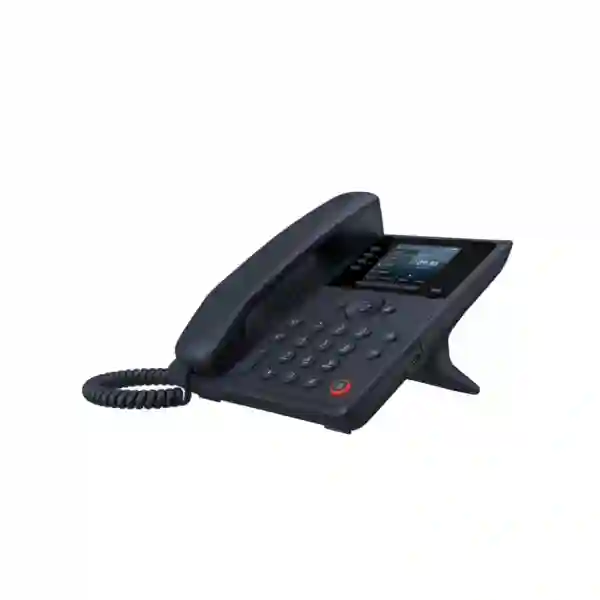
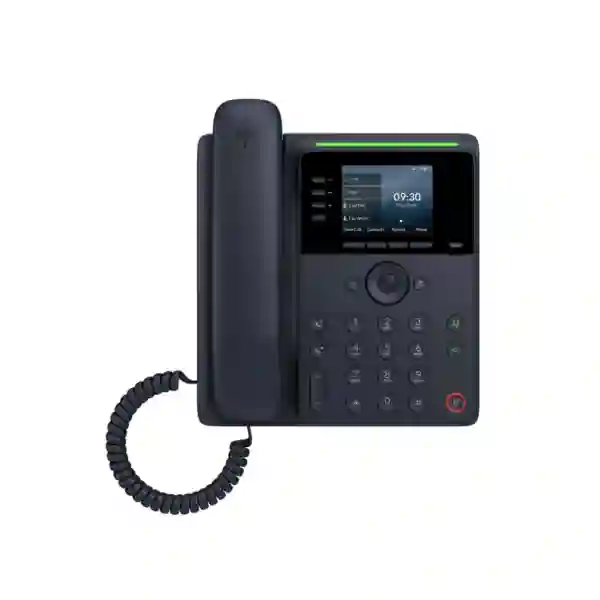
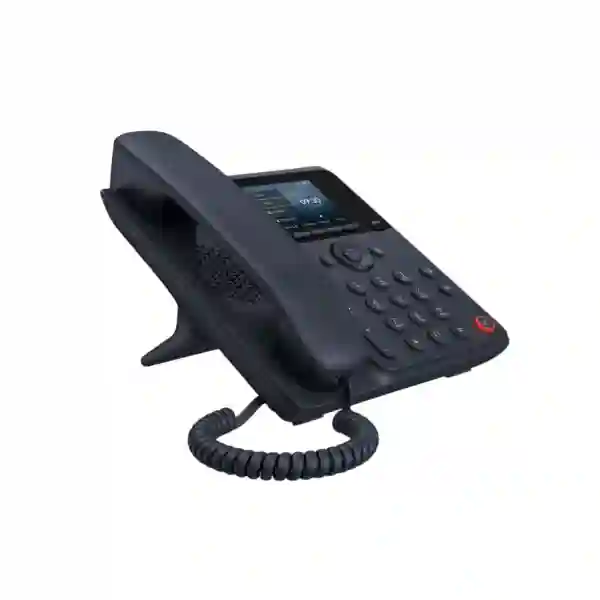
HP Poly Edge V250 Plus IP Desk Phone
A business desk phone for clear frontline conversations, accessible line controls and flexible wired or wireless deployment. The HP Poly Edge V250 Plus IP Desk Phone combines a 2.8-inch colour display with modern audio processing and Open SIP connectivity for supported phone systems.
Quick specification guide
| Product family | HP Poly Edge V Series Open SIP |
|---|---|
| Display | 2.8-inch colour screen |
| Line interface | Four keys; up to sixteen configured lines, features and contacts |
| Audio | HD Voice, full duplex, echo cancellation, NoiseBlockAI and Acoustic Fence |
| Wireless | Wi-Fi 6E, Bluetooth 5.4 and passive NFC |
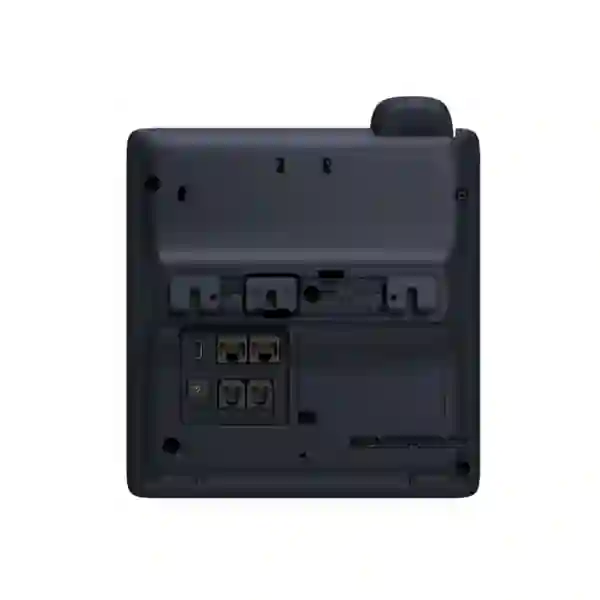
| Network | Two 10/100/1000 RJ-45 Ethernet interfaces |
| Headset connections | Supported Bluetooth, USB Type-C, headset and optional EHS paths |
| Placement | Two-position desk stand; wall-mount option |
| Expansion module | Not supported on the V250 Plus |
| Integration | Open SIP; confirm PBX, provider and feature interoperability |
Specifications describe manufacturer-stated capabilities. The chosen service, firmware, network and regional product package determine what can be deployed.
A desk phone for the people who keep business moving
The HP Poly Edge V250 Plus IP Desk Phone is intended for people who answer and place calls throughout the day: a front-counter employee checking an order, a service representative receiving an enquiry, or a supervisor transferring a customer to the right colleague. It keeps the familiar physical handset and keypad while adding a colour screen, programmable line access and connectivity choices that are useful in modern IP-telephony deployments. The value is not simply having another screen on the desk; it is giving someone a clear, predictable place to manage important calls.
This is an Open SIP endpoint rather than a complete telephone service. It must be configured against a compatible phone system, hosted SIP service or other appropriately supported call server. A buyer should therefore evaluate the desk phone together with account provisioning, call routing, network reliability and ongoing administration. FourTeck Tanzania can use your existing voice-platform details and intended desk locations to help frame a suitable product enquiry without assuming that every SIP service will work identically.
Who benefits most from this model
A good fit is a role that needs clear call status, repeatable call handling and relatively compact line visibility. Examples include reception overflow stations, a retail office, a hotel administration desk, a school office or a team leader who answers direct calls and monitors a modest number of configured contacts. The physical keys make routine actions more visible than relying entirely on a software calling application, particularly at a shared counter where staff may change during the day.
It may be less suitable for a specialist switchboard operator monitoring dozens of colleagues at once. HP identifies the V250 Plus as a four-line-key model and does not list expansion-module support for it. For larger attendant-style deployments, review a higher Edge V model with the required line visibility and verified expansion capability. Decide based on real call-handling tasks, not just the number of employees at the site.
Four line keys and up to sixteen configurable positions
HP specifies four line keys that can support up to 16 lines, features and contacts through the phone interface. That is a flexible way to organize frequently used functions, but the wording matters: sixteen available positions must not be confused with sixteen simultaneous active conversations, sixteen SIP registrations or sixteen included telephone numbers. Actual behavior depends on the provisioning configuration, voice platform, software features and how those keys are assigned.
Map the important actions before deployment. One team may need a primary line, a second service line and several speed-dial contacts; another may prioritize shared-line appearances, transfers or presence indicators where supported. Ask the system administrator which functions the chosen SIP platform exposes to this device. A practical key plan, written down and tested, often improves adoption more than enabling every possible shortcut at once.
Colour display and quick visual awareness
The V250 Plus has a 2.8-inch colour display and a multicolour RGB light bar above the screen. The combination can make the phone easier to scan during a busy period: users may check relevant line information or other configured status cues without opening a desktop application. HP positions its visual indicators as a way to convey information quickly, although the exact meaning of each light or screen state depends on device software and configuration.
This matters where a telephone is shared between shifts or sits beside a point-of-sale terminal. Good deployment practice includes choosing readable labels, avoiding cryptic abbreviations and showing staff how to distinguish an incoming call from a held call or other status. Confirm visibility under the room lighting and test any accessibility display settings. The display is a useful aid, but it is not a substitute for a carefully designed call queue or receptionist workflow.
Audio that keeps a conversation understandable
HP Poly HD Voice, full-duplex audio and echo cancellation support the phone’s core purpose: understandable two-way speech. Full duplex helps conversation flow naturally because both parties can speak without waiting for the other side to finish. HP’s NoiseBlockAI and Acoustic Fence technologies aim to reduce distracting noise entering the call from the user’s surroundings. These are relevant to busy open offices, counter service areas and locations where other employees are speaking nearby.
Audio results still depend on the complete path. The microphone position, handset or headset, room noise, codec negotiation and network packet delivery can affect what customers hear. In an evaluation, conduct real calls from the proposed desk positions, including a quieter period and a busy period. Listen at both ends and confirm that voices remain natural. A noise-control feature can help, but cannot repair poor connectivity or an unsuitable acoustic environment.
What NoiseBlockAI and Acoustic Fence do—and do not do
The two audio features address related but different everyday problems. NoiseBlockAI uses machine-learning-based processing to identify and suppress certain distracting sounds. Acoustic Fence is designed to emphasize the speaking area around the user, reducing pickup from farther-away activity. Together they are valuable in a workstation where keyboard noise, background speech or intermittent sounds can distract a customer from the main conversation.
Neither feature should be sold as a guarantee of perfect silence. Microphone location, speaker volume, background conditions and software settings all influence performance. If a desk sits directly beside machinery, a public-address speaker or an extremely noisy customer line, test the intended headset and handset in the actual setting. In some cases, changing the workstation location or choosing a suitable close-talking headset produces a bigger improvement than adjusting a phone setting.
Headset options for different ways of working
The V250 Plus supports several headset-related connection paths, including a headset interface, Bluetooth-compatible devices, USB Type-C headset support and an electronic hook switch interface for an optional APP-51 adapter according to HP documentation. These options are useful for staff who need both hands to work, such as an administrator entering customer records while speaking. However, physical connector availability alone does not guarantee that every headset model, call-control button or electronic hook switch function is interoperable.
Choose the headset around the employee’s workday. A corded headset may suit a fixed counter where charging and pairing are unwanted tasks. A supported wireless headset may suit someone who steps between nearby work areas. Ask for the exact headset manufacturer and model, supported connection method, microphone preference, charging requirements and call-control expectations. Test answering, ending, muting and transferring calls before purchasing a large batch of headsets.
Bluetooth 5.4 without unnecessary cabling
Integrated Bluetooth 5.4 gives the device a modern wireless interface for compatible mobile-phone or headset pairing. In a practical office, that can simplify desk layouts and reduce the need to route an extra cable across a working surface. It is especially relevant when a worker moves between the handset and a personal audio accessory. HP also describes mobile pairing among the Edge V family’s capabilities.
Treat Bluetooth as a compatibility and policy question, not as automatic proof that every phone contact, mobile calling function or headset button will synchronize. Check supported profiles and feature behavior for the actual device software and chosen accessory. For shared workstations, establish who may pair a personal device, how old pairings are removed and how the next shift returns the handset to a known state. Wireless convenience should not compromise account separation or privacy.
Wi-Fi 6E for hard-to-cable workstations
Built-in Wi-Fi 6E offers an alternative network connection for desks where structured Ethernet cabling is difficult or costly to extend. That may be useful in a rearranged office, a temporary administrative workspace or a counter where furniture layout changes. It is not the same as promising an uninterrupted call on every wireless network. The access point, supported bands, regulatory settings, signal strength and airtime congestion all influence the experience.
Confirm whether the installed wireless infrastructure supports the phone’s required configuration and whether local rules permit the intended frequency operation. Test connection stability from the actual desk position, rather than relying on a quick speed test near an access point. Voice traffic is sensitive to packet loss, jitter and roaming behavior even when general web browsing seems satisfactory. Where a reliable wired network is already present, Ethernet may remain the simplest baseline for troubleshooting.
Gigabit Ethernet for a structured office network
HP lists two RJ-45 10/100/1000 Ethernet interfaces for the V250 Plus. In many IP-phone layouts, this can help accommodate both a desk telephone and nearby workstation connectivity according to the network design. It gives IT teams a familiar route for configuring managed switching, monitoring network health and applying voice-oriented quality-of-service policies. Those benefits arise from the whole network architecture, not from the port speed alone.
Before deployment, have the network team verify switch-port policy, VLAN behavior, DHCP settings, addressing, DNS resolution and any network access controls. A phone connected physically to a switch may still be unable to register if its provisioning server or SIP service is unreachable. When a computer is connected through the phone, check the intended topology against the model’s documentation and the organization’s security requirements rather than assuming unrestricted pass-through behavior.
Confirm the power method before ordering
HP describes power configurations for the Edge V family that include Power over Ethernet and USB-C options, with power adapters depending on the product package. The V250 Plus is marketed in more than one market-specific bundle, including versions described with an external supply. Therefore, a purchasing team should not assume a particular wall adapter is included in every shipment or that an ordinary USB charger is suitable.
Record the chosen supply method for each desk. For a PoE design, check switch power budgets, port availability and the applicable device requirements. For an adapter-based installation, verify the exact included or separately required supply, local mains compatibility and cable placement. Where call continuity matters during electricity interruptions, consider the power backup plan for the phone, network switch, router, internet connection and call platform together. Powering only the handset cannot keep a disconnected network service operational.
Open SIP means flexibility with checks
Open SIP provides an important starting point for connecting a desk phone to a suitable communications platform. Organizations may use an on-premises PBX, a hosted SIP service or a managed enterprise voice environment. Even so, SIP as a protocol does not establish that a specific PBX edition, cloud subscription, provider profile or advanced call feature has been tested with this exact device and software version.
Before a purchase, ask the telephony administrator to confirm endpoint provisioning support, user licensing, registration limits, codec policy, transfer functions, shared-line needs and whether the provider permits third-party handsets. If a team relies on call recording, voicemail indicators, queue logins or BLF presence, verify each workflow explicitly. Avoid assuming automatic compatibility with Microsoft Teams, 3CX or any other named platform without a current interoperability statement or successful controlled test.
Secure voice communication starts with configuration
HP documentation identifies security capabilities such as 802.1X authentication, TLS, SRTP, digest authentication, encrypted configuration files, HTTPS provisioning and support for signed software. These can be important tools in a managed business network, particularly where voice devices sit alongside computers and sensitive customer workflows. A capability listed in a specification is not proof that it has already been enabled on an installed phone.
Security outcomes depend on the administrator’s work. Decide who can access the phone’s management interface, how administrator credentials are stored, how certificates are maintained and whether the voice service supports the intended secure signaling and media modes. Plan for firmware updates, reset procedures and removal of stored configuration before reassignment. If the network uses 802.1X or segmented voice VLANs, test both initial onboarding and recovery after a power or connectivity interruption.
Provisioning and fleet management for IT teams
HP lists Poly Zero Touch Provisioning and HP Poly Lens among management capabilities for this product family. The aim is to reduce repetitive setup tasks and make device administration more consistent where suitable services, accounts and workflows are available. A centrally controlled configuration can standardize line labels, calling features and update practices across multiple sites, which is useful when a growing organization wants similar phone behavior at every reception or branch desk.
However, zero-touch is not zero planning. The rollout still requires an authenticated voice account, an appropriate provisioning method, access to the necessary services and a clear device inventory. IT teams should document factory-reset behavior, configuration ownership, firmware policy and escalation routes for a failed registration. Pilot one phone with a representative user before copying its settings to a department. Confirm any cloud management entitlements or service costs with the relevant provider.
Call workflows worth testing in a pilot
A telephone specification cannot tell you whether the front desk can complete its actual job comfortably. Write down several realistic calls before approval: incoming enquiry, transfer to another extension, warm transfer, call on hold, missed call, voicemail retrieval and return call from the call log. If the business uses multiple published numbers or shared lines, include those cases as well. Test the functions that matter most using the production-intended call server and network configuration.
Document the outcomes in plain language. Which key starts a transfer? Does the user see the right name? Can the call be recovered if the destination is unavailable? Does the caller hear the expected hold audio? These are service-design questions as much as hardware questions. Repeat tests with the selected headset and handset, and train a second employee to complete the same tasks without relying on the installer being present.
Reception and customer service desks
A receptionist might handle a steady flow of calls while greeting visitors and directing people to departments. For this role, the V250 Plus offers physical line keys, visual feedback and a traditional handset. It can suit a moderate number of frequently used contacts where the phone system supports the required configuration. A well-chosen headset may make it easier to check visitor details or consult a customer record while remaining on the line.
The crucial limit is scale. If the employee must monitor many colleagues or hundreds of directory entries in real time, a four-line-key phone without an expansion module may not be the most productive choice. Assess calls per hour, number of monitored extensions, transfer frequency and use of attendant software. A larger phone or software console may be justified even if the V250 Plus has the audio and security features the organization likes.
Retail and hospitality administration
Customer-facing retail and hospitality teams often need a phone close to a counter or back-office workstation. Staff may check a reservation, confirm a delivery, contact another department or respond to a supplier without moving away from their work area. The colour screen, call controls and noise-management features can be useful in a location with incidental conversations and background activity.
Do not assume the phone integrates with a hotel property-management system, point-of-sale application or reservations tool merely because both products use a network. Such integrations depend on the PBX, application, licensing and integration method. If a workflow requires automatic guest-name display or click-to-dial from software, request a demonstration using the actual application. Also consider cable routes, cleaning routines and whether a wall position would keep the device out of a busy working surface.
Education, clinics and administrative teams
School administration offices, clinic reception staff and other service-oriented teams may value a physical call endpoint that is easy to identify and operate. A dedicated desk phone can help separate business call handling from an employee’s personal mobile device. It can also make shift handover simpler when extension assignments, directory labels and voicemail access are administered consistently. Good call clarity matters when names, appointment details or instructions must be understood.
These settings may have privacy, record-handling or accessibility requirements beyond ordinary telephony. The device should be deployed within the organization’s approved network and communications policies. Never assume that a phone’s security feature list automatically meets a specific health, education or government compliance regime. Assess call-recording policy, user authentication, contact-display exposure and how the phone is reset when personnel move to a new station.
Branches, shared desks and changing layouts
A business with multiple offices may aim for a consistent telephone experience rather than a different model at every site. The V250 Plus can be considered where users share similar calling duties and need a straightforward colour-screen handset. Standard labels, support documentation and a repeatable provisioning approach make it easier for colleagues to work from another location and still recognize the controls.
Branch environments vary in network quality and power reliability. Collect site details before specifying a rollout: wired availability, Wi-Fi coverage, switch capacity, address assignment, firewall restrictions and the route to the SIP server. A phone that performs well on headquarters Ethernet may behave differently at a wireless branch desk. A short site-specific acceptance test is a more reliable basis for larger purchasing decisions than assuming all branches are identical.
A practical option for hybrid workstations
The V250 Plus includes modern connectivity that may fit a worker who alternates between a fixed office desk and a suitably prepared home office. Wireless networking can reduce dependency on a nearby Ethernet socket, and supported headset or mobile pairing may simplify the working arrangement. PC connectivity features should be considered only after confirming the supported use case and firmware behavior for the chosen configuration.
Remote deployment has distinct responsibilities. Employees need an approved network path to the organization’s voice service, appropriate security controls, a reliable power source and clear support instructions. Home routers can introduce NAT, firewall and quality-of-service complications that were absent in the main office. Test the environment before promising identical behavior in every location. If a business mainly makes calls through a laptop application, compare that workflow honestly against maintaining a separate physical desk phone.
Accessibility and readable everyday controls
HP describes Edge V family accessibility options that include text-to-speech, enlarged font settings and screen adjustments intended to help users with different visual needs. The company also identifies hearing-aid compatibility in the technical documentation. These features are relevant when a telephone is used by staff with varied hearing, vision or dexterity requirements, although the exact available settings and accessory behavior should be confirmed on the specific firmware.
For an accessible deployment, ask employees which controls they need to use most often and allow them to test the phone. Consider handset comfort, display angle, reachability, audible alerts and the distinction between visual indicators. A claim of compatibility does not replace individual testing with a person’s own hearing aid or assistive accessory. Document the successful configuration so it can be restored if the phone is replaced or reset.
Desk placement, mounting and daily use
HP includes a two-position desk stand and describes a wall-mount option for the V250 Plus. This flexibility helps when one location has a conventional workstation and another has limited counter space. The selected placement should preserve a comfortable viewing angle, a clear path to the keypad and convenient access to the handset or headset. If a wall installation is planned, confirm that the supplied hardware and mounting surface are suitable.
Leave enough room for cable strain relief and safe movement around the workstation. Avoid routing power or network leads where customers can catch them or where staff will repeatedly pull the handset against a taut cord. If the phone is shared, establish a simple cleaning and handover practice appropriate to the work environment. Physical installation details are small individually, but together they influence whether employees enjoy using the device.
Network quality matters more than headline bandwidth
Voice calls normally consume far less bandwidth than large downloads, but they are sensitive to the timing and continuity of packet delivery. Jitter, packet loss, delay and overloaded wireless channels can make speech sound broken or cause calls to fail. A business should examine how its network handles real-time traffic instead of relying only on an internet connection’s advertised download speed.
Where the network supports it, plan appropriate quality-of-service handling, voice VLANs and traffic monitoring under the organization’s IT policy. Check whether the call server is local or remote and whether a route through a VPN or firewall changes latency. During a pilot, place simultaneous calls while normal staff applications are in use. The result should be measured in intelligible conversations and consistent call handling, not just a successful one-off registration.
Local readiness in Tanzania
For buyers in Tanzania, the useful questions are the same fundamental ones that determine a successful IP-telephony project anywhere: which voice platform will register the phone, what network will carry the calls, how will the workstation be powered and who will support configuration after installation? These questions are especially important when buying hardware separately from a hosted PBX subscription or when replacing an older analogue system.
Confirm local availability, exact product bundle, commercial terms and any relevant regulatory or wireless requirements before making a commitment. This description does not claim a particular supplier stock level, delivery zone, approval status or compatibility with a named local telecommunications operator. If the organization uses an existing SIP trunk, ask the service provider whether the planned PBX and endpoint combination is approved for the intended call flow and numbering arrangement.
A sensible deployment sequence
Begin with discovery, not with unpacking a large shipment. Record the desk locations, current calling system, number of users, expected call patterns and any shared reception functions. Next, check the network and power plan for representative positions. Then configure a pilot handset with the correct voice account, relevant security settings, directory entries, line keys and firmware policy.
During acceptance testing, confirm inbound and outbound calling, caller identification, transfers, hold behavior, voicemail indicators where available, device recovery after a restart and the selected headset. Capture the configuration so a replacement unit can be provisioned consistently. After a successful pilot, deploy in manageable groups and give staff a short guide to the functions they will actually use. A documented handover saves time later when passwords, service contacts or network details change.
Questions for the SIP or hosted PBX provider
A procurement discussion should include the voice-service administrator because the endpoint does not decide call routing on its own. Ask whether the provider supports the HP Poly Edge V250 Plus by name and which software version has been validated. Establish whether automatic provisioning is available, how credentials are assigned and whether secure signaling and media are supported end to end.
Then cover the user experience: call waiting, transfer, BLF or presence behavior, speed dials, corporate directory access, voicemail notification, time settings and emergency-call routing. Not every platform offers every feature, and availability may depend on a subscription or administrator configuration. If the service provider offers a supported-device list, retain it with the purchasing records. A verified compatibility statement is more valuable than a broad claim that the device is an SIP phone.
What to verify about codecs and audio paths
HP’s product brief lists audio codecs including G.711, G.722, G.729AB, iLBC, OPUS and G.722.1. Codec support helps a phone participate in different voice environments, but both endpoints and the service must negotiate an allowed codec. Wideband audio is useful only where the complete call path supports it. Calls passing through gateways, older devices or particular trunks may use a different format.
Ask the voice engineer to confirm the approved codec order, any transcoding points and how the chosen network handles media packets. If the organization records calls, verify that the recording workflow is compatible with the PBX and selected audio path. Test outbound and inbound speech on typical destinations. Avoid promising HD quality for every external call simply because a handset supports a wideband codec.
Comparing the V250 Plus with nearby Edge V models
HP presents the V250 Plus as an enhanced front-line option in its Edge V range. Compared with the basic V200, its colour display and integrated wireless options can be useful. Relative to the V250, the Plus model has a larger 2.8-inch screen and a multicolour status light. The V400 and V450 series occupy a different part of the range, with more line keys and, for selected models, expansion options.
Choose the model around concrete workflow needs. If the user rarely handles more than one call, a simpler handset might be sufficient. If wireless deployment and screen readability matter, the V250 Plus may be a better fit. If one person supervises a high number of extensions, review an appropriate higher-tier phone or attendant application. Confirm the exact features and configuration of any alternative before using a comparison as a purchasing promise.
Expansion limits are a useful buying filter
The V250 Plus does not have an HP-listed Edge V expansion-module option. This is easy to overlook when comparing phones by appearance or brand family alone. A buyer who expects to add a sidecar of monitored contacts later should account for the limitation now, rather than assuming an expansion accessory can be attached after rollout.
That does not make the device unsuitable for typical frontline work. Four line keys and configurable display positions can be enough for modest line-management needs. The question is how many people, teams and lines the intended operator must see at once. If extensive monitoring is necessary, compare a model that officially supports the required number of keys and expansion units. Making this decision early reduces the risk of replacing otherwise functional handsets because the daily workflow outgrows them.
Support, firmware and ongoing operations
A desk phone remains part of the business network long after the initial installation. Plan who is responsible for software updates, configuration backups, provisioning access, account changes and troubleshooting. HP maintains documentation for Poly Voice Software and the Edge V series, but a buyer should verify the correct software stream and support arrangements for the exact hardware in use.
Maintain a simple device inventory with site, extension assignment, serial number, software version and assigned user or desk. When an employee leaves, remove or reassign credentials under the company policy. When a fault appears, record whether it follows the phone, headset, cable, network switch or account. These basic operational habits help distinguish a handset issue from a wider telephony problem and make service calls more productive.
Budget for the whole calling solution
The purchase price of a desk phone is one part of the total deployment cost. Depending on the environment, a business may also need Ethernet outlets, suitable switch power, a compatible headset, a PBX seat or SIP subscription, setup work, ongoing service and user training. Wireless designs can shift spending from cabling to access-point coverage and support. Adapter-based power plans may require additional hardware.
Request quotations that separate the endpoint, accessories, provisioning, installation and any ongoing charges. Ask for the exact variant and its included power accessories so that competing offers can be compared fairly. This page does not state a Tanzanian shilling price because none has been verified for the intended listing. An accurate scope of work is a stronger buying tool than a low device-only figure that leaves required services unspecified.
What to confirm in the product box
HP’s product material identifies core packaging items such as the phone console, handset, desk stand, handset cord, Ethernet cable and documentation, and also references wall-mount hardware. However, power-adapter bundles vary by sales variant and region, and vendor listings may describe a package as including a power supply. The contents of the selected shipment should therefore be checked against the exact quotation and manufacturer part number.
When a delivery arrives, verify the unit model, physical condition, serial identification, included cables and power arrangements before scheduling installation. Keep the supplier paperwork and support terms available to the IT administrator. Do not substitute a retail vendor’s stock-keeping code for the FourTeck listing SKU; that field is not supplied here. Clear receiving records prevent an avoidable delay when several desks are being deployed at the same time.
How to decide whether this is the right desk phone
Start with the user’s work rather than with an impressive specification sheet. The V250 Plus is attractive when staff need a handset, clear visual status, manageable multi-line access, noise-reduction features and a choice of modern connections. It is particularly worth evaluating when a business wants a dedicated calling device while keeping the current compatible SIP system.
Pause before ordering if the team needs very large attendant-style key layouts, a guaranteed native application certification, a specific untested headset or a power arrangement not yet confirmed. Also pause if the existing telephone system cannot register a modern Open SIP endpoint. The best outcome is a phone that solves a known workflow problem and fits the network, rather than a device chosen for an unused feature. Ask FourTeck Tanzania for a quote based on your quantities and deployment requirements.
Frequently asked questions
Is the HP Poly Edge V250 Plus an ordinary analogue telephone?
No. It is an Open SIP IP desk phone intended to work with a suitably configured voice network and compatible call service. It is not a direct replacement for an analogue handset on an unmodified traditional wall socket. A migration may require a PBX or hosted service, suitable network access and administrator-led configuration.
How many lines can the four keys support?
HP describes four line keys supporting up to sixteen lines, features and contacts through the device interface. This is a configurable interface capability, not a promise of sixteen simultaneous voice calls or included telephone numbers. The exact assignments and available actions depend on the connected phone service.
Does the V250 Plus have Wi-Fi and Bluetooth built in?
Yes. HP lists Wi-Fi 6E and Bluetooth 5.4 for this model. Effective use still depends on the local wireless environment, permitted bands, network policy and compatibility of the intended accessory or paired mobile device. Test both features on the planned software version before standardizing a deployment.
Can it work on an Ethernet network?
Yes. HP lists two 10/100/1000 Ethernet connections. Your IT team should verify the switch configuration, IP addressing, voice VLAN policy, firewall route and registration server. A physically connected network cable does not by itself create a working telephone account.
Does the handset include a power adapter?
Do not assume the same accessories across all regional bundles. HP describes multiple power methods and product packages, including a version identified with a power supply. Confirm the exact selected package, PoE plan and any separately required adapter before purchasing or installing the device.
Is this model compatible with my PBX or SIP provider?
Open SIP support makes interoperability possible, but feature-level compatibility is not automatic. Ask the provider to verify the exact V250 Plus model and firmware with the intended platform. Test registration, transfers, voicemail behavior, line keys and any special call-center functions before a large order.
Can I connect a headset?
HP documents headset options including Bluetooth and USB Type-C, together with a headset interface and an EHS connection for an optional adapter. Confirm the exact headset model, cabling and call-control features before making a purchasing decision. Wireless pairing and remote answering can vary between accessories.
What is the purpose of HP Poly NoiseBlockAI?
NoiseBlockAI is designed to identify and reduce distracting sounds that might otherwise enter a call. It complements Acoustic Fence and the phone’s other audio technologies. Its effectiveness varies with the room, audio accessory and configuration; it cannot correct network packet loss or every possible acoustic problem.
Does the V250 Plus support expansion modules?
HP’s Edge V comparison does not list expansion-module support for the V250 Plus. Buyers who need many continuously visible monitored extensions should consider an officially supported higher-tier model or an attendant application instead of planning to add a sidecar to this handset.
Is the device secure by default for every organization?
The phone supports security technologies including TLS, SRTP, authentication and protected provisioning. Whether those protections are used correctly depends on the voice service, administrator configuration and network policy. IT teams should manage passwords, certificates, software updates and device reassignment procedures.
Is it suitable for a shared reception desk?
It can be, when the receptionist needs a moderate set of frequently used lines and contacts rather than extensive switchboard monitoring. Set up clear key labels, test transfers and shared-line behavior, and create a handover procedure. A high-volume switchboard may call for a different model.
Can it be wall mounted?
HP describes a two-position stand and a wall-mount option for the V250 Plus. Confirm the mounting parts supplied with the exact package, the suitability of the wall and the location of the network and power connections. The display and handset should remain easy to reach.
Will it work if the internet or electricity fails?
An IP call depends on its service and network path. A powered telephone cannot complete remote calls when required network or provider services are unavailable. Consider backup power for switches and routers and an appropriate business-continuity plan. Confirm with the provider what limited or emergency call behavior is supported.
Can I get a confirmed price in Tanzanian shillings?
A local price is not stated here because an exact FourTeck Tanzania listing price has not been verified. Request a current quotation that specifies the device variant, quantities, included power accessories, relevant services and any installation or delivery terms. This avoids comparing incomplete offers.
What details should I send when requesting a quote?
Share the expected quantity, current PBX or hosted SIP provider, desired wired or wireless deployment, PoE availability, preferred headset type and the main calling tasks. If a compatibility test is required, include the current software version and network constraints. These details help define a useful purchase specification.
Request an HP Poly Edge V250 Plus quotation for Tanzania
Tell FourTeck Tanzania how many desks you need to equip, your current SIP or PBX platform, preferred connectivity, power arrangement and intended headset accessories. Ask for the exact model bundle, confirmed local availability and a quotation covering the equipment and services you require. A small compatibility pilot is recommended when an existing voice system has not been verified with this model.
Request product details and a quote from FourTeck Tanzania




Reviews
There are no reviews yet.