
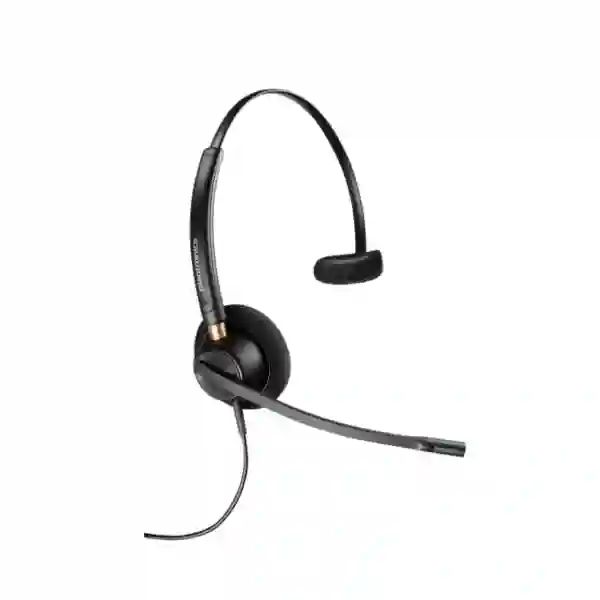
Business voice headset · Monaural · Quick Disconnect
HP Poly EncorePro 510 Mono QD Headset
A practical wired, single-ear headset for contact-centre agents, reception desks and customer support teams. Built around clear speech, a noise-cancelling boom microphone and the right connection accessory for your workplace.
Before you order: Tell us whether your calls run through a desk phone, PC or both. A compatible QD cable or adapter may be required separately.
At a glance
Wearing style
Single-ear on-ear, monaural
Connection
Wired Quick Disconnect (QD)
Microphone
Noise-cancelling flexible boom
Speaker
30 mm; speech-focused audio
Protection
Poly SoundGuard
Weight
Approximately 52 g
Manufacturer specifications describe the headset itself. Computer or telephone compatibility depends on a suitable accessory and the specific endpoint. No Tanzania price, stock status or included adapter is assumed.
Verified technical snapshot
| Product family | HP Poly EncorePro 500 |
|---|---|
| Model | EncorePro 510, standard mono QD configuration |
| Headset format | Wired, over-the-head, one on-ear speaker |
| Microphone | Noise-cancelling boom |
| Speaker size | 30 mm |
| Speaker bandwidth | 150 Hz to 6.8 kHz |
| Boom length and movement | 135 mm; approximately 290° rotation |
| Headset cable | Approximately 78.5 cm to QD |
| Ear cushion | Foam |
| Acoustic protection | Poly SoundGuard |
| Colour | Black |
| Nominal headset weight | Approximately 52 g |
| Included item identified by HP | Headset; connection accessories require confirmation |
Details reflect HP’s product information for the standard monaural QD configuration; exact commercial variants should be checked against the item quoted. The quoted product’s manufacturer number and any accessory contents must be confirmed before purchase.
A practical headset for people who handle calls all day
The HP Poly EncorePro 510 Mono QD Headset addresses a practical communication requirement: an employee must hear a caller clearly, speak naturally and remain aware of the activity around the desk. The single-ear design is an appropriate starting point for reception teams, service agents, help desks and customer-contact roles that combine calls with short conversations with colleagues. Rather than providing immersive entertainment audio, this product is designed around intelligible speech and reliable wired operation. It belongs to Poly’s EncorePro 500 family of professional communications headsets, with a Quick Disconnect interface that supports suitable connectivity arrangements.
The main buying question is not simply whether the headset looks comfortable. It is whether the wearing style fits the user’s tasks, whether the microphone can be positioned consistently and whether the existing phone or computer has the right connection path. This page explains those choices in plain language so that buyers can specify a complete working solution rather than an isolated headset. It also highlights considerations for Tanzania-based procurement without assuming stock, delivery coverage, local warranty terms or a particular telephone system.
What the single-ear configuration changes
Monaural means that one ear is covered by the headset and the other remains uncovered. This is useful for staff who sometimes need to hear a colleague, respond to someone at a counter or notice a nearby workplace announcement. A support representative might use the covered ear for a phone conversation while using the uncovered ear to remain attentive to a supervisor. That flexibility is one reason mono headsets remain relevant in reception and customer-facing roles. The speaker is intended for call audio, not for isolation from surrounding activity.
An uncovered ear is also a tradeoff. In an especially noisy room, the user may find it harder to concentrate than with a two-ear headset. If the job involves lengthy confidential conversations, high ambient noise or minimal interaction with nearby staff, compare a binaural model before standardising. The correct choice depends on acoustic conditions and working practice, not solely on whether a mono or stereo specification appears more sophisticated. A short wearing trial across representative shifts is more informative than a photograph or product name.
Why the microphone matters for the person on the other end
The EncorePro 510 uses a noise-cancelling boom microphone. Its purpose is to emphasise the employee’s spoken voice while reducing some of the unwanted environmental sound transmitted to the caller. In a service environment, that can mean fewer interruptions caused by nearby conversations and better opportunities to understand names, numbers and instructions. The flexible boom lets the wearer move the microphone into a suitable speaking position. HP describes positioning guides that help make placement more consistent between users.
Noise cancelling should not be interpreted as silence at the far end. A headset microphone cannot fully remove shouting colleagues, hard reflective surfaces, open doors or poor network audio. Place the boom according to the manufacturer’s guidance, speak at a steady level and address room acoustics when background noise remains excessive. Supervisors evaluating call quality should listen to representative conversations rather than judge microphone performance from a specification alone. The headset contributes to a wider communication system that also includes the phone, software, adapter, network and working environment.
What Quick Disconnect actually means
Quick Disconnect, commonly abbreviated QD, is the connector at the end of the headset’s attached cable. It allows the headset section to be separated from a compatible connection lead or adapter without unplugging the entire arrangement at the equipment end. For desks with fixed telephone installations, this can be convenient when an employee needs to step away briefly. The QD mechanism is a physical headset connection feature; it is not Bluetooth, wireless roaming, a USB plug or an internet calling service.
The important limitation is that a QD headset is only one part of the connectivity chain. A compatible bottom cable, USB adapter, audio processor or desk-phone interface may be necessary. The actual requirement depends on the endpoint. QD connector shapes and wiring conventions should not be assumed interchangeable across every headset brand. Purchasing the headset without defining the downstream cable can leave an otherwise correct product unusable on the day it arrives. For deployment planning, document both the headset and the chosen connection accessory.
Connecting to a computer for softphone calls
For computer-based calling, the user typically requires a suitable Poly QD-to-USB audio adapter or another compatible interface. The headset plugs into the adapter’s QD connector, while the adapter provides the connection to the computer. Confirm whether the workstation has USB-A or USB-C ports and which adapter model matches the calling environment. HP identifies computers running Windows 10, Windows 11 and macOS among supported operating-system contexts, but that does not mean the headset’s QD end can be inserted directly into a computer.
A softphone deployment should also check microphone selection, playback device selection, call-control behavior and any software permissions. Some functions, such as answering calls from a hardware control, depend on the adapter and communication application rather than the passive headset alone. Test the precise combination of headset, adapter, computer operating system and application before ordering for a large team. This avoids a common mistake: treating physical connectivity, voice quality and software call controls as one guaranteed feature when they are separate compatibility questions.
Connecting to a desk telephone
Desk phones may use different headset ports and interfaces, including dedicated headset sockets or arrangements that depend on a suitable amplifier or connection lead. The EncorePro 510’s QD termination is not itself a standard telephone plug. To specify the correct cable, record the phone’s manufacturer, model and available headset socket. Verify whether an electronic hook switch accessory, a separate audio processor or a manual handset operation is required for the desired workflow. The answer varies by phone family and installation.
For a receptionist who answers many calls, the ease of call control matters alongside sound quality. One connection arrangement may deliver audio but still require pressing a key on the telephone. Another, with supported accessories, may allow different control behavior. Ask for a written compatibility check before ordering headsets and bottom leads together. If the organisation uses several generations of desk phones, list those models separately rather than assuming a cable suitable for one handset will work across every desk.
When users work with both a desk phone and a PC
Some support teams operate a desk telephone alongside a computer calling application. In that environment, the choice of headset is only the beginning. A compatible switching solution may be needed to route audio between the two sources. HP’s broader Poly accessory range includes devices designed around headset and endpoint connectivity, but any proposed switch must be checked for the particular telephone, computer interface and EncorePro headset version being deployed. Do not infer dual-device operation simply from the headset’s QD connector.
Before specifying such a setup, identify which device receives incoming calls, whether the employee must transfer between sources, and whether simultaneous listening is a requirement. Separate the desired workflow from the list of connectors. A pilot desk can reveal awkward switching steps, microphone level differences or a control button that is unsupported by the chosen software. This is particularly useful for organisations transitioning gradually from traditional telephony to computer-based communications, where some desks may need a different accessory set from others.
Wired operation and workplace predictability
This headset is wired rather than battery powered. That removes the need to schedule headset charging and can be useful for desks that must be ready whenever a shift begins. A fixed connection also avoids reliance on Bluetooth pairing for the headset itself. However, a wired design is not a guarantee that every call will be stable. An internet-based calling system can still be affected by network congestion, the computer, the application or the telephone service. Think of the headset as one dependable component within the overall communications environment.
A corded unit is less suitable where staff regularly walk across a room while remaining in conversation. Quick Disconnect permits separation from a compatible cable; it does not continue the call as a wireless signal after the connection is broken. Users who need to move around while speaking should compare a purpose-built wireless headset and check its range, charging requirements and platform compatibility. For stationary agents, a well-routed cable and a secure desk setup may be simpler to manage.
Lightweight fit and daily wear
HP lists the EncorePro 510 at approximately 0.052 kg, or 52 grams, for the referenced monaural model. That low nominal weight is relevant where a person wears a headset for a significant part of the working day. The on-ear foam cushion and adjustable over-the-head arrangement support a practical fit, while the flexible microphone boom gives the user room to fine-tune speaking position. The physical design is one of the product’s central features, not merely a decorative detail.
Comfort remains personal. Head size, spectacles, hairstyle, ear sensitivity and the number of hours worn can affect the experience. A light headset can still feel uncomfortable if positioned poorly or pressed against the same spot throughout a shift. Encourage users to adjust the headband, avoid unnecessary tension and follow workplace guidance on breaks. For bulk purchases, let a representative mix of intended wearers test the fitting arrangement. Fit feedback should be part of procurement evaluation rather than an issue considered only after deployment.
Foam cushion care and shared workstations
A foam ear cushion provides a contact surface between the headset and the ear. In workplaces using shared desks or rotating shifts, that surface deserves attention in cleaning and replacement procedures. Staff should follow the current manufacturer’s cleaning instructions and organisational hygiene policy rather than saturating electronic components with disinfectant. Inspect cushions for compression, tearing or accumulated debris. Replace worn cushions with compatible parts where available and avoid substituting a visually similar component without checking fit.
Teams can reduce avoidable problems by assigning a headset to each worker while allowing them to use a shared workstation through the appropriate compatible QD lead. Where personal allocation is not possible, establish a clear handover procedure for cleaning, storage and reporting defects. This is a practical operations question, not a special hygiene certification of the headset. Recording spare cushion requirements alongside the initial headset quantity can also reduce interruptions when small consumable parts need replacing.
Sound quality is designed around speech
HP specifies a 30 mm speaker and a speaker bandwidth of 150 Hz to 6.8 kHz for the standard EncorePro 510 monaural QD configuration described in its product specifications. These figures align with the headset’s focus on understandable voice communication. Speech clarity, however, is influenced by much more than bandwidth. A poorly positioned headset, excessively loud surroundings or compressed audio from a connection can undermine the listening experience. The figures help establish product characteristics but do not predict results in every office.
For evaluation, use realistic call recordings or live approved test calls and include different speaking voices and levels. Check whether employees can understand addresses, numerical sequences and accents at a comfortable volume. Do not rely on music playback as the deciding test for a voice-oriented headset. Also compare performance at normal listening levels, because excessive volume can introduce fatigue and should not be treated as a remedy for poor audio. If a team has accessibility requirements, evaluate those needs separately.
Poly SoundGuard acoustic protection
The headset includes Poly SoundGuard acoustic protection, an HP-listed feature for managing sudden high-level incoming audio. HP describes SoundGuard as an acoustic limiting technology used in its communications headsets. That is relevant in call-handling work, where abrupt volume changes and unexpected sounds may occur. It should be understood as a protective audio feature within the manufacturer’s stated design, not as a guarantee that every workplace noise hazard has been eliminated or that a user can disregard good listening practices.
Employers should still provide appropriate volume settings, sensible call procedures, breaks where needed and a route for employees to report uncomfortable audio. The effectiveness of a complete workstation also depends on the connected adapter, telephone and configuration. A protective feature is not a substitute for an occupational hearing assessment when one is required. During rollout, document the approved headset and adapter combination so users receive a consistent experience instead of each workstation being assembled from unrelated accessories.
A flexible boom with repeatable positioning
HP lists a boom microphone length of 135 mm and rotation of 290 degrees for the referenced EncorePro 510 configuration. More important than memorising these dimensions is knowing how they affect use. The boom is designed to move into an appropriate position near the user’s mouth, helping the microphone pick up speech more consistently. Visual and tactile positioning cues are described in HP’s product information, supporting a repeatable setup when staff put the headset on at the start of a shift.
Introduce microphone-position training when deploying the headset to many users. A microphone placed too far away can make speech faint; one placed in an unsuitable position can produce breath noise or awkward level changes. Staff should not be expected to compensate through shouting or extreme software gain settings. The correct position should be confirmed with a brief test call and reviewed if colleagues report low or uneven speech volume. Good technique is inexpensive, easy to teach and often improves results without replacing equipment.
Who should consider this model
A customer-service operation with fixed desks is a natural candidate. Its agents may spend the day switching between conversations, case notes and occasional exchanges with colleagues. A wired single-ear headset keeps the call in one ear without isolating the worker from the immediate workplace. Reception staff may value similar awareness when answering a caller while monitoring a front desk. Internal IT support teams can also use the headset for troubleshooting calls where clear speech matters more than music playback.
The model can also suit organisations replacing compatible EncorePro-family QD headsets in an established deployment. In that case, existing accessories may be relevant, but the precise adapter and version still need confirmation. A new installation has different questions: which calling platform will be used, what endpoint hardware is available and who supplies the correct interface accessories? The headset can serve several types of organisation, but the recommendation should always follow the communication task and equipment inventory rather than an industry label alone.
Who may be better served by another headset
This product is not automatically the best choice for every call-heavy role. If a staff member works in a particularly loud environment or needs sustained concentration without local interruptions, a two-ear headset may be more appropriate. If the user must walk between rooms or consult people away from the workstation while remaining on a call, a wireless solution deserves consideration. For a simple laptop meeting setup, a direct-USB headset can be easier to deploy because there is no separate QD conversion step.
Employees with particular hearing, comfort or accessibility requirements may need a different shape, level of adjustability or wearing style. Some teams prefer a voice-tube microphone variant for operational reasons, but that is not the standard noise-cancelling boom model described here. The ideal evaluation compares two or three relevant forms under actual working conditions and records the feedback. Buying one model for every role is convenient only if the differences between those roles have first been understood.
EncorePro 510 compared with the 520
The EncorePro 510 is the monaural, single-ear option in this part of the EncorePro 500 range. The EncorePro 520 is commonly offered as a binaural, two-ear alternative. The main distinction for the buyer is situational awareness versus additional ear coverage. An agent who frequently exchanges information with a nearby colleague may prefer the 510, while an employee who wants more separation from room activity may prefer a two-ear model. Neither design will make an acoustically poor room entirely quiet.
When comparing the two, confirm that the quoted version of each uses the intended connection type. A number alone is not enough because product families can include QD, USB and other named variants. Evaluate comfort, call handling, the need for awareness and the complete cost of the selected connection accessories. Avoid assuming a stereo model always has a superior microphone or that a single-ear model is inherently less professional. These are different wearing arrangements intended to meet different working preferences.
QD models compared with direct-USB headsets
A direct-USB headset often simplifies a new computer-only installation: the headset’s connector is made for the computer interface, subject to operating-system and application compatibility. A QD headset separates the wearing component from the connection adapter, which may be valuable in organisations using desk-phone installations or standardised Poly QD accessories. This distinction matters when IT teams are deciding whether to retain an established QD environment or move entirely to computer-based telephony.
The QD approach introduces a procurement dependency: the correct adapter or cable must be present. A direct-USB model introduces different considerations, including its fixed computer connection and platform-specific controls. Neither connection type should be selected solely on the assumption that one always provides better audio. Review existing equipment, user movement, the software platform, deployment support and the expected life of accessories. Where both kinds exist in one business, document exactly which model is assigned to which workstation.
Standard noise-cancelling boom versus voice-tube variants
Poly’s EncorePro range includes differently named versions, including models with a voice-tube arrangement. The standard EncorePro 510 described on this page uses a noise-cancelling microphone boom. A product labelled 510V refers to a different microphone variant and should not be treated as identical for ordering, spare parts or technical specifications. Those differences can matter when an organisation is trying to replace the same headset used at existing desks.
Before approving a quotation, ask the supplier to confirm the exact model description and the manufacturer’s product number appearing on the item to be supplied. Where procurement records contain historical Plantronics names such as HW510, compare the full product identifiers instead of relying only on an old family nickname. Do not assume that a voice-tube model, a digital model and a QD noise-cancelling model have interchangeable parts. A precise written description prevents the most avoidable errors in repeat business orders.
What the physical specifications tell a buyer
HP lists the monaural EncorePro 510 QD configuration as black, on-ear and wired, with a foam cushion. The headset cable length is listed as about 78.5 cm before any additional connection accessory. That is a useful planning detail when arranging workstation layout: the headset cord must reach the appropriate QD junction without becoming stretched or crossing a walking route. HP also lists physical dimensions of 11.1 × 14.9 × 6.7 cm for a referenced commercial configuration.
Do not use a single dimension to decide whether the headset fits every person or desk. Physical measurements describe the item, while comfort and desk ergonomics depend on adjustment and use. Packaging dimensions and manufacturer part numbers can vary by regional listing. For a volume order, request the exact boxed configuration and verify what ships inside it. The company ordering spare units should record both the headset variant and the accessory set so later replacements match the original deployment.
What comes in the box, and what might not
HP’s product specifications identify the headset as the package content for the referenced EncorePro 510 configuration. That is a key clue for procurement: the listing of a headset does not establish that a USB adapter, telephone cable, switch, spare ear cushion or carrying case is included. The safe approach is to treat the connection accessories as separate items unless the quotation explicitly identifies a bundle. This is particularly important if the intended use is a laptop or a desk telephone.
A useful quote should state the main headset, compatible connection adapter or bottom lead, any required call-control accessory, the intended endpoint and the quantity of each item. The purchasing team can then confirm whether the proposed solution will be usable upon arrival. Ask for the actual supplied package contents rather than relying on an illustration that may show accessories. When several departments use different phones, separating these line items makes errors easier to spot and budgets easier to explain.
A complete example: a customer support desk
Imagine a support agent who remains at a computer for most of the day and uses an approved softphone application. The EncorePro 510 supplies the single-ear listening arrangement and the boom microphone. A suitable Poly QD-to-USB adapter supplies the physical link to the computer. IT then checks the correct playback and recording devices, microphone levels and the relevant call-control functions. The user adjusts the headset and completes a short test call in the real office environment.
That example is intentionally a workflow, not a promise of universal compatibility. The exact adapter, computer port, application and software version still matter. If the business later changes softphone provider, those details may need rechecking even though the headset remains physically unchanged. Treat this as a model for a deployment checklist: define the task, identify the endpoint, select the compatible interface, test speech quality and document the final equipment combination.
A complete example: a front-desk telephone
Consider a reception desk whose main calls arrive on a dedicated office phone. The employee wants one ear available to hear visitors while speaking to callers. The EncorePro 510’s monaural wearing style may meet that requirement, but the telephone model determines how it can connect. The buyer records the phone’s full model number and selects a verified QD-to-phone cable or audio interface that fits the handset’s available connections. The team also checks how an incoming call is answered and ended.
If reception must alternate between a desk phone and a PC, that is a separate requirement and may call for additional equipment. A basic audio connection does not automatically supply switching or remote call control. During acceptance testing, the receptionist should place and receive calls, adjust listening volume and make sure the cord does not interfere with keyboard or visitor-facing work. The final configuration should be documented so a replacement headset can be fitted without guessing the cable type.
A complete example: multi-shift contact centre
In a multi-shift team, dozens of agents may use the same desk infrastructure across different time periods. A standardised QD connection can support a practical separation between the personal headset and a fixed workstation cable where the organisation has adopted that arrangement. Employees can be issued their own compatible headset, while IT maintains the endpoint connection and approved audio settings. That may make seat changes simpler to manage, provided the QD accessories are correctly matched.
The larger operational questions involve storage, identification, cleaning, microphone-position guidance and spare-part planning. Decide whether every employee receives an assigned headset, how replacements are authorised and who reports damaged connectors. Train supervisors to distinguish a defective headset from a missing adapter or misconfigured softphone. Track recurring issues by workstation and accessory model. These steps help managers evaluate the full ownership process rather than judging a headset solely by its initial purchase cost.
Supporting hybrid and temporary workstations
Some organisations have employees who alternate between office desks and temporary or home-based computer workstations. A wired QD headset can be part of such an arrangement when each location has the correct connection accessory. The headset by itself does not make an unfamiliar workstation compatible. Computers may differ in their ports, calling software, operating-system policies and audio configuration. A user who moves between locations should know which adapter to carry or which approved adapter is already installed at the destination.
For this use case, specify whether the employee needs a portable headset kit or a fixed accessory at every desk. Consider cable handling during travel and a safe way to store the microphone boom. Check the organisation’s data and call-handling policies separately from headset selection. If employees routinely join meetings from mobile devices or need to walk around, compare a different connectivity format rather than making assumptions about universal QD compatibility with phones, tablets or conferencing applications.
Tanzania procurement: specify the right solution
For an organisation purchasing communications headsets in Tanzania, the most useful first step is a clear technical request. State the number of users, the desk-phone or PC models, the preferred monaural design, whether software calling is involved and whether adapters are already installed. This helps prevent a quotation for headset-only units when complete workstation kits are required. It also makes it easier to evaluate like-for-like options from suppliers without relying on vague terms such as ‘universal headset’.
Local procurement should confirm the applicable quoted price, currency, tax treatment, availability, lead time, delivery terms and warranty support with the seller before payment. None of those commercial conditions should be inferred from the manufacturer’s international product specifications. A quote should identify the exact headset variant and each additional accessory. In a business operating across multiple offices, include the final receiving location and any internal distribution requirements in the purchase request. Clear requirements are more valuable than unsupported claims that a particular model is always in stock.
Check existing phone and computer infrastructure first
An inventory of the current environment saves time. List each endpoint manufacturer and model, whether the user places calls through a desk phone or software, the computer’s USB ports and any existing Poly audio equipment. If a particular QD adapter or desk-phone cable is already used successfully, record its exact model instead of describing it only by appearance. A site with ten identical desks may need a simpler accessories plan than one with a mixture of analogue handsets, IP phones and computers.
Where the environment is mixed, build a matrix that links each desk type to an approved headset and connection accessory. Verify the manufacturer guidance for the intended pairing, then test a representative example. Avoid purchasing the entire quantity based only on one employee’s successful connection. Also confirm whether the application requires any additional permissions or supported audio-control behavior. This modest preparation can reduce rework, helpdesk incidents and confusion when headsets are distributed.
A checklist for a sensible trial
A pilot should represent real work, not just an unboxing demonstration. Select a small number of employees who regularly handle calls and have different wearing preferences. Give each person the complete approved connection kit. Ask them to place an outgoing call, receive an incoming call, speak at a normal level and check whether the other person understands speech clearly. Include an environment with ordinary office conversation, because that is where microphone positioning and monaural awareness become meaningful.
Collect observations about headband fit, microphone stability, listening volume, cord routing and any difficulty using call controls. Include technical notes for IT: adapter model, port, operating system, telephone model and softphone version. If a user reports an issue, reproduce it with the same setup before deciding the headset is defective. A short documented pilot offers evidence for a larger order and helps buyers distinguish product suitability from connection mistakes or workstation-specific problems.
Deployment instructions for supervisors and IT teams
Once an approved headset-and-adapter combination has been selected, create a brief workstation guide. It should show the correct QD connection, how to position the microphone, where listening volume is adjusted, which device should appear as the input and output on a computer, and whom to contact for assistance. Keep separate instructions for desk-phone and PC setups if both are present. Users should know that disconnecting at the QD junction is a physical action, not necessarily an application-level hold or mute command.
For a larger rollout, label adapters or cable kits clearly and keep spare parts organised by compatible model. Train supervisors to identify common issues such as a loosely connected QD lead, the wrong microphone selected in software or a poorly positioned boom. Avoid letting every workstation evolve into a unique assortment of replacement cables. A controlled, documented connection standard makes future onboarding and fault investigation easier and allows the headset to be evaluated fairly.
Caring for the headset and connection lead
Routine care should focus on preserving fit, clean microphone placement and the integrity of the cable and QD connector. Store the headset in a dry, suitable place when it is not in use. Avoid pulling on the cord to disconnect it or sharply bending the cable at a connector. Inspect the foam cushion and headband periodically and follow HP Poly guidance for cleaning. The goal is to reduce preventable wear, not to impose a complex maintenance schedule on a simple wired headset.
A helpdesk can improve support by asking users whether the fault follows the headset or stays with a particular desk. Testing with a known compatible adapter may help isolate the connection path, provided the test follows approved procedures. Damaged cables and unsuitable cleaning methods should be addressed rather than tolerated. For shared equipment, include cleaning and personal handling guidance in the shift handover process. Keep an accurate record of parts supplied with a deployment so replacements do not introduce an incompatible cable.
Understanding audio complaints before replacing equipment
A quiet microphone, intermittent speech or one-way audio does not necessarily mean the headset is defective. The cause can include microphone placement, software device selection, a loose QD connection, the wrong adapter, telephone configuration or a calling-service problem. A structured diagnosis starts with the simplest observations: confirm the headset is connected, the selected input device is correct, and the issue is reproducible. Move through the connection chain in a controlled order instead of changing several settings at once.
When possible, compare against another known-good headset-and-adapter combination using the same equipment. If the problem occurs on only one workstation, investigate its local connections and software. If several people report the same issue after a platform change, examine the shared application or adapter configuration. Keep the user informed without assuming all ‘noise’ complaints are equal; background speech entering the microphone, distortion and poor incoming volume are different problems. Careful distinction helps teams choose an appropriate remedy.
Planning accessories and replacement units
For a single user, the purchase may be straightforward once the correct adapter is known. For a larger organisation, replacement planning is more valuable. Maintain the exact model description for the headset, the matching connection adapter and any consumables such as compatible ear cushions. Record how many active workstations use each combination. This makes it easier to request consistent quotations and avoids mixing accessories that look similar but serve different endpoint types.
Decide whether spare headsets will be stored centrally or allocated by department, and who can authorise replacement. A faulty headset should not force a department to replace a working desk-phone cable unnecessarily. Equally, replacing only the headset will not fix a damaged adapter. The total equipment plan should consider connectors, cushions, the end user’s comfort and a method for testing replacements. No special quantity or spare percentage can be recommended universally without the organisation’s usage and support data.
Comparing the total cost of a working desk
The cost that matters is the complete usable workstation rather than the headline price of the headset alone. Add the required QD cable or USB adapter, any phone-specific interface, spares and the internal effort needed for setup. If a quote bundles items together, request an itemised description so the buyer knows exactly what is included. This is especially important when comparing a QD model against a headset that connects directly to USB and therefore has a different accessories structure.
Also examine the value of a consistent connection standard across multiple desks. Reusing suitable, verified accessories may simplify a phased replacement, while introducing an entirely new connection format may have different training and support implications. Do not assume that the lowest unit price leads to the lowest total cost. Assess the equipment under the same user requirements and testing criteria. A well-specified purchase should be explainable to finance, IT and frontline supervisors without relying on undocumented technical claims.
Questions to include with a request for quotation
A useful request should identify the desired HP Poly EncorePro 510 Mono QD Headset by its full descriptive name and ask the seller to confirm the precise manufacturer variant. State whether each headset is for a computer, desk phone or mixed setup, and provide endpoint models. Ask which connection adapter or cable is necessary, whether it is included and how any call-control functions are supported. Specify whether the team needs assigned personal headsets, shared workstations or additional ear cushions.
Commercial questions should cover an itemised Tanzania quotation, tax treatment, available quantities, delivery arrangements, manufacturer or seller warranty terms and the process for reporting a fault. Where the seller references product identifiers, request the actual manufacturer’s model information and the seller’s separately identified stock-keeping code. These are not interchangeable. A clear quotation makes the final choice more defensible and reduces the risk of receiving a correct headset with the wrong accessory.
Interpreting model identifiers carefully
An organisation may encounter the names Poly, HP Poly, Plantronics, EncorePro 510 and HW510 in descriptions or older purchase records. These terms reflect brand and model-family histories, but they should not be used as proof that every listed item is the same package. HP publishes specific commercial product numbers for different versions and regions. For this page, the requested subject is the standard monaural Quick Disconnect headset with noise-cancelling microphone, not every product carrying a similar family name.
The exact listing SKU for the Tanzania product has not been supplied, so it should not be invented from a manufacturer’s number or copied from another retailer. Request the part number shown on the intended supplier’s quotation and check it against the manufacturer’s model description. If a buyer needs an exact-match replacement, retain a photograph or record of the existing product label in the organisation’s own asset system. Precise identification is particularly important where QD, direct-USB and voice-tube variants coexist.
Where network and calling software enter the picture
This headset handles local listening and voice capture through its connected audio path; it does not itself provide an internet connection, a phone number or a communications service. For a computer softphone, call experience also depends on the application, audio adapter, operating system and network. When an employee hears clipping, delays or dropped calls, those issues should be investigated separately from the headset’s physical design. A well-chosen headset will not correct an unstable internet link or a misconfigured calling platform.
Before rollout, IT should validate the communication application’s supported audio devices and any call-control functions required by the team. Keep software updates and device policies under the organisation’s normal IT change procedures. Where a particular collaboration-platform certification is mandatory, verify the exact supplied headset variant and adapter combination; do not treat a general claim about the EncorePro family as certification of every configuration. This distinction protects buyers from assumptions that are difficult to discover until after installation.
How to choose between awareness and isolation
A manager purchasing headsets for several departments may be tempted to choose one wearing style for everyone. Instead, ask whether each role benefits more from hearing the room or concentrating on call audio. Reception workers, dispatch coordinators and supervisors may need awareness of coworkers; a monaural design can support that. Employees handling uninterrupted calls in a busy open room might favour coverage over both ears. Neither requirement is universal even within one company.
A simple evaluation form can capture the user’s main activity, noise level, average call duration, need to interact with nearby people and tolerance for wearing pressure. Let staff compare options at normal working volume. Headset selection should also respect workplace accessibility and safety guidance. The EncorePro 510 is a purposeful single-ear communication product: it should be selected because that configuration solves an actual operating need, not because its name implies a higher or lower status than another model.
A purchasing decision built around fit and compatibility
The essential value of this headset is a professional speech-oriented design: a noise-cancelling boom, a single-ear wearing arrangement, SoundGuard acoustic protection and a QD connection intended for appropriate Poly-compatible equipment. These attributes make the EncorePro 510 a candidate for structured voice work at fixed desks. The main dependency is the connection accessory and the endpoint that accessory must serve. The main wearing tradeoff is whether leaving one ear uncovered matches the workplace.
For a purchase in Tanzania, request confirmation of the exact variant, supported connection kit and commercial conditions before placing an order. Start with a representative test when planning a large deployment. This approach is more reliable than making an assumption about stock, price or plug compatibility. The result should be a headset solution that frontline employees can use consistently and the organisation can support with clear records and sensible replacement procedures.
Frequently asked questions
Does the EncorePro 510 connect directly to a laptop USB port?
No. The standard QD model ends in a Quick Disconnect connector, not a USB plug. Computer connection normally uses a suitable Poly-compatible QD-to-USB audio adapter. Confirm the adapter and the laptop port type, then verify compatibility with the operating system and softphone. If the organisation wants a headset that plugs directly into USB without this additional step, compare a separately specified direct-USB model. Do not treat all EncorePro 500-family names as equivalent.
Can it be used with an office desk phone?
Potentially, provided a suitable connection cable or approved audio interface is chosen for the exact telephone model. The QD connector is not a universal desk-phone plug. Give the seller or IT team the phone make and model and state whether remote call control is required. Test calling and answering behavior with the final accessory arrangement. Merely fitting a cable into a socket is not proof that every function is supported.
Is this a mono or stereo headset?
It is monaural, meaning a single on-ear speaker covers one ear while the other stays uncovered. This suits some reception and service roles because the wearer can retain awareness of the surrounding room. It does not deliver the two-ear coverage of a binaural headset. In a loud office or where isolation is important, a different wearing style may be preferable. A wearer trial is advisable before a sizeable purchase.
Does the noise-cancelling microphone remove all background noise?
No. The microphone is designed to reduce unwanted environmental sound reaching the far-end caller, but its effectiveness depends on positioning and conditions. Nearby voices, very loud noise or incorrect microphone placement can still be audible. Use the flexible boom as instructed and conduct realistic call tests. If the background environment is persistently disruptive, review room layout and working practices in addition to headset selection.
What does Quick Disconnect allow an employee to do?
QD allows the headset cable to be separated from a compatible attached lead or adapter at the connector. It can be convenient when a user needs to leave the desk briefly. It does not create wireless audio or guarantee a call will be paused, muted or preserved by software in a particular way. Users should follow the organisation’s call-handling procedure before disconnecting, especially when dealing with customers or sensitive conversations.
Are the USB adapter and phone cable included?
HP’s referenced product details identify the headset in the box. A buyer should not assume that the QD-to-USB adapter, phone lead or switching accessory is included in a particular commercial offer. Ask for an itemised quotation that names every included component. If the headset is purchased without the correct connection accessory, it may not be ready to use with the intended endpoint. Bundles should be confirmed in writing.
Can a team use this headset for online meetings?
It can be considered for computer communications when connected through an appropriate supported QD audio interface. Audio transmission may work with relevant calling and meeting applications, but platform certifications, remote call controls and mute or answer buttons must be verified for the exact adapter and software environment. The standard QD headset does not automatically provide the control features of every direct-USB communications headset. Test the complete combination before standardisation.
How heavy is the headset?
HP lists a weight of approximately 52 grams for the referenced monaural EncorePro 510 configuration. That is a useful specification for people who expect to wear a headset for long periods, but it does not guarantee an identical comfort experience for every person. Head size, ear sensitivity, glasses and adjustment all matter. A representative trial should test fit over normal work periods and record any pressure or positioning concerns.
Is there hearing-protection technology?
Yes. HP lists Poly SoundGuard acoustic protection for this model. SoundGuard is intended to limit sudden high-level audio as described by the manufacturer. It does not replace safe listening practices, appropriate workplace volume settings or any required occupational hearing program. Call handlers should be encouraged to report uncomfortable audio, and the whole workstation configuration should be checked when levels appear abnormal.
What are the differences between the 510 and 510V?
The standard EncorePro 510 described here has a noise-cancelling microphone boom, while the 510V naming identifies a voice-tube variant. They should be treated as separate product configurations when ordering and planning spare parts. If existing equipment is being replaced, confirm the precise manufacturer’s part number rather than assuming the presence of ‘510’ means the same package. Product details also vary by connection option and regional commercial listing.
Can the headset work with a shared-desk arrangement?
It can be evaluated for shared infrastructure where compatible QD connection equipment is already installed, allowing a user to connect an assigned headset to an approved workstation. This should be planned rather than assumed. Establish ownership, hygiene procedures, cable identification and troubleshooting guidance. The workplace may prefer individual headsets even when desk infrastructure is shared, but that is an organisational operating choice, not a technical guarantee from the headset alone.
What should a Tanzania buyer provide when asking for a quote?
Provide the number of headsets, intended location for the order, PC or desk-phone models, software calling platform if applicable, and any existing Poly QD adapters. Ask the seller to identify the exact standard EncorePro 510 variant, compatible accessories, itemised prices, applicable taxes, availability, lead times and warranty terms. A precise request prevents confusion between headset-only pricing and a complete working connection kit. The seller should confirm commercial conditions for the actual offer.
Request a compatible headset quotation
Ask for the HP Poly EncorePro 510 Mono QD Headset with the correct QD adapter or cable for your device. Share your desk-phone model, computer ports, calling application and required quantity so the proposed configuration can be checked before ordering. Request confirmation of the exact product variant, included components, Tanzania pricing, availability, delivery arrangements and applicable warranty conditions.
Next step: request a product and connection compatibility check from FourTeck Tanzania.




Reviews
There are no reviews yet.