
Business headsets | Tanzania product guide
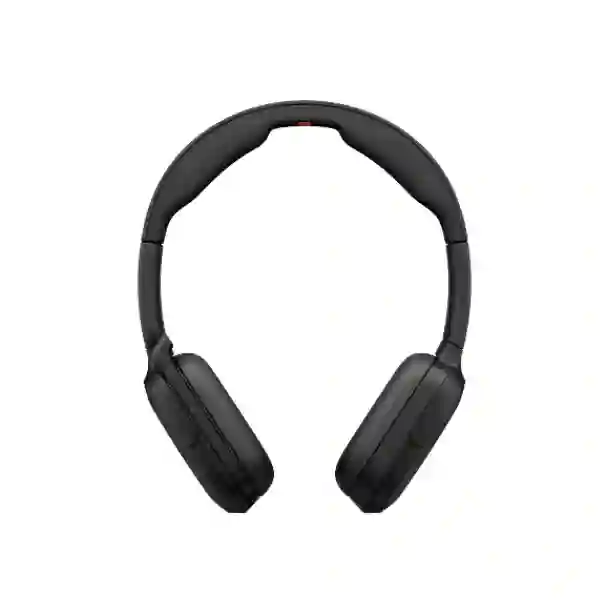
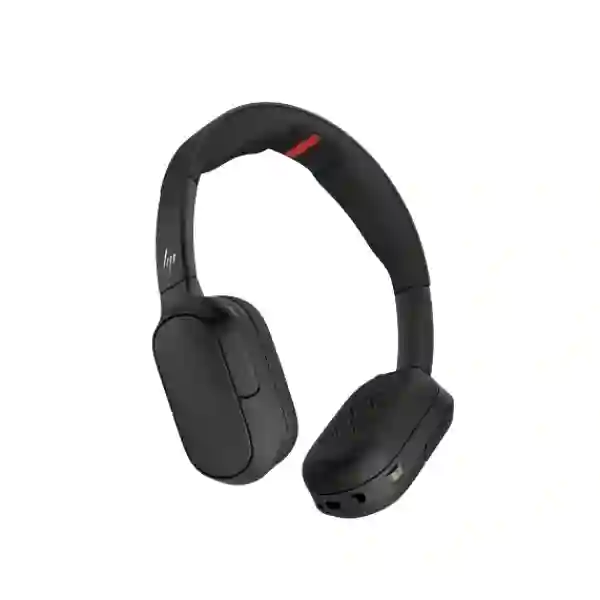
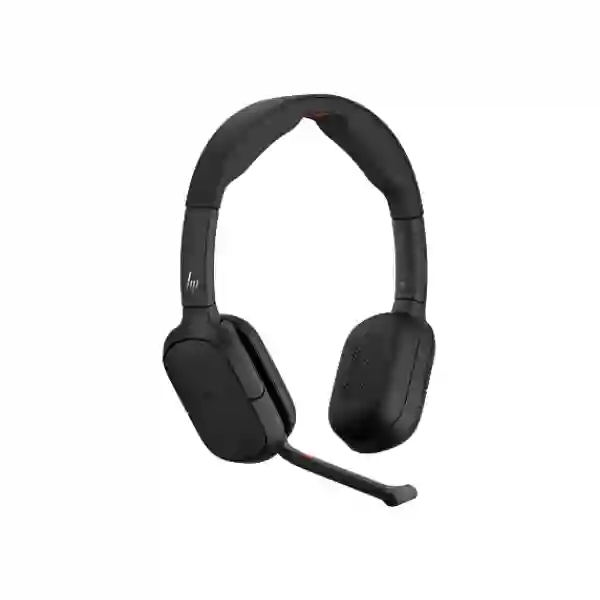
HP Poly Focus 625 Fold Stereo Bluetooth Headset
A foldable, on-ear stereo headset for clear business conversations, focused listening and flexible laptop-to-phone working. Hybrid ANC, voice-focused microphones and multipoint Bluetooth help professionals move through the day with fewer avoidable audio interruptions.
Designed for hybrid work and travel. Ask FourTeck Tanzania for a quotation covering the exact model, intended quantity and applicable commercial conditions.
Key features at a glance
Talk and listening figures are manufacturer-rated maximums under specific settings. Actual results vary. The wireless charging stand is not listed as an included accessory for this base package.
Verified technical specifications
| Product | HP Poly Focus 625 Fold Stereo Bluetooth Headset |
|---|---|
| Manufacturer product number | C56XSAA (not a verified FourTeck listing SKU) |
| Form factor | Foldable, on-ear stereo; black |
| Weight | Approximately 208 g |
| Sound and microphone | 32 mm speakers; six MEMS microphones in full architecture |
| Noise handling | Hybrid ANC, Transparency mode, Acoustic Fence 2.0 |
| Bluetooth | Qualified against Bluetooth Core 6.0; multipoint |
| Device pairing | Up to 10 remembered; 2 simultaneous connections |
| Rated range | Up to 50 m under suitable conditions |
| Talk time | Up to 25 h with ANC and online indicator on; up to 30 h with both off |
| Listening time | Up to 42 h with ANC on; up to 52 h with ANC off (indicator off) |
| Charging | USB-C wired approximately 1 h; compatible wireless charging approximately 3 h |
| Computer adapter | BT700 USB-C, with USB-C to USB-A adapter |
| Compatible OS | Windows 11/10, macOS, Chrome OS, iPadOS, Android, iOS |
Manufacturer specifications provide a planning baseline. They do not by themselves verify local stock, service eligibility, pricing or application behavior in a specific installation.
Who this headset is for
The HP Poly Focus 625 Fold Stereo Bluetooth Headset suits people whose working day mixes scheduled online meetings, spontaneous conversations, concentration time and travel between workspaces. An operations manager may need to answer a mobile call after leaving a laptop meeting. A consultant may use the same headset at a client site, in a home office and during a journey. A customer-facing team leader may want fewer distracting sounds while reviewing work, without committing to a bulky over-ear device. The product is designed around these transitions, rather than around stationary telephone use alone.
The important buying decision is whether mobility, flexible Bluetooth connectivity and professional meeting features matter more than a fixed desk charging arrangement. This is a stereo on-ear headset with a foldable frame and hideaway boom, not an ordinary music-only pair of headphones. Before purchasing for an organization in Tanzania, compare the expected calling pattern, platform, physical workspace, device ports and daily charging routine. A product that is technically compatible may still be unsuitable if staff require a permanently wired connection, specialized telephone integration or another wearing style.
At-a-glance features and practical benefits
The essential combination is a foldable on-ear stereo design, hybrid active noise cancellation, voice-focused microphone processing, a BT700 USB-C Bluetooth adapter, multipoint connection capability and a substantial quoted battery life. These features address different problems. Foldability makes packing easier; ANC reduces what the wearer hears from the environment; microphone noise reduction addresses the sound transmitted to the other participant. Buyers should not treat these distinct functions as interchangeable, because they improve different parts of a call.
HP specifies a 32 mm speaker, six digital MEMS microphones in the overall system, SoundGuard Digital acoustic protection, a 135-degree rotating microphone boom and compatibility with several major desktop and mobile operating systems. Its product information also identifies collaboration certifications, a dedicated Microsoft Teams control and HP Poly Studio App management. Those details can be useful for evaluating a team-wide purchase. The simplest next step is to confirm whether the required computers, meeting platforms, Bluetooth policy and headset management process align with the exact model being quoted.
How hybrid active noise cancellation helps
Hybrid active noise cancellation, commonly shortened to ANC, works on the listening side of the headset. It uses microphones and processing to reduce a portion of incoming environmental noise before it reaches the wearer’s ears. That can be useful around steady ventilation sounds, office background hum or other distractions that interfere with concentration. HP describes hybrid ANC on this Focus 625 Fold model and offers a Transparency mode when the wearer needs greater awareness of surrounding sounds. These modes serve opposite needs and should be selected deliberately.
ANC is not a guarantee of silence. Its practical effect varies with the frequency and character of nearby sound, the fit of the ear cushions, headset settings and surrounding conditions. Sudden voices or irregular noise may remain audible. A user walking around the office, hearing announcements or collaborating with colleagues may prefer Transparency mode rather than the strongest isolation available. For purchasing teams, a realistic staff trial should assess whether the sound reduction helps the intended work environment without preventing people from noticing relevant workplace activity.
What colleagues hear on a call
Microphone noise control is different from headphone ANC. HP identifies Acoustic Fence 2.0 with enhanced noise reduction and describes four noise-cancelling microphones supporting clearer voice pickup. The published specification lists six digital MEMS microphones across the complete headset architecture, including transmit and ANC roles. This design aims to prioritize the user’s speech while managing unwanted background sound. The hideaway boom places a microphone closer to the mouth than a typical headset without a boom, and the boom can be positioned for conversation.
Clear results depend on fitting the headset correctly, keeping the boom in a suitable position and using sensible microphone settings in the conferencing application. No microphone system can promise that every noise will disappear, particularly when a nearby person speaks loudly or the room is extremely busy. A useful pilot is to record several test calls in the real work area, play them back to a colleague and compare the intelligibility of speech rather than simply checking whether the headset connects. For teams with high call volumes, microphone performance deserves its own evaluation.
Foldable construction for work on the move
The distinguishing feature of the Fold model is its packing-oriented construction. HP describes a slim shape, folding design and hideaway boom microphone. Users who move between workstations can store the headset more conveniently instead of carrying a permanently extended frame. The included travel pouch offers a defined place to keep the headset and its small accessories together. The on-ear cups are covered with artificial leather over foam, while the ergonomic headband has been designed to spread contact pressure during use.
Portability should be considered alongside care. Folding hardware is convenient, but users should follow the natural hinge movement rather than forcing the earcups into an unfamiliar position. Protect the headset from crushing loads inside a packed bag and avoid leaving loose adapters where they could be misplaced. People who travel frequently should also check whether the foldable form factor and supplied pouch meet their protection expectations, instead of assuming that every package includes a rigid case. What matters is the exact supplied accessory set and how the headset will be carried.
Fit, wearing style and long-meeting comfort
The Focus 625 Fold is an on-ear stereo product rather than an earbud or a fully enclosing over-ear headphone. On-ear cushions rest against the ears, making fit and personal comfort important for staff who attend long video meetings. HP lists a weight of approximately 208 grams and soft cushions with an ergonomic headband design. The foldable shape and hideaway boom help keep the visual profile restrained when the headset is not in an active call. Replaceable or swappable cushions are also referenced in HP’s product documentation.
Comfort remains individual. Glasses, hairstyle, head size, working temperature and the number of consecutive calls can all influence the experience. A headset that feels light for a brief demonstration may fit differently after a day of intermittent use. For an organizational purchase, invite a representative group of staff to test the headset with their normal workday rather than relying only on weight or promotional descriptions. Choose the wearing style that supports clear speech and attention without creating fatigue, and plan how cushions can be inspected or replaced when required.
Stereo audio for meetings and media
Two speakers provide stereo listening for calls, training clips and ordinary media playback. HP specifies 32 mm speaker drivers and a published speaker bandwidth of 20 Hz to 20 kHz. The product is therefore intended to cover a broad range of everyday listening material, from speech to presentations and music during personal focus time. Stereo reproduction can make virtual training and recorded content more engaging than a single-ear headset, while still keeping the calling-focused controls and microphone available when needed.
Speaker size and frequency figures are technical descriptors, not direct promises about subjective audio quality. Actual sound depends on fit, content, playback device, Bluetooth profile, software processing and selected audio settings. The best work headset is not always the one with the most prominent bass response; for many buyers, understandable dialogue at sensible volume matters more. Test familiar video meetings and recordings before standardizing a fleet. Users should set volume responsibly and take advantage of the supplied acoustic protection technology, rather than compensating for a noisy room by continually raising playback level.
Laptop Bluetooth and the supplied USB adapter
The package includes an HP Poly BT700 Bluetooth USB-C adapter plus a USB-C to USB-A adapter. This is valuable in mixed computer environments because not every laptop has the same port selection. An employee can use the included adapter with a suitable USB-C port or the supplied converter when a USB-A connection is needed. The headset also supports Bluetooth connectivity for compatible personal devices. These routes offer flexibility, but an organization should choose one consistent deployment method where practical.
When evaluating a Windows, macOS or Chrome OS workstation, verify corporate USB restrictions, permitted radio devices, operating-system updates and the conferencing client’s preferred audio route. A Bluetooth logo on a laptop does not automatically guarantee the same connection behavior as the supplied adapter in every managed environment. IT teams should test microphone selection, speaker selection, call control and reconnection after sleep. Document the approved setup so employees do not switch between several similar audio devices in the operating system and accidentally send meeting audio to the wrong output.
Multipoint pairing: one laptop and one phone
HP states that this headset can remember up to ten paired devices and maintain connections to two devices simultaneously through multipoint technology. A common practical use is a work laptop plus a mobile phone. This arrangement can reduce the effort of repeatedly removing a pairing and adding another device as a workday changes. It is particularly relevant to people who use a mobile network for urgent calls while participating in scheduled desktop meetings through an application.
Ten stored pairings does not mean ten active connections. The simultaneous connection limit is two, and one of those connections may be the BT700 adapter. Audio focus, interruption behavior and the handling of overlapping calls can vary by application and device. Before deploying at scale, verify exactly what happens when a cellular call arrives during a conference, whether meetings resume correctly and how the mute state is shown. A good user guide should tell employees which paired devices are the preferred pair and how to avoid accidental handoff.
Advertised wireless range and realistic movement
HP quotes a wireless range of up to 50 metres, equivalent to approximately 164 feet, under suitable conditions. For some office layouts, that may allow the user to move away from a laptop while continuing a conversation. A professional handling both documents and meetings may value being able to stand or retrieve a nearby item without immediately disconnecting. However, the quoted figure is an upper bound from specification conditions rather than a prediction for every actual building.
Walls, furniture, structural materials, radio congestion, the position of the USB adapter and connected-device capabilities can shorten usable range. Even within one office, two meeting rooms may behave differently. An organization should test the locations where calls actually occur, including hallways or shared areas, and avoid making movement promises solely from the maximum range. Walking away from the computer while screen-sharing or handling sensitive discussion can also raise practical privacy issues. Wireless freedom should be paired with reasonable behavior and secure meeting habits.
Understand the battery-life figures
HP publishes distinct battery claims for different workloads and settings. The specification gives up to 25 hours of talk time when ANC and the online indicator are both enabled, and up to 30 hours of talk time with those functions disabled. For listening, HP states up to 42 hours with ANC on and the online indicator off, or up to 52 hours when both are off. These numbers describe different operating conditions; it would be misleading to present the longest listening figure as the expected talk-time figure.
Real runtime depends on volume, activity, connectivity, temperature, battery age and whether the headset spends the day on calls or playing audio. A call-heavy worker who relies on ANC should plan around the relevant talk-time specification, not the more generous music figure. Managers evaluating a rollout can compare these stated figures with the team’s usual number of meetings between charging opportunities. Keeping a modest charging margin is sensible, especially when staff move between sites and may not have predictable access to a charger.
Charging methods and quick top-ups
The headset comes with a USB-C charging cable. HP quotes approximately one hour for a wired charge, while charging wirelessly on a compatible stand is quoted at approximately three hours. Wireless charging is supported by the product family, but a wireless charging stand is not listed among the standard contents of this specific Fold headset package. The two routes should therefore be considered separately when planning a purchase and the desk accessories that accompany it.
HP also specifies that around ten minutes of wired charging can provide up to four hours of talk time with ANC and the online indicator off, or up to six hours of listening under the stated settings. These are manufacturer maximums, not guarantees for every battery state. For a user who forgets to charge overnight, a short cable top-up before a meeting may be useful. For an office fleet, shared charging locations and clear personal responsibility can help employees start work ready for calls without assuming that an optional stand arrives in every box.
Wired audio options and important limits
This Fold package includes a USB-C to 3.5 mm audio cable, which HP highlights for corded listening use cases such as suitable in-flight entertainment systems. HP’s broader specifications also identify audio-over-USB capability. These options give the headset more flexibility than a device designed around Bluetooth alone. They may be useful for a traveller dealing with an audio socket or a person who wants a suitable wired listening path in addition to wireless meetings.
Do not assume every supplied cable supports all the same microphone controls, call-management features or application certifications as the Bluetooth adapter. The behavior of a 3.5 mm connection depends on the host socket, cable path and supported signal arrangement. Before buying for a specialized recorder, aircraft outlet, classroom device or kiosk, test the exact required function. If the use case demands a continuously wired microphone and specific call-control integration, ask for a verified demonstration rather than inferring full support from the presence of an audio cable.
Microsoft Teams and collaboration certification
HP’s product documentation lists certification for Microsoft Teams, including Teams Open Office and Native Bluetooth, along with Google Meet and Zoom Workplace headset certifications. A dedicated Microsoft Teams control also appears among the device’s buttons. These details make the model relevant to organizations that place substantial importance on predictable collaboration experience rather than treating a headset as an unmanaged consumer accessory. The exact certification set is a property of the listed headset model, not a guarantee that every organizational feature is enabled automatically.
An effective rollout should include checking the required application version, supported host operating system, meeting permissions and the headset firmware. Organizations that use several platforms can test their common tasks on each one: joining a meeting, answering a call, muting, unmuting and ending an interaction. Some control behavior is application-dependent, and an employee can still choose the wrong audio device. Certification helps narrow the selection, but IT validation of the actual corporate setup remains the appropriate final step.
Controls that reduce interruptions
The published controls include power and pairing, call answer and end, mute, volume adjustment, ANC or Transparency mode, playback functions, voice-assistant access and a Microsoft Teams button. HP also lists call hold and resume support. A rotating boom and rotate-to-mute feature can create a physical cue for the user’s microphone state. Spoken voice alerts cover common conditions such as mute, battery level and connection status. The headset also has on-call and do-not-disturb indicator functions.
These functions are most effective when users know what they mean in their normal applications. An onboarding guide can explain the difference between a headset mute action and the mute icon in the conferencing software, including how to verify which one currently controls the microphone. Employees should learn to check the on-call indicator before assuming a private conversation has ended. Teams that often alternate between calls and listening can reduce confusion by using a simple, consistent routine for boom position, mute confirmation and reconnecting after a break.
The HP Poly Studio App and headset management
HP identifies the HP Poly Studio App as the management software for the Focus 625 Fold. Management software can be useful when an organization wants a more deliberate approach to device settings, firmware maintenance and employee support. The actual available controls depend on the app version and host environment, so administrators should consult the applicable HP instructions before designing a deployment process. For an individual, a clear path to the supported app is preferable to installing random software from an unverified source.
For a small fleet, identify who is responsible for checking device state, maintaining firmware and documenting unusual behavior. For a larger organization, define an approved headset model and a consistent connection method, then create instructions for common incidents such as missing microphone audio or unexpected Bluetooth switching. Support time often falls when a team knows which accessory was supplied and which adapter belongs to which headset. Software management is only part of that discipline; clear inventory and user instructions matter as well.
Compatibility across operating systems
HP lists Windows 11, Windows 10, macOS, Chrome OS, iPadOS, Android and iOS in the compatible operating-system set. This broad list is useful for a business that has laptops from several vendors and mobile devices from more than one ecosystem. The headset’s Bluetooth functionality supports a portable working pattern, while the USB adapter provides a defined route for compatible computer ports. Buyers should still assess the operating system alongside the specific conferencing app that users will open each day.
Compatibility is not identical to feature parity. A basic audio connection may work while a dedicated call-control key or an administration feature behaves differently on another platform. Managed laptops can also block hardware or software that would be permitted on personal machines. IT purchasing teams should test a representative Windows computer, any important Mac configuration and the mobile devices expected in daily use. Capture the results as a simple matrix of audio, microphone, mute, call control and reconnection behavior instead of relying only on the broad compatibility list.
Practical setup for a new user
Start with the supplied components: headset, BT700 USB-C adapter, USB-C to USB-A adapter, USB-C charging cable and travel accessories. Charge the headset using the appropriate cable and follow HP’s current pairing procedure for the exact device. If using a laptop, decide whether the approved path is the BT700 adapter or the host’s direct Bluetooth connection. Then select the headset for both input and output in the operating system and conferencing application. A short test call should confirm that speech is audible in both directions.
After the first call, check that the user can mute intentionally and can distinguish ANC from microphone noise reduction. If two devices are to remain connected, pair the second device and test transitions rather than assuming multipoint works identically across all combinations. Store spare adapters and cables where they will not be lost. Users who work in several locations can benefit from a one-page checklist covering charge level, connected devices, selected microphone and boom position before each important customer meeting.
A sensible pilot before equipping an entire team
A pilot is especially valuable when employees work in different environments. Select participants who represent quieter home offices, ordinary shared workspaces, busy call areas and frequent travel. Give them the same test tasks: a video meeting, an incoming mobile call, a noisy-background voice sample, an extended listening session and a return to work after the computer sleeps. Ask them to assess clarity, fit, controls, stability and charging rather than simply whether they like the appearance.
Record issues in plain language so the buyer can distinguish a fixable setup problem from a genuine mismatch. For example, a wrong microphone choice inside an app is different from a poor physical fit, and a blocked USB port is different from Bluetooth congestion. Pilot findings should determine training requirements, the preferred connection method and the accessory bundle. This helps a Tanzania procurement team choose on evidence rather than assuming that a published maximum range or battery number fully describes everyday user experience.
Common business scenario: hybrid office staff
Hybrid employees frequently move between a desk at work and another place where they need to participate in meetings. A foldable headset reduces the burden of packing, and the included USB adapter can support a defined desktop connection method. The same headset can connect over Bluetooth to a phone, helping the worker avoid a completely separate audio accessory for every meeting type. Stereo playback also supports training videos and recorded updates between live calls.
The deployment questions are simple but important: where will employees charge, what software will they use, how will the company manage headset firmware and how will people handle a misplaced adapter? A buyer should check whether every laptop has an appropriate port and whether the organization’s security policy permits the accessory. The goal is to provide a consistent experience when an employee changes location, not to promise flawless connectivity in every network or building. Practical setup documentation is as useful as the hardware itself.
Common business scenario: professional services and consulting
Consultants, auditors, project managers and other professionals may attend confidential calls while travelling between meetings. Their requirements often include compact storage, good speech pickup, reliable call controls and the ability to move from laptop audio to a mobile telephone. The Fold model’s compact design and Bluetooth multipoint capability address these working patterns, while its on-ear fit is an option to evaluate against earbuds and larger headsets. The included pouch makes keeping the accessory set together easier.
Privacy responsibilities remain with the user and organization. ANC does not make an audible conversation private, and microphone processing does not stop people nearby from physically hearing the speaker’s voice. Use a suitable room for sensitive matters and follow company guidance on public-space calls. Consider whether the headset needs to be carried through frequent security checkpoints or stored alongside other electronics. A pilot should verify how it packs, how quickly it reconnects and whether the traveller can manage charging without extra accessories.
Common business scenario: customer support and team leadership
A supervisor who spends time on support calls, internal meetings and quality review may appreciate stereo listening, effective microphone noise reduction and a visible call status indicator. The headset can also support walking between nearby work areas while remaining on a call, within practical wireless limits. For team leaders rather than fixed telephone operators, the combination of laptop and phone connectivity can be especially useful. However, the correct platform and peripheral integration should be checked before treating it as a drop-in solution.
Where calls are continuous for an entire shift, assess wear comfort, battery reserve, charging breaks and any required integration with a contact-centre application. A published Zoom Workplace Contact Center certification is relevant but does not establish compatibility with every third-party call centre system, desk telephone or proprietary softphone. Ask the software owner to validate that application and its call controls. Team-wide purchases benefit from a clear escalation process for microphone issues, worn ear cushions and lost adapters.
Common business scenario: training and virtual workshops
A facilitator may switch between speaking, listening to participants and playing instructional material during a virtual workshop. Stereo speakers support playback and voice-focused microphones help transmit instructions, while the headset’s mute and volume controls may make routine operation simpler. The headset can work with supported computer and mobile operating systems, allowing the presenter to use a familiar audio device across a range of sessions. The ANC and Transparency options can be selected depending on whether room awareness is necessary.
Training environments vary substantially. A quiet webinar may present few acoustic challenges, while a workshop conducted near a busy shared area can expose limitations of any headset. Test the exact meeting platform, including whether its noise-suppression options interact well with the headset’s own processing. Verify that video playback and microphone input remain stable during screen sharing. For instructor-led work, a backup connection plan and an opportunity to charge between sessions are practical safeguards that matter more than an impressive specification alone.
Important purchasing differences within the Focus family
The exact phrase Fold matters in the product name. HP offers different Focus 625 configurations, including a non-folding headset and packages that may include a wireless charging stand. The Fold product discussed here carries HP product number C56XSAA and is designed to pack more compactly. This identification is a manufacturer product number for model selection, not a verified FourTeck Tanzania listing SKU. A quote should clearly identify the desired variant so the procurement team does not confuse a charging-stand bundle with a portable Fold package.
Do not assume that all Focus 6 accessories or model bundles are identical. Confirm whether a quote includes a stand, replacement cushions, an audio cable or merely the base headset and standard package contents. The manufacturer identifies separate compatible charging accessories, but their inclusion in a particular commercial offer must be confirmed explicitly. Buyers should also distinguish the stereo Focus 625 Fold from other HP Poly product lines that may have different wearing styles or deployment priorities. Correct variant identification prevents avoidable ordering and support confusion.
What comes in the standard package
HP’s published list for the Fold model includes the wireless headset, travel pouch, BT700 Bluetooth USB-C adapter, USB-C charging cable, USB-C to USB-A adapter, USB-C to 3.5 mm audio cable, quick start guide and warranty card. This is a useful baseline for purchase-order checks and receiving inspections. The set covers common laptop port arrangements and provides a separate audio cable for compatible wired listening situations. Packaging images may not show every component, so the written manufacturer list should remain the reference.
On receipt, an organization can verify that all expected items are present, record the manufacturer’s product identification and retain the quick start and warranty documents according to its asset policy. Users should be told which adapter and cable belong to the headset, especially in shared offices where accessories often move between desks. A wireless charging stand is not on this base box list. If desk charging is essential, ask for a separately specified accessory and confirm that it is appropriate for the exact headset and intended charging location.
Specifications worth recording in an IT asset register
Useful attributes include the HP product number C56XSAA, black colour, on-ear stereo form factor, approximate 208 gram weight, 32 mm speakers, USB-C Bluetooth adapter and supported operating systems. HP lists a Bluetooth implementation qualified against Bluetooth Core 6.0, with connection profiles including HFP, HSP, A2DP, AVRCP and AVDTP. These identifiers help an IT team describe the exact device in a support ticket or procurement register. They should not be conflated with a locally assigned retailer SKU or an organization’s asset tag.
Additional published details include a 70 mm microphone boom with 135-degree rotation, six digital MEMS microphones, multipoint technology, up to ten remembered pairings and the four stated talk and listening endurance conditions. The headset supports SoundGuard Digital and user-replaceable or swappable elements referenced by HP. Not every organization needs to publish all of these numbers to end users. A concise internal record can keep enough technical detail for troubleshooting while a customer-facing instruction page focuses on normal operation and what to do when a connection fails.
Acoustic protection and sensible listening
HP lists SoundGuard Digital among the headset’s acoustic protection technologies. This feature should be seen as part of a broader approach to responsible listening rather than a reason to ignore volume habits. Workers may increase volume to mask environmental sounds, especially when moving from a quiet desk to a noisy shared area. ANC may help reduce that temptation for some kinds of noise, but users should still select a comfortable listening level and adjust their surroundings where possible.
Employers with established hearing-safety guidance should incorporate the headset into that existing policy. The published device features do not replace workplace risk assessment or medical advice, and they are not a universal guarantee against all unexpected loud sounds. Use actual work scenarios when deciding whether a stereo, on-ear headset is suitable. Where users need to hear alarms, announcements or nearby colleagues, Transparency mode and appropriate operating practices should be considered. Protecting attention should not come at the expense of workplace awareness.
Care, hygiene and replaceable components
Headsets used throughout the workweek benefit from straightforward care. Keep ear cushions clean according to HP’s product guidance, avoid excessive moisture and protect the charging port and adapter from contamination. The artificial-leather surface and foam padding are contact materials that should be inspected for wear, especially when the headset is worn during long sessions. HP also identifies swappable ear cushions and a replaceable battery in its official product documentation, which may help with responsible lifecycle planning.
An organization should verify the local availability and approved service method for replacement components before assuming that a particular spare can be purchased immediately. Shared headset use also calls for a hygiene plan rather than casually passing the same cushions between many staff members. When an audio issue appears, inspect the boom position, charge level, mute state and selected application device before concluding that hardware must be replaced. Good care practices can reduce avoidable interruptions and create a clearer record when service support is actually needed.
Planning a Tanzania procurement request
When requesting this headset for a business in Tanzania, provide the exact model name, manufacturer product number C56XSAA, desired quantity, intended user roles, computer types and principal collaboration applications. State whether users require the Fold variant or a separate wireless charging accessory. If the purchase is for multiple departments, it can help to group requirements by task, such as occasional meetings, frequent calls or travel-heavy work. This allows the supplier to respond to a defined equipment need rather than a vague request for Bluetooth headphones.
The local commercial details must be confirmed in the quotation. The available evidence does not establish a FourTeck Tanzania selling price, stock status, shipping timeframe, locally applicable warranty handling or delivery coverage. Those items should not be inferred from foreign retail sites or converted prices. Ask for an itemized offer identifying the model, included accessories and any applicable service arrangements. Where connectivity or software integration is critical, request confirmation of the deployment assumptions so both buyer and supplier evaluate the same scenario.
Questions to ask before approving a business order
Confirm the required daily talk time, the value of foldability, whether active noise cancellation matters in the intended space and whether users are expected to pair both a phone and a laptop. Ask the IT owner if the USB Bluetooth adapter is allowed by organizational policy. Identify which communications applications are business critical and whether controls such as mute and answer must operate in a particular way. Determine how headsets will be charged and whether the standard package is sufficient or a separate accessory is necessary.
Next, confirm the quoted manufacturer model and commercial terms. Request the included accessory list in writing, ask about the applicable support route and clarify how a faulty or missing adapter would be handled. Where many headsets are required, evaluate a sample rather than assuming all users will have the same fit preference. Record the agreed technical requirements before sign-off. This is particularly valuable in cross-functional purchases because procurement, IT and end users often mean different things by phrases such as wireless, compatible, noise cancelling and ready for Teams.
How the Focus 625 Fold compares with a basic headset
A basic Bluetooth headset may be adequate for occasional casual calls, but a business buying for repeated meetings often needs a more complete capability set. The Focus 625 Fold combines two-ear listening, a boom microphone, hybrid ANC for the wearer, voice-focused noise reduction, multipoint connectivity and collaboration-oriented controls. The foldable structure is an additional differentiator for users who transport their equipment frequently. These features can justify a closer evaluation when staff depend on call clarity and device switching during the workday.
However, feature richness is not always the deciding factor. A permanently desk-bound employee who rarely takes a call may prefer a simpler device, while someone who needs wired integration to a particular desk telephone should investigate a model designed for that setup. An in-ear option may be better for users who strongly dislike on-ear pressure. Compare the device against real work constraints rather than treating a longer feature list as proof that it is the best choice for every person or every department.
What to verify about warranty and support
HP publishes a standard two-year limited manufacturer’s warranty in its product information for this model. The practical terms, exclusions, proof-of-purchase requirements and service route are governed by the applicable warranty documentation and regional arrangements. The existence of a published manufacturer warranty should not be interpreted as confirmation of a specific Tanzania service promise from any retailer. Buyers should ask for the local commercial terms of the quoted item before committing to a purchase.
For a business order, keep the purchase records, product identification and receiving notes in an accessible place. Identify how technical support requests will be initiated and whether replacement accessories are covered or purchased separately. If a team relies on headsets for daily customer contact, decide how staff can continue working during a device fault. This is a procurement and continuity question rather than a claim about this particular product’s failure rate. Clear expectations at purchase time make support easier if a problem occurs later.
A straightforward decision checklist
Choose the Fold version when compact storage, a professional boom-mic calling design, stereo listening and flexible computer-plus-phone use correspond to a real employee need. Confirm that an on-ear fit is comfortable, that the primary meeting software behaves correctly and that the included adapters suit the organization’s managed devices. Use the correct battery figure for the expected workload and check whether charging through the supplied USB-C cable will fit employees’ routines. Do not purchase on maximum range alone without testing the intended site.
If the team values desktop charging, specify any optional stand separately. If a particular cable path or telephone system is essential, request a verified compatibility check. For high-volume purchases, a brief pilot and a consistent onboarding guide can be more valuable than a purely specification-led decision. Once the right variant and quantities have been confirmed, request a Tanzania quotation covering the exact model, included items and applicable commercial conditions. The goal is a predictable daily communications tool, chosen with clear eyes about both its strengths and its limits.
Frequently asked questions
Is this a foldable headset or the standard Focus 625?
It is the Fold variant, identified by HP product number C56XSAA. The foldable construction is an important distinguishing feature for portability. When requesting a quotation, include the full name and manufacturer product number rather than relying only on the shorter phrase Focus 625. Other variants may be packaged differently, particularly where wireless charging stands are concerned. The product number is not being presented as a verified local retailer SKU.
Does the headset have active noise cancellation?
Yes. HP lists hybrid active noise cancellation for the listener, as well as a Transparency mode for greater awareness of surrounding sounds. The device also has separate microphone noise-reduction technology that aims to improve transmitted speech. Neither feature can eliminate every environmental sound, and performance can vary by fit and background conditions. Buyers should test the two functions independently in the workspace where the device will be used.
Can I connect a laptop and phone at the same time?
Yes. HP’s multipoint specification allows two simultaneous active device connections, while up to ten devices can be remembered as pairings. A practical arrangement is one work computer and one phone. Remember that the BT700 adapter counts as a connected Bluetooth device where used. Incoming-call priority and switching behavior should be checked on the specific computer, phone and communication applications because workflows can differ.
How long can I talk with ANC enabled?
HP publishes up to 25 hours of talk time with both active noise cancellation and the online indicator enabled. The up-to-30-hour figure refers to talk time with those functions disabled. Longer figures of up to 42 or 52 hours relate to listening under their stated conditions, not continuous voice calls. Individual results depend on volume, connection conditions, battery age and usage. Staff with heavy call schedules should allow some charging margin.
Does the box contain a Bluetooth USB adapter?
Yes. The HP published package list includes a BT700 USB-C Bluetooth adapter and a USB-C to USB-A adapter, along with a USB-C charging cable. These items are helpful when a business has laptops with different port designs. The headset can also pair with compatible devices through Bluetooth. An IT administrator should confirm that the chosen connection method is permitted on managed machines and works with the organization’s preferred collaboration software.
Does this Fold package include a wireless charging stand?
No wireless charging stand appears on HP’s standard package-content list for product number C56XSAA. HP does identify compatible wireless charging accessories separately. If a stand is important for a desk installation, request it explicitly in the quotation and verify the exact accessory and compatibility. Wireless charging capability should not be confused with an assurance that a stand is included in the standard box.
Can I use the headset for wired listening?
The Fold model’s standard contents include a USB-C to 3.5 mm audio cable, and HP also references audio-over-USB functionality. This makes some wired listening scenarios possible with suitable host equipment. It is still important to test the particular connection you plan to use. Do not assume that a wired path will carry microphone audio, provide full meeting controls or behave exactly like the BT700 Bluetooth adapter in every application.
Is the headset compatible with Windows and macOS?
HP lists Windows 11, Windows 10 and macOS among compatible operating systems, along with Chrome OS, iPadOS, Android and iOS. That is a useful starting point for mixed-device organizations. Operating-system support does not guarantee identical behavior for every application control or IT-managed setting. Before standardizing the model, test speaker selection, microphone input, mute operation, call functions and reconnection on representative devices.
Is it certified for major meeting platforms?
HP’s datasheet identifies Microsoft Teams, Teams Open Office and Native Bluetooth certifications, as well as Google Meet and Zoom Workplace certifications. These are meaningful product attributes for a collaboration-oriented purchase. The functionality available to each employee can still depend on the host computer, application version, pairing approach and firmware. An organization should confirm the exact workflows that it depends on, especially if contact-centre or third-party calling software is involved.
What is the headset’s wireless range?
HP specifies up to 50 metres or approximately 164 feet in suitable conditions. The achievable range in an office may be lower because of walls, metal structures, competing radio traffic and the placement of the host device or adapter. This figure should be treated as a specification limit rather than a promised operating radius. Testing the actual rooms and movement patterns is the sensible way to establish whether the available range is sufficient.
How much does the headset weigh?
HP lists a weight of about 208 grams for this model. It is an on-ear stereo design with soft foam cushions and an ergonomic headband. Weight is useful when comparing equipment, but it does not fully predict personal comfort. Staff members who wear glasses or spend long periods on calls may notice differences in fit. For a large business purchase, a representative comfort trial should be part of the decision.
Can the microphone boom be muted by movement?
HP lists a rotating boom with a rotate-to-mute function, and its published controls also include a dedicated mute action and voice alerts. This can provide a convenient physical cue during conversations. However, users should still check the mute status in their calling application before assuming the microphone is inactive. Application state, platform settings and the chosen connection method can influence the overall user experience.
Is there software for device management?
HP lists the HP Poly Studio App as management software for the product. The specific functions available to an organization or individual depend on the supported application version and host environment. IT teams should use current HP guidance for installation and configuration. A managed rollout benefits from keeping firmware procedures, audio settings and support instructions consistent, rather than letting users experiment with unrelated software downloads.
Is a Tanzania price or stock figure confirmed here?
No. This product information describes the manufacturer-verified model and its capabilities but does not establish a current selling price, local stock status or delivery arrangement for FourTeck Tanzania. A buyer should request a current quotation specifying the exact variant and quantity. Local tax, shipping, warranty handling and related conditions need to be confirmed through the relevant commercial offer instead of being inferred from prices shown by overseas sellers.
What details should I provide when requesting a quote?
Give the full product name, HP product number C56XSAA, required quantity and the type of computers and calling applications in use. Explain whether employees need simultaneous laptop and phone connectivity and whether a wireless charging stand should be included as an additional item. If the order is for several departments, mention the expected working environments. Ask for an itemized response covering accessories and the applicable Tanzania commercial terms.
What should I check before a bulk rollout?
Run a small pilot that includes real meeting calls, background noise, mobile-call switching, extended comfort and everyday charging. Verify compatibility on the same operating systems and software versions used by employees. Check whether the BT700 USB adapter is acceptable under the company’s device policy. Include basic onboarding instructions for pairing, mute verification, boom position and battery management, then compare pilot results with the original purchasing requirements.
Request a Tanzania business quotation
Ready to evaluate the HP Poly Focus 625 Fold Stereo Bluetooth Headset? Share the manufacturer model number C56XSAA, required quantity, laptop types, collaboration platforms and any requested accessories when contacting FourTeck Tanzania. Ask the team to confirm the exact item, available commercial terms and any locally applicable support arrangements before purchase.
No Tanzania price, stock, delivery promise or reseller-specific warranty claim is stated here because those details have not been verified for this offer.




Reviews
There are no reviews yet.