
Professional wired USB audio · Tanzania purchasing guide
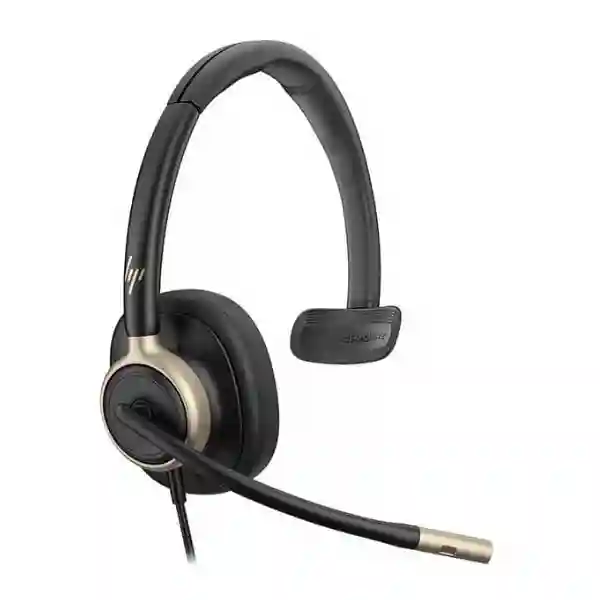
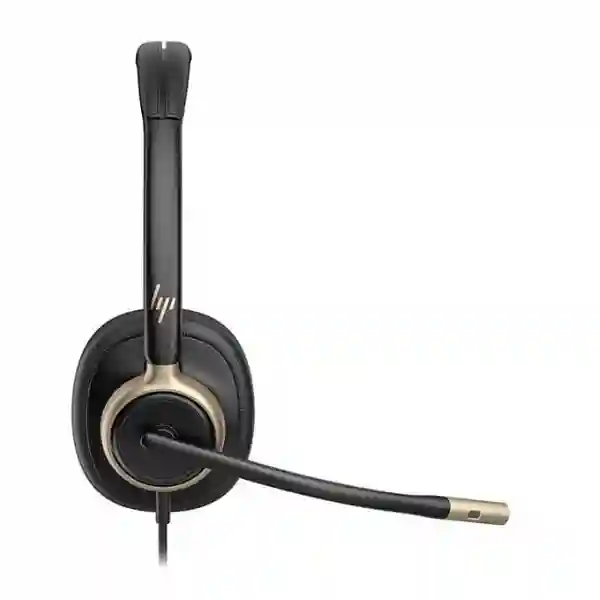
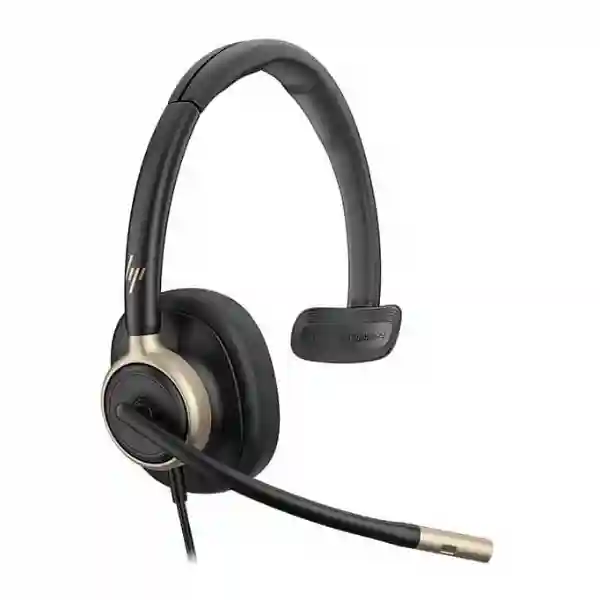
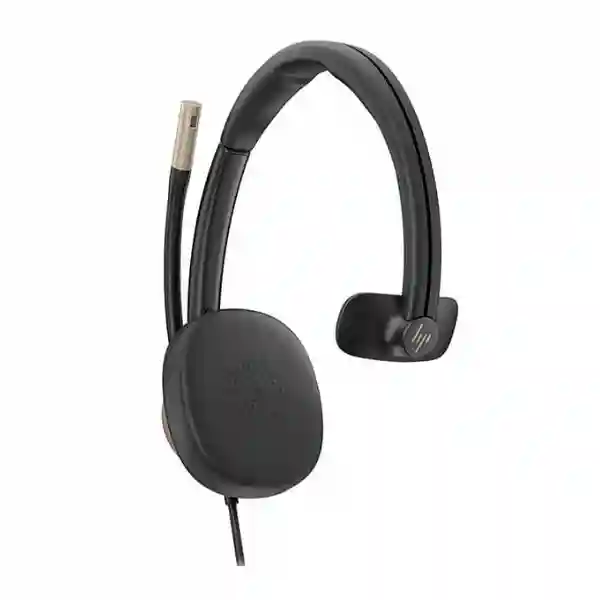
HP Poly Mission 815 Monaural USB Wired Headset
Need a professional headset for clear computer calls while remaining aware of your office? The HP Poly Mission 815 pairs a single-ear design with three-microphone AI noise reduction, feedback ANC and wired USB-C connectivity. It is designed for communication-heavy desk work, including Microsoft Teams meetings and customer conversations.
At a glance: is this the right headset?
What it solves
Helps callers hear your voice more clearly in shared workspaces using AI microphone noise reduction.
What it preserves
Leaves one ear uncovered so you can remain aware of colleagues and nearby activity.
What it connects to
Uses a wired USB-C connection with a supplied adapter for compatible USB-A ports.
What to confirm
Check the exact offered configuration, software behavior and local purchase terms before ordering.
A single-ear headset for communication-intensive work
When work involves frequent calls, selecting a headset is about more than finding a microphone and an earcup. Employees need to hear callers accurately, speak without constantly repeating themselves and stay aware of what is happening around the desk. The HP Poly Mission 815 Monaural USB Wired Headset addresses this combination with a single-ear on-ear design, a wired connection and audio functions intended for busy professional communication. It is especially relevant when calls are a regular part of the working day rather than an occasional activity.
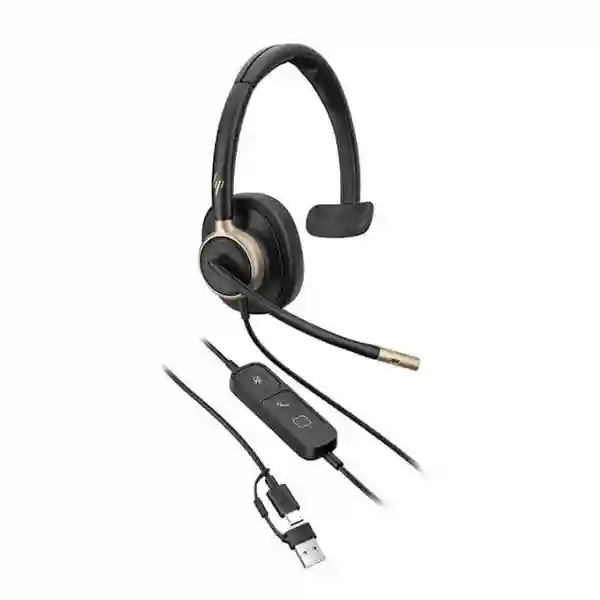
A monaural format leaves one ear uncovered. That can be useful for front-desk staff who greet visitors, team leads who answer quick in-room questions and office workers who coordinate with colleagues between online conversations. It is not the same experience as a closed, two-ear headset: the open ear continues to hear the surrounding environment. Buyers should see that as a deliberate tradeoff, not a shortcoming hidden behind an active-noise-cancellation claim.
Who should consider this model
Consider the Mission 815 for reception desks, service teams, finance and operations staff, account managers, supervisors and other professionals whose calls happen at a computer. A typical suitable user needs their hands free for notes or software, wants dependable USB connectivity and appreciates physical call controls within reach. A shared workspace can also benefit from the busy-light cue and microphone noise management, although these features cannot remove the need for sensible office acoustics.
It may be less suitable for someone who needs full coverage of both ears, routinely works far away from a desk or expects a wireless connection to a phone. The cable and monaural geometry are fundamental parts of this product. Choosing the best headset means matching the user’s actual movement, noise exposure and communication workflow. Ask staff whether they must hear people nearby while wearing the headset before making a department-wide decision.
Three microphones: what they do for the listener
HP specifies three microphones with AI-enhanced transmit noise reduction. The microphone system is designed to prioritize a speaker’s voice and reduce competing sounds sent to the person at the other end of a call. This matters when nearby colleagues speak, office ventilation is audible or several employees use headsets in the same room. The intended benefit is improved intelligibility for other participants, rather than a promise that every unwanted sound will disappear.
The best results still depend on how the microphone boom is positioned, the loudness of the room, application audio settings and the quality of the underlying connection. Users should perform a short test call in their normal environment and ask a colleague whether speech is clear. A headset microphone cannot compensate for a severely overloaded network, an incorrectly chosen input device or persistent acoustic noise that exceeds what processing can reasonably reduce.
Active noise cancellation versus microphone noise reduction
Two separate features are easy to confuse. AI microphone noise reduction works on the audio transmitted to other people. Active noise cancellation, or ANC, is intended to reduce some ambient sound heard by the wearer through the covered ear. HP describes feedback ANC on the Mission 815, with a user control to switch it on and off. Together, these technologies target two different sides of the conversation: what your caller hears and what you hear.
Because this is a one-ear headset, ambient sound will still enter through the uncovered ear. That is often exactly why an office chooses a monaural device. Buyers should not expect the isolation of a pair of over-ear headphones with two sealed earcups. Users may prefer ANC on for a sustained call and off when immediate awareness of colleagues is more important. Experiment in the intended setting and favor comfortable listening levels over maximum volume.
Why a wired USB connection can be desirable
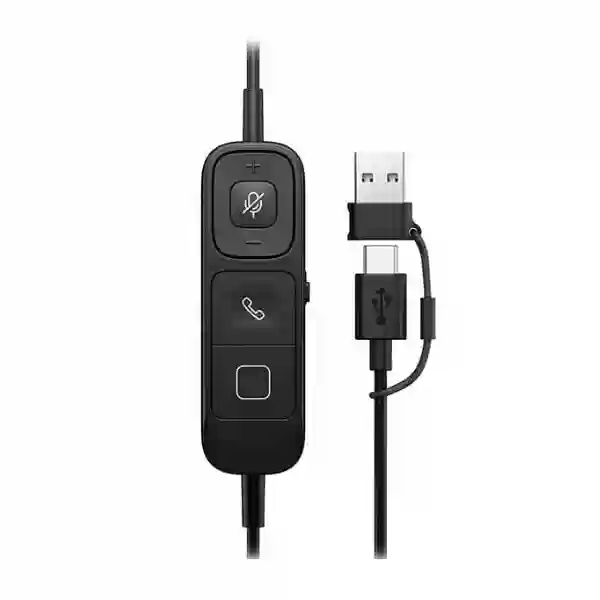
A wired headset creates a straightforward connection between the work computer and the audio accessory. It does not require Bluetooth pairing, routine charging or an independent wireless audio link. For desks where colleagues start calls throughout the day, reducing the number of setup steps can simplify daily routines. The Mission 815 uses USB Type-C and includes an adapter for a USB Type-A port, so purchasing teams can plan around computers with different compatible USB connections.
Wired does not mean universally compatible with every application or phone. The computer must recognize the USB audio device, the operating system must be supported and the meeting or calling software may require the correct input and output selection. Inline call functions can also depend on software integration. Before rollout, test the actual combination of laptop, docking station, operating system, application and any security restrictions used by the organization.
USB-C and USB-A planning for mixed computer fleets
HP lists a USB Type-C headset connection and a USB Type-C-to-Type-A adapter in the box. This is helpful when an office has a mixture of newer devices and older computers with conventional USB-A sockets. It can reduce the need to purchase a separate adapter for each user, provided the supplied adapter is present and the port works correctly. Procurement teams should identify the physical ports available at each workstation rather than assume every modern laptop uses the same arrangement.
There are still practical details to check. A crowded docking station may leave no accessible free port, a desktop beneath a desk may make cable routing inconvenient and some managed computers apply restrictions to peripheral access. Test with the exact docking configuration and ensure that the headset remains selected when the laptop is disconnected and reconnected. The supplied adapter changes the physical plug; it should not be mistaken for a wireless receiver or a call-control guarantee.
Microsoft Teams Open Office certification explained
HP identifies the Mission 815 as Microsoft Teams Open Office certified. This is an important purchasing signal for businesses that conduct a large share of meetings in Teams, because the product is designed for professional speech pickup in open-plan conditions and has a dedicated Teams control. It does not mean that Teams licensing, connectivity or an organization-wide meeting configuration is included with the headset. Those remain separate software and IT matters.
For practical evaluation, check that the company-approved Teams client recognizes the headset, call and mute controls behave as users expect, and staff can access the relevant features through their normal accounts. Other communication platforms may also work, but precise certification and control behavior should be verified for the particular application version. A small pilot is more informative than assuming every collaboration feature functions identically across every service.
Inline controls for daily call handling
The published control set includes mute and unmute, volume adjustments, call answer or ignore or end, Microsoft Teams interaction and ANC on or off. Dedicated buttons can reduce the need to switch repeatedly between an on-screen meeting window and the work being performed. For reception staff or customer-facing colleagues, keeping these essential actions within reach can make calls less disruptive to the rest of the task.
Teams should include control familiarity in basic onboarding. Users should know which control mutes the microphone, how the selected application displays mute state and whether the call button operates correctly in their preferred softphone. A hardware button may not map to every application command. If a feature does not respond as expected, verify the operating system, permissions and any supported software integration before concluding the headset hardware is faulty.
Microphone boom and visible call status
HP describes a microphone boom with 285-degree rotation and a feature that can mute the microphone when the boom is moved upward. This offers an additional physical gesture for handling private interruptions. HP also describes a 360-degree visible busy light on the earcup that illuminates red during calls. In a shared workplace, this cue can help colleagues recognize when a nearby employee is already occupied with a conversation.
The busy light is a courtesy signal, not a substitute for an agreed office etiquette policy. Coworkers may not always see it, and some users may position the earcup differently. Likewise, microphone-mute behavior should be demonstrated during onboarding, especially for people who switch between software mute and boom movement. After adjusting the headset, users should confirm the microphone is actually muted in the active application before discussing anything sensitive.
Hearing a caller clearly
HP specifies a 32 mm speaker driver, super wideband audio and a published speaker frequency range of 20 Hz to 20 kHz in multimedia mode. For the employee using the headset, the practical goal is easier recognition of speech and less need to strain for words on long conversations. A clear incoming voice can be especially valuable when discussing numbers, names, appointments or instructions that must be captured accurately.
The final sound is shaped by more than the driver. Network quality, source microphone performance, the calling codec, the meeting application and listening volume all influence the outcome. A broad speaker-frequency specification does not mean every conversation is transmitted at that range. Use test calls involving both quiet and busy conditions, adjust volume to a comfortable level, and review whether the single-ear format gives enough isolation for the intended work.
SoundGuard Digital and sensible listening
HP lists SoundGuard Digital acoustic protection for this model. The feature is designed to manage potentially uncomfortable audio spikes and aspects of sustained listening exposure. That can be useful for roles involving repeated calls, where sudden changes in audio level may be distracting. It should be understood as one layer of listening protection within a broader approach to safe, comfortable headset use, not as a reason to keep audio unnecessarily loud.
Organizations should still teach employees to use moderate volume, allow suitable breaks and report discomfort. The room environment, individual hearing needs and headset fit deserve attention in their own right. If an employee is concerned about occupational noise or hearing, the appropriate workplace health process should guide assessment. A consumer product description cannot establish an individual’s safe exposure conditions or substitute for employer-specific safety procedures.
Comfort during repeated meetings
At approximately 122 g, the Mission 815 is a relatively lightweight on-ear device according to HP’s published specification. HP also describes a padded headband and memory-foam ear cushion with a PU leather surface. These design choices address common sources of discomfort when a headset is worn for long intervals. The single-ear format further allows one ear to remain uncovered rather than maintaining contact on both sides of the head.
Comfort is nevertheless personal. Head size, glasses, earrings, hairstyle, temperature and the way the ear cushion rests can all change how a headset feels after several hours. A successful purchasing trial should last longer than a short demonstration. Invite prospective users to wear the headset through a realistic block of calls, then ask about pressure points, warmth, adjustability and whether the microphone maintains a comfortable position.
Keeping colleagues accessible while on a call
A monaural headset often makes sense when work alternates between online conversations and immediate discussion with people nearby. A receptionist might need to notice that a visitor has arrived. A team supervisor might need to hear an urgent question from a coworker while monitoring a scheduled service call. The uncovered ear supports this environmental awareness, while the headset supplies more focused computer-call audio to the covered ear.
That balance is not always appropriate. In a highly distracting room where users need to concentrate on complex meetings, a stereo headset could be a better fit. Some workplaces also require employees to avoid divided attention when handling confidential calls. Determine which situations should be handled without interruption and establish expectations for moving to a private room when necessary. The product choice should support work practices rather than attempt to replace them.
Use cases for reception and customer service
Reception and customer service positions benefit from simple call handling and the ability to continue working at the keyboard. The Mission 815 can be considered when a receptionist answers computer-based calls, checks appointment information and occasionally needs to speak with colleagues in the same office. The inline controls and wired design can reduce the number of separate actions needed to manage a routine conversation.
Before adoption, confirm what actually provides the telephone connection. The headset does not replace a PBX, a desk telephone or the organization’s softphone service. If the workflow uses a browser-based calling system, test microphone selection, ringing behavior and hardware-button interoperability in that browser. If several users share a workstation, create a simple process for selecting the correct audio device and maintaining appropriate hygiene between shifts.
Use cases for teams, operations and administration
Operations coordinators, project teams and administrative staff may participate in meetings while working with documents, spreadsheets and internal applications. A USB headset can make that task more convenient than relying on laptop speakers and built-in microphones, especially when others are working nearby. The Mission 815 offers a single earcup for call audio and leaves the user free to hear the room, which can be useful in collaborative office environments.
For staff who frequently present, lead lengthy training sessions or analyze detailed audio, check whether one-ear listening remains comfortable across an entire schedule. The same headset will not suit every role in a mixed department. Organizations can classify work patterns into short frequent calls, sustained collaborative meetings and high-concentration sessions, then select monaural or stereo equipment accordingly. This role-based evaluation often prevents the cost and disruption of unsuitable bulk purchases.
Use cases for contact-centre-style desks
A desk-based employee handling repeated calls is a potential user when the communication software supports an ordinary USB audio peripheral. AI transmit noise reduction may help when neighboring agents are talking, and inline mute and call controls may simplify interactions. The busy-light indicator also provides a visible signal that an agent is engaged. These are practical advantages to assess when improving the basic equipment at a calling station.
A contact centre has additional requirements that a headset alone cannot satisfy. Integration with queue software, quality monitoring, call recording, supervisor tools and specific call-control protocols depends on the wider platform. Validate those needs with the software vendor and actual workstation configuration. A successful microphone test does not prove all call-management commands work. The headset should be evaluated as one component of the complete calling environment.
Shared and hot-desk working arrangements
An organization that uses hot desks may value the familiar connection of USB audio equipment, particularly where staff use approved laptops or docking stations. One common approach is assigning each employee a personal headset and allowing that person to connect it at the desk selected for the day. This reduces shared contact with ear cushions while supporting predictable call quality across compatible workstations.
Another approach is allocating headsets to fixed desks. That requires stronger procedures for cleaning, storage, asset tracking and replacing worn contact surfaces. HP indicates that replacement headband pads and cushions are available separately, but local procurement availability must be confirmed before relying on that service plan. In either setup, keep the included adapter with the assigned device and include headset recognition in the hot-desk sign-in checklist.
Compatibility with supported operating systems
HP lists Windows 11, macOS, Chrome OS, Android and iOS among compatible operating systems for this product. This is a useful starting point when an organization operates a mixed fleet, but it should not be interpreted as confirmation that every hardware platform or every control feature behaves in precisely the same way. Physical connection, USB audio handling, application support and any relevant device-management rules remain part of compatibility.
For computers, verify the operating system release and the meeting or calling client in active use. For phones and tablets, consider whether a supported USB port or suitable adapter is available and whether the device handles connected USB audio as required. Never assume a USB-A adapter supplied for computers makes the headset directly compatible with every phone. A device-specific trial is the soundest basis for buying in volume.
Audio settings to check before the first meeting
After connecting a USB headset, the operating system may register a new audio input and output device. Users should open their preferred meeting or calling application and verify that the new headset is selected for both microphone and speaker. A short spoken test confirms whether other participants receive audio from the boom microphone rather than an unrelated laptop microphone. A playback test confirms that incoming audio routes to the headset.
It is also worth checking mute indicators, notification sounds and the way audio behaves when a docking station is connected or removed. If a laptop has multiple speakers or wireless devices nearby, default selections may change unexpectedly. Writing these checks into an onboarding guide prevents the common problem of a user hearing through the headset while speaking into the wrong microphone.
A practical first-day setup process
Unpack the headset, identify the USB Type-C connector and locate the included Type-A adapter if your workstation needs it. Choose a suitable USB port that does not pull the cable across a busy walkway or trap it under a chair. Place the earcup comfortably over the preferred ear and position the boom close enough to pick up normal speech without brushing the face. The published boom rotation allows positioning flexibility.
Connect the headset and allow the operating system to identify it. Choose the headset as input and output in the meeting application, then make a test call. Test volume changes, mute, ANC and any software-specific call controls before a high-stakes meeting. If the device is not detected, inspect the physical connector and the workstation’s USB settings, then try another approved port. Follow the organization’s IT support policy for unresolved problems.
Managing cables and desk ergonomics
HP specifies a cable length of approximately 2 m. This provides flexibility for many workstation layouts, but the real working reach depends on where the USB socket sits relative to the employee. A cable that is generous on a desk may become short when routed behind a monitor and under a desk to a desktop computer. Measure the intended path rather than relying on the headline cable length alone.
Aim to leave enough slack for normal head movement without letting the cable drag across drawers, chair wheels or walking paths. Avoid sharp bends near the connector and do not use the cord to pull the headset off the workstation. If an office relies on docking stations, position the connector so employees can disconnect and reconnect without strain. Good cable routing makes a wired accessory practical throughout the working day.
Adjusting audio to the task and environment
The most useful audio settings are the ones staff can apply consistently. Start with a comfortable listening volume, test ANC in the real office and confirm that callers can understand normal speech. If the room is quiet, there may be little reason to increase listening volume or rely heavily on noise processing. If nearby conversations are frequent, encourage staff to position the boom correctly and review whether a quieter calling space is available.
A monaural headset also means that callers may hear a voice from one channel while the wearer hears conversation in the open ear. That is not a hardware fault, but a feature of the wearing style. Train employees to move away from distractions when dealing with complex information. Microphone processing improves communication conditions but should never be used to justify poor acoustics or inadequate privacy.
Maintenance, hygiene and everyday care
Routine care helps preserve fit and comfort. Encourage employees to store the headset away from drinks, dust and direct pressure, and to avoid wrapping the cable tightly around the headband. Keep the ear cushion and headband contact points clean according to the manufacturer’s applicable care instructions. Do not soak electrical components or improvise with cleaning chemicals that could damage the materials or microphone.
Where headsets are personally assigned, each employee can inspect their equipment for cable wear, cushion deterioration and changes in microphone performance. Shared equipment needs a documented cleaning procedure appropriate to the workplace. HP describes separately available replacement cushions and pads for the Mission 815, but buyers should verify local parts availability and ordering details before promising a defined replacement cycle.
What is included in the standard package
HP’s product information lists the headset, a USB Type-C to USB Type-A adapter, a carrying case, a quick-start guide, a warranty card and a product notice for the standard Mission 815 listing. These inclusions are useful when planning first-day deployment because staff can connect to a compatible USB-A socket without having to source another adapter separately. The carrying case is relevant when employees move between workstations.
The exact contents of a commercial order should still be confirmed on the quotation, especially where regional configurations or bulk packaging arrangements are involved. HP also lists a bulk variant in some markets, so procurement paperwork should not treat all packaging configurations as identical. The listing’s target-site SKU has not been supplied and should remain unset until FourTeck Tanzania confirms the exact offer.
A concise technical specifications overview
The following specification points are taken from HP’s published standard Mission 815 information. They are intended to help an IT buyer assess physical fit and device requirements before requesting a quote. Values are manufacturer product specifications, not independent laboratory performance results for a particular workstation. The exact regional sales configuration should be confirmed in the order documentation.
Important details include monaural on-ear wear, a three-microphone AI noise-reduction system, feedback ANC, a 32 mm speaker, a 2 m cable, a 285-degree rotating boom and USB-C connectivity with a supplied USB-A adapter. HP specifies a microphone frequency range of 50 Hz to 16 kHz, a speaker range of 20 Hz to 20 kHz in multimedia mode and dimensions of 155 by 180 by 40 mm. Nominal weight is 122 g.
How the Mission 815 differs from a basic office headset
An entry-level USB headset may provide straightforward voice pickup and sound reproduction without the same set of workplace-focused extras. The Mission 815 adds HP’s published combination of three-microphone AI transmit processing, active noise cancellation, Teams Open Office certification, SoundGuard Digital, a busy-light indication and dedicated call controls. These features may matter more to an employee who spends hours on calls than to someone who joins one meeting a week.
The sensible question is not whether the specification sheet is longer, but which features resolve actual employee problems. If calls are already consistently clear in a private office, some extras may be less important. If colleagues repeatedly struggle to be heard in a shared room, a controlled pilot could justify a move to a stronger professional headset. Match measurable complaints and workflows to the capabilities on offer.
Monaural versus stereo: making the right choice
A monaural headset covers one ear, making it easier to retain awareness of colleagues and visitors. A stereo headset covers both ears and may be preferable when a worker needs more consistent separation from ambient conversation. Neither format is universally better. The Mission 815 is intended for the first scenario: communication and situational awareness at the same desk, with ANC assisting only on the covered side.
Before ordering, speak to staff about their most demanding task. Are they answering the door while taking calls, or listening carefully to long presentations? Do they work in a naturally quiet office, or a space where several conversations occur nearby? Do they need to move between rooms without a cable? A fit-for-purpose decision avoids buying an impressive specification that does not match the way employees actually work.
A comparison within HP Poly’s Mission range
HP’s broader Mission USB family includes lower-series and stereo configurations. HP identifies a Mission 615 monaural model with two-microphone AI noise reduction, while the Mission 815 has three microphones and active noise cancellation. HP also lists the Mission 825 as a stereo model with four-microphone AI noise reduction and ANC. These differences provide a useful initial comparison of microphone configuration, wearing style and noise-management features.
This is not a recommendation to substitute one model without checking details. Part numbers, packaging and the actual purchasing offer still need confirmation. If a buyer needs one uncovered ear, the 815 is a more direct fit than a stereo variant. If two-ear coverage is required, it may be sensible to compare stereo models. Make the choice on verified requirements, not on the numerical model name alone.
Procurement checklist for a Tanzania organization
Before asking for prices, list the number of intended users, the workstation types, the preferred communications applications and the wearing style each role needs. Record whether USB-C or USB-A ports are available, whether docking stations are involved and whether employees require ANC and a dedicated Teams button. Confirm that the organization wants wired equipment rather than wireless mobility. This preparation gives a seller a clear basis for a consistent quotation.
Ask FourTeck Tanzania to confirm the exact offered model and part number, package contents, applicable local price, tax treatment, stock status, delivery arrangements and commercial warranty terms in writing. These commercial details are deliberately not stated as facts on this page because they have not been verified for the target listing. Procurement should compare the final written quote and specification against the requirements before authorizing a purchase.
Pilot-testing before a wider rollout
A practical pilot can involve a few employees representing the different environments in which the headset will be used. Select at least one shared-desk user, one person who takes longer meetings and one employee who receives frequent short calls. Let each participant use the headset with the real computer, docking station and communications software. Capture feedback about caller clarity, perceived background noise, comfort and control behavior.
Use a simple test checklist: incoming speech intelligibility, transmitted voice quality, mute confidence, application detection, earcup comfort, ANC behavior and cable reach. Ask remote callers to judge microphone audio without knowing which headset is being used, where feasible. A pilot cannot guarantee performance in every future environment, but it can identify mismatches before the organization places a larger order.
Troubleshooting: computer does not recognize the headset
If the headset is not detected, first ensure it is fully seated in an approved USB port and that any adapter is connected securely. Check whether the operating system can see the device under its audio settings. Some docking stations or hubs may behave differently from a direct laptop port, so a test with a known working port can help narrow down the cause. Follow IT policy before changing managed-system settings.
If the headset appears in the operating system but not the meeting application, check application permissions and restart the relevant application when appropriate. Verify that the correct input and output are selected instead of relying solely on a default device. An organizational security policy or unsupported application configuration can also affect behavior. If basic checks do not resolve the issue, involve the IT administrator and retain the exact device and software details.
Troubleshooting: remote callers hear noise or weak speech
Start by checking the microphone source in the calling software. A common problem is speaking through a laptop microphone even though the headset is worn. Then inspect the boom position and test again at a normal speaking level. Ask the remote listener to describe the sound: low volume, background conversations, clipping and intermittent dropouts suggest different causes and should not be treated as one generic microphone failure.
Noise reduction is not a substitute for correct setup. Move away from a direct fan or loud nearby conversation for a comparison test, then check whether audio improves. If the issue happens only in one application, compare the application’s audio settings and the IT-approved configuration. If speech becomes choppy during heavy network usage, investigate connection quality as well as the headset.
Troubleshooting: controls work inconsistently
Some users may find that volume and mute function while a call-answer button behaves differently across applications. The headset’s controls are designed for professional communications, but the actual command interpreted by software depends on integration and the current application state. Verify that the expected calling client is active, any supported management components are correctly configured and application permissions allow the required interaction.
Teach users to recognize the difference between hardware mute, application mute and an operating-system audio setting. If a Teams-specific control is required, test it in the business’s deployed Teams environment instead of assuming identical behavior in every conferencing product. When troubleshooting, document the application name, version, operating system and exact control that fails; this helps IT resolve issues without unnecessary hardware replacement.
Deployment across branches and remote teams
A consistent USB headset model can simplify an organization’s training and support documentation when employees use similar computer-based calling applications. IT can build one basic setup guide explaining cable connection, audio selection, mute behavior, care and troubleshooting. When employees work from different sites or remotely, a recognizable accessory reduces variation in the guidance that help desks need to provide.
Standardization should still respect differences in real devices and network conditions. A remote worker’s home computer may not have the same ports or approved software as an office workstation. Internet quality affects online calls independently of headset audio processing. Confirm each environment before extending a central purchasing decision and avoid promising that identical hardware will produce identical call quality in every location.
Responsible environmental and lifecycle considerations
HP lists paper-based packaging and at least 20 percent post-consumer recycled plastic as sustainability features for the standard product. HP also discusses replaceable cushion and headband components. These details can inform a purchasing team’s product-lifecycle review alongside usability, support and expected handling. They should not be expanded into an unverified claim about overall environmental superiority or guaranteed recycling options in Tanzania.
A practical equipment policy may prioritize repairable wear parts, careful storage, sensible cleaning and accurate asset records. Before committing to a replacement strategy, confirm which parts can actually be ordered locally and what commercial arrangements apply. Packaging details and environmental claims can vary by product configuration, so the purchase specification should identify the exact regional unit that will be supplied.
Security and privacy in everyday calls
A professional headset helps employees manage conversations at a desk, but it does not encrypt meetings, control participant access or prevent people nearby from overhearing. The uncovered ear makes the Mission 815 particularly suited to staying aware of a shared room, not to insulating a confidential conversation from that room. For sensitive topics, use the organization’s approved private space and communication procedures.
Users should also understand that pressing mute must be verified in the application and should not be treated as a universal privacy guarantee. Keep meeting software updated through the organization’s normal IT process and avoid leaving confidential audio playing in shared areas. The headset is one part of a secure communications setup; software, network safeguards, work practices and staff awareness remain essential.
Questions to settle before choosing a quantity
A department buying one headset can usually make a quick assessment of fit, while an enterprise rollout needs a fuller plan. Identify whether employees require personal equipment, the expected number of spare units, the way devices will be labelled and who will handle support requests. Decide how adapters and carrying cases will be stored so essential parts do not become separated from the units.
For a larger purchase, ask for a representative sample of the intended sales configuration when this is commercially possible. Check comfort, controls and application behavior before approving the final quantity. Document what success means: fewer repeated words on calls, improved caller feedback, reliable device recognition or more comfortable daily use. Those results will provide a much stronger purchasing basis than specifications alone.
Why confirm the exact part number
HP’s regional product information identifies the standard Mission 815 monaural USB model under manufacturer reference C01F8AA. The manufacturer also identifies a different bulk-packaging reference in some regions. That is why a quotation should identify the actual variant and included accessories rather than relying exclusively on a shared marketing name. A part number is a manufacturer reference and should not be mistaken for FourTeck Tanzania’s own listing SKU.
The target listing’s SKU was not provided with this content brief. It has therefore been left blank rather than guessed from HP information or another seller’s product page. If a buyer requests a specific regional configuration, document the requirement before purchase. Matching the ordered variant, connector arrangement and package contents helps prevent avoidable receiving and deployment problems.
After-purchase onboarding that reduces support issues
An easy-to-follow employee guide can cover six short actions: connect the USB plug, select the headset in the operating system, select it again in the meeting application if needed, position the microphone, perform a short test call and learn the mute and call controls. For shared teams, add an explanation of the busy light and of how an uncovered ear changes the listening experience.
Keep a small troubleshooting reference with the approved IT contact route. Employees should know how to report a damaged cable, an adapter that has been misplaced or audio that suddenly changes after an application update. A standard guide saves time but should be reviewed when workplace software changes. The headset itself does not automatically maintain every call application or policy setting.
Requesting a clear quote from FourTeck Tanzania
The next step is to request a quotation with enough context for the exact configuration to be checked. Mention HP Poly Mission 815 Monaural USB Wired Headset, the number of units, the types of computers to which they will connect and the main call or meeting platform. Indicate whether the workforce specifically needs a single-ear design and whether a pilot unit is important before a larger rollout.
Request written confirmation of the exact offered manufacturer part number, what is included, local price, commercial warranty details, availability and delivery arrangements. These items must be confirmed by the seller rather than assumed from an international manufacturer’s webpage. If the role requires full two-ear isolation or wireless mobility, ask to review a more suitable category before an order is finalized.
Manufacturer specification reference
These are HP-published details for the standard model; the precise regional order configuration must be confirmed separately.
| Wearing style | On-ear, monaural (single ear) |
|---|---|
| Connectivity | Wired USB Type-C; USB-C to USB-A adapter included |
| Microphones | Three; AI-enhanced transmit noise reduction |
| ANC | Feedback active noise cancellation with on/off control |
| Speaker driver | 32 mm |
| Microphone bandwidth | 50 Hz to 16 kHz |
| Speaker bandwidth | 20 Hz to 20 kHz in multimedia mode |
| Cable length | 2 m (approximately 6.5 ft) |
| Headset weight | 122 g |
| Dimensions | 155 × 180 × 40 mm |
| Boom rotation | 285 degrees |
| Ear cushion | Memory foam with PU leather surface |
| Acoustic protection | SoundGuard Digital |
| Compatible operating systems listed by HP | Windows 11, macOS, Chrome OS, Android, iOS |
| Control functions | Mute, volume, call handling, Teams, ANC |
| Product color | Black |
| Manufacturer reference for standard model | C01F8AA; verify exact supplied regional variant |
Frequently asked questions
Quick answers for employees, IT administrators and purchasing teams evaluating the Mission 815 in Tanzania.
Is the HP Poly Mission 815 Monaural USB Wired Headset wireless?
No. This is a wired USB headset, not a Bluetooth model. It connects through USB Type-C and HP lists a USB Type-C-to-Type-A adapter among the included accessories. Users who need to walk away from the computer during calls should evaluate a suitable wireless headset instead. A wired connection does not require regular headset battery charging, but it also limits movement to the length and routing of the cable.
Does the headset cover one ear or both?
It is a monaural, on-ear headset that covers one ear. The other ear remains open to surrounding sound. That arrangement can be valuable for front-desk employees and staff who need to hear colleagues while on computer calls. It is less suitable when two-ear listening and stronger separation from nearby conversations are essential. Its ANC feature acts on the covered ear rather than turning the open-ear design into a sealed stereo headset.
Does the Mission 815 have active noise cancellation?
Yes. HP specifies feedback active noise cancellation and an ANC control for this model. ANC helps manage some sound reaching the wearer through the earcup. It is different from the AI noise reduction applied to the microphone signal that other call participants hear. The extent of audible improvement depends on the surrounding noise and the fit. Because one ear remains uncovered, listeners should not expect full-room isolation.
How many microphones does the standard Mission 815 have?
HP’s official standard Mission 815 specifications list three microphones and describe the system as three-microphone AI noise reduction. This processing is intended to improve transmitted speech clarity in environments with competing sounds. If another retailer uses a different microphone count in a description, verify the exact manufacturer reference against HP documentation before making a purchasing decision. No microphone system guarantees perfect suppression of every background sound.
Can I use it with a USB-A computer?
HP includes a USB Type-C-to-Type-A adapter with the standard product configuration. A computer with a compatible USB-A port can therefore be considered, subject to supported operating-system and application behavior. Verify that the actual shipment includes the adapter, particularly for regional or bulk packages. If the computer uses docking equipment, test the full configuration. The adapter is for the physical USB connection; it is not a wireless device.
Is it certified for Microsoft Teams?
HP identifies the headset as Microsoft Teams Open Office certified and lists a dedicated Microsoft Teams button. This is relevant to professional use in shared offices. The certification does not supply a Teams subscription or replace a compatible account, computer and application. Buyers should still check the behavior of the controls using their organization’s deployed Teams client, because actual software configuration and policies can affect day-to-day operation.
Will the call-control buttons work in every meeting app?
Do not assume identical behavior in every application. HP specifies inline call, mute, volume, Teams and ANC controls, but the mapping of particular call functions can depend on software and integration. The safest approach is to test the exact platform, operating system and version used by employees. If one control is unavailable, the headset may still provide basic USB microphone and speaker functions, subject to the application’s supported configuration.
Can this headset connect directly to a desk telephone?
This product is described as a wired USB headset for compatible host devices. A traditional desk telephone may use a different audio connection and may not accept USB audio from a headset. Do not assume direct connection to an analog or proprietary phone port. If the organization uses desk telephones, identify their make and model and verify a supported integration before buying. Computer-based softphones are a separate use case.
Can it be used with Windows, macOS or mobile devices?
HP lists Windows 11, macOS, Chrome OS, Android and iOS as compatible operating systems. That broad list does not establish that every hardware connector or conferencing control works on every device. Verify USB port compatibility, support for USB audio and the selected calling application. A small trial on the actual organization-owned device is preferable to making assumptions based on operating-system names alone.
How long is the headset cable?
HP specifies a cable length of approximately 2 m, also expressed as about 6.5 feet in some regional specifications. That length may be comfortable for many desk layouts, but its usefulness depends on the location of the USB port and the chosen routing path. Measure the distance to a dock or desktop computer and keep the cable clear of drawers, chair wheels and walkways. Avoid stretching the cord tightly across the workstation.
What is the weight and wearing material?
HP lists the standard headset at approximately 122 g. The ear cushion uses memory-foam padding with a PU leather surface, and HP describes a padded headband. These details help buyers assess daily comfort, but wearability is subjective. Head shape, glasses, temperature and extended call schedules can influence the experience. A realistic trial by representative employees is a useful step before a larger deployment.
What is SoundGuard Digital?
SoundGuard Digital is the acoustic protection technology HP lists for this headset. It is intended to help manage certain sudden audio spikes and continuous listening exposure. That function is not a guarantee that any listening level is safe for every person or workplace. Employees should use comfortable volume, take suitable breaks and follow relevant organizational hearing and workplace safety procedures. Individual clinical or occupational concerns need appropriate professional assessment.
Can I replace worn ear cushions?
HP’s product description refers to separately available replacement ear cushions and headband pads. This may help an organization plan for wear and hygiene over the device’s useful life. However, the availability, pricing and lead time of replacement components in Tanzania have not been verified for this listing. Ask for confirmation of the appropriate parts and local commercial arrangements if maintainability is a major purchasing requirement.
Is the Mission 815 suitable for a busy open-plan office?
It may be suitable, especially where staff need microphone noise reduction and a single free ear for environmental awareness. HP identifies Microsoft Teams Open Office certification, three-microphone AI noise reduction and ANC for the covered ear. Nevertheless, a busy office differs from site to site. Run a test with nearby conversations, check how remote callers hear the microphone and confirm that a one-ear wearing style gives enough focus for the intended tasks.
How is it different from a stereo USB headset?
The main difference is the wearing style: the Mission 815 covers one ear, while a stereo headset covers both. Mono can improve awareness of colleagues and visitors, whereas stereo may help someone focus on long meetings or detailed listening. HP’s Mission 825 is a separate stereo option in the same broader family, but exact specifications and availability should be checked independently. Choose based on the user’s daily workflow rather than the higher model number.
Does the headset include a softphone service or calling licence?
No such service or licence is included in HP’s listed headset package contents. The headset is an audio peripheral and relies on a compatible computer, communications application and the organization’s telephone or meeting arrangements. If a department needs call queues, numbers, recording or reporting, those capabilities must be assessed in the calling platform rather than attributed to the headset. Verify platform requirements with IT before purchasing equipment.
Is a price or delivery date available for Tanzania?
No verified Tanzania price, stock count or delivery timeframe was supplied for this page. Such details should not be inferred from another country or converted from a foreign retail listing. Request a current written quotation from FourTeck Tanzania for the required quantity and configuration. Ask for confirmation of applicable local commercial terms before placing an order, particularly if the purchase supports an urgent deployment.
What details should I include in a quote request?
Provide the full model name, quantity, preferred single-ear wearing style, computer and docking-station types, USB port availability and primary calling applications. Ask the seller to identify the exact offered manufacturer part number, packaging, included adapter, price, commercial warranty details, stock and delivery conditions. If buying for a team, mention whether you need a trial unit and whether users have different tasks that may require another headset type.
Request a Mission 815 quotation
Contact FourTeck Tanzania with your required quantity, workstation connectors and calling applications. Ask for confirmation of the exact model reference, package contents, local price, available stock, delivery conditions and applicable commercial warranty terms before placing an order.
No Tanzania-specific stock, pricing, office location or delivery promise is implied. If you need a stereo or wireless alternative, describe the job role so the correct headset type can be assessed.




Reviews
There are no reviews yet.