
DECT wireless for compatible desk phones · Tanzania buying guide
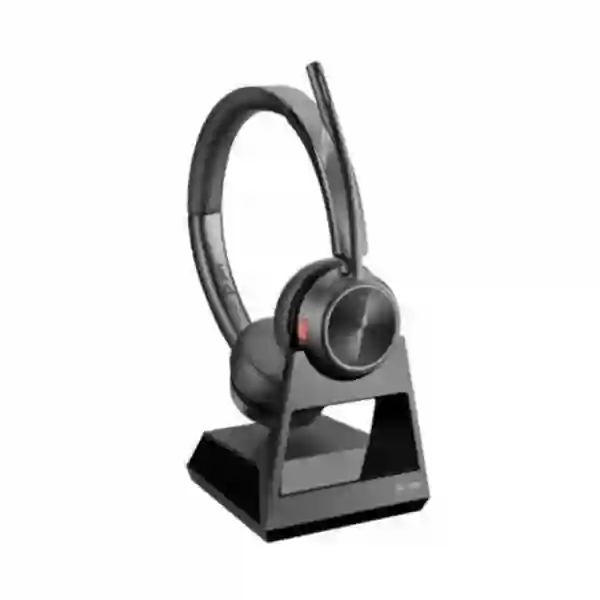
HP Poly Savi 7220 Office Stereo DECT Headset
The HP Poly Savi 7220 Office Stereo DECT Headset gives desk-phone users a practical way to speak, listen and move without holding a telephone handset. It combines two-ear listening, a flexible noise-cancelling boom microphone, dedicated controls and a powered office base. For reception teams, service desks, administrators and telephone-intensive staff, the principal benefit is freedom to handle a call while reaching for a file, checking a workstation or consulting a colleague. The model is purpose-built for compatible desk phones; buyers seeking computer softphone or mobile Bluetooth connections should choose a different type of headset. Before ordering for a Tanzania workplace, identify the phone model and decide whether the user needs to answer calls away from the desk.
Before buying: confirm your phone model, connection method and whether remote answering is required.
The key benefits in one view
- Keep both hands free during desk-phone conversations.
- Listen through two on-ear speakers with stereo wearing style.
- Use a flexible noise-cancelling microphone for voice calls.
- Move within the practical DECT coverage area of the office base.
- Use up to 12 hours of manufacturer-rated talk time.
- Return the headset to its powered docking base for charging.
- Consider optional EHS or handset-lifter integration for supported remote-answer workflows.
- Support selected supervised calls by conferencing compatible headsets on one base.
Specifications at a glance
| Product family | HP Poly Savi 7200 Office |
|---|---|
| Product type | Wireless DECT headset system for compatible desk phones |
| Wearing style | Stereo / binaural, on-ear |
| Microphone | Flexible noise-cancelling boom |
| Rated wireless range | Up to 120 m / 400 ft from office base |
| Talk time | Up to 12 hours |
| Recharge time | Less than three hours |
| Battery | Rechargeable lithium-ion polymer |
| Connection arrangement | DECT wireless headset-to-base; telephone cable from base to compatible desk phone |
| User controls | Call answer/end, mute, volume and power |
| Audio bandwidth | Narrowband 300 Hz–3.3 kHz; wideband 100 Hz–6.8 kHz |
| Acoustic technology | SoundGuard |
| Multiple-headset calling | Conference up to four headsets on one base |
| Adaptive radio power | DECT adaptive power |
| Base and power | Charging base and AC power accessories included in standard complete system |
| Important purchase note | Confirm exact desk-phone compatibility, regional variant and separately required EHS/lifter accessories |
Manufacturer-rated performance is subject to operating conditions and the exact supplied hardware configuration. Verify regional identifiers and commercial terms on the final quotation.
Who the Savi 7220 Office is designed for
This headset makes sense when a worker’s main voice endpoint is a physical desk phone and incoming or outgoing calls form a substantial part of the working day. A customer service representative can keep both hands available for notes and records. A receptionist can consult a booking system without balancing a handset on one shoulder. An administrative assistant can move to a nearby cabinet while a conversation continues. These are practical examples of the work pattern the product serves, not guarantees of a specific distance or acoustic outcome in every building.
The stereo, over-the-head design places a speaker at each ear. That is useful when concentrating on the caller matters more than continuously hearing everything around the desk. By contrast, a shared front counter or safety-sensitive workstation may benefit from a one-ear model that leaves one ear more open to the room. Choose the wearing style around the actual job, not simply the word wireless. Ask the employee to consider how often they speak to colleagues face to face, how noisy the room is and whether calls need to continue during short movements.
What stereo listening changes during a busy day
The Savi 7220 uses an on-ear, binaural arrangement with a speaker on each side of an adjustable headband. Listening through both ears can make the caller easier to attend to in a workplace with competing voices, printers or keyboard activity. This is a concentration benefit from the form factor rather than a claim that the earcups provide active noise cancellation. On-ear pads sit against the ears; their fit and perceived comfort vary between users. A trial with the intended user is sensible for long shifts.
Stereo is not automatically the better choice for every office. If a receptionist must monitor people approaching a counter, a colleague must hear a room announcement or a supervisor frequently speaks to someone at the desk, a mono headset may be more appropriate. The Savi 7210 is the one-ear member of the same Office family. The Savi 7220 suits users who value two-ear coverage for desk-phone conversations. Compare both versions using the same phone, the same room and a representative call before standardising a large department.
A microphone intended for spoken conversations
The flexible microphone boom includes noise-cancelling technology intended to make the user’s speech easier for the person on the other end of a call to understand. A moveable boom is useful because different users wear the headband at different angles. Positioning the microphone consistently is just as important as selecting the headset model. HP’s Savi 7210/7220 quick-start guidance recommends positioning the boom approximately two finger-widths from the corner of the mouth.
A noise-cancelling microphone is not a promise of silent surroundings or perfect intelligibility over a poor phone connection. The quality of the desk phone, the underlying calling service, the room’s noise level and microphone placement still affect the conversation. During installation, make a short test call both from a quiet desk and from the normal working area. Ask the receiving party whether the user’s voice is clear and whether surrounding speech becomes distracting. Correct the boom position and adjust the available speaking level rather than assuming every problem requires a different headset.
DECT wireless mobility, with sensible range expectations
HP rates the Savi 7200 Office headset family for wireless roaming of up to 120 metres, or about 400 feet, from the base in suitable conditions. This describes a maximum rated capability, not a promise that a signal will travel the same distance through reinforced walls, multiple floors, glass partitions and equipment rooms. The actual usable range depends on the layout and the amount of radio obstruction. Walking a real route within the office is a better acceptance test than measuring a straight line on a building plan.
The wireless connection runs between the headset and its office base. The base itself remains connected to a compatible desk phone and power source. This distinction prevents a common buying error: the product does not turn every nearby telephone into a mobile device and does not make desk-phone services available outside the configured system. For teams moving between a desk, filing area and meeting corner, plan where the base will sit and test the complete movement pattern before deploying many units.
Battery capacity and charging in everyday use
The manufacturer specifies up to 12 hours of headset talk time per charge and a charging time of less than three hours under the stated product conditions. These figures help buyers judge whether the product suits a shift but should not be treated as a guaranteed duration in every use pattern. Call activity, battery condition, operating settings, distance from the base and charging habits can influence practical use. A headset used throughout long back-to-back shifts still benefits from deliberate charging periods.
Place the headset in the powered office charging cradle whenever the workstation is unoccupied and encourage staff to check the base’s battery or charging indication. A spare charging window during lunch or a scheduled break may be useful in high-volume calling teams. If a unit appears to run flat unusually quickly, inspect whether it was correctly seated in the cradle and whether the base has power before concluding the battery is defective. For rotating shifts, agree on a handover and charging routine instead of assuming one charging cycle will cover every possible schedule.
Understand the desk-phone connection before purchasing
The Savi 7220 Office is a desk-phone headset system. The supplied telephone interface cable links the office base to the appropriate connection on a compatible phone. Many phones offer a dedicated headset port; others require a handset-port arrangement. HP provides separate setup methods for these cases. A phone brand alone does not fully establish suitability, because model, hardware revision, port type and the way call control works can differ across a manufacturer’s range.
This is not the right product when the main requirement is to plug a USB cable into a laptop for online meetings, pair a mobile phone through Bluetooth or move freely among multiple PC and mobile call sources. Those use cases need a headset whose stated interfaces specifically support them. Some product-family marketing describes capabilities offered by other Savi ranges, so buyers should check the exact Savi 7220 Office configuration rather than assuming that all Savi products connect in the same way. Confirm the intended endpoint first, then choose the headset.
Phone compatibility should be checked at model level
HP describes the Savi 7200 Office family as compatible with more than 800 analogue and IP desk-phone models. That broad family figure is useful context, but it is not proof that any specific phone will offer every call-control function. An office may have a mix of Poly phones, Cisco handsets and other brands installed over several years. Successful deployment depends on identifying exactly which models are in use, how the base will attach and whether extra call-control accessories are necessary.
For a quote request, provide the complete phone model number, any relevant extension-module information and a clear photograph of the ports if model documentation is unavailable. Explain whether staff currently use the handset, a dedicated headset socket or another headset system. Also identify whether one user will occupy each desk or whether headsets will move between desks. A compatibility review should resolve cable requirements, the correct base configuration and remote-answer expectations before a quantity is confirmed. This preparation is especially valuable for multi-desk purchases.
Remote answering: what the EHS or lifter does
A frequent point of confusion is the difference between wearing a wireless headset and being able to answer a ringing desk phone while standing away from it. On a standard connection without a compatible remote hook-switch arrangement, the user may still need to press the phone’s headset button or lift and replace its handset. Pressing the headset call button alone does not necessarily operate the telephone’s hook-switch. HP’s setup instructions explicitly distinguish these behaviours.
A compatible electronic hook switch, usually called EHS, can let supported desk phones communicate call-control actions with the headset system. For other compatible telephone arrangements, an HL10 handset lifter is an alternative mechanical method. These are additional accessories where needed; they are not assumed to be included with the standard system. The right choice is specific to the phone model and required function. State whether remote answer and remote end are essential, merely desirable or unnecessary. That decision can affect both the final configuration and the useful range of movement during calls.
A practical installation sequence for one workstation
Start by identifying the telephone’s connection option. Position the office base on a stable desk surface with access to power and enough room for docking. Connect the telephone interface cable according to the arrangement in HP’s guide: use a supported dedicated headset port if available, or the specified handset connection when the phone lacks a separate headset socket. Connect the power adapter, charge the headset and make sure the headset is powered on. Do not assume a visually similar connector is electrically interchangeable without checking the phone documentation.
Next, place a call from the phone and check that sound reaches both headset speakers and that the distant caller hears the boom microphone. Set listening and speaking levels conservatively. Confirm the mute control, volume adjustments and the call button behaviour. If remote answering is required, fit and configure the separately selected compatible EHS accessory or lifter and test an incoming call while standing away from the desk. Finish by walking the normal route and returning the headset to its cradle. Document the working settings so support staff can reproduce them later.
What the headset controls actually provide
HP lists call answer/end, microphone mute, volume increase and decrease, and power on/off among the Savi 7220 user controls. Having these actions on the headset helps the wearer respond without repeatedly reaching for a physical handset. The mute function is particularly useful when discussing a caller’s question briefly with a colleague or consulting someone nearby. Clear handling of the controls also reduces uncertainty about whether the microphone is live during a conversation.
There is an important boundary: on-headset controls do not guarantee that every connected desk phone exposes remote call answer and end without additional integration. The exact behaviour depends on the phone connection and selected accessory. Show employees how their installed workstation operates rather than teaching a universal button sequence that assumes a particular EHS setup. During training, demonstrate answering, placing a call, muting, unmuting, ending a call and returning the device to charge. A short demonstration can prevent avoidable user complaints caused by configuration rather than hardware.
Call audio, bandwidth modes and hearing protection
HP specifies both narrowband and wideband speaker operation for this headset family: approximately 300 Hz to 3.3 kHz in narrowband mode and 100 Hz to 6.8 kHz in wideband mode. The microphone specification is 100 Hz to 6.8 kHz. A wider headset audio path may be useful where the phone and calling system can deliver the corresponding audio. It does not independently upgrade a narrowband telephone line or repair network problems that occur before the sound reaches the headset.
The manufacturer also identifies SoundGuard acoustic protection. This is a headset audio feature, not a substitute for suitable workplace volume practices or an occupational noise assessment. Set levels to a comfortable point and avoid compensating for room noise by keeping the speaker volume unnecessarily high. If sound is distorted, echoing or unexpectedly quiet, review the desk-phone configuration, speaking and listening adjustments and the type of call before changing the headset. Listening results should be judged through real calls on the installed system.
Training calls with more than one headset
HP states that up to four Savi 7200 Office headsets can be conferenced on one base. In practical terms, that can allow a trainer or supervisor to join a call with a colleague for supported training scenarios. It is a helpful feature for service teams introducing new staff to telephone procedures, especially where an experienced employee needs to listen and guide a colleague during a live interaction. Each participating person still requires an appropriate compatible headset and correct subscription to the base.
Do not interpret four-headset conferencing as four separate telephone lines, four independent simultaneous calls or connection to four different phones. The stated function concerns a shared call on one base. Plan the supervisory process, the number of headsets required and the organisation’s rules for customer confidentiality before using it. A trial should verify how a guest headset joins, how the call ends and whether the trainee and supervisor can communicate as intended. This avoids purchasing equipment based on an incorrect understanding of the headline number.
DECT adaptive power and office planning
The Savi 7200 Office family uses DECT adaptive power technology. HP describes this as automatically adjusting wireless signal strength according to distance from the base. The practical purpose is to use an appropriate radio level rather than operating unnecessarily at maximum power under all conditions. For a business with many headsets, it is useful to understand that a deployment involves multiple wireless bases and users, even though each user’s setup appears straightforward at the individual desk.
When planning a larger office, map workstation locations, shared desks, high-density calling areas and the routes employees commonly walk. Avoid placing bases where cabling is strained, where staff cannot easily dock headsets or where maintenance access is poor. Assess the actual layout instead of presuming that the rated maximum range will extend through every wall. Exact radio-frequency variants and any applicable local requirements should be checked for the units supplied to Tanzania; a specification for a different regional variant should not be assumed to apply automatically.
A straightforward fit for several business roles
A telephone-based support desk is one potential fit: representatives can type notes, check account information and keep both hands available while listening through two earcups. An administrative office may use the headset for regular supplier or customer calls while staff consult records. Reception teams that spend much of their time on the phone may value the movement offered by DECT, provided the stereo design does not interfere with monitoring visitors or communicating with colleagues in person.
A supervisor may find the shared-headset conferencing capability useful for training a new employee on a desk-phone call. A finance or purchasing department with a high volume of routine calls might appreciate a reliable dock-and-charge routine at a fixed workstation. These scenarios illustrate suitability rather than guaranteed performance in every room. If a role uses laptop meetings, mobile phone calls or cloud softphones rather than a physical desk phone, assess a different headset category. The key question is which device actually originates the call.
Deployment checklist for a Tanzania office
A purchase should start with the installed communication system, not an attractive feature list. Inventory the desk-phone brand and exact model used at each workstation. Record which users need stereo listening, which need to hear room activity and which must answer calls while away from the desk. Identify the available power sockets, suitable location for the charging base and whether desks are assigned or shared. If an extension is managed through a PBX, confirm that the phone itself provides a supported physical headset interface.
Before ordering, ask the supplier to verify the supplied product variant, included base, telephone cable and power accessories. Confirm whether an EHS cable, handset lifter or another model-specific item is necessary and whether it is included in the quotation. Request the applicable local warranty and support terms rather than relying on warranty statements published for another market. Discuss availability, delivery arrangements and final TZS pricing only through a verified quotation. No particular stock status, shipment date or Tanzania regulatory approval is implied by this product description.
Stereo Savi 7220 versus mono Savi 7210
The decision between the Savi 7220 and the related Savi 7210 starts with wearing preference. The 7220 covers both ears using a stereo on-ear design; the 7210 uses a single-ear arrangement. Both belong to the Savi 7200 Office family intended for desk-phone use. Stereo can be useful in a busy call-handling environment because the wearer has audio at both ears, while mono allows greater awareness of nearby conversation and announcements. Neither design should be called universally more comfortable or better.
Consider the employee’s role and typical shift. A customer service adviser focused on calls may prefer two-ear listening. A receptionist frequently interacting with arriving visitors may prefer keeping one ear more open. A mixed workplace may reasonably standardise on both versions for different teams. The most useful comparison is a short, real-world trial with the intended phone, room and call pattern. Confirm that the phone accessories and base setup being compared match the proposed order; model similarity is not proof that every package has identical components.
Savi 7220 Office versus a computer meeting headset
A conventional computer headset is intended for audio from a laptop or desktop through interfaces such as USB, Bluetooth or an approved wireless dongle. The Savi 7220 Office serves a different need: its office base provides a wireless link to a headset while the system works with a compatible physical desk phone. Buying it solely because the words wireless and office appear in the name can lead to an expensive mismatch if staff mainly use browser calling applications or meeting software.
Ask users where they place and receive calls today. Is there an IP desk phone on the table, or do they click a softphone application on a computer? Do they use mobile calls throughout the day? Must the same headset switch among several devices? If the answer involves computer or mobile sources, choose equipment whose official specifications list those sources explicitly. Do not infer them from a general family name, a third-party accessory illustration or a reference to another Savi model. A clear connectivity decision comes before comparing range, fit or microphone features.
Accessories, package contents and quotation clarity
HP’s published full-system contents include the wireless headset, office base, AC power adapter, interchangeable AC plugs, telephone cable, safety guide, warranty card and quick-start guide. This list helps a purchaser distinguish a complete office system from replacement headsets or headset-only packages. A product advertised as a spare top unit should not be treated as identical to the complete base-and-headset kit. Packaging and regional product numbers can differ, so the quotation should name exactly what is included.
Remote hook-switch accessories deserve particular attention because they can determine whether the wearer is truly free to answer calls away from the phone. A compatible EHS cable or HL10 lifter should be identified as an additional item where required. Also confirm whether replacement ear cushions, replacement batteries or other maintenance items are available for the offered version rather than assuming they are bundled. Ask for a consolidated bill of materials showing quantity, product variant, required accessories and any separately quoted setup work. This prevents a low headline headset price from concealing important missing components.
User comfort and practical day-to-day habits
The Savi 7220 uses an over-the-head structure and on-ear cushions. HP describes the cushions as artificial-leather surfaced, and the headband can be adjusted for fit. A correct fit keeps the earcups reasonably stable without excessive pressure and places the boom near the mouth. Because head size, hair, spectacles and personal tolerance differ, comfort should be evaluated by the intended user rather than determined only from a catalogue photograph or a specification sheet.
Encourage employees to adjust the headband once, position the microphone consistently and keep volume at a comfortable level. Where headsets are shared, hygiene arrangements and individual fit adjustments become more important. For an office with long shifts, a trial lasting more than a few minutes gives a better view of comfort than briefly trying the headset at a sales counter. Build charging and cleaning habits into the normal work routine. If a user finds the two-ear design restrictive, investigate mono alternatives rather than expecting the wearer to adapt to every aspect of the design.
Maintaining consistent performance after installation
Routine support should begin with simple checks. Confirm that the base receives power, the headset seats properly in its charging cradle and the headset is subscribed to the correct base. Verify the telephone cable has not been disturbed by desk moves or cleaning. If the user cannot hear a caller, check the phone’s active audio path and the configured base connection before changing hardware. If callers cannot hear the user, inspect microphone position, mute state and the appropriate speaking-level adjustments.
If remote answering stops working, investigate the specific EHS or handset-lifter connection instead of assuming the wireless headset has lost its radio link. For short battery life, confirm adequate charging and inspect whether operating conditions have changed. For intermittent sound, test close to the base and then repeat at the normal roaming distance. Keeping a record of phone models, accessories and tested base settings makes support faster when workstations move or staff change. Any repairs or battery replacement should follow the manufacturer guidance for the exact supplied unit.
Setting realistic expectations for voice quality
Call quality is a chain involving the caller’s device, the telephone network, the office PBX or service, the desk phone, the interface cable and the wireless headset. The Savi 7220 can contribute clear local listening and speech capture through its stereo speakers and noise-cancelling microphone, but it cannot correct a faulty PBX connection or unstable upstream call quality. Evaluate speech with the actual service your office uses rather than judging audio solely from a recording played on another device.
A useful acceptance test includes one quiet call, one call during normal office activity and one call at the farthest location where the employee expects to work. Ask both participants about volume, speech clarity and interruptions. If an issue occurs, first identify whether it happens only at distance, only with a certain caller or only on a certain desk phone. This narrows the likely cause. Complete the test before staff depend on the headset for customer-facing calls or the business commits to a larger rollout.
Buying for several desks rather than one
An individual purchase usually needs one compatibility decision. A team deployment needs a small inventory and a standard configuration. Group employees by desk-phone model, user role and required answer method. This may produce more than one accessory combination even when everyone receives the same headset model. A small pilot in each representative group can reveal differences in telephone ports, base settings and employee preferences before a larger order is placed.
For procurement records, list the number of complete systems, any extra guest headsets used for training, appropriate hook-switch accessories and the intended installation locations. Identify who will teach users to charge, mute and answer calls. Determine where replacement accessories will be stored and who will check them in the future. The target is a repeatable setup that staff can use confidently, not an unnecessarily complex specification. Ask for a quotation that clearly distinguishes headset quantities, separately required accessories and any service terms so it can be reviewed fairly.
When this product is not the right answer
The Savi 7220 Office is not the automatic choice for everyone who wants wireless audio at work. It may be unsuitable where the central requirement is music playback, mobile Bluetooth calling, laptop conferencing or switching among several separate communication devices. It may also be less suitable where staff must hear room announcements continually or where there is no compatible desk phone. The maximum advertised wireless range should not be used as a guarantee for remote work outside the office building.
Similarly, a headset should not be selected solely because another office reports success with the same name. Their phone model, regional hardware variant and accessories may differ. If your deployment requires specific platform certifications, local radio authorisations, integration with a particular handset or strict acoustic rules, request written confirmation for the exact hardware variant before purchasing. A clear statement of limitations protects the buyer from assuming features the manufacturer does not list for this configuration.
A suggested five-step acceptance test
First, verify the complete package and compare it with the quote, including the office base and every model-specific accessory. Second, connect the base to the exact intended desk phone, charge the headset and establish that calls can be placed and received. Third, check both sides of the audio path using a colleague who can describe the microphone sound and speaker levels. Fourth, try mute, volume and call controls, including remote answering if the installation includes compatible EHS or lifter equipment.
Fifth, walk the normal working route, return to the desk and dock the headset for charging. Record any limitations discovered during the test: a particular area with poor coverage, a button combination on the telephone, a different speaking-level setting or an accessory that must be ordered. Repeat the process for each distinct phone type in a larger workplace. This simple acceptance method is more dependable than assuming that a general compatibility claim establishes a complete, working system at every desk.
Request the right configuration for your workplace
When contacting FourTeck Tanzania about the HP Poly Savi 7220 Office Stereo DECT Headset, provide the desk-phone brand and model, the number of users, the expected calling pattern and the required call-answering behaviour. Mention whether two-ear listening is appropriate, whether staff work at assigned or shared desks, and whether training calls with additional headsets are planned. These details make it easier to identify the correct configuration and avoid a purchase that looks compatible on paper but lacks the needed accessory.
Request confirmation of the exact offered variant, complete package contents, telephone compatibility, any separately required EHS cable or handset lifter, price, availability, delivery and applicable warranty terms. The recommended next step is a compatibility review followed by a clear quotation; there is no need to assume an unverified price or stock position. Once the phone connection and usage needs are established, a representative workstation test can provide confidence before the rest of a department is equipped.
Frequently asked buying questions
Does the Savi 7220 Office connect to a laptop through USB?
The standard Savi 7220 Office configuration is intended for compatible desk phones through its office base. It should not be purchased as a plug-and-play USB computer headset. If your employees mainly use a laptop softphone or video-meeting app, choose a model whose official specification explicitly includes computer connectivity. Identify the communication application and device before ordering.
Can this headset pair directly with a mobile phone by Bluetooth?
Bluetooth mobile pairing is not listed as the calling interface for the Savi 7220 Office headset system. Its wireless connection uses DECT between the headset and its base, while the base serves a desk-phone connection. For mobile calling or combined desk-phone, PC and mobile use, compare an appropriately specified multi-device headset instead of assuming the broader Savi name provides those functions.
What is the maximum wireless range?
HP states up to 120 metres or 400 feet from the base under suitable conditions. Actual usable coverage varies with walls, floors, furniture, construction materials and other site characteristics. The base remains at the workstation. If staff need to move to an adjacent office, storage area or shared workspace, test that route with the intended phone and installed base position before purchasing a large quantity.
How long does the battery last and how quickly does it recharge?
The published specification is up to 12 hours of talk time per charge with a charging time of less than three hours. Actual endurance may differ with use and battery condition. Keep the cradle powered and return the headset to charge when not in use. For shift-based teams, establish a charging routine that matches actual call volume rather than relying on the maximum rating alone.
Is the 7220 a stereo headset?
Yes. The Savi 7220 is a binaural, on-ear headset with two speakers. The related Savi 7210 is a mono option. Two-ear listening may support concentration in busy offices, while a single-ear configuration can be preferable for employees who need to hear conversations and activity around their desks. Choose the wearing style based on working conditions and user preference.
Will it work with any Cisco or Poly desk phone?
Not necessarily. HP identifies broad compatibility across many analogue and IP desk phones, including models from major manufacturers, but the exact telephone model and its port arrangement must be verified. Base configuration and optional call-control accessories vary. Supply the complete desk-phone model number and describe whether the user must answer calls remotely so the correct setup can be assessed.
Do I need an EHS cable or handset lifter?
Only some usage scenarios require them. Without an appropriate remote hook-switch connection, the user may need to operate the desk phone’s headset button or handset when answering and ending calls. A compatible EHS cable or a supported HL10 lifter may allow remote call control. These accessories are separate where required, and their suitability depends on the exact phone model.
Does a noise-cancelling microphone remove all office noise?
No. The flexible noise-cancelling boom is designed to help improve speech pickup in office conditions, but it does not make a noisy environment silent. Place the boom correctly, test real calls and address unusually loud background activity where practical. Remember that the microphone feature is different from active noise cancellation in the earcups, which should not be assumed from the product name.
Can supervisors listen to training calls?
The Savi 7200 Office family supports conferencing of up to four compatible headsets on one base, which can be useful for supervised training or supported shared-call activities. This does not provide four independent desk-phone lines. Plan how the additional headsets are paired and establish appropriate customer privacy rules before using the feature for live calls.
What comes with a complete Savi 7220 Office system?
HP lists a wireless headset, office base, AC power adapter, interchangeable AC plugs, telephone cable, quick-start guide, safety guide and warranty card for the standard complete system. Confirm the exact offered regional package before buying. A headset-only replacement unit is a different purchase from a full system, and optional remote-answer accessories should be identified separately on the quote.
Is there a confirmed price or stock level in Tanzania?
No local price, stock level or delivery commitment is stated here. Those details depend on the actual offered product variant and a current verified quotation. Ask FourTeck Tanzania to confirm the applicable price, availability, included accessories, delivery arrangements and warranty conditions for the intended quantity. Do not assume pricing or availability from foreign retail listings.
Does the headset improve a poor telephone network connection?
The headset can provide a suitable local audio interface, but it cannot repair packet loss, service interruptions, PBX faults or other upstream calling problems. If calls sound poor, test the desk phone and service first, then inspect the base connection, speaking and listening levels, microphone position and wireless distance. A representative live call is the best way to isolate which part of the chain needs attention.
How can we check compatibility before ordering several units?
List every desk-phone make and model, the number of users at each type of desk, and whether remote answer and end are required. Ask for the compatible cable or lifter configuration and arrange a small pilot on representative workstations. Check call audio, controls, range and charging. Document settings that work so the installation can be repeated consistently across the office.
Which product should we choose if workers need to hear colleagues nearby?
Consider a mono headset such as the Savi 7210 Office if keeping one ear more open to the surroundings is important. The Savi 7220 provides two-ear listening that may suit dedicated call handlers. The better choice depends on room activity, user comfort and the frequency of in-person interactions. A short trial with the actual employee and desk phone is preferable to making the choice from a picture.
What information should be sent with a request for a quote?
Include the full desk-phone model, desired headset quantity, workplace use, whether remote call answering is essential and whether any guest headsets will be needed for training. Ask for confirmation of the full system, optional accessories, regional variant, applicable warranty and the final Tanzania quotation. This gives the supplier a practical basis for recommending a compatible setup without assuming features that have not been checked.
Request a compatibility check and Tanzania quotation
Tell FourTeck Tanzania the full desk-phone model, headset quantity, intended users and whether remote answering is needed. Request confirmation of the complete office system, compatible accessories, current price, availability and applicable warranty before ordering. The most useful first step is verifying the configuration for your installed phone.
Ask FourTeck Tanzania for a configured HP Poly Savi 7220 Office quote.




Reviews
There are no reviews yet.