
Business wireless calling | Tanzania buyer guide
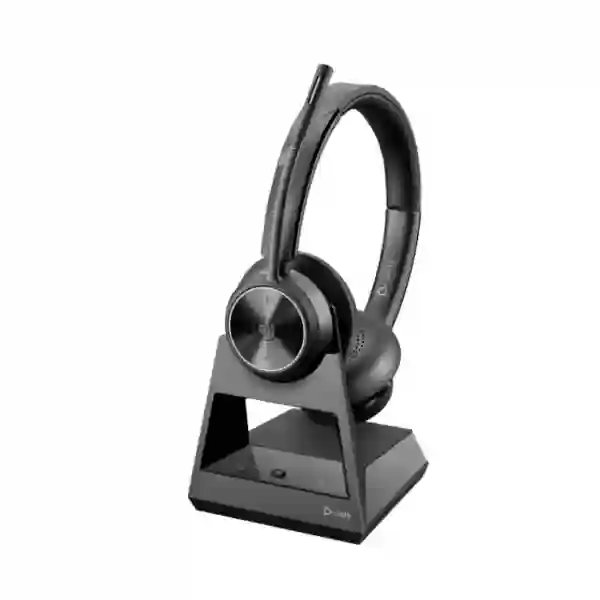
HP Poly Savi 7320 Office Stereo DECT Headset
Stay focused on important desk-phone and computer calls while moving around the office. The HP Poly Savi 7320 Office Stereo DECT Headset combines two-ear listening, a noise-cancelling boom microphone with Poly Acoustic Fence, and a dedicated DECT office base. It is intended for professional communication where voice clarity, call handling and workplace security matter. Before ordering in Tanzania, confirm the exact regional model, your phone compatibility and any accessories needed for remote answering.
Key features at a glance
Focused conversations
Two on-ear speakers for stereo listening during professional calls.
Clearer outgoing speech
Poly Acoustic Fence technology helps reduce distracting surrounding voices.
Office flexibility
Dedicated base supports desk-phone and computer calling arrangements.
Practical movement
Manufacturer-rated range up to 180 m in open space, with lower typical indoor range.
Workday endurance
Up to 13 hours of manufacturer-rated talk time with charging at the base.
Security-minded design
DECT security capabilities intended for workplace communications.
Verified specifications and buying notes
| Product family | HP Poly Savi 7300 Office series |
|---|---|
| Wearing style | Stereo, on-ear, adjustable over-the-head band |
| Headset-to-base wireless connection | DECT |
| Office connection targets | Desk phone and computer |
| Microphone | Noise-cancelling boom with Poly Acoustic Fence |
| Rated talk time | Up to 13 hours |
| Rated standby time | Up to 52 hours |
| Rated radio range | Up to 180 m open area; up to 55 m typical office |
| Charging time | Approximately 2 hours |
| Battery | Rechargeable lithium-ion polymer |
| Call controls | Answer/end, mute, volume and power |
| Acoustic protection | SoundGuard Digital; applicable software settings should be confirmed |
| HP-listed operating systems | Windows 10, Windows 11 and macOS |
| Illustrative HP regional product number | 8D3F7AA is a documented 1880–1900 MHz variant; verify the proposed regional package |
Specifications follow manufacturer information for the Office family and documented regional configurations. Confirm the exact supplied variant and current manufacturer guidance before purchase.
A work headset for calls that need attention
The Savi 7320 Office is designed around a daily business task: hold a clear conversation while continuing to work away from a desk. Its two on-ear speakers help the wearer concentrate on the caller, while a boom microphone is intended to make the outgoing voice easier to understand in a shared room. Because the headset communicates with its office base using DECT wireless technology, the employee does not need a cable running from the head to the telephone or computer. The charging base provides a consistent home for the device between calls.
This arrangement suits reception teams, contact-centre agents, service desks, customer advisers and administrators who use a desk phone, a computer softphone, or both. The value is not simply being wireless. It is having one familiar answering and mute interface, a base positioned near the work equipment, and a headset that can move with the user during a conversation. Buyers should still check their exact phone model, software environment and required remote-answering accessories before ordering.
Understand the Office configuration before buying
The word Office matters in this product name. The Office package includes a desktop base intended to interface with a desk telephone and a computer. The headset itself communicates wirelessly with that base; the base makes the physical connection to the relevant telephone equipment. This is different from a headset that pairs directly to a laptop over Bluetooth or relies on a small USB DECT adapter. A team replacing an existing office telephone headset should compare connection paths rather than assume every Savi 7320 package has the same components.
Also distinguish the stereo 7320 from the single-ear 7310 and the separately named UC or Microsoft Teams variations. A Teams-oriented package can include variant-specific controls, while other regional versions may have different radio specifications or product numbers. The product family name alone does not establish which exact package is being quoted. Ask the supplier to confirm the complete manufacturer description, regional version and included cables against the equipment you already operate.
Why a DECT connection matters
DECT is a wireless communications system developed for voice devices. In this setup it carries the call audio between the Savi headset and its office base. The practical advantage is a dedicated local radio link for workplace calling rather than the expectation that the headset must pair independently with every phone or laptop. For organisations with a defined workstation and a permanent telephone base, that structure can make the user experience familiar and predictable. The base and headset form a system and should be treated as a matched set.
HP positions the Savi 7300 Office family for environments where voice privacy, many nearby headsets and reliable communication are priorities. The manufacturer describes secure pairing, 128-bit authentication and 256-bit AES encryption within the series’ DECT security architecture. These are useful technical capabilities, but they are not a substitute for an organisation’s call-handling policy, endpoint security, access controls or legal obligations. A secure headset link cannot by itself protect the other systems through which a conversation travels.
Microphone clarity in a busy room
A major reason to choose the Savi 7320 is its noise-cancelling boom microphone with Poly Acoustic Fence technology. The feature is designed to emphasise the wearer’s speech and reduce unwanted nearby voices reaching the far end of the call. HP associates the technology with the Microsoft Teams Open Office microphone specification. This is particularly relevant where colleagues work close together, a customer support area is active, or telephone conversations are frequent throughout the day. A clearer outgoing signal can reduce interruptions and repeated explanations.
Microphone noise reduction should not be confused with a promise of silence. Very loud rooms, poor microphone placement, clipping, strong echoes, weak internet voice connections and background sounds close to the mouth can still affect intelligibility. For the best result, position the boom as directed in the user guide, carry out a test call at the actual workstation and ask the person at the other end how the voice sounds. Real-world tests with the intended phone and application remain more useful than a generic claim of perfect sound.
Stereo listening without sacrificing awareness of the workspace
The Savi 7320 has an on-ear, stereo wearing style with two earpieces. Some employees prefer this to a single-ear headset because incoming speech is heard through both ears and there is less temptation to lean toward the phone. Stereo can be helpful when an adviser needs to focus on detailed customer instructions, when the surrounding office is distracting, or when a computer application includes occasional audio playback as well as calls. The adjustable over-the-head band helps the wearer find a workable fit.
Stereo is a preference, not a requirement for good communication. A receptionist who must hear visitors, colleagues and a ringing desk telephone may be better served by a single-ear design. On-ear cushions also feel different from over-ear cups: users who wear glasses or remain on calls for hours should try the fit when possible. This headset has microphone noise reduction, but it should not automatically be described as providing the same active noise cancellation found on some other listening headsets.
Connect desk-phone and computer workflows
A central Office-series benefit is supporting both desk-phone and PC calling from the base. A company may have a traditional telephone system for external calls and a computer softphone for internal conversations, or may be moving gradually from desk telephones to software-based calling. Rather than purchasing two separate wearing devices for every employee, the Savi 7320 Office provides a single headset designed for those connected sources. HP lists the desk phone and PC as the supported endpoint categories.
The exact workflow depends on how the office base is connected and configured. The desk-phone line uses the applicable telephone connection, while computer audio is handled through a USB connection to the base. The base provides controls for desk-phone configuration and softphone selection. This does not mean every application, SIP phone or PBX function is automatically supported. Before rollout, confirm audio routing, call control, supported host operating systems and the specific software or desk-phone model in a test environment.
How daily call control feels
The headset provides user controls for answering or ending calls, muting the microphone, adjusting volume and powering the headset on or off. Voice alerts communicate conditions such as mute status, connection status and a low battery. These small conveniences matter across a full shift: an agent can check whether the microphone is muted without looking away from the task, and a colleague can manage listening volume from the headset rather than searching through computer settings during a live conversation.
Call-control behaviour can differ between connection methods. Audio can work even when a particular application does not expose all of its software commands to headset buttons. Likewise, answering a ringing physical desk phone from a distance may depend on an optional compatible electronic hook switch or handset lifter. The right procurement question is therefore not only whether the headset produces sound, but whether every required action—answer, end, hold, transfer and mute—works in the intended environment. Test these actions separately.
Computer installation and softphone checks
For a computer-based setup, place the Office base near the workstation, connect it using the appropriate supplied USB cable and select the correct audio device in the operating system and calling application. HP lists Windows 10, Windows 11 and macOS among compatible operating systems for the Office model. A basic verification should include speaker output, microphone input, software permissions, mute behaviour and a call to a colleague outside the immediate workspace. Computer security policies may restrict installation of optional device utilities.
For a team using several applications, check the selected default communications device in each one. A headset that works for a browser meeting may not automatically become the preferred input for a dedicated softphone. If the microphone is silent, first confirm application permission, input selection and the headset mute state before assuming a hardware fault. When testing computer audio, record the software version and USB connection used so the same successful setup can be repeated across multiple desks.
Desk-phone compatibility is a specific question
Business desk phones have different headset interfaces, connector types, firmware behaviours and remote-answering arrangements. The Savi Office base is built to connect with desk telephones, but the phrase compatible with desk phones does not guarantee that every feature works with every manufacturer and handset. Confirm the actual phone model number and available connection before purchasing. The supplier may need to establish the appropriate base settings or advise whether an accessory is necessary for the user’s preferred call-handling workflow.
A useful acceptance test begins with a call placed from the telephone keypad, then checks receive volume, microphone level, ringing indication and whether returning the headset to the base behaves as expected. Next test an incoming call and any requested remote pickup function. If the phone uses a complex PBX or cloud-hosted telephony service, note that headset-side compatibility and call-system behaviour are two different issues. Document both so the user is not left with a working microphone but inconvenient answering steps.
Remote answering may need another component
Many buyers assume a wireless headset lets someone answer a desk-phone call while standing anywhere within radio range. That may be possible, but a compatible electronic hook switch arrangement or mechanical handset lifter is often required to control an ordinary desk phone remotely. Such accessories should not be assumed to be part of the standard Office package. Their availability and compatibility depend on the telephone brand and model, not simply on the headset’s wireless range.
If remote answering is important—for example, for a warehouse office, front desk or supervisor who walks between nearby workstations—request a demonstration of a ringing call, remote pickup and call termination using the exact proposed combination. It is better to identify the required accessory while preparing a quotation than to discover after delivery that a staff member still has to return to the desk to lift a handset. A base can support headset audio while remote call control remains a separate compatibility task.
Battery capacity and charging habits
HP specifies up to 13 hours of talk time and up to 52 hours of standby time for the Savi 7320 Office. The battery is rechargeable lithium-ion polymer, and the manufacturer gives a charging time of about two hours. These are maximum or indicative performance figures, not a guarantee that every user will achieve the same duration. Actual battery life depends on the age of the battery, radio conditions, usage pattern, volume settings and how frequently the wearer talks rather than remaining on standby.
A practical routine is to return the headset to its office base during planned breaks and at the end of the working day. For shared headsets, decide whether each worker has an individually assigned unit or a controlled charging and cleaning procedure. For critical telephone positions, establish what happens if the battery is empty partway through a shift. Staff should know how to read or hear the low-battery warning and should not depend on the advertised maximum to schedule a day with no charging opportunities.
Wireless range in a real office
The manufacturer rates this Office variant for wireless operation up to 180 metres in an open area and up to 55 metres in a typical office environment. The difference is important. An open-space maximum is not a promise that audio will remain reliable through several concrete walls, metal cabinets, dense storage areas or multiple floors. Distance from the office base, building construction and other nearby equipment influence the usable range. The headset is made for workplace roaming, not unlimited mobility.
Before a multi-user purchase, perform an actual walk test from each proposed base position to the places staff must visit during calls. Include corridors, stock rooms, side offices and stairwells where relevant, rather than testing only along a clear line of sight. Record where audio becomes unreliable and where the device reports loss of connection. Move the base where practical to improve coverage. If the required journey goes beyond tested range, reconsider the workflow instead of treating the published open-area figure as an assured coverage map.
Higher headset density for shared floors
HP markets the Savi 7300 series as supporting up to twice the deployment density of certain other DECT headsets. The reason this matters is simple: a contact centre may have dozens of people speaking simultaneously, each with a wireless audio link to a nearby base. That is a different radio environment from one headset in a private office. The family is designed to address high-density deployments, and the benefit deserves consideration when many employees will be active at once.
The two-times figure is a manufacturer comparison, not a verified count of simultaneous headsets for your building. A reliable rollout plan still needs desk spacing, actual occupancy, neighbouring DECT devices, operating radio region and expected concurrent calls. Pilot the proposed setup in a representative area before multiplying it across an entire floor. A technical buyer should ask for compatibility and density guidance appropriate to the specific layout rather than importing a headset capacity number from an unrelated office.
Security features and their limits
The Savi 7300 Office family is presented by HP as designed to meet DECT Security Step C, including secure pairing, authentication and AES encryption features. This makes it a serious candidate for organisations where sensitive client conversations take place and where a generic consumer headset is not the preferred device. The headset link can be part of a layered approach to communication security, especially when a company wants predictable office equipment and centrally managed device settings.
Security claims should always be interpreted at their correct boundary. Radio-link encryption does not determine whether a call recording is stored securely, whether a computer is infected, or whether someone nearby can overhear the person speaking. Procurement teams should also confirm the correct regional radio version and check any applicable organisational approval requirements. Do not treat a manufacturer’s statement about security architecture as an independent certification of a complete telecommunications service or of compliance with Tanzania-specific regulations.
Sound protection and listening levels
HP identifies SoundGuard Digital as part of the model’s acoustic protection capabilities. The technology is intended to help manage excessive listening sound exposure, and manufacturer documentation notes that certain Digital features require enabling through compatible Poly desktop software. For employees who wear a headset for a substantial part of their day, sound management is a useful procurement consideration alongside comfort and microphone clarity. It is not a reason to increase everyday listening volume unnecessarily.
Users should start with a comfortable level, increase it only as needed and report persistent distortion, loud call peaks or discomfort. IT and occupational health teams can check the available device settings and organisational listening guidelines. Be careful not to assume that every protective function is enabled in the shipped state or that a headset by itself establishes a safe working environment. Application gain, desk-phone settings, user preferences and software management can all affect the result.
Fleet configuration and software management
A single headset is relatively straightforward to look after, but a larger deployment requires repeatable settings and a method for handling updates. HP describes software management options for the Savi 7300 family, including device configuration and firmware management through its Poly ecosystem. These tools can help IT teams establish standard behaviour and reduce uncertainty when employees move desks or computers. The supported management functions should be confirmed against the actual current software release and company environment.
Before deployment, decide who owns configuration, how firmware changes are tested and whether workstation policies permit the necessary application. Maintain a simple inventory recording the model variant, assigned user or workstation, base location and installation date. Train support staff to identify the difference between a headset pairing issue, a computer input selection problem and a desk-phone wiring problem. A modest documented process often matters more to day-to-day service quality than a long list of features.
Fit, hygiene and shared use
The Savi 7320 Office has an adjustable headband and artificial-leather-surface on-ear cushions. A user should adjust the band until both earpieces sit comfortably and position the microphone boom according to the manufacturer’s instructions. The balance between a secure fit and excessive pressure is personal, particularly for people who wear glasses. A short wearing trial can identify concerns that are not obvious from a specification table. Managers should invite feedback rather than assuming that one stereo design suits everyone.
Where the same headset is shared by different shifts, agree on cleaning and storage practices compatible with the materials. Do not spray cleaning liquid into the microphone, charging contacts or electronic openings. Follow the official care guidance for appropriate products and replacement parts. A labelled individual headset may be preferable in environments with strict hygiene requirements, while a central charging location can help teams track equipment. Hygiene expectations and procurement quantity should be planned together.
Useful scenarios for customer-facing teams
A service adviser may need to review a customer’s account while speaking, a help-desk agent may need to consult a colleague, and a reception worker may need to move to a nearby cabinet without immediately ending a call. The Savi 7320’s stereo audio, boom microphone, office base and wireless roaming can serve those situations. In a busy customer contact area, the microphone’s attention to outgoing speech is particularly relevant because several people may be talking within hearing distance.
The fit depends on what the worker must hear outside the headset. For a desk where face-to-face interaction is constant, consider whether two covered ears suit the job. For a position that handles confidential records, consider screen privacy and access control in addition to audio. For teams already using one supported desk-phone platform, standardising a tested base configuration can help support. These practical decisions turn a product feature list into a deployment that matches the work.
Fit for administration, finance and sensitive conversations
Finance offices, medical administrative desks, government departments and regulated service teams often value consistent call quality and clear procedures for handling sensitive information. HP explicitly positions the Savi 7300 family for environments where sensitive conversations occur. The headset’s secure DECT architecture and noise-reducing microphone are relevant points for a technical evaluation, especially where a workplace may restrict the use of certain wireless technologies or require an approved device inventory.
No headset alone makes an organisation compliant with confidentiality law or internal policy. Workers must still verify callers, control nearby access, use approved call-recording systems and manage customer data correctly. A purchase specification should therefore distinguish headset-level features from telecommunications, software and procedural requirements. Ask the internal security or compliance team to confirm any policy regarding DECT use, endpoint management and radio equipment before assuming that an attractive security claim resolves all approval questions.
Stereo versus mono: Savi 7320 and Savi 7310
Within the Savi 7300 Office family, the basic wearing-style choice is whether the employee needs stereo listening or one ear left free. The 7320 is the stereo, two-ear design. The related 7310 is the mono alternative. Both belong to the same broader office-focused family, but the user experience differs. An agent concentrating on extended conversations might prefer two earpieces, while a front-counter employee may need more natural awareness of visitors and colleagues throughout the day.
Do not choose only on appearance or assume that extra ear coverage automatically improves every use case. Ask a representative group to test comfort, ability to hear relevant office sounds and clarity during actual calls. If a department contains different roles, a mixed policy may be more successful than purchasing one wearing style for everyone. Confirm any model-specific package details and accessory compatibility before treating mono and stereo alternatives as otherwise interchangeable.
DECT Office headset versus a Bluetooth alternative
A Bluetooth headset can be suitable for workers who want direct pairing with a mobile phone and several portable devices. The Savi 7320 Office makes a different trade-off. Its primary wireless relationship is with the dedicated DECT base, and the Office system focuses on a desk phone and computer. A buyer should not choose it expecting straightforward, direct Bluetooth pairing to a smartphone. The distinction is particularly important when the same employee alternates frequently between a mobile phone and workstation.
The appropriate comparison is based on real use, not an assumption that one radio technology is universally better. For an established desk location, a DECT base and well-tested call controls may be the desired configuration. For workers who commute and need direct mobile pairing, another product family may fit better. Assess security policy, required devices, room layout, battery routine, call-control integration and portability together, then select the technology whose constraints are acceptable to the team.
Planning a Tanzania office deployment
For a buyer preparing a deployment in Tanzania, start with the equipment already in the office rather than an assumed national configuration. List the exact desk-phone models, computer operating systems, calling applications, number of concurrent users, floor layout and required call-control actions. Confirm the regional radio version that the supplier proposes and any applicable local equipment requirements before purchasing or deploying units. HP documents different Savi 7320 variants, so the complete manufacturer identifier deserves attention.
It is also sensible to evaluate the environment around the desk. Reliable power for the base, usable USB ports, internet connectivity for the softphone and protected workstations all contribute to call quality and staff productivity. A DECT headset does not repair a congested internet link or an unreliable PBX. No particular Tanzanian stock level, delivery time, price, installation service or regulatory certification is implied by this description. Request an offer that verifies those local commercial and technical details.
What the Office box contains
HP’s published package list for the relevant Savi 7320 Office variant includes the wireless headset, Office base, telephone cable, Micro USB to Type-A cable, Micro USB to Type-C cable, USB Type-C to USB Type-A cable and quick-start guide. A charging base and connection cables are important because the system depends on the base for everyday use. Check the supplier’s quoted package before opening a deployment project, particularly when a listing is labelled only with the shorter Savi 7320 name.
Packaging may change by market, manufacturing revision or variant. The published list should be treated as guidance to confirm, not a promise about every listing. Do not assume that a handset lifter, EHS cable, alternative power accessory, spare ear cushions or replacement battery is included unless the quote identifies it. Ask for a clear itemised bill of materials when buying for a large team. This makes receiving inspections easier and avoids delays caused by one missing accessory required at a specific workstation.
A sensible pilot before a full order
A small pilot makes the specification meaningful. Select a quiet office, a representative busy desk and a station near the edge of the required roaming area. Test incoming and outgoing calls on the actual desk phone and computer application. Check the microphone with nearby colleagues speaking, walk through the required range and confirm the battery routine works for a normal shift. Include an employee who needs a high level of concentration and another who must remain aware of their surroundings.
Record the result of every test in a simple matrix: device, phone model, software version, audio quality, mute, remote answer, range, comfort and any required accessory. If a function fails, establish whether the problem lies in configuration, incompatibility, local radio conditions or the telephone system. Only after the pilot should the team standardise the bill of materials and user instructions. This approach is especially valuable when many identical desks will be equipped and small setup issues could otherwise multiply.
Troubleshooting common setup symptoms
If a caller cannot hear the user, check the physical mute control, boom position, selected microphone and application permission first. If the user cannot hear a caller, verify the listening volume, selected output device, base source and desk-phone headset setting. If the audio breaks up while walking, return nearer to the base and repeat the call, then test whether walls or nearby equipment are affecting the link. If the headset does not appear to charge, confirm that it is seated correctly and the base is powered.
For desk-phone problems, remember that a working audio connection does not automatically prove remote call control. Test answering directly at the telephone, then check the relevant EHS or lifter setup separately. For software calling, compare behaviour between applications to narrow down the fault. Keep a record of the successful configuration and consult the current HP support instructions for any reset, subscription or update procedure. Avoid random firmware or security changes during live customer operations.
Care, charging and long-term use
Good routine handling keeps the system ready for the next conversation. Store the headset in the charging position when it is not being worn, avoid placing heavy objects on the boom or cable connections, and keep the base where users can reach it without pulling attached leads. Look for signs of damaged cushions or loosened connectors during normal equipment checks. If a shared office has scheduled desk moves, label both the headset and its corresponding base to reduce accidental mixing.
Battery performance and the feel of ear cushions can change over time, as with other frequently used accessories. Plan a method for reporting reduced runtime, discomfort or broken components before they interrupt customer service. Only use appropriate compatible replacement parts and follow current manufacturer instructions. A two-year manufacturer limited warranty appears in HP’s model documentation, but local purchase terms, eligibility and support arrangements must be confirmed with the seller rather than promised for an unverified listing.
Important limits to understand
The Savi 7320 Office is a strong candidate for a fixed work environment, but it is not the universal headset for every employee. Its base needs an appropriate connection to the intended equipment. The advertised open-area range is not a guaranteed indoor coverage radius. Remote answering from a desk phone may require a separately selected accessory, and software call control depends on supported applications. Stereo wear may also be less suitable when the worker must hear visitors or workplace announcements throughout the day.
It is equally important not to interpret the microphone’s Acoustic Fence feature as personal sound isolation, the DECT encryption features as full end-to-end data security, or the maximum battery figure as a guaranteed working shift under every condition. The purchase should be based on the specific job, phone and computer environment. When the usage pattern requires direct smartphone pairing, outdoor mobility or completely independent laptop travel, ask whether another headset design would be more appropriate.
Procurement checklist for technical buyers
For a useful quotation, provide the exact quantity required, desk-phone manufacturer and model, desktop or laptop operating systems, calling platforms, expected headsets per room and whether users need remote call answering. State whether a stereo headset is required for all positions or whether some need a mono option. Confirm whether microphone performance will be tested in a busy open-plan area and whether any IT approval is required for management software or wireless devices.
Then request written confirmation of the exact regional manufacturer variant, supplied base and cables, optional EHS or lifter requirements, warranty terms for the proposed sale, local price, applicable taxes, delivery arrangements and any required support. None of these commercial details should be inferred from an international datasheet. The objective is a transparent bill of materials and a setup that can be reproduced, supported and used confidently—not merely an appealing headset name on a purchase order.
Before requesting a quote
The most productive next step is to describe the phone and computer equipment that will connect to the Savi 7320, the number of users and the type of conversations they handle. For a desk-phone-only position, compatibility and remote pickup may be the main decision. For a hybrid desk-phone and softphone station, prioritise source switching and computer call-control tests. For a busy contact centre, plan a representative density and microphone trial before ordering for an entire floor.
A quote can then be assessed against operational fit rather than a single headline specification. Ask the supplier to identify what is included, what is optional and which functions have been verified with your equipment. If the proposed system is appropriate, the HP Poly Savi 7320 Office Stereo DECT Headset can provide a focused stereo calling solution for daily office use. Request confirmation of the configuration and commercial terms before committing to a purchase.
Frequently asked questions
Can the Savi 7320 Office connect to a desk phone and a computer?
Yes. The Office system is designed around a base that connects to a desk phone and a PC. The exact connections and call controls must be checked with the intended phone model and computer calling software. It is not a promise that every business telephone automatically supports remote answering.
Does this headset use Bluetooth to connect directly to a mobile phone?
The Savi 7320 Office is a DECT-based office headset with a dedicated base. Do not buy this model on the assumption that it pairs directly to a smartphone using Bluetooth. If mobile pairing is essential, compare a headset specifically designed to support that device and workflow.
What is the difference between the 7320 and 7310?
The 7320 is the stereo, two-ear wearing option and the 7310 is the mono, single-ear option in the related Savi 7300 family. Stereo can help focus on callers, whereas mono can make it easier to hear colleagues or visitors. Choose by role and comfort, then confirm exact package details.
How long can I speak before recharging?
HP specifies up to 13 hours of talk time for the Office model and up to 52 hours of standby time. Actual performance varies with usage, battery age and radio conditions. A regular charging routine is advisable for staff who take calls throughout the day.
How far can I walk from the base?
HP quotes up to 180 metres in open space and up to 55 metres in a typical office setting for the relevant variant. Walls, floors and equipment can reduce practical coverage. Test the route employees actually need rather than relying only on the maximum figure.
Is the microphone useful in an open-plan office?
The noise-cancelling boom uses Poly Acoustic Fence technology, designed to reduce unwanted surrounding speech reaching a caller. It is particularly relevant in shared work areas. A test call in the real environment is still important because no microphone removes every background noise.
Does the headset have active noise cancellation in the earpieces?
The manufacturer’s prominent claim concerns noise reduction at the microphone, which protects the far-end caller from surrounding sounds. Do not assume it provides the same listener-side active noise cancellation as a dedicated ANC headset. Confirm any listening-specific requirement before buying.
Can I answer the desk telephone from another room?
The wireless connection can allow the user to move within range, but remote desk-phone answering may require a compatible electronic hook switch or handset lifter. Its suitability depends on the specific telephone. Ask for a demonstration with the phone model that will be used.
Is there a dedicated Microsoft Teams button?
HP offers separately identified Microsoft Teams variants in the Savi family. Do not assume that a generic Savi 7320 Office package has every Teams-version control. Ask the supplier to specify the complete manufacturer variant and the required Teams experience.
Is the DECT connection secure?
HP describes security capabilities for the Savi 7300 Office family including secure pairing, authentication, AES encryption and DECT Security Step C design. Those protections apply to the headset wireless architecture, not to every connected application, telephone service, recording system or business process.
Will it work with our existing PBX and softphone?
Compatibility depends on the desk-phone hardware, connection method, host operating system, calling software and the functions your team requires. Audio, mute, call answering and remote hook control should be tested individually. Provide specific model and software details when requesting a quote.
What comes with the Office package?
HP lists a headset, office base, telephone cable, several USB connection cables and a quick-start guide for the relevant variant. Verify the offered package and any optional accessories. A desk-phone lifter or EHS accessory should not be assumed to be included unless stated on the quotation.
Can we deploy many Savi headsets in one contact centre?
HP promotes higher DECT deployment density for the Savi 7300 family. Actual capacity depends on the room, base spacing, other radio devices and concurrent calls. A pilot in a representative part of the office is the best way to verify the proposed installation.
Is a price or local availability confirmed for Tanzania?
No local price, stock position, delivery date or regulatory approval has been verified for this proposed Tanzania listing. Request an itemised quotation for the exact regional headset package, accessories and commercial terms before making a purchasing decision.
Request a configuration and quotation
Tell FourTeck Tanzania which desk phones and calling applications your team uses, how many stereo headsets are needed, and whether remote desk-phone answering is essential. Request confirmation of the precise regional model, optional accessories, availability, local price and commercial terms for the proposed package.
Ask for a verified HP Poly Savi 7320 Office Stereo DECT Headset quote before purchasing.




Reviews
There are no reviews yet.