
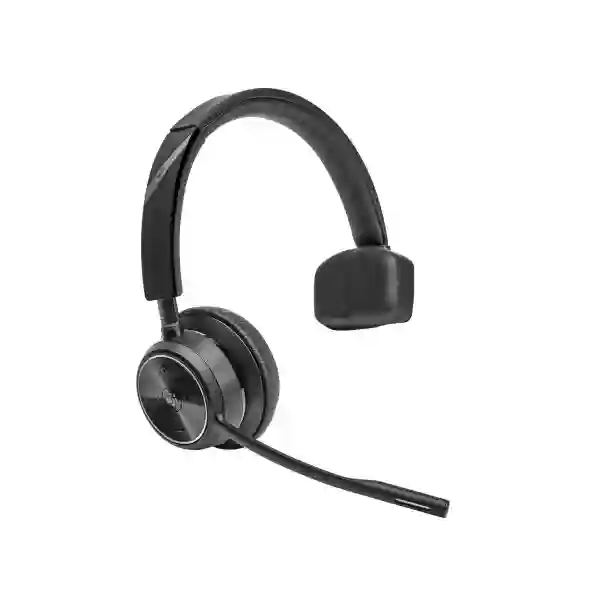
HP Poly Savi 7410 Office Monaural DECT Headset
Move more freely while handling calls from your desk phone, computer and mobile through one dedicated office base. The single-ear wearing style keeps one ear available for nearby activity; the noise-cancelling microphone is built for clear professional speech. Confirm the exact regional and application variant before ordering for Tanzania.
A single-ear office headset for people who manage calls across devices
The HP Poly Savi 7410 Office Monaural DECT Headset is designed for professionals who need to answer business calls without remaining beside a desk. Its on-ear, one-sided wearing style leaves the other ear uncovered, while the wireless headset communicates with a dedicated office base using DECT technology. The base brings together computer, desk-phone and mobile-phone connectivity, allowing a worker to manage different call sources through one headset system. That combination makes it particularly relevant to reception desks, administrative staff, account managers, coordinators and teams that move between conversations and computer work throughout the day.
A successful headset purchase begins with workflow, not the longest feature list. Consider where calls enter the business, whether the operator must hear colleagues nearby, which telephony and meeting applications are in use, and how far the operator normally moves from the workstation. This model is strongest where the user needs a single-ear fit, a fixed desk base and more than one calling device. A different design may suit employees who work primarily while travelling, who want both ears covered, or who do not have room for an office base.
For organizations in Tanzania, the important procurement step is to verify the exact manufacturer variant and the existing phone environment before ordering. The Savi 7410 family includes regional radio-frequency configurations and distinct Microsoft Teams-oriented versions. A generic model description is not sufficient to determine which specific package is being quoted. Request a precise manufacturer part number and confirmation of the intended country configuration, connection method and calling-platform requirements.
This page explains how the product works, the benefits and limitations of its design, the specifications confirmed in HP Poly documentation and the questions worth asking before a quote. The aim is to help an individual buyer or IT purchaser decide whether the headset will actually solve a daily calling problem rather than assume every compatibility claim applies to every combination of hardware and software.
Understand the three-way office base before choosing
The Savi 7410 Office system uses a base as the central connection point. A computer can connect through the supplied USB connection, an appropriately compatible desk telephone connects through the telephone interface, and a mobile device pairs to the base over Bluetooth. The headset itself uses a DECT wireless link to communicate with that office base. This distinction matters: its mobile-phone support does not mean the headset is intended to pair directly to a smartphone in the same manner as a general-purpose Bluetooth earbud.
In a typical office workflow, a receptionist may receive a call on the desk phone, then answer a web-based business call on the computer, and later take a mobile call. Separate line controls on the base help the user choose the relevant source. Three-way connectivity describes supported sources; it is not a promise that three unrelated calls can always be heard, recorded or merged simultaneously. Actual call-handling functions depend on the connected devices, their configurations and the softphone or phone system.
The benefit is easier management of a mixed communications environment. When a business still uses a desk telephone but also relies on software calling, buying a PC-only headset may leave an important part of the workflow uncovered. Conversely, when all calls run through one computer application and staff do not use landline phones, an office base with multiple inputs may be more than they need. Identify the actual devices used each day, rather than buying around a possible future feature.
Before installation, decide which source should act as the default line, where the base will sit and how it will receive power. Confirm that desk-phone cables and any optional call-control accessory match the telephone model. The supplied cables establish the physical connection options, but automatic remote answering or hanging up can require additional compatibility considerations. Testing those behaviors with the actual desk phone is better than relying on generic connector descriptions.
Why a monaural headset can be the right choice
Monaural means that one ear is covered by the headset while the other remains open. This can be helpful in front offices, shared desks and administrative areas where users must remain aware of people approaching, announcements or colleagues asking questions. It also allows operators to monitor the immediate environment without removing both earcups, which may be an advantage for staff moving repeatedly between live conversations and walk-up assistance.
This wearing style is a preference, not an automatic productivity gain. A single-ear design provides less physical isolation from environmental sound than a two-ear headset. That is useful if awareness is required but can be distracting in a loud or densely occupied office. If the role involves prolonged focused listening in a high-noise room, a suitable stereo option may be more comfortable for that individual. Evaluate the noise level at the actual workstation before choosing between mono and stereo.
The Savi 7410 uses an on-ear construction with an artificial-leather-surfaced ear cushion according to manufacturer specifications. Fit, comfort and perceived weight vary across users. A headset may feel suitable during a short demonstration and less comfortable during extended call blocks, so trials should include representative work periods. Consider glasses, headset positioning, ear sensitivity and the need to alternate tasks. Set the headband and microphone boom for the wearer rather than assuming the first position will work for everyone.
Noise-reducing microphone for conversations in an active office
HP Poly specifies a noise-cancelling microphone and Acoustic Fence technology for the Savi 7410 Office family. The purpose of these features is to reduce distracting background noise picked up by the microphone, so the person on the other end can concentrate on the speaker. For someone taking customer calls beside other desks, printers or routine office activity, that is a practical benefit. It is not a guarantee that all nearby speech or loud sound will disappear from a call.
Microphone noise reduction and the amount of sound heard by the wearer are separate questions. A good microphone may improve what the remote caller hears while the user still hears nearby conversations through the uncovered ear. This is particularly important for organizations comparing the Savi 7410 with two-ear or active-noise-cancelling listening headsets. Ask what is being cancelled: sound sent into the call, sound reaching the user, or both. Avoid treating a noise-cancelling microphone as proof of active noise cancellation in the earcup.
For best results, position the boom according to the manufacturer’s fitting instructions, maintain a consistent mouth-to-microphone distance and make a test call under ordinary office conditions. Check whether the distant caller can clearly understand speech when people are talking at nearby desks. Adjust software microphone gain carefully rather than simply increasing every level. Microphone clarity depends on physical placement, room acoustics, connected applications and device settings as well as the headset’s built-in processing.
DECT wireless freedom: range in real buildings
A DECT headset is useful when workers need to stand, retrieve a file, approach a colleague or move around a working area without disconnecting from a call. HP Poly specifies up to approximately 180 metres in an open area and about 55 metres in a typical office environment for this headset family. These are manufacturer-rated maximum or representative conditions, not a fixed radius guaranteed across every floor plan. Walls, partitions, equipment and building layout can reduce practical range.
For a team buying in Tanzania, the more meaningful question is whether reception, workstations, meeting-room entrances and nearby filing areas remain within usable coverage from the actual base position. The signal path from the base to the headset matters. Placing a base behind dense equipment or at the far end of a room may not produce the experience expected from an open-area distance figure. Test the route employees really walk while talking, not just a straight line in an empty corridor.
An office with many headsets also needs to consider local radio conditions, neighboring DECT systems and deployment density. HP Poly promotes enhanced density and adaptive power behavior in this series. Those manufacturer claims describe design intent and capabilities; they do not replace an on-site plan. If several teams are outfitting one building, conduct a small pilot and verify which regional radio version has been selected before expanding a purchase. Greater quoted range should never substitute for a coverage test in the work area.
Talk time, charging and the daily shift
Manufacturer documentation lists up to 13 hours of talk time and up to 52 hours of standby time, with charging in under about two hours for the Savi 7410 Office specification reviewed. These figures provide a planning benchmark. Actual use may be lower depending on settings, battery age, radio conditions and working patterns. A user who takes long consecutive calls may have a different charging routine from someone who answers brief calls throughout the day.
The office base and charging cradle help keep the headset associated with a regular workstation. Teams can encourage users to return the headset to its charging point during breaks and at the end of a shift. The system includes a rechargeable lithium-ion-polymer battery; charging and battery care should follow the official instructions. Do not assume the headline talk time will remain unchanged over years of use, or that an unspecified spare-battery accessory comes with the package.
Plan for the real operational scenario: an eight-hour shift with frequent calls, a longer support shift with heavy phone traffic, or several users sharing a workstation at different times. Where interruptions are costly, develop a backup procedure and check the headset battery indication before the shift starts. Procurement should also ask about supported replacement parts and local support arrangements for the exact quoted variant, rather than relying on assumptions from a global warranty statement.
Controls that matter during live calls
The headset provides controls for powering on or off, answering or ending a call, muting and adjusting volume. The office base includes separate source controls for computer softphone, Bluetooth and telephone interface lines, together with additional navigation or configurable controls described in HP Poly specifications. These functions are designed to make routine call handling practical without constantly switching between a computer window, a desk telephone and a mobile screen.
The important distinction is between a button existing on the headset and that button controlling every application exactly as expected. Softphone integration and desk-phone remote call control can depend on software, firmware, telephony compatibility and optional accessories. Check the precise actions that matter to the role: answer, end, mute state, line switching, call waiting, and the behavior when two devices receive calls close together. A demonstration should use the organization’s own calling setup.
A simple operator guide can prevent confusion after deployment. Label which button selects the computer, desk phone or mobile line, explain when the headset is muted and show users where to confirm call status. In multi-user departments, standardizing these steps reduces inconsistent handling. IT administrators should document firmware versions and application settings so that the system can be supported consistently if calling software or the phone platform changes later.
Computer calling and unified communications
Connecting the base to a computer can provide a consistent headset for softphone calls, online meetings and related voice workflows. HP Poly documentation identifies USB Type-A and Type-C connection options in the product kit and lists Windows and macOS support in its published product information. However, a supported operating system does not automatically guarantee every function of every calling application. The critical checks are audio-device recognition, call-control integration and any required vendor software.
At installation, make sure the computer is using the intended headset system as its input and output audio device. Test the microphone and speaker in the actual softphone or meeting client, and verify that the application respects device selection after restarting. Where users switch between a browser-based dialer and a desktop meeting application, confirm that audio does not unexpectedly stay routed through laptop speakers or another peripheral.
Microsoft Teams certification needs special attention. The Savi 7410 family has distinct ordering configurations and manufacturer descriptions referring to Teams support or certification. Do not present an unspecified generic Savi 7410 as the exact Teams-certified SKU requested by an IT department. If a procurement specification requires particular certification, dedicated controls or platform support, confirm the complete manufacturer part number and associated documentation before approval.
For businesses managing many desks, review whether approved endpoint-management software, firmware maintenance and user permissions fit the organization’s IT policies. HP Poly refers to management through its device tools, but feature coverage can vary with product, software release and administration environment. Plan updates and pilot deployment with normal endpoint controls rather than assuming that connecting a USB cable alone delivers all centralized management features.
Desk-phone connectivity: verify the exact telephone
The Savi 7410 Office package includes a telephone interface cable and office base. That is helpful for workplaces using a physical desk phone, especially where staff must handle voice calls while using a computer. Nevertheless, desk-phone models use different headset ports, audio settings and remote-control options. A cable being included does not establish compatibility with every analogue phone, IP phone, PBX extension or communications system.
Start with the handset or desk-phone manufacturer and exact model. Confirm whether its headset interface accepts the supplied connection, what audio configuration is required and whether additional electronic hook-switch equipment or a handset lifter is needed for the desired answer-and-end behavior. Different accessory requirements may change the final cost and user experience. The requirement is not simply to hear audio; many offices want calls to be answered without lifting the handset at all.
Organizations planning a PBX replacement should check the future calling workflow too. A Savi office base may serve a mixed desk-phone and softphone environment, but the value depends on supported interfaces. Buying before confirming the target platform creates a risk of extra adapters, unexpected manual steps or underused functionality. Gather the telephone model numbers and the call-control requirements in writing before requesting a commercial quote.
During acceptance testing, place an incoming call, answer it from the headset, mute and unmute, hang up, then repeat while the telephone is in a different call state. Listen for appropriate audio levels and check that the device does not leave a line open accidentally. These simple tests reveal integration issues that a product data sheet cannot demonstrate by itself. Document any required settings for future desk replacements.
Mobile-phone calling through the office base
Bluetooth support on the Savi 7410 Office base allows a suitable smartphone to become one of the calling sources. This is useful for employees who receive work calls on a mobile number but prefer a stable desktop headset during office hours. The mobile phone is paired with the base, and the headset connects wirelessly to the base over DECT. It is important to communicate this architecture to users who expect to take the headset into a vehicle or work remotely with no base.
HP Poly specifies Bluetooth 5.2 and common audio profiles in its technical documentation for the reviewed configuration. Real behavior depends on the handset, operating system and application. Pair the actual business phone, test incoming and outgoing calls and verify how audio switches when the computer or desk phone also needs attention. For sensitive departments, decide whether personal mobile pairing is allowed under local device policy.
The base-centric approach is well suited to a regular work desk, not a substitute for a self-contained travel headset. When staff frequently move between sites or operate entirely from a mobile device away from an office base, a purpose-built direct-Bluetooth headset may be simpler. The choice is therefore as much about location and workflow as about the presence of Bluetooth in a specification list.
Call security and organizational privacy
HP Poly describes the Savi 7400 Office family as offering DECT security features and specifically highlights security-oriented design in manufacturer material. This matters for teams discussing customer details, business transactions or internal matters. A secure radio design is one component of call privacy, but privacy also depends on the connected phone or application, network security, access controls and how people handle conversations in shared rooms.
Avoid interpreting a headset’s security feature as a claim that every call path is end-to-end encrypted. The headset-to-base radio link, the computer or desk-phone connection and any cloud telephony platform are distinct parts of a communication session. A business evaluating confidentiality should document each part of the chain and apply its own security and data-handling policies to the full workflow.
Physical practices matter as much as technical design. Teach users to check the microphone mute state, handle caller verification appropriately and avoid speaking sensitive information in public areas. Configure device management with approved administrative access and review firmware updates as part of normal IT maintenance. Shared workstations should have a documented handover procedure so users do not accidentally reuse an earlier employee’s open call or mobile pairing.
The exact security statements applicable to a purchase should be cross-checked against the documentation for the manufacturer part number being supplied. Do not assume every security certification or regulatory statement associated with one regional version automatically describes all versions. If a tender requires a specific standard, request the exact supporting certificate or datasheet rather than relying on a general marketing paragraph.
Sound protection and listening levels
Manufacturer specifications include SoundGuard Digital acoustic-protection technology. This is relevant for users who spend many hours listening to speech, where unexpectedly loud sounds can be unpleasant or disruptive. HP Poly documentation also indicates that some SoundGuard Digital features require its desktop software to be enabled. It is therefore worth checking both the physical headset and the configuration of the connected computer before claiming that every optional protection behavior is active.
Use a comfortable headset volume rather than maximizing output to compensate for office noise. If a user must continually increase volume to follow conversations, investigate the room environment, earcup fit and audio setup. The uncovered ear in a monaural design still hears environmental sound, so a louder headset is not always the best solution. Encourage routine listening-level checks, especially for staff working with several calling platforms that may have different output levels.
For an organization, listening safety is part of user training and policy rather than a single device setting. Confirm any required operating-system software, test the results in the real calling application and respect applicable occupational practices. If a worker reports discomfort or difficulty hearing, review the individual fit and workplace conditions instead of assuming that a particular technology feature has eliminated all risks.
What comes in the standard manufacturer box
The published HP Poly product information for the Savi 7410 Office lists a wireless headset, office base, charging cradle, AC power adapter, telephone interface cable, USB Type-A cable and USB Type-C cable. That collection supports the product’s role as a desk-based headset system rather than a standalone mobile accessory. The list is useful for checking a delivery against the quoted configuration and planning workstation connections.
Packaging may be described differently by regional distributor or configuration, so use the exact manufacturer variant on the quotation as the final reference. Do not assume it includes an electronic hook-switch adapter, handset lifter, additional headset, travel case or replacement battery unless those are separately confirmed. Optional accessories can be essential for a specific telephone model even when the base and headset themselves are correct.
Before a department rollout, photograph or document a pilot kit’s components and cable labels. Verify that the selected workstation has a suitable USB port, power position and desk space for the base and charging cradle. Then check how the telephone interface will route without pulling on the cable when a desk phone is moved. Simple pre-installation organization reduces the number of calls IT must handle during the first working day.
A practical first-day setup sequence
Begin by inspecting the supplied equipment and confirming the manufacturer part number against the order. Locate the base where the user can see its controls and return the headset to charge easily. Keep the base away from unnecessary obstructions and from positions where cables may be damaged. Connect the power supply according to the official instructions and charge the headset before the initial full-day test.
For a computer calling workflow, attach the appropriate USB cable to the PC and configure the chosen application to use the Savi system as its microphone and speaker. Make a test call to a colleague and check audio in both directions. Then confirm answer, end, mute and volume behavior. If the employee uses several applications, repeat the test for each one instead of assuming that correct behavior in one client establishes correct behavior in all.
For a desk phone, use the appropriate telephone interface and follow the phone-specific compatibility and setup instructions. Do not purchase an optional call-control accessory until the exact phone model and the desired remote-answer features are confirmed. For a mobile phone, pair it with the office base using the documented procedure and verify both incoming and outgoing calls before relying on it during business hours.
Finish with a real workflow rehearsal. Have the user take a computer call, switch the intended source, leave the desk within the normal working area and return the headset to the cradle. Check that the user understands the mute indication and that no unintentional call remains active. Record the chosen settings and any compatibility accessories so another workstation can be provisioned consistently in the future.
For reception, administration and front-office desks
Reception roles frequently combine digital communication and face-to-face service. A monaural headset lets the operator remain aware of arriving visitors while using the microphone to speak to someone remotely. The Savi 7410 Office may be a strong match when calls come through a desk phone and a computer-based system, with occasional mobile calls handled at the same workstation. Its office base can reduce the need to physically exchange different headsets between devices.
An operator who also handles paperwork may benefit from short-range movement during a call, provided the desk and nearby work area have reliable coverage. The practical objective is not to walk the manufacturer’s maximum distance; it is to complete common tasks without a call drop. Map the real walking pattern and perform a test from storage cabinets, reception counters and other normal working positions.
The possible drawback is ambient noise. A busy entrance can be noisy, and a single-ear headset does not physically isolate the wearer in the same way as a dual-ear model. Ask the receptionist to participate in the pilot instead of imposing a design chosen only from a technical checklist. Customer service quality improves when the communications tool matches the working conditions and the operator can hear both the caller and relevant activity nearby.
For customer-service and internal support teams
A support employee may need to speak with a caller while navigating a ticket, checking a record or consulting a colleague. The dedicated base and computer connection can give that employee a stable headset system for repeated calls. When a desk telephone is also present, one headset may reduce equipment clutter. Voice clarity matters in these roles because repeated misunderstandings can lengthen conversations and require customers to repeat information.
In an open-plan team, microphone noise reduction can help manage what the caller hears from nearby workstations. The team’s own experience still depends on local noise, seating, telephony software and headset positioning. Pilot users should provide feedback on intelligibility, comfort, line switching and ease of muting before an entire department adopts the system. A small sample across different voice levels and seating positions is more informative than a single demonstration at a quiet desk.
Procurement should also decide what happens when the user’s headset is charging, when a base fails or when call software is updated. A shared spare or documented fallback process may be appropriate for a busy service desk, but this is an organizational planning decision rather than a promise included in the product. Record compatibility and support contacts in the internal deployment documentation.
For managers, coordinators and hybrid work patterns
A manager who takes desk-phone, computer and mobile calls from one primary office may appreciate having those sources available through a single headset station. The uncovered ear can help when conversations shift between remote participants and colleagues in the room. It may also suit a coordinator who needs to move a short distance from the computer during a call without leaving audio behind.
The same configuration can be less appropriate for a frequent traveler. Because the system’s core wireless headset link is through the office base, this is not equivalent to carrying a small direct-Bluetooth headset between locations. A hybrid worker with two regular workstations should evaluate how equipment will be used at each one rather than assuming one base will serve both sites. Confirm practical portability, connections and any extra accessories before ordering.
Hybrid calling setups can also expose subtle switching problems. If an employee alternates between a corporate softphone, a personal mobile line and meetings, agree on how work calls should be routed and whether personal devices may pair with the office base. Clear policy and a short demonstration of the source controls can avoid mistaken answers on the wrong line or unexpected use of the wrong microphone.
Training and collaboration on a shared office base
HP Poly describes a conferencing capability for up to four headsets with a compatible Savi 7400 Office base. This can be useful in a training scenario where a supervisor listens alongside a new employee, or where a second colleague joins a caller discussion. It should not be mistaken for a guarantee that any four headsets from any manufacturer will connect. Confirm the exact supported headset models, pairing method and operational restrictions in the applicable user guide.
Training workflows should also consider customer privacy and consent. A workplace should communicate when additional participants are listening and follow its internal procedures for monitored or shared calls. Use the feature deliberately for coaching, not as a hidden monitoring shortcut. When a department needs call recording, supervision or analytics, those are often capabilities of the phone platform rather than features supplied merely by purchasing a headset.
During a pilot, test the intended training setup with the exact accessories or headsets the team expects to use. Verify whether the shared audio is intelligible, how participants join and leave, and what happens when the call ends. The result will determine whether the conferencing feature actually fits the organization’s training process and whether separate telephony-system functions are still required.
Buying for a Tanzania business: the essential verification points
For Tanzanian buyers, start with the exact operating environment rather than assuming a globally listed feature or bundle is universally interchangeable. Confirm the complete manufacturer part number, the intended DECT radio configuration, the chosen computer or desk-phone connection and the status of any Teams-oriented variant. Manufacturer information identifies several region-specific frequencies and ordering numbers within the Savi 7410 family. The country-specific suitability of a proposed device should be checked against the applicable requirements and supplier documentation before use.
Ask the seller to identify whether the quoted unit is the standard Office monaural version or a Microsoft Teams-specific model. These descriptions can look similar in a catalog but are not an adequate replacement for the precise part number. If the organization works under a formal IT procurement policy, add the model, frequency variant, software compatibility and required accessories to the acceptance checklist. Do not infer local approval from a specification intended for another country.
A quotation should also make commercial matters explicit. Request confirmed local price and currency, product availability, delivery arrangements, warranty coverage, support procedure and any accessory costs. None of those values can be reliably determined from the headset’s global feature description alone. Avoid budgeting around prices shown in another market, which can have different inclusions and commercial conditions. The suitable purchase is the complete working configuration, not merely the lowest headline price.
Finally, verify the business phone and network environment. The headset connects locally to its base, but computer calling still depends on the organization’s communications platform and network quality. Reliable internet, proper application settings and functioning desk-phone equipment remain necessary. Ask for a demonstration against the real devices wherever compatibility or calling continuity is mission-critical.
Understand the differences between similar headset options
Choosing a headset is easier when the alternatives are defined by actual tasks. A wired USB headset can be simple and economical for someone who rarely leaves the desk and makes calls only from a computer. A direct-Bluetooth travel headset can suit users moving between locations with a smartphone or laptop. A dual-ear DECT office model may be preferable when stronger passive isolation from nearby conversation is important. The Savi 7410 instead prioritizes a single-ear design and multi-source connectivity through an office base.
The Savi 7420 name is associated with a stereo member of the same Office family, while the 7410 is the monaural option. That is a design difference, not a statement that one model is universally superior. Compare audio needs, the desired level of environmental awareness, office noise and comfort. A user working on urgent phone calls while monitoring a reception counter may favor one ear open, while another handling long confidential calls in a crowded room may prefer two ears covered.
Do not compare products using only range, Bluetooth version or advertised battery hours. Include compatibility, charging routine, ability to control calls remotely, microphone behavior, user training and availability of service support. A headset that fits the calling platform and office routine will often provide more value than a model with a longer feature list but missing a required telephone interface.
Where a procurement team is evaluating multiple bids, use the same real-world test for each candidate: answer a desk-phone call, take a softphone call, pair the approved mobile, test mute, walk the normal office route and wear the headset during a representative work block. Then ask users to rate speech clarity, wearing comfort, simplicity and reliability. This makes the decision traceable rather than based on marketing categories.
Procurement checklist for IT and purchasing teams
A well-structured purchase request should record the target departments, number of intended users, source devices and the operational problems the purchase is meant to solve. List the telephone brands and model numbers, softphone applications, computer operating systems and any required management software. This information allows compatibility questions to be answered before a supplier issues the final configuration rather than discovered after delivery.
Require a full manufacturer part number and a description of the DECT regional variant on the quote. Ask separately about any accessories needed for remote desk-phone call control, and confirm that the included cables correspond to the expected connection methods. Specify whether the organization requires a particular Microsoft Teams certification and how it will be evidenced. Distinguish requirements from preferences so that the quote remains precise.
For an initial deployment, select a pilot group representing different users and locations. Include at least one desk phone if the wider team uses them, and test the computer calling applications used most often. Log call quality, effective roaming area, charging performance and unexpected button behavior. A short record of actual results is more valuable than treating the quoted maximum range as a deployment guarantee.
Before sign-off, confirm local commercial terms in writing: quantity, availability, price, tax treatment where relevant, delivery terms, warranty procedure and any installation or support services. These are supplier-specific details, not manufacturer specifications supplied by this page. Keep a record of what was promised and compare the received devices against the approved configuration during goods acceptance.
How to evaluate a pilot installation
A pilot should begin with a simple pass-or-fail script and a few subjective comfort questions. Test audio in both directions through the primary calling platform, then through each secondary device the user actually needs. Confirm that mute is visible or audible as expected, that the correct call source is selected and that an unanswered call does not accidentally change the active source. These scenarios reveal configuration mistakes more reliably than a demonstration of music playback.
Next, reproduce routine office movement. Ask the user to walk to a filing shelf, an adjacent desk or a nearby room while on a normal-volume call. The intended area needs consistent practical coverage, not just a best-case range reading. Check what happens near walls and other devices, and repeat the test at a busy time if many wireless systems operate in the area.
Finally, have employees use the headset across a representative shift. Gather structured comments about the cushion, microphone boom, one-ear listening preference, charging habits and source controls. A headset can pass a technical connection test but still be a poor workplace fit. Compare findings to the original objective and decide whether to order more units, adjust the configuration or choose another design.
Maintenance, support and troubleshooting
If the remote caller reports unclear sound, first check the microphone boom position, the selected computer microphone and the mute state. Then make a comparison call from the same workstation with background noise reduced. If the problem appears only in one software application, review that application’s audio settings before attributing it to the headset hardware. A consistent diagnostic order helps support staff avoid unnecessary replacement requests.
If the user cannot hear a desk-phone call, verify that the correct base source is selected and that the telephone connection and phone settings match the supported configuration. Remote answer and hang-up problems may indicate missing call-control compatibility rather than an audio fault. For mobile issues, confirm pairing with the base, the relevant line selection and the mobile’s audio route. For PC issues, check USB connectivity and the chosen input/output devices.
When wireless coverage feels poor, start with base positioning and the route the user is walking. Compare the situation with a close-range test. Obstacles, layout and other radio activity can explain differences between expected and observed performance. If a unit behaves unexpectedly after a software or firmware change, record the versions and follow the official manufacturer support instructions for the exact model.
Regular maintenance can include careful cushion cleaning in accordance with manufacturer guidance, inspection of cable strain, consistent charging and periodic review of supported device updates. Avoid unapproved cleaners or attempts to modify radio hardware. For a fleet deployment, maintain an inventory of assigned headsets, base locations, part numbers and related desk-phone accessories so faults can be traced to a specific configuration.
Common ordering mistakes and how to avoid them
The first mistake is assuming every Savi 7410 listing refers to an identical radio configuration. Manufacturer records show regional and application-specific variants, so the words Office and Monaural should be supplemented by the complete part number. This is especially important when a distributor sources equipment from multiple markets. Confirm the intended country configuration instead of inferring it from the appearance of the product.
The second mistake is confusing Bluetooth support with a headset that can operate independently of the base. In this design, the office base handles Bluetooth mobile connectivity while the headset uses DECT. Buyers whose primary need is to connect directly to a smartphone while travelling should evaluate a different category of product. A short explanation of this difference during procurement can prevent the wrong user expectation.
The third mistake is selecting the headset before checking a desk phone’s call-control requirements. The telephone interface cable addresses connection, but the ability to answer and end calls remotely may need accessory or phone-specific configuration. The fourth is treating the stated wireless range as guaranteed through walls, across building sections or between floors. Pilot testing is the remedy for both problems.
A final mistake is to purchase based on a generic claim of platform certification or local availability. Obtain evidence for the precise quoted version and documented commercial terms. The product decision should cover the complete working headset system: base, appropriate cables, software setup, calling devices and user expectations.
Verified technical overview
The following is a buyer-oriented summary of reviewed HP Poly Savi 7410 Office documentation. Confirm the complete part number and corresponding regional datasheet before treating any configuration-dependent detail as part of a specific order.
| Product family | HP Poly Savi 7400 Office |
|---|---|
| Model and wearing style | Savi 7410 Office; monaural (single-ear), on-ear |
| Wireless headset link | DECT between headset and office base |
| Mobile device link | Bluetooth through office base; version 5.2 on reviewed specification |
| Supported calling sources | Computer, compatible desk phone and mobile device |
| Computer / telephone connections | USB Type-A, USB Type-C and RJ-11 telephone interface, as applicable |
| Microphone | Noise-cancelling boom with Acoustic Fence technology |
| Acoustic protection | SoundGuard Digital; some features require relevant desktop software |
| Manufacturer-rated talk time | Up to 13 hours |
| Manufacturer-rated standby time | Up to 52 hours |
| Charging | Under approximately two hours in reviewed manufacturer specification |
| Manufacturer-rated range | Up to 180 m open area; approximately 55 m typical office |
| Battery | Rechargeable lithium-ion polymer; 500 mAh in reviewed specification |
| Finish and cushion | Black; artificial-leather-surfaced cushion |
| Regional options | Different DECT frequency and Microsoft Teams-oriented variants; confirm exact part number |
| Standard listed kit | Headset, base, cradle, power adapter, USB-A cable, USB-C cable and telephone interface cable |
Frequently asked questions
Use these answers to clarify the most common product, compatibility and purchasing questions. Specific configuration, commercial and regulatory details should always be confirmed for the quoted headset and the devices in your office.
What is the HP Poly Savi 7410 Office Monaural DECT Headset?
It is a single-ear wireless office headset system designed to connect to an office base. The base provides a way to work with a computer, compatible desk phone and mobile device. The headset uses DECT radio technology for its connection to the base, and it has a noise-cancelling boom microphone. It is intended for desk-based users who need freedom to move within a working area rather than for base-free travel use. Check the exact manufacturer variant before purchase.
Can it connect to my computer and desk phone?
The Savi 7410 Office is designed for computer and compatible desk-phone connectivity through its office base, but the exact desk-phone model matters. Computer operation requires appropriate USB connection and application configuration. Desk-phone operation depends on the telephone’s headset interface, settings and any extra remote call-control accessory. Provide the precise model of your desk phone and the applications used on the computer when requesting compatibility confirmation.
Does the Savi 7410 connect directly to a mobile phone?
The supported mobile-phone connection is through Bluetooth on the office base. The headset itself communicates with that base over DECT, so it should not be treated as an ordinary direct-Bluetooth travel headset. A mobile device can be paired with the base and selected as a call source. Users who expect to take calls while away from the base, such as during commuting, should evaluate a headset designed specifically for that use.
Is the Savi 7410 a one-ear or two-ear headset?
The Savi 7410 Office is a monaural, or one-ear, headset. The uncovered ear can help a reception or administrative user remain aware of colleagues and visitors while on a call. This can be useful in a mixed front-office role, but it gives less passive isolation from workplace sound than a suitable dual-ear design. People working in noisy rooms should assess whether the one-ear style matches their listening needs before ordering.
How much wireless range can I expect?
HP Poly quotes up to around 180 metres in open conditions and about 55 metres in a typical office. Actual coverage depends on walls, room layout, interference, base location and other environmental factors. The figures should be used as planning references rather than guaranteed walking distances. A practical trial should include the employee’s real route through the workplace while making an ordinary call.
How long does the battery last?
The reviewed manufacturer specifications list up to 13 hours of talk time, up to 52 hours on standby and a charge time of roughly under two hours. These are rated figures rather than assurances for every workday, because battery condition, settings and usage patterns affect runtime. Returning the headset to its charging cradle between shifts can make daily operation easier. Heavy-use teams should also plan how calls are handled when a headset is unavailable.
Does the microphone reduce office background noise?
Yes. HP Poly specifies a noise-cancelling boom microphone with Acoustic Fence technology, intended to make the speaker’s voice clearer to the distant caller while reducing background distractions. Results vary with microphone position and the surrounding environment. It does not mean that the wearer’s uncovered ear is shielded from nearby sound. A real test call in the user’s ordinary workplace is the best way to assess suitability.
Can I use it with Microsoft Teams?
The Savi 7400 Office family includes Microsoft Teams-related configurations, and HP Poly identifies collaboration-platform support. However, the exact Teams certification and control features must be checked against the manufacturer part number being quoted. A generic Savi 7410 model name is not enough to identify a Teams-specific version. Ask for the full variant and test call controls in the organization’s current Teams environment before making certification a procurement claim.
Can it answer desk-phone calls from the headset?
The product provides headset call controls, but remote desk-phone answering depends on the telephone and the complete connection arrangement. Some phone models may require a compatible electronic hook-switch accessory or other setup. Confirm the desk-phone manufacturer and model before promising hands-free answer and hang-up. During installation, test incoming calls, ending calls and line state rather than relying only on the fact that audio can be heard through the headset.
Does it work with every IP PBX?
No universal IP PBX compatibility should be assumed. The headset connects to a physical phone or to a computer running compatible call software; those devices and applications determine much of the actual integration. Share the phone model, desktop operating system, calling application and required button behavior with the supplier. The relevant question is whether the full endpoint setup works, not whether the headset is described broadly as suitable for business telephony.
What is included with the headset?
HP Poly’s published kit list includes the wireless headset, office base, charging cradle, AC power adapter, USB Type-A cable, USB Type-C cable and telephone interface cable. The precise quoted variant should be checked against that list. Do not assume the price includes a spare headset, electronic hook-switch adapter, handset lifter or extra accessories unless the seller confirms them. Check the delivered items against the final quote.
Can multiple people listen to a call for training?
HP Poly describes a compatible conferencing arrangement with up to four headsets on a Savi 7400 Office base. Actual use depends on the supported headset models and pairing procedures, so it should be tested for the intended training scenario. The organization should also follow its applicable rules for disclosure and call monitoring. The headset conferencing function should not be confused with a phone system’s recording, supervision or analytics features.
Are the radio-frequency versions the same worldwide?
No. HP Poly lists different regional DECT frequency configurations for the Savi 7410 family. Because country requirements vary and the user has not supplied a specific manufacturer part number, this product page does not claim that a particular frequency is the approved Tanzanian version. Request the part number and country suitability information for the actual item offered, and verify any regulatory requirement through appropriate authoritative channels.
Can it be used when working away from the office base?
The headset needs its office base for the DECT link and for access to connected calling devices. It can move within practical wireless coverage of that base, but it is not designed to be a standalone mobile headset in another location without the system. A person who mainly travels or changes workplaces daily may prefer a direct-Bluetooth portable alternative. Distinguish moving around one office from working remotely without the base.
Is this better than a wired USB headset?
That depends on the job. A wired USB headset may be easier for a worker who uses only a PC calling application and never needs to move away from the desk. The Savi 7410 Office offers mobility and a multi-device base, which may justify additional equipment for reception or mixed phone environments. Compare the actual calling sources, desk space, integration requirements, charging routine and budget rather than treating wireless connectivity as an automatic improvement.
What should I request with a Tanzania quotation?
Ask for the exact manufacturer part number, regional radio variant, intended software or Teams configuration, desk-phone compatibility and any required accessories. Request the confirmed local price, currency, availability, warranty procedure, delivery details and support terms separately. None of these commercial details are established by a generic global product name. A small pilot can further confirm fit, call quality and usable wireless coverage before a larger order.
What should I test immediately after installation?
Make a call through the primary device and confirm both listening and microphone audio. Verify answer, end, mute, volume and the correct call source. Repeat for the desk phone and mobile phone if those are part of the workflow. Walk the normal office route to assess range, then return the headset to its charging cradle. Note any application-specific settings so that IT can reproduce the configuration on other desks.
How do I choose between Savi 7410 and Savi 7420?
The key distinction in the family is wearing style: the 7410 is monaural, while the 7420 is the two-ear stereo member. Choose around environmental awareness, office noise and individual comfort. The uncovered ear of the 7410 can be useful for a receptionist, whereas a two-ear headset may better suit someone who needs more isolation. Confirm variant-specific features and fit instead of assuming every specification is identical across the family.
Request the correct Savi 7410 Office configuration
Ask FourTeck Tanzania for a product quote that identifies the exact manufacturer part number, regional DECT variant, desk-phone compatibility and required accessories. Include your computer calling platform and whether a Teams-specific option is required. Request confirmation of current pricing, supply and warranty arrangements for the exact item offered.
A precise configuration check is the most reliable next step before purchasing for an individual workstation or a larger deployment.




Reviews
There are no reviews yet.