
OFFICE COMMUNICATIONS · MICROSOFT TEAMS · DECT
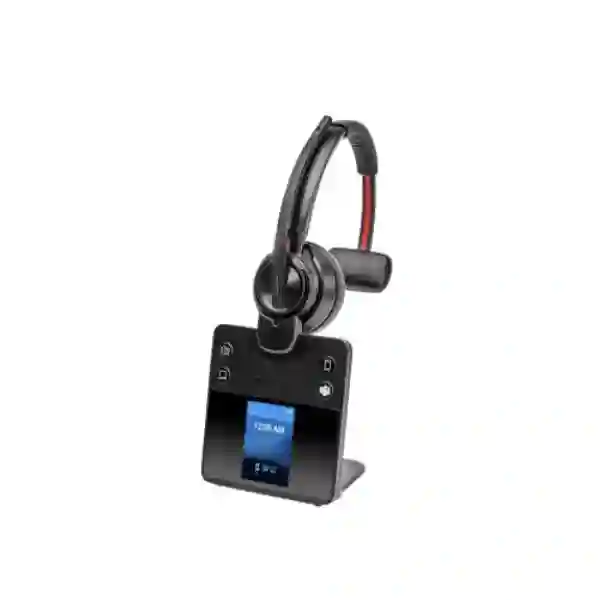
HP Poly Savi 8410 Office Microsoft Teams DECT Headset
One wireless single-ear headset for compatible desk-phone, computer and mobile workflows. Assess the right regional version and telephone setup for your Tanzania workplace before ordering.
Built for fixed office desks · Teams-focused control · Call handling across three sources
Quick feature summary
One-ear headset
An open ear can help users stay aware of customers and colleagues.
Three sources
Office base for computer, compatible desk phone and mobile.
Teams edition
Microsoft Teams-certified version with dedicated Teams control.
Office roaming
DECT range rated to 55 m typical office and 180 m open area.
Battery
Up to 13 hours talk time; less than three hours charging.
Voice pickup
Noise-cancelling boom microphone with close-conversation limiting.
Manufacturer maximums and features depend on the exact variant and operating conditions. Confirm desk-phone accessories, DECT band and local quotation.
A single headset for a multi-channel workday
An employee rarely uses just one communication system. A typical office day might begin with a Microsoft Teams meeting on a laptop, continue with a customer calling the desk telephone, and end with a return call on a mobile phone. Switching devices in the middle of that routine can mean removing one headset, picking up another, changing speakers in software, or losing time while a caller waits. The Savi 8410 Office is designed around that practical problem. Its office base provides connections for a computer, a compatible desk phone and a Bluetooth-enabled mobile phone, while a cordless DECT link lets the wearer move away from the base during a conversation.
This is a single-ear or monaural model, not a stereo headset. That difference matters: the wearer can listen to a call in one ear while remaining aware of a nearby colleague or reception visitor. It can be a sensible choice in an office where people alternate between digital conversations and face-to-face interaction. It is less suitable when users want both ears covered to reduce environmental distractions or for immersive music. The commercial question is therefore not simply whether the headset is wireless, but whether one-ear working and three-device calling match the role.
For a Tanzanian business evaluating headsets, the first step is to map the user’s devices and call platforms. List the desk-phone make and model, the computer operating system, the Microsoft Teams environment and the mobile handset. Confirm the exact regional package before committing to a purchase. A precise compatibility review is more useful than assuming that every telephone connector, radio variant or call-control feature will work identically in every office.
At-a-glance capabilities and where they help
The Savi 8410 Office combines a DECT wireless headset, an office base and a charging cradle. According to HP’s published specifications, the headset is on-ear and monaural, weighs approximately 115 g and uses an artificial-leather ear cushion. The rechargeable lithium-ion polymer battery is rated for up to 13 hours of talk time and up to 50 hours on standby. HP lists a full charging time of less than three hours. These are manufacturer maximums, not a guarantee for every shift, acoustic setting or battery age.
HP states a wireless reach of up to 180 metres in a clear, open area and up to 55 metres in a typical office environment. The distinction is important for procurement: walls, furniture, neighbouring wireless equipment and the location of the base can reduce the usable distance. The mobile connection uses Bluetooth 5.2 at the office base; the headset itself communicates with the base over DECT. Computers connect to the base through its supported USB interface, while compatible desk phones use the telephone interface.
The Microsoft Teams-certified edition includes a Teams control on the base, together with source-selection controls for softphone, mobile and telephone calls. It also includes a noise-cancelling microphone with close-conversation limiting. Think of these as aids to a more orderly working day rather than promises that no unwanted noise will ever be heard. Real-world microphone results still depend on correct boom placement, speaking level and the surrounding acoustic environment.
Microsoft Teams certification: what it means
The requested model is the Microsoft Teams-certified Savi 8410 Office edition. Microsoft lists the Savi 8410/8420/8445 Office series among certified Teams headsets, and HP describes a dedicated Teams button on the office base. For a Teams-centred organisation, this is a meaningful distinction from an unspecified generic Bluetooth headset. The device is intended to support a more integrated Teams calling experience, including access to the desktop application through its Teams controls when the appropriate software and configuration are in place.
Certification does not automatically establish every feature on every laptop or every Teams deployment. The application version, device firmware, USB connection, computer audio settings and enterprise permissions can influence behaviour. During rollout, test that incoming calls ring through the expected audio device, that mute state is clearly understood by the user, that call answer and end actions behave as intended, and that the dedicated Teams controls work with the organisation’s installed desktop application.
If the business also uses another calling application, test that application separately. Audio playback may work even when hardware call-control integration is limited. Some softphones require Poly software or additional configuration to enable answer, end and mute functions. Confirm that the selected edition is indeed the Teams model rather than a similarly named UC edition. A clearly labelled purchase quote and acceptance test prevent an apparently minor version mismatch from becoming a support issue later.
Manufacturer specification reference
| Attribute | Published information and buying note |
|---|---|
| Headset style | On-ear, monaural; one ear covered |
| Communication sources | Compatible computer, desk phone and Bluetooth mobile via office base |
| Wireless technologies | DECT headset-to-base; Bluetooth 5.2 through office base for mobile |
| Talk and standby | Up to 13 hours talk; up to 50 hours standby |
| Charging | Rechargeable Li-ion polymer; full charge in less than 3 hours |
| Range | Up to 180 m open area; up to 55 m typical office |
| Microphone | Noise cancelling with close-conversation limiting |
| Headset controls | Power, call answer/end, mute and volume |
| Teams controls | Dedicated Microsoft Teams control on Teams-certified edition |
| Headset weight | Approximately 115 g |
| Included core items | Headset, office base, charging cradle, power adapter, USB-A/USB-C and telephone interface cables |
| Regional radio band | Depends on exact regional variant; verify the quoted unit |
This reference summarises HP-published product-family details. It is not a certification, country-specific approval or commercial offer for Tanzania.
How three-way connectivity works
The office base is the centre of the system. It can be associated with the PC, a compatible desk telephone and a Bluetooth mobile phone. Dedicated controls on the base help the user select which line or audio source to use. This is particularly useful at a front desk or customer-facing workstation where staff may be asked to answer a traditional extension and then join a cloud meeting without changing their wearable device.
Three-way connectivity describes access to three source types. It should not be interpreted as a guarantee that every application can be mixed into one conference call, or that three conversations can be conducted independently at the same instant. Call routing, conferencing and line behaviour depend on the connected services, telephone system and supported functions of the headset base. For each proposed use, decide whether the requirement is switching between calls, joining a Teams meeting, answering a mobile call, or actually bridging participants.
The Bluetooth connection is especially easy to misunderstand. A mobile phone pairs with the office base, not as a replacement for the headset’s DECT connection. Therefore the mobile needs to remain within practical Bluetooth range of the base for that link, while the wearer can roam on the DECT connection within its own coverage. If staff expect to carry the headset outdoors with only their mobile phone and no base nearby, a different type of portable Bluetooth headset may be a better fit.
A closer look at DECT roaming
DECT is the wireless technology between the Savi 8410 headset and its base. Its purpose in this system is to let a user continue an office call while stepping away from the desk, for example to collect a document, consult a colleague or move between nearby work areas. HP’s open-area figure of up to 180 metres is measured under favourable conditions. Its typical-office reference of up to 55 metres is a more useful starting point when planning a normal workplace, though it is still not a site-specific prediction.
Assess range where employees actually move. An office with concrete walls, metal shelving, enclosed stairwells or multiple floors can perform differently from an open-plan room. Place the base on a stable, accessible desk surface rather than behind dense equipment, then make test calls at the locations that matter. Include reception counters, meeting-room doors, storage rooms and corridors if those are part of the user’s normal routine. Listen for audio interruptions and notice whether the headset signals an approach to the coverage limit.
For a group deployment, do not treat a single theoretical radius as the final design. Multiple headsets, radio settings and the local environment affect capacity and experience. The applicable DECT frequency version must also match the intended country and regulatory requirements. HP documents regional variants with different radio bands, so the frequency printed on an overseas retailer’s listing must not be assumed to describe the particular unit quoted for Tanzania. Confirm the exact supplied variant before import or installation.
Noise-cancelling microphone and speech quality
The Savi 8410 uses a noise-cancelling boom microphone with close-conversation limiting. In practical terms, the microphone system is designed to favour the wearer’s voice and reduce some of the surrounding speech that would otherwise reach the other person on the call. This matters in shared offices where adjacent desks may have overlapping conversations. The key benefit is improved voice focus for the far-end listener, not complete silence around the headset wearer.
Correct positioning has a significant effect on results. The boom should sit close to the mouth according to the manufacturer’s fitting guidance, without touching the face or clothing. If a caller says the voice is weak, distorted or unusually noisy, check microphone position and software input selection before concluding that the hardware has failed. A test call from the actual desk is more informative than a quick demonstration in a quiet showroom. Check both Teams and the telephone line because they may use different audio paths and gain settings.
The listening experience is also shaped by the monaural design. One ear remains open, so ambient conversation can still be heard by the wearer. This can be helpful for supervisors, front-desk personnel and staff who need awareness of surrounding activity. It can be distracting for a person trying to concentrate in a very loud room. If both-ear isolation is essential, compare a suitable stereo or binaural business headset rather than expecting this single-ear model to behave like one.
Battery life, charging and daily readiness
HP rates the Savi 8410 Office for up to 13 hours of conversation and up to 50 hours of standby. That provides a useful planning benchmark for many office roles, but actual battery performance depends on usage patterns, radio conditions, operating settings, battery health and whether the headset is charged between shifts. A person making near-continuous calls should have a different charging routine from someone who takes short, occasional conversations. For busy call teams, consider whether the maximum rating leaves sufficient operating margin for the longest expected day.
The charging cradle sits with the office base, giving the headset an obvious place to return after a call or at the end of a shift. HP lists less than three hours to charge, and its operating guidance recommends allowing initial charging before first use. Supervisors can encourage staff to check battery level before a long scheduled meeting rather than discovering a low charge after a conference has begun. Voice and indicator notifications can help users recognise battery status, mute state and wireless range warnings.
Battery care is also a long-term ownership question. Rechargeable batteries age, and a headset deployed across several shifts may need service planning earlier than a lightly used unit. Ask about genuine compatible replacement batteries and the support process for the exact regional product. Do not build a staffing or service commitment on the assumption that one charge will always deliver the published maximum. A simple charging habit and a realistic spare-device policy can reduce avoidable interruptions.
The office base and everyday controls
The office base gives the Savi 8410 much of its practical value. Instead of making users search through a different audio menu each time they change devices, the base provides dedicated line controls for computer or softphone audio, mobile Bluetooth audio and the telephone interface. HP also lists a Microsoft Teams button, scroll wheel and back key for supported base functions. The base has an interface for managing settings, so users and administrators can find relevant options without treating the headset as an opaque accessory.
Headset controls include power, call answer or end, mute and volume adjustment. Those controls are especially valuable when a worker is holding a folder, consulting a screen away from the desk, or moving between reception and another nearby workstation. Nevertheless, the behaviour of answer and end commands should be confirmed with the specific softphone or desk-phone system. A telephone line may require a compatible electronic hook switch accessory or other installation arrangement for full remote call handling.
Training should concentrate on a small number of tasks rather than every menu. Show users how to choose the right source, recognise a mute warning, place the headset correctly on the charging cradle and switch from a mobile conversation to their next computer call. A thirty-second practice scenario often identifies configuration problems faster than a complex instruction sheet. For shared desks, label the charging location and avoid swapping an unregistered headset onto a base without checking the pairing process.
Desk-phone compatibility comes before purchase
A desk phone can be physically close to the Savi base and still require a compatibility check. The supplied telephone interface cable is part of the manufacturer’s documented box contents, but the required call-control behaviour depends on the telephone model and system. Different phones can use different headset ports, lifter options, electronic hook switch protocols and settings. An RJ-style connector alone is not proof that remote answering, ringing indication or microphone levels will work as expected.
Before requesting a quotation, record the desk phone’s manufacturer, complete model number, firmware where relevant and the PBX or hosted telephony service it connects to. Ask which supported interface arrangement is needed for that exact combination. If an EHS cable or handset lifter is necessary, clarify whether it is an extra accessory and whether it is included in the proposed supply. This is particularly important when replacing a wired headset that relied on the phone’s own button for call control.
At installation, test both inbound and outbound calling. Confirm the caller’s voice is audible, the caller hears an appropriately clear microphone signal, and desk-phone volume settings do not introduce distortion. Test hold, answer, end and any planned remote-control actions. If an organisation uses multiple phone models, approve each model or define a standard supported configuration. One successful demonstration on a single desk does not prove compatibility with every extension in the building.
Computer and softphone setup
The manufacturer lists USB Type-A and USB Type-C cables in the standard package for connecting the office base to a computer. During deployment, connect the compatible USB lead to the appropriate port and verify that the operating system recognises the intended audio device. In Microsoft Teams, select the headset system for both speaker and microphone where appropriate, make a test call and check that hardware call controls respond as intended. Avoid relying solely on the fact that a computer can play a notification sound through the headset.
The Savi 8410 Office is described by HP as compatible with contemporary Windows and macOS computer environments, with additional supported mobile operating systems associated with the overall product. Business IT teams should still check their own operating-system version, endpoint-management policies, USB docking arrangement and softphone application. Shared docking stations, virtual desktops, remote desktops and restricted device permissions can add variables that are not settled by a general compatibility label.
Poly Lens software may help with supported settings, updates and device management. The user guide notes that some softphones require Poly software for call-control functionality. When an endpoint is centrally managed, have IT approve software installation and firmware changes rather than asking every employee to make untracked changes. Record a baseline configuration after testing, including USB connection, chosen Teams audio device and any relevant telephony integration settings. That makes troubleshooting easier when a user changes desks or receives a replacement laptop.
Pairing a mobile phone through the base
For staff who use a business mobile alongside computer calling, the office base’s Bluetooth link offers a useful additional channel. The setup process involves opening the base’s device menu, choosing the mobile-pairing option and selecting the Savi system from the phone’s Bluetooth settings. The exact sequence should follow the included instructions for the shipped firmware. Once paired, staff can select the mobile source at the base when they need to handle a supported call.
The distinction between pairing and transferring audio matters. A mobile may be paired successfully while the current call audio remains on the phone because it was answered there. The Savi operating instructions describe moving mobile audio between the handset and the headset system using the base controls. Test the workflow with a real mobile call so the user understands which device currently owns the audio. Do not assume that a music app, mobile meeting app and a telephone call will all behave identically.
For security and practical administration, pair only authorised handsets to shared office equipment. Remove former users’ devices when a workstation is reassigned, and review Bluetooth settings if mobile calling is not required. The product is useful for someone who has a fixed office base and moves around that workplace. If the person spends most of the day travelling between sites, evaluate a headset designed for direct portable phone pairing rather than treating a desk-based DECT system as a travel accessory.
Why the single-ear design can be the right choice
Headset design is a workplace decision, not merely an aesthetic one. The Savi 8410 is a monaural on-ear unit: it covers one ear and leaves the other available. Receptionists often need to hear arriving visitors. Team leaders may need to notice a colleague asking for assistance. Office sales staff may have to make a call while listening for an internal question. In these contexts, environmental awareness can be a meaningful benefit, especially where wearing a large stereo headset would separate staff from the office around them.
The other side of that choice is concentration. A person who spends several hours in an extremely noisy room might prefer a two-ear option for more consistent listening. The noise-cancelling boom helps the far-end caller, but it does not transform the open ear into a soundproof barrier. Buyers should distinguish microphone noise cancellation from acoustic isolation for the wearer. This prevents disappointment when a headset has good transmitted voice quality but the user still hears a nearby conversation.
Fit is personal. The approximately 115 g manufacturer weight offers a specification for comparing designs, but comfort depends on head shape, ear cushion condition, wearing duration and individual preferences. Let a representative user test the headset during a normal shift. Ask whether the headband pressure is acceptable, whether the boom stays correctly positioned and whether the wearer can reach controls without disturbing the headset. A suitable headset is one employees will use consistently and correctly.
Useful workplace scenarios
At a reception or administrative desk, the staff member might answer a desk-phone extension, consult a visitor and later attend a short Teams meeting. One-ear wearing makes it possible to remain aware of in-person arrivals, while the office base reduces the need to keep changing hardware. The important test is whether the desk phone supports the required remote-answer functions and whether the wearer has adequate roaming coverage near the counter and adjacent workspace.
For a sales or account-management team, a workstation may involve mobile calls with clients, Teams meetings with internal colleagues and occasional calls through a fixed business telephone. The three-source base can reduce daily switching friction. Managers should confirm whether employees need only to move between conversations or to combine participants across services; those are different requirements. A clear workflow can make better use of the equipment than a feature list alone.
Customer-support supervisors may use the system when they need to hear a colleague’s question while remaining on a call. HP describes conferencing up to four compatible headsets through the base, a capability that can support monitored training and collaboration where correctly configured. Check the supported headset combinations and the actual training arrangement before ordering extra headset units. The same model may be less suited to a roaming field technician who needs a headset without a fixed base station.
For a hybrid worker with an assigned office desk, the system can integrate the office computer and telephone with a mobile handset. For a worker who carries only a laptop between different locations every day, the size and power requirements of a base-based solution may make a more portable headset preferable. Match the product to the stable workstation, expected call mix and time spent away from the base.
Training and supported headset conferencing
HP identifies the ability to conference up to four headsets onto a single Savi Office base as a feature of the series. This can be relevant when a supervisor wants to guide a new colleague through a live customer interaction or when two people need to listen to the same business call. In a suitable training setup, avoiding separate loudspeakers can protect the acoustic quality of the conversation and allow nearby teams to continue working.
The four-headset figure is a system conferencing capacity, not a statement that four completely independent office telephone lines are provided. Also, not every Savi headset generation can be paired with the base. HP’s support documentation specifically notes that the base does not connect to the Savi 7200 headset, so buyers should not assume universal compatibility from the shared Savi name. Obtain the exact headset models intended for training and check whether additional cradles, batteries or accessories will be needed.
A sensible training plan includes pairing or subscription procedures, supervisor permission for the training session, a trial call and an agreed process for ending the conference. Organisations handling sensitive conversations should apply their normal consent, monitoring and confidentiality policies. Device capability does not replace those policies. For contact-centre procurement, specify the number of agents, the number of training positions and the desired monitoring method so the quotation includes suitable equipment rather than an unexplained quantity of headset tops.
DECT security and privacy considerations
HP describes the relevant Savi 8410 Office variants as DECT security certified. This is a useful manufacturer security characteristic of the headset-to-base wireless system. It should not be expanded into a claim that every telephone call is end-to-end encrypted or that an entire corporate network is automatically protected. The call still travels through the desk-phone, computer or mobile service that the organisation uses, each with its own security responsibilities.
For an IT department, a practical security review includes who can pair devices to the base, how software updates are controlled, whether shared headsets are reset between users and how meeting or call data is handled by the relevant service. Where mobile pairing is enabled, establish a process for disconnecting phones when an employee leaves or changes desk. If call monitoring or training conferences are used, ensure company policy addresses the participants and any applicable legal obligations.
The regional radio version is also part of responsible purchasing. Different DECT bands are documented for different markets. A system shipped for one country should not be assumed appropriate for deployment in another simply because the physical hardware resembles a unit on a manufacturer’s international page. Ask the supplier to confirm the precise product code, operating frequencies and any applicable approval requirements for the intended Tanzania deployment. Do not interpret the absence of a published local approval statement as evidence of approval.
The exact regional version matters in Tanzania
There is an important distinction between the product family name and the specific sales configuration. HP publishes a Microsoft Teams-certified Savi 8410 Office variant for the Africa region using a DECT band of 1880–1900 MHz. HP also publishes North American configurations using 1920–1930 MHz. This demonstrates that regional versions exist; it does not by itself prove which exact configuration is offered, importable or approved for use by a particular Tanzanian buyer.
When preparing a purchase order, request the manufacturer’s full product number and the printed radio-frequency specification for the actual unit being quoted. Have the supplier verify compliance with any requirements that apply to the installation and the importing organisation. If the headset will be deployed across multiple countries, identify the destination country of each unit instead of assuming one regional package suits every location. Also verify the power adapter supplied with the package and any necessary local arrangements.
Commercial details deserve the same precision. Local selling price, stock, dispatch time, shipping, any required accessories and the final warranty terms should come from the exact Tanzanian quotation rather than from international catalogues. The product description here does not establish local availability, regulatory authorisation or a price in Tanzanian shillings. These are sensible questions to settle before approval, particularly for an organisation buying a fleet of devices rather than a single demonstration unit.
What is included in the standard package
HP’s published specification for the Savi 8410 Office lists a wireless headset, office base, charging cradle, AC power adapter, USB Type-A cable, USB Type-C cable and telephone interface cable. That is a useful baseline when checking a quotation or unpacking a unit. Package contents should still be confirmed against the manufacturer’s exact regional item and the seller’s offer, especially if accessories, adapters or country-specific power components are discussed separately.
Do not confuse the presence of the telephone interface cable with an assurance that every desk phone needs no other hardware. Some supported installations can require an electronic hook switch adapter or a handset lifter for the desired remote-answer behaviour. Similarly, extra headset units for training and conferencing should be specified by model and quantity; they are not automatically implied by the base’s conferencing capability. A spare battery, replacement cushion or additional cradle should not be described as included without a verified package list.
For receiving teams, use a simple unpacking check. Match the printed product number with the approved quotation, identify the Teams edition, inspect the headset and cradle, verify the power supply and USB cables, and retain the instructions needed for setup. If the packaging contains a regional radio designation, capture it for the asset record. A complete receiving record helps distinguish a shipping mismatch from a configuration problem during the initial workplace rollout.
Planning a pilot before a larger rollout
For an organisation buying several Savi 8410 Office units, start with a representative pilot rather than deploying every workstation on the same day. Choose users who cover the main call patterns: one Teams-heavy worker, one person who uses the desk phone and one employee who needs the Bluetooth mobile channel. Include at least one real example of the office’s normal background noise and one workstation at the edge of the expected roaming area. The objective is to test the actual environment, not merely to confirm that the headset powers on.
Give the pilot a short acceptance checklist. Verify incoming and outgoing audio, microphone clarity, mute status, source selection, call answer and end behaviour, battery and charging, usable range, Teams control integration and desk-phone accessories. Ask pilot users to comment on single-ear comfort after a meaningful period of work. Document the computer image or operating system, softphone version, telephone model and headset firmware so the results can be reproduced.
After the pilot, decide whether the product should be standardised for every role or reserved for positions where its three-device base is valuable. Not all employees need a desk telephone interface; not all require direct mobile access. A tailored allocation can be more economical and easier to support than assigning the most complex headset to everyone. Only then finalise quantities, approved accessories, spare units, asset labels and a supported procedure for new employee onboarding.
IT administration, updates and ongoing support
The Poly Lens application is part of the manufacturer’s wider management and configuration ecosystem. HP’s documentation references it for supported Savi settings, device updates and certain softphone-related controls. A business IT team can evaluate whether central configuration and maintenance are appropriate for its deployment. Before installing software on managed computers, review the organisation’s security and endpoint-management requirements, and verify that the application version supports the specific devices and operating systems involved.
In normal support, the most useful troubleshooting records are often simple: the headset base’s connection path, the selected audio source, the PC’s current output and input device, the presence of an EHS accessory and whether the headset is paired or registered to the intended base. Many apparent headset failures are really source-selection errors, changed computer defaults or desk-phone configuration issues. Keeping an approved setup record can reduce repeated diagnosis when devices are moved.
Create a controlled maintenance process. Check manufacturer guidance before applying firmware updates, schedule changes outside critical calling periods where possible and confirm key Teams and telephone functions afterwards. Establish who handles battery replacement, cradle problems and lost peripherals. Where multiple employees share equipment, include cushion hygiene and physical condition in routine checks. A predictable support process protects the investment far better than assuming the headset will need no attention once deployed.
Audio troubleshooting for a busy desk
If a user can hear the other person but cannot be heard, begin by checking the microphone mute state, boom position and active audio source. On a computer, verify the microphone chosen in both the operating system and the calling application. For a desk telephone, review the supported base interface and microphone gain settings. It is not unusual for one channel to work while another needs adjustment, because the device routes audio through different paths.
If there is no sound at all, verify power, charging, registration to the base and the selected line. Confirm that the call is active on the intended application or telephone, and check whether the sound has remained on a paired mobile rather than moving to the headset. If the user’s reported problem occurs only while walking away from the desk, repeat the call at different positions and consider base placement, walls and the effective DECT range. A stable call at the desk does not establish performance in every room.
When a Teams button or hardware answer control does not behave as expected, test the Teams desktop application and software integration rather than assuming the microphone or speaker is defective. Some supported softphones need Poly software for full call control. If a problem persists, record the exact product variant, installed software version, operating system, telephone model and symptoms before escalating to technical support. Consistent information prevents a simple configuration question from becoming an unnecessary hardware replacement.
Comparing Savi 8410 with other headset formats
The main distinction between the Savi 8410 Office and a simple wired USB headset is freedom from a cable at the desk, combined with the ability to use an office base that serves more than one call source. A wired headset can be a good value when the user rarely leaves the computer and does not need a desk phone or mobile connection. A three-device DECT system is more attractive when movement and switching between communication channels are routine rather than occasional exceptions.
Compared with a portable Bluetooth headset, the Savi’s DECT headset-to-base connection is intended for an office setting with a dedicated base. That may suit a stable workplace but requires desk space, power and an installation process. A portable Bluetooth headset is often easier to use across hotels, home offices and mobile work because it does not need to travel with an office base. Choose according to where calls actually occur, not only the maximum advertised range.
Within office headset styles, the Savi 8410 is the mono choice. If staff need both ears covered, compare a compatible stereo Savi option and evaluate comfort, noise exposure and the intended collaboration platform. If a user needs only a Teams USB endpoint and no telephone support, compare simpler Teams-certified devices. If the buyer requires multiple agents to share supervised calls, compare training functions and compatible headset combinations. The Savi 8410 is strongest when one-ear awareness, a fixed three-source base and office roaming are all meaningful.
Understanding true ownership cost
The purchase price of a headset is only part of its total cost. For a Savi 8410 Office workstation, include the exact headset and base configuration, any desk-phone integration accessory, fitting and setup time, optional extra training headsets, battery or cushion replacement planning and a realistic spares arrangement. If the base is used with a phone model that needs an additional EHS cable, omitting that cable from the quotation can make an apparently inexpensive setup unsuitable on delivery.
Staff productivity is harder to reduce to a single number, but the workflow is clear. Employees who otherwise switch between several headsets or walk back to the desk just to answer a call may benefit from a system designed for those routines. That benefit depends on the person’s work pattern and on successful integration. Do not assume every office worker will save the same amount of time or that the headset alone changes call-centre performance.
For Tanzanian procurement teams, compare quotes on a like-for-like basis. Ask whether taxes or freight are included, which regional product number is offered, what locally supportable accessories are included and what warranty or service process applies to the supplied unit. Obtain each commercial statement from the supplier’s current terms. This page intentionally makes no local price, stock or delivery promise. An accurate specification and clear acceptance criteria are more valuable than a speculative discount claim.
A practical buying checklist for IT and procurement
Begin with the role: is the employee a receptionist, account manager, supervisor or remote worker? Confirm that the one-ear design fits their need for awareness versus isolation. Then list the three source categories actually required: computer or Teams, desk phone and mobile. The strongest purchase case is where several of these channels genuinely matter. If the user only takes a few laptop calls each week, a simpler headset might be sufficient.
Next, record technical dependencies. Specify the PC operating system, Teams or other calling application, telephone make and model, and mobile device platform. Ask for a documented compatibility check and the accessory list for the exact desk phone. Verify whether users need remote answer and end functions, the Teams-specific controls, or supervisor conferencing. Separately check DECT coverage at the actual work site and the desired number of simultaneous users or training positions.
Finally, request the exact product number for the intended Tanzania supply. Confirm the regional DECT frequency, applicable radio and import requirements, package contents, power supply, warranty terms, local quotation, fulfilment conditions and spare-part arrangements. These checks are most effective when written into the quote or internal approval request. They prevent confusion between a product-family specification and the commercial configuration the organisation will actually receive.
Step-by-step onboarding for an individual user
Start with a clean, stable desk position for the base and the charging cradle, then follow the manufacturer’s setup instructions for the exact shipped unit. Check the power supply and charge the headset as directed before the first extended call. Connect the base to the computer with the appropriate supplied USB cable. Select the headset’s input and output in the operating system and Teams, then place a test call to confirm both speaking and listening are clear.
If a compatible desk phone is part of the installation, connect it using the correct telephone interface arrangement and any additional approved call-control accessory. Test an inbound call, remote answering if required, outgoing dialling and appropriate microphone volume. Then pair the authorised mobile handset with the office base if mobile calling is needed. Make a separate mobile test call, confirm the audio route and practice selecting sources at the base.
Finish with a short user handover. Demonstrate call answer and end, mute, volume, choosing a source, interpreting a battery warning and returning the headset to its cradle. Walk a real route away from the desk while on a test call to evaluate coverage. Tell the user who to contact if a headset is lost, damaged or no longer registers to the base. The best first-day result is not merely a successful installation but a user who knows how to operate the system confidently.
When not to choose this headset
The Savi 8410 Office is not the answer to every communications problem. If the employee works primarily on a smartphone while travelling and rarely has a fixed desk, a portable Bluetooth headset may be more convenient. If the person needs to block as much surrounding sound as possible with both ears covered, a binaural design may be more suitable. If a workstation has no desk telephone, no mobile channel and only light laptop calling, the additional base capabilities may not justify the extra equipment and setup.
There are also technical reasons to pause before ordering. An older desk phone might need special integration hardware, or a desired remote-control function may not be supported. A building with challenging radio propagation should be tested before committing to a roaming requirement. An imported variant without confirmed regional suitability should not be approved purely on the basis of an attractive overseas price. These issues are best resolved by compatibility checks rather than a blanket claim of universal support.
For organisations evaluating multiple models, define the non-negotiable requirements first: one ear or two, fixed base or travel, compatible desk phone, Teams certification, expected movement, and support for a shared training arrangement. These factors provide a defensible comparison. The Savi 8410 Office should be selected where its documented abilities solve everyday problems and its limitations are acceptable to the people who will use it.
Request a Tanzania quotation with the right details
To evaluate the HP Poly Savi 8410 Office Microsoft Teams DECT Headset for a Tanzanian workplace, request a product-specific quotation and compatibility review. State the quantity required, the desk-phone model if any, computer operating systems, use of Microsoft Teams, the need for mobile Bluetooth calling and whether supervisor training or shared headsets are planned. If the installation covers multiple offices or countries, say where each system will be used so regional product specifications can be checked.
Ask the supplier to confirm the exact manufacturer product code, DECT regional variant, package contents and any additional accessories required for the proposed phones. Local availability, price in TZS, shipment timing, regulatory considerations and warranty service should be confirmed in the written offer. A separate technical check may be appropriate where the workplace has dense walls, multiple floors or a large number of nearby headsets.
The goal is a complete, usable communications setup rather than simply a headset in a box. For a single employee, that may mean verifying the phone model and Teams connection. For a fleet deployment, it may mean conducting a pilot, standardising approved settings and planning spare units. Contact FourTeck Tanzania to request an assessment and an offer for the exact configuration suited to your workplace.
Frequently asked questions
Is the HP Poly Savi 8410 Office certified for Microsoft Teams?
Yes. Microsoft lists the Savi 8410/8420/8445 Office series among Teams-certified headset models, and HP documents the Teams-specific Savi 8410 Office version. The Teams edition includes a dedicated Teams control. Verify that the quoted item is the certified Teams version and test the features with the organisation’s installed Teams desktop application. A similarly named UC configuration should not be treated as the same sales variant without checking its exact product code.
Can it connect to a desk phone, laptop and mobile?
The office base is designed for three source types: compatible desk phone, computer and Bluetooth mobile. This lets one headset serve several calling workflows at a fixed desk. Physical connections, call controls and accessories depend on the exact telephone and computer environment. Three-way connectivity does not by itself promise that three unrelated calls can be mixed into one call, and the Bluetooth mobile connection runs through the base rather than directly replacing the headset’s DECT radio link.
What range should we expect inside an office?
HP specifies up to 180 metres in an open area and up to 55 metres in a typical office. These figures are maximum reference values, not site guarantees. Concrete walls, floor layouts, metal surfaces and nearby equipment can change the result. A user who needs reliable coverage along specific corridors or between rooms should make test calls from those areas before a larger purchase. Choose base placement with the actual roaming route in mind.
How long does the battery last and how fast does it charge?
The published ratings are up to 13 hours of talk time and up to 50 hours of standby, with charging in less than three hours. Real duration depends on activity, environmental conditions, battery condition and settings. Place the headset in its cradle between shifts and check battery status before prolonged meetings. High-volume users should assess whether their daily calling pattern leaves enough reserve rather than assuming that the rated maximum will always be available.
Does a noise-cancelling microphone mean the wearer cannot hear office noise?
No. The microphone is intended to reduce some background sounds transmitted to the caller, including nearby conversations through close-conversation limiting. The Savi 8410 is a single-ear headset, leaving the other ear exposed to surrounding activity. That is useful where people must remain aware of colleagues or visitors, but it is not the same as isolating both ears. If the user needs a quieter listening experience, consider whether a suitable two-ear business headset is more appropriate.
Does it support training with several headsets?
HP describes conferencing up to four compatible headsets through the Savi Office base. This can be useful for supervised call training or collaboration, but it does not provide four separate phone lines. Additional headsets must be confirmed compatible with the exact base and may need to be purchased separately. HP specifically notes that Savi 7200 headsets are not compatible with this base. Set up and test the intended training arrangement before including it in a team rollout.
Do we need an extra cable for our desk telephone?
Possibly. HP lists a telephone interface cable in the standard package, but a specific desk phone may require an electronic hook switch accessory, a handset lifter or another supported configuration for the desired remote-control features. The correct answer depends on the phone’s manufacturer and full model number. Request a compatibility check and confirm every extra cable or adapter on the quotation. Do not infer that a similar-looking phone connector guarantees full call-control support.
Can it be used without installing Poly Lens?
Basic audio connection and operation depend on the supported device and system configuration. Poly’s guidance notes that some softphones require Poly software to enable call-control functions such as answer, end and mute. Poly Lens is also used for supported device settings and firmware updates. The IT team should decide whether and how the software is installed on managed computers, and test the exact Teams or other softphone workflow before a deployment is declared complete.
Which DECT frequency version is suitable for Tanzania?
HP documents more than one regional frequency variant of the Savi 8410 Office, including an 1880–1900 MHz Africa-region product and a separate 1920–1930 MHz North American product. That difference is a reason to verify, not a basis for assuming local authorisation. Ask for the exact manufacturer product number and documented radio specification of the quoted unit, then confirm any applicable Tanzanian regulatory and import requirements through the responsible parties before purchase or deployment.
Is a Tanzania price, stock level or warranty confirmed here?
No. Product-family specifications can be verified from HP, but a current Tanzania selling price, local stock position, delivery commitment, regulatory status and terms of supply require confirmation for the exact commercial offer. The manufacturer publishes warranty information, but the scope and service route for the supplied regional unit should also be checked. Request a written quotation identifying the item, any required accessories, applicable terms and the support process.
Will the headset work directly with a phone when the office base is elsewhere?
Its office arrangement is built around the DECT connection between the wearable headset and the base. The base, in turn, manages compatible computer, desk-phone and Bluetooth mobile sources. That means the system is not equivalent to a portable Bluetooth earpiece paired directly to a mobile phone for use anywhere. If a user’s work requires frequent travel away from the base location, confirm whether a different headset category would be a better operational match.
What should an IT buyer check before approving several units?
Confirm the user roles, single-ear preference, exact Teams variant, computer and calling applications, desk-phone compatibility, required telephone accessories, Bluetooth mobile use and expected roaming area. Request the regional product code and verify applicable frequency requirements. Pilot the device with real calls and record answer, end, mute, charging, comfort and coverage results. Then document quantity, spares, user training, support ownership and the current Tanzania commercial quotation. This process is more reliable than buying solely from a generic feature comparison.
Request an HP Poly Savi 8410 Office compatibility review and quotation
Share the number of headsets, your desk-phone models, use of Microsoft Teams, required mobile connectivity and expected office roaming area. Ask for the exact manufacturer variant, accessory list and applicable Tanzania supply terms before purchase.
Contact FourTeck Tanzania for a product-specific quotation.




Reviews
There are no reviews yet.