
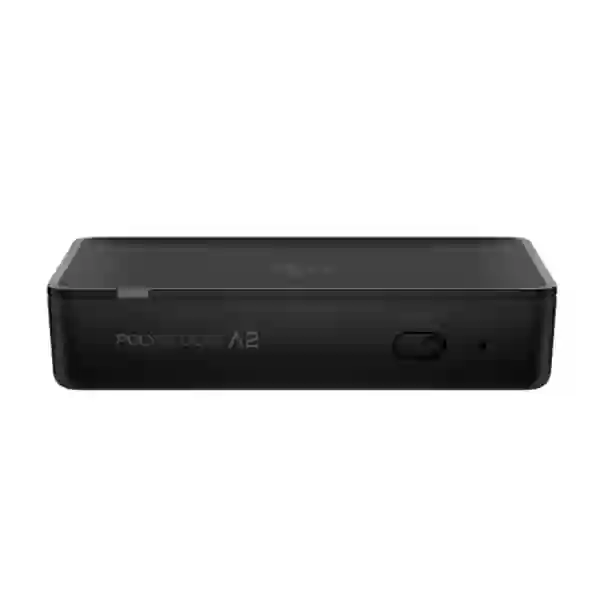
HP Poly Studio A2 Audio Bridge
Build a more flexible Poly meeting-room microphone system with A2B microphone connectivity, Poly StudioNet and Power over Ethernet.
The HP Poly Studio A2 Audio Bridge links compatible HP Poly Studio A2 Table Microphones to supported next-generation Poly video systems. It is intended for organisations planning a new meeting room, redesigning a boardroom table or extending pickup across a larger collaborative space. Before requesting a quote, confirm the room system, microphone quantity, approved network connection and power source; the bridge is not a universal replacement for older Poly microphone accessories.
At a glance: what this device does and does not do
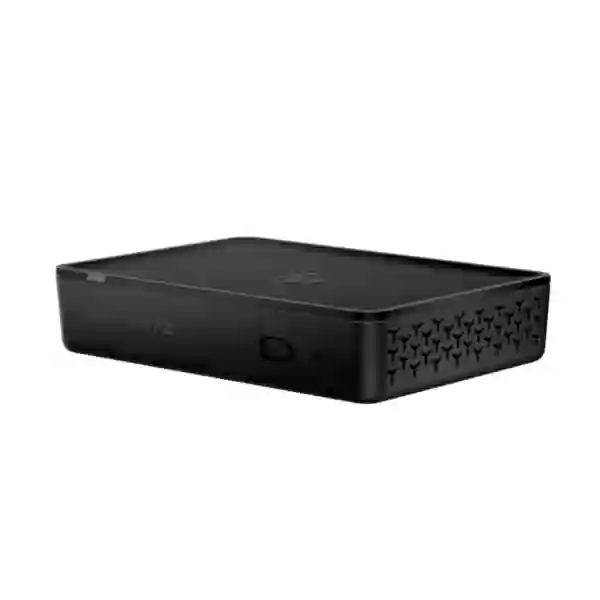
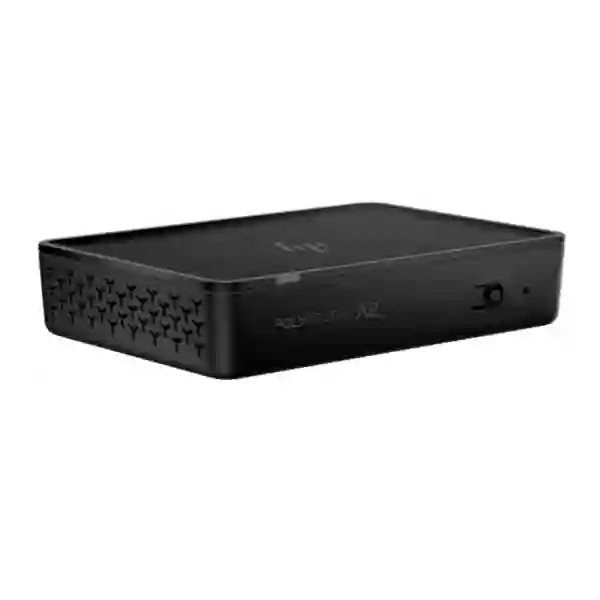
The audio bridge is the connection point between the A2B audio bus used by HP Poly Studio A2 Table Microphones and the StudioNet audio transport used with supported HP Poly video room systems. It provides four A2B bus ports and one RJ-45 Ethernet network interface. The bridge itself is compact and designed to be mounted discreetly, but its role in the system is substantial: it joins microphone branches, supplies the connected A2 audio devices through the supported power arrangement, and transfers their audio and control information to the host video system.
Choose it when the room design calls for multiple Studio A2 table microphones and your host system is on HP’s supported list. It can help keep microphone placement aligned with a table layout rather than forcing people to sit close to the video bar. It also offers a structured way to plan expansion or changes to the furniture layout. A clear cable plan and sufficient PoE power remain essential even when the system is described as easy to deploy.
Do not buy it simply because a product has a familiar Poly logo or an Ethernet port. StudioNet is a defined Poly audio connection, not an assurance that the bridge will work with arbitrary IP conferencing equipment, switches, speakers, analog microphones or recording software. The bridge is not a USB audio interface, mixing console, standalone microphone, amplifier, or an all-purpose audio-over-IP converter. Compatibility follows the exact video system and its supported Studio A2 configuration.
For procurement in Tanzania, this means the first question should be “Which video system and which microphones will be connected?” rather than only “How much is the bridge?” A complete answer avoids ordering a component that cannot be deployed with the rest of the room.
Verified technical essentials
| Device role | A2B-to-StudioNet audio bridge for compatible HP Poly video systems |
|---|---|
| Audio connection | Four A2B bus ports |
| Network interface | One RJ-45 Ethernet interface; 10/100/1000 network capability |
| Power | PoE+/PoE++ with supported IEEE 802.3at/bt classes 4, 5, 6 and 8 |
| Management | Poly Lens and supported Poly system administration tools |
| Compatibility | Poly Studio G62, X72, V72, X52, V52 and X32 in supported configurations |
| Dimensions | 147 × 103 × 24 mm |
| Device weight | 330 g |
| Operating temperature | 0°C to 40°C |
| Physical protection | Kensington-style security lock slot |
| Manufacturer part number | B22X2AA for the standard HP product configuration; confirm regional suffix |
| Listing SKU | Not provided for the intended FourTeck Tanzania listing |
The manufacturer’s part number is not the FourTeck Tanzania SKU. Equipment, country-specific product configuration and required accessories should be confirmed for the quote.
Which Poly video systems support the A2 Audio Bridge?
HP identifies Poly Studio G62, Studio X72, Studio V72, Studio X52, Studio V52 and Studio X32 as compatible host systems. This is the essential starting point for purchasing. Compatibility does not mean that the same number of microphones, port topology, power arrangement or accessory set applies to every model. The host model and software environment determine what is practical, and any proposed design should be checked against current HP configuration guidance before equipment is ordered.
For a Poly Studio G62 installation, HP lists support for up to eight Studio A2 Table Microphones. For Studio X72 and V72, HP lists up to four; the same published limit of four applies to Studio X52 and V52. For Studio X32, HP lists up to two. These are system-specific maximum supported microphone counts, not a suggestion that every meeting room requires the maximum. Table shape, seat positions, acoustics, available cabling routes and how the speakers participate should determine the actual quantity.
The Studio A2 Table Microphone is a separate component from the bridge. Ordering only the bridge will not create tabletop microphone coverage. Likewise, selecting the correct number of microphones is not enough if the mounting, interconnect cables, approved LLN connection and power budget have not been planned. The buyer should request an itemised bill of materials that distinguishes the bridge, microphones, connectivity accessories and any power equipment.
HP also states that the A2 Audio Bridge is not backward compatible with legacy Poly microphone solutions. In particular, owners of older Studio X70, X50 or X30 systems, USB products or Poly G7500 equipment should not assume that the A2 bridge is an upgrade path for their existing microphone hardware. Those platforms use the relevant legacy analog or IP expansion microphone ecosystem. If the conference room already contains Poly equipment, record exact model numbers before deciding whether to retain the older audio path or move to a supported newer video system.
Microphone capacity by video system
| Supported Poly host | HP-listed maximum Studio A2 table mics | Planning consideration |
|---|---|---|
| Studio G62 | 8 | Larger custom room layouts; confirm routing and power |
| Studio X72 / V72 | 4 | Check the supported platform, peripherals and connection topology |
| Studio X52 / V52 | 4 | Check the supported LLN / adapter arrangement |
| Studio X32 | 2 | Keep the smaller room and boot-order requirements in view |
The published capacity is a maximum for the supported configuration. It should not be confused with the 32-channel audio capability or interpreted as a promise of uniform microphone coverage.
What do 32 audio input channels actually mean?
HP describes support for up to 32 audio input channels when the A2 Audio Bridge is used with supported next-generation Poly video room devices. This is a channel-processing and connection capability, not a statement that the bridge accepts 32 separate tabletop microphone units. It is especially important to distinguish the two because a Studio A2 Table Microphone contains multiple microphone elements, while the supported count of physical table microphones remains constrained by the specific room system.
In practice, purchasing decisions should use the host-system microphone limits rather than simply dividing or multiplying the 32-channel figure. A G62 design may support as many as eight Studio A2 table microphone devices; an X32 design supports fewer. Power supply selection and connection topology must still be checked. A design with four microphones spread across a long table may be more appropriate than installing the supported maximum in a small, reflective room.
The difference also matters when reviewing third-party product descriptions. A description that equates 32 input channels to 32 daisy-chained microphones can lead to inaccurate budgets and an unworkable bill of materials. The appropriate question for a meeting-room buyer is how many compatible microphones the host supports, where they should be placed and whether they can be powered and cabled within HP’s limits.
The bridge also does not create a guarantee of improved acoustics on its own. Microphone selection is one part of the full room experience. Seating arrangement, distance from participants, reverberation, ventilation noise, speaker placement and the video system’s audio processing all affect the result heard by remote participants. A thoughtful room assessment generally contributes more than an unsupported claim about maximum channel numbers.
How A2B, StudioNet and Ethernet fit together
The A2 Audio Bridge connects two distinct parts of the audio path. On the room side, HP Poly Studio A2 Table Microphones communicate over the A2B audio bus. On the video-system side, the bridge uses Poly StudioNet to exchange audio and control with the compatible Poly host. Standard Ethernet cabling is used for this connection, but that does not mean every port or office network layout is automatically appropriate.
HP describes StudioNet as a mechanism for direct communication between compatible Poly devices, using approved network infrastructure and a video device’s LLN, or local link network, connection. The actual topology depends on which video bar or codec is installed. A straightforward installation can look very different from one in which the video system needs a particular USB-to-Ethernet adapter to dedicate its built-in LAN port to the local audio link.
The RJ-45 port on the bridge is therefore part of a designed Poly conferencing system, not a generic promise of interoperability with every audio-over-IP standard. When asking an installer to specify the network path, request a diagram showing the host device, bridge, switch or injector if used, microphones, corporate network connection and any approved adapters. This makes the installation easier to inspect, support and change later.
A clear diagram also helps the IT team distinguish the room-audio transport from ordinary business network traffic. It prevents misunderstandings such as assuming that connecting the bridge to an available wall socket guarantees automatic discovery. Use the current HP installation guide for the exact video model and software configuration, particularly when a managed network switch is proposed.
Choose the right connection topology before ordering
Poly Studio G62 and Studio X72 have dedicated LLN connectivity in the HP guidance reviewed for Studio A2. Those systems can be planned around the supported direct local-link arrangement, with a suitable PoE power source for the bridge. The presence of an LLN port on the video system does not mean it supplies sufficient power to the bridge; the A2 Audio Bridge requires its supported PoE arrangement. Confirm the exact cabling and port functions in the system documentation instead of relying on a general networking diagram.
For Poly Studio X32, X52 and V52, HP documents a different consideration: an approved USB Type-A-to-Ethernet adapter may be required to move the corporate network connection to the adapter and free the video bar’s built-in LAN connection for LLN operation. HP identifies its USB 3.0 to Gig RJ-45 Adapter G2, part number M91114-001, for this supported arrangement. That adapter reference is a manufacturer accessory identifier, not a FourTeck product SKU. Ask the supplier whether the exact host and deployment kit requires the adapter and include it as a separate line item if necessary.
The configuration for V-series USB video bars and any room-compute base kit needs particular attention. A video bar that appears on the compatibility list does not remove the need to check the connected computer, controller, firmware and operating mode. Never infer that all V-series installations use the same cabling as a standalone X-series video appliance. Verify the complete room configuration with HP’s current guidance.
Use a simple before-and-after layout to test each planned connection: which port serves corporate data, which port serves StudioNet, where power enters the bridge and where the first table microphone joins the A2B bus. Label those physical connections in the installation documentation. This is valuable for multi-room projects and for any future support technician who was not present during the original installation.
Power over Ethernet: a purchasing and design checkpoint
HP specifies Power over Ethernet support for the Studio A2 Audio Bridge using the stated IEEE 802.3at/bt classes. The supported power classes include Class 4, 5, 6 and 8, commonly associated with PoE+ and PoE++ equipment. The bridge consumes power and distributes it within the connected Studio A2 microphone configuration. It should therefore be treated as an active device whose PoE source and downstream loads must be considered together.
HP’s Studio A2 support guidance describes a bridge power requirement of approximately eight watts and Studio A2 table microphone power of approximately two watts per microphone for its listed class planning examples. The guide describes up to eight table microphones under the specified supported power arrangements. These numbers are useful when discussing the design, but they do not replace the official topology, cable limits and power-source requirements for the chosen host. Check the active HP installation documentation before using a switch or injector already owned by the customer.
A PoE label alone is not enough for procurement. Ask whether the injector or switch supplies the appropriate class and budget, whether the network cable type is suitable and whether the bridge will be installed within the allowed cable-distance limits. Make sure the actual power accessory is included in the final quote if it is required. The manufacturer’s standard box contents do not list a PoE injector, so do not assume it is automatically supplied with the bridge.
For Tanzanian facilities, power continuity is a practical deployment consideration. A local power interruption affecting the switch, injector, room computer or video appliance may interrupt meeting-room audio. If uninterrupted conferencing is a requirement, ask the site’s IT team to review power protection for the entire room system, not only the bridge. The appropriate UPS size and electrical design depend on the complete installation and should not be assumed from the bridge’s specifications alone.
Cabling, microphone branches and table layout
The bridge provides four A2B bus ports. This gives installers choices for connecting microphone branches rather than requiring all table microphones to be placed in one physical line. HP Studio A2 microphones support daisy-chain configurations within documented limits, and the official installation material provides guidance for the appropriate microphone cable and extension lengths. A proposed design should show the number of microphones on each branch, route lengths, connector positions and which locations are serviceable after furniture is installed.
Where possible, design the cable routes at the same time as the table furniture. A long boardroom table with floor boxes, cable trays or modular sections may need a different microphone arrangement from a movable training room. Keep cables away from pinch points, chair tracks and high-traffic walkways. Leave accessible service loops where the manufacturer’s guidance allows them, so staff can reposition table sections without putting strain on the audio connectors.
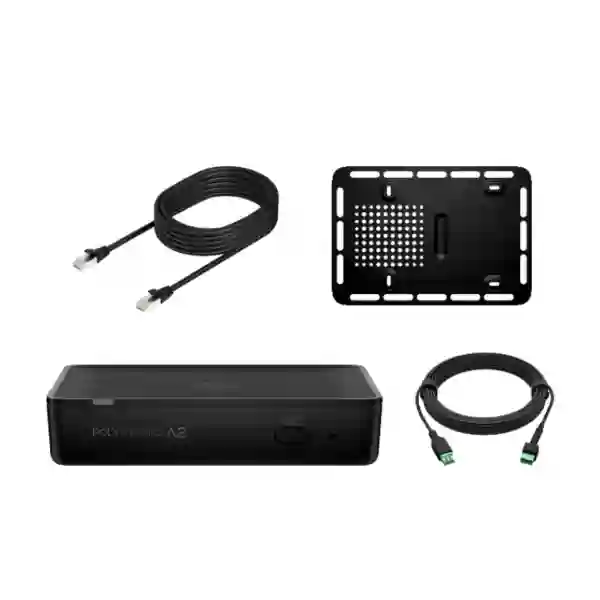
HP supplies a 3.66-metre CAT6A Ethernet cable and an eight-metre microphone extension cable with the standard bridge package. These are useful installation components, but they do not establish the maximum permitted distances for a complete installation. If a table is farther from the equipment cabinet, use the actual manufacturer’s supported cable types and connection-distance specifications rather than extrapolating from the included cable lengths.
HP’s administration guidance calls for shielded twisted-pair Ethernet cabling in particular PoE links. The Studio A2 microphone wiring also has specified connector and cable requirements. Treat microphone bus cables and ordinary Ethernet patch leads as different items even though a room may contain both. A cable can look convenient yet be unsuitable for the A2B microphone route. Clearly label every cable and retain a marked-up as-built diagram for later changes.
Microphone spacing should support natural speaking positions, not simply a symmetrical appearance. A good plan accounts for where the chairperson, guests and remote presenters sit, whether participants turn toward a shared display, and whether tables are occasionally separated. Ask the installer to test the actual room rather than promising universal performance from a fixed number of microphones.
Physical installation and the supplied accessories
The Studio A2 Audio Bridge has a small enclosure measuring 147 by 103 by 24 millimetres and weighing about 330 grams. This makes it suitable for discreet positioning in an approved equipment location, but it should still be mounted securely and left accessible for inspection. The device provides a Kensington-style physical security slot, and HP describes a mounting arrangement intended to simplify positioning and tidy the finished appearance.
According to HP’s standard product information, the package includes the A2 Audio Bridge, mounting plate, CAT6A cable of approximately 3.66 metres, eight-metre microphone extension cable, safety information, quick-start guide and warranty card. HP installation guidance also references mounting hardware. Always check the particular supplied country configuration and the delivered packaging rather than treating every regional bundle as identical.
Plan a mounting position that protects connectors from strain, avoids excessive heat, supports the intended cable routes and allows staff to observe status indicators. If the bridge is hidden behind a display, below a table or near an equipment rack, make sure technicians can still reach it without dismantling the room. The published operating temperature range is zero to 40 degrees Celsius; an enclosure that becomes hot during the day requires attention before installation.
The bridge should not be treated as an environmental or outdoor-rated device. If a customer has a challenging installation location, request an assessment for ventilation, dust exposure, cable protection and access control. These are room-design questions, not evidence of any additional environmental certification. The finished layout should also identify who maintains the bridge and who controls access to the system’s settings.
A practical commissioning sequence for the IT or AV team
Begin with an equipment audit. Record the Poly host system model, installed software version, microphone models, planned number of Studio A2 microphones and any room-compute components. Compare that list with HP’s current compatibility and release notes. Check that any adapter or power accessory required by the chosen host is specified. If an existing Poly room is being upgraded, identify which components belong to the previous microphone generation rather than assuming they can remain.
Next, create a room-specific connection diagram. Mark each A2B microphone branch, its cable run, the bridge’s proposed location and the StudioNet connection to the host system. Choose the approved PoE device and check its available class and budget. Confirm cable construction and lengths, including the relevant shielded Ethernet cabling requirements. Where an X32, X52 or V52 system needs the special network adapter arrangement, document which connection becomes the corporate LAN and which becomes the local link network.
Mount the microphones and bridge according to HP’s hardware instructions. Check that the microphone connectors are correctly oriented and not being forced into the wrong socket. HP’s cabling guidance notes an important power-on order: connect Studio A2 Table Microphones to the bridge before applying PoE power. If microphones are added after the bridge is already powered, the bridge may not detect them until the connection and startup sequence is corrected.
For a Poly Studio X32 deployment, HP also documents a host startup consideration: allow the X32 system to start and begin acquiring network information before applying power to the A2 Audio Bridge. This is a specific documented procedure and should not be generalised as a universal startup rule for every Poly model. Follow the manufacturer’s model-specific procedure rather than relying on memory from a different room installation.
Once powered, inspect physical status indicators and the host system’s device management interface. Confirm that the audio bridge and each planned microphone appear as connected devices. HP’s configuration documentation describes an Audio Bridge view and a microphone-identification function that can illuminate the relevant table microphone indicator. Use that identification feature to match the software inventory with real positions on the table and to correct any swapped or missing device labels.
Finally, run a two-way meeting test with real participants in the intended seats. Ask remote attendees whether the quietest speaker is intelligible, whether simultaneous speakers are handled well, and whether noises from ventilation, chairs or open doors dominate. Test normal calls, not only a local microphone meter. Record the software version, audio settings, physical placement and any follow-up corrections in the room acceptance document. The goal is a supported, reproducible installation, not simply getting a status light to turn green.
Room audio configuration and collaboration experience
The A2 bridge connects the microphone system, while much of the listening experience depends on the associated Poly host device and its audio processing settings. HP documents features such as microphone selection and Multi-Mic Mode for supported combinations. Certain compatible systems can capture from multiple table microphones at the same time rather than choosing only one active input. Availability and exact behavior depend on the host system and software, so administrators should check the corresponding HP configuration documentation before enabling a feature.
For example, HP describes Multi-Mic Mode on supported Studio X52, X72 and G62 systems that have at least two supported Studio A2 microphones. It also documents interaction between external table microphones and microphones built into particular video bars. The best setting is not automatically the one that mixes the greatest number of sources. A reflective room with a noisy air-conditioning unit may call for a different approach from a carpeted room with evenly distributed speakers.
The team should validate pickup for people who speak softly, speakers who sit at the ends of the table and participants who turn away from the video system. A room test should include interruptions, more than one speaker, and periods of silence. The success criterion is intelligible speech for people joining remotely, without distracting noise or repeated changes in perceived loudness.
Do not promise that the audio bridge itself includes every sound-processing function described in the broader Poly ecosystem. Features such as NoiseBlockAI belong to the supported room-system configuration and may vary by product and software. The bridge has a defined connectivity role. Good product selection means combining that role with the right microphone placement, host capabilities and room acoustics.
Management, visibility and ongoing maintenance
HP identifies Poly Lens as a management option for the Studio A2 ecosystem. The connected video system also exposes information about the audio bridge and attached table microphones through supported administration interfaces. For an IT team responsible for multiple meeting spaces, that visibility can make it easier to identify missing devices, document hardware changes and distinguish an audio-system fault from a general video meeting issue.
Management should begin with an accurate asset register. Store each room’s host model, serial records kept securely, microphone count, bridge location, software versions, network and power topology, and a contact for the responsible support team. A diagram photographed or saved at handover is often more useful during a failure than an invoice alone. Keep an inventory of any adapters and injectors because an apparently minor accessory change can prevent the room audio path from working as designed.
Before software updates, review HP’s current release notes for the room system and the A2 family. An update may affect configuration options, support matrices or known issues. Schedule changes when a room can be tested afterward, then verify detection, live audio and room control. If a unit must be replaced, preserve the previous configuration information and repeat the necessary commissioning checks. Do not assume a replacement is automatically an identical operational state.
For customers with a mix of new and old Poly systems, support documentation should distinguish the Studio A2 configuration from legacy expansion microphones. That prevents a help desk from recommending an incompatible replacement part. When staff report that “the microphone is not working,” the first diagnostic questions should identify the exact room and whether the bridge, the A2 microphone or the video host is the component in question.
Troubleshooting questions worth checking first
If none of the Studio A2 microphones appears on the video system, verify the supported host model and the StudioNet connection before moving microphones around. Check the bridge’s PoE source, link state and the required LLN topology. Confirm that the intended Ethernet port is being used for the local audio link, especially in installations where an approved USB-to-Ethernet adapter changes the host’s corporate network arrangement. A bridge powered from an unsuitable source or connected to the wrong network path may not behave as expected.
If the bridge appears but one or more microphones are missing, compare the physical branch layout with the approved wiring plan. Inspect the A2B connectors and cable orientation, and confirm that the table microphones were connected before the bridge received power. Avoid repeatedly hot-plugging components as a substitute for following the documented startup procedure. Use HP’s current guidance for safe recovery and restart steps, especially on X32 systems with a model-specific power-on sequence.
If the room is connected but speech sounds weak, uneven or noisy, do not immediately conclude that the bridge is defective. Recheck microphone positions, test different speaking locations and consider the host audio-processing configuration. Where supported, use the microphone-identification function to confirm that the microphone detected in software matches its physical location. Try a controlled test call with the door closed and noisy equipment identified, then repeat under normal working conditions.
If a problem starts after a firmware update or room rearrangement, record exactly what changed. Check the currently installed versions, release notes, cable runs, power components and any altered network settings. Reproduce the issue during a documented test before replacing parts. The diagnostic record should include the affected room, host model, number of microphones and observable indicator status, without sharing passwords or private network credentials in an open support request.
For recurring or unexplained problems, use the official HP troubleshooting process for the installed version and the appropriate support channel. An installer can provide valuable room-specific observations, but unsupported resets or improvised cabling should not be presented as safe universal fixes. Protect the existing configuration and use an approved method before attempting a factory restore.
Tanzania procurement: what a complete quote should cover
Businesses purchasing conferencing equipment in Tanzania often need clarity about the complete room configuration, not only the headline price of one accessory. The relevant project questions include the existing video system, the number of speaking positions, whether tables are fixed or movable, who will install the cabling and which team will support the system after handover. These factors determine whether the A2 bridge is a suitable component and what additional items the project requires.
Ask for an itemised quote that clearly separates the HP Poly Studio A2 Audio Bridge from Studio A2 Table Microphones, approved PoE switch or injector, any required USB-to-Ethernet adapter, cables, mounting materials, host video system and professional deployment work if requested. A component-by-component quote makes it easier to evaluate whether the proposal actually covers the full installation. It also prevents the common mistake of comparing an accessory-only price with a complete conferencing-room package.
No Tanzania selling price, live stock status, delivery commitment, installation coverage or local warranty handling terms are stated here because those details must be verified for the intended listing and transaction. Manufacturer warranty information is not a substitute for confirming who will receive a local service request or what the actual purchase documentation covers. Ask the seller to specify the current warranty terms and the route for support, as applicable to the product and buyer.
For a multi-room deployment, provide a room schedule rather than assuming one design fits every room. Include room type, Poly host model, approximate table arrangement, planned microphone count and any existing power or network infrastructure. This allows an apples-to-apples proposal and gives procurement a clearer basis for phased implementation. Where the buyer’s organization requires purchase approvals, record any dependence on additional accessories as a separate risk.
The next step is to request configuration review and a quotation for the exact Tanzania project. State whether the request concerns a new installation, a compatible existing room or a migration from legacy equipment. That short description can prevent days of back-and-forth and helps ensure the final order contains the right components.
When a different audio approach may be more suitable
The A2 bridge makes sense when the chosen video system supports Studio A2 microphones and the room needs that ecosystem’s distributed table-microphone arrangement. It is less compelling when the room is a very small meeting space whose compatible video bar already provides satisfactory pickup, or when the buyer intends to use unrelated analog, USB or IP audio products. A device should be selected because it fits a supported architecture, not because it looks expandable on paper.
If the room uses an older Poly Studio X70, X50 or X30, a USB product outside the published A2 compatibility list, or Poly G7500, investigate the applicable supported microphone options for that platform instead. HP explicitly warns that the A2 bridge is not backward compatible. A different room system, use of supported existing microphones or a separate upgrade project may be more economical than attempting to adapt incompatible accessories.
If the customer wants to connect external mixers, ceiling arrays, third-party digital signal processors or a building-wide paging system, the appropriate integration path must be confirmed separately. Four A2B ports do not imply four universal analog microphone inputs. Likewise, a gigabit-capable Ethernet port does not make the bridge interoperable with all network-audio devices. The whole system’s I/O requirements should be checked before choosing a bridging product.
A room design should also avoid overspecification. Installing more table microphones than required can increase hardware, cabling and maintenance without necessarily helping speech quality. A realistic discussion about room acoustics, host-system limits, participant behavior and future furniture changes is a better basis for purchasing. If the necessary microphones or approved power network cannot be accommodated, reconsider the room design rather than promising that the bridge will overcome physical limitations.
A buyer checklist before issuing a purchase order
Record the full model name of the video room system and confirm that it is one of HP’s supported A2 hosts. Note whether the room uses a standalone video bar, codec or room-compute arrangement. Verify the number of Studio A2 Table Microphones needed against both the manufacturer limit and the physical table plan. Confirm whether those microphones are already owned and whether they are actually A2 models rather than legacy Poly expansion products.
Request a wiring plan that distinguishes A2B microphone cabling from StudioNet Ethernet connectivity and ordinary corporate networking. Verify the approved PoE class and source, and make the installer identify whether an injector, switch or network adapter is a separate purchase. Check cable types and manufacturer-supported distance limits before cabinetry, ceiling work or new furniture is finalised. Confirm mounting access, ventilation, power continuity expectations and a suitable handover test.
Finally, ask the supplier to confirm the exact product configuration, manufacturer part number, locally assigned listing SKU if applicable, current price, stock situation, delivery terms and warranty support process in writing. None should be inferred from a product name alone. For a smooth procurement review, attach the room diagram and the proposed itemised bill of materials to the quotation request. Doing this early can prevent a purchase that appears complete but lacks one essential accessory.
Frequently asked questions
Does the HP Poly Studio A2 Audio Bridge work with any Poly video bar?
No. HP names specific supported models: Studio G62, X72, V72, X52, V52 and X32. Older Poly devices are not automatically compatible, even if their names sound similar or their ports appear suitable. Confirm the exact model and supported software configuration. If the room uses Studio X70, X50, X30 or Poly G7500, review its own supported expansion-microphone options instead of assuming the A2 bridge will work.
Is the A2 Audio Bridge itself a microphone?
No. It connects supported HP Poly Studio A2 Table Microphones to a compatible Poly video host. The physical microphones are separate equipment and must be included in the room design and purchase as appropriate. The bridge supplies connectivity and participates in power and audio transport; it does not replace a tabletop microphone or provide the same function as a standalone conference speakerphone.
How many Studio A2 table microphones can I connect?
The supported count depends on the connected video system. HP lists up to eight Studio A2 Table Microphones with Studio G62, four with X72 or V72, four with X52 or V52, and two with X32. These are not minimum requirements. A smaller number may be appropriate after considering table length, seating arrangement and room acoustics. Always confirm the current support matrix for the software being deployed.
Does the 32-channel specification mean I can connect 32 table microphones?
No. HP’s figure of up to 32 audio input channels refers to channel capability with supported next-generation Poly room devices, not 32 individual tabletop microphone products. A Studio A2 microphone can involve multiple input elements, and the number of microphone units remains limited by the host system. Use the published microphone-per-host figures when estimating equipment quantity and cost.
Does the bridge require PoE power?
Yes. HP specifies PoE+/PoE++ support with IEEE 802.3at/bt classes 4, 5, 6 and 8. The correct power source must support the installed bridge and connected microphones within the manufacturer’s approved configuration. Do not assume that an ordinary unpowered network socket or the video host will power the entire system. Confirm whether a suitable switch or injector is already available or needs to be purchased.
Are Studio A2 microphones and the PoE injector included in the box?
The standard HP box-content list includes the audio bridge, mounting plate, CAT6A cable, microphone extension cable and printed documentation. It does not list separate Studio A2 Table Microphones or a PoE injector as included items. Check the actual regional product bundle and proposed sales quotation, since a seller may offer a kit containing additional parts. Do not equate a bundle description with the standard manufacturer accessory list.
What comes in the standard HP bridge package?
HP lists the bridge itself, mounting plate, 3.66-metre CAT6A cable, eight-metre microphone extension cable, safety guide, quick-start guide and warranty card. Installation instructions may also describe included mounting hardware. The exact delivered kit should be checked against the chosen regional product configuration. Included cable lengths are not the same as the maximum permitted cable distances for the full room, so a detailed wiring plan may still require additional approved material.
Can the bridge use an existing company Ethernet switch?
Possibly, but only if that switch and the physical connection arrangement meet the current HP StudioNet and PoE requirements. StudioNet depends on a supported local-link topology, and HP refers to approved switches in its implementation guidance. A spare port on a normal corporate switch is not sufficient evidence of compatibility. Have the IT or AV designer identify the expected traffic path, power class, cabling, and the video host’s LLN connection before approving the layout.
Why might an X32, X52 or V52 room need a USB-to-Ethernet adapter?
HP’s documented arrangement for these models can use an approved USB Type-A-to-Ethernet adapter for the corporate network connection while the built-in LAN port becomes the local-link connection for StudioNet. HP identifies its USB 3.0 to Gig RJ-45 Adapter G2, manufacturer part number M91114-001, for the supported setup. The exact topology and accessory need should be verified against the installed system and current HP instructions before purchase.
Can microphones be plugged into the bridge after it is powered on?
HP’s documented cabling instruction is to connect the Studio A2 Table Microphones before applying PoE power to the audio bridge. Adding microphones after the bridge has powered up may prevent them from being detected. This is important during commissioning, table changes and troubleshooting. Follow the official startup procedure for the specific video host, including the additional documented sequence for Studio X32 where relevant.
Can Poly Lens manage the bridge?
HP identifies Poly Lens as management software for the Studio A2 ecosystem. The associated video system also provides supported device-management views for the bridge and connected microphones. Available features, permissions and interface paths depend on the deployed host, software version and management environment. The IT team should verify the current release notes and its own policies before promising any particular cloud-management workflow or remote diagnostic capability.
Can I get a confirmed Tanzania price and delivery date from this page?
This page explains technical fit and purchasing considerations but does not state a verified Tanzania price, live inventory or delivery date. Request a current itemised quotation for the exact part configuration and required accessories. Ask the seller to confirm stock, lead time, delivery arrangements and warranty handling for the transaction. If your project covers several rooms, provide the room models and quantities so the quote reflects the complete installation rather than only a single bridge.
Request a configuration review and quotation
If you are specifying a new conference room or expanding a supported Poly installation in Tanzania, request a quotation based on the actual room system and microphone layout. Provide your Poly host model, number and shape of tables, expected number of speakers, preferred cable routes and whether the site already has suitable PoE infrastructure. Also explain whether the room is intended for a single fixed meeting setup or frequently changing configurations.
Ask for the HP Poly Studio A2 Audio Bridge alongside a confirmed list of Studio A2 microphones, required cabling, approved power and network accessories, and any model-specific adapters. An itemised proposal helps prevent compatibility mistakes, makes budget comparisons clearer and creates a usable plan for future support. Product availability, final pricing, lead time and applicable warranty handling should be confirmed in the seller’s written quote.
Plan your Poly Studio A2 room with confidence
Request a Tanzania-specific product quote and compatibility review for your exact video system, microphone count and room layout. A verified equipment list is the best starting point for an installation that can be commissioned and maintained reliably.




Reviews
There are no reviews yet.