
Zoom Rooms · Room computing and control
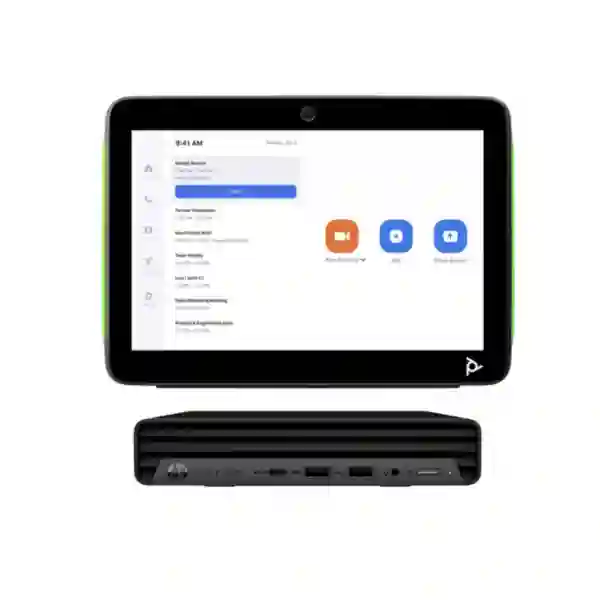
HP Poly Studio Base Room Kit for Zoom Rooms
Create a consistent shared meeting-room experience with a dedicated HP conferencing computer and a Poly TC10 touch controller. This is a flexible foundation for a professionally configured Zoom Room, not an all-in-one camera-and-audio package. Match it with supported peripherals, displays and separate Zoom Rooms licensing suited to your meeting space.
At a glance
- Core kit: HP Mini Conferencing PC with Zoom Rooms plus Poly TC10 touch controller
- Reference computing platform: 12th-gen Intel Core i7, 16 GB DDR5 and 256 GB SSD in HP’s published configuration
- Touch interface: 10.1-inch controller with documented PoE support
- Separate items: camera, microphones/speakers or video bar, displays and Zoom Rooms licence
- Best approach: specify the complete room before requesting a firm Tanzania quotation
Quick equipment overview
| Component | Buyer guidance |
|---|---|
| HP Mini Conferencing PC | Dedicated Zoom Rooms compute unit; validate exact current configuration and mounting package |
| Poly TC10 | 10.1-inch touch interface; verify PoE power and controller-to-PC network communication |
| Camera and audio | Not included in the base kit; select compatible equipment for the seating layout |
| Zoom Rooms licence | Required separately for the intended licensed room deployment |
| Installation and support | Confirm cable work, configuration, commissioning, warranty terms and responsibilities in the quote |
What this base kit actually does
The HP Poly Studio Base Room Kit for Zoom Rooms provides the computing and touch-control foundation of a dedicated conference room. Instead of connecting a staff member’s laptop for every meeting, the room uses its own HP Mini Conferencing PC to run the Zoom Rooms experience. The Poly TC10 supplies a convenient touch interface for people in the space. This arrangement can make a shared meeting room easier to operate, particularly when people from different teams use the room throughout the working day.
A base kit should not be confused with a complete videoconferencing bundle. You still need compatible camera and audio components, suitable displays, the required connections and a Zoom Rooms licence for regular operation. Which accessories are appropriate depends on seating layout, acoustic conditions, the number of participants, the room’s dimensions and the collaboration features your organisation intends to use. An equipment plan is therefore part of the purchase decision, not merely an optional finishing step.
This modular approach is valuable when upgrading an existing room. You may be able to retain a compatible display or selected peripherals after checking their condition and Zoom compatibility. It also suits new rooms where the camera position, microphone coverage and display arrangement must be tailored. The practical benefit is flexibility, but the trade-off is that buyers must validate the whole solution rather than assume the box contains every component.
What is included and what needs to be added
HP describes the core package as an HP Mini Conferencing PC with Zoom Rooms and a Poly TC10 touch-control panel. The manufacturer’s product brief also documents power and mounting accessories associated with these devices, although exact supplied accessories can vary by regional configuration and part number. Request a written packing list for the particular offer. That avoids unexpected gaps between what appears in a product photograph and what is physically delivered.
The room camera is not part of the base kit. Nor should buyers presume that microphones, speakers, a video bar or a digital signal processor are included. The necessary audiovisual equipment must be selected separately or purchased as part of a correctly specified larger bundle. A display is another room component to budget for. Cabling, network switching, mounting materials, installation labour and any building work should be considered explicitly, not buried in an assumed equipment price.
The Zoom Rooms licence is also separate. For a normal shared Zoom Room, your organisation needs the applicable Zoom Rooms licensing entitlement and an account administrator able to configure it. A basic Zoom user account should not be assumed to provide the required room licence. If calendar integration, advanced meeting features or multiple-room management is part of the plan, review the relevant account permissions and subscriptions before sign-off.
Ask the supplier to distinguish the base kit itself from a complete commissioned meeting room. A clear quotation should identify the PC, controller, selected camera, sound system, display-related equipment, software entitlements, installation work, configuration work and support scope. This is the simplest way to compare different proposals fairly.
Key computing and controller specifications
The HP product brief for this generation identifies an HP Mini Conferencing PC built around a 12th-generation Intel Core i7 processor, specifically an i7-12700T in the documented configuration. It lists 16 GB DDR5-4800 memory and a 256 GB PCIe NVMe solid-state drive, with Windows 11 IoT Enterprise 64-bit as the operating system. These are useful reference specifications when evaluating the kit against your organisation’s existing room-computing standards.
The mini PC uses a compact form factor that is easier to place around a meeting-room display than a conventional desktop tower. HP’s reference dimensions are approximately 17.7 by 17.5 by 3.4 centimetres, excluding external mounting clearances and connected cables. The published port selection includes USB connections, wired Ethernet, DisplayPort outputs and an HDMI output. Actual display topology and accessory connection requirements must be checked against Zoom’s supported configuration and the selected peripheral hardware.
The Poly TC10 is a dedicated touch-control device with a 10.1-inch screen. HP describes Power over Ethernet operation compatible with IEEE 802.3at, allowing a suitable network connection to carry the required power rather than relying on an ordinary separate tabletop charger. The controller communicates with the room system over the network, so its network reachability and the correct PoE provisioning matter during installation.
Treat these figures as manufacturer reference data, not an assertion that every regional part number has identical memory, accessories or operating-system image. Request the full model code, current datasheet and confirmed bill of materials for the unit being quoted in Tanzania.
A familiar meeting experience for everyday users
A dedicated touch controller reduces the number of steps people need to remember when they enter a shared conference room. Instead of locating the correct cable and opening an application on a personal computer, the meeting organiser can approach a room interface designed for the Zoom Rooms workflow. The outcome still depends on the room being correctly set up, scheduled and connected, but the intent is a repeatable process for staff and visitors.
The TC10 is designed to put common room controls close to participants. Depending on the configured Zoom Rooms features and connected equipment, users may manage meeting joins, participant audio, camera functions and other room controls through the interface. Avoid promising a particular feature until its availability is verified for the installed Zoom Rooms version, room licence and peripheral combination. Some advanced controls depend on the selected camera, not the base controller.
For facilities managers, a consistent interface across multiple meeting rooms can reduce the training burden. People moving between rooms are less likely to encounter a completely different control method. For IT teams, a dedicated room compute device also offers a more structured support target than a rotating collection of users’ laptops with different security settings, drivers and software versions.
An effective room design still needs simple instructions at the point of use, sensible microphone placement and clear display labelling. The base kit is one element of usability, not a substitute for checking the whole meeting journey from booking to ending a call.
Why a modular Zoom Rooms setup may be a better fit
Modular room systems allow organisations to choose parts according to the physical environment. A short room with a single table may need an integrated USB video bar, while a wide room with a long table might benefit from a camera with different framing characteristics and a more deliberate audio design. The HP Poly base kit can act as a consistent foundation across these room types while the audiovisual peripherals change.
This separation can also protect a sensible existing investment. If a room already has an acceptable professional display, an approved audio interface or a supported USB camera, a careful compatibility review may reveal components that can be reused. However, electrical connectivity alone does not prove that a device has been tested or certified for the proposed Zoom Rooms configuration. Reuse decisions should be based on verified support and practical testing.
The alternative is an integrated meeting appliance or a complete room bundle. Those options can simplify purchasing when their fixed camera and audio coverage matches the room. The base kit is more attractive where equipment selection flexibility matters, where an integrator must solve an unusual seating arrangement, or where a phased replacement plan is needed. Neither category is universally superior; success depends on the actual room.
Before selecting the modular route, assign responsibility for connecting and testing everything together. A quotation that lists several individually reputable devices without identifying a supported combined architecture may still leave the buyer with avoidable integration risk.
Choosing cameras for small meeting rooms
In smaller meeting rooms, camera field of view and participant distance often matter more than an impressive headline resolution. A camera that cannot capture people seated at the edge of a table will make remote participants feel excluded, even if its image sensor is capable of high resolution. Similarly, a camera placed too high or too far from the meeting table can produce an awkward viewing angle.
HP identifies the Poly Studio V12 as one of the video-bar options to pair with the base kit for small rooms. Its integrated camera and audio approach may be appropriate where the table is compact and the seating arrangement is straightforward. However, a recommendation should be based on the manufacturer’s current supported-room guidance and on the room’s exact dimensions. Do not assume the example configuration will work in every small space.
Consider the distance between the display wall and the furthest participant, whether people sit along both sides of the table and whether the room has distracting backlight. Place the camera where participants naturally look when viewing the screen. Check whether any physical obstacle, such as a monitor edge or table object, blocks a clear view.
A small meeting room is often used by nontechnical staff, so reliable camera positioning and intelligible audio should take priority over optional complexity. The camera choice must also be reviewed alongside the required microphone coverage.
Designing a medium conference room
Medium meeting rooms usually have more variation in seating positions. A central table may be wider, people may sit further from the display, and discussion can move rapidly between participants. The camera must frame the group without leaving the distant end of the table unrecognisable. Audio pickup must remain useful when speakers turn away from the camera or talk quietly from their seats.
HP presents the Poly Studio V52 as a pairing option with the Poly Studio Base Room Kit for Zoom Rooms in medium spaces. The value of selecting an appropriate video bar is that camera, speakers and microphones can be designed as a coordinated audiovisual solution. The actual fit depends on acoustic conditions, room geometry and the manufacturer’s supported coverage guidance, not just nominal capacity labels.
Before ordering, measure the maximum speaking distance, note where remote participants will appear on the screen and test whether the room has persistent echo from bare walls or glass partitions. A suitable microphone cannot completely repair difficult acoustics. Soft furnishings, acoustic treatment and better speaker placement may produce a more useful improvement than simply increasing volume.
If the room has existing ceiling microphones or a specialised audio system, review whether a certified USB audio interface or DSP-based solution is more suitable. An engineer should confirm the signal path and echo-cancellation design before procurement.
Planning larger boardrooms and training spaces
Larger rooms may require different camera architecture because participants sit across a longer distance or along more than one side of a table. A single wide-angle camera can capture the room yet make individual faces too small for remote attendees. Conversely, a narrow view may miss participants who speak from the sides. Camera placement, optical capability and switching behaviour become central design choices.
HP lists Poly Studio V72, E60 and E70 options in its wider Zoom room-bundle guidance. Some camera choices provide integrated audio, while certain standalone smart-camera configurations require separate compatible audio equipment. Buyers should distinguish these alternatives carefully. A camera with advanced imaging capabilities is not automatically a complete microphone and loudspeaker solution.
Features such as Poly DirectorAI or Zoom Intelligent Director depend on the selected hardware, supported software configuration and, where applicable, additional cameras. The base kit alone does not supply those camera intelligence features. If intelligent multi-camera composition is part of the requirement, ask for a supported system diagram that names the cameras, connection method, software prerequisites and expected participant coverage.
For executive boardrooms, involve actual room users in a demonstration where possible. Examine the remote participant’s experience as well as the view from inside the room. Speech intelligibility, natural sightlines, control simplicity and predictable call joining usually matter more than an impressive equipment list.
Audio design deserves equal attention
A video meeting succeeds only when colleagues can understand each other. Small problems such as a distant microphone, noisy air conditioning, a loudspeaker placed too close to the pickup array or excessive hard-surface reflections can make a technically working Zoom Room unpleasant to use. The HP Poly base kit does not remove the need to design the microphone and speaker system around the room.
With an integrated USB video bar, audio capture and playback may be supplied by that separate device. In other layouts, a compatible conference phone, supported USB audio arrangement or digital signal processor may be used. HP identifies Poly Trio C60 and room-DSP approaches in its product guidance, but that should not be read as blanket compatibility for any device or firmware version. Check the exact supported topology.
Map the furthest and most frequently occupied speaking positions. Identify likely sources of noise, including fans, streetside windows, projectors and sliding doors. Check whether people need to share a presentation while sitting away from the main table. Practical speech tests from each seat often reveal issues that specifications do not capture.
Also define microphone mute behaviour and participant expectations. A meeting room should make it obvious when microphones are active, who can control the call and whether a second laptop is accidentally creating an audio feedback loop. Good operational guidance reduces embarrassing problems during important meetings.
Displays and content sharing
The room computer must present remote participants and shared content in a way that suits the meeting. Some spaces use a single front-of-room display; others benefit from separate screens for people and presentation materials. The HP reference mini PC provides several physical video outputs, but having multiple connectors does not guarantee that every proposed multi-display mode is supported by Zoom Rooms or by the installed configuration.
Plan the display installation before finalising cables. Decide how high the screen should be mounted, how it will be viewed from the furthest chair and whether local presenters can read shared text clearly. A display sized only for video faces may be inadequate for spreadsheets, technical drawings or slide decks. Glare and reflections can undermine an otherwise excellent screen.
Clarify the intended content-sharing workflow. Some organisations expect to share wirelessly; others require a straightforward wired connection for visiting presenters. Compatibility, security restrictions, the room’s Zoom configuration and any additional sharing hardware should be reviewed. Do not assume that a particular type of guest sharing is included just because the room uses Zoom.
During handover, test sharing from realistic company laptops under the organisation’s access policies. Confirm that remote participants can read content, that presentation audio behaves as intended and that users can switch back to the meeting view without asking an administrator for assistance.
Zoom Rooms licensing and account readiness
A Zoom Rooms hardware purchase and a Zoom Rooms software entitlement are distinct decisions. Zoom’s official deployment guidance says that an operational shared Zoom Room requires the applicable Zoom Rooms licence, while limited testing options may be available without a production entitlement. For normal planning, budget for the required licence separately and confirm its current terms directly through your authorised procurement process.
Identify who will own the Zoom account and administer the room. A deployment can stall when equipment arrives but no one has permission to create the room, assign its licence or complete the activation process. If the business uses a shared calendar system, include the administrator responsible for that integration in the planning phase. Calendar booking and in-room controls work best when ownership is agreed before installation.
Ask whether the Zoom Rooms environment has specific policies for guest meetings, user permissions, managed devices or data handling. Software functionality can change with releases, subscriptions and account settings. A hardware specification cannot substitute for checking what the organisation’s Zoom environment actually permits.
Licensing should also appear as a separate line in the purchasing decision. Compare the total ongoing room cost rather than only the initial equipment purchase price. For multiple rooms, maintain a simple record linking each physical space, deployed computer, controller and licence assignment.
Networking and Power over Ethernet planning
The room computer needs dependable access to the organisation’s network and Zoom services. The Poly TC10 also needs a suitable network path to operate as the room controller. HP documents PoE compatibility for the TC10, which means the network infrastructure must provide the appropriate power budget through a suitable switch or injector. A standard network port does not necessarily supply PoE.
For a wired installation, check that the controller’s Ethernet path reaches the intended room system under the organisation’s network segmentation and firewall rules. If different virtual LANs or security zones are in use, an IT administrator should verify the required permitted traffic. Zoom’s setup guidance specifically highlights the importance of controller-to-room network reachability. Avoid assuming that Wi-Fi access alone solves a segmented-network problem.
Assess upstream connectivity as a business requirement, not a box specification. Video call stability can suffer from packet loss, congestion or unreliable internet service even when the room computer itself is functioning correctly. Check performance during representative busy periods when multiple users are making calls or accessing cloud resources. An office with frequent power interruptions should consider power continuity for critical network equipment and displays.
Record cable routes, port labels and the switch location during installation. A clearly documented Ethernet path speeds troubleshooting when a touch panel goes offline after a network change. Confirm that network policies permit required management and update services while meeting your organisation’s security expectations.
Installation layout, mounting and ventilation
A compact mini PC gives installers placement flexibility, but it should still be installed deliberately. HP’s documentation lists a compact form factor and mounting accessories for documented configurations. Confirm what mounting hardware is in the exact package before positioning equipment behind a display or inside furniture. The mounting plan must allow safe cable access and the ventilation clearance specified by the manufacturer.
The touch controller needs a practical location within reach of meeting organisers. On a long table, one controller near an entrance may not be convenient for the person leading a call. Tabletop or wall placement should account for cable protection, visibility, reach, accessibility and the way participants enter the room. Never assume that a second controller or a separate scheduler display is included in the base kit.
For installations in shared or publicly accessible areas, consider how the PC and cabling are physically protected. Exposed power adapters, unsecured display ports and loose cables can create maintenance and safety problems. Leave a documented way to restart equipment and inspect connections without dismantling the entire meeting-room installation.
Schedule installation at a time when the room can be tested without interrupting normal business operations. A proper handover should include labelled cable connections, a record of installed equipment, administrator ownership and basic recovery instructions.
Security and device administration
A dedicated conferencing computer should be treated as a managed workplace endpoint. That means applying the organisation’s rules for physical access, software updates, administrative credentials and change control. HP’s reference kit documentation lists management and security capabilities associated with the mini PC, including HP management tooling; the actual available management path must be checked for the deployed software image.
Room devices often sit in spaces accessible to employees, visitors and contractors. Protect administrator accounts rather than leaving privileged credentials visible near the controller. Review whether access to the operating-system desktop, external USB ports and remote management interfaces is appropriate under your security policy. A meeting-room PC may be dedicated to collaboration, but it still belongs in the device inventory.
Coordinate maintenance between IT, audiovisual support and the Zoom account administrator. A camera firmware change, network rule update or room application update may affect different parts of the solution. Define who has permission to change each component and how changes are tested. Record the working configuration after commissioning so that a future incident can be compared against a known baseline.
If privacy requirements apply to meetings, review settings for recording, participant admission and content sharing with the organisation’s policy owner. Do not confuse the presence of a camera with permission to capture or retain sensitive discussions.
Making maintenance predictable
A room that works on installation day is only the beginning. Over time, firmware, application versions, network configuration and peripheral settings can change. A simple preventative maintenance schedule is often more valuable than waiting for a visible failure immediately before an important meeting. Assign a responsible owner and identify how users should report problems.
Use the management mechanisms appropriate to your HP Poly devices and Zoom deployment. HP references Poly Lens-related management capabilities for supported equipment, while Zoom provides its own administration and device-management workflows. Confirm the specific version and device coverage rather than assuming every peripheral will appear in a single dashboard. Different cameras and audio interfaces may need different maintenance processes.
Keep a record of installed model numbers, serial numbers, application versions, network locations and the room’s physical layout. Protect those records in the organisation’s approved system rather than displaying sensitive identifiers publicly. When a component is replaced, update the inventory and re-test camera, microphone, loudspeaker and control functions.
A recurring short test can verify that the room joins a call, presents content, reproduces remote audio, captures local speech and ends a meeting correctly. These practical outcomes are the service users care about.
A useful approach for Tanzania-based organisations
Organisations procuring meeting-room equipment in Tanzania may be coordinating the purchase with local facility work, existing IT policy, international participants and multiple office locations. The base kit may be a good foundation where a company wants a dedicated Zoom experience, but the surrounding deployment should be assessed against the actual office environment. No particular city, service area, delivery date or local installation coverage is assumed here.
Check that the intended site has a dependable network connection and a practical power arrangement for the computer, controller, displays and peripherals. In buildings with shared network administration, obtain approval for required switch ports and traffic before the equipment arrives. If installers must cross a finished meeting room with cables, agree the route and mounting approach with facilities staff.
International meetings can expose network or acoustic issues that internal test calls miss. Plan a realistic pilot with remote attendees in different locations where feasible. Examine speech quality, how shared content appears and whether participants can easily control the meeting from the table. Keep a small list of outcomes to improve before wider rollout.
Ask for a written Tanzania-specific quotation rather than assuming a price or warranty advertised for another region also applies locally. Confirm the exact part number, current availability, included accessories, applicable warranty terms, support responsibilities and any separately charged commissioning.
Who should consider this solution
The base kit is a logical option for businesses that already standardise on Zoom for meetings and want shared rooms to behave consistently. IT teams can work with one familiar room-computing model while varying camera and audio equipment based on space. Facilities teams can make decisions about table layout and display placement without being restricted to one fixed video bar in every room.
Professional services organisations may value predictable client meeting experiences. Educational institutions may use a dedicated room for staff collaboration, remote presentations or scheduled discussions, provided the selected camera and microphones suit the teaching or meeting format. Nonprofit organisations and project teams may also benefit from a room that does not rely on one employee’s laptop being present.
The fit is weaker when the organisation uses multiple meeting platforms without a clear preferred room workflow, lacks a suitable management process or needs only occasional informal video calls. In those situations, a simpler peripheral setup or a different certified room solution may be more economical. A modular kit should be selected because it solves a defined operational need, not simply because it is enterprise-branded.
Use the expected number of meetings, room occupancy, support resources and user experience goals to decide whether a dedicated room is justified. An honest requirements review is more reliable than selecting equipment solely by processor specification.
Comparing a base kit with a full room bundle
The term base kit means the essential compute and control layer. A complete room bundle typically combines the base with defined audiovisual components. With a base kit, buyers have more freedom to choose an appropriate camera and audio arrangement. The corresponding responsibility is to ensure that the final combination is compatible, adequately powered, installed and supported.
A complete bundle can make procurement easier because the camera and audio choice has already been made for a particular room profile. It may be preferable when a straightforward small or medium room closely matches the vendor’s intended use case. However, a preselected bundle is not necessarily ideal for unusual seating layouts, long tables, specialist microphones or existing equipment that the organisation wants to retain.
A useful comparison should ask the same questions of both proposals: Is the Zoom Rooms licence included or separate? Which camera and microphones are supplied? Who confirms display and cable requirements? Who performs network configuration? What exactly is commissioned and tested? Who owns support after installation? And what happens if a key item is no longer orderable?
Comparing total delivered solutions protects buyers against a misleading low initial price. A quotation for a base kit should never be compared directly with a fully installed room bundle without accounting for the missing equipment and services.
Planning an upgrade from an older meeting room
An upgrade does not always require replacing every component, but it should begin with an inventory. Identify the current camera, microphones, speakers, display, control system and any embedded room computer. Note their exact models, connection types, firmware versions and current operational problems. A usable-looking USB connector is not enough to establish compatibility with the HP Poly and Zoom Rooms combination.
Decide which weaknesses the new system must address. If people mainly complain about poor microphone pickup, replacing only the room compute device is unlikely to resolve the problem. If meetings are difficult to start because users depend on personal laptops, moving to a dedicated Zoom Rooms controller and computer may have greater operational value. If remote participants cannot see the full room, the camera design deserves attention.
Plan a transition procedure that includes testing the new system before the old equipment is removed where practical. Document calendar-resource changes, device removal, configuration ownership and any decommissioned account access. Disposal or reuse of old IT devices should follow your organisation’s information-security process.
After installation, evaluate the upgrade using the original problems as acceptance criteria. Faster or more reliable meeting joining, clearer audio and fewer support calls are more meaningful measurements than the fact that the hardware is new.
A practical procurement checklist
Before requesting a quote, record room dimensions, typical and maximum occupancy, seating layout and the distance from the camera location to the furthest participant. Identify the main meeting type: routine team calls, customer presentations, board discussions, training sessions or mixed use. Different activities create different requirements for camera movement, microphone pickup and content presentation.
Then document the technology already in the room. Include display size and inputs, installed speakers, microphones, existing USB devices, Ethernet availability, switch PoE capability and any network restrictions. Ask the IT team whether the room will be connected to the organisation’s existing Zoom tenant and whether the necessary licence is available. If calendar scheduling is required, identify the calendar administrator.
Request a proposal that names the exact HP Poly Studio Base Room Kit for Zoom Rooms variant and separately identifies the chosen camera and audio devices. Ask for a diagram of how all components connect. The quote should state mounting, cables, network requirements, software entitlements, installation work, commissioning tests and support scope. If any detail is provisional, it should be shown as provisional rather than silently assumed.
Finally, confirm the commercial conditions for the local transaction. Ask the supplier to verify current orderability, product lifecycle position, applicable warranty, delivery arrangements, tax treatment and support responsibility for the exact offering. None of these items should be inferred from another market’s listing.
Questions to settle before installation day
The first practical question is whether the room is actually ready. Check that displays have been mounted securely, power outlets are available in the planned positions and the network ports are working. A dedicated meeting room should not depend on an extension cable trailing across the floor or on an undocumented shared wireless network to reach its controller.
Next, confirm who will activate the Zoom Room. The organisation needs an authorised Zoom administrator with the required permissions and licence. Where room calendars are used, agree the correct resource account and booking policy. A room may be perfectly wired yet remain unusable because the software tenant has not been prepared.
Confirm the accessory list against the approved bill of materials. Check camera mounts, audio interfaces, cables, power accessories, Ethernet provisioning and any required room control components. Leave time to update firmware and software, which may be necessary even with newly delivered equipment.
Arrange for real users to be present during final acceptance. A technician can validate connections, but a member of staff can often identify confusing labels, poor sightlines or a controller position that is inconvenient in daily use.
Commissioning and acceptance tests
A well-commissioned Zoom Room should be tested from the user’s point of view. Start by confirming that the computer boots into the intended room environment and the Poly TC10 communicates with it. Verify the room can be activated under the organisation’s Zoom account and that the controller consistently displays the controls expected for the configured experience.
Then conduct a live call with someone outside the room. Have participants speak from every normal seating position and ask the remote attendee to comment on volume, clarity and background noise. Repeat the exercise with the room speakers active to check for echo or feedback. If the system uses automatic camera framing, observe how it behaves when people enter, leave or move around the table.
Test the actual presentation workflow. Share text-heavy slides or a spreadsheet, verify that participants at both ends can read the material and check that the room can return to the discussion view. Test audio mute, camera selection if configured, and meeting exit. Confirm the room operates after a controlled restart and reconnects correctly when normal power returns.
Capture the results in a handover record, including any limitations still being resolved. Acceptance should be based on completed tests and clearly documented exceptions rather than only on visual inspection of the installed hardware.
Operating the room after handover
Provide a brief user guide near the room that reflects its real configuration. It can explain how to start or join a scheduled meeting, control microphone and speaker functions, share content and end the session. Keep the wording simple enough for a visitor who has never used this particular room. Avoid printing passwords, licence keys or administrator credentials in the room.
Assign a support contact within the organisation and agree a practical escalation route to the supplier or integrator when appropriate. Employees should know whether to contact internal IT about an internet issue, an audiovisual specialist about microphone pickup or the Zoom administrator about room scheduling. A single intake point can still coordinate those responsibilities behind the scenes.
Revisit the room after a period of normal use. Users may identify additional needs, such as clearer display positioning, better cable management or a different camera preset. Small operational refinements can improve meeting quality without replacing the whole system.
For a multi-room programme, use the same commissioning checklist and labelling convention across sites, while allowing the peripheral selection to differ where room sizes and layouts genuinely differ. This balances a consistent user interface with appropriate local design.
Understanding total cost rather than box price
The total investment in a dedicated Zoom Room consists of more than its base hardware. Include the camera, microphone and speaker solution, room displays if required, mounting accessories, structured cabling, PoE networking where needed, installation work and the separate Zoom Rooms licence. Audio tuning, acceptance testing and staff orientation may also be significant parts of a professional deployment.
Ongoing costs can include software subscriptions, device support, network administration and replacement of failed peripherals. An organisation with many rooms should consider how quickly support staff can diagnose issues and whether hardware standardisation reduces operational complexity. These costs are affected by the selected room architecture and the organisation’s internal resources.
Do not assume a reseller price observed outside Tanzania represents a local quotation, includes taxes or reflects current orderability. Local commercial conditions and the availability of the specific part number require confirmation. Similarly, a warranty or service statement from a different region should not be presented as a promise about support in Tanzania.
A sensible buying decision weighs expected meeting usage, avoidable support interruptions and the importance of reliable remote collaboration against the cost of a fully configured and maintained room.
Questions that prevent common purchasing mistakes
One frequent error is buying the compute-and-controller kit while assuming a camera comes with it. Another is selecting a camera that looks suitable in product photography but cannot adequately cover the room’s real seating positions. Both problems can be prevented by a complete parts list and a simple floor-plan review.
A third mistake is neglecting the separate Zoom Rooms licence or the administrator permissions needed for room activation. A fourth is placing the controller on a network segment that cannot communicate properly with the room computer. The hardware may appear intact while the touch controls fail to connect. Network design should therefore be part of the project brief.
A fifth mistake is using room-size labels as if they were engineering guarantees. Room acoustics, participant distance, obstructions and furniture can change the effective performance of a camera or microphone. The recommended solution should be verified against the room and its intended use, including a live test where possible.
Finally, buyers sometimes accept a proposal without confirming whether commissioning and ongoing support are included. Ask who will make the system work end to end and who will resolve issues after handover. Clear responsibilities matter as much as technical specifications.
Where this product fits within a longer-term room strategy
For an organisation building several Zoom Rooms, a shared base architecture can simplify internal documentation and user training. It becomes possible to define a common approach for licensing, controller placement, update ownership and support records while choosing different cameras and audio designs for different physical rooms.
The strategy should be based on room profiles rather than imposing identical peripherals everywhere. A small huddle room, a medium training space and a long boardroom have different viewing angles and speech distances. Standardise what users and administrators need to be consistent, then customise what the physical space requires. This gives staff familiar room controls without compromising practical audio and video performance.
Consider future changes in room use. A space originally designed for four participants may later host hybrid training sessions. A modular architecture can make some changes more manageable, but future compatibility is not guaranteed. Check current manufacturer support and the consequences of adding or replacing peripherals before promising an easy upgrade path.
Keep procurement records current so future orders reference the supported generation rather than relying on an old model description. Product lines and lifecycles change, and the available equivalent may differ from the kit originally installed.
How to request the right configuration
When approaching FourTeck Tanzania about the HP Poly Studio Base Room Kit for Zoom Rooms, begin with the meeting outcome you need. Share the room dimensions, normal participant count, a brief description of the table layout and whether the project is new or an upgrade. Indicate which displays, camera or audio components you already own, if any.
Tell the team whether the room will be used mainly for meetings, formal presentations, training or board discussions. Mention any expectation for automatic camera framing, multi-camera layouts or specialist microphones so that support prerequisites can be evaluated rather than assumed. Include information about network availability, PoE switching and whether a Zoom Rooms licence has already been assigned.
Ask for the exact current kit variant and a compatible set of peripherals as separate, clearly described quote items. Request confirmation of what is included, what remains to be supplied, what installation work is required and how the system will be tested. Where a specific older configuration is no longer orderable, ask for the supported alternative rather than assuming a like-for-like substitution.
The next step is a configuration and quotation review for your actual room. A complete scope should help you decide whether a modular base kit, a room-size bundle or another Zoom-certified approach is the best value for your organisation.
Frequently asked questions
Does the HP Poly Studio Base Room Kit for Zoom Rooms include a camera?
No. HP’s base-kit documentation describes the room-computing PC and Poly TC10 touch controller as the core components. A compatible camera or video bar is selected separately. Check the written bill of materials if a supplier offers a larger bundle under a similar name.
Is a Zoom Rooms licence included?
Do not assume so. HP states that a Zoom Rooms licence is required separately for a normal complete deployment. Verify the organisation’s licensing entitlement and administrator access before installation. Zoom documents limited test options, but those are not a substitute for production licensing.
What type of rooms can use the base kit?
The compute-and-control foundation can be configured with suitable peripherals for small, medium or larger rooms. Camera, microphone and speaker choices determine which room profiles are a good fit. The base kit itself has no meaningful camera pickup range or microphone coverage rating.
Can we use an existing camera and speakers?
Possibly, but reuse is not guaranteed. Check the exact device models, connection type, software and firmware versions, and current Zoom Rooms compatibility. Include practical testing before promising that an existing peripheral will work in the proposed configuration.
What is the Poly TC10 used for?
The Poly TC10 is a dedicated touch interface used to operate a compatible configured room system. It provides a practical way to interact with the Zoom Rooms experience. The available controls depend on room setup, software versions, licence and connected equipment.
Does the TC10 require Power over Ethernet?
HP identifies PoE support compatible with IEEE 802.3at for the controller. Ensure the actual network switch or injector and cable installation can supply the required power and connectivity. IT should verify network reachability between the controller and the room computer.
Does this kit provide Poly DirectorAI or Intelligent Director by itself?
No. Those capabilities are associated with supported camera hardware and specific software configurations. Advanced multi-camera functions may require additional compatible cameras and prerequisites. Ask for an exact supported design if intelligent framing is a purchase requirement.
Can the HP Mini Conferencing PC connect to more than one display?
HP’s reference specification lists several physical video outputs. That does not establish a particular Zoom Rooms screen count for every installation. Confirm the supported display mode, cabling and the selected Zoom Rooms configuration before purchasing monitors or adaptors.
Is this a Microsoft Teams Rooms system as well?
This named kit is configured and marketed for Zoom Rooms. Do not treat it as a Microsoft Teams Rooms product or assume that switching platforms is a supported conversion. If the organisation needs Teams Rooms, compare a purpose-built supported Teams configuration instead.
Can a supplier quote it for a project in Tanzania?
Ask for a Tanzania-specific quotation with the exact model variant, current orderability, components, licence assumptions, installation scope and applicable support terms. No local price, stock level, delivery period or warranty entitlement is established by this description.
What should be tested before staff begin using the room?
Test Zoom activation, touch-controller connectivity, camera framing, speech pickup from every seat, remote audio playback, content sharing, mute operation and recovery after a normal restart. Record any issues and obtain handover instructions for administrators and everyday users.
What information should we provide to request a quote?
Provide room size, seating layout, number of participants, main use cases, existing peripherals, display plans, network and PoE readiness, Zoom licensing status and whether installation or commissioning is required. These details help turn a base kit into a workable room proposal.
Request a Zoom Rooms configuration and quotation
Tell FourTeck Tanzania about your room size, seating, existing equipment and licensing status. Ask for an itemised proposal covering the exact available HP Poly kit, compatible camera and audio products, network requirements and commissioning. The base kit is only the starting point; the objective is a complete meeting room that works reliably for your team.
Enquire about the right HP Poly Zoom Rooms setup for your meeting room.




Reviews
There are no reviews yet.