
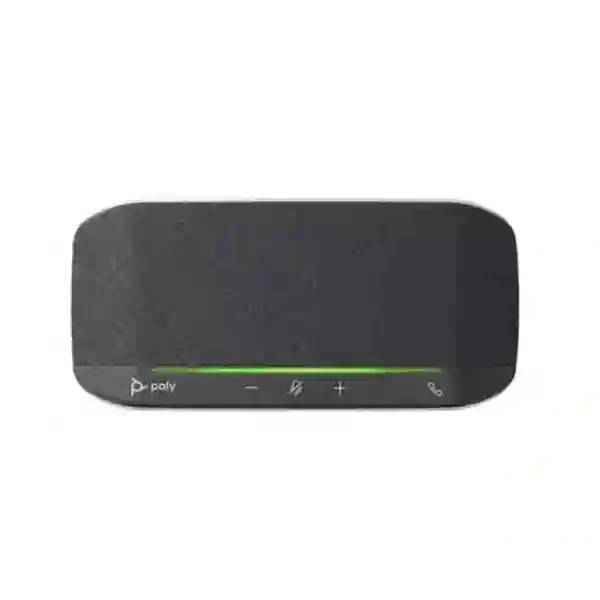
HP Poly Sync 10 USB Speakerphone
Bring clearer two-way conversation to a computer-based desk or small meeting space without adding a complicated conferencing system. The HP Poly Sync 10 USB Speakerphone is a wired, USB-powered microphone and loudspeaker in one compact unit. It suits people who want to join online meetings, hear colleagues through a dedicated speaker, and speak naturally without wearing a headset throughout the call.
Its steerable two-microphone array, noise and echo reduction, full-duplex audio, and straightforward touch controls make it a practical option for an individual office or a modest shared workspace. Check the exact USB connector bundle and meeting-platform certification before ordering, because product variants differ. Request a specification and quotation check for your Tanzania deployment rather than assuming a particular variant, local price, or stock status.
At a glance: the right fit
Best considered for one desk, a nearby pair of participants, or a small group seated within the microphone’s intended coverage. It is not a battery-powered Bluetooth speaker, a large-boardroom audio system, a camera, or a stand-alone telephone. These distinctions matter more than a long list of marketing features when you are choosing equipment for everyday meetings.
1. A dedicated speaking and listening device for computer meetings
The Poly Sync 10 combines a microphone array and a loudspeaker in a single tabletop device. Instead of relying on a notebook’s built-in speakers and microphones, the meeting uses hardware designed specifically around voice communication. A person can place the device in front of the screen, join a call on the computer, and use the speakerphone for both outgoing speech and incoming sound. This setup is particularly straightforward where the computer is already the centre of work.
That simplicity is the product’s main appeal. You do not need to plan ceiling microphones, separate amplifiers, or a complex audio console for an individual workstation. The unit travels with a laptop more easily than a fixed meeting-room system, but it also remains useful at a permanently assigned desk. The physical form factor is small enough to sit alongside a keyboard, notebook, and monitor without taking over the working surface.
Choose it because your meetings need a clear, consistent shared audio endpoint, not because every computer requires an accessory. A quiet laptop with good built-in sound may already satisfy occasional calls. The dedicated speakerphone becomes more useful when people take calls frequently, want accessible desk controls, sometimes sit slightly back from the laptop, or want a single device that colleagues can recognise and operate with minimal explanation.
2. The practical advantages and limits of a wired USB connection
A wired USB connection gives the Sync 10 a predictable place in the working setup: it connects to the computer and draws its operating power through USB. There is no charging routine for a separate speakerphone battery and no Bluetooth pairing step before the next online meeting. At a fixed office desk, removing those two steps can make the device easier to hand over between users or incorporate into a standard workstation configuration.
The trade-off is that the computer must be close enough for the supplied cable arrangement. HP lists a cable length of approximately 71.5 centimetres for a published Sync 10 configuration. A buyer should measure the distance from the intended speakerphone position to the available laptop port, dock, or computer connection. If the USB port is awkwardly located under a table or behind a monitor, cable routing deserves attention before purchasing several units.
This speakerphone is not intended for wireless conversations while moving around a room. It does not provide the freedom of a battery-powered Bluetooth model and should not be specified for smartphone calling merely because a phone has a USB-C socket. For those requirements, compare purpose-built mobile or Bluetooth-capable devices. A wired-only design is a benefit when the desk is stable and a limitation when the meeting location changes constantly.
3. Two microphones that focus on conversation
HP specifies a steerable array containing two microphones. The purpose of this arrangement is to capture voices from people sitting within the intended speaking area rather than treating every sound in the room as equally important. Alongside the microphone array, Poly provides noise and echo reduction. These features can make communication easier where ordinary office sounds compete with a voice, such as a nearby fan, typing, or an occasional background conversation.
No compact microphone can remove every distraction. A loud television, several people speaking at once nearby, traffic through an open window, or a person talking from outside the recommended pickup distance can still affect the remote participant’s experience. Acoustic performance depends on room surfaces, noise levels, computer software, and where the device sits. The best results come from a modestly quiet room with speakers facing the device rather than turning their heads away.
The two-microphone design is appropriate for a personal conferencing product. It should not be mistaken for a multi-microphone ceiling installation or a whole-room beamforming system. If a meeting routinely involves participants around a long table, ask for a device rated for a larger speaking area. Matching pickup range to the actual seating plan is more dependable than purchasing based on microphone count alone.
4. Full-duplex audio and why it matters during meetings
Full-duplex audio allows the device to handle people speaking and listening at the same time. In a conversation, that capability helps participants respond naturally without waiting for a device to switch between transmit and receive modes. During a video call, colleagues may interrupt to clarify a point or acknowledge a question while someone else is still speaking. A system designed for full-duplex communication is better suited to that everyday rhythm than basic equipment that treats audio as one direction at a time.
The microphone and speaker share the same compact housing, so the device also needs acoustic processing to limit the speaker’s sound returning through its microphones. HP describes noise and echo reduction as part of the Sync 10 audio feature set. The intent is to make the discussion less tiring for remote participants, although a poor network connection, excessive volume, or unsuitable software settings can still undermine intelligibility.
Full duplex does not turn one small speakerphone into a room sound system. Its value is conversational quality at appropriate distances and volumes. If you use it with a laptop, make sure the meeting application selects the Sync 10 for both microphone and speaker. Leaving the laptop microphone active while sound plays through the speakerphone can produce feedback or unexpected echoes, defeating the point of a unified audio device.
5. Understanding the published 1.5-metre pickup range
HP publishes an expected microphone pickup range of up to 1.5 metres, or five feet, for the Sync 10. This is a planning figure, not a promise that a quiet voice will be captured equally well in every room. A user speaking from a normal desk position will generally be closer than that limit. Two or three people seated around a small table may also be within range, depending on the exact layout and background noise.
Consider the position of the farthest participant before deciding that one speakerphone will serve everyone. If a person sits at the end of a long table, behind a monitor, or beyond the advertised range, their voice may sound distant to callers. A microphone pickup specification measures more than the physical dimensions of a room: it describes the practical speaking distance between the people and the equipment.
Place the speakerphone where voices can reach it directly and avoid hiding it behind a laptop screen or stack of documents. Test the farthest seat with a live colleague rather than relying only on a local recording. If a call will involve more people than can comfortably sit within that small speaking area, choose a higher-capacity conferencing solution instead of assuming the Sync 10 will stretch to fit.
6. Matching the device to a room of up to 3 × 3 metres
The manufacturer’s guidance identifies spaces up to approximately three metres by three metres as an ideal use case. This makes the Sync 10 a realistic candidate for a home office, a private workroom, or a compact discussion area. The guidance does not say that every person anywhere inside such a room can speak equally clearly. Actual performance depends on whether participants are sitting close enough to the unit and how much surrounding noise the room contains.
A small room with hard tiled floors, glass walls, and bare surfaces can produce reflections that make distant voices harder to understand. Soft furnishings or other ordinary acoustic treatments may help, as can keeping the microphone away from the loudest mechanical noise source. Place the unit on a firm, open table surface with its microphone area unobstructed. Avoid putting it beside another powered speaker used for the same call.
For Tanzania offices preparing a small meeting corner, room size should be one part of the purchasing brief alongside the intended number of participants and the laptop connection. A meeting room that is physically small but noisy may demand a different arrangement from a quiet private office of the same dimensions. Ask how users will sit and talk, not just how many square metres the room covers.
7. USB-A, USB-C, docks, and the importance of the exact bundle
The Sync 10 family includes published arrangements associated with USB Type-A and USB Type-C connectivity. HP’s product information for the USB-A/USB-C version describes connection through a USB-A cable and USB-C adapter. Other listed configurations describe a USB-A-to-USB-C cable. Those are not identical box-content statements. The correct purchase order should identify the exact product variant and accessories being supplied rather than assuming all packages are interchangeable.
Before choosing the model, inspect the user’s computer. Some laptops have conventional rectangular USB-A ports, while others rely heavily on smaller USB-C ports. A dock can provide a practical connection where the laptop has limited ports, but the dock must support the required USB audio device and supply a reliable connection. Avoid an improvised chain of adapters when a correct manufacturer-supported cable arrangement is available.
Check whether the user will connect directly to a laptop or leave the speakerphone at a shared hot desk. A permanently attached device may be more convenient through an appropriate dock, while a personal mobile workstation benefits from simple cable handling. If a USB hub causes a device to disconnect or disappear from the sound settings, test a direct computer port. Confirm included adapters and cable length on the final quoted configuration.
8. Computers, operating systems, and meeting applications
HP lists Windows 11, Windows 10, and macOS among the operating systems supported by a published Poly Sync 10 configuration. The device is a computer-connected audio accessory rather than a stand-alone meeting client. It receives sound from the chosen desktop application and sends microphone audio back to the computer. Users therefore still need a compatible laptop or desktop, their usual internet access, and the required conferencing software account.
Zoom certification is listed for a published standard Sync 10 variant, while a separately identified Sync 10-M product is marketed for Microsoft Teams certification. Certification should be checked against the exact part number, not assumed from the shared Sync 10 family name. Many meeting applications can use a compatible USB microphone and speaker as basic audio devices, but button integration and other software-specific functions may vary by application and installation.
During setup, open the meeting application’s audio settings and explicitly select the Poly speakerphone for input and output. Do a microphone test, listen to a colleague’s reply, and confirm that the mute indicator and in-app status behave as expected. Users joining through a web browser may encounter different call-control behaviour from those using a desktop client. Treat the application test as part of deployment, especially when several employees use different calling tools.
9. Touch controls and visible call status
The unit’s published controls include answering or ending a supported call, muting the microphone, and adjusting listening volume. These functions are especially helpful when a user is presenting a screen or working in another window and does not want to search for the correct software button. An illuminated status area can provide an immediate physical cue that the device is active. The practical benefit is operational confidence, not a reduction in the need for basic meeting etiquette.
Call control support is not necessarily identical in every application. A touch control may work as expected in a supported desktop communication client while behaving differently in another program or browser-based meeting. Confirm the target application before advertising one-touch meeting management to an entire team. If the microphone is muted through one interface, also verify how the status appears inside the meeting app so colleagues are not left talking while their computer remains muted.
Use the speakerphone’s volume controls to establish a comfortable level, then avoid increasing both the operating system and application volumes to their maximum. Excessive output volume can disturb nearby co-workers and may cause avoidable echo in reflective rooms. For private calls, a headset can be a more appropriate accessory because the Sync 10 plays the other participant’s voice into the room.
10. A 40 mm speaker built for clear everyday audio
HP identifies a 40-millimetre speaker and lists a speaker bandwidth of 80 Hz to 20 kHz for the published USB-A/USB-C model. The microphone bandwidth is specified as 100 Hz to 7.8 kHz. These figures describe parts of the audio design; they are not a standalone measure of whether a meeting will sound good. Voice intelligibility also depends on microphone placement, background sound, network conditions, and the far-end participant’s equipment.
The Sync 10 can serve as the computer’s audio output for online meetings and ordinary listening. Some users may appreciate having one external speaker for calls, instructional videos, and occasional music at their desks. Nevertheless, it is primarily a personal conferencing accessory, not a replacement for dedicated stereo music speakers or a public-address installation. Purchase it first for the quality and convenience of two-way speech.
To evaluate output, play a short spoken recording at a moderate level and move to the expected seated listening position. A person next to the device should hear colleagues without straining, while someone across a large room may not experience the same clarity. Remember that speech from the remote side cannot be improved beyond the quality transmitted by that person’s microphone and connection.
11. Desk placement, dimensions, and cable management
An HP-published Sync 10 variant measures approximately 18.2 by 8.9 by 3.3 centimetres and weighs about 280 grams. That low-profile shape makes it practical on a compact desk, but the device needs an open surface to operate properly. Do not bury it beneath papers or put it behind a monitor. A central position near the main speaker’s normal working area is a better starting point than a far corner of the desk.
Run the cable where it will not be pulled by the chair or caught when a laptop is moved. The short cable reach matters more than the device’s weight when configuring a meeting table. If the port is located on the far side of a laptop, plan for that geometry before assigning the speakerphone a permanent position. Ensure the computer can remain connected throughout calls without the device hanging over the edge of a desk.
Shared rooms benefit from one simple placement rule: return the speakerphone to its marked position after every meeting. This makes it easier for colleagues to reproduce a tested configuration. Keep the surface reasonably clean, leave the sound openings unobstructed, and avoid routing the cable next to liquids. Compact hardware can still create frustration if users must untangle or reconnect it each time a meeting starts.
12. Common business scenarios worth planning for
At an individual desk, the product offers hands-free speech without the pressure of wearing headphones throughout a long call. In a small private office, a manager can sit normally while speaking with a supplier or colleague. In a compact interview setting, two nearby participants can speak toward the same table device if they are positioned within the specified range. The advantage in each case is a shared local audio endpoint attached to an ordinary computer.
For training, the device may be useful when one or two staff members follow a remote demonstration from the same laptop. A small team can use it for a short project review where everyone is seated close enough to speak naturally. A consultant who changes between quiet workstations may also appreciate the familiar USB setup, provided the computer has the right port and the cable is handled carefully.
These examples are planning scenarios, not a promise of guaranteed participant capacity. A crowded classroom, open-plan work area, long boardroom table, or noisy workshop creates a different audio problem. Likewise, someone joining confidential human-resources or financial discussions should consider a headset or private room. The correct question is not whether the Poly Sync 10 can make sound, but whether its form of shared audio matches the conversation.
13. Choosing speakerphone audio for Tanzania office workflows
Organisations in Tanzania may use online calls for routine coordination with employees, customers, advisers, or colleagues working at different locations. In such workflows, predictable equipment at a laptop can reduce the time spent troubleshooting a meeting. The Sync 10 addresses the local endpoint: the microphone and speaker used by the people in the room. It does not replace an internet connection, video camera, subscription, or the meeting service itself.
Where electricity or network continuity is a concern, plan for the wider workstation rather than assuming an audio accessory solves the problem. Because the speakerphone relies on USB power from the host computer, it will not independently continue a call if the computer shuts down. A remote meeting also depends on the reliability of the internet connection and the software being used. Test the complete computer, network, and speakerphone together under typical working conditions.
For purchasing teams comparing conference speakerphones in Tanzania, this product’s strengths are its compact wired design and clearly published microphone range. Evaluate those against the actual use case before seeking a quotation. Do not assume a Tanzania-specific product price, an available local warranty process, delivery coverage, or installation service from an international manufacturer’s brochure; ask for such commercial details to be confirmed for the specific order.
14. Standardising multiple workstations in a small organisation
Consistency becomes valuable when several people need similar meeting equipment. If each assigned laptop is connected to the same type of speakerphone, employees can follow one brief setup guide for choosing the audio input, choosing the audio output, and checking microphone mute. The IT team can also document one known-good configuration for the supported operating system and meeting application instead of answering a different set of questions for every desk.
Before a larger rollout, test a sample unit with the particular laptops, ports, docks, and software versions used in the organisation. Confirm device recognition after restart and after reconnecting a laptop. Check whether volume and mute indicators behave correctly in the primary calling application. Test with an actual remote listener, not only with a local system sound. If a company uses several platforms, repeat the test in each important one.
Keep the purchase record tied to the exact configuration ordered. Similar product names can refer to different connection accessories or collaboration certifications. For a standard workplace package, that small administrative detail prevents a batch of equipment from arriving without the correct adapters. An organisation can also decide which users genuinely need shared-speaker audio and which should retain headsets for privacy or for work in open-plan offices.
15. Different Sync 10 variants and part-number checks
The HP Poly Sync 10 family contains more than one published commercial configuration. For example, HP lists a USB-A/USB-C speakerphone configuration and separately lists a Sync 10 model paired with a USB-A-to-USB-C cable. A Sync 10-M configuration is identified for Microsoft Teams. Differences in published product colour, cable contents, packaging, and certification mean that the product family name alone is not enough to finalise a procurement specification.
This page deliberately describes the core Sync 10 USB speakerphone rather than assigning an unverified catalogue number to the requested Tanzania listing. Before an order is placed, request the exact manufacturer part number, connection arrangement, colour if important, included accessories, and software certification relevant to your users. Verify the information on the quotation and packaging. Do not substitute a reseller’s internal stock number for the manufacturer’s identifier.
If your team uses Microsoft Teams every day, ask whether a Teams-certified variant is a requirement for your organisation’s deployment policy. If Zoom is the principal platform, confirm whether the quoted standard variant carries the expected Zoom certification. Certification affects purchasing confidence and supported integration; it should not be confused with a guarantee that all buttons or features work identically across every application.
16. Poly Sync 10 versus a Bluetooth-capable alternative
The Sync 10 is for the buyer who values a fixed wired computer connection. The Poly Sync 20 family, by comparison, includes USB and Bluetooth functionality and battery-powered operation in published manufacturer information. This difference is more relevant than simply choosing a larger model number. Someone who regularly moves around a workplace with a smartphone may find the additional connection flexibility worthwhile, while someone who spends the day at one computer might prefer the simplicity of the Sync 10.
Ask whether the user needs to take calls directly from a phone, work away from a powered laptop, or bring a speakerphone to different rooms without plugging into a computer. If the answer is yes, the Sync 10’s design may be limiting. Also consider whether a larger microphone pickup area is required. A small device should not be bought for a boardroom merely because a related product from the same family is designed for larger spaces.
A comparison should include total working convenience, not only the initial equipment price. USB-only operation eliminates the need to monitor a speakerphone battery, but limits positioning to the cable. Wireless capability creates flexibility, but adds charging and pairing considerations. Where privacy is important, an individual headset may be the better comparison than either tabletop model. The aim is to match the accessory to the real meeting pattern.
17. A short setup procedure for first-time users
Start with the computer powered on and the necessary meeting software installed or available. Connect the Poly Sync 10 using the connector or manufacturer-supplied adapter provided with the exact unit. Allow the operating system to recognise the device. Open Windows sound settings or the corresponding macOS audio settings and check that the speakerphone appears as an available microphone and output device. Select it for both directions where appropriate.
Next, open the application’s audio settings and select the same device rather than relying on the last-used default. Make a test call with someone in another room. Speak from the normal seated position and ask whether the listener hears speech at a comfortable volume. Test microphone mute and unmute, then confirm whether the supported answer/end control works in that application. Adjust volume gradually until both ends can communicate comfortably.
After a successful call, record the preferred settings for that workstation. If the user regularly connects a different headset, explain how to switch the audio device before joining a meeting. If a USB dock is part of the normal setup, perform the test through that dock as well. A short initial check is far more useful than discovering during a customer presentation that the computer is still using the wrong microphone.
18. Troubleshooting when sound is missing or unclear
If the speakerphone is not listed as an audio device, check that its USB connection is fully seated and try a suitable direct computer port. Avoid changing several settings at once. First establish that the operating system can detect the equipment, then confirm that the meeting application is pointing to it. If the speaker works but the microphone does not, check both the hardware mute state and the application’s permission to use the microphone.
Where remote participants report an echo, make sure that only one microphone and one loudspeaker arrangement is active for the call. Two computers joining the same meeting with open speakers in the same room can create acoustic feedback. Move the speakerphone away from reflective obstructions, lower excessive output volume, and verify that participants sit within the intended microphone range. Background noise can be reduced by closing unnecessary audio sources and using a quieter room.
If the computer recognises the device but certain call buttons do not control the application, investigate software support rather than immediately assuming the hardware is faulty. HP maintains setup and support information for the Sync 10 family, and Poly Lens is listed as management software for published configurations. Any firmware or software update should follow the organisation’s normal IT process and correspond to the exact device and supported operating system.
19. A practical purchasing checklist before requesting a quote
First define the environment: one personal desk, a two-person office, or a small shared table. Record the distance of the farthest participant from the proposed speakerphone position and note any significant nearby noise. Then check the workstation’s operating system, the available USB port, and whether the user connects through a dock. These points determine whether the Sync 10 can fulfil the practical requirement without additional audio equipment.
Second identify the collaboration platform. Note whether normal USB audio is sufficient or the organisation requires a specific certification and integrated call controls. Confirm the exact manufacturer’s part number and the cable or adapter included in that quoted version. Ask what is in the retail box, how a faulty unit would be handled, and what support documentation is available for that configuration. Avoid relying on a generic image to determine the accessories supplied.
Third request an itemised commercial quotation for Tanzania that clearly sets out the actual product configuration and any applicable taxes, delivery arrangements, or other charges. No Tanzania selling price or local stock position is asserted on this page. It is better to receive a verifiable quotation than to build a budget around a converted foreign price. Where several units are needed, pilot one device before approving the full quantity.
20. Care, longevity, and everyday operating discipline
The published USB-A/USB-C configuration carries an IP64 designation in HP’s specification. This indicates a degree of protection against dust and splashing water under the relevant test conditions, not permission to immerse, wash, or use the device carelessly around liquids. As with all electrical desk accessories, keep the connection dry and follow the guidance accompanying the specific product. Physical protection is useful but does not replace sensible handling.
Use a soft, appropriate cleaning approach and avoid pushing liquid into the speaker grille or connector. Never pull on the cable to disconnect it. If the speakerphone is moved between rooms, coil or secure the cable gently to prevent repeated strain. At a shared desk, label the device so that it is returned to the correct workstation and so that staff can identify the intended USB audio device in a busy meeting room.
An effective equipment policy is simple: check audio before calls, keep the microphone area clear, handle the cable carefully, and protect private conversations from unintended listeners. These habits are not special technology requirements, yet they have a direct impact on the quality and reliability of meetings. For the exact service terms and local support route, request documentation corresponding to the quoted product and purchasing channel.
21. What the technical specifications mean in practice
Specifications are most helpful when they answer a user question. Two microphones describe the voice pickup hardware; the 1.5-metre figure helps with table placement; the 3 × 3-metre room guidance helps rule out unsuitable large-room expectations. The 40-millimetre speaker describes the built-in output component, while USB connection defines the source of both audio and operating power. None of these numbers alone predicts the outcome of a meeting.
Weight and dimensions help determine whether the unit fits a laptop bag or desk. Cable length helps prevent unsuitable desk layouts. Windows and macOS compatibility narrows the types of host computers for which manufacturer support is documented. Touch controls make basic actions accessible, but integration still depends on the software. For organisations using formal purchase specifications, these are more valuable criteria than general phrases such as professional sound or premium meeting quality.
A final note on accuracy: HP publishes several Sync 10 configurations, and fields such as finish, included adapter, and collaboration certification can differ. The numeric reference specifications below describe the published USB-A/USB-C model where applicable, rather than certifying the contents of an unspecified local box. Always reconcile the quotation with the exact manufacturer part number before procurement, especially if a tender demands specific included accessories.
22. When the Poly Sync 10 is not the right choice
Not every voice-call problem is a speakerphone problem. In an open-plan office, conversations played over a shared speaker can disturb colleagues and make confidential information audible to people nearby. A comfortable, well-fitted headset usually provides more privacy and may help keep surrounding speech out of the user’s microphone. The Sync 10 is best where hands-free sound is desirable and the room itself is suitable for audible calls.
For a larger room, the important limitation is coverage. A long table with people seated far from the microphone may require a device designed for a wider pickup area or a meeting-room system with more distributed audio capture. Adding extra people beyond the recommended speaking area does not make the two-microphone array behave like a professional room installation. If participants need to move around while speaking, investigate suitable alternatives.
The device is also not an all-in-one video conference bar. There is no webcam or video display built into the product, and it cannot host a meeting independently without a connected computer and application. It does not add mobile network access or overcome slow internet connections. Choosing the correct equipment begins by separating the audio task from the camera, network, privacy, and room-design tasks.
Reference technical specifications
The following is a product-family orientation based on HP’s published specifications. Values associated with a particular configuration must be rechecked against the exact part number in a Tanzania quotation.
| Specification | Published guidance |
|---|---|
| Product category | Personal wired USB speakerphone |
| Microphone system | Two-microphone steerable array |
| Audio processing | Noise and echo reduction; full-duplex audio |
| Microphone pickup | Up to 1.5 metres / 5 feet |
| Suggested room | Up to approximately 3 × 3 metres |
| Speaker driver | 40 millimetres |
| Microphone bandwidth | 100 Hz to 7.8 kHz |
| Speaker bandwidth | 80 Hz to 20 kHz |
| Computer platforms | Windows 11, Windows 10, macOS, per published variant |
| Connection and power | USB computer connection; USB powered |
| Physical call controls | Mute, volume up/down, supported answer/end |
| Dimensions, reference variant | Approximately 18.2 × 8.9 × 3.3 cm |
| Weight, reference variant | Approximately 280 g |
| Cable length, reference variant | Approximately 71.5 cm |
| Accessory/certification notes | Cable, adapter, colour and platform certification depend on exact variant |
The standard USB-A/USB-C product listing also includes an IP64 entry and identifies Zoom certification; the Microsoft Teams-oriented Sync 10-M is a separately identified version. Do not infer a specific local package from these family-level reference details. Published manufacturer warranty wording is not a substitute for confirmation of the actual Tanzania purchase terms.
Frequently asked questions
These answers focus on practical purchase, setup, and suitability questions rather than assuming a particular Tanzania stock item or manufacturer part number.
Is the HP Poly Sync 10 USB Speakerphone wireless?
No. The Sync 10 is designed around a wired connection to a computer and uses USB power. It is not a Bluetooth speakerphone or a battery-operated portable conference device. That makes it straightforward at a fixed laptop workstation, but less suitable for calls taken directly from a phone or from places where a compatible USB computer connection is unavailable.
How many people can use one device?
There is no single reliable headcount for every room. The published guidance gives a microphone pickup range of up to 1.5 metres and an ideal room size of up to roughly 3 × 3 metres. One person or a small cluster seated close to the device is the intended scenario. Confirm the farthest speaker’s clarity in a real call before planning a shared table around it.
Can I connect it to a USB-C laptop?
HP publishes Sync 10 configurations involving USB-A and USB-C connectivity, including a USB-A cable and USB-C adapter arrangement and another description involving a USB-A-to-USB-C cable. Confirm the precise connector or adapter included in your quoted variant. Do not assume a USB-C plug is built into every package just because the family name mentions USB-C.
Does the device work with Microsoft Teams?
The Sync 10 can act as a computer audio device, while a specifically identified Sync 10-M variant is marketed for Microsoft Teams certification. For organisations that require Teams-certified peripherals, verify the exact model and approved part number before purchase. Availability of in-app call controls may depend on the particular application, device version, and desktop configuration.
Is the Sync 10 suitable for Zoom meetings?
HP lists Zoom certification for a published USB-A/USB-C Sync 10 model. Confirm that the exact unit quoted is the variant relevant to your software requirement. During setup, choose the speakerphone as both the microphone and speaker inside Zoom, then test voice pickup and mute. A certification statement for one part number should not automatically be applied to every related configuration.
Does it have noise cancellation?
HP describes noise and echo reduction and a two-microphone steerable array. These features are intended to help people hear speech more clearly, but they cannot eliminate loud or unpredictable environmental sounds. A quieter room and sensible placement remain important. For a busy open office or a noisy shared environment, a headset may be a more practical choice than speakerphone audio.
Is it appropriate for a large boardroom?
No, it should not be selected as a large-room audio system on the basis of its compact form factor. The published 1.5-metre microphone pickup guidance and approximately 3 × 3-metre room fit point to personal and small-room conversations. A long boardroom table, numerous distributed participants, or people moving around while speaking calls for a separately evaluated larger-room solution.
Will it continue working if the laptop is unplugged from electricity?
The device receives power from the USB connection, so it can operate while the host laptop is running on battery if that laptop continues supplying suitable USB power. The speakerphone itself is not a backup battery. If the laptop shuts down, USB power is lost, or the calling application disconnects, the speakerphone cannot independently maintain the meeting.
Can I use it as a regular computer speaker?
Yes, it functions as a computer audio output device as well as a microphone for calls. It can be used for routine spoken content and other suitable listening tasks. Its principal design purpose remains clear two-way communication, not high-powered stereo playback. Check the computer’s output selection and keep listening volume appropriate to the office environment and nearby colleagues.
What should I check if the other person cannot hear me?
First make sure the speakerphone is connected and selected as the active microphone in both the operating system and the calling application. Check hardware mute and the software mute state, then test from a normal seated position. If the microphone is still missing, try a suitable direct USB connection and review the relevant HP support documentation for the exact device.
What is supplied in the box?
HP publishes different Sync 10 variants with different descriptions of included USB cabling or adapters. One published USB-A/USB-C version lists the speakerphone, a user guide, and a USB Type-A cable; another lists a wired speakerphone in its summary. Request the exact manufacturer part number and a written accessory list from the supplier before ordering. Do not rely on generic catalogue photographs.
What is the local price or availability in Tanzania?
No current Tanzania price, stock status, import charge, delivery timetable, or local service entitlement has been verified for this requested listing. Ask for a dated quotation that identifies the exact variant and states what is included. This is particularly important when the procurement requirement specifies a connector type or software certification. Foreign retail prices should not be treated as Tanzania selling prices.
Does the Sync 10 include a camera or internet connection?
No. It is an audio accessory with a microphone and speaker, connected to a compatible computer by USB. A video call still requires a suitable camera if video is needed, and the meeting application still needs network access. The Sync 10 helps manage audio at the local desk; it does not provide conferencing software, a mobile data connection, or an independent meeting service.
Can it be used for confidential calls?
Technically it can reproduce a private call, but speakers make the other person’s words audible to anyone nearby. Choose a private room if using the Sync 10 for sensitive discussions, or use an appropriately configured headset instead. The right audio hardware depends not only on clarity but also on who can hear the conversation in the surrounding workspace.
Request a configuration-matched quotation
Considering an HP Poly Sync 10 USB Speakerphone for a desk or small meeting area in Tanzania? Ask FourTeck Tanzania to confirm the exact manufacturer part number, included USB cable or adapter, application certification where needed, and current commercial terms. Share the number of users, laptop port type, meeting platform, and room layout to help identify an appropriate configuration.
Next step: Request a product specification check and a Tanzania quotation before placing an order.




Reviews
There are no reviews yet.