
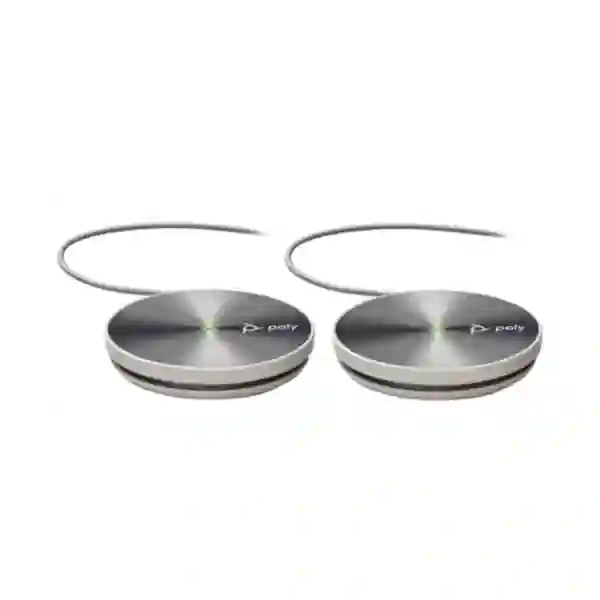
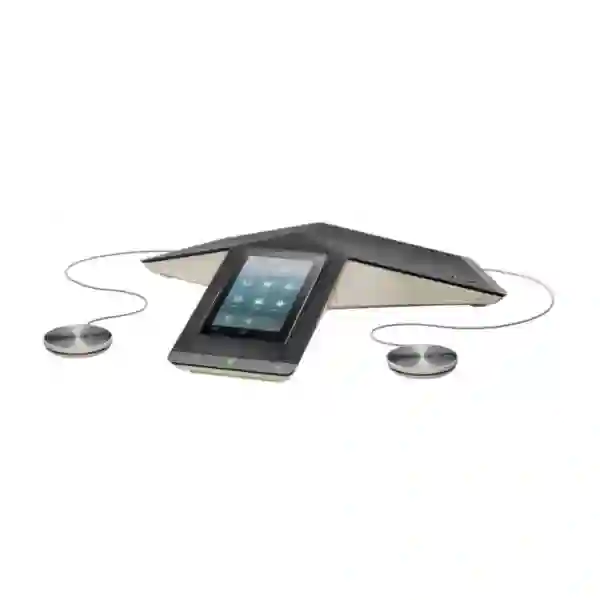
HP Poly Trio 8300 Expansion Microphone
Bring microphone pickup positions closer to the people around your meeting table. This optional wired accessory is for compatible Poly Trio conference phones; confirm the exact kit and your room layout before ordering.
At a glance
Manufacturer references identify the accessory family; they are not a verified FourTeck listing SKU. Exact supplied contents and commercial terms require written confirmation.
Why add microphones to an existing Trio 8300?
A conference phone in the middle of a small meeting table may be adequate until the room begins hosting a different pattern of meetings. Participants may sit at both ends of a long table, pull their chairs farther apart for a workshop, or use a space that has been reconfigured without moving the communications equipment. A wired microphone closer to a talker can provide a more appropriate pickup position than relying entirely on a distant central unit. This is the practical reason to consider a HP Poly Trio 8300 expansion microphone instead of simply increasing speaker volume.
The accessory addresses microphone placement, not every possible cause of poor meeting audio. It cannot repair a failing network connection, an incorrectly configured calling service, strong room reverberation or a participant who is muted. A useful purchasing decision begins by identifying what remote listeners actually report. If they consistently hear the person nearest the Trio but struggle to follow people seated away from it, additional pickup positions may help. If every voice is distorted or calls disconnect, troubleshooting the phone, service and room should come first.
For buyers arranging equipment for an office in Tanzania, the sensible next step is to document the current conference phone model and the layout of the meeting space. This supports a more specific quotation and reduces the chance of ordering a microphone designed for a different Poly family. The goal is to improve participation in ordinary meetings, not to attach a performance promise to a particular room dimension or number of attendees.
What the accessory is—and what it is not
The accessory is a wired expansion microphone solution designed to work with the Poly Trio conference-phone family. The Trio 8300 already has its own built-in microphone system; expansion units are optional additions that can be placed on the table where additional voice pickup is needed. They do not replace the phone’s speaker, keypad, calling software, network connection or service subscription. An existing compatible Trio phone is therefore an essential part of the proposed installation.
HP’s conference-phone comparison identifies the Trio 8300 as a model that supports expansion microphones. HP’s accessory catalogue names the Poly Trio 8300/8800 Expansion Microphones and gives part number 85X00AA. The older Poly Trio 8300 datasheet calls out an optional expansion microphone pair under reference 2200-65790-001. These identifiers help a purchaser describe the required accessory, but they should be checked against the physical product and the seller’s exact package description before an order is accepted.
The microphone option is especially relevant when a working conference phone is already installed. Businesses setting up an entirely new room should evaluate the complete audio system and room size rather than assuming that adding accessories to a particular model is the best answer. Similarly, a buyer should not order an expansion set merely because a room is described as a boardroom; the actual seating positions and acoustic conditions matter more than the room’s name.
Kit contents, cable length and product identification
Published installation illustrations show two accessory microphones, each associated with a cable of approximately 2.1 metres, or 7 feet. Commercial descriptions commonly refer to a pair of microphones supplied with two connection cables. However, a product page title containing the singular word ‘microphone’ does not prove that one unit or two units will arrive. Before approval of a purchase order, ask for a written description of the quoted quantity, part reference and included cables. This is particularly important where quotations have been shortened or item names were imported from a supplier catalogue.
The documented cable length gives teams a starting point for checking placement. It is not the same thing as the distance over which a microphone can reliably capture speech. A cable runs from the conference phone’s compatible microphone connection to the accessory position, and the route across or under the table uses some of that available length. Measure along the route that a safe installation will actually follow rather than measuring a straight line through open air. Do not assume that an ordinary replacement cable, extension lead or adapter is approved without confirming it.
The manufacturer part reference is useful for differentiating this accessory from the separate Poly Trio C60 microphone accessory, which HP lists under a different part number, 85X02AA. Those products should not be treated as interchangeable merely because they share the Trio brand. For a Tanzania quotation, record the phone model from its label or management interface, the requested accessory reference and the unit count on one document so procurement, IT and the supplier are discussing the same items.
Compatibility checks before ordering
The target phone for this page is the Poly Trio 8300. HP expressly lists expansion-microphone support for that device. Published listings also associate the older Poly expansion microphone pair with Trio 8500 and Trio 8800 systems, but a customer using one of those different phones should still ask for verification of the exact accessory and software combination. Compatibility with the Trio family does not mean compatibility with every Poly conference phone, speakerphone, video bar or microphone input.
A useful check takes only a few facts: the complete phone model, any model suffix shown on the device, the current software version, the physical condition of the microphone ports and whether other accessories are already connected. A phone can be identified by photographs of its product label and connection area, but do not share passwords, provisioning credentials or other confidential administration data in a public enquiry. If a site has several similar rooms, label the information by room so the wrong model is not used to approve the entire order.
The accessory should be considered part of the existing phone’s audio configuration. Compatibility does not independently certify that the enterprise calling platform, cloud meeting application or PBX integration is configured correctly. Before spending money, separate two questions: will the microphone hardware connect to this exact Trio phone, and is the complete meeting system currently making satisfactory calls? Confirm the hardware question first, then assess the whole calling workflow during the installation test.
Understanding coverage without confusing specifications
HP describes the Trio 8300 conference phone itself with a nominal microphone pickup specification of 3.7 metres, or 12 feet. That figure is for the conference-phone base model and must not be advertised as a guaranteed range for each external microphone. Real-world audibility also depends on speaking volume, background noise, table shape, reflective surfaces and how the system processes several active microphones. A practical design therefore starts with people’s seats and speaking habits rather than a single radius drawn around the central phone.
Expansion microphones are valuable because they can move a pickup point into a part of the seating area that the base phone does not serve as comfortably. For example, staff seated at the far end of a rectangular table may be easier to capture when a compatible microphone is positioned nearby. This does not mean that every seat in a large, irregular or noisy room becomes equally well served. Teams should check the worst seat, not just the average seat, before accepting the setup.
When discussing microphone coverage with a supplier, request a description of the proposed layout and any conditions that could affect the result. Treat claims of exact expansion-microphone pickup distance cautiously unless they are supported by documentation for the precise accessory. The most credible acceptance criterion is a short real meeting-style call in which the intended remote listeners confirm that voices from all important seating positions are understandable.
Where to place microphones on the meeting table
A sensible first layout places the Trio conference phone where participants can reach and hear it, then places additional microphones closer to seats farther away. On a long rectangular table, this may mean using the optional microphones toward the two outer seating zones while leaving adequate cable slack. On a wide or irregular table, the positions may need to shift away from the geometric ends toward the people who speak most often. The appropriate configuration should be confirmed against the actual supplied microphone connections.
Avoid positioning an accessory directly against a laptop fan, projector exhaust, cup tray, stack of papers or other predictable source of noise. Do not hide a microphone behind a monitor or under a document folder. If a table has built-in cable channels, check whether they can carry the microphone wiring without sharp bends or pinched connectors. Allow for the movement of chairs and any removable table leaves. A layout that works only while the furniture is perfectly arranged is not a durable meeting-room design.
Mark intended positions temporarily before making cable routing permanent. Have a colleague sit at each normal seat and speak naturally while someone outside the room listens through the real calling service. Try the setup with both near and distant participants speaking in turn. Move one microphone at a time to understand which changes help. Recording the final positions with a simple internal room photograph makes it easier to restore the same configuration after cleaning, furniture rearrangement or maintenance.
Installing the wired expansion microphones
Installation planning begins with the phone, not the accessory. Check that the Poly Trio 8300 is functioning, registered to its intended calling service and capable of completing a normal call before connecting additional equipment. Follow the current Poly or HP setup instructions applicable to the exact phone and accessory. Confirm that the microphone connectors are the designated expansion connections; do not attempt to use the Ethernet, USB or unrelated sockets simply because a cable appears to fit.
Route the supplied cables so that participants cannot easily snag them with shoes, bags or chair wheels. Leave a little slack near the phone and microphone housings, but avoid loose coils in a busy seating area. If a facilities team needs to run cables through furniture, coordinate with them before a permanent installation. Protect the accessories during installation and avoid pulling on the cable when moving microphones. Do not modify plugs or splice cables without written manufacturer guidance.
After connection, confirm that the expected microphone units are recognized or functioning in a live call. Use ordinary speaking levels from the nearest and farthest seats. Check mute behaviour and whether a remote listener hears changes when the microphones are moved or obstructed. If results are poor, first verify that the accessories are the correct variant and correctly connected. Escalate persistent problems with the device model, software version, connection description and reproducible symptoms rather than repeatedly changing unrelated system settings.
A simple acceptance test for facilities and IT teams
A short, repeatable test is more useful than a promise that a room will sound ‘crystal clear’ under all conditions. Start with a stable call to a remote colleague who uses familiar headphones or a known-good speaker system. Ask one local participant at a time to read a short ordinary sentence from every planned seat. The remote colleague should report intelligibility, unexpected background noise, inconsistent loudness and whether any location regularly drops syllables. Do the test while the room is arranged as it normally will be for meetings.
Then check real meeting situations: two people speak in quick succession, someone turns away from the table to refer to a display, a laptop is opened near a microphone and the ventilation system runs at its typical setting. The goal is not to make the room artificially quiet; it is to learn how the configuration behaves during common work. A microphone that performs well only while everyone sits unusually still may not solve the actual collaboration problem.
Record the baseline before installation and compare it with the same test after positioning the accessories. Note which seats improved, which did not and whether moving a microphone had any unintended effect. For multiple office rooms, a one-page acceptance record is enough to capture the phone model, accessory reference, microphone positions, call service, observer and unresolved issues. This evidence helps buyers decide whether the accessory has delivered useful value in their particular environment.
Room acoustics still matter
Extra microphones do not remove sound reflections from hard floors, glass partitions or bare walls. A meeting room with pronounced echo can remain difficult for remote participants even when microphones are physically close to the speakers. If people hear a hollow sound or speech becomes muddy when several participants are present, review the room itself. Simple changes in placement, background noise and how people use the room may be more effective than increasing the number of devices.
Look first for controllable noise: mechanical ventilation, portable fans, phones vibrating against the table, loud corridors and open doors. Avoid positioning microphones where cables rub against moving furniture or where participants repeatedly tap the table beside them. A fabric-covered chair or other ordinary soft furnishing may affect room reflections, but improvements should be evaluated rather than promised. The accessory is a pickup tool, not an acoustic treatment or a substitute for sensible room planning.
Consider who normally joins meetings remotely. If remote colleagues cannot distinguish people at opposite ends of the table, the priority may be consistent speech capture. If they hear every chair movement but cannot understand discussion, microphone positioning and room noise may require attention together. Ask for feedback from the people receiving the audio, because a room can sound entirely normal to participants sitting inside it while sounding poor to everyone on the call.
Common business use cases
Management discussions often have participants seated at fixed positions around an established table. In these rooms, the central conference phone may be shared by everyone while microphones can be positioned toward distant speakers. The need is especially easy to recognize when the chairperson near the phone is consistently clear but remote attendees ask other participants to repeat themselves. A carefully planned accessory layout may improve inclusion without changing where the group naturally sits.
Training and briefing rooms introduce different challenges. Participants may gather around one large table for some sessions and break into smaller groups for others. Before purchasing, decide which layout the microphone arrangement is meant to support. If the furniture is regularly moved, safe and repeatable cable routing becomes part of the buying decision. A permanent wired solution may not suit every flexible classroom, even though it makes sense for a stable conference-table arrangement.
Project meetings, supplier reviews, interview panels and hybrid planning sessions can all benefit from audio that reaches beyond the person nearest the phone. The common requirement is intelligible speech from known seats, not a particular industry label. For every room type, the IT or facilities team should agree where people usually speak, where accessories can be placed and how success will be judged before buying additional hardware.
Using the accessory in hybrid meetings
A hybrid meeting combines people gathered in the room with others connected through a calling service or meeting application. The expansion microphones work as accessories to the compatible Trio phone; they are not a separate USB microphone kit intended to plug directly into each participant’s laptop. The full call path still depends on how the Trio is connected and configured. If a computer-based calling workflow is being used, confirm that the phone’s supported speakerphone mode and relevant meeting application behave as expected.
The experience of remote participants is the most important evidence. Local people often compensate for quiet talkers by looking at them or reading facial expressions, while someone on the call has only the audio. Encourage one person at a time to speak clearly and leave a brief pause before changing speaker. Even a well-placed microphone cannot reliably rescue someone who talks while walking away from the table or covering the microphone with a notebook.
If a hybrid room also has cameras, screens or additional audio equipment, avoid assuming the expansion accessory will integrate with those devices directly. It connects within the supported Trio ecosystem. Check how the room selects its microphone and speaker sources, especially where several USB and conferencing devices are connected. A small amount of configuration review can prevent duplicate audio paths, unexpected feedback and confusion when staff switch between meeting platforms.
Expansion microphones versus replacing the conference phone
An accessory is often the most focused option when the existing Trio 8300 is already meeting the business’s calling requirements and the main complaint concerns people sitting farther from its built-in microphones. In that situation, keeping the established phone and adding appropriate pickup positions may be simpler than redesigning the entire space. The buyer still needs a compatible hardware reference and a test of actual seating coverage, rather than relying on the accessory name alone.
A replacement system deserves consideration when the room has become much larger, the organization wants a substantially different conferencing workflow, or the current phone no longer meets operational requirements. Newer conference systems vary in microphone capabilities, management features and supported meeting modes. Those differences must be checked for the exact proposed model. An expansion microphone cannot change the underlying phone’s display, networking features, platform support or lifecycle status.
For rooms with no existing Trio phone, this product is not a complete meeting solution. A standalone accessory purchase would leave the customer without the device that handles the call. Ask for an assessment of the room and planned calling service first. A clear distinction between an accessory upgrade and a new-room deployment helps avoid purchases that look inexpensive individually but do not form a usable conference system.
IT administration, networks and power
The expansion microphones are wired accessories, while the Poly Trio 8300 base phone continues to rely on its normal power, network and calling arrangement. HP documentation identifies the Trio 8300 as an IP conference phone and describes a network connection with power-over-Ethernet arrangements in its setup material. The microphone accessory should not be presented as a separate IP endpoint that needs its own network address, independent telephone line or cloud account. It forms part of the conference phone installation.
Before ordering, IT staff should verify that the phone works with the organization’s existing telephony or meeting service, that the network link is dependable and that any required power supply arrangement is correct. A microphone accessory does not correct packet loss, insufficient bandwidth, misconfigured audio routing or service registration failures. If the present problem affects all participants and happens intermittently, first investigate the broader call path rather than concluding that more microphones are needed.
Document the model and configuration already in service, especially where a company maintains several generations of Poly devices. Make a note of who can perform a test call, who administers phone software and who is responsible for cabling in the room. The information is simple but prevents a procurement request from becoming stalled between purchasing, IT and facilities. Verify that any firmware or platform change is recommended for the exact installation before applying it.
Procurement questions that prevent the wrong order
Begin with the precise description: wired expansion microphones for a Poly Trio 8300, with the intended manufacturer accessory reference. Ask the quotation to state whether it supplies a pair, whether both cables are included and whether the conference phone is excluded. If a supplier shows photographs, confirm they correspond to the quoted item rather than to an example of the complete Trio system. An item title copied from a catalogue is not a substitute for a complete scope of supply.
Check whether the part reference on the offered packaging matches the one being requested, especially where the catalogue displays both a historical Poly number and an HP accessory number. These references can be useful for identification but are not proof of the seller’s own SKU. Ask separately about current pricing, currency, taxes if applicable, availability, lead time, warranty terms and any local installation service. None of those commercial details should be assumed solely from the manufacturer’s technical materials.
A sensible purchasing decision also includes a plan for acceptance. Who will confirm the phone model? Who will connect and route the microphones? Who will make a test call from the actual room? Who can raise an issue if the supplied pack differs from the quotation? Answering these questions before an order is placed can be more valuable than comparing two brief listings that omit the items and conditions necessary for deployment.
Troubleshooting after connection
If the extra microphones appear to make no difference, confirm that the correct phone model and accessory were used and that each cable is connected to its intended socket. Check whether the microphone units are positioned close to the speakers whose voices are hard to hear. Make an ordinary test call with a listener outside the room and compare the same seat with and without the accessory in use, following the device’s appropriate operational guidance. Avoid judging performance solely from the room’s own loudspeaker.
If speech is clear only at certain seats, the placement may need adjustment. Check whether table objects obstruct a microphone, whether another source of noise is nearby or whether the room layout has changed. If audio is distorted from every position, examine the phone’s underlying call quality and configuration. If the issue appears only on one conferencing platform, check that platform’s supported integration and selected audio path rather than treating the physical microphone as the only possible cause.
Intermittent problems should be recorded with enough detail to reproduce them. Note the call type, which seats were affected, whether participants were muted and whether the issue happened before the accessory was installed. Preserve a simple cable and room layout diagram. Do not perform unapproved resets, cable modifications or configuration changes on a managed company phone; involve the relevant administrator or support provider when the basic physical checks do not resolve the problem.
Meeting etiquette and accessible participation
Meeting technology is most valuable when more people can contribute without continually asking to be heard. A microphone placed near the far end of a table may make participation more comfortable for colleagues who cannot or do not wish to move toward the central phone. It can also reduce the temptation to lean forward unnaturally while speaking. However, accessibility needs are individual, and microphones alone do not ensure that every participant can communicate or follow a meeting equally.
Agree simple habits that work with the room: speak one person at a time, avoid covering microphones, minimize unnecessary table tapping and announce when a remote participant wants to contribute. If mute controls are available on the installed accessory, explain their function to regular room users and confirm them during a call. Staff should not assume that a microphone is active or muted without checking the actual device’s feedback and the meeting application’s status.
For teams conducting important interviews, reviews or decisions, appoint someone to monitor whether remote attendees can hear clearly. Invite feedback before the meeting moves to the next agenda item. Good microphone placement, clear facilitation and dependable network quality reinforce one another. No single item of hardware replaces the basic communication practices that make a hybrid conversation effective for everyone.
Long-term care and room ownership
A wired microphone kit is straightforward to overlook once it becomes part of a table. Assign basic ownership to the office or IT team so that cables are not stretched or moved accidentally during cleaning and furniture maintenance. Keep drinks away from microphone housings and avoid using their cables as handles. Follow the manufacturer’s current cleaning and handling advice for the exact product; do not spray unapproved liquids directly into openings or connectors.
If the room is rearranged for an event, photograph the original layout and label the microphone positions if necessary. After restoring the furniture, check that no cable has been trapped under a table leg and that all connectors remain secure. A brief test call is appropriate when equipment has been disconnected or moved. It is easier to identify a loose connection before a board meeting starts than while several remote participants are already waiting.
Maintain a simple record of the conference phone model, accessory identification, installation date and support contact. Do not record or circulate confidential device credentials in general room documentation. When a phone is replaced, review microphone compatibility again instead of automatically transferring the same accessories. An accessory bought for an earlier Trio generation may not be the correct expansion option for a different new conference device.
Tanzania buyer and deployment considerations
For an organization purchasing in Tanzania, exact compatibility is often the first specification to settle, because a microphone that cannot connect to the installed conference phone provides no useful upgrade. Share the Poly Trio 8300 model and the proposed HP accessory reference when requesting a quotation. If the room is already operating, describe the seating layout and the specific audio complaint. This gives the supplier a better question to answer than a general request for ‘conference microphones’.
Ask for written confirmation of the current offer and fulfilment terms relevant to your location. Pricing, taxes, stock, delivery arrangements, warranty conditions and technical support should be established from the actual quotation, not inferred from overseas retail listings or historic manufacturer documentation. A product being described in a catalogue does not confirm that it is immediately available for a particular Tanzanian site. If installation help is required, request confirmation of that service rather than assuming it forms part of the accessory price.
Commercial buyers may also want their IT team to approve the accessory before procurement. A one-page specification containing the phone model, manufacturer part reference, expected package contents and planned test can support that approval. Once the technical fit is confirmed, request the commercial details from FourTeck Tanzania through the business’s normal enquiry process. This keeps technical suitability and purchasing terms clear without suggesting unverified local stock or an unsupported service commitment.
Important limitations and fit decision
This is an accessory for a compatible conference phone, not an independent microphone system or a guaranteed solution for every large room. It does not add a new conference service, automatically improve an unreliable internet connection or turn a Trio 8300 into a different model. The documented 3.7-metre pickup figure for the base phone should not be assigned to each expansion microphone, and no exact room-size guarantee is offered here. Final performance is best judged in the real space with the intended users.
An appropriate buying decision considers the complete chain: the exact phone, the accessory version, the seating positions, the physical cable route, the room’s background noise and the experience of remote participants. If any part of that chain is uncertain, the uncertainty should be resolved before a purchase order is approved. A wrong kit cannot be made compatible by more ambitious placement, and microphone coverage cannot compensate for a faulty call connection.
Choose the HP Poly Trio 8300 expansion microphone option when a working, compatible Trio installation needs additional pickup positions and the room can safely accommodate wired table accessories. Consider a broader audio assessment if the problem is more complex, involves extensive room reconfiguration or affects every participant equally. Ask for compatibility and package verification first, then proceed to a quotation based on the confirmed requirements.
Frequently asked questions
Does the Poly Trio 8300 support expansion microphones?
Yes. HP’s conference-phone comparison identifies the Trio 8300 as supporting optional expansion microphones. The accessory should still be checked against the exact phone and packaging reference before purchase. The presence of expansion support does not mean that every microphone sold under the Poly brand is suitable. Make the model number part of the quotation and test the installed units during an ordinary call.
Are the microphones wireless?
The expansion accessory discussed here is a wired microphone arrangement. Installation therefore includes checking the cable route and where the units will sit on the meeting table. Wireless features of a conference phone should not be confused with the connection method used by its optional microphones. If wireless placement is a firm requirement, ask for a different complete room-audio recommendation rather than expecting this wired kit to behave like a wireless microphone system.
Is the Trio 8300 conference phone included?
No complete conference phone is implied by this accessory description. The microphone kit is intended to supplement an existing compatible Trio unit, and the phone must be sourced separately where required. Before ordering, request a written scope of supply identifying the number of microphones, the cables and the absence or inclusion of any other hardware. A photograph showing microphones connected to a phone is illustrative and should not be treated as a packing list.
How many microphones come in the kit?
Manufacturer documentation refers to an optional pair, and published kit descriptions commonly identify two microphones with two cables. However, the exact quantity being offered under a local listing should be confirmed on the quotation. A singular item name may be an abbreviated catalogue title rather than a reliable indicator of pack quantity. Ask the supplier to state exactly what will be supplied, particularly if different part numbers or packaging options are shown.
What is the difference between 85X00AA and 2200-65790-001?
HP’s accessory documentation lists 85X00AA for the Trio 8300/8800 expansion microphones, while older Poly product documentation lists a microphone pair under 2200-65790-001. These are useful manufacturer identification references. They should not be copied into an unrelated retailer’s SKU field without evidence that the retailer uses them for the exact listing. If a quotation contains one reference and a carton carries another, request written confirmation of equivalence before installation.
How long are the microphone cables?
Poly setup illustrations show accessory microphone cables of approximately 2.1 metres, or 7 feet, for the documented configuration. The available placement distance will be shorter when the cable follows a safe route around or through furniture. This measurement describes a physical cable, not an audio pickup radius. Verify the included cables against the exact offer and avoid assuming that unapproved extension leads or replacement cables will provide equivalent operation.
Will expansion microphones solve echo and dropped calls?
Not necessarily. Extra pickup positions may help when distant voices are the main problem, but echo can be influenced by room acoustics and dropped calls can involve networks, services or configuration. Try to separate the symptoms before buying. If remote attendees hear nearby speakers well but not distant speakers, assess microphone placement. If all speakers experience the same interruptions, troubleshoot the complete conferencing setup first.
Can I use this accessory with a Poly Trio C60?
Do not assume so. HP lists a distinct accessory reference for Poly Trio C60 expansion microphones, different from the Trio 8300/8800 entry. Similar branding does not establish interchangeable connectors or supported operation. Identify the complete model name on the conference phone before placing an order, and ask for the appropriate accessory for that specific model. This avoids treating every product named ‘Trio expansion microphone’ as the same item.
What information should I send for a quotation in Tanzania?
Provide the current phone model, the accessory part reference you are considering, the number of rooms, and a brief description of the seating layout. Ask for confirmation of the supplied microphone quantity, cables, compatibility, price and current fulfilment terms. If installation support is needed, make that a separate explicit question. Do not include passwords, private provisioning details or other sensitive business information in an ordinary product enquiry.
How do I know whether the upgrade worked?
Conduct a call with someone listening remotely, using each normal seat in turn. Compare speech clarity before and after the microphones are installed and positioned. Test the room under its usual conditions, including ventilation and normal laptop use. Note any seats that remain difficult to hear, and adjust positioning where appropriate. Successful installation means the arrangement meets the room’s actual communication requirements, not simply that the accessories are physically connected.
Request a compatibility check and quotation
Tell FourTeck Tanzania that you need the HP Poly Trio 8300 expansion microphone accessory. Share the conference phone model, requested manufacturer reference, meeting-table layout and expected microphone quantity. Ask the team to confirm the correct pack contents and current commercial terms before you order.
Next step: request a product-specific quote and confirm compatibility.




Reviews
There are no reviews yet.