
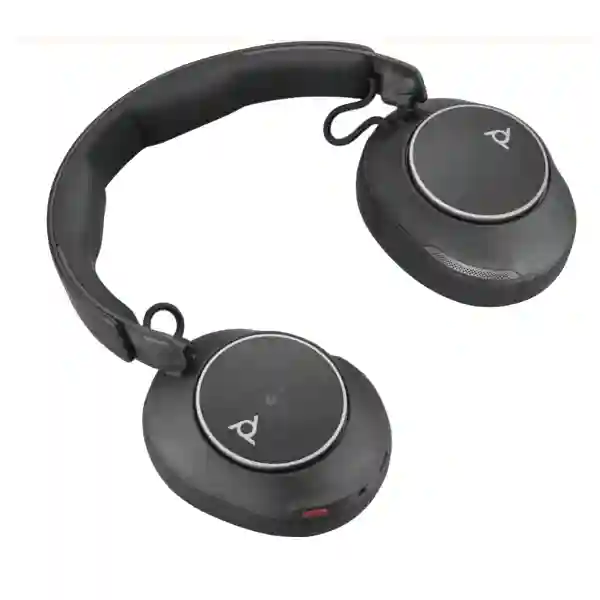
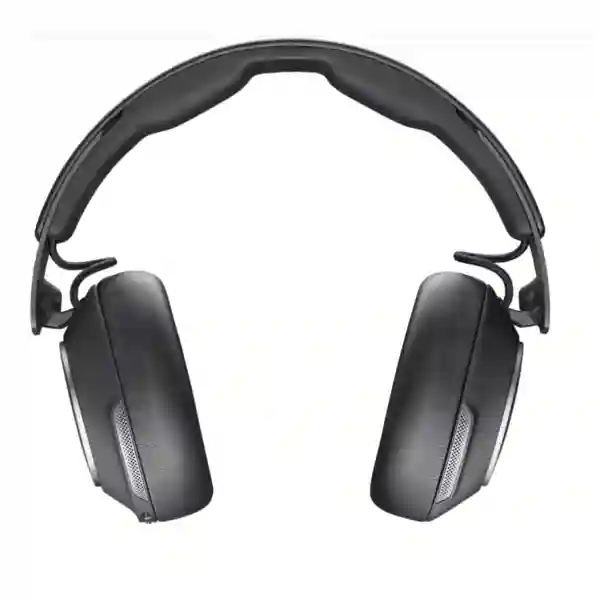
HP Poly Voyager Surround 80 UC Bluetooth Headset
If your workday involves regular video meetings, customer conversations and time spent concentrating at a laptop, this headset combines a discreet over-ear design with call-oriented features. The HP Poly Voyager Surround 80 UC Bluetooth Headset offers boomless voice pickup, adaptive active noise cancellation, Bluetooth 5.3 and supported USB connection options. It suits buyers who need to evaluate clarity, comfort and software fit rather than just comparing consumer headphone specifications. Ask FourTeck to verify the exact Tanzania offer before ordering.
Boomless call pickup
Six microphones for call transmission; ten microphones overall in HP specifications.
Adaptive ANC
Work-focused listening with selectable transparency for nearby conversations.
Flexible connections
Bluetooth 5.3, supported BT700 computer adapter and documented corded modes.
Workday battery
Up to 21 hours of talk time or 24 hours of listening, subject to use.
What makes this headset useful for business communication?
The HP Poly Voyager Surround 80 UC Bluetooth Headset is designed for people whose working day moves between online meetings, independent tasks and conversations with colleagues. Instead of asking users to choose between a conventional office headset with a visible microphone boom and casual listening headphones, it brings professional call functions into a discreet over-ear form. Its purpose is practical: hear the people in a meeting, communicate clearly, reduce some ambient distractions and move between supported work devices without changing equipment for every task.
A headset becomes an important business tool when employees regularly speak with customers, suppliers, colleagues or remote project teams. Poorly understood speech forces repetition; weak wearing comfort makes meetings tiring; and complicated connection arrangements slow down the start of calls. The Surround 80 UC addresses those categories with integrated microphones, adaptive active noise cancellation, padded earcups, Bluetooth connectivity and dedicated computer-adapter options. Each function contributes differently, so buyers should evaluate their actual working environment rather than relying on a single feature label.
This model is best assessed as a communications-first headset that also plays music and other media. It is not a standalone conference-room speakerphone, a protective hearing device, or a substitute for a stable internet connection. Call quality still depends on the meeting software, network conditions, microphone positioning and the background activity near the user. For a Tanzania office or remote-work purchase, start by identifying where the wearer will use it, which software they rely on and whether the proposed package contains the adapters they need.
A quick fit check before you request a quote
The strongest fit is for professionals who want stereo sound and an over-ear design, particularly people taking recurring online meetings at a desk or in a shared workspace. Managers, account teams, consultants, administrative staff, project coordinators and mobile knowledge workers may value the combination of call-oriented microphones and a less conspicuous appearance. A user who changes between a laptop and a smartphone can also benefit from the headset’s ability to maintain connections to two supported devices at once.
The Surround 80 UC is less naturally suited to buyers looking for a lightweight, single-ear headset, a permanently wired low-cost desk accessory or headphones selected primarily for high-fidelity music. Over-ear cushions surround both ears, which may feel more immersive but can be warmer than an on-ear or mono alternative during lengthy wear. The electronic noise cancellation is designed to reduce what the wearer hears; it does not promise silence or eliminate the sound of every nearby conversation.
Consider how often the employee must hear colleagues without removing the headset. Transparency mode can be useful for that workflow, while an open office with frequent desk-side interruptions might call for agreed expectations about using it. Equally, a user who takes calls only occasionally may not need all the available management and control functions. A sensible buying decision reflects daily frequency of calls, shared-office noise, operating-system requirements and total user comfort rather than the length of the specification sheet.
Boomless microphones: voice pickup without a visible arm
HP describes six microphones for call transmission within the headset’s boomless design, while its technical specification lists ten microphones in total. These statements describe different aspects of the microphone system, not competing headset models. The integrated arrangement allows users to speak without positioning a separate arm in front of the mouth. That can suit customer-facing video meetings, collaborative work and staff who prefer an understated appearance while wearing a headset for several hours.
The absence of a microphone boom is convenient, but correct orientation matters. HP’s user documentation explains that the voice microphones sit toward the front of the earcups; wearing the headset backwards can make the speaker sound muffled or distant to other participants. Always identify the left and right earcups before a call and check the incoming microphone level in the software. A short sample recording or test meeting can reveal problems that are difficult for the wearer to hear personally.
Noise-cancelling microphones aim to make speech more intelligible in everyday work settings. They cannot guarantee that keyboard sounds, nearby speech, traffic or construction noise will never be transmitted. Severe background noise and competing conversations can still challenge any boomless microphone design. For teams buying multiple units, test one headset with the actual calling platform and the typical workspace before settling on the final configuration. That is a more reliable indicator than assuming a particular microphone count guarantees call quality in every environment.
Adaptive ANC and transparency: two distinct listening needs
Active noise cancellation, usually abbreviated ANC, is intended to reduce external sound reaching the person wearing the headset. HP describes a hybrid adaptive ANC system for the Voyager Surround range. Adaptation helps the noise-cancelling response account for factors such as the user’s fit and movement. In a workplace, the practical goal is to make it easier to concentrate on a meeting, spoken information or individual work without continually increasing playback volume.
Transparency mode serves the opposite purpose: it helps the wearer remain aware of nearby sounds while leaving the headset on. HP’s user guide identifies environment-oriented and speech-oriented transparency settings, along with configurable ANC options in Poly Lens. This flexibility is relevant in offices where an employee may need a brief face-to-face conversation between video calls. The user can choose a listening mode suited to the immediate task instead of treating maximum isolation as the only desirable setting.
ANC is not a safety feature and should not be relied on to block hazardous noise. Neither should transparency mode replace looking and listening attentively around moving vehicles, industrial equipment or other risks. A headset that performs well against steady office hum may react differently to sudden sounds or voices. When comparing alternatives, ask whether the wearer needs immersion, environmental awareness, strong voice pickup or a mixture of all three. That distinction helps select the correct design rather than treating noise cancellation as a single universal measure.
Stereo listening for meetings, training and everyday media
The Surround 80 UC uses an over-ear stereo arrangement with 40 mm speaker drivers specified by HP. In work use, stereo audio can make online training, presentations and shared multimedia easier to follow, while the headset’s communications orientation keeps voice interaction central. Users may listen to recorded briefings, webinars, instructional videos, customer calls played back for coaching or regular music between meetings. Clear listening helps, but the quality of the underlying recording and meeting connection remains important.
Buyers should distinguish a work headset from headphones engineered primarily for audiophile listening or heavy bass. The balance that supports speech clarity may not be the sound signature preferred for every music genre. Audio settings, connected devices, source quality and the application can change the listening experience. If music quality is a major purchase criterion, audition the headset against a music-focused option before approving a large office order.
Volume should be set for intelligibility rather than loudness. Strong isolation can tempt listeners to stay immersed for extended periods; short breaks and awareness of the surrounding workplace remain useful. HP also lists SoundGuard Digital acoustic protection technology for the documented USB-C model, but users should follow their employer’s listening-safety practices and the applicable manufacturer instructions. The headset is designed as a working audio endpoint, not a certification of personal exposure or a guarantee against hearing injury.
Comfort and wearing style through the working day
Fit matters because a headset may be worn for meetings, preparation, focused work and follow-up calls in the same day. The manufacturer specifies an over-ear construction, artificial-leather ear-cushion surface and a weight of approximately 275 grams for the documented model. The headband design and angled drivers are intended to help users remain comfortable over longer sessions. These are useful design choices, but comfort is personal and depends on head shape, glasses, hair, room temperature and the length of continuous wear.
For a practical trial, wear the headset during an ordinary video call rather than only for a few moments. Check whether the earcups seal comfortably, the headband distributes its weight evenly and the controls remain reachable. People who wear glasses should evaluate the pressure at the temples. In warmer workplaces, over-ear cushions may feel different after an hour than they do at the start of a demonstration, so a realistic trial can prevent an unsuitable bulk purchase.
Adjust the headband so that the cups cover the ears without excessive pressure. The left and right markings are not merely aesthetic: correct orientation also supports the intended microphone pickup. If a team rotates equipment among employees, provide simple fitting guidance and consider cleaning procedures appropriate to the materials. A premium specification is valuable only if people actually choose to wear the headset throughout the calls for which it was purchased.
Bluetooth 5.3 and two-device work routines
HP specifies Bluetooth Core 5.3 for this headset, with support for connection to PCs and smartphones. The manufacturer’s user guide states that the headset can remember multiple previously paired devices and connect to up to two devices at the same time, including its USB Bluetooth adapter. For example, a professional may keep the laptop connection ready for a scheduled video conference while remaining connected to a mobile phone for incoming business calls. The exact transition between audio sources depends on the devices and active applications.
A two-device connection is not the same as mixing two live calls into one conversation. Users should test what happens when a phone rings during a computer meeting and understand how their preferred platform handles held calls, mute status and sound routing. Bluetooth performance is affected by radio congestion, barriers, the host device and other electronics. Although HP specifies a wireless range of up to 30 metres, that figure is a maximum under suitable conditions, not a guaranteed distance through concrete walls or across a busy multi-floor office.
Teams deploying several headsets should consider wireless density as well as individual range. Open-plan spaces with many Bluetooth peripherals and multiple neighbouring users can present a different radio environment from a single home office. If dropouts occur, a wired connection may be a better choice during critical calls. For procurement, confirm the laptop’s ports, the mobile devices to be used and the requirements of the calling application rather than assuming Bluetooth support alone makes every business workflow identical.
Why the BT700 USB adapter can matter
The documented USB-C package includes an HP Poly BT700 Bluetooth USB-C adapter and a USB-C-to-USB-A adapter. The BT700 creates a defined audio connection between a supported computer and the headset. HP’s user guide recommends its USB Bluetooth adapter for optimal headset connection, computer softphone functions and acoustic performance. For staff using a business laptop regularly, this can make setup and troubleshooting more consistent than relying entirely on the computer’s built-in Bluetooth radio.
The USB-C-to-USB-A adapter is relevant to older desktops and laptops that do not offer a suitable USB-C port. Before purchasing, inspect the available ports, especially on devices with limited connectors or docking stations. Some computer configurations may need a free port to remain accessible during meetings. For a shared-desk arrangement, establish whether the adapter stays with a designated laptop, a particular user or a managed docking setup so that it is not lost between shifts.
Do not assume that any generic Bluetooth dongle is an equivalent replacement for the supplied BT700 or that every headset control works identically over direct Bluetooth. Application integration and feature support can vary by connection path. A sensible IT rollout tests microphone selection, playback selection, mute synchronisation, ringing, call control and any required meeting-platform behaviour on the actual Windows or macOS build. The manufacturer lists USB connectivity options, but the exact items supplied should be checked against the product part number on the quote.
Corded audio as a practical backup
Wireless mobility is useful, but a wired option can become important when the battery is low or a dense radio environment causes intermittent audio. HP’s user guide documents corded audio for the Voyager Surround 80 UC using supplied cables. The USB-C corded connection can carry audio while charging the headset battery. The guide also describes a USB-C-to-3.5 mm audio cable for supported wired listening, while noting that this cable does not charge the battery.
This distinction makes a difference when setting up a workstation. A USB-C connection may allow an employee to continue a conference while the headset takes power from a computer or appropriate USB source. A 3.5 mm connection offers another supported route for audio, but should not be treated as a power cable. Always check the host device’s port capabilities, application microphone selection and the intended cable configuration before a time-critical meeting. Not every headset feature necessarily behaves the same way in every wired mode.
For staff who work in high-interference spaces, build a simple fallback plan: keep the correct cable available, know where the audio settings are located and test the alternative connection before it is needed. A backup method is especially useful for scheduled interviews, client negotiations or long training sessions where reconnecting mid-call would be disruptive. It also means a wireless headset can remain useful when a user temporarily prefers the predictability of a cable.
Controls designed around active calls
The right earcup provides touch-based interaction for supported volume, media and call functions, while the headset also has dedicated controls for functions such as muting and power. HP documents swipe and tap gestures, configurable control behaviour and a distinct ANC or transparency function. These controls can reduce the need to search for tiny on-screen buttons during a busy meeting, especially when the headset is being used with a familiar, supported softphone.
Touch controls require a little practice. Employees should know which surface is active, how to answer or end a call and how to confirm that the microphone is muted. Accidental touches or incorrect assumptions about application integration can create confusion. As part of initial orientation, make a short test call, adjust the playback volume, mute and unmute deliberately and check that colleagues can hear the difference. This is more useful than learning a new gesture during a customer conversation.
Online indicator lights on the headset can help colleagues notice that someone is on a call. They do not automatically mean a person cannot be interrupted in every situation, so teams may still want shared office etiquette. Similarly, functions associated with Microsoft Teams, including dedicated Teams interactions, are described by HP as Teams-model-specific. They should not be promised for an unspecified UC package without verifying its part number and the installed Teams application.
Battery expectations, charging and work planning
HP rates the Voyager Surround 80 UC at up to 21 hours of talk time or up to 24 hours of listening time. These manufacturer figures describe different usage patterns; they should not be added together or read as a guarantee that every user will obtain the stated duration. Actual runtime is influenced by volume, calling behaviour, ANC settings, connection conditions, temperature and battery condition. A professional who is in continuous calls may have a different experience from someone who mainly listens to recorded material.
The manufacturer specifies a charging time of approximately one hour for the documented configuration. USB-C charging and battery-status notifications help users plan around meetings. A practical routine is to check the headset’s battery indication before the first major call of the day and top up during scheduled breaks if required. For teams with shared equipment, establish a clear charging location and make sure charging cables are returned after use.
Unlike the Voyager Surround 85 UC, the Surround 80 UC should not be sold as including the range’s wireless charging stand. HP identifies that stand as a Surround 85 UC feature. Buyers comparing the two models should explicitly ask what charging accessories are supplied. If continuous availability is essential, the documented USB corded mode is an important fallback. Battery life is most valuable when paired with a realistic charging habit and a tested contingency for an unexpected low-battery alert.
Smart sensors and how to configure their behaviour
The headset incorporates smart sensor technology that can respond when the wearer puts the headset on or removes it. HP’s guide describes actions such as answering supported calls or pausing and resuming media, with configuration options in Poly Lens. These functions may save small interactions across a busy working day, but they should be understood as convenience features rather than guaranteed rules across every operating system or web-based application.
A sensor that works well for one user may behave differently for another because of headband adjustment, movement or the way the earcups make contact. If media unexpectedly pauses or mute behaviour seems inconsistent, review the active sensor configuration before assuming a microphone or connection has failed. HP documents options for adjusting settings and resetting sensors where necessary. Test all automatic call-handling behaviour before using it in customer-facing conversations.
In a shared office, automatic functions should match the team’s norms. One employee may prefer media to stop as soon as the headset is removed; another may prefer manual control to avoid interruptions when adjusting the fit. Similarly, automatic answer behaviour may not suit someone who needs to check their surroundings before taking a call. The important advantage is configurability: establish a recommended baseline, then allow permitted user-level adjustments where the organisation’s support policy allows.
Working with meeting software and operating systems
HP lists Windows 10, Windows 11, macOS, Android and iOS among compatible operating systems for its documented model. The Voyager Surround family is positioned for business communications and supported collaboration services, including Microsoft Teams and other major meeting environments. However, compatibility is not a promise that every application command, headset indicator, mute feature or platform-specific button will work on every device and every model variant.
Before ordering for a team, define the actual use case: browser-based meetings, a desktop collaboration application, a contact-centre softphone, mobile calling or a combination. Test call pickup, microphone selection, stereo playback, mute synchronisation, handling of simultaneous devices and recovery after a laptop sleeps. If the business relies on a specialised browser or virtual desktop environment, confirm that arrangement separately rather than extrapolating from basic operating-system support.
The distinction between standard UC and Teams-oriented variants matters. HP offers different Surround 80 configurations with their own product numbers and feature descriptions. A Teams-labelled key or certification requirement should be checked against the exact quoted unit. For a workplace rollout, specify which applications are mandatory and ask for a demonstration using the same client versions the employees use. That protects the buyer from assuming that a generic product title establishes all platform functions.
Poly Lens and an IT-managed fleet
HP Poly Lens software provides configuration capabilities for the headset, while Poly Lens management options are presented by HP for organisations handling many supported devices. The user can adjust available headset settings, review device information and work with firmware updates where supported. For an IT department, a managed configuration can reduce the number of different behaviour patterns employees encounter, especially when the same model is deployed across several teams.
A useful rollout policy starts with a baseline rather than attempting to customise every setting individually. Decide on preferred ANC behaviour, sensor actions, audio prompts and the update process. Give staff clear guidance for the functions they are allowed to change. Keep a record of the exact headset variant, adapter type and host operating-system version, because those details often explain differences between otherwise similar incidents. Any cloud-management features should be evaluated under the organisation’s own access, privacy and licensing procedures.
Software management is not a substitute for training or network readiness. Even a correctly configured headset can be selected as the wrong audio device inside a meeting application, and an outdated operating-system permission can stop microphone input. Plan a short first-use guide and an escalation route for common symptoms. For organisations in Tanzania evaluating a fleet purchase, ask how device configuration will fit existing endpoint-management practices and who will own headset firmware and accessory support after deployment.
Useful workplace scenarios, not just a feature list
Consider a sales manager who participates in an early client call, reviews a proposal and then takes an incoming mobile call. A two-device connection can reduce the need to switch headsets between laptop and phone, while the over-ear design helps focus on the current task. The manager still needs to understand how the two devices handle competing call audio and should not assume they can combine separate conversations.
In a shared administrative office, surrounding voices and equipment noise may make it hard to concentrate. Adaptive ANC can help the wearer manage that listening environment, and the boomless call microphones are intended to support clear speech transmission. The result will depend on how loud and close the background sources are. A sample call in that particular office gives a more realistic decision than a silent-room demonstration.
For a project coordinator working between office and home, portability and familiar controls may matter more than elaborate room audio equipment. The headset’s carrying case and documented adapter options are useful for moving the same personal audio endpoint between suitable workstations. Meanwhile, training staff may use the stereo speakers for instructional video and spoken content, then switch to a live video discussion. Across these scenarios, the strongest value comes from matched workflow, fitting and software support rather than any unsupported claim of perfect noise isolation.
Questions specific to a Tanzania purchase
A buyer searching for a Poly headset in Tanzania should treat the manufacturer’s technical specification and the local commercial offer as two separate confirmations. HP can establish the model’s documented capabilities, but it does not establish the exact kit, stock status, price, fulfilment arrangements or service commitments for an individual FourTeck Tanzania quotation. Ask for the full model or product number shown on the supplied offer, because variants with similar names may have different Teams-oriented features or accessory bundles.
If the headset is intended for an office rollout, prepare a simple device schedule listing the number of employees, operating systems, laptop port types, meeting applications and whether mobile pairing is required. Include any users who need a mono headset or who cannot comfortably wear closed over-ear cushions. This avoids buying a single design for roles whose needs are actually different. For a remote worker, verify the home computer ports and the reliability of the chosen calling connection before deciding on accessories.
Commercial points should be confirmed in the written quote: the applicable price and currency, availability, delivered package, warranty terms offered for that transaction, and any support or return conditions. Do not infer that an overseas manufacturer’s warranty statement automatically defines all local service arrangements. If a business needs documentation for purchasing approval, ask for a clear identification of the offered variant and the included USB accessories. This approach makes the procurement record useful to finance, IT and the end user.
Distinguishing Surround 80 UC from neighbouring options
The Surround 80 UC sits within a broader headset range, so small wording differences deserve attention. HP’s manufacturer material distinguishes the Surround 85 UC wireless charging-stand feature from the Surround 80 UC. A person who specifically wants that stand should not assume it is part of the product under consideration. Likewise, the standard UC configuration and a specifically Teams-oriented configuration can have different product identifiers and controls. The name alone is not enough to establish every box detail.
Another comparison is form factor. An over-ear headset encloses the ears and suits someone who wants a more immersive listening experience; a mono office headset keeps one ear more available to surrounding conversations; and a lightweight on-ear style may feel less enclosed. None is universally better. The right choice depends on how often users interact with colleagues beside them, their comfort preferences and whether the primary task is continuous voice communication or mixed work and media.
Against general consumer headphones, the Surround 80 UC emphasises business calling functions, Bluetooth USB adapter connectivity and device-management options. Buyers whose highest priority is music reproduction, travel-focused ANC or a very small carrying size should compare it with alternatives designed around those purposes. A transparent buying process therefore states both where the Poly model fits well and where a different design could be more appropriate.
Technical specifications and how to interpret them
The technical figures below follow HP’s documented Voyager Surround 80 UC USB-C configuration. They are useful for evaluating the model, but the delivered part number and included accessories should still be verified against the actual offer. Numbers such as maximum wireless range and maximum battery duration describe specified capabilities under suitable conditions. They are not promises of identical performance in every building, meeting application or listening environment.
HP lists Bluetooth 5.3, an over-ear stereo design, 40 mm speaker drivers, ten microphones overall, a rechargeable lithium-ion battery, a nominal product weight of 275 grams and a maximum stated wireless range of 30 metres. The listed dimensions are approximately 191 by 77 by 181 millimetres. These physical details help when assessing portability, storage and potential employee fit, but an actual wearing trial is still advisable for a larger purchase.
What to confirm in the package
HP’s documented USB-C package lists the wireless headset, carrying case, user guide, USB charging cable, BT700 Bluetooth USB-C adapter, USB-C-to-USB-A adapter and USB-C-to-3.5 mm audio cable. That makes the documented bundle versatile for several computer port arrangements and supported wired use. Nevertheless, the user has identified the product family rather than a verified local listing SKU, so the supplied accessories must be confirmed for the exact quoted variant.
Check the contents against the order and retain the packaging or a record of the manufacturer part number for future support questions. A missing USB adapter is not merely a small inconvenience: it may change how a business softphone behaves and how the user pairs a computer. For fleet deployment, record which adapter belongs to which user or computer and keep replacement arrangements in mind. Establish whether employees should carry the adapter in the case or leave it securely with their workstation.
The carrying case is useful for staff who alternate locations, but no claim is made here that the case is waterproof, impact-proof or suited to industrial conditions. It should be treated as a transport accessory rather than specialised protective equipment. When requesting a quote, ask for a written box-content confirmation if the intended installation relies on a specific connector.
A first-day setup checklist for employees
Begin by checking the physical fit. Identify the correct earcup orientation, adjust the headband and make sure the headset is sufficiently charged. Choose the intended computer connection method. Where the quoted package includes the BT700 adapter, insert it into a compatible USB-C port or use the appropriate USB-A adapter. HP states that the supplied adapter is normally pre-paired with the headset; consult the relevant user documentation if reconnection is needed. For a mobile phone, enter the headset’s pairing mode and complete Bluetooth pairing using the phone settings.
Next, open the organisation’s actual communication application. Select the Poly headset as the speaker and microphone where necessary, make a brief test call and listen to the recorded result. Check mute state, call-answer controls, volume and whether colleagues can hear you without excessive environmental noise. If a user also pairs a smartphone, try a test notification or call so they understand which device has audio priority. Confirm that headset behaviour matches the team’s expectations before a client-facing session.
Finally, configure preferred ANC, transparency and sensor behaviour through supported Poly software if needed. Keep firmware-maintenance responsibility with the appropriate user or IT team. Show employees how to check battery level, use the wired fallback and store the adapter after work. A concise setup guide can prevent repeated support requests, especially when several employees receive the same model at once.
Practical troubleshooting before raising a support case
If another caller reports a faint or distant voice, check that the headset is facing the correct way and that the microphone openings are toward the front. Then confirm the active microphone inside the meeting application. Many computers list several audio endpoints, and a built-in laptop microphone can be selected inadvertently. Check mute status both on the headset and in the application. Test in a quieter environment to establish whether the problem is pickup positioning or surrounding noise.
For audio dropouts, check whether the user has moved beyond the practical wireless range, whether the adapter is obstructed and whether the room contains many active Bluetooth devices. Restarting the call application’s audio selection or switching to the documented corded mode may help isolate a radio problem. If the BT700 is missing or disconnected, re-establish the correct pairing using the manufacturer’s supported instructions rather than assuming a generic adapter will reproduce the same features.
If calls work but automatic pause or mute actions seem erratic, inspect sensor settings through Poly Lens. If one platform’s call controls work and another’s do not, compare the application, connection path and headset variant. For unresolved problems, capture the operating system, communication application, firmware status, adapter type and exact symptom. These details let IT staff or the responsible support channel investigate efficiently without promising that every software environment behaves identically.
Care, storage and long-term ownership
A business headset is handled repeatedly, so everyday care influences its useful life. Store the device in its supplied case when travelling, keep the adapters together and avoid putting strain on the charging connection. Follow the current HP care instructions for cleaning the earcups and headband; do not assume that harsh solvents, soaking or abrasive cleaning products are suitable for the materials. The artificial-leather cushion surface should be checked regularly for wear, particularly on shared equipment.
Avoid leaving the headset exposed to extreme heat, direct moisture or physical pressure in a crowded bag. Charge with appropriate equipment and follow the manufacturer guidance if the battery behaves unusually. For shared workstations, establish a hygienic handover process and consider whether individually assigned headsets are preferable. Organisations should also have a way to track device ownership, accessories and any support cases without attaching private employee information to publicly accessible records.
Before planning lifecycle costs, request the warranty and support conditions applicable to the exact local purchase. HP’s documentation gives product-family warranty information, but fulfilment and service routes should be confirmed for the quoted transaction. A clear procurement record makes later questions about the correct adapter, replacement cushions, firmware or return process easier to resolve.
How to make a confident buying decision
The simplest decision framework is to begin with the person who will wear the headset and the calls they need to make. If they spend significant time in collaboration applications, want full stereo over-ear coverage, value professional voice pickup and prefer a boomless appearance, the Surround 80 UC merits consideration. If the task is short, occasional calls or a role requiring constant ambient awareness, a different form factor may be a more natural fit. Neither result reflects a defect; it reflects different work requirements.
For a single user, compare comfort and audio quality during a genuine meeting, verify the laptop port and confirm what is supplied. For a group, select a representative pilot that includes the busiest meeting software, the noisiest realistic workspace and the operating systems in the fleet. Document feedback about wearing comfort, call clarity, accidental touch operations, battery management and handoff between phone and PC. This converts a feature comparison into operational evidence.
Before authorising payment in Tanzania, ask FourTeck to identify the exact offered variant and confirm the commercial details in writing. Prioritise the package’s actual connectivity, collaboration-platform requirements, price, accessory list and applicable after-sales terms. That approach helps the buyer obtain a headset suited to the intended workplace without relying on unverified promises about stock, local service levels or compatibility with an untested application.
Specifications at a glance
| Design | Over-ear, stereo, boomless headset |
|---|---|
| Bluetooth | Bluetooth Core 5.3 |
| Microphones | 10 microphones overall; HP describes 6 for call transmission |
| Speakers | 40 mm drivers |
| Talk time | Up to 21 hours |
| Listening time | Up to 24 hours |
| Wireless range | Up to 30 m in suitable conditions |
| Weight | Approximately 275 g |
| Approximate size | 191 × 77 × 181 mm |
| Charging | USB-C; approximately 1 hour, per HP |
| Computer connectivity | Direct Bluetooth or supported BT700 USB-C adapter |
| Documented mobile support | Bluetooth pairing with compatible smartphones |
Manufacturer figures are for the documented Voyager Surround 80 UC configuration. Verify the complete offered part number, product contents, software support and commercial terms before purchase.
Frequently asked questions
Is the HP Poly Voyager Surround 80 UC primarily for work or music?
It is positioned as a business communications headset with stereo media playback. The strongest reasons to choose it are over-ear comfort, integrated voice microphones, ANC, call controls and flexible computer and mobile connectivity. It can play music, but buyers focused on a particular music sound signature should audition it rather than assuming it will replace every dedicated music headphone.
How many microphones are built into the headset?
HP lists ten microphones in its technical specifications and separately describes six built-in microphones for voice transmission in the boomless call design. These descriptions address the total system and the call-focused microphones. The wearer should still position the headset correctly, because HP states that the voice pickup is located toward the front of the earcups.
Can the headset connect to a laptop and mobile phone?
Yes. HP’s user guide describes connecting to up to two devices at the same time, including a supported USB Bluetooth adapter. Users should test how calls and notifications switch between those devices. Two simultaneous connections do not mean two conversations can be mixed together, and behaviours can vary by operating system and calling application.
Does it cancel background noise for both people on a call?
Two different technologies are involved. Adaptive ANC is intended mainly to reduce external sound heard by the wearer, while noise-cancelling voice microphones help transmit speech to people at the other end. Neither function guarantees perfect isolation from loud nearby voices, traffic or sudden noises. Testing in the actual environment remains important.
What are the advertised talk and listening times?
HP specifies up to 21 hours for talk time and up to 24 hours for listening. They are manufacturer maximums under suitable conditions and are not additive. The actual duration depends on use, settings and battery condition. The documented USB-C cable supports charging, and the headset can use corded audio when a wireless connection is inconvenient.
Is a USB Bluetooth adapter included?
The HP-documented USB-C kit includes a BT700 USB-C Bluetooth adapter and a USB-C-to-USB-A adapter, together with other accessories. The precise contents of a local offer depend on the exact quoted variant. Ask for the manufacturer’s part number and a written box-content list rather than assuming every similarly named product includes an identical package.
Can I use it with Microsoft Teams?
The Voyager Surround range includes business collaboration support, and HP lists particular certification details for documented variants. Teams-specific button behaviour is model-dependent, and an installed compatible application may be required. Verify the full product number and required Teams functions before purchasing units for an organisation with a strict platform requirement.
Can I continue using the headset with a cable?
HP’s user guide documents corded operation using a USB-C cable and a USB-C-to-3.5 mm audio cable in supported configurations. The USB-C connection can charge the battery during corded operation; the 3.5 mm cable does not charge it. Confirm the host device ports and the actual included cables for the quoted kit.
Will the headset work with Windows, Mac, Android and iPhone?
HP lists Windows 10, Windows 11, macOS, Android and iOS among compatible operating systems for the documented model. Actual call-control features and application integration may differ between platforms or between direct Bluetooth, BT700 and corded use. For a business application, test the exact software and device combination before a wider rollout.
Does the Surround 80 UC include a wireless charging stand?
Do not assume so. HP identifies the wireless charging stand as a feature associated with the Voyager Surround 85 UC rather than the Surround 80 UC. The documented Surround 80 UC configuration uses USB-C charging. If a stand is essential, compare the correct headset model and the offered package before ordering.
Is there a confirmed Tanzania price, stock level or delivery date?
No local commercial figure or fulfilment commitment is established by this product description. The manufacturer confirms technical characteristics, not an individual seller’s current stock or service arrangement. Ask FourTeck for the exact quoted variant, price, currency, availability, fulfilment method and applicable terms for the intended Tanzania purchase.
What should an IT team test before deploying several units?
Test the actual meeting application and operating-system build, microphone pickup, mute synchronisation, USB adapter pairing, mobile handoff, comfort, battery routine and any automatic sensors. Include a representative busy workspace because radio density and surrounding noise can affect results. Keep the part number and accessory list in the deployment record so support staff can identify the configuration later.
Request the correct Surround 80 UC configuration
Ask FourTeck Tanzania for a quotation identifying the full product number, package contents, compatible computer adapter, required meeting-platform features and applicable commercial terms. Include your expected quantity, laptop ports, operating systems and main calling applications so the proposed headset matches the people who will use it.
Next step: Request a product and compatibility quote from FourTeck.




Reviews
There are no reviews yet.