
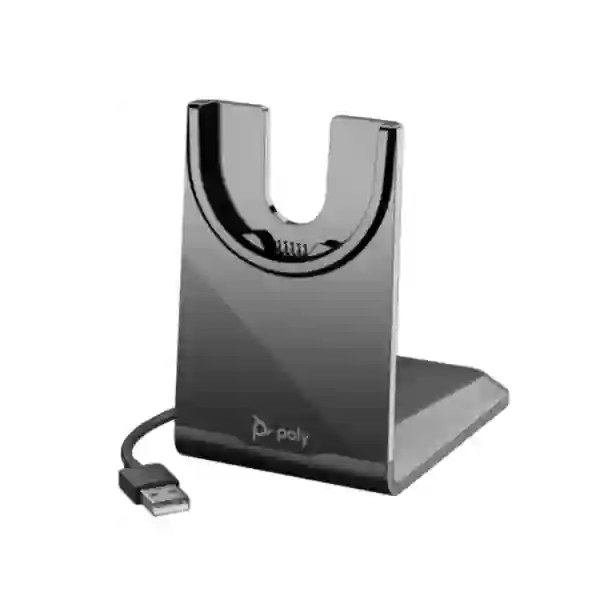
GENUINE HP POLY ACCESSORY · DESKTOP CHARGING
HP Poly Voyager USB-C Charging Stand
A dedicated USB-C-connected charging position for compatible Poly Voyager Focus 2 and Voyager 4300 headsets. Check the model you already own, confirm HP reference 783R7AA, and request a quotation for the exact accessory needed.
At a glance
The Poly Voyager USB-C Charging Stand is designed for people who already have a supported Voyager headset and want a practical desktop place to charge it. It is not a replacement for the headset itself. For buyers in Tanzania, the critical first step is confirming compatibility, the exact manufacturer reference and the terms of a current quotation.
| Product | Poly Voyager USB-C Charging Stand |
|---|---|
| HP manufacturer reference | 783R7AA |
| Connection | USB Type-C |
| Compatible headset families | Voyager Focus 2 and Voyager 4300 |
| Product weight | 0.24 kg (240 g) |
| Package weight | 256 g |
| Package dimensions (W × D × H) | 178 × 229 × 50 mm |
| Listed box contents | Poly VOYAGER USB-C Charge Stand |
| Published manufacturer warranty | Poly standard one-year limited warranty; verify applicable local terms |
What this charging stand is—and what it is not
The HP Poly Voyager USB-C Charging Stand is a desktop charging accessory made for compatible Poly Voyager headsets, particularly the Voyager Focus 2 and Voyager 4300 families. It provides a dedicated place to return the headset between calls, with power supplied through a USB Type-C connection. For an employee who takes a headset on and off repeatedly, a recognizable charging position can be more convenient than leaving equipment loose on the desk. The main question is not whether a USB-C plug fits a computer, but whether the particular Voyager headset is one of the supported designs.
This is a charging stand, not a standalone headset, wireless audio transmitter, Bluetooth adapter, conferencing speakerphone or universal USB-C dock. Buying it does not add a microphone, noise cancellation, a Teams certification or new calling features to the headset. Those characteristics depend on the headset and the communication setup already in use. The stand is best understood as an additional or replacement charging point for a supported device. It should be selected by headset family and exact product identity, not by the presence of USB-C alone.
Quick compatibility answer for buyers
HP lists compatibility with Poly Voyager Focus 2 and Voyager 4300 headsets. The Voyager 4300 family includes familiar Voyager 4310 and Voyager 4320 configurations, and HP’s own accessory compatibility lists include numerous variants. This family-level statement is a practical starting point rather than permission to assume that every Poly headset, every Voyager product or every similarly shaped charging cradle is interchangeable. Confirm the headset model, the actual charging contact arrangement and the stand identifier before purchasing for a mixed fleet.
A headset marked Voyager Focus 2 is a much stronger match than one identified only as Poly or Voyager. A headset marked Voyager 4310 or Voyager 4320 belongs to the broader 4300 family, but the order configuration should still be checked, especially where an organization has purchased multiple package variants over time. If the headset’s label is unreadable, consult procurement records or the original product documentation. When ordering multiple stands, request compatibility confirmation against one representative headset first rather than assuming that appearance alone proves a fit.
Why a dedicated desk charging location helps
In a busy office, the operational problem is often simple: the user finishes a conversation, removes the headset and places it wherever there is space. Later, the headset may be away from its power connection, resting under papers or left in a meeting room. A defined stand gives the user one familiar return point. That can support a more consistent between-call routine without requiring staff to remember a separate cable connection each time they take off their headset.
The benefit is organizational convenience, not a promise of longer battery life or faster charging. Actual charging and battery behavior depend on the compatible headset, the connected power source and the condition of the equipment. A stand does not eliminate the need to manage the headset responsibly. It also occupies desk space and requires access to suitable power. Buyers should weigh those requirements against the frequency with which the headset is used, the availability of a spare power connection and whether a charging location is already included with the original headset bundle.
The essential verified specifications
HP identifies the accessory as Poly Voyager USB-C Charging Stand, product reference 783R7AA. Its connection type is USB Type-C. HP lists a stand weight of 0.24 kg and a package weight of 256 g. The published package dimensions are 178 × 229 × 50 mm, specified as width, depth and height. Those numbers describe the shipping package, not a guaranteed measured desktop footprint, cable length or height of the installed stand. The box contents are described as the Poly VOYAGER USB-C Charge Stand.
The manufacturer describes it as a genuine replacement or additional accessory. HP also lists its standard one-year limited warranty, although applicable conditions, purchase-channel requirements and regional coverage should be confirmed for the individual order. Published product details do not establish any Tanzania selling price, local availability, adapter inclusion, expected charging duration or universal USB power-supply compatibility. We therefore avoid presenting any of those details as fixed product promises. For procurement, the stable identifiers and family compatibility are more useful than a retailer-specific price appearing in another country.
Understanding USB-C on this accessory
The USB Type-C reference describes the power connection used by the charging stand. It does not mean the stand accepts every USB-C headset, connects a computer to a second monitor, transfers call audio, or provides extra USB ports. A compatible headset is seated on the stand according to the shape and charging interface of that product. The USB-C end is used to connect the stand to an appropriate power source in the intended setup. That distinction matters because many unrelated technology accessories now use the same external USB-C connector.
Before deployment, check what power connection will be available at the workstation. A USB-C port on an appropriately specified host or compatible USB power arrangement may be considered according to HP’s and the headset’s instructions, but do not assume that any adapter, extension, hub or shared desk port will behave identically. Keep the power route practical, do not stretch a cable across a walkway and avoid placing the stand where a laptop movement could tug it off the desk. If the existing environment provides only USB-A sockets, verify a supported solution instead of assuming that an unspecified adapter is included.
Headset model verification before ordering
Start with the headset itself, its original purchase document or the device records maintained by IT. Write down the full family name and, if available, its precise configuration rather than entering just Poly headset on a purchase order. A team may use Voyager Focus 2, Voyager 4320 and another unrelated Voyager model on the same floor. They can look broadly similar in a purchase spreadsheet while requiring different charging accessories. Family identification prevents the most common accessory selection error: choosing by branding rather than confirmed mechanical and electrical compatibility.
Where the headset was supplied as part of a package that already includes a stand, the purchase question changes. The organization may need a replacement because the previous dock was lost or damaged, or a second charging position for an employee working at two desks. If the unit already includes the required charging stand and a single location is sufficient, another stand may add little value. If the headset is an unfamiliar special bundle, ask for the original bundle identifier and verify the accessory association before approving a purchase.
Voyager Focus 2 users: practical considerations
For a person using a Poly Voyager Focus 2 headset for recurring online meetings or calls, the stand provides a consistent charging location when the headset is not being worn. The relevant advantage is routine: complete a session, place the headset in its intended charging position and leave it in a predictable location. This can be particularly helpful at a dedicated workstation, where the headset belongs to one user and the desk layout remains stable during the working week.
Confirm that the item to be charged is a Voyager Focus 2 rather than a different Poly Focus product with a similar name. Also confirm whether the existing package already supplied a charging stand and whether the additional accessory is actually needed. The stand does not itself change the headset’s microphone performance, acoustic features or software integration. Those functions remain attributes of the particular Focus 2 headset and the computer or service it uses. For replacement purchases, keep the headset model and the 783R7AA stand reference together on the request.
Voyager 4300 users: practical considerations
The Voyager 4300 family is relevant to workplaces using Voyager 4310 or Voyager 4320 configurations. A manager purchasing charging points for several employees should avoid assuming that all headsets supplied with USB-A adapters, USB-C adapters or different communications bundles use different charging stands. The adapter associated with a headset’s computer connection is a separate consideration from the stand’s own power connector. Instead, compare the exact headset model against HP’s compatibility information for the charging accessory.
A 4300-series deployment may include staff using their headset at an assigned desk, between home and office, or alongside a laptop that moves frequently. A fixed charging location is helpful only where a suitable and stable power source is present. If the employee routinely packs up the entire workstation, the team should evaluate whether a dock left on the desk or an approved direct-charging approach better fits the workflow. The strongest purchase decision considers both compatibility and real daily behavior, not just whether the accessory appears in a catalogue.
Home working and hybrid working use cases
At a home desk, a dedicated charging stand can keep the headset in one designated place rather than mixed with notebooks, cables and other personal devices. This is useful when the same person takes several calls throughout a day and returns to one workstation afterward. A buyer should check that the location remains accessible and that the power cable can be routed without creating clutter. The stand should be positioned so that the headset can be placed into it without pulling the cable or reaching behind an unstable stack of equipment.
For hybrid employees, it is worth deciding whether one stand is intended to travel or whether a second compatible charging location is required. Neither option is universally best. Leaving a stand at a stable office desk avoids carrying it, while carrying a power accessory may suit a temporary setup if transport and cable management are practical. An additional stand is a convenience purchase, not proof that an employee needs to maintain two powered docks. Ask which location causes missed charging opportunities and select the arrangement that solves that actual problem.
Office desks, shared workstations and contact centres
In an assigned office seat, the stand can form part of a repeatable end-of-shift routine. The headset has a visible place to rest, and a user can check that it has been returned appropriately before leaving. In shared seating, the picture is more complicated. Staff may bring their own headsets, different device families may be in circulation and a charger that suits one employee may not suit the next. Labeling a stand by compatible headset family can reduce confusion, but it cannot replace model verification.
Contact centres and support teams should treat the accessory as one small component of headset readiness. A charging stand may make a supported headset easier to return between calls, but it does not resolve software configuration, network quality, audio routing, device hygiene or user training. Fleet managers should check how many supported headsets exist, which workstations require a dedicated accessory and whether power is accessible on each desk. A small pilot can reveal placement problems and inconsistent headset models before a larger accessory purchase.
Simple setup sequence for an appropriate workstation
First, identify the headset model and confirm that the stand is intended for that model. Next, choose a dry, flat location with enough room for the headset and a secure route for the USB-C cable. Connect the stand to a suitable power source according to the relevant product documentation. Place the compatible headset onto the stand in its intended orientation, taking care not to force any contact points. Use the headset’s normal indicators or documented charging behavior to determine whether it is receiving power.
These are sensible setup checks rather than a substitute for HP’s device-specific instructions. Do not improvise a connection if the connector, cradle or contacts do not align. Do not force the headset into the stand simply because both items use the Poly name. Avoid routing the cable under sharp desk edges or across areas where office chairs move. For several identical workstations, confirm a working arrangement on one desk before standardizing placements across the room. If charging does not begin, investigate the basic fit and power path before concluding that the headset is defective.
Placement, cable routing and desk ergonomics
Choose a position that is reachable when a user removes the headset and far enough from the desk edge to avoid accidental knocks. The surface should be stable and should not be routinely moved by monitor arms, drawers or laptop docking movements. Keep the USB-C lead free from excessive tension. Good cable management does not require complex fittings; it mainly requires avoiding a sharp bend, a cable crossing a walkway or a power connection that repeatedly disconnects when an employee adjusts other equipment.
A tidy installation makes the charging habit easier to maintain. Place the stand where a person naturally puts their headset after a call, not behind a screen or among cables that must be untangled each time. In a shared environment, consider a simple workstation label identifying the supported Voyager family. Do not infer exact stand footprint from package measurements: the published 178 × 229 × 50 mm dimensions belong to packaging. For restrictive desk layouts, ask for the assembled product dimensions before committing to a fitted compartment.
Charging convenience versus direct cable charging
Some compatible headsets can be charged in more than one way under the manufacturer’s instructions. The practical comparison is therefore between a dedicated docking routine and the approved charging methods available for the exact headset. A stand provides a specific resting location; direct cable charging may avoid occupying a separate permanent spot on a crowded desk. The stand’s value is often the ease of returning the headset to a designated place rather than an inherently superior charging specification.
Do not assume that buying the stand makes charging faster, extends battery service life or provides emergency power during an outage. Those claims would require supporting product and charging data. A team that rarely uses headsets and already has a satisfactory charging process may not need a stand for every user. Conversely, for workers who repeatedly forget to connect a charging cable, a clearly visible dock may help reinforce a charging routine. Make the decision from the way the headset is used, and keep performance claims separate from convenience benefits.
An additional stand or a replacement?
An additional stand is useful when the supported headset is already in working order and a second charging location has a clear purpose. Common examples include one home desk and one office desk, or a workstation where the original charging point is awkward to reach. A replacement is different: it is intended to take the place of a missing, worn or damaged charging accessory. In either case, the headset itself does not need to be replaced merely because a charging stand is unavailable, assuming the headset remains functional and has another manufacturer-approved charging option.
Before replacing anything, identify what actually failed. If charging is intermittent, the cause could involve the power source, cable routing, alignment, headset contacts or other hardware. A new stand is not guaranteed to correct every charging complaint. Where organization policy allows, confirm charging with a known suitable arrangement and inspect the equipment without making unsafe electrical modifications. For a warranty-related fault, follow the applicable service procedure rather than disassembling the accessory. Record whether the request is for an extra unit, a lost unit or a confirmed faulty unit.
Buying by manufacturer part number
HP uses the reference 783R7AA for this Poly Voyager USB-C Charging Stand. Including that reference in a request helps distinguish the item from USB-A charging accessories, other Voyager docks and bundles containing a complete headset. It is appropriate to use 783R7AA as a manufacturer product reference, but it must not be silently repurposed as FourTeck Tanzania’s stock-keeping unit. A seller-specific SKU belongs to that seller’s inventory records and may be different, even where the physical accessory is the same.
Purchase documents should include the full name of the accessory, the manufacturer reference, the intended headset families, quantity and whether the order is for additional or replacement use. This gives the supplier the information needed to check that the requested item matches the buyer’s equipment. Avoid accepting a generic listing headed USB-C Voyager stand without inspecting its specific part description. Two products can be described with similar keywords while targeting different hardware or using different connectors. A precise request reduces avoidable procurement back-and-forth.
What to confirm on a quotation
A useful quotation should name the accessory clearly and identify the corresponding manufacturer reference. Ask the supplier to confirm that the proposed item is the Poly Voyager USB-C Charging Stand, HP reference 783R7AA, and that it is suitable for the listed headset models. Confirm the number of stands, any separate power accessories the installation may require, the commercial warranty terms applicable to the sale and the supplier’s stated fulfillment conditions. Obtain local price and taxes directly from the quotation rather than importing a price seen on an overseas storefront.
For Tanzania procurement, the important local questions are practical and should be answered for the actual order: whether the exact item can be supplied, how a buyer will receive it, what payment terms apply and what service route is available if the item arrives damaged. None of these details can safely be assumed from global HP accessory specifications. When an organization needs a large quantity, request a written product-and-model match and consider assessing a sample with the actual headset stock before approving a fleet-wide order.
Understanding the published size and weight figures
The verified stand weight of 0.24 kg gives a basic sense that this is a physical desktop accessory rather than a tiny USB converter. It should not be used to calculate shipping charges without packaging and order-specific details. HP’s published package weight is 256 g; the listed package dimensions are 178 × 229 × 50 mm. These figures are useful for cataloguing and procurement data, but they are not a reliable substitute for a site-specific desk-fit measurement.
Buyers sometimes interpret shipping measurements as the dimensions of the assembled device. That can cause mistakes when a charger needs to fit under a shelf, beside a monitor stand or inside a workstation cubby. Ask for assembled dimensions from a validated source if exact clearance matters. Similarly, weight does not tell you how the stand will behave on every surface. Test its position on the actual desk, confirm the cable is not under tension and avoid promising any particular stability rating or resistance to knocks unless supporting manufacturer data is available.
Understanding what comes in the box
HP lists the box contents as the Poly VOYAGER USB-C Charge Stand. That product description confirms the charging stand itself. It does not establish that a complete headset, Bluetooth dongle, spare battery, wall charger, country-specific plug or separately sold adapter is included. The existence of a USB-C connection also should not be treated as evidence that every possible power adapter is supplied. For sites with an existing USB-C power arrangement, this may be straightforward; for others, procurement should check what the final workstation requires.
A careful order separates the stand from accessories the headset may already use for computer connectivity. A Bluetooth adapter such as a BT700, when present in certain headset packages, serves a different purpose from the charging stand. Do not include such an adapter in the expected box contents of this accessory unless the exact quoted bundle states it. When receiving goods, compare the delivered label and contents against the order. Keep the packaging and purchase documentation until compatibility and condition have been confirmed under the seller’s returns process.
Warranty expectations and service questions
HP’s published product listing describes the Poly standard one-year limited warranty for this charging stand. A listed manufacturer warranty is useful background, but its detailed coverage, start date, proof-of-purchase requirements, authorized service pathways and applicability to a particular Tanzania transaction must be checked with the seller and the relevant warranty terms. It should not be read as a promise of a local walk-in repair centre, immediate exchange or a specified repair turnaround.
On receipt, check for visible damage and confirm that the accessory works with a compatible headset in the intended setup. Preserve the invoice and product identifier so that a future service request can be matched to the actual item. If the accessory has failed, describe the symptom precisely: no power, unstable contact, physical damage, an intermittent connection or a fit problem. Clear observations help separate a wrong-accessory purchase from a fault requiring warranty review. Avoid altering the charging contacts or opening the stand in an attempt to repair it.
A practical receiving and acceptance checklist
For a single stand, acceptance can be simple: confirm the supplied item is the ordered accessory, verify the HP reference, check for visible damage, connect it correctly and establish that a compatible headset charges as expected. For a multi-unit order, use a short receiving record rather than assuming that all packages are correct because one works. Record the quantity delivered, product identity and any discrepancies. This is particularly useful when an organization uses several Poly headset generations and different accessories are stored in one IT cupboard.
Do not use a charging stand that is visibly damaged, has loose power connections or appears to fit only when the headset is forced. Separate the questionable unit and follow the supplier’s service process. Check that the workstation’s USB-C power provision is available and that any cable route is safe. Document a successful working combination of stand model and headset family for future orders. A small amount of acceptance discipline can avoid costly confusion later, especially when spare stands are issued to users by staff who did not originally specify the headset fleet.
Troubleshooting when the headset does not charge
Begin with the simplest documented questions. Is this the correct stand for the headset family? Is the stand connected to a suitable working USB-C power source? Is the headset placed in its intended orientation and seated properly without force? Are the charging contacts visibly obstructed or is the equipment damaged? A seating problem can resemble a power problem; a disconnected USB-C cable can resemble a headset failure. Review the headset’s own charging indications in its user guide instead of assuming a particular light pattern applies to every model.
If basic checks do not solve the issue, use a controlled comparison where safe and authorized. Test the power connection with known suitable equipment, or compare with another confirmed-compatible stand if one is available. Do not connect unapproved power supplies, bend charging pins, use liquids on electrical contacts or dismantle the base. If the stand works with another compatible headset but not the user’s unit, the headset may need attention; if a known working headset does not charge in the stand, the accessory or power path may need attention. Contact the seller or support channel with the model references and observations.
Care and cleaning for shared environments
A charging stand is handled frequently and may be used in areas where dust, paper debris or other desk materials accumulate. Keep the charging position unobstructed and follow the manufacturer’s cleaning guidance for the accessory and headset. Disconnect the device from power before any cleaning step that requires it, and avoid flooding connectors or contacts with fluids. Do not use sharp tools to scrape charging points. If a contact appears bent or damaged, obtain appropriate support instead of trying to reshape it.
At a shared workstation, ownership of the headset and cleaning responsibilities should be clear. The charging accessory does not sanitize the headset, and it does not replace organization rules on shared audio equipment. Labeling a dedicated charging location can help users return the correct headset, especially where several models are in circulation. A simple periodic visual check for frayed cables, obstructed contacts or unstable placement is more defensible than inventing a rigid maintenance interval unsupported by the product documentation. Replace damaged accessories through the approved procurement or service process.
What IT and procurement teams should standardize
For a small business, the purchase may involve one stand and one headset. For a larger team, accessory management benefits from consistent naming. Create a catalog entry that distinguishes the Poly Voyager USB-C Charging Stand from full Voyager headsets, headset charging cables and other Poly bases. Record HP reference 783R7AA as the manufacturer identifier and keep the seller’s actual SKU separate if one is assigned. List validated headset families and any internal test notes. This reduces the chance that staff will reorder an incorrect item from memory.
Standardization should not become an assumption that the same charging stand suits every headset. Organizations may own wired USB headsets, other Poly wireless families and several generations of Voyager equipment. Each deserves its own compatibility check. When preparing a purchase request, include model counts and installation locations. When receiving units, record which area or employee receives them, particularly if they are shared assets. A simple, accurate record often provides more ongoing value than unsupported claims about universal compatibility or automatic device management.
When this is the right purchase—and when it is not
The accessory is a good candidate when the user already owns a compatible Voyager Focus 2 or Voyager 4300 headset, wants a predictable desktop charging location and has suitable power access. It is particularly relevant when the original stand is missing, a replacement is required or a second desk genuinely needs a charging point. The fit is much weaker when the headset model is unknown, when the device belongs to a different Poly family or when the buyer actually needs a new headset rather than an accessory.
It is also the wrong product to select when the underlying need is a Bluetooth USB adapter, direct computer audio connection, call-control software, audio troubleshooting or a generic USB-C expansion dock. The word USB-C in the title does not turn a charging accessory into a connectivity hub. Buyers should define the problem in one sentence before ordering: for example, we have a Voyager 4320 and need an additional desk charging stand. If that sentence cannot be completed confidently, verify the device first. This avoids unnecessary accessory purchases and sets a clear expectation for what the product can accomplish.
Procurement guidance for Tanzanian organizations
An organization sourcing this product for use in Tanzania should combine global product verification with a local transaction check. HP’s manufacturer information establishes the accessory name, reference, key physical specifications and intended headset families. It does not establish inventory in Tanzania, local shipping capability, taxes on a specific sale or the terms of a local service contract. Those elements need confirmation from the actual supplier when the quotation is prepared. This page intentionally does not show an unverified Tanzania shilling price or availability badge.
Business buyers can strengthen a request by listing the number of users, headset families, whether the accessory is additional or replacement equipment and where it will be installed. The supplier can then confirm the proposed item and commercial terms against an understandable requirement. If a team plans a larger rollout, request documentation for the exact supplied variant and ensure that workstation power arrangements are compatible. For mixed headset fleets, avoid buying all stands under one line item until the model mix is reconciled.
Decision checklist before you request a quote
Before approving the purchase, answer the following questions: Is the headset confirmed as Voyager Focus 2 or a Voyager 4300-family model? Does the order explicitly identify the charging stand rather than a complete headset? Is HP reference 783R7AA the item being quoted? Is there a practical USB-C power connection at each destination desk? Is this an additional accessory or a replacement? Does the chosen position allow safe placement and cable routing? Have the quantity, warranty terms and delivery arrangements been confirmed in writing for the actual transaction?
If any answer is uncertain, resolve the uncertainty before placing an order. The checks are particularly important when purchasing for multiple staff members or when equipment comes from different acquisition periods. A simple compatibility confirmation is usually less disruptive than arranging returns for an accessory that cannot be used. Keep the quotation, product identifier and verified headset details together for later replenishment. The goal is to choose a charging stand that solves an actual workflow need and fits the equipment already in service.
Frequently asked questions
Does this stand work with Voyager Focus 2?
Yes. HP identifies the Poly Voyager USB-C Charging Stand as compatible with Voyager Focus 2 headsets. Confirm the exact headset product and the proposed stand reference before purchasing, particularly if the device was supplied in a special bundle. The stand provides charging convenience; it does not supply a headset or change its audio features. If a charging accessory was already included in the original package, assess whether you need an additional charging point or a replacement for the original.
Can I use it with Poly Voyager 4310 or 4320?
HP specifies compatibility with the Voyager 4300 headset family and lists multiple 4310 and 4320 configurations within its compatibility information. That makes these models relevant candidates, but buyers should still verify the full headset configuration with the supplier for the exact order. Do not assume that every Poly product carrying Voyager in its name uses the same physical charging interface. Record both the headset family and stand reference on the purchase request.
Will any USB-C headset charge in it?
No. USB-C describes the stand’s power connection, not a universal headset compatibility system. The charging stand is intended for the supported Poly Voyager headset families. A different headset may have a USB-C port yet require its own cable, charger or differently shaped docking station. Physical resemblance or connector terminology is not sufficient evidence of support. Consult the manufacturer’s compatibility information and avoid trying to force an unrelated device onto the charging contacts.
Is the USB-C stand also a Bluetooth adapter?
No. The stand is a charging accessory. Bluetooth communication between a compatible headset and its host device depends on the headset and any separate communication hardware used in that setup. Some Voyager headset packages reference a BT700 adapter, but that is not the charging stand. The stand should not be ordered to resolve Bluetooth pairing, microphone recognition, call routing or operating-system audio problems. Identify the required function before choosing an accessory.
Does the package contain a Voyager headset?
No. HP’s listed box contents identify the Poly VOYAGER USB-C Charge Stand. This is not a complete headset bundle. Do not assume it includes ear cushions, a microphone, a BT700 adapter or a separately specified AC power adapter. If an order needs a headset as well as the stand, those requirements should be listed clearly in the quotation. Check the quoted product bundle and the delivered package against the specification rather than relying on a generic product photo.
What is HP part reference 783R7AA?
783R7AA is the HP manufacturer reference for this charging stand. It is useful for identifying the exact accessory in manufacturer information and supplier requests. It should not be presented automatically as a Tanzania retailer’s SKU, because store-specific inventory codes can differ. Use the full product name together with the manufacturer reference when requesting a quotation. If a supplier offers an alternative reference, ask for an exact compatibility and product-identity confirmation.
Can the stand charge faster than a cable?
No charging-speed comparison can be promised from the verified specifications used here. The principal documented role of the stand is to provide a USB-C-connected charging location for supported headsets. Charging behavior is affected by the headset, power arrangement and device condition, so a faster-charge claim would need precise manufacturer evidence. Choose the stand for compatibility and desktop convenience; do not purchase it on the assumption of a guaranteed battery-life or charge-time improvement.
What is the stand’s weight?
HP lists a product weight of 0.24 kg, which is 240 g. HP also publishes a package weight of 256 g. The two figures refer to different things and should not be confused. Weight alone does not establish that the stand will be suitable for every moving or narrow desk surface. Choose an appropriate placement and avoid strain on the power connection. For shipping estimates, request order-specific packaging and delivery details from the supplier.
What are its dimensions?
HP lists package dimensions of 178 × 229 × 50 mm, stated as width, depth and height. Those are dimensions of the package, not confirmed dimensions of the assembled stand on a desk. If an installation requires an exact clearance under a shelf or beside fitted equipment, ask for verified product dimensions instead of estimating from the carton. This distinction matters most in dense workstations where even small measurement errors can make an accessory impractical.
Does it include a wall power adapter?
The published box-content statement identifies the Poly VOYAGER USB-C Charge Stand but does not establish inclusion of a separate wall adapter. Do not assume one is supplied unless the exact quoted package says so. Confirm what power source is appropriate for the installation and which accessories are included in the order. A USB-C connector alone does not establish the specifications of an adapter or the suitability of a particular port, hub or power strip.
Can I use it on a shared office desk?
It can be considered for shared workstations when users bring compatible headset models and an appropriate power source is provided. However, a shared desk may serve people with different headsets, so the stand should not be described as universal. Clear identification, cable management and a device-use policy help avoid mistakes. Where multiple models are deployed, document compatible combinations before purchasing common accessories for an entire floor.
Does the stand provide Microsoft Teams certification?
No. Microsoft Teams certification, where applicable, belongs to the relevant headset or broader communications device configuration. The charging stand does not independently create a certification, control calling features or improve software compatibility. If collaboration-platform support is a purchasing requirement, verify it on the exact headset model. Order this accessory to provide the intended charging function for a supported device, not to change that device’s communications capabilities.
Can I buy a second stand for a home desk?
An additional stand may be a reasonable option when a supported Voyager headset is used regularly at two places. Check that the headset model is compatible and that each location has a practical power arrangement. A second stand is not required for every hybrid worker; it depends on how frequently the employee moves and whether existing approved charging options are convenient. Decide from the actual work pattern and confirm the product reference before ordering.
What should I do if charging is intermittent?
First verify headset compatibility, the USB-C power connection, correct seating and the absence of visible damage or obstruction. Compare against the manufacturer’s charging guidance for the specific headset. If possible and authorized, try a known suitable power arrangement or another verified compatible stand. Avoid forcing connectors, altering contact pins or introducing liquids. Record the exact symptoms and contact the supplier or manufacturer support if the issue persists; a new stand may not solve every headset or power fault.
Is there a verified price or stock level for Tanzania?
No local price or stock status is stated here because neither has been verified for the intended Tanzania transaction. Published prices on overseas storefronts cannot establish what a buyer will pay locally. Request a current quotation for the exact Poly Voyager USB-C Charging Stand, reference 783R7AA, including quantity and applicable commercial terms. Confirm any delivery arrangements, taxes and support terms directly for the order rather than relying on assumptions.
What warranty is specified?
HP publishes a standard one-year limited Poly warranty for the accessory. The exact terms and local eligibility depend on the applicable warranty documentation and transaction circumstances. A published warranty statement should not be interpreted as a guarantee of local stock, immediate replacement, on-site servicing or a particular turnaround. Retain proof of purchase and confirm the seller’s service process before completing procurement, particularly for larger multi-unit orders.
Request a quote for the correct Voyager charging stand
When contacting FourTeck Tanzania, specify the HP Poly Voyager USB-C Charging Stand, manufacturer reference 783R7AA, the model of your existing Voyager Focus 2 or Voyager 4300 headset, and the number of stands required. Request confirmation of compatibility, local price, availability, delivery arrangements and applicable warranty terms before committing to a purchase.
Ask for product compatibility and a current Tanzania quotation.




Reviews
There are no reviews yet.