
Professional desk telephony · Tanzania buying guide
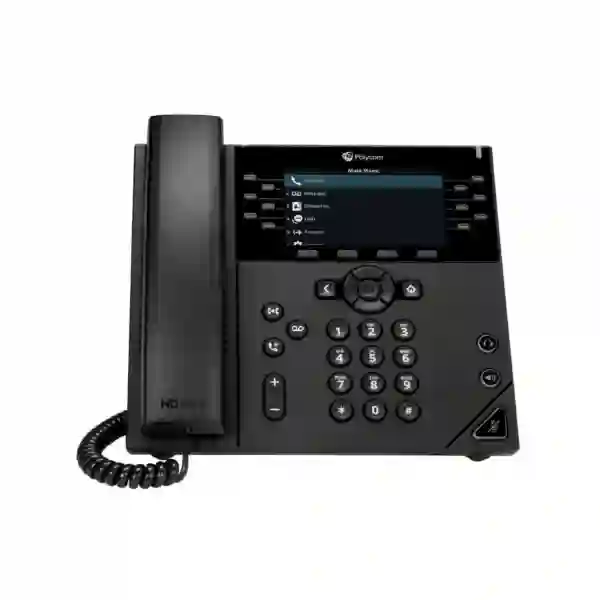
HP Poly VVX 450 IP Desk Phone: manage busy calls with confidence
The HP Poly VVX 450 IP Desk Phone combines twelve physical line keys, a 4.3-inch colour display, wired Gigabit connectivity and Power over Ethernet in a familiar business telephone format. It suits people who regularly answer, transfer and monitor calls, provided the device is provisioned on a compatible SIP telephone service.
At-a-glance technical specifications
Specifications are for the VVX 450 family and must be checked against the exact hardware, firmware edition, service configuration and accessory bundle offered.
What this business IP telephone does
The VVX 450 is a network-connected desktop telephone. Instead of connecting directly to a traditional analogue wall telephone socket, it communicates through an IP network and a configured calling platform. That platform may be an office IP PBX or a compatible hosted voice system. The physical handset, speakerphone, display and dedicated keys provide a conventional calling experience, but telephone numbers, outside calling, extension assignments and feature permissions come from the voice system. This distinction matters when replacing an older handset because purchasing hardware alone does not activate a telephone service.
The device is useful where callers need prompt, consistent attention: a person can see line activity, reach transfer or hold controls and work from a familiar keypad instead of opening a computer application for every interaction. It can also serve as a fixed desk endpoint alongside a softphone or mobile application when the organisation’s platform supports that arrangement. Before choosing it, decide whether the primary requirement is simply making calls, handling several call appearances, monitoring colleagues or managing a shared reception workflow. Those needs determine configuration and whether a twelve-line model is worthwhile.
Twelve line keys: what they mean in practice
Twelve physical line keys make the VVX 450 attractive to staff who need more visible call controls than a basic office telephone provides. Depending on the SIP platform and provisioning profile, keys may represent line appearances, speed-dial contacts or monitored colleagues. A receptionist might reserve some keys for regular departments; an administrator could place frequently called extensions within reach. The value is not that twelve independent telephone subscriptions automatically appear when the handset is connected. Key behaviour and the number of usable registrations are managed by the device software and the telephone system.
For a practical setup, list the functions each role needs before programming the keys. Start with the main incoming line, common transfer destinations and any supported busy-lamp monitoring. Avoid filling every key just because the hardware allows it. A neat and clearly labelled layout is easier to learn, especially when employees rotate between desks. Check whether the PBX supports the particular monitoring or call-pickup feature you intend to assign. The same hardware can feel simple or complicated depending on whether the key plan reflects actual daily work.
Colour screen and dedicated calling controls
The 4.3-inch colour LCD has a stated resolution of 480 by 272 pixels. Its role is to display call information, soft-key choices and other status details provided by the phone’s software and calling service. It is not described as a touchscreen; users navigate through buttons and the directional control. For staff who prefer physical keys, this can be easier to operate during a live conversation than a touch-only interface. The display and four context-sensitive soft keys help present relevant actions without requiring a long series of memorised keypad codes.
The separate hold, transfer, message and headset controls help distinguish common tasks. This matters when an employee answers while checking a booking, looking up a customer file or speaking to a colleague. Good configuration should minimise the number of menu steps required for those everyday interactions. Screen layouts and available labels can vary by firmware, provider provisioning and call state, so demonstrations should reflect the intended deployment rather than a different system’s screenshots. Train users on the exact prompts they will see after the phone is registered to the organisation’s service.
Voice clarity and acoustic processing
Poly HD Voice is intended to give conversations a natural, intelligible sound over a suitably configured voice connection. The phone also incorporates Acoustic Clarity functions associated with full-duplex conversations, echo cancellation and background-noise suppression. Acoustic Fence technology is documented for use with the handset or a compatible wired headset. These technologies can be helpful at an active reception desk or shared office where background conversations might otherwise distract a caller. The experience still depends on correct microphone positioning, supported audio paths and the wider telephone environment.
Audio quality cannot be guaranteed by the handset alone. Packet loss, poor network prioritisation, incompatible codecs or a problematic external telephone route can make an otherwise capable phone sound distorted. Assess how calls travel from the handset to the PBX, SIP trunk or hosted provider and onward to the caller. Prefer a stable wired connection, test with the actual telephone service and listen to both ends of the call. Where a headset is necessary, validate that exact headset combination; audio features and accessory controls do not operate identically across every device and firmware option.
Dual Gigabit Ethernet and cable planning
The phone includes two RJ-45 ports with 10/100/1000 Mbps Ethernet capability. A common arrangement connects the network socket or switch to the phone’s LAN port, while the second port can provide a wired connection to a nearby computer. This can be useful where a desk has limited wall outlets. It does not eliminate the need to plan switch capacity, network segmentation or security. The final design should follow the organisation’s IT policy, especially where voice devices and staff computers are assigned to separate virtual LANs.
Before deployment, determine whether each desk has a suitable Ethernet drop and whether the switch supports the required speed and power. Confirm that the phone can reach the PBX, obtain the intended IP settings and use any prescribed voice VLAN. If a computer is connected through the phone, validate that the data connection behaves as intended when the telephone restarts or loses power. Labelling both ports and the relevant switch connection can greatly shorten later troubleshooting. A careful cabling plan is particularly valuable when several desks are being migrated at the same time.
Power over Ethernet and alternative power
The VVX 450 supports automatic IEEE 802.3af Power over Ethernet, Class 0. Its published maximum power figure is 13 W. With a suitable PoE switch or injector, the same Ethernet cable can provide both network connectivity and power. That reduces dependence on separate desk-side power sockets and simplifies cable management. It does not mean every ordinary network switch can supply power. Verify that the connected switch is PoE-capable and that its total available power budget covers the planned number of telephones and any other powered devices.
Where PoE is unavailable, an appropriate AC adapter may be used as an optional accessory according to the Poly setup documentation. Do not assume an adapter is included in every sales configuration. Confirm its exact compatibility and the contents of the offered package before placing an order. In areas where electricity interruptions are a concern, plan backup power for more than the individual telephone: the PoE switch, router, firewall, PBX and internet access may all require continuity. A powered handset cannot reach its voice service when the network equipment behind it has stopped operating.
Headsets, hands-free work and EHS
The VVX 450 has an RJ-9 headset connection and a separate electronic hook-switch, or EHS, port for supported accessories. The manufacturer’s setup guidance also describes compatible USB and wired headset options. This gives organisations flexibility to equip staff who handle extended calls, but the connector alone is not a guarantee that any arbitrary headset will work. EHS operation may require an adapter or a particular certified combination. Microphone quality, wearing style and physical comfort should be considered alongside compatibility.
For a receptionist, a suitable headset can free both hands to search records or greet visitors while speaking to callers. For a manager, the built-in speakerphone may be enough for occasional hands-free calls. Test actual call answer and end functions, microphone level, volume controls and any remote hookswitch behaviour before ordering multiple accessories. Wireless headset requirements deserve extra attention because a wireless headset system is not the same thing as built-in Bluetooth on the telephone. Ask for confirmation of the exact headset model and accessories rather than relying on a generic compatibility label.
Two USB ports and optional connectivity
Two USB 2.0 Type-A ports are documented for supported accessories and media-related uses, including certain headsets, optional Wi-Fi adapters and expansion modules. These ports can broaden how the device is configured without changing its essential role as a business telephone. However, a USB socket is not a promise that every off-the-shelf wireless dongle, storage device or headset is supported. Manufacturer guidance, firmware release notes and the voice provider’s deployment profile should determine what is approved for a particular installation.
The safest default for a fixed office desk is a wired Ethernet connection because its operation and power delivery are easy to define. If the deployment depends on wireless networking, verify the supported optional adapter, security requirements and service provider approval before purchasing. Likewise, do not interpret a product description mentioning USB as confirmation of built-in Wi-Fi or built-in Bluetooth. Accessory support may change with a hardware revision or firmware release. Request a configuration list showing which optional items are needed and which are already part of the quoted bundle.
Understand the role of the SIP platform
A SIP telephone is one component of a wider communications service. The VVX 450 needs a compatible platform to register, receive its identity and handle calls. Administrators may need a SIP user, extension credentials, server details, dial plan, provisioning files and relevant network access. Organisations using a hosted PBX should first check whether the provider accepts this exact model and firmware edition. A platform may broadly support SIP while declining to auto-provision a specific handset, which can substantially change the amount of manual configuration and support required.
Features such as voicemail notifications, busy-lamp monitoring, transfer, call parking, pickup, corporate directories or paging can depend on server features and configuration. The correct question is therefore not only ‘Does the VVX 450 support SIP?’ but also ‘Does our telephone service support the workflows we want on this firmware build?’ Obtain a written device-compatibility response when possible. If replacing an existing handset, record the current extension, call handling rules, headset arrangement and desired buttons before making changes. That simple inventory avoids surprises once the new device is connected.
PBX and hosted voice compatibility checklist
Ask the prospective PBX or hosted service provider to confirm the exact VVX 450 hardware variant, firmware train and provisioning method. Establish whether the provider supplies a tested profile or expects manual configuration. Check supported authentication, SIP transport, audio codecs and registration limits relevant to your deployment. Confirm whether the system offers the advanced features your users expect and whether those features work on this endpoint rather than only in a desktop app. Also ask how emergency calling, dialling permissions and caller ID are handled in the intended service.
If your organisation already runs an IP PBX, arrange a pilot with a single device before committing to a larger order. During the pilot, place inbound and outbound calls, transfer between colleagues, test voicemail, restart the handset and confirm it reconnects automatically. Observe its behaviour after switch or internet recovery. A pilot provides stronger evidence than a broad compatibility statement from a reseller. For a new telephone system, select and validate the communications platform first, then match endpoints to roles; choosing all handsets before confirming the platform can create avoidable integration work.
Microsoft Teams calling: important limits
Microsoft documents a SIP Gateway service for connecting compatible SIP devices to supported Teams Phone calling environments. Poly’s VVX family, including the VVX 450 in relevant documentation, is among the device families addressed by this approach. This should not be mistaken for the VVX 450 being a modern native Teams touchscreen telephone. SIP Gateway provides an intentionally defined subset of calling functions, and Microsoft controls the requirements, onboarding methods and supported device firmware. Organisations considering this use must verify the current model entry and minimum approved software.
Deployment may require Teams administration, suitable user calling entitlements, network access, device provisioning and possibly a management method such as Poly Lens. Features available in the complete Teams desktop application are not automatically present on a SIP desk phone. Call queues, presence-related behaviour, meetings and advanced collaboration experiences may differ. Plan a real-user test around calling, hold, transfer, voicemail and the specific queue behaviour the business needs. If full native Teams experiences are essential, compare a phone designed and certified for that environment rather than assuming a general-purpose SIP handset provides feature parity.
UC Software, OBi editions and hardware revisions
VVX 450 product literature can refer to Poly UC Software and to OBi software editions. Those names are not interchangeable descriptions of an identical configuration. Software edition influences provisioning processes, provider interoperability and which management instructions apply. The same product family can also have different manufacturing revisions and regional package combinations. For a buyer, this is a key reason to confirm the precise unit on the quotation rather than identifying the device only from its outward appearance or the number of line keys.
Before procurement, request the manufacturer product identifier, offered software edition, current firmware version and any migration or update restrictions. The supplier should confirm that the proposed device can run the release required by the target platform. If the handset is intended for an existing fleet, compare it with working units, including their software history. Do not assume an OBi-oriented configuration can be converted to another edition without qualification. Maintaining a record of each device’s MAC address, serial number and deployed profile will also help administrators investigate future issues and replacement requests.
Phone security and network policy
HP Poly documentation lists features such as TLS, SRTP, digest authentication, encrypted provisioning files and 802.1X-related capabilities for the product family. These are technical options, not evidence that all deployments are encrypted or protected by default. The telephone server, provisioning method, firmware and network configuration must actually use the relevant safeguards. A secure deployment should minimise unnecessary services, protect administrator access, use appropriate credential storage and avoid sharing extension secrets with unauthorised personnel.
Treat desk phones as managed network devices. Define who can change their configuration, how updates will be applied and how a lost or retired handset is removed from the telephony platform. Consider voice network segmentation and access-control requirements set by the organisation’s IT team. If remote provisioning is used, review how device identity is verified before configuration is delivered. Test calls after security settings change because an incorrectly configured TLS or authentication rule can prevent registration. Security should form part of the acceptance test, not something added only after the phones are already in daily use.
Provisioning several desk phones efficiently
Provisioning means supplying the telephone with the settings required to join a managed voice service. Depending on the selected platform and software edition, those settings may be entered manually or delivered from a provisioning system. Central management is especially useful when a business has several floors, departments or branch locations, because administrators can keep extension layouts and firmware policies consistent. Poly documentation references management and provisioning options, but the practical availability of each option depends on the specific software, provider and account configuration.
Plan configuration around roles rather than treating every employee identically. A reception profile may need many monitored contacts, while a private office profile might show only a principal line and a few shortcuts. Prepare an extension inventory and a secure process for assigning devices to users. When staging handsets, mark their physical location, test the correct profile and document any exception to the template. Finally, verify what happens when a device is factory-reset or replaced. A predictable recovery process can save far more time than the initial configuration itself.
Reception and front-desk call handling
A front desk often has to balance telephone calls with visitors, messages and internal questions. The VVX 450 is a sensible candidate for that role because the visible line keys, dedicated transfer and hold controls and clear display can reduce navigation during a busy period. Staff can have frequently used destinations at hand where the PBX supports the necessary assignments. Where monitoring of other extensions is important, check the exact busy-lamp field capability and the number of usable key assignments with the intended provider before declaring the design complete.
Consider the actual receptionist journey: answer an incoming call, confirm the caller’s request, find the correct person, transfer or return to the original caller and record the outcome. Map that sequence into buttons and prompts on the device. If callers regularly require multiple departments, standardise directory names and extension labels. Avoid storing sensitive customer information in informal speed-dial labels. During training, simulate two callers arriving close together and rehearse both blind and consultative transfer if the platform allows them. Those exercises reveal workflow problems earlier than a simple test of dial tone.
Executive and manager desk use
Managers and other staff who spend significant time in conversations may benefit from the VVX 450’s physical handset, integrated speakerphone and selectable headset arrangements. The colour screen and dedicated controls can support quick transitions between taking a call, placing someone on hold and contacting an assistant. A good installation should make those common tasks feel straightforward. It is not necessary to use all twelve keys; a manager may prefer only a main extension, an assistant, a team line and a few important contacts.
Assess the user’s working habits before choosing a headset or additional accessory. Someone who takes calls while reviewing documents may benefit from a suitable hands-free headset, while a user who rarely leaves the desk may prefer the regular handset. If an assistant monitors a manager’s availability, test the exact presence or busy-lamp behaviour supported by the phone system. Where call privacy matters, adjust speakerphone practice and office placement accordingly. The best configuration is usually the one staff can operate accurately without looking through a long instruction manual.
Small offices and growing teams
For a smaller office, a twelve-line phone can be more capability than every desk requires. That does not make it unsuitable, but a sensible purchase should reflect the job rather than selecting the highest key count by default. A central administrator or business owner who manages calls for several people may justify the VVX 450, while a colleague with occasional calls might be comfortable using a simpler endpoint. Standardising on a single model can simplify training, but a mixed deployment may control costs when different teams have different call demands.
Consider what happens when the business adds employees, a second telephone number or another department. The important scaling questions concern the PBX capacity, calling plan, switch ports, power budget and provisioning process as much as the telephone itself. Document which key layouts can be copied and which must remain person-specific. Ensure there is a method for moving a phone to a new desk without losing secure administration of its credentials. Growth planning is about making the entire calling environment maintainable, not merely having unused buttons available on day one.
Network readiness for offices in Tanzania
For a Tanzania deployment, start by examining the actual office rather than assuming an IP phone will behave identically at every site. Map the available internet connection, local switching, cabling, router and backup electricity arrangements. The telephone’s wired Ethernet capability is useful when stable data cabling is available. A business relying on one internet circuit should consider what its hosted calling service will do during a circuit outage. The answer varies by provider and may involve forwarding or alternative routing, which must be confirmed rather than presumed.
Physical site conditions also matter. The published phone operating temperature range is 0 to 40 degrees Celsius; the manufacturer specifies additional environmental conditions. Avoid locations exposed to heat, liquids or cable strain, and provide a safe route for handset and network cords. Verify any local electrical, procurement or regulatory requirements that apply to the exact offered configuration. This page does not claim local regulatory approval, stock, delivery coverage or installation service. Those commercial and compliance details should be verified in the quotation and accompanying product documents.
Call quality depends on the whole network
Voice calls are sensitive to network interruptions even when ordinary web browsing seems acceptable. A short period of packet loss or excessive delay may cause choppy speech or one-way audio. Plan for stable switching, appropriate network prioritisation where supported and a clear route between the desk phone and the calling provider. Do not rely on a headline internet bandwidth number alone. The condition of the local area network, uplink utilisation, firewall configuration and the remote voice service can all influence real calls.
Test call quality at different times of day and while staff are performing typical office activities. Include inbound external calls, outbound calls and internal extension-to-extension conversations. Listen for delay, echo, distortion and missing audio. Record which path was used for an unsuccessful test so the responsible technician can locate the problem. If a provider recommends particular ports, codecs or quality-of-service settings, record that recommendation in the deployment plan. A reproducible test process is particularly valuable where the phone is part of a customer-facing operation and an intermittent fault can be hard to describe.
A practical installation sequence
Begin with a confirmed telephony service and the correct device variant. Connect the handset cord and network cable according to Poly’s setup sheet, then power the phone through a suitable PoE source or the correct optional AC adapter. When the device starts, allow it to obtain the intended network configuration and complete the supported provisioning procedure. Confirm the visible extension, date and time information where the platform provides them. A connected Ethernet cable by itself does not prove that registration to the calling platform has succeeded.
Next, place an internal call, an incoming external call and an outgoing call where the service permits them. Test hold, transfer, voicemail indicators and any customised keys. If a headset is attached, test that separately. Restart the device and ensure it returns to an operational state without requiring unsecured manual re-entry of credentials. Record the final firmware, extension, device identifier, desk location and support contact according to company policy. Perform these checks before declaring a phone ready for an employee, especially in a deployment involving many similar desks.
Help staff use the device from day one
Even an intuitive desk phone benefits from short, role-specific instruction. Show users how to identify the active call, adjust volume for the handset or headset, place someone on hold, transfer a caller, check missed calls and retrieve voicemail through the actual service. Use two colleagues to demonstrate how multiple line appearances work. Avoid confusing the number of visible line keys with permission to handle unlimited simultaneous external calls; the service and configured user entitlement determine operational limits.
Provide a concise desk guide using the terminology displayed on the deployed phones. If keys are programmed for speed dial or monitoring, explain what each light or label represents and where users should report an incorrect status. Make it clear whether staff should unplug a phone before moving desks and whom they should contact if a registration prompt unexpectedly appears. Training is also the right moment to explain privacy: do not discuss sensitive information over an open speakerphone when others can hear. A few rehearsed workflows can prevent repeated support requests.
Planning power continuity
Power continuity is an important part of telephone design when the phone is expected to be available during office interruptions. With PoE, the desk phone draws power from its compatible switch, making that switch a natural point for backup planning. But power at the switch is only one piece of the chain. Routers, firewalls, local PBX servers and internet equipment may also need to remain running. A UPS should be sized from measured equipment loads and required operating duration, not from the telephone’s maximum consumption alone.
Confirm whether the organisation’s critical numbers have an alternate routing plan during site or internet failure. For a hosted telephone system, investigate what the provider can do when an endpoint becomes unreachable. For an on-premises PBX, check what remains operational if external connectivity is lost. Do not present any such backup function as a built-in feature of the VVX 450. Document how staff will communicate during an extended outage and test that plan separately. This is especially relevant to reception points whose primary purpose is maintaining contact with customers.
Frequently asked questions about the VVX 450
Does the HP Poly VVX 450 include twelve independent telephone numbers?
No. Twelve physical line keys provide configurable access to line appearances and other functions. Telephone numbers, call capacity and feature rights depend on the SIP PBX or hosted voice service. Check the provider’s supported configuration.
Is the display a touchscreen?
The manufacturer specifies a 4.3-inch colour LCD with 480 by 272 resolution, operated using the phone’s keys and navigation controls. Do not order this model expecting touchscreen operation.
Will it work with any internet connection?
It requires an appropriate network and compatible SIP calling service. A broadband connection alone does not provide a dialling plan or telephone subscription. Voice quality and registration depend on network and platform conditions.
Can the phone receive power through Ethernet?
Yes. The published specification supports IEEE 802.3af Power over Ethernet, Class 0, with a maximum stated power requirement of 13 W. The switch or injector must have suitable PoE support and remaining power budget.
Is an external power adapter included?
Not necessarily. Poly’s setup guidance describes an AC power supply as an optional accessory where PoE is not available. Confirm the exact quoted package, power adapter compatibility and local electrical requirements before ordering.
Does the VVX 450 have built-in Wi-Fi or Bluetooth?
Do not assume those radios are built in. The manufacturer’s documentation discusses optional USB Wi-Fi accessories and supported headset connectivity. Check the exact accessory, firmware and provider requirements for any wireless use.
Can I connect a headset?
The phone has an RJ-9 headset connection and an EHS port, and Poly documentation describes certain USB headset support. Compatibility varies by headset and accessory arrangement. Confirm the exact model and test answer, end and microphone controls.
Can I use the VVX 450 with Microsoft Teams?
Microsoft provides SIP Gateway functionality for supported SIP device models, including relevant Poly VVX phones. This is not equivalent to a native Teams phone. Confirm current support, firmware, licensing and the limited calling features with the Teams administrator before deployment.
What is the difference between the UC and OBi editions?
The software edition affects the phone’s provisioning and service compatibility. Ask the supplier to identify the offered variant and confirm that it matches the telephone platform. Do not assume editions can be exchanged or converted without restrictions.
Does it need a separate PBX or hosted service?
Yes. A configured SIP service is required to provide extensions and call handling. The VVX 450 is the desk endpoint; the PBX or hosted platform supplies calling functions, identities and outside-number connectivity.
Can several staff members use the same handset?
Shared use may be possible if the chosen platform supplies a supported and securely managed workflow. Availability of login, hot-desking and individual user features is service-dependent; confirm this explicitly rather than assuming it from the hardware.
What should a Tanzania buyer provide for a quotation?
Share the quantity required, existing or proposed PBX provider, use cases, intended desk locations, PoE availability, headset requirements and desired software edition if known. Ask the seller to confirm the offered package and current commercial terms.
Request a VVX 450 quotation for Tanzania
For an accurate HP Poly VVX 450 IP Desk Phone quotation, provide your quantity, the telephone platform you use, whether each desk has PoE, and any headset or USB accessory requirements. Ask for the exact hardware identifier, firmware edition, package contents, current price and applicable commercial terms to be confirmed before purchase.
Next step: request a configuration and compatibility review together with your quote. No stock, pricing or delivery commitment is implied on this page.




Reviews
There are no reviews yet.