
Wireless meeting-room collaboration
LINKVIL CA200 Wireless Conference Kit
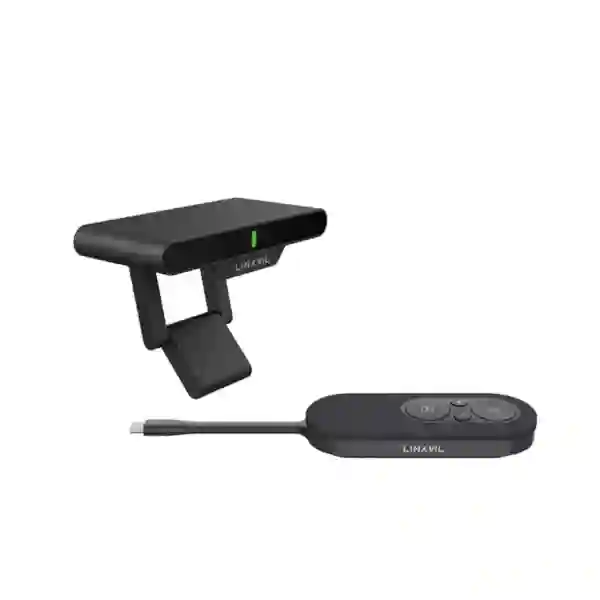
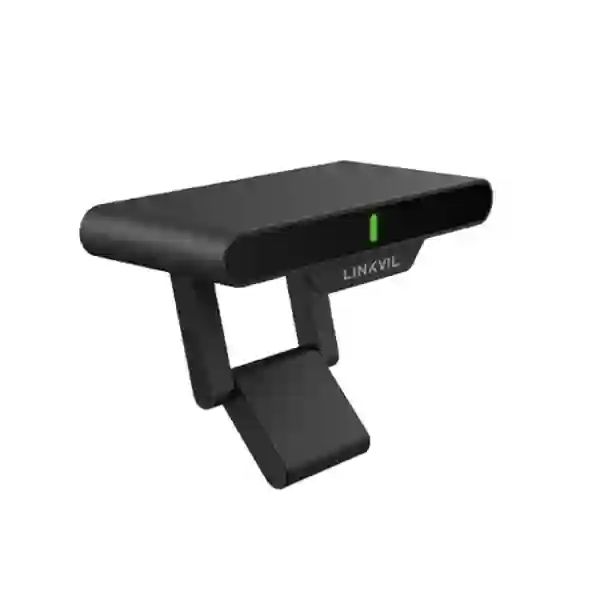
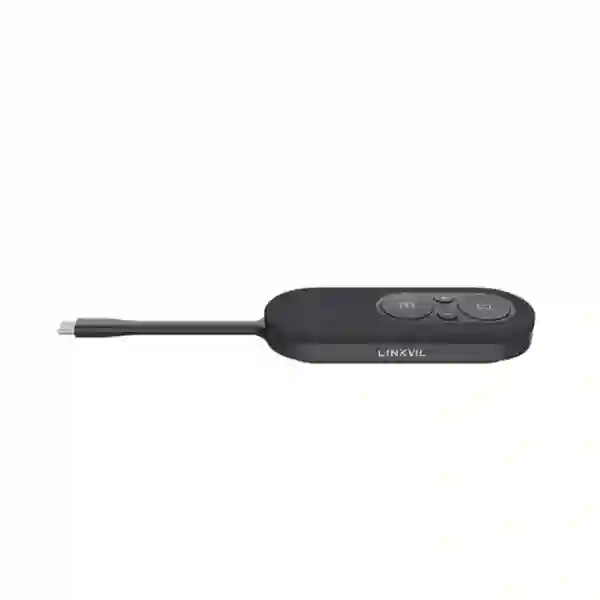
The LINKVIL CA200 Wireless Conference Kit is designed for organisations that want a simpler way to share content in meeting rooms without repeatedly connecting presentation cables or installing screen-sharing software. The CA200 combines an RC10 receiver hub with a CP20 screen-sharing pod and related accessories, supporting wireless presentation up to 4K at 30 frames per second. It can connect up to four CP20 pods for teams that need several presenters to move between devices during a meeting. For businesses in Tanzania, the practical value is straightforward: presenters can connect compatible Windows or Mac computers, laptops, tablets or smartphones with full-featured USB-C, press to share, and use freeze control when they need to pause the room display while preparing the next item privately.
What the LINKVIL CA200 solves
Meeting-room delays often begin with small compatibility problems: the right HDMI adapter is missing, a guest cannot install the preferred casting application, the cable does not reach the presenter, or the next speaker spends several minutes changing inputs. The LINKVIL CA200 is aimed at reducing that friction by moving presentation sharing to a wireless, pod-based workflow. The receiver hub connects to an HDMI-enabled display, while the CP20 screen-sharing pod connects to a compatible source device. The result is a presentation experience intended to be easier for recurring staff meetings, boardroom presentations, project reviews, customer briefings, training sessions and hybrid-collaboration spaces.
The product is particularly relevant where different people need to present from different devices. One CA200 hub can support up to four CP20 sharing pods, so a room can be prepared for several regular presenters without rebuilding the setup each time. Mirror and extended desktop modes give users practical flexibility: a presenter can mirror the same content visible on the source device or work with an extended desktop workflow where supported. Freeze mode is useful when a presenter wants the shared screen to remain on a selected slide while privately opening another file, checking notes or arranging the next window.
4K wireless presentation
The official CA200 datasheet specifies wireless screen sharing up to 4K/30fps with low latency, making the kit suitable for slides, dashboards, documents, web applications and high-resolution presentation content where the connected display and source support the required format.
Plug-and-play workflow
The CA200 is designed to work without software installation for the core pod-based sharing workflow. That can simplify guest presentations and reduce the dependence on room-specific applications, accounts or browser extensions.
Secure wireless link
LINKVIL specifies WPA3-PSK encryption for the CA200 wireless connection. Security still depends on correct room practices, controlled physical access and sensible device handling, but WPA3 support is an important foundation for business presentation environments.
Meeting peripheral access
The RC10 receiver hub includes USB-A 3.0 and can provide wireless access to a UVC camera, microphone or speaker in supported configurations, allowing the CA200 to participate in a broader conferencing-room design rather than acting only as a display-sharing accessory.
Verified technical highlights
| Area | LINKVIL CA200 specification |
|---|---|
| Wireless sharing | Up to 4K/30fps; mirror and extended desktop modes |
| Wireless standards | Wi-Fi 5 / Wi-Fi 6, 2.4 GHz and 5 GHz |
| Security | WPA3-PSK encryption |
| Multi-device expansion | Up to four CP20 screen-sharing pods |
| Receiver hub interfaces | HDMI x1, USB Type-C PD, USB-A 3.0 x1 |
| CP20 interface | USB Type-C PD + DisplayPort Alt Mode |
| Transmission distance | Up to 10 metres, subject to environment and deployment conditions |
| Compatible device types | Windows/Mac PCs, laptops, tablets and smartphones with full-featured USB-C |
| Package | CP20 sharing pod, RC10 receiver hub, pairing adapter, 1.5 m HDMI cable, USB-C power adapter and quick installation guide |
The official documentation also lists a working temperature of -10°C to +40°C and working humidity of 0% to 95% RH. These limits matter for procurement because conference-room devices should be installed in controlled indoor environments rather than treated like general-purpose outdoor hardware. The receiver hub is powered at 5V/2A, while the CP20 screen-sharing pod has a stated 5V operating voltage and 2.5W power consumption. Specifications can change as a manufacturer revises hardware or documentation, so the final quotation should be checked against the exact current product revision being supplied.
Compatibility and room-planning guidance
The most important compatibility check is the USB-C capability of the presenting device. A USB-C connector alone does not guarantee video output; the source device needs a full-featured USB-C implementation capable of the relevant DisplayPort Alt Mode functions. Organisations should therefore test representative laptops, tablets and smartphones before standardising the CA200 across many rooms. The display side is simpler: the receiver hub is designed for an HDMI-enabled display. In a complete conference room, the display, camera, microphone, speaker and UC platform should still be considered as one system because presentation sharing is only one part of the meeting experience.
For a broader collaboration project, FourTeck Tanzania’s technology services overview explains how video conferencing, audio, networking and displays can be planned together. The Tanzania technology shop is useful when a project also needs related business hardware, while the FourTeck Tanzania approach describes the importance of matching products to the actual operating environment. For quotation or compatibility questions, use the verified FourTeck Tanzania contact page.
Related communications products on FourTeck Tanzania
The CA200 is primarily a meeting-room presentation product, but many buyers are standardising several communications endpoints at the same time. For desk-voice requirements, the Dinstar C60S business IP phone provides a straightforward SIP endpoint; the Dinstar C60SP PoE business IP phone is relevant where centrally powered desk phones are required; the Dinstar C60U-T 4G IP phone addresses a different connectivity profile; and the Dinstar C60U-W Wi-Fi IP phone can be considered where a Wi-Fi-capable SIP desk endpoint is preferred. These are not substitutes for the CA200; they illustrate how meeting-room collaboration and business telephony can be sourced as parts of a wider communications environment.
LINKVIL CA200 Wireless Conference Kit Tanzania
Organisations evaluating the LINKVIL CA200 Wireless Conference Kit in Tanzania are usually trying to improve a practical meeting-room problem: content sharing takes too long, users bring different devices, cable adapters go missing, or guests need an easier way to present without installing software. The CA200 is well suited to that requirement because its design separates the room-side receiver from the presenter-side sharing pod. Once the receiver is connected to the HDMI display and powered, a compatible presenter can connect the CP20 pod to a full-featured USB-C device and start sharing. That makes the product useful for boardrooms, management meeting rooms, sales presentation spaces, training rooms, university administration areas, hotel meeting facilities and other professional environments where presentations change hands regularly.
For Tanzania procurement, buyers should focus on device compatibility, room layout and the complete bill of materials rather than treating the CA200 as an isolated accessory. Confirm the HDMI input on the intended display, verify USB-C video capability on the laptops or tablets used by staff, identify whether additional CP20 pods are required, and decide how the receiver hub will access any camera, microphone or speaker that forms part of the room. The wireless range is specified up to 10 metres, but walls, interference, room geometry and competing radio traffic can affect real conditions. A short in-room test is sensible when a deployment will be repeated across several offices.
Security-conscious organisations should also include the CA200 in normal meeting-room governance. WPA3-PSK supports encrypted wireless sharing, but physical access, guest-device practices and presentation handling remain important. Where the room already uses a Microsoft Teams, Zoom or other UC workflow, confirm how the CA200 will complement that system rather than assuming it replaces the conferencing platform. FourTeck Tanzania can help structure the requirement around the exact display, participant workflow and existing room peripherals. The main benefit is not simply wireless video; it is a more predictable meeting start, cleaner table setup and less time lost to presentation-cable troubleshooting.
LINKVIL CA200 Wireless Conference Kit Dar es Salaam
Businesses in Dar es Salaam often operate fast-moving meeting environments where internal teams, visiting suppliers, customers, regional managers and project partners need to present from different computers. The LINKVIL CA200 can make that workflow more consistent by giving the room a dedicated wireless presentation path. Instead of passing a long HDMI cable around a boardroom table or keeping a drawer of adapters, the room can be prepared with the RC10 receiver and one or more CP20 sharing pods. Up to four pods can be associated with the hub, which is useful when several regular presenters are expected during a management review, tender presentation, design discussion or commercial meeting.
Dar es Salaam deployments should be planned around the real device mix used by the organisation. Modern laptops increasingly use USB-C, but not every USB-C port supports video output. Procurement teams should identify the laptop models used by executives, finance teams, consultants and visitors, then verify full-featured USB-C support before buying a large quantity. For guest-heavy rooms, it is worth keeping a documented fallback presentation method for devices that do not meet the requirement. The HDMI display should also be checked for suitable resolution, available input and mounting location so the CA200 does not end up connected through unnecessary adapters or poorly positioned cables.
Wireless congestion can matter in dense office buildings. Although the CA200 supports Wi-Fi 5 and Wi-Fi 6 across 2.4 GHz and 5 GHz, real room performance still depends on the surrounding radio environment. Business Wi-Fi access points, neighbouring networks and other wireless presentation devices can all contribute to interference. A structured deployment therefore considers room location, receiver placement and user expectations. For a larger office refresh, the CA200 can be assessed alongside displays, cameras, room audio and network readiness rather than introduced without context. FourTeck’s Tanzania contact workflow allows Dar es Salaam buyers to submit the room count, display models, common laptop types, expected presenter count and conferencing platform so the quotation can reflect the actual deployment rather than only the base kit.
LINKVIL CA200 Wireless Conference Kit Mwanza
For organisations in Mwanza, the LINKVIL CA200 offers a practical route to modernising meeting-room presentation without redesigning the entire room. This can be attractive to branch offices, professional firms, education organisations, healthcare administration teams, hospitality operators and commercial businesses that already have suitable HDMI displays but want an easier way to move presentation content from personal devices to the main screen. The kit’s plug-and-play orientation reduces reliance on locally installed casting applications, which can be especially helpful when external visitors need to share content and cannot install corporate software.
A Mwanza buyer should begin with the room workflow. If one person presents for the entire meeting, a single CP20 may be sufficient. If the room frequently hosts departmental reviews where several people share dashboards, spreadsheets and reports, multiple CP20 pods can make handover faster; the CA200 supports up to four. Freeze mode can help presenters keep a chart or slide visible while they prepare another window privately. Mirror and extended desktop support can also be useful for presenters who want to keep notes or controls on their own display while showing only the intended content on the room screen.
Procurement should also include basic continuity questions. Identify where the receiver will be powered, how HDMI cabling will be routed and how the equipment will be secured against accidental removal. The receiver hub is small, so tidy mounting and labelling are helpful in shared rooms. Where the CA200 will connect to a UVC camera, microphone or speaker, test the exact peripheral combination and the organisation’s preferred meeting application. If several Mwanza branches or rooms will use the same design, document a standard installation layout, pod naming method and user quick guide. A short, consistent instruction card placed in each room can reduce support requests and make adoption easier. The strongest deployment is therefore a repeatable room standard, not simply a collection of devices purchased individually.
LINKVIL CA200 Wireless Conference Kit Arusha
Arusha has a wide mix of organisations that host client briefings, tourism and hospitality meetings, NGO coordination sessions, training events, education discussions and internal management reviews. The LINKVIL CA200 can fit these environments when the main requirement is rapid wireless screen sharing from modern USB-C devices to an HDMI display. A conference room used by outside partners benefits from a presentation method that does not depend on each visitor knowing the room’s software. With the CP20 sharing pod, the user connects to a compatible device, waits for the connection and presses to cast, creating a familiar physical workflow that can be explained quickly.
For hospitality and customer-facing venues, room appearance is also important. Long presentation cables across tables can look untidy and are easily damaged or misplaced. A CA200 deployment can help reduce visible cable clutter, although the receiver still requires sensible power and HDMI installation behind or near the display. Facilities and IT teams should therefore coordinate mounting so the receiver is accessible for maintenance but not hanging loosely where guests can disturb it. If the room is frequently reconfigured, consider where the sharing pods will be stored and how they will be charged or powered between sessions.
Arusha buyers should assess source-device compatibility carefully because visitor populations can be diverse. Some laptops use Thunderbolt or full-featured USB-C, while others provide USB-C only for data or charging. Smartphones and tablets also differ. A pilot test with representative devices can reveal whether a secondary presentation option is needed. Wireless performance should likewise be validated in the actual room. The CA200 supports 2.4 GHz and 5 GHz operation, but surrounding Wi-Fi conditions can change from one building to another. For organisations using the CA200 as part of a broader hybrid-meeting setup, room audio and camera positioning still need separate attention. The CA200 improves content sharing; it does not replace the planning required for participants to be seen and heard clearly.
LINKVIL CA200 Wireless Conference Kit Dodoma
Dodoma organisations may use the LINKVIL CA200 in administrative meeting rooms, management offices, training facilities, institutional conference spaces and professional-service environments where presentations need to start quickly and consistently. The product is useful where the room already contains a suitable display and the main pain point is the connection between that display and the people presenting. Rather than requiring a dedicated room PC or a permanently attached HDMI lead, the CA200 creates a wireless sharing path through its receiver hub and CP20 presenter pod. This is particularly convenient where staff bring laptops to the room and where more than one person needs to contribute during the same session.
A well-scoped Dodoma quotation should include the number of rooms, display type, common source devices, expected number of simultaneous regular presenters, room dimensions and any existing camera, microphone or speaker. The CA200 can support up to four CP20 pods, but additional pods should be purchased because the workflow needs them, not merely because the maximum is available. Smaller meeting rooms may work perfectly with the standard kit. Larger decision rooms may benefit from multiple pods labelled by seat or department so handover remains organised.
The CA200’s WPA3-PSK encryption is relevant for government-adjacent, institutional and corporate environments that care about secure wireless connectivity. However, secure operation still requires operational controls such as keeping pods within the room, knowing who can access the equipment and preventing unauthorised people from using connected displays. IT teams should also document the receiver and pod arrangement so support staff can identify whether a reported issue is caused by the source device, USB-C capability, wireless link, HDMI display input or an attached UVC peripheral. This kind of troubleshooting discipline matters when the same technology is repeated across several offices. For buyers in Dodoma, the product is best understood as a collaboration workflow upgrade that should be standardised, documented and integrated with the wider meeting-room environment.
LINKVIL CA200 Wireless Conference Kit UAE
Businesses with operations in both Tanzania and the UAE may use the LINKVIL CA200 to standardise presentation behaviour across offices. A repeated room design can reduce user confusion because employees travelling between branches encounter the same physical sharing pod, the same press-to-present workflow and the same approach to freeze mode and multi-presenter handover. In the UAE, where many offices combine fixed boardrooms with flexible collaboration rooms, the CA200 can be considered for spaces that already have HDMI displays and need a simple wireless content path rather than a complete replacement of the conferencing system.
The most important design decision remains compatibility. Corporate laptop fleets are often standardised, which makes it easier to confirm whether the deployed USB-C ports support DisplayPort Alt Mode and power requirements. Guest-heavy boardrooms may still need a backup path for older HDMI-only laptops or devices with limited USB-C implementations. The CA200 supports Wi-Fi 5 and Wi-Fi 6, WPA3-PSK, up to 4K/30fps output and up to four CP20 pods, so it can support polished presentation workflows when the room and endpoints are selected correctly.
For UAE projects, FourTeck UAE provides a regional IT, telecom and infrastructure reference point for organisations coordinating collaboration technology with networking, security and other office systems. Multi-country IT teams should define a common room template that lists display inputs, pod quantities, supported laptop models, cable standards, power arrangement and support ownership. That document can then be adapted to each site rather than recreated from zero. The result is easier procurement and more consistent user experience. Where the CA200 is paired with camera and audio equipment, the exact UVC peripheral path should be tested with the preferred conferencing platform before mass deployment, because successful wireless screen sharing does not by itself guarantee that every camera or audio workflow will behave identically across all operating systems and UC applications.
LINKVIL CA200 Wireless Conference Kit Uganda
Ugandan organisations evaluating wireless presentation tools can use the LINKVIL CA200 where meeting-room simplicity is more important than adding another software-driven collaboration layer. The kit gives users a physical presentation pod and a dedicated receiver, which can make the process easier to explain to staff and visitors. For companies with branches in Tanzania and Uganda, the same CA200 room standard can also reduce training overhead and simplify procurement documentation because the device workflow remains consistent across countries.
The CA200 is especially relevant to business environments where several departments use the same meeting room. A finance review may involve a spreadsheet, an operations meeting may switch to a dashboard, and a sales meeting may involve a customer presentation. With support for multiple CP20 pods, the room can be arranged so more than one presenter is ready to share. Freeze mode is useful when a presenter needs to protect private desktop activity from the room display while changing files or preparing a new window. Mirror and extended desktop modes give additional flexibility for different presentation styles.
Uganda deployments should include basic site checks: confirm the HDMI display, identify the supported USB-C devices, check room dimensions against the stated up-to-10-metre wireless distance and review local radio conditions. If the room also uses a conferencing camera, microphone or speaker, validate that peripheral workflow with the receiver hub and the organisation’s preferred UC platform. FourTeck Uganda provides regional context for business communications and IT projects. Procurement teams should provide the room count, display model, user-device mix, meeting platforms, required CP20 quantity and installation expectations. This allows the solution to be quoted as a working meeting-room component rather than simply as a box with a model number.
LINKVIL CA200 Wireless Conference Kit Kampala
Kampala offices often combine local teams, regional visitors and remote participants in the same meeting. The LINKVIL CA200 addresses the content-sharing part of that environment by creating a dedicated wireless link from compatible presenter devices to an HDMI display. This can reduce the time spent searching for adapters at the beginning of a meeting and can make conference spaces easier for non-technical users. The physical CP20 control also gives presenters an obvious way to start sharing and to freeze the displayed content without navigating a room-control application.
In larger Kampala offices, meeting-room standards should be designed centrally. IT teams can decide which laptop models are approved for direct CP20 use, how many pods each room receives, where the RC10 receiver is mounted and how attached camera or audio peripherals are handled. A consistent installation template improves support because technicians know what to expect in every room. If a user reports that screen sharing is unavailable, support can quickly check the source USB-C capability, pod status, receiver power, display input and wireless environment in a repeatable order.
Wireless congestion deserves attention in busy commercial buildings. The CA200 supports both 2.4 GHz and 5 GHz and modern Wi-Fi standards, yet other nearby access points and devices can still influence performance. The equipment should therefore be installed and tested in the actual room, not evaluated only on a desk. Organisations that intend to show high-detail design content or dashboards should also test their typical files at the desired 4K resolution and confirm that the display scales text appropriately. The CA200’s strongest value in Kampala is operational consistency: meetings can begin with less cable handling, presenters can transition more smoothly, and IT can manage a standard room design. It should be selected alongside—not instead of—good display placement, clear room audio, suitable camera framing and reliable connectivity to the organisation’s online conferencing platform.
LINKVIL CA200 Wireless Conference Kit Arua
Arua organisations with branch-style meeting rooms can benefit from a product that is straightforward for local users and manageable by a central IT team. The LINKVIL CA200 fits this pattern because the sharing workflow can be standardised without requiring every presenter to install software. A branch can keep the receiver connected to its meeting-room display and issue a simple local instruction: connect the CP20 to a compatible USB-C device, wait for connection and press to share. This makes the system practical for recurring administrative meetings, partner discussions, training sessions and project coordination.
Remote support planning is important for branch deployments. Equipment should be labelled, the display input should be documented and users should know where the CP20 pod is stored. If more than one pod is supplied, each can be numbered so missing accessories are easier to identify. A basic troubleshooting guide can separate common causes: a laptop USB-C port that does not support video, an unpowered receiver, an incorrect display input, a disconnected HDMI cable or a pod that needs pairing attention. These simple steps can reduce unnecessary site visits.
The product’s wireless security and up-to-10-metre transmission specification are useful, but the final room still needs local validation. Building materials, other wireless networks and equipment placement can influence real performance. Organisations should also decide whether the room requires only presentation sharing or a full hybrid-conferencing experience. If remote participants need to see and hear the room, the camera, microphone and speaker design remains essential. The CA200 can provide wireless access to UVC peripherals in supported configurations, but exact compatibility should be tested with the intended devices and platform. For Arua procurement, the most effective request identifies the number of rooms, common laptop models, display inputs, desired CP20 quantity and support expectations. This provides enough information to build a repeatable branch-room standard rather than leaving users to improvise after the hardware arrives.
LINKVIL CA200 Wireless Conference Kit Mbarara
Mbarara businesses and institutions can use the LINKVIL CA200 to improve presentation flow in rooms where teams currently rely on shared cables or manual source changes. The kit is particularly attractive when employees frequently bring laptops into a meeting rather than using a permanent room PC. By establishing the receiver as the fixed room component and the CP20 pod as the presenter interface, the organisation can create a more predictable routine. Staff do not need to know the television or projector cabling path; they only need to understand the supported source-device connection and sharing control.
For training and education-oriented spaces, the ability to move between presenters can be valuable. An instructor can keep one pod while a second participant or facilitator prepares another device. In business reviews, separate pods can be assigned to finance, operations or sales presenters. Up to four can be connected to the hub, allowing the organisation to scale the workflow without replacing the receiver. Freeze mode can support teaching and workshops because the room can continue showing a reference image while the presenter opens another document privately.
Mbarara deployments should still be sized carefully. The CA200 is not a general wireless network extender and should not be evaluated by internet throughput. Its job is presentation sharing and supported peripheral access. The display must have HDMI, source devices need the correct USB-C capability, and the room should fit the wireless operating distance. If a boardroom uses older laptops with HDMI only, procurement should plan an alternative rather than assuming every connector marked USB-C will work. For organisations with limited local technical staff, standardisation becomes especially valuable: use the same receiver location, cable labelling, user card and pod storage method in every room. A good quotation should specify whether installation, display connection, testing and user orientation are required in addition to supply. This reduces uncertainty and helps ensure the product is usable immediately after handover.
LINKVIL CA200 Wireless Conference Kit Gulu
Gulu organisations considering the LINKVIL CA200 are likely to value simplicity, portability and a clear presenter workflow. In a shared meeting room, the technology should not require a technician every time a new person wants to show a document. The CA200 supports that goal through hardware-based wireless screen sharing. Once the room-side receiver is installed, a compatible USB-C source can use the CP20 pod to begin presentation sharing. The design can be useful for branch offices, education and training organisations, healthcare administration, NGOs, professional firms and commercial teams that regularly host meetings with internal or external participants.
The room design should account for where the receiver and power supply will be placed. A neat installation keeps HDMI and power cabling close to the display, prevents accidental disconnection and allows support staff to reach the device when troubleshooting is required. The CP20 should have a defined storage location because small meeting accessories are easy to misplace. Where multiple pods are supplied, clear numbering can help users return them correctly. These operational details matter as much as headline specifications in environments where technology is shared by many teams.
Gulu buyers should also distinguish wireless presentation from internet conferencing. The CA200 can make it easier to show local content, but a successful remote meeting still depends on stable internet, the UC application, camera framing, microphone pickup and speaker quality. If the CA200 is intended to help users access UVC room peripherals wirelessly, those exact devices and the chosen conferencing software should be validated together. The same applies to high-resolution screen sharing: confirm that the source, CA200, HDMI path and display all support the desired format. A practical procurement checklist should therefore include laptop types, display models, room measurements, meeting applications, peripheral models and pod quantity. This produces a deployment tailored to the real room instead of relying on assumptions based on the product name alone.
LINKVIL CA200 Wireless Conference Kit Kenya
Kenyan organisations can use the LINKVIL CA200 in boardrooms, huddle rooms, training spaces and customer briefing areas where quick wireless presentation is a priority. The product is especially relevant for companies standardising rooms across East Africa because the same CA200 workflow can be repeated in Tanzania, Kenya and Uganda. A regional standard can define the receiver placement, screen resolution, approved source-device requirements and number of CP20 pods per room, making user training and support more consistent across branches.
The CA200 supports 4K/30fps sharing, Wi-Fi 5 and Wi-Fi 6, WPA3-PSK and up to four sharing pods. Those capabilities make it appropriate for modern collaboration environments, but procurement teams should still build the design around the users. A small huddle room with a single regular presenter may only need the base kit. A regional management boardroom where several departments present in sequence may benefit from additional pods. A training facility with many guest presenters may need a documented fallback for devices without full-featured USB-C.
For regional project coordination, FourTeck Kenya provides a relevant point of reference for IT and video-conferencing solutions. Organisations operating across borders should keep a central room-standard document that lists approved displays, cable lengths, mounting practice, supported laptop families and user instructions. They should also define support ownership: whether first-line troubleshooting is handled locally, by central IT or by a service partner. The CA200’s plug-and-play model can reduce complexity, but a predictable support process still improves uptime. Before ordering for Kenya, confirm the exact product bundle, current manufacturer revision, accessory count and compatibility with the intended source devices. This is particularly important when a multi-room project is being purchased in phases, because hardware and firmware details can evolve over time.
LINKVIL CA200 Wireless Conference Kit Kuwait
In Kuwait, the LINKVIL CA200 can support corporate offices, project meeting rooms, professional-service firms, training centres and other environments where presentation switching needs to be fast and tidy. Wireless sharing can be particularly helpful in formal boardrooms where exposed cables are undesirable and in rooms that host visiting partners with different laptops. The CA200 uses a dedicated receiver and sharing pod, so the user experience can remain consistent even when the organisation uses multiple conferencing applications for different customers or partners.
The product should be evaluated against the organisation’s existing AV architecture. If displays are connected through central switchers, matrix systems or wall plates, the HDMI path should be confirmed. If the room already includes a USB conferencing camera or speakerphone, the CA200’s supported wireless UVC access may be valuable, but compatibility needs to be tested with the exact peripheral and operating system. For managed enterprise environments, security teams may also want to understand how the WPA3-PSK wireless link fits into room usage policy and whether presentation hardware is physically secured after hours.
FourTeck Kuwait provides regional context for IT, communications and infrastructure projects. Multi-region customers can reduce support complexity by maintaining the same basic CA200 deployment standard in Kuwait and Tanzania while allowing each office to adapt for local room size, display type and peripheral equipment. Procurement teams should avoid assuming that wireless presentation eliminates all cabling; the receiver still needs reliable power and an HDMI connection to the display. Good installation hides and secures those fixed cables while keeping service access practical. When requesting a quotation, specify how many rooms are involved, whether additional CP20 pods are needed, what displays and laptops are used and whether commissioning or user orientation is part of the required scope.
LINKVIL CA200 Wireless Conference Kit Ghana
Ghanaian businesses can consider the LINKVIL CA200 when they want to make existing meeting-room displays easier to use for wireless presentations. The kit does not require an organisation to replace its entire conferencing environment; it can be introduced as a focused improvement to the content-sharing workflow. This is useful for offices that already have cameras, audio devices and displays but still rely on HDMI cables or ad-hoc adapters for presentations. The CA200’s dedicated sharing pod gives users a clear physical control and can reduce the number of steps required to place a laptop presentation on the main display.
For offices with different departments sharing the same room, the ability to pair up to four CP20 pods can improve handover. A sales manager can present a customer deck, finance can switch to a spreadsheet and operations can show a dashboard without continuously unplugging one cable from another laptop. Freeze mode also allows the current screen to remain visible while the presenter prepares the next item privately. These workflow benefits can be more important in daily use than simply quoting the maximum resolution.
Regional buyers can refer to FourTeck Ghana for related business technology planning. For multi-country deployments, standardisation should include source-device compatibility testing, because the same connector shape can hide different USB-C capabilities. The display’s HDMI input, room dimensions and wireless environment should also be checked. If the CA200 will be used in a hybrid room, test the selected camera, microphone or speaker with the user’s operating systems and conferencing applications. Ghana procurement teams should ask for the exact current kit contents and confirm whether any additional CP20 pods, mounts, cables or room accessories are included or priced separately. A clear bill of materials makes it easier to compare proposals and prevents installation-day surprises.
LINKVIL CA200 Wireless Conference Kit Nigeria
Nigerian organisations with busy meeting rooms can use the LINKVIL CA200 to reduce dependence on shared HDMI cables and software-based casting tools. In multi-department offices, the practical challenge is often not the display itself but the transition between presenters. A wireless pod that gives each presenter a familiar press-to-share control can help meetings start faster and can reduce interruptions when the next person needs to show a document or dashboard. The CA200’s support for up to four CP20 pods is particularly useful for recurring executive reviews, project meetings and training sessions with several presenters.
Large offices should treat the CA200 as part of an AV standard. Define which rooms receive the product, which displays are approved, where the receiver is mounted and how pods are stored. Wireless performance should be tested in the final location because dense office environments can have many access points and other devices operating in the same bands. The CA200 supports Wi-Fi 5 and Wi-Fi 6 and both 2.4 GHz and 5 GHz, but environmental validation remains important for a reliable user experience.
For Nigeria project context, FourTeck Nigeria covers broader business IT and communication requirements, while FourTeck IT Solutions Africa provides a multi-market reference for organisations standardising technology across the continent. Nigerian buyers should confirm USB-C video capability on the actual laptop fleet and should not assume that every phone or tablet will support identical behaviour. If the requirement includes wireless camera, microphone or speaker access, run a pilot with the exact conferencing application. This is especially important before deploying the same design to many rooms. A successful CA200 project creates a simple user ritual, a tidy fixed installation and a support process that can identify source, display or peripheral issues quickly.
LINKVIL CA200 Wireless Conference Kit Seychelles
Seychelles businesses, hospitality operators, professional organisations and meeting venues may find the LINKVIL CA200 useful where presentation rooms host a mixture of staff and visiting guests. In such environments, simplicity has a direct operational benefit because presenters may have limited time to learn the room setup. The CA200’s hardware-based sharing model can provide a straightforward way to connect a compatible USB-C device and place content on an HDMI display without installing additional presentation software. This can suit hotel boardrooms, management spaces, training areas and customer presentation rooms where a clean table and fast handover are desirable.
Hospitality and guest-facing environments should think carefully about accessory management. CP20 sharing pods are portable and should have a defined storage and return process. The receiver hub can be mounted or placed discreetly near the display, with fixed HDMI and power cabling secured so guests do not need to handle it. A short printed user card can explain connection, share and freeze functions in a few steps. Staff can then focus on assisting with unusual source devices rather than explaining the entire room architecture.
Device diversity is likely to be one of the main deployment considerations. Visitors may arrive with Windows laptops, MacBooks, tablets and smartphones, and not all USB-C ports provide the same display capabilities. The organisation should therefore define supported connection requirements and keep an alternative presentation method for unsupported devices. If the room is used for online meetings as well as local presentation, camera and audio quality remain separate design concerns. The CA200 can complement those systems and can provide supported wireless UVC access, but it should not be expected to correct poor acoustics, weak internet or badly positioned cameras. For Seychelles procurement, a pilot room is often the best way to confirm the user experience before expanding to several spaces, especially when a venue serves external guests with unpredictable device combinations.
Buying guidance: how to specify the CA200 correctly
1. List the rooms
Record the number of meeting rooms, their approximate size, seating arrangement and display type. A small huddle room and an executive boardroom may need different pod quantities and peripheral arrangements.
2. Check source devices
Identify the exact laptop, tablet and smartphone families used by staff. Confirm full-featured USB-C with the required display capability instead of relying on connector appearance alone.
3. Decide pod quantity
The CA200 can support up to four CP20 pods. Buy additional pods where presenter handover justifies them, and plan how they will be stored and labelled.
4. Verify UC peripherals
If the room uses a UVC camera, microphone or speaker, test the exact hardware and conferencing application with the intended operating systems before a large rollout.
Quotation checklist
To request an accurate LINKVIL CA200 quotation, provide: the required quantity; number of meeting rooms; display make/model and available HDMI input; typical Windows or Mac laptop models; whether tablets or smartphones must share; expected number of regular presenters per room; required number of additional CP20 pods; existing camera, microphone and speaker models; preferred UC applications; whether installation and testing are required; and whether the CA200 will be part of a wider video-conferencing or office-technology project. If several countries are involved, include the intended branch locations so product standardisation can be discussed consistently.
Frequently asked questions
Does the LINKVIL CA200 support 4K wireless screen sharing?
Yes. The official LINKVIL datasheet specifies up to 4K resolution at 30fps with low latency. The final result also depends on the source device, display and content being used.
How many CP20 screen-sharing pods can connect?
One CA200 hub supports up to four CP20 screen-sharing pods. This is useful when several presenters need to switch between devices during the same meeting.
Does the CA200 need software installation?
The product is designed for plug-and-play sharing without installing software for the core pod workflow. Compatibility still depends on the source device having the required USB-C capability.
What security does the CA200 use?
LINKVIL specifies WPA3-PSK encryption. Organisations should still apply normal meeting-room security practices, physical control and device-use policies.
Can the CA200 work with cameras and speakerphones?
The official material states that the CA200 can provide wireless access to UVC camera, microphone and speaker devices. Exact peripheral, operating-system and UC-application compatibility should be tested before a large deployment.
What is the wireless distance?
The official datasheet states up to 10 metres. Real performance can vary with room geometry, interference, device placement and the surrounding radio environment.
Is every USB-C laptop compatible?
No. A USB-C connector can support different capabilities. LINKVIL specifies compatibility with devices using full-featured USB-C, so buyers should verify the exact laptop, tablet or smartphone model before standardising the solution.
Can FourTeck help with a complete meeting-room solution?
Yes. FourTeck Tanzania’s published services cover video conferencing, audio conferencing, displays, networking and supporting infrastructure. Share the room size, participant count, meeting platform and existing equipment so the CA200 can be evaluated within the complete room design.
Decision recap
Choose the LINKVIL CA200 when your primary goal is to simplify meeting-room content sharing from compatible modern devices, support up to four regular presenter pods, reduce presentation cable handling and add a secure WPA3-based wireless sharing workflow. Verify USB-C capability, display HDMI input, room distance and any UVC peripherals before finalising a multi-room purchase.
Consultation panel
Tell FourTeck Tanzania how many rooms you are equipping, which displays and laptops you use, whether you need extra CP20 pods and whether the CA200 must work with an existing camera, microphone or speakerphone. This gives the sales and technical team enough context to discuss compatibility, accessories and the scope required for a complete quotation.
For broader multi-market requirements, the verified FourTeck network also includes FourTeck global alongside the regional sites linked above.




Reviews
There are no reviews yet.