
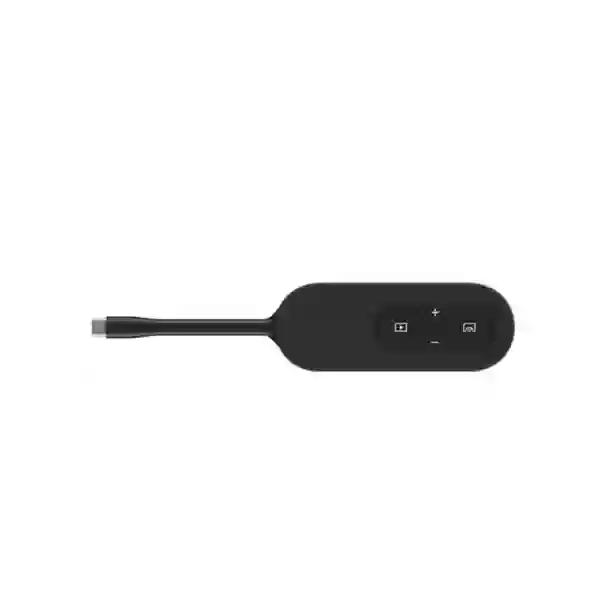
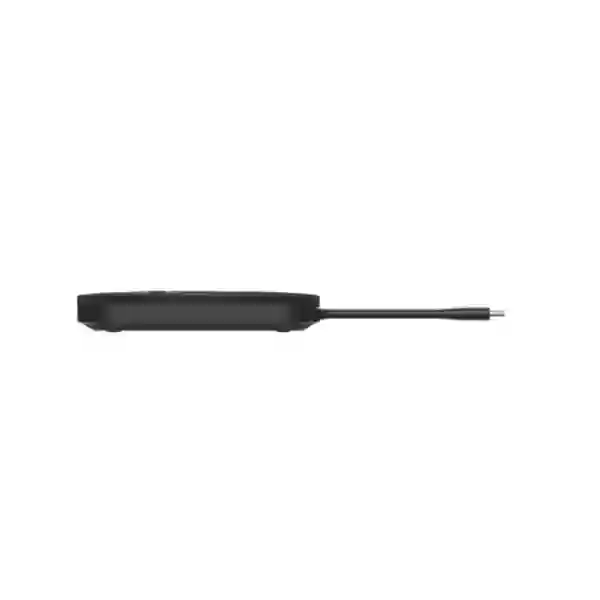
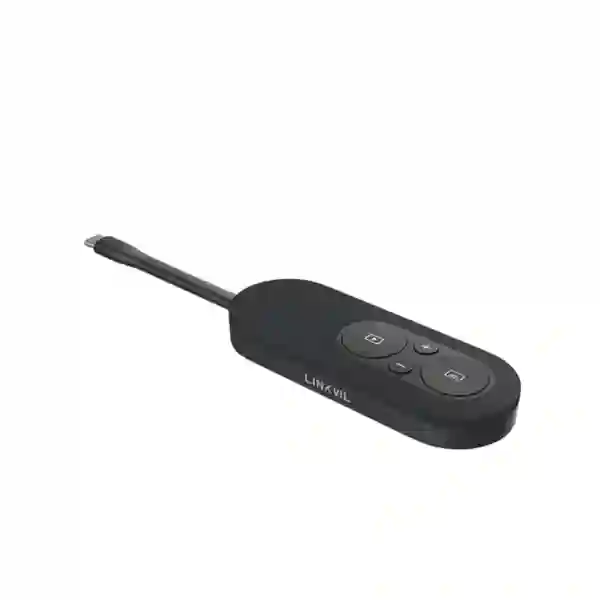
LINKVIL CP20 4K Wireless Screen Sharing Pod
The LINKVIL CP20 is a compact wireless screen-sharing pod for teams that want to present from compatible USB-C devices without installing drivers or passing display cables around the room. Official LINKVIL information specifies one-press sharing at up to 4K/30fps, a dedicated screen-freeze function, synchronized volume control, CA200/CA400 integration and wireless access to UVC camera, microphone and speaker devices within the supported conferencing architecture.
LINKVIL CP20 Tanzania
Organizations in Tanzania can use the CP20 to simplify meeting rooms where employees, guests and trainers frequently switch presenters. The one-button workflow can reduce dependence on adapters and room-specific casting applications. Before procurement, confirm the receiving LINKVIL system, display path and the USB-C capabilities of the laptops that will be used.
The CP20 is most useful where presentation convenience matters as much as resolution. Boardrooms, huddle spaces, training rooms, classrooms and customer presentation areas can benefit from a repeatable process that makes screen sharing easier to understand. The freeze function is particularly useful when a presenter needs to move between applications without exposing desktop activity to the audience.
If multiple users regularly present in the same meeting, LINKVIL documents support for up to four devices in the supported CA200/CA400 environment. This can reduce cable swapping and make discussions more fluid. Procurement teams should still select the number of pods according to the actual room workflow rather than purchasing the maximum supported quantity automatically.
For a Tanzania quotation, include quantity, city, room type, existing CA200 or CA400 equipment, laptop models and whether the requirement is only wireless presentation or full BYOD conferencing with access to the room camera, microphone and speaker. See the FourTeck Tanzania technology overview, Tanzania business technology shop and FourTeck Tanzania contact page.
LINKVIL CP20 4K Wireless Screen Sharing Pod Dar es Salaam
Dar es Salaam businesses often host employees, clients, consultants and visiting partners in the same meeting rooms. The CP20 can help standardize the way these users present by providing a physical one-press sharing control. That consistency is useful in offices where IT teams want fewer support calls related to adapters, inputs and casting software.
A boardroom deployment should check the full user journey: where presenters sit, how far the display is from the table, which laptops are standard, whether guest devices are common and whether room camera and audio peripherals must be accessible from a presenter laptop. When these questions are answered before procurement, the CP20 can be incorporated into a much more reliable room design.
The screen-freeze function is useful for executive meetings because it lets a presenter hold the current public frame while opening another application or document. In a multi-presenter meeting, additional CP20 units can reduce interruptions caused by unplugging and reconnecting a single transmitter.
For Dar es Salaam sourcing, request a quote with exact quantity, intended room type, existing LINKVIL equipment, display resolution and typical host devices. This avoids treating the CP20 as an isolated accessory when the project may actually require a receiver, conferencing kit or wider room integration.
LINKVIL CP20 4K Wireless Screen Sharing Pod Mwanza
Mwanza branch offices, training facilities, healthcare administration, hospitality businesses and professional firms may use the CP20 to make shared rooms easier for non-technical users. Its plug-and-play positioning reduces reliance on installed desktop software, while the physical share button gives presenters a simple, repeatable action.
Training environments may benefit especially when several participants need to show content. A facilitator can use one pod, while other contributors use additional paired pods in a supported LINKVIL environment. That approach can make workshops and collaborative sessions smoother than repeatedly moving one cable or transmitter between seats.
Support planning is important for Mwanza deployments. Label pods, record their assigned receivers, keep a short instruction card in the room and document which laptop models have been tested. If employees use older devices without full-featured USB-C display output, keep an alternate wired presentation route available.
A procurement request should specify room count, number of presenters, existing conferencing components, display resolution and whether users need only screen mirroring or wireless access to UVC room peripherals.
LINKVIL CP20 4K Wireless Screen Sharing Pod Arusha
Arusha’s tourism, hospitality, NGO, training and professional-service environments often have meeting rooms used by both local teams and visitors. The CP20 can provide a consistent hardware-led presentation method so users do not need to learn a different casting application for every room.
Conference venues and hotels may find the screen-freeze feature useful during speaker transitions. The public display can retain the current frame while the next presenter prepares content privately. Where several speakers are expected, supported multi-pod deployment can reduce handover delays.
Because guest device diversity is high, USB-C compatibility should be tested carefully. A venue should not assume every visitor laptop supports the required display function. A practical room design includes a fallback input for incompatible devices and clear instructions for staff.
For Arusha quotations, include room type, quantity, existing LINKVIL equipment, expected presenter count and whether the system will be used for presentation only or for BYOD conferencing with camera and audio integration.
LINKVIL CP20 4K Wireless Screen Sharing Pod Dodoma
Dodoma offices, education environments, project teams and administrative organizations can use the CP20 where many participants contribute content in the same meeting. One-press screen sharing can make presenter changes faster than a workflow built around a single fixed cable.
The freeze control is helpful in formal meetings where a presenter may need to prepare the next document or check private notes. If the room already uses a supported LINKVIL CA200 or CA400 solution, additional CP20 units can be considered according to the number of regular presenters.
Room planning should cover display resolution, receiver location, laptop compatibility and any required UVC camera, microphone or speaker workflow. A 4K-capable pod cannot compensate for an unsupported host port or an incorrectly designed receiving path.
A useful Dodoma quote request identifies room count, product quantity, current conferencing equipment, host-device models and whether the project is a new deployment, an expansion or a replacement for conventional HDMI presentation.
LINKVIL CP20 4K Wireless Screen Sharing Pod UAE
UAE businesses frequently operate meeting rooms used by employees, consultants, clients and international visitors. The CP20 can simplify these environments because it uses a physical sharing control and does not depend on a mandatory installed casting application.
Engineering, finance, sales and project teams may all need to present during one session. A supported multi-pod LINKVIL design can reduce the need to disconnect a single cable repeatedly and can make long-table boardrooms easier to use.
IT teams should validate actual host ports because USB-C functionality differs across devices. If the project includes wireless use of UVC room peripherals, test the preferred conferencing applications, camera selection, microphone input and speaker playback before a large rollout.
For broader UAE requirements, use the FourTeck UAE technology portal when collaboration, networking or related business IT is part of the project.
LINKVIL CP20 4K Wireless Screen Sharing Pod Uganda
Uganda organizations can use the CP20 to standardize meeting-room presentation for employees and visitors. The plug-and-play approach is particularly useful in shared rooms where a complex software-based process would create unnecessary support overhead.
If several people regularly present, the documented support for multiple CP20 units in the CA200/CA400 environment can reduce interruptions. Organizations with offices in more than one city can also standardize labels, instructions and compatibility testing across sites.
The procurement checklist should include display details, receiver or conference-kit model, laptop types and the desired BYOD workflow. If room camera and audio access is needed, test it as a separate acceptance item rather than assuming it follows automatically from screen sharing.
For wider regional technology needs, see the FourTeck Uganda IT solutions site.
LINKVIL CP20 4K Wireless Screen Sharing Pod Kampala
Kampala’s corporate offices, NGOs, financial organizations, education providers, hotels and professional-service firms often depend on frequent presentations. The CP20 can make presenter changes more predictable when users have compatible USB-C devices.
An executive room may keep multiple pods around the table, while a training room may allocate them to instructors or breakout groups. The appropriate number should reflect actual meeting behavior and the supported capacity of the chosen LINKVIL environment.
IT administrators should test common laptop families, docking scenarios and conferencing applications. If the room is intended for software-based meetings from user laptops, validate UVC camera, microphone and speaker enumeration as part of commissioning.
A Kampala quotation should specify whether the CP20 is being added to an existing room or supplied as part of a complete collaboration environment, together with room count, display details and expected presenter numbers.
LINKVIL CP20 4K Wireless Screen Sharing Pod Arua
Arua branch offices, NGOs, training centers and commercial organizations may value a meeting-room system that can be operated without a dedicated AV technician. A clearly labeled CP20 can create a straightforward user process for compatible devices.
The pod should be treated as part of a supported LINKVIL system rather than a complete standalone room solution. Before deployment, confirm the receiver, pairing, display path, freeze behavior and any required UVC peripheral workflow.
For branch locations, configuration records are useful. Document which pod belongs to which room, how replacements are paired and which laptop models have been validated. Keep a fallback for users whose computers do not provide compatible USB-C display output.
Arua pricing requests should include number of rooms, quantity, expected presenters and existing CA200 or CA400 equipment so the product can be scoped correctly.
LINKVIL CP20 4K Wireless Screen Sharing Pod Mbarara
Mbarara organizations can use the CP20 where meeting-room simplicity is a priority. The user workflow is easy to explain: connect a compatible host, begin sharing with the physical control, freeze the screen when privacy is needed and stop sharing at the end.
Universities, training centers and regional business offices may benefit from multiple pods where lecturers, students, managers or visitors regularly take turns presenting. The room should be designed around seating and user movement so transmitters are placed where they are naturally needed.
Commissioning should include laptop compatibility, receiver selection, display resolution, firmware and BYOD requirements. Wireless use of room camera and audio devices should be tested specifically with the chosen conferencing software.
A Mbarara procurement request should identify number of rooms, pod quantity, current conferencing equipment and whether the requirement includes only product supply or complete room integration.
LINKVIL CP20 4K Wireless Screen Sharing Pod Gulu
Gulu organizations can use the CP20 in project rooms, training facilities, partner meetings and management sessions where many different people need to present. The physical sharing workflow can reduce dependence on one fixed cable and create a more consistent meeting-room experience.
The 4K/30fps capability is useful for detailed content, but final presentation quality still depends on the display and receiving system. Room planners should evaluate the complete signal path rather than treating the transmitter specification as the only performance factor.
For multi-site organizations, label pods, record receiver assignments and document approved laptop models. This makes replacement and support easier, especially at locations where specialist AV staff are not always available.
A Gulu quotation should state quantity, room design, existing LINKVIL components and whether the requirement includes wireless access to room conferencing peripherals.
LINKVIL CP20 4K Wireless Screen Sharing Pod Kenya
Kenya businesses modernizing meeting rooms for hybrid work and client presentations can use the CP20 to reduce reliance on installed casting software. The pod is particularly relevant to rooms that support employees and visitors with different laptops.
If teams regularly hold design reviews, sales demonstrations or management meetings where several people contribute, multiple pods in a supported LINKVIL environment can make handovers faster. Screen freeze also helps users prepare the next item without showing private desktop activity.
Procurement and IT teams should verify USB-C capability on representative laptops and test their chosen conferencing software. Where room UVC peripherals are part of the project, validate camera, microphone and speaker behavior as part of acceptance testing.
For Kenya-focused requirements, the FourTeck Kenya business IT portal provides a regional route for collaboration, communication and related solutions.
LINKVIL CP20 4K Wireless Screen Sharing Pod Kuwait
Kuwait organizations often require polished meeting rooms for executive reviews, engineering discussions, client engagement and cross-office collaboration. The CP20 offers a direct presentation method for compatible USB-C host devices without a mandatory casting application.
Consultants and project teams may alternate between presentations during the same session. A supported multi-pod design can reduce the inconvenience of one cable or adapter moving around a long table.
Implementation should cover full-featured USB-C compatibility, receiver selection, display resolution, room audio, camera integration and preferred UC applications. A pilot room is advisable before a larger rollout when several laptop models are in use.
For broader Kuwait technology requirements, the FourTeck Kuwait regional site provides a related business IT route.
LINKVIL CP20 4K Wireless Screen Sharing Pod Ghana
Ghanaian businesses adopting hybrid meeting practices can use the CP20 to simplify the transition between individual laptops and a shared display. The plug-and-play model is especially useful where visitors frequently present and do not have preinstalled room software.
Standardizing room layouts and instructions can improve support across offices. IT teams can create a tested device list for common Windows and Mac laptops and explain clearly that compatible display-capable USB-C is required.
Sales demonstrations, training and partner reviews can benefit from screen freeze because the presenter can prepare the next item while the audience continues to see the previous frame. Multi-presenter rooms can also use additional supported pods.
For wider Ghana IT requirements, see the FourTeck Ghana regional site.
LINKVIL CP20 4K Wireless Screen Sharing Pod Nigeria
Nigeria’s corporate, financial, technology, education, energy and professional-services sectors create many meeting-room scenarios where presenter switching needs to be fast. The CP20 supports one-press sharing and can be expanded with multiple devices in supported CA200/CA400 environments.
A 4K/30fps capability is valuable for detailed graphics, but successful deployment also depends on host compatibility, receiver configuration and room design. IT teams should verify the USB-C capabilities of the actual laptops used by employees and guests.
If the room is intended for BYOD conferencing, test the full workflow, including camera, microphone and speaker access through the supported UVC path. Larger organizations can reduce support complexity by replicating the same tested room design across branches.
For wider Nigeria requirements, the FourTeck Nigeria regional site provides a relevant business IT route.
LINKVIL CP20 4K Wireless Screen Sharing Pod Seychelles
Seychelles organizations in hospitality, tourism, government and professional services often need meeting rooms that serve both local teams and international visitors. The CP20 can make the presentation process easier to understand by replacing room-specific software steps with a clearly defined physical sharing workflow.
Hotels and conference venues may benefit from supported multi-pod use during seminars or panels, while screen freeze can improve presenter transitions by holding the current audience view as the next item is prepared.
Because visitor hardware varies widely, venues should not assume every USB-C device supports video output. Test common laptop families and keep a fallback presentation method for incompatible devices. If hybrid meetings are required, verify the room camera, microphone and speaker workflow with actual conferencing applications.
A Seychelles procurement request should specify whether the CP20 remains in one boardroom, moves between event spaces or forms part of a standardized kit across multiple rooms, along with quantities and existing LINKVIL equipment.
Compatibility and quotation checklist
Host devices: verify full-featured USB-C with suitable display output on actual laptops.
Receiving system: confirm CA200, CA400 or other supported room architecture, pairing requirements and device capacity.
Presenter count: estimate how many people typically present during one meeting.
Room peripherals: determine whether users need only screen sharing or also wireless access to UVC camera, microphone and speaker devices.
Applications: test presentation software, browser content and preferred meeting platforms during commissioning.
Quote details: include quantity, location, room type, display setup, laptop standards and existing LINKVIL components.
Frequently asked questions
Does the LINKVIL CP20 support 4K?
Yes. Official LINKVIL information specifies one-press wireless screen sharing at up to 4K/30fps.
Does CP20 require software?
LINKVIL positions it as plug-and-play without required software installation. Host-device compatibility still needs verification.
Can several CP20 units be used?
LINKVIL documents support for up to four devices in the supported CA200/CA400 environment.
What does screen freeze do?
It holds the current shared frame while the presenter works privately on the host device, then allows sharing to resume.
What should I send for a quote?
Send quantity, city, room type, current CA200/CA400 equipment, laptop types, display details and whether the requirement includes BYOD conferencing.
Decision recap
Choose the LINKVIL CP20 when the primary need is a simple, hardware-led wireless presentation workflow in a supported LINKVIL conferencing environment. Its main advantages are 4K/30fps sharing, plug-and-play use, screen freeze, multi-presenter expansion and supported UVC peripheral access.
Before procurement, verify host USB-C capability, receiver compatibility, display path and the intended room workflow. The best deployment is designed around the users and meeting pattern, not the transmitter specification alone.




Reviews
There are no reviews yet.