

OUTDOOR WIRELESS BRIDGE · TANZANIA
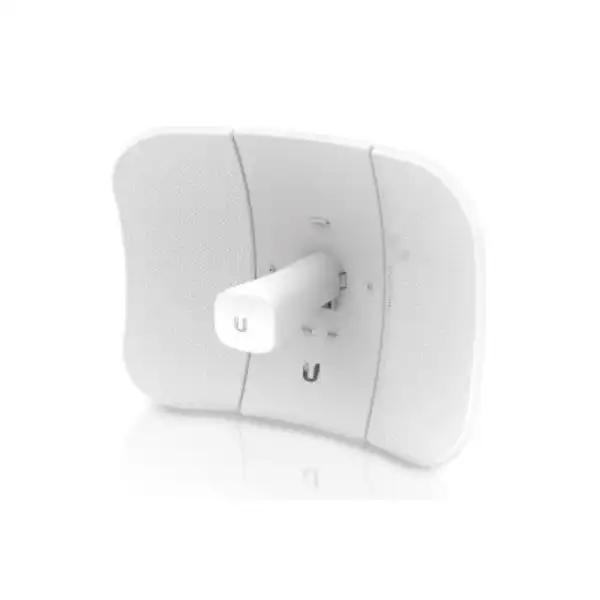
Ubiquiti airMAX LiteBeam 5AC Extreme-Range (LBE-5AC-XR)
Build a carefully engineered long-distance 5 GHz wireless connection with a 29 dBi directional antenna, Gigabit Ethernet, and point-to-point or point-to-multipoint capabilities. Review the route, radio compatibility and installation needs before ordering.
Specifications at a glance
| Model | LBE-5AC-XR |
|---|---|
| Radio frequency hardware range | 5.15–5.85 GHz worldwide; permitted frequencies vary by region |
| Antenna gain | 29 dBi |
| Published total throughput | 450+ Mbps |
| Interfaces | 1 × Gigabit Ethernet RJ45 |
| Operating modes | Point-to-point and point-to-multipoint |
| Channel widths | 10/20/30/40/50/60/80 MHz |
| Max conducted TX power | 25 dBm, subject to local regulatory limits |
| Power | 24V DC, 0.5A Gigabit passive PoE adapter listed as included |
| Voltage range | 22–27V DC |
| Maximum consumption | 7W |
| Weatherproofing | IPX6 |
| Dimensions | 747 × 525 × 347 mm |
| Weight | 3.2 kg |
| Pole diameter | 35–60 mm |
| Operating temperature | −40 to 70°C |
| Humidity | 5–95%, non-condensing |
| Wireless encryption | WPA2-PSK (AES) |
Specifications are manufacturer-published; link results and permitted radio settings depend on location and installation.
What this wireless station is designed to solve
A network may need to cross a road, reach another building, connect a distant service point, or bring a subscriber into an existing wireless network without laying a new cable across the whole route. The Ubiquiti airMAX LiteBeam 5AC Extreme-Range LBE-5AC-XR is a directional outdoor wireless station intended for that class of problem. Its integrated 29 dBi antenna concentrates radio energy along a chosen path rather than spreading coverage in every direction. That is helpful when the objective is a deliberate link between known locations rather than general indoor Wi-Fi coverage. The unit supports point-to-point and point-to-multipoint operation, but the full network design determines which configuration is appropriate. A single station does not replace the rest of a complete link. Buyers should identify the station at the other end, the required bandwidth, the mounting positions, and the actual visibility between sites before purchasing. Request a configuration review when the path or compatibility is uncertain.
A clear distinction from household Wi-Fi
The LiteBeam XR is not an ordinary indoor wireless router, and its directional antenna is not intended to provide convenient phone or laptop coverage around a house. It is an outdoor network link component. In a typical installation, Ethernet carries traffic between the LiteBeam and a local router, switch, or other suitable network equipment, while the directional radio faces a compatible remote station. Users at the destination can then connect to local networking equipment as the design requires. This separation matters because a successful radio link does not automatically provide DHCP service, routing, firewall protection, or indoor access points. Design these services independently. The 5 GHz radio is not a substitute for a mobile network SIM connection. In addition, the auxiliary management radio noted by the manufacturer must not be confused with a second general-purpose client Wi-Fi service. Correct expectations prevent expensive installation changes after equipment is mounted.
Where the extreme-range design can help
The manufacturer’s extreme-range description identifies the product’s intended use, not a guaranteed distance for every site. Large open areas, agricultural facilities, industrial compounds, distributed business premises, education facilities with separate buildings, and network-provider access routes may all create a need for a long outdoor radio path. A high-gain directional station can be useful where a suitable peer, sufficient clearance, and an acceptable link budget are available. In dense built-up districts, roofs, walls, vegetation, and other wireless systems may limit performance long before theoretical range becomes the decisive factor. For a short unobstructed connection, a smaller product may be easier to mount and align. For exceptionally demanding throughput or interference environments, an entirely different radio platform may be preferable. Start with the real service objective and physical path rather than choosing equipment only because its product name refers to extreme range.
The meaning of 29 dBi antenna gain
An antenna’s gain describes how strongly it concentrates radiation in particular directions relative to a reference, not how much electricity the radio consumes or the guaranteed distance a signal can travel. The LBE-5AC-XR uses a 29 dBi integrated directional antenna. The practical advantage is that a properly aligned installation can focus energy toward its partner station and reduce sensitivity to some signals outside the useful direction. That benefit comes with a requirement for careful aiming. A dish pointed a few degrees away from the intended route may perform worse than expected, especially on longer paths. High gain does not remove the need to check spectrum conditions, allowed transmit power, cable quality, and the receive characteristics of the other endpoint. Equally important, the gain figure is not an assurance that a link will function through buildings, hills, or heavy vegetation. Treat antenna selection, alignment, and path clearance as one engineering decision.
Understanding 450+ Mbps throughput
Ubiquiti lists total throughput of 450+ Mbps for the model. This is a published system capability figure, not a promise that a specific customer will obtain the same speed at every distance, in every country, or during every period of operation. Actual useful throughput can change with channel width, radio modulation, interference, signal quality, traffic direction, device configuration, and the performance of attached network infrastructure. A service requiring uninterrupted application traffic should be designed with margin, not at the upper boundary of a marketing specification. For instance, measured speed on a clear demonstration path should not automatically become the committed rate for a remote production site. Ask what sustained download and upload capacity is required simultaneously, which applications are sensitive to delay, and how busy periods affect the use case. Run appropriate tests after commissioning, and record a baseline for future troubleshooting.
Point-to-point installation decisions
A point-to-point layout connects two defined locations through a dedicated wireless path. Examples include transferring connectivity between two business buildings or connecting a remote operational site to a network core. A practical design usually requires suitable equipment at both ends, each mounted with the correct direction and height. The LiteBeam XR can serve as one of those endpoints when the selected peer and configuration are compatible. Evaluate line of sight, clearance around the path, expected link availability, power at both endpoints, and the existing Ethernet infrastructure. Remember that the radio path is only one part of service continuity: an unprotected indoor switch or an unreliable power source can interrupt the whole connection. Record the installation’s purpose, endpoint names, frequencies, channel widths, management addresses, and responsible contact. This documentation makes maintenance, remote support, and later network changes much simpler than relying on informal installer knowledge.
Point-to-multipoint role and compatibility
A point-to-multipoint network connects multiple subscriber locations to a shared access point or base station. Ubiquiti lists PtMP among the LiteBeam XR operating modes, so the model can be considered for relevant subscriber-side or other supported deployment roles. However, mode support does not establish compatibility with every Ubiquiti generation, every proprietary wireless platform, or an arbitrary third-party Wi-Fi access point. Confirm the particular access point model, firmware, operating mode, protocol settings, country configuration, and expected client count before ordering. Capacity planning is especially important because several clients may share available airtime. An impressive radio figure for one station does not mean that every subscriber will receive that entire amount simultaneously. Evaluate actual loading, upload-to-download traffic patterns, and sector design. For an expanding network, leave room for future customers and avoid building the initial configuration around ideal conditions that are unlikely to persist.
Gigabit Ethernet and the local network handoff
The unit has one Gigabit Ethernet RJ45 networking interface. This wired connection links the outdoor radio to an appropriately configured local network and carries its data interface. Gigabit capability avoids a 100 Mbps Ethernet port becoming an immediate bottleneck, but it cannot create radio capacity beyond the actual wireless link. Check what the port connects to: a switch, router, firewall, or customer gateway may need correct VLAN configuration, addressing, routing, and surge-protection arrangements. Where devices reside outdoors or at height, cable selection and weatherproof entry should follow sound installation practices. A link can show good radio signal yet fail to pass traffic because of incorrect local VLAN settings or IP addressing. Test both physical and logical layers before declaring the installation complete. When multiple sites share a service, define access controls and traffic boundaries to avoid inadvertently joining networks that should remain separate.
Passive PoE power requirements
The manufacturer’s specification identifies a 24V DC, 0.5A Gigabit passive PoE adapter as included, with a 22–27V DC supported range and a maximum consumption of 7W. The stated power method is two-pair passive PoE. Passive PoE is not interchangeable with every common automatic-negotiation PoE implementation. Do not assume that a generic 802.3af or 802.3at switch port can power this unit directly without a verified compatible arrangement. Use the correct power source and observe the specified wiring and voltage. Plan power location, grounded electrical infrastructure, surge exposure, and cable route before mounting the radio. If the site relies on a UPS, verify that the whole network chain—not just the outdoor unit—remains powered. Low maximum wattage is helpful for energy planning, but total site power includes switches, routers, other radios, and any backup equipment.
Outdoor weather and environmental suitability
The LBE-5AC-XR carries an IPX6 weatherproofing rating and the manufacturer specifies an ambient operating temperature range of minus 40 to 70 degrees Celsius, with 5 to 95 percent non-condensing humidity. These data help evaluate the device for exposed installations, including warm outdoor environments, but they are not a substitute for a complete environmental assessment. IPX6 addresses a defined water-exposure condition; it does not imply that every cable termination or connected indoor component is equally protected. Install the equipment according to its official mounting and weatherproofing instructions. Consider the risk of nearby lightning, salty or corrosive environments, extreme wind, vibration, and accidental movement of a supporting pole. Local conditions can place additional demands on the mount and cable management. An outdoor radio is only as dependable as the structure, power installation, and network hardware supporting it.
Mounting dimensions and support structure
Ubiquiti specifies dimensions of 747 by 525 by 347 millimetres and a weight of approximately 3.2 kilograms. This is a sizable directional assembly rather than a small wall-mounted access point. It includes a pole mounting arrangement with a stated compatible pole diameter of 35–60 millimetres. The manufacturer also publishes a wind-loading figure of 1100 newtons at 200 km/h. These details should be discussed with the installer responsible for the actual roof, mast, bracket, and fasteners. A nominally compatible pole diameter alone does not prove that the complete support will resist the required loads. Assess access for safe installation and future servicing. Leave enough room to aim the antenna and secure cable runs without forcing a severe bend. Accurate installation matters most when the antenna needs a narrow, consistent pointing direction over a long distance.
Why line of sight is more than visibility
A person standing at one endpoint may see the distant roof and assume the wireless connection is clear. Radio design also considers clearance around the direct path, including the Fresnel zone, and the curvature of the Earth on sufficiently long routes. Trees, building edges, terrain, cranes, and future development can create loss or variations in received signal. Vegetation becomes a particular concern when seasonal growth or moisture changes the obstruction. The path should be surveyed with actual coordinates, mounting heights, terrain information, and known obstacles. Where practical, use a suitable link-planning tool and compare its predicted conditions with a physical site visit. Do not use a theoretical maximum-range claim as proof of feasibility. A careful survey can show that a modest mast adjustment resolves a problem—or that a relay site or entirely different delivery method is necessary.
Selecting an appropriate channel
The hardware’s worldwide supported frequency range is listed as 5.15–5.85 GHz, and Ubiquiti documents configurable channel widths of 10, 20, 30, 40, 50, 60, and 80 MHz. That range describes equipment capability, not a blanket permission to transmit on every frequency or at maximum power in Tanzania. Available channels, power limits, licensing requirements, and other conditions depend on the current regulatory framework and the device’s configured country settings. The wider the chosen channel, the more spectrum it occupies. Wider channels can support higher capacity in suitable conditions, while narrower channels may be easier to coordinate in crowded environments. A site survey should measure usable spectrum and existing interference, then select a configuration that serves the real traffic requirement. Confirm the relevant current permissions with the appropriate Tanzanian authority or qualified local spectrum specialist before operating the radio.
Planning for interference and changing conditions
Wireless links do not exist in isolation. Other 5 GHz systems may share nearby spectrum, and a new installation by another party can change the conditions of an established route. Problems can appear as reduced speed, packet loss, unstable modulation, or interruptions despite a clear visual path. For this reason, commissioning should include a basic spectrum review, measurements at both ends, and records of chosen channels and power settings. Ubiquiti lists airView among available utilities, which may assist with evaluating radio conditions. However, one scan at one moment is not evidence that a channel will remain clear indefinitely. Reserve time for follow-up monitoring and a documented response when performance changes. Avoid solving every issue by increasing transmit power; unwanted interference, regulatory limits, receive imbalance, or a poor installation may be the actual cause. Correct diagnosis is usually more effective than aggressive settings.
Security considerations for the wireless bridge
The manufacturer specifies WPA2-PSK with AES for the wireless link. This protects the radio association when correctly configured, but network security must be managed beyond that single feature. Choose a strong unique key, restrict management access, change default credentials where applicable, maintain suitable firmware, and make clear which administrators are authorized to change settings. Determine whether the link should transport one trusted network or separate business and guest traffic through different VLANs and firewalls. A bridge can connect networks efficiently, but that convenience may increase exposure when remote sites lack appropriate segmentation. Where sensitive applications travel across the connection, assess the need for additional end-to-end protections. Include configuration backup, credential custody, and device replacement procedures in the deployment plan. A stable link that is difficult to manage securely is not a complete solution.
Management and diagnostics
Ubiquiti lists management through the radio’s web interface and features such as SNMP, SSH, remote logging, ping watchdog, speed testing, traceroute, discovery utility, and antenna alignment tools. Which controls are appropriate depends on firmware, configuration, and the administrator’s security policy. The practical value is that technicians can diagnose several common problems without immediately visiting the mast. For example, interface status, signal observations, and path tests can help distinguish wireless impairment from local network configuration errors. Monitoring systems should record only the metrics needed to detect service degradation, and management services should not be exposed unnecessarily to public networks. Before handover, document where management is reachable, how authorized personnel gain access, how backups are stored, and who receives alerts. A small amount of operational planning can prevent long outages after the initial installer has left.
Speed and reliability testing after installation
A thorough acceptance check should do more than confirm that two endpoints associate. Verify negotiated Ethernet speed, error counters, radio alignment, received signal quality, the chosen channel, and useful traffic performance under realistic conditions. Where applications depend on low delay, measure latency and packet loss over an appropriate period. If a link will serve multiple remote devices, test with representative simultaneous traffic rather than one idle client. Compare observations with the design’s expected throughput and service objectives. Record results, installation date, firmware version, configuration, and any known compromises. These values become the baseline when users report degradation months later. Consider repeat measurements after heavy weather or changes to nearby construction. Test traffic should be authorized and should not disrupt production services. Where the design carries critical operations, plan redundancy and escalation procedures appropriate to the consequences of an interruption.
Choosing between XR and smaller antenna models
A larger high-gain directional unit is not automatically the best choice for all links. A compact radio may be simpler to install on a short path with plenty of signal margin. An extreme-range directional antenna becomes more attractive when a carefully engineered route needs additional gain, but its physical size, wind loading, alignment demands, and potentially higher installation costs must be considered. Evaluate required capacity, available spectrum, peer compatibility, installation access, pole strength, and site aesthetics. Some projects need a sector access point serving multiple subscribers rather than a narrow directional station. Others need a different protocol family or a higher-capacity backbone solution. Make a shortlist based on measured or well-modeled conditions rather than assuming all 5 GHz Ubiquiti products are interchangeable. The LiteBeam XR is a specific tool for deliberate outdoor connectivity, not a universal upgrade for every wireless network.
Business-to-business building links
For offices or commercial premises that occupy separate buildings, a wireless bridge can avoid the immediate disruption of trenching along a complex property route. First establish whether the buildings have legally and physically suitable mounting points, a sufficiently clear path, reliable power, and appropriate network access at both ends. A security policy should define whether the remote building joins the same internal network or uses a routed and segmented design. Consider voice, video calls, business applications, CCTV, and file transfers when calculating capacity. Do not assume every service benefits equally from raw throughput; voice and interactive systems also need stable delay and low packet loss. Where the link becomes a critical connection, compare the cost of resilience against the impact of downtime. The LiteBeam XR can form part of such a design when detailed planning confirms a suitable role and peer station.
Agricultural and remote-site connectivity
A remote operational site may require a data connection for reporting, administration, approved surveillance systems, telemetry, or personnel access. The challenge is often not just distance: power continuity, accessible maintenance, secure mounting, and the route’s physical obstructions can dominate the deployment. A directional station can bring network traffic over a suitable wireless path, but the endpoint still needs local switching, routing, and client connectivity as required. Survey the site for seasonal foliage growth, changes to equipment, and safe servicing access. Where grid power is unreliable, size any backup system against all equipment loads and desired runtime. Avoid assuming that a strong antenna will overcome terrain, dense trees, or a poor channel. Buyers should describe their source connection, destination, expected data rate, and service importance so that the radio design can be evaluated as a whole.
Network-provider subscriber applications
A wireless internet provider or integrator may evaluate the XR as a directional station within a compatible airMAX network. The relevant questions are not limited to whether it can connect: planners need to assess base-station compatibility, airtime use, subscriber loading, link budgets, spectrum coordination, management, and maintenance processes. A shared point-to-multipoint sector has different capacity economics from a dedicated two-endpoint route. Subscriber packages should be based on defensible network capacity and service policies, not on adding together manufacturers’ headline throughput figures. A long-range installation may also require better mounting and more precise alignment than a short local subscriber connection. Confirm licensing and permitted operation for the actual Tanzanian deployment. Document the exact platform and firmware assumptions, and validate new customer equipment before extending a production network. This reduces the chance of equipment being purchased for a role that its supported mode alone does not guarantee.
Deployment in Tanzanian operating conditions
Tanzania includes many different physical environments, from dense urban districts to more open and remote areas. That diversity makes site-specific engineering essential. A link near other network installations may face interference, while a remote route may be dominated by mast accessibility, dependable power, and access for maintenance. Hot, wet, windy, or corrosive conditions also affect the supporting hardware and cable installation. This product’s published operating specifications provide a starting point, but they do not establish suitability for every local site by themselves. Check relevant spectrum regulations, site permissions, grounding, lightning precautions, and building or mast requirements. Do not assume local stock, a particular delivery time, or installation coverage from the existence of a product description. Ask for an actual quotation and confirm any commercial or service commitments in writing. A disciplined local deployment plan is more valuable than an unsupported universal coverage promise.
Materials and equipment to confirm before purchase
The unit includes an integrated pole mounting solution and Ubiquiti lists a 24V, 0.5A Gigabit passive PoE adapter in the standard product specifications. Yet a complete installation may also need a properly rated mast, appropriate fastening hardware for the site, outdoor Ethernet cabling, suitable surge protection, grounding arrangements, a compatible remote radio, and local networking equipment. Which components are required depends on the design. Do not assume every ancillary item is included in the quoted package. The customer should request an explicit bill of materials and verify the contents of the specific offer before payment. If a deployment needs two endpoints, confirm quantity and exact model for each side. Check the power arrangement and physical connector requirements. A transparent equipment list helps compare bids fairly and prevents surprises during installation when technicians discover that the radio alone cannot complete the intended connection.
Pre-purchase checklist for the buyer
Describe the two or more locations to be connected, the approximate distance, and the purpose of the connection. Establish whether a clear or partially obstructed radio path exists and provide proposed mounting heights where available. List the number of users or devices, peak traffic, expected upload and download usage, and applications that are sensitive to interruptions. Identify the existing router, switch, base station, and any radio equipment the new station must work with. Confirm that power and cabling can reach a suitable mounting position. Ask whether the route requires site permission or regulatory checks. If this is a replacement, record the current radio model and the reason it is being replaced. Finally, state whether a supply-only quotation or an engineered installation proposal is needed. These details let an integrator distinguish a simple equipment sale from a network design that calls for surveying and other hardware.
Common buying errors to avoid
A frequent mistake is comparing only antenna gain while ignoring the requirement for a compatible peer and sufficient spectrum. Another is treating the published throughput figure as an assured user internet speed. A third is assuming that outdoor weather resistance eliminates the need for safe mounting and electrical protection. Passive PoE mistakes can also damage equipment or leave it unpowered. Some buyers order only one radio when their planned point-to-point arrangement needs equipment at both ends. Others assume that any radio with 5 GHz in its name can join an existing proprietary wireless network. Finally, installation costs may exceed the price of the device when new masts, access arrangements, and electrical work are necessary. The remedy is simple: verify the whole path, actual network role, compatibility, and accessory list before deciding on the product.
FAQ: Can I use a single LiteBeam XR to connect two buildings?
A complete point-to-point path normally requires an appropriately configured wireless endpoint at each building. One LiteBeam XR alone does not create a connection to a remote site without compatible equipment at the other end. You may already own a suitable remote station, but compatibility and operating mode must be checked for the exact models and firmware. The buildings also need network handoff equipment appropriate to their requirements. Even with matching radios, success depends on path clearance, spectrum conditions, alignment, power, and configuration. Describe the two locations and your existing equipment when requesting a quote so the required quantity and architecture can be established.
FAQ: Is the 450+ Mbps figure guaranteed at my location?
No. The 450+ Mbps number is the manufacturer’s published total-throughput capability. It is not a guaranteed internet service speed or a measured result for a particular path. Real performance depends on factors such as available channel width, interference, received signal quality, configuration, load, and the rest of the local network. For a production connection, design against the traffic you actually need, including upload, download, and latency-sensitive applications. A link survey and post-installation test provide more useful evidence than the maximum figure alone. If a minimum service level is essential, agree on measurable acceptance criteria and contingency arrangements before equipment is installed.
FAQ: Does 5 GHz mean it can operate anywhere in Tanzania?
No. The listed global hardware frequency range and configurable radio settings should not be confused with country-specific permission. The available bands, channel conditions, transmit-power limits, and any relevant licensing duties must be confirmed for the actual use and location. A safe purchasing process includes checking applicable Tanzanian spectrum requirements and ensuring the radio is configured accordingly. Do not use an unrestricted country setting merely to make an otherwise unavailable channel selectable. The details can depend on the nature of the service and current regulation, so qualified local guidance may be required before operating a production link.
FAQ: Will it supply wireless access directly to phones?
The LiteBeam XR is intended primarily as a directional outdoor wireless link station, not as a conventional indoor Wi-Fi access point for general smartphone and laptop coverage. A business that wants users in another building to access Wi-Fi will typically connect the wireless bridge to suitable local equipment, including an appropriate access point. That arrangement separates the long-distance transport link from coverage within rooms or around a property. Specify both requirements when requesting equipment: the bridge delivers connectivity along the engineered path, while local access-point planning addresses coverage, capacity, roaming, and users’ devices.
FAQ: What should an installer check first if the link is unstable?
Start with safe, authorized diagnostics rather than immediately resetting the device or increasing transmit power. Check the physical mounting and alignment, cable and power condition, the state of the Ethernet interface, and recent configuration changes. Review signal observations, noise or interference conditions, and basic traffic tests at both endpoints. Confirm that attached routers and switches are not causing the symptoms. When problems occur only during certain weather or times of day, record those patterns; they can point to environmental or spectrum changes. Preserve configuration backups and baseline measurements. If the cause is not clear, a qualified technician should investigate without disrupting other users or violating permitted radio operating conditions.
Request a product and link-design quotation
When considering the Ubiquiti airMAX LiteBeam 5AC Extreme-Range LBE-5AC-XR for a Tanzanian network project, request a quotation that covers the exact equipment quantity and the requirements of the site. Supply the proposed distance, intended topology, compatible equipment information, mounting conditions, power availability, and expected traffic. Ask the supplier to identify which accessories and services are included, along with the terms that apply to the actual offer. Price, stock, warranty, and lead time should be confirmed separately rather than assumed from general product information. For more involved links, ask for a survey-led proposal and clear commissioning tests. The objective is not merely to obtain a high-gain radio; it is to build a usable, manageable, and appropriately engineered connection.
Talk through your link requirements
Ask FourTeck Tanzania for an equipment quotation and share the route, required bandwidth, existing equipment, and installation constraints. Commercial terms and stock should be confirmed for the exact quotation.




Reviews
There are no reviews yet.