

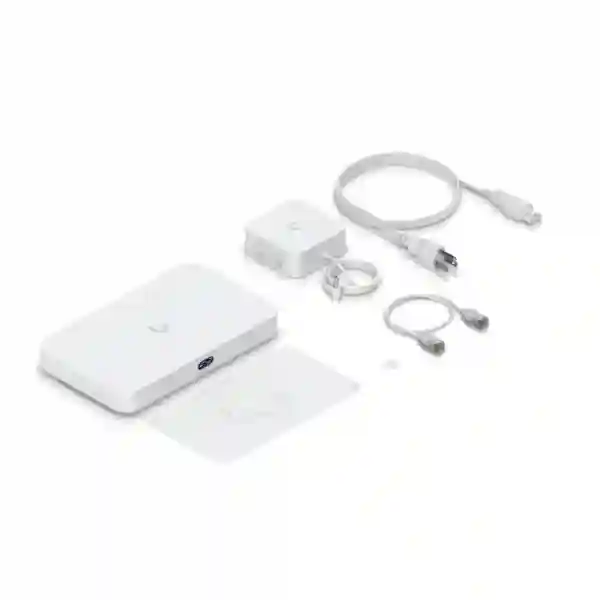
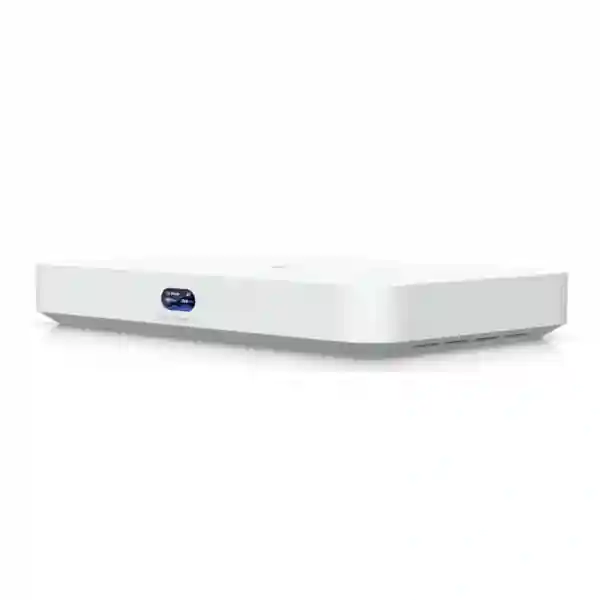
UniFi Networking · Tanzania Product Guide
Ubiquiti Cloud Gateway Fiber UCG-Fiber
A compact wired 10G UniFi gateway for growing networks that need multi-gigabit interfaces, central management, advanced policy controls and optional surveillance storage. Understand the actual capabilities, the equipment you still need and the practical steps for a Tanzania deployment.
Is this gateway right for your network?
Choose this model when you need a wired gateway that can connect modern multi-gigabit equipment while keeping routing, firewall rules, networks and supported UniFi applications under one management system. It is especially relevant for small and growing organisations, mixed wired and wireless deployments, technically demanding home networks and sites considering modest UniFi Protect recording.
The central purchasing distinction is that a capable gateway is not an entire network in one box. You may still need separate Wi-Fi access points, managed switches, additional PoE power, compatible SFP+ modules and an SSD or tray for the recording configuration. The Ubiquiti Cloud Gateway Fiber UCG-Fiber is a strong candidate when those elements fit a coherent design; it is less suitable when the requirement is simply an integrated wireless router or a large independent surveillance recorder.
Verified technical specifications
The following model-level figures come from Ubiquiti’s published specifications. They describe the hardware, not a confirmation of local listing stock, bundled storage or accessories.
| Item | Specification |
|---|---|
| Model | UCG-Fiber |
| Product type | Compact desktop wired UniFi cloud gateway |
| RJ45 multi-gigabit ports | 4 × 2.5 GbE (10M/100M/1G/2.5G) |
| RJ45 high-speed port | 1 × 10 GbE (1G/2.5G/10G) |
| SFP+ ports | 2 × 10G SFP+ (1G/10G) |
| Default WAN interfaces | 1 × 10GbE RJ45; 1 × 10G SFP+ |
| IDS/IPS throughput | 5 Gbps (manufacturer rating) |
| Built-in PoE | One PoE+ port; 30 W total PoE budget |
| Wireless radio | None; separate APs required |
| Managed UniFi devices | 50+ (published guidance) |
| Simultaneous connected users | 500+ (published guidance) |
| Protect camera examples | 15 HD / 8 2K / 5 4K (manufacturer guidance) |
| NVR option | Selectable NVMe SSD, up to 2 TB |
| Processor and RAM | Quad-core ARM Cortex-A73 2.2 GHz; 3 GB RAM |
| Form factor and size | Desktop; 212.8 × 127.6 × 30 mm |
| Operating environment | 0–40°C; 5–95% noncondensing humidity |
| Power adapter | 54 V DC/1.1 A included; input 100–240 V AC |
What the UCG-Fiber is designed to solve
The Ubiquiti Cloud Gateway Fiber UCG-Fiber is intended for networks that have moved beyond a basic broadband router but do not necessarily need a large rack-mounted security appliance. An organisation may have faster internet, multiple office teams, a guest network, security cameras and several UniFi access points. The challenge is not merely moving packets quickly: it is maintaining visibility, applying the correct policies and keeping the network understandable as connected devices grow. This model puts gateway routing, security and the UniFi management experience in a compact desktop format.
Its attraction is a balanced set of interfaces rather than one headline speed. The gateway offers high-speed uplink options, multiple 2.5GbE connections, a useful PoE+ output and a local console for UniFi applications. It can anchor a small business network or an ambitious home installation without automatically replacing every other component. The internet service, switching topology, Wi-Fi coverage, camera storage and power resilience still need their own design. Treat the gateway as the control point of a complete system, not as a substitute for planning that system.
A quick technical picture before buying
The model is a wired cloud gateway with four 2.5GbE RJ45 ports, one 10GbE RJ45 port and two 10G SFP+ slots. The default WAN arrangement uses the 10GbE RJ45 and one SFP+ interface; other port roles depend on configuration. The manufacturer rates intrusion detection and prevention throughput at 5 Gbps, which is a different metric from a port’s theoretical 10 Gbps link speed. A buyer should compare the services that will actually run with the intended internet connection rather than treating every figure as interchangeable.
The hardware also includes a quad-core ARM Cortex-A73 processor at 2.2 GHz, 3 GB of system memory and a small 0.96-inch status display. Ubiquiti lists a 30 W PoE budget, optional NVMe NVR storage up to 2 TB and a compact enclosure measuring approximately 212.8 × 127.6 × 30 mm. These characteristics suit installations where space matters, but the available port mix, power output and thermal environment should be checked before procurement. The design is desktop-oriented, so plan the installation location accordingly.
Understanding the 10G and 2.5GbE interfaces
A 10-gigabit physical interface is helpful when a compatible upstream internet handoff or downstream aggregation switch can use it. The RJ45 10GbE interface is specified for 10G, 2.5G and 1G operation. Each of the four 2.5GbE RJ45 interfaces supports 2.5G, 1G, 100M and 10M operation. The two SFP+ interfaces are specified for 10G and 1G operation. These distinctions matter because a connection only negotiates a usable speed when both ends and the medium agree.
Do not assume a 2.5Gbps optical handoff will work directly in an SFP+ slot merely because it is physically compatible with the cage. Ask the provider for the exact transceiver type, speed, wavelength, fibre connector and authentication or service handoff requirements. For copper, verify the Ethernet run, cable quality and termination. For a short equipment-room uplink, a suitable direct-attach option may simplify cabling. The correct choice depends on physical distance, equipment compatibility and the service delivered, not only on the interface label.
Building a sensible LAN topology
The four built-in 2.5GbE ports can connect a handful of local devices or an appropriately selected access point, but they should not automatically be treated as a replacement for a managed access switch. Offices with many desks, cameras, phones and access points normally need additional switching capacity. A dedicated UniFi switch can provide the larger port count, PoE budget, VLAN-aware access ports and uplink arrangement that the site requires. A 10G uplink can then connect the gateway to an aggregation layer where the topology benefits from it.
Consider how traffic moves inside the site, not just to the internet. A workstation transferring files to local storage may need a faster LAN path even when the broadband subscription is modest. Segmentation between office staff and guests may be more important than peak throughput in a customer-facing location. Map uplinks, access ports and device groups on a simple diagram before ordering equipment. This avoids discovering later that the gateway has enough speed in theory but too few suitable physical connections or powered ports for the actual deployment.
Multiple internet connections and failover
Ubiquiti lists multiple WAN capability, load balancing, internet quality reporting and failover functions. For businesses that rely on payment terminals, hosted applications, video meetings or remote support, these controls can support a more resilient design. The two default WAN interfaces can accommodate different physical handoffs when the service providers and cables are compatible. Additional WAN assignments may be possible through supported port configurations, but the published maximum WAN port count is not a promise that every desired LAN and WAN combination will be available simultaneously.
Redundancy is only useful if the second connection fails differently from the first. Two contracts delivered through the same building entry point or shared upstream infrastructure may share a failure risk. Ask each provider how service is delivered and test what happens to real applications when a WAN link goes down. Existing calls or sessions may need to reconnect when public addressing changes. Also decide which applications should prefer which path and how much traffic the backup link can sustain. Load balancing should not be confused with bonding every connection into one faster download.
Firewall controls that match real business needs
The platform provides a stateful firewall, application-aware filtering, traffic identification and zone-based policy options. That gives a network administrator tools to define who may reach internal services and which classes of traffic should be restricted. A simple example is allowing a guest Wi-Fi network to use the internet while preventing it from reaching staff computers and administrative interfaces. Another is permitting a camera network to communicate only with the services necessary for recording and management.
Good policy design starts with a list of legitimate traffic flows. Avoid opening broad routes merely to make initial testing easier, and document any rule that provides an exception. Identify who is authorised to manage the gateway, access points and switches; protect those interfaces and review permissions when responsibilities change. Content filtering and application rules can support policy goals, but neither replaces endpoint security, patching or employee awareness. A gateway can enforce the boundaries you define, provided those boundaries are realistic, tested and kept current.
The meaning of 5 Gbps IDS/IPS throughput
The manufacturer publishes a 5 Gbps intrusion detection and prevention throughput rating. This is an important figure for buyers planning fast internet while running security inspection. A 10GbE connector does not mean that every security service, VPN operation or real-world traffic pattern will achieve 10 Gbps. Application mix, enabled features, packet sizes, client hardware and provider conditions can affect observed performance. Capacity planning should include the security policy expected at the site rather than relying on a laboratory link-speed figure alone.
Decide whether the main goal is high-volume internet routing, protection of several VLANs, low-latency business applications or a mixture of these. Then establish a realistic peak-load estimate, including future growth. If the intended internet service or inspected traffic consistently approaches or exceeds the gateway’s published security throughput, evaluate a different capacity class or revise the architecture. Consider measured application performance after deployment, rather than drawing conclusions only from a single internet speed-test result. A useful gateway choice preserves security headroom during the busiest periods.
VLANs and traffic segmentation
Virtual LANs help a single physical network serve groups with different access requirements. A small office might separate corporate laptops, employee phones, guest devices, cameras and infrastructure management. A training centre may need another group for temporary student machines. The gateway supports VLAN and subnet-based segmentation, but the whole path has to be coordinated: switch ports, wireless SSIDs, DHCP allocation and firewall rules must all reference the intended networks. Naming conventions and an address plan make later maintenance significantly easier.
Segmentation is not useful merely because VLAN IDs exist. Test whether guests are prevented from reaching protected equipment; confirm that staff can still reach approved services such as printing when needed. Some discovery protocols and consumer devices rely on broadcast or multicast behaviour, so cross-network access may require deliberate configuration. Keep network management on a restricted path and avoid using the same password or access level for every role. Well-designed segmentation reduces unnecessary exposure while retaining the workflows users genuinely need.
Traffic visibility, diagnostics and policy decisions
UniFi Network brings device, connection and traffic information into one operational view. Ubiquiti lists deep packet inspection and traffic identification, internet quality reporting, and visibility into traffic flows. For a manager or technician, that can help answer practical questions: is a particular link unstable, are clients consistently saturating an uplink, or has a new device appeared in the network? Visibility is most useful when it informs an action, such as improving an overloaded access layer or investigating repeated service interruptions.
Interpret dashboard data with its limits in mind. Traffic categories do not necessarily prove what a user intended, and high utilisation does not automatically mean the gateway is at fault. Establish a normal pattern during business hours, after hours and during planned backups. Record incident times alongside provider notifications and changes to firewall rules. For organisations handling sensitive information, give administrative access only to authorised personnel and decide which usage information should be retained or shared. A clean monitoring practice can improve troubleshooting without turning every ordinary network event into an alert.
Remote access with VPN options
The published feature list includes several VPN approaches such as WireGuard, OpenVPN, IPsec and Ubiquiti’s own simplified remote-access options. These can help authorised staff connect to selected resources or allow secure interconnection between locations. The correct choice depends on the device types involved, identity management, required routes and the organisation’s support capability. For occasional remote support, a simple approach may be sufficient; a more structured business environment may require explicit routing, user lifecycle controls and additional authentication measures.
Before enabling remote access, define exactly which internal systems are needed. Avoid giving every remote user unrestricted access to all subnets. Make sure endpoints are maintained and that old accounts are removed when staff or contractors leave. Test remote connections from a network outside the office, because a configuration that works locally may fail behind a different NAT or firewall. Also verify the internet provider’s addressing policy: carrier-grade NAT or other upstream restrictions can affect certain inbound designs. Choose the VPN design based on the actual service conditions.
Connecting multiple offices and branches
A business operating more than one site may want a shared policy approach and private connectivity between locations. Ubiquiti lists Site Magic, IPsec and OpenVPN site-to-site capabilities, along with license-free SD-WAN features. These functions can reduce the manual work associated with selected multi-site arrangements, but automatic simplicity does not remove the need for IP planning. Duplicate subnet ranges, inconsistent VLAN structures and unclear ownership of shared applications can make branch links difficult to troubleshoot after deployment.
Begin with a map of which site hosts each application and how other sites should reach it. Decide which traffic must remain local, which must traverse a VPN and which should use the nearest internet exit. Consider the effect of a branch outage, a central office outage or an expired user credential. Some services may need DNS changes or application-specific configuration in addition to routing. If a site relies on the public internet for interoffice communications, measure link stability during real working hours and plan an acceptable fallback.
Wireless networking requires separate access points
A crucial distinction is that the UCG-Fiber is not a Wi-Fi access point. It has no built-in wireless radio. Buyers seeking wireless coverage must add compatible access points, position them appropriately and provide Ethernet connectivity and power. The gateway can manage UniFi access points within the Network application, helping administrators maintain consistent SSIDs and policies. Coverage, however, comes from access-point placement, physical building materials, client density and radio conditions, not from the gateway’s 10G port rating.
For an office, estimate occupancy and application demands before selecting access points. A meeting room full of video calls is different from a corridor with occasional handset use. Multi-floor buildings, metal shelving and concrete walls may require additional survey work. Separate staff and guest wireless networks where appropriate, and ensure each SSID has the intended VLAN and firewall treatment. Check the total PoE power needed, because powering numerous access points will normally require a suitable PoE switch. Test actual coverage and roaming after installation rather than relying on a floor plan alone.
Using the integrated 30 W PoE+ output
One of the four 2.5GbE RJ45 ports provides PoE+, with a published power budget of 30 W. That can be convenient for a compatible access point or another supported powered device in a small installation. It removes the need for a separate power injector in that one connection, provided the receiving device and required power mode match the gateway’s specifications. Check the exact power requirement of the connected device, including startup consumption and accessory loads; do not assume that every device labelled PoE will be compatible.
The integrated power budget should not be interpreted as four powered Ethernet outputs or a site-wide PoE reserve. A deployment with several cameras, access points, access-control devices or phones should have a separate PoE plan. Count each powered endpoint, compare its maximum demand with the switch or injector allocation, and allow reasonable operating headroom. Also factor PoE consumption into UPS selection. Power delivery is part of network reliability: a gateway remaining online is of limited help when critical access points and switches lose their power at the same moment.
What full UniFi application support means
The manufacturer lists support for UniFi Network, Protect, Access, Talk and Connect on this gateway. That allows the product to participate in a broader UniFi environment instead of acting as a routing-only appliance. It is useful for organisations considering a single management ecosystem for networking and related systems. Nevertheless, application support does not make physical devices, subscriptions, storage or external services appear automatically. Door access needs suitable access hardware, voice services need a compatible telephony design, and camera recording needs supported cameras and appropriate storage.
For a mixed deployment, identify which UniFi applications are genuinely required, then size the system against published device and camera capacities. Running several functions on one appliance also creates an operational dependency: an outage, upgrade or storage issue can affect more than one service. Decide whether that concentration is acceptable for the location. Businesses with critical surveillance retention requirements or large access deployments may prefer dedicated hardware for some roles. The best configuration reflects workload, maintenance procedures and the impact of downtime, not only the list of applications shown on a feature sheet.
Optional NVMe storage and UniFi Protect
The gateway offers selectable NVMe NVR storage up to 2 TB for appropriate UniFi Protect use. This can make it appealing when a business wants central network management together with a modest camera installation. Buyers must identify the exact product variant being quoted: a unit without storage is not the same as one supplied with an SSD. Ubiquiti notes that adding your own drive later requires a separate M.2 SSD Tray. Confirm that the tray, SSD and any other installation accessories are included before treating recording as ready to use.
Storage capacity alone does not establish how many days of video will be retained. Resolution, recording mode, frame rate, codec, activity, number of cameras and recording policy all influence usage. Important footage may also require backup or export procedures. Build a camera schedule, state the retention objective and test the selected settings in the actual environment. If uninterrupted surveillance is operationally critical, consider the consequences of keeping gateway and NVR functions in the same physical device and evaluate whether a dedicated recorder provides a better failure boundary.
Understanding published device and camera capacities
Ubiquiti’s published guidance includes management of more than 50 UniFi devices and more than 500 simultaneous connected users. It also lists camera capacity examples of 15 HD, 8 2K or 5 4K cameras, plus support for 50 access hubs. These figures are guidance for specific classes of workload, not a guarantee that every possible combination of cameras, other applications, advanced security features and active clients can be pushed to its maximum at the same time. Real installations vary considerably in traffic and processing demands.
For a buyer, the right question is not simply whether a headline client count is larger than the current headcount. Ask how many concurrent devices will be busy, whether large transfers or high-rate video traffic will cross the gateway, and which services must be hosted locally. A site with relatively few employees but many cameras may have very different requirements from a crowded guest wireless network. Plan for business growth, firmware overhead and troubleshooting headroom. Use published numbers as a first filter, followed by a specific network design and monitoring plan.
ISP handoff checks for a Tanzania deployment
For a Tanzania installation, begin by asking the internet provider exactly how the service terminates at the premises. The answer may be an Ethernet handoff from an optical network terminal, a managed customer-premises device or another approved arrangement. A fibre subscription does not automatically mean that the customer can bypass provider equipment and insert an arbitrary SFP+ optic into the gateway. Some networks require provider authentication, VLAN settings, specific optics or configuration that the customer is not permitted to change.
Request the advertised download and upload rates, physical interface, supported negotiation speeds and IP addressing method. Confirm whether a static public address is required for any inbound service and whether carrier-grade NAT applies. If planning dual WAN, ask whether the second provider uses a genuinely independent last-mile path. Keep provider contract details and change procedures accessible to the network administrator. These checks avoid an expensive mismatch between a technically capable gateway and a service handoff that is not compatible with the proposed design.
Power continuity, heat and installation location
The gateway is a compact desktop appliance rather than an outdoor device. Ubiquiti lists an ambient operating range of 0 to 40 degrees Celsius and 5 to 95 percent noncondensing humidity. Those limits make placement important in hot equipment cupboards or rooms with limited airflow. Do not install it where direct sunlight, trapped heat, moisture or physical interference can compromise operation. Allow space around the unit and its cabling, especially when using transceivers that may run warm under sustained traffic.
The included DC adapter accepts a 100–240 V AC supply according to the published specifications; plan a correctly protected power source and suitable surge precautions. A UPS can be considered for the gateway, ISP handoff equipment, upstream switches and critical access points as a complete chain. Calculate the actual load rather than backing up only the smallest component. Confirm the power plugs and installation accessories supplied with the specific local offer. A resilient network depends on every essential element staying operational through the disturbances the business expects to encounter.
Cabling, optics and upstream switching
Multi-gigabit networking often exposes weaknesses that were invisible on a 100Mbps or 1Gbps link. Check patch leads, structured cabling, patch panels and link negotiation along the entire path. For 10G copper, cable category, run length and installation quality all matter. For optical connections, the modules at both ends must be suitable for the fibre type, connector, wavelength, distance and supported switch or gateway interface. A component being physically insertable does not establish interoperability.
When designing the link between the gateway and a core or access switch, decide whether the uplink will serve mainly internet traffic, internal segmentation or both. Document which SFP+ port is assigned to LAN and which is assigned to WAN before ordering optics. Remember that a port repurposed for one role is not simultaneously available for another. Test interface errors and stability, not only an initial successful link indication. Clear labels and a small port schedule make subsequent service calls far faster when the installation has several similar-looking cables.
A practical first-deployment sequence
Start with a short written design containing WAN details, internal subnets, VLAN names, administrator identities, planned Wi-Fi SSIDs and the equipment list. Install the gateway in a ventilated location, attach power and the intended initial internet connection, and complete the supported UniFi setup flow. Set strong authentication and make sure authorised administrators can recover management access. Check for appropriate firmware updates and document the approved maintenance procedure rather than enabling changes without understanding how the site will be affected.
Next, configure the LAN, DHCP services and VLANs, then adopt switches and access points in a controlled order. Create firewall policies from the required traffic flows; avoid switching on every advanced feature before baseline connectivity is proven. Test internet access, internal services, DNS, guest isolation, remote VPN and any failover route one at a time. Record working configuration information and export appropriate backups where supported. The final step is acceptance testing with actual users, including key business applications during a representative load period.
Migrating from an existing router
Replacing a router is easier when the old configuration is treated as a source of business requirements rather than a collection of settings to copy blindly. Inventory DHCP reservations, static routes, port forwards, VPN users, DNS choices, site-to-site tunnels and any special provider settings. Identify applications that depend on fixed internal IP addresses or an externally reachable endpoint. A change in network numbering or NAT behaviour can disrupt equipment that appeared unrelated to the router during ordinary operations.
Schedule the change for a sensible maintenance period and prepare a rollback plan. Preserve access to the previous device and capture the information needed to reconnect it if essential services do not work. Verify that network switches, access points and clients receive the intended addresses after cutover. Remote users should test their connections from outside the office. Where the old network contains poorly understood exceptions, document and resolve them instead of reproducing insecure rules. A successful migration is measured by business continuity and manageable configuration, not only by a working internet speed test.
Scenario: small and growing offices
A small office with several teams may need segmented staff and guest wireless networks, secure access to cloud services and simple monitoring of internet quality. The gateway can provide the routing, firewall and central UniFi Network management foundation, while separate access points deliver wireless coverage. A managed switch can handle the required desk and device connections. The four local 2.5GbE ports may be helpful for a limited number of high-speed links, but total workstation count should determine the switching plan.
The most valuable design choice is often policy clarity. Finance computers, shared printers, guest phones and management devices do not need the same permissions. Establish an administrator role, a backup contact and a regular review of firmware and firewall changes. If the office depends heavily on cloud software, evaluate a second broadband path and determine what happens to user sessions during failover. Plan spare ports, power and Wi-Fi capacity before growth forces unplanned additions.
Scenario: hospitality, training and customer-facing sites
A venue with visitors, attendees or rotating users typically needs reliable guest access while protecting staff and operational systems. The UCG-Fiber can form the gateway layer for separate network segments, with UniFi access points and properly sized switches extending connectivity through the building. The important quantities are simultaneous users, expected application traffic, guest-session behaviour and physical coverage. A compact gateway does not remove the need for an access-point survey where walls, floors or dense seating affect wireless performance.
Apply guest isolation and bandwidth policies to match actual service requirements, then test them with representative devices. Business operations such as reception terminals or back-office accounting should not be placed on an unrestricted guest network. Consider the consequences of a primary internet interruption and provide a documented escalation path. If video surveillance is also part of the design, size recording independently from guest network demand. This reduces the chance that one attractive hardware specification distracts from the distinct needs of each service.
Scenario: surveillance-aware small sites
For a modest installation that already uses or plans UniFi cameras, the optional recording capability may reduce the number of separately managed appliances. The gateway can host UniFi Protect with suitable storage, subject to its published capacity limits. That is a practical consideration for a shop, small office or other site where camera requirements are defined and modest. It should not be interpreted as a universal replacement for a dedicated NVR or as a guarantee of a particular retention period.
Create a camera plan first: count each device, choose the recording resolution and frame rate, estimate storage consumption and agree on how incidents will be reviewed or exported. Separate camera traffic from guest devices where appropriate and ensure every camera has sufficient PoE power from a suitable switch or injector. Confirm who maintains the recording system during firmware updates and outages. Where footage must be available under demanding business or legal procedures, evaluate additional resilience, access controls and storage strategies before relying on a multifunction gateway alone.
Scenario: advanced home, studio or lab network
A technically confident household, creative studio or lab may value the combination of 10G-capable uplinks, several 2.5GbE interfaces and integrated UniFi control. Fast local storage, development machines and multiple network zones can benefit from a structured layout. The gateway may connect to a suitable high-speed switch, while separate wireless access points serve phones and portable computers. For these users the chief advantage may be flexible topology and visibility rather than a promise that every household application will run at multi-gigabit speed.
Plan which devices actually need faster wired interfaces. A workstation, NAS or aggregation switch may deserve the premium port more than a low-bandwidth appliance. Consider the security boundary between work machines, personal devices, test servers and smart-home equipment. A lab environment is a good place to learn routing and VLANs, but experiments should not accidentally interrupt essential household services. Keep a simple documented recovery path and avoid enabling exposed services solely for convenience.
Everyday security and maintenance
A gateway is not a set-and-forget security product. Establish a policy for reviewing firmware releases, security advisories, administrator permissions and configuration backups. Use appropriate multifactor authentication on management identities where available, and remove access that is no longer required. Maintain a record of important changes, including the reason, owner and rollback plan. When changing VLANs or firewall policies, verify that the modification does not unintentionally expose management interfaces or break approved business traffic.
Use monitoring to detect meaningful problems such as repeated WAN loss, saturation during work hours or unusual new devices. Separate configuration management from incident response so administrators know what to do when a security alert appears. Check that connected switches, access points and other infrastructure receive their own updates. Protect the physical gateway and its power supply from tampering. Good operational discipline makes the advanced feature set easier to use responsibly and is often more valuable than switching on another inspection rule without a clear purpose.
How to compare the UCG-Fiber with another gateway
Begin with physical requirements: how many 10G-capable links are needed, what handoff does the provider supply, how many 2.5GbE ports will be used and is a single 30 W PoE+ output sufficient? Next compare the expected inspected traffic with the published 5 Gbps IDS/IPS rating. A buyer needing sustained high inspection throughput or very large concurrent workloads may have to consider a larger gateway class. Conversely, a site with only basic broadband needs might not obtain practical value from the available high-speed interfaces.
Then compare the management model and operational impact. The appeal of a UniFi cloud gateway is strongest where UniFi network management and perhaps other UniFi applications are useful. A routing-only appliance may make sense in a different ecosystem. A dedicated recorder may be better when surveillance is a high-priority independent function. Check space, power, backup strategy and support capability. The appropriate solution is the one that meets the actual service design with adequate headroom, not simply the product with the most impressive interface count.
Important limitations and trade-offs
The gateway has no integrated Wi-Fi and only one built-in PoE+ output, so it is not a complete wireless or multi-device PoE solution by itself. The SFP+ ports are specified for 1G and 10G, which requires care when an ISP supplies a different optical speed. The 10G physical interface rating is not the IDS/IPS throughput rating. Optional NVR storage and the tray for a user-added drive must be checked against the exact variant. These are ordinary design constraints, but they can materially affect what a buyer must purchase.
A multifunction gateway also concentrates management responsibilities. If the same unit handles routing and recordings, an appliance outage or a planned maintenance operation can affect both. Published device and camera capacity numbers are not promises for every combined workload. Some advanced security services may have optional commercial arrangements; confirm what is included before making an operational commitment. Local stock, delivery, prices, warranty terms and the precise accessories included must be confirmed for the actual Tanzania offer instead of inferred from specifications or another market’s store listing.
Pre-purchase checklist for the Tanzania buyer
Ask for the exact UCG-Fiber variant and whether it includes any NVMe SSD, the separate storage tray, applicable power accessories and any required optics. Confirm the service handoff from each internet provider, including the speed, connector, authentication and IP address arrangement. List the number of users, UniFi devices, wireless access points, powered endpoints and cameras. State the desired VPN method, firewall segmentation, recording retention target and realistic traffic peaks. These inputs make an equipment recommendation more reliable than choosing only by the words 10G or fibre.
Also identify who will install and manage the system, how firmware changes will be approved and what recovery is expected after a power or internet failure. Request a design that shows gateway, switches, APs, UPS, ISP equipment and network boundaries. If the site needs multiple branches or especially sensitive applications, explain those needs before pricing is finalised. Ask FourTeck Tanzania to confirm the current offer, compatible accessories and commercial details through its normal enquiry process. No local availability or delivery promise should be assumed from this product description.
Frequently asked questions
Does the UCG-Fiber include Wi-Fi?
No. It is a wired gateway with no integrated Wi-Fi radio. Add appropriately chosen UniFi access points for wireless coverage, and confirm how each access point will receive power. A single compatible AP may be powered by the gateway’s 30 W PoE+ port, but larger installations generally need a dedicated PoE switch. Wi-Fi performance depends on access-point design and positioning rather than the router’s port speeds.
Can I connect my internet provider’s fibre directly?
Only if the provider’s handoff, transceiver requirements and connection configuration are compatible and the provider permits that arrangement. Some fibre services terminate on an operator-supplied ONT or managed device that presents Ethernet to the customer. Confirm optics, service speed, VLAN or authentication settings and routing details with the provider first. A device with an SFP+ socket cannot automatically replace every type of fibre termination.
Are both SFP+ ports able to run at 2.5 Gbps?
The manufacturer’s published SFP+ interface speeds are 1G and 10G. Do not assume native 2.5G SFP operation from the connector shape or a third-party module advertisement. A provider supplying a 2.5G Ethernet handoff may be better connected through the gateway’s supported RJ45 10GbE interface, where the physical service presentation permits it. Verify the specific handoff and module compatibility before buying hardware.
Does a 10G interface mean 10 Gbps with IPS enabled?
No. Ubiquiti specifies 5 Gbps IDS/IPS throughput for this model. A link may negotiate at 10G while a security feature or real traffic pattern creates a lower practical processing limit. VPN encryption, traffic behaviour and endpoint capability can introduce other constraints. Design around the security services you need, and measure real application performance after installation rather than relying on the highest link-speed number.
How many access points can it manage?
Ubiquiti publishes guidance for more than 50 managed UniFi devices, which can include network equipment. The useful number for a particular site depends on the combined environment and active workload. The gateway does not power that many devices directly. Plan an appropriate switching and PoE arrangement, and separately confirm Wi-Fi coverage, connected client density and any other UniFi applications that will run on the console.
Can it power cameras and APs from all four 2.5GbE ports?
No. The integrated PoE+ capability is associated with one 2.5GbE port and has a 30 W budget. Other powered devices need suitable external power, injectors or a PoE switch. Check each endpoint’s exact requirements, including peak consumption. A site with multiple cameras and access points should use a structured PoE power budget rather than relying on a single powered gateway port.
Is an SSD included for UniFi Protect?
Not necessarily. The product is offered with selectable storage variants, so the exact order or quotation determines what is supplied. The manufacturer describes NVMe NVR storage up to 2 TB and notes that adding your own drive later requires an M.2 SSD Tray. Confirm the variant and accessories, then size recording retention from camera counts, resolution, frame rate and policy. Storage capacity by itself does not guarantee a particular number of retention days.
Can the gateway connect two ISPs?
Yes, it supports multiple WAN connections and functions including failover and load balancing. The default WAN arrangement uses a 10G SFP+ and a 10GbE RJ45 interface. Actual deployment depends on each provider’s handoff and correct configuration. Check how sessions behave when failover occurs, and understand that two connections do not necessarily combine into a single faster connection for one activity. Independent providers and paths improve the practical value of redundancy.
Can I run UniFi Protect and UniFi Network together?
The model is listed with support for UniFi Network and Protect, as well as other UniFi applications. The combined workload still has to fit the device’s published guidance, and Protect requires a valid camera and storage design. For a business where recordings are critical, assess whether placing recording and routing on one unit creates an unacceptable operational dependency. Confirm the intended application configuration and firmware support before deployment.
Does it provide branch-office VPN connectivity?
The manufacturer lists Site Magic, IPsec and OpenVPN site-to-site functions, plus several remote-access options. Appropriate connectivity depends on WAN addressing, routing, subnet uniqueness, user access policy and the other endpoint. A planned configuration is important when two offices use overlapping IP ranges or when applications require predictable reachability. Validate the specific topology before making the connection part of a business continuity commitment.
Will it work for an office with more than 500 devices?
The published figure is 500+ simultaneous connected users, while managed UniFi device guidance is a separate 50+ figure. They describe different measures and are not interchangeable. A network’s suitability depends on traffic volume, security inspection, running applications and the design of the switching and wireless layers. If a site is expected to operate near published limits or has demanding resilience requirements, consider a capacity review and possibly a higher class of gateway.
How can I request a Tanzania price or configuration?
Provide the desired quantity, ISP handoff type, expected users and connected devices, access-point and camera requirements, storage preference and required installation accessories. Ask FourTeck Tanzania to confirm current commercial details and the exact contents of the quoted variant. No Tanzania price, local stock, delivery time, warranty or installation commitment is stated here because those details were not independently verified for this listing. A requirements-based enquiry helps avoid purchasing an incomplete or incompatible setup.
Request UCG-Fiber details for Tanzania
Share the internet handoff, planned device count, security requirements and whether you need Wi-Fi, PoE switching or camera storage. Ask FourTeck Tanzania to confirm the specific UCG-Fiber variant, compatible accessories and current quotation details before ordering.
Next step: Contact FourTeck Tanzania with your project requirements to request a product and configuration quotation.




Reviews
There are no reviews yet.