
Ubiquiti EdgeRouter 6 PoE (ER-6P) — Gigabit Router with 24V Passive PoE
The Ubiquiti EdgeRouter 6 PoE ER-6P is a compact Gigabit router designed for networks where administrators need control over routing, segmentation, internet connections and compatible network equipment. It offers five RJ45 Gigabit data ports, one 1Gbps SFP slot and configurable 24V passive Power over Ethernet on the copper ports. Its EdgeOS platform suits professionally managed installations rather than simple all-in-one consumer Wi-Fi setups. Businesses and technical buyers in Tanzania can evaluate it for branch networking, dedicated routed segments, fibre-facing connections and selected compatible wireless equipment.
A critical buying consideration is the power system: 24V passive PoE is not the same as automatic IEEE 802.3af/at PoE. A receiving device must explicitly support the correct voltage, pairs and power level. The included adapter is rated at 60W for the whole device, so do not assume five simultaneous 24W outputs. This guide explains specifications, limitations, design options, setup precautions and the questions to answer before requesting an accurate quotation.
Technical specifications at a glance
| Network interfaces | 5 × 10/100/1000 Mbps RJ45; 1 × 1Gbps SFP |
|---|---|
| PoE method | 24V passive PoE on 5 copper ports, 2-pair or 4-pair |
| Per-port passive PoE maxima | 12W (2-pair) / 24W (4-pair), subject to shared power budget |
| Power adapter | Included external 24V, 2.5A, 60W |
| Processor and RAM | 4-core 1GHz MIPS64; 1GB DDR3 |
| Flash storage | 4GB eMMC; 8MB SPI NOR |
| Operating range | -10°C to 50°C; 10–90% humidity, non-condensing |
| Enclosure and dimensions | Metal, fanless; 229 × 136.5 × 31.1mm |
| Mounting | Wall; optional ER-RMKIT rack-mount kit |
These are equipment specifications, not a promise of application throughput or universal device compatibility. Verify external peripherals, interface assignment and power before installation.
What the hardware includes
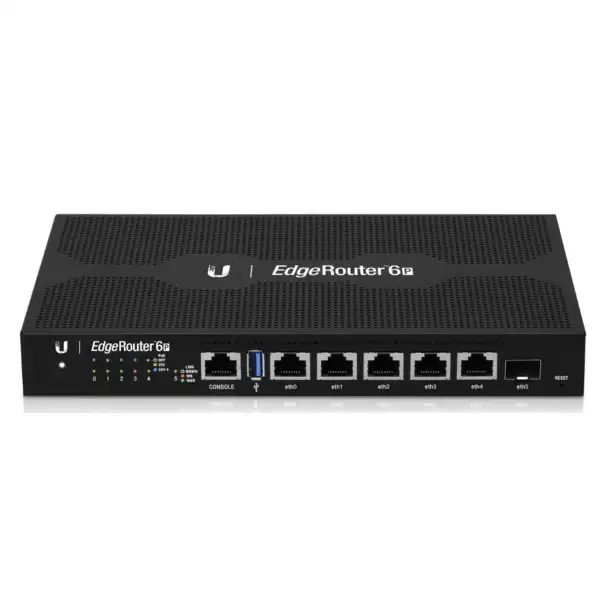
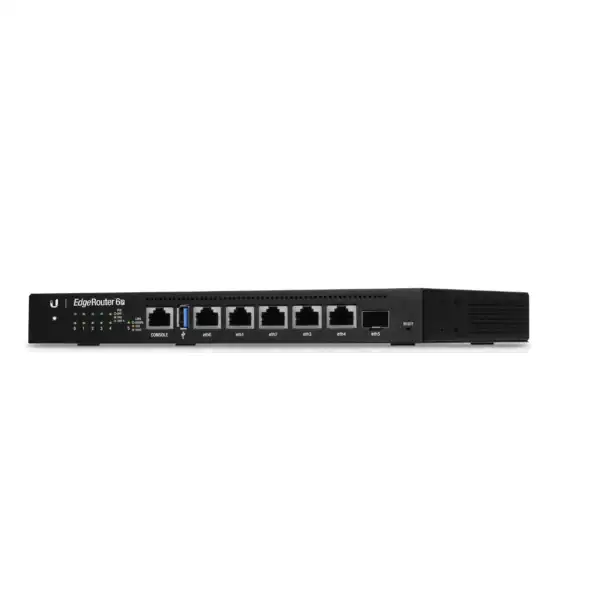
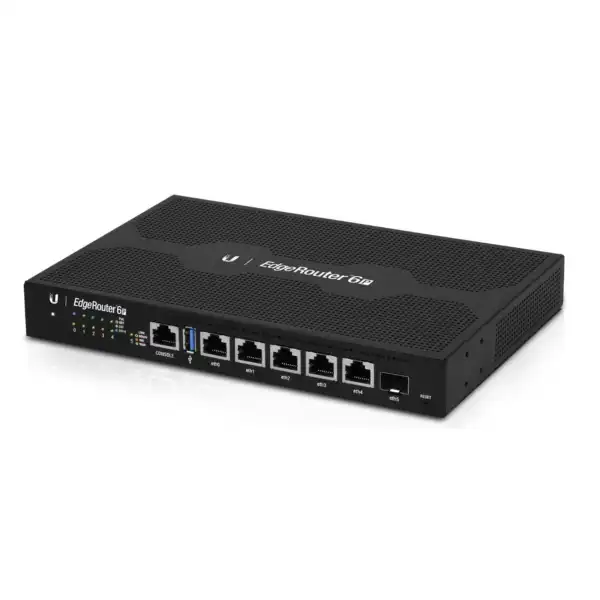
Ubiquiti equips this EdgeRouter with five 10/100/1000 Mbps RJ45 networking interfaces, labelled eth0 through eth4, and one 1Gbps SFP interface, labelled eth5. There is also a separate RJ45 serial console port for administrative access. The console is not an additional regular LAN data port. The unit has a four-core 1GHz MIPS64 processor, 1GB DDR3 RAM, 4GB eMMC storage and 8MB SPI NOR flash. These hardware specifications identify the platform but do not determine how fast every possible VPN, firewall policy or routing configuration will perform.
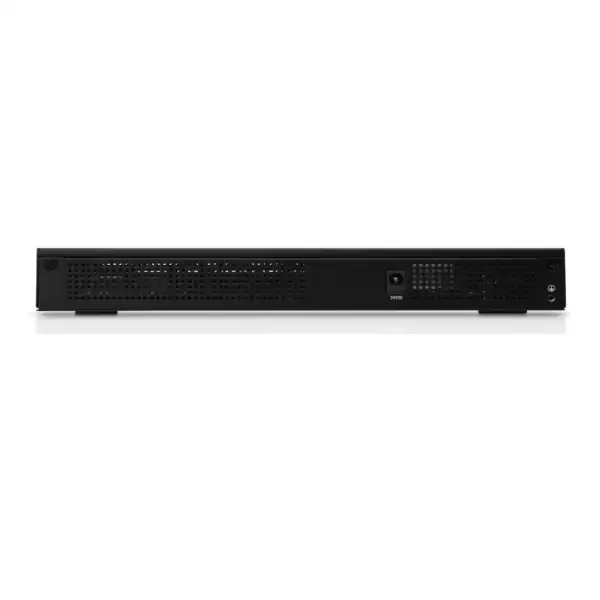
The metal enclosure is fanless and supports wall installation. An optional rack-mount kit, identified by Ubiquiti as ER-RMKIT, is required for a suitable rack installation. The device has no integrated wireless radio, so Wi-Fi access requires separate access points. Its USB connector is identified in the manufacturer’s installation instructions as reserved for future use, not as a guaranteed external modem or storage expansion option.
Understanding the six network interfaces
The number six in the product name refers to five copper data ports plus the SFP network interface. It does not mean that six ordinary Ethernet cables can be plugged into six RJ45 data sockets. The SFP slot can accept a compatible module for a one-gigabit link, while the RJ45 interfaces offer Gigabit wired connectivity. Port assignment is flexible: a technician might designate one for the WAN, one for a managed LAN switch and others for separate routed segments or a backup connection.
An interface plan should be drawn before installation. Allocate WAN handoffs, management access, internal networks and fibre connectivity intentionally, leaving sufficient room for future changes. Avoid copying port layouts from a different EdgeRouter model without checking the running configuration. The serial console, power connector and USB connector have roles distinct from normal LAN and WAN data interfaces.
Who is the EdgeRouter 6P suitable for?
This model is worth considering for a small or medium business network, a branch office, a technician-managed site or an installation that uses devices explicitly compatible with 24V passive PoE. It is particularly relevant when separate IP networks and deliberate security rules matter more than simple wireless setup. EdgeOS gives administrators tools to plan routing, address translation, firewall policies and other networking tasks rather than relying on consumer-oriented automatic configuration.
It is less suitable for someone who wants integrated Wi-Fi, large numbers of same-LAN switch ports, universal PoE for modern cameras or access points, or a 10Gbps fibre connection. Those needs can be better met through a dedicated switch, standards-based PoE equipment, a wireless gateway or higher-speed hardware. The right purchasing decision begins with the workload and electrical requirements, not with the apparent count of connectors.
Planning copper Ethernet connections
A practical office arrangement could place an internet modem on eth0 and a managed access switch on eth1. Other interfaces could connect a controlled management subnet or independent upstream service if the network design warrants them. One copper interface can carry appropriately tagged VLAN traffic into a managed switch, helping many departments share a physical uplink without being placed in one unrestricted broadcast domain. Those VLANs still require suitable routing and firewall policies to provide the intended isolation.
If twenty workstations must share one local network, do not plan to connect them by turning several routed ports into a makeshift high-density switch. Ubiquiti distinguishes EdgeRouter models with built-in switch chips from models that rely on software bridging. The ER-6P is not in the listed hardware-switch group. A dedicated switch is the clearer approach for endpoint density and predictable local switching behavior.
Making use of the Gigabit SFP slot
The one-gigabit SFP port can be useful for an optical uplink to another network device or a provider handoff when the required transceiver and remote interface are compatible. Fibre connectors, wavelengths, module specifications, link distance and the other end of the connection all matter. The presence of an SFP slot does not mean an arbitrary internet fibre can be inserted directly, and it does not replace any optical terminal required by the service provider.
Some internet connections are supplied through Ethernet from an optical network terminal or modem, in which case using an ordinary RJ45 WAN interface may be simpler. Other designs genuinely benefit from the SFP slot. Verify the service handoff and optics before purchase, including whether a suitable module is sold separately. The SFP port is rated at one gigabit, not as a 10G SFP+ uplink.
24V passive PoE: the most important compatibility detail
The ER-6P can provide configured 24V passive PoE on five RJ45 interfaces. This method is different from standards-based IEEE 802.3af, 802.3at and 802.3bt systems that negotiate power with connected equipment. Power must never be enabled simply because a device description mentions PoE. Confirm the exact receiving model’s supported voltage, wiring pairs, pinout and power consumption. A device needing standards-based 48V-class PoE may require a different switch, a separate injector or another appropriate power method.
Ubiquiti’s ER-6P quick-start documentation says the PoE option is off by default on eth0 through eth4 and instructs users to verify device compatibility before enabling it. Keep that protection in place until the checks are complete. If the device specification is unclear, use a safe independent power source rather than making assumptions that risk damaging connected equipment.
Two-pair and four-pair output explained
Ubiquiti specifies a maximum of 12W per port for 24V two-pair passive PoE and 24W per port for 24V four-pair passive PoE. This distinction is important: the correct mode is determined by what the connected device actually supports, not by a desire to send it more power. An installer should record the expected watts, voltage and pair arrangement for each device before enabling any output. The SFP interface is a data connection, not an electrical PoE output.
Different generations of wireless radios and access points may use different power systems, even if their exterior shapes appear similar. Verify model numbers rather than using family-wide assumptions. Recheck the power plan when equipment is replaced in future. For high-load installations, a dedicated, appropriately specified PoE distribution system may be a better fit than relying on router outputs.
Calculate the shared 60W power budget
The supplied external adapter is rated at 24V and 2.5A, equivalent to 60W. Ubiquiti lists the router’s own maximum power consumption as 16W, excluding its PoE output. Therefore, the five per-port output maxima must not be added together and treated as a guaranteed simultaneous capacity. Five loads drawing 24W each would exceed the adapter’s rating before allowing power for the router. The combined supply limit is a core design constraint.
Make an equipment schedule with maximum and typical power draws, account for router operation and allow reasonable headroom. Then verify that each individual port and the entire powered arrangement remain within the supported limits. This matters particularly at wireless distribution sites with multiple radios. Stable electrical power and suitable cable installation are essential; a router cannot compensate for an overloaded adapter or mismatched PoE device.
Powering wireless radios and access points
The built-in passive PoE outputs can simplify certain installations that use equipment designed to accept the specified 24V power. However, compatibility should be confirmed for every connected model, including whether a two-pair or four-pair mode is needed. Do not assume that every Ubiquiti wireless product accepts the same input power: product lines and revisions differ. A modern access point that requires negotiated PoE must receive power through a compatible solution.
Power planning also influences port planning. An RJ45 port occupied by a powered radio is a network interface that cannot simultaneously serve an unrelated cable run. Count the upstream WAN, internal switch, dedicated segments and powered radios together before deciding whether five copper interfaces are enough. Where multiple endpoint connections are needed, an external switch can expand the LAN without turning the router into an improvised switching platform.
EdgeOS administration and configuration
EdgeOS provides a web configuration interface and command-line access for professional routing configuration. Ubiquiti documents initial setup, addressing, firewall rules, NAT, multiple WAN arrangements and more advanced routing workflows. This flexibility is valuable when a site needs specific behavior. It also creates responsibility: a misconfigured rule may expose internal devices, block legitimate services or cause traffic to take an unintended path. Administrative ownership should be established before deployment.
A practical configuration record includes WAN address method, LAN subnets, device names, routing decisions, DNS and DHCP scopes, management access restrictions, and who may approve changes. Make secure backups after meaningful changes. Test actual permitted and blocked traffic rather than assuming that an interface showing a green link LED confirms that the network is secure and working correctly.
VLAN segmentation for staff and guests
Different activities on one physical site often deserve different network policies. A small business could separate staff computers from guest Wi-Fi and network administration. A school might separate instructional devices from office systems. An EdgeRouter can participate in VLAN routing while a properly configured managed switch carries tagged or untagged frames as required. The design depends on compatible switches, access points and clear traffic policies, not solely on the gateway hardware.
A VLAN is not automatically a security boundary. A routing device can pass traffic between VLANs unless policies prevent it. Decide which client groups may access printers, servers, internet services and management interfaces; then implement and test the corresponding firewall rules. Guest clients normally should not be able to administer networking equipment. Allow only intentional exceptions and keep an IP addressing diagram for troubleshooting and future growth.
Firewall policies and network address translation
The ER-6P can act as a gateway between the internet and internal private networks using supported EdgeOS firewall and NAT configuration. NAT allows common private-address networks to share a public connection, but it is not a complete substitute for firewall security. An installation should explicitly restrict unwanted WAN access and protect device administration. Security must also cover management passwords, software maintenance, segmentation and any exposed application services.
Make a policy table that identifies trusted and untrusted zones, the services that must communicate, and the traffic that should be denied. Verify the rules from more than one client segment. If remote access is needed, investigate an appropriate secured VPN or controlled access method rather than automatically opening management ports to the public internet. Documenting the intended behavior makes it possible to detect unintended exposure later.
VPNs between offices
Ubiquiti publishes EdgeOS configuration guidance for IPsec site-to-site VPNs, including policy-based and route-based approaches. A business with two locations may use such a design to connect selected internal resources across an internet link. The actual configuration must align tunnel endpoints, addressing, firewall rules, encryption settings and routes on both sides. Internet provider behavior, including address translation and public reachability, can affect which method is practical.
Do not treat the ER-6P’s headline packet-forwarding benchmark as a guarantee of encrypted VPN speed. Encryption overhead, packet size, software version, CPU load and offloading behavior influence actual results. Where a site-to-site tunnel carries business-critical traffic, test the required performance and recovery procedures before making it the only access path. Keep authentication details secure and document the people responsible for maintaining both ends.
Dual WAN, balancing and failover
EdgeOS includes WAN load-balancing and failover configuration features. An installer can assign separate interfaces to two internet services and configure connection monitoring, selection rules and appropriate routing. A secondary line can reduce dependence on one upstream provider when the two services are genuinely independent. It does not create extra physical bandwidth on any single gigabit port, and it is not automatically ready merely because both service cables have been connected.
A correct design checks the two handoff methods, WAN health targets, NAT handling, firewall policies and application sensitivity to IP changes. During failover, existing calls or secure sessions may drop, and recovery time can vary with configuration and upstream service behavior. Test a deliberate outage in a controlled setting, record the expected behavior and make sure users understand the limitations.
What the performance numbers mean
Ubiquiti’s EdgeRouter datasheet reports 3.4 million packets per second for 64-byte packets and up to 6Gbps aggregate layer-three forwarding at line rate for packets of 512 bytes or larger. These are manufacturer benchmark figures under defined conditions. They do not mean that a single WAN socket handles six gigabits or that the SFP slot runs above one gigabit. Each individual listed copper and optical interface is a Gigabit network connection.
Production speed can be affected by NAT, traffic shaping, firewall complexity, encrypted tunnels, inter-interface bridging, packet sizes and other processing. A useful buying assessment considers real WAN speed, expected simultaneous traffic, application latency and planned advanced features. Use representative throughput and latency tests in the target configuration to determine whether the router fits the network instead of basing the decision on one maximum figure.
Hardware offloading and processing tradeoffs
Ubiquiti’s EdgeRouter documentation describes supported hardware offloading functions for forwarding and related operations. These features can improve efficiency in appropriate packet paths, but results depend on the model, firmware and combination of features enabled. Turning on a service that uses more software processing may change CPU utilization and throughput. Therefore, treat published maximum forwarding data as context rather than an unconditional promise for every firewall, VPN or shaping workload.
During a trial deployment, compare the baseline routed path with the intended production configuration. Observe interface counters, CPU load, loss and latency under representative use. Test site-to-site VPNs separately if they are important to business operations. If performance disappoints, diagnose whether the issue is in the router, the internet service, optical link, switching infrastructure or the endpoint rather than assuming an advertised figure was universally attainable.
Why a dedicated switch may still be needed
The ER-6P is a router with multiple physical interfaces, not a large hardware-switched LAN platform. Ubiquiti’s model-selection guide explains that some EdgeRouter devices include a switch chip, whereas others rely on software bridging to emulate certain switch behavior at a performance cost. The ER-6P is not named in the hardware-switch list. For many endpoints on the same subnet, a proper access switch usually provides clearer management and more suitable expansion.
A dedicated switch is especially useful when a site needs many RJ45 ports, VLAN access-port assignment, negotiated IEEE PoE or room for future devices. Keep router ports focused on meaningful routing roles such as WANs, subnets and uplinks. This division improves troubleshooting and can let a business upgrade switches or access points without rebuilding its entire routing design.
A small-business office example
Imagine a modest office with accounting computers, employee laptops, guest visitors and a single wired internet handoff. The ER-6P could route between a provider-facing interface and VLANs carried through a separate managed switch. Staff systems, guest users and network administration could have different addressing and firewall rules. If a second provider circuit is justified, an additional WAN interface and failover design could be added after planning port availability and service constraints.
The router alone will not supply wireless coverage, numerous desk ports or advanced business-application security. Access points, switches and endpoint controls still have to be selected. A successful installation includes documentation of service details, administrator credentials, device labels and the maintenance owner. The goal is not simply internet access on installation day, but a network that remains understandable when support is needed later.
A wireless distribution installation
An installer building a small wireless distribution location may value the ER-6P’s flexible routing interfaces and 24V passive PoE support for verified compatible radios. A fibre uplink could be considered if the remote network equipment and optical transceivers are suitable. This arrangement is attractive when the number of powered devices is limited and their combined power requirements fit the available electrical budget. It is not a universal replacement for a high-capacity radio power controller.
Outdoor cabling and electrical exposure must be assessed carefully. Ubiquiti recommends appropriately shielded and grounded cabling for outdoor applications, and the router itself should be sheltered from rain and moisture. A protected enclosure, surge-control strategy, ventilation, reliable power and planned remote recovery are as important as the router’s interface specifications. A larger radio array may need a separate PoE switch or power distribution system.
Hospitality and guest-network design
A guesthouse, hotel or shared workspace often needs internet connectivity for visitors while keeping internal operational devices separate. The ER-6P may serve as a wired gateway in a network with managed switching and properly designed access points. Guest traffic can be assigned a separate logical network with firewall restrictions against internal resources. This approach helps limit casual access to administrative systems and makes traffic problems easier to identify by segment.
The router does not provide integrated room Wi-Fi coverage, captive-portal functionality, guest billing or an enterprise wireless management suite by itself. Those requirements need separate decisions. Performance depends on the actual internet connection, AP capacity, switch uplinks and concurrent traffic. Buyers should define guest access, internal security and management needs clearly so the full solution can be quoted rather than assuming one gateway addresses the entire deployment.
School and shared-facility networks
A school or mixed-use site might have separate requirements for administration, classrooms, guests and device management. With an appropriate managed switch, the router can be part of a design that routes selected segments and uses firewall rules to control access between them. The one-gigabit SFP port may support a compatible optical uplink when a separate building or distribution switch requires it. All connected networking equipment must be chosen for the actual link and traffic demands.
Consider how users will access printers, shared servers, educational systems and the internet. Limit management rights and protect sensitive records through more than simple VLAN labels. Plan for content-filtering requirements or application-specific policies separately if they are needed. Check the number of users, peak usage patterns and service-level expectations with a real workload test rather than estimating capacity from the six-interface product name.
Mounting, size and ventilation
The manufacturer’s dimensions are 229 × 136.5 × 31.1mm, with weight around 730g. The metal, fanless body can be wall-mounted and may be rack-mounted with the separately identified ER-RMKIT accessory. The quick-start guide calls for at least 20mm clearance near ventilation openings. A compact body should not be taken as permission to seal the device inside a hot, unventilated box. Thermal conditions affect reliable operation even without a moving fan.
Provide enough room for labelled network cables, power connection, optical modules and maintenance access. Confirm the mounting surface and any rack accessories before ordering. The external power adapter also requires a safe location and appropriate power input. Ensure the installation does not expose the device to accidental splashes, direct water ingress or cable tension that could dislodge an interface.
Climate, cabling and electrical protection
The ER-6P operating temperature specification is -10°C to 50°C and operating humidity is 10 to 90 percent non-condensing. These numbers do not describe a waterproof outdoor enclosure. Tanzanian installations vary widely in temperature, dust, humidity and lightning exposure depending on the building and site. Evaluate the actual room or cabinet conditions, avoiding assumptions that a fanless router can be placed in any environment without protection.
For outdoor Ethernet runs, follow the manufacturer’s shielding and grounding requirements and have a qualified installer evaluate surge protection. Protect the provider modem, router, switches and access points as one system. Where power interruptions create business risk, size an appropriate UPS for the full connected load and required autonomy. The 60W adapter rating alone does not indicate backup runtime.
Secure initial setup
A new ER-6P should be configured in a controlled environment before it is connected to a production WAN. Follow Ubiquiti’s current installation instructions to reach EdgeOS through the appropriate management interface and address configuration. Change any factory credentials, restrict administrative access and check current official software guidance before selecting firmware. No administrative service should be exposed to an untrusted internet connection without a deliberate, secured design.
Before handover, create and securely store a backup of the working configuration. Record the administrator, interface roles, address ranges, firewall rules, service-provider settings and recovery steps. Test that management is reachable from the permitted location and not from guest or other restricted segments. Repeat access checks after any significant firmware or firewall change.
UISP monitoring and daily operations
The Ubiquiti installation guide describes UISP management as an option for monitoring, configuration, upgrades and backups of compatible devices. That may suit an installer administering multiple network locations. The ER-6P is an EdgeOS router, not a UniFi Network gateway; buying it on the assumption that it will appear as a UniFi gateway in the UniFi Network controller is inappropriate. Confirm the desired management approach and operational access rights before purchase.
Monitoring should focus on actionable events such as WAN state, failed optical links, congested interfaces, configuration changes and unreachable remote endpoints. Decide who receives alerts and what they should do. A monitoring platform without ownership is unlikely to deliver a useful service. Restrict management credentials, maintain recoverable backups and document a safe update process.
Comparisons that matter before buying
If the deployment needs fewer copper ports and no integrated 24V passive outputs, a different EdgeRouter arrangement may be easier to maintain. If the key requirement is powering numerous modern IEEE PoE access points or cameras, a standards-based PoE switch paired with an appropriate gateway may be a better fit. If a ten-gigabit optical uplink is essential, seek hardware with the required SFP+ interface. If the objective is simple managed Wi-Fi, a different integrated architecture might better meet the operating requirements.
Compare exact model revisions and published capabilities instead of brand names alone. Prioritise gateway speed under required traffic features, copper port count, optical handoff, power compatibility, switching requirements and the management skills available. A more modular solution can be a better value when it avoids incompatible PoE equipment or an immediate capacity bottleneck.
Important product limitations
This model does not contain Wi-Fi, a 10G SFP+ port, a full hardware LAN switch or automatic standards-based PoE outputs. The advertised passive PoE figures are per-port maxima subject to the combined power arrangement. The optional rack kit must be checked separately. Its six data interfaces do not establish the count of users a deployment can support, because traffic patterns, security rules and related network equipment matter. Neither manufacturer benchmarks nor descriptive content should be treated as a guarantee of real-world encrypted throughput.
It is also not possible to infer stock, warranty length, a Tanzania price, delivery times or installation coverage from hardware specifications. Those commercial matters belong in the exact supplier quotation. Being clear about the limitations makes it easier to choose appropriate SFP optics, switches, injectors and support arrangements at the start.
Commissioning checklist
Before deployment, map both the logical and physical topology. Identify WAN service type, IP addressing, intended VLANs, routing policies, any VPN requirements, the optical link partner and the management approach. List each endpoint that might receive passive PoE, including exact model, voltage, pair requirement and maximum power. Check the combined budget against the included adapter and allow headroom. Verify all necessary transceivers, switches and cabling are available.
After assembly, test link speed, assigned addresses, DNS, client routing and firewall isolation. Exercise backup internet service if a failover arrangement is configured. Test representative business traffic, including VPN use where applicable, and observe interface and CPU behavior. Confirm safe power operation and document final port settings. Store configuration backups securely and include a rollback procedure in the handover pack.
Diagnosing connectivity and performance issues
Start troubleshooting with the simplest observable facts. If an Ethernet client cannot connect, check the physical link, negotiated speed, correct port, IP address, VLAN tagging and routing table. If the SFP link fails, verify optics, fibre type, connection cleanliness, link partner and supported one-gigabit mode. If a powered radio does not start, disable PoE until its electrical requirements and available wattage have been checked. Never experiment with passive voltage on an unknown device.
For intermittent performance, distinguish upstream internet problems from CPU-heavy routing features, switching issues, incorrect shaping or physical link faults. Record a baseline and compare measurements before and after changes. If an alternate WAN is not working, test each connection separately and inspect health checks, routes, NAT and firewall policies. Preserve a configuration backup before making significant changes in production.
Planning expansion without creating a bottleneck
Consider how the network may change over the next few years. A site that is likely to add more wireless APs, cameras or wired workstations will need suitable switching and electrical capacity. A site expecting multi-gigabit service should not rely on a one-gigabit SFP interface for a future high-speed uplink. If additional VLANs are expected, ensure the addressing scheme and firewall documentation can be expanded without confusion.
A clear separation between provider equipment, routing, switching and wireless access makes upgrades easier. Label all interconnections and document their roles. A future router replacement then becomes a controlled change rather than a discovery exercise. Choose the ER-6P where its current capabilities support a realistic plan; choose different hardware when a known future requirement would exceed the interface or PoE design.
Requesting the right product quote in Tanzania
When requesting an ER-6P quotation, provide the model name, intended WAN handoff, whether you require the one-gigabit SFP slot, and a list of connected devices. Identify any 24V passive PoE endpoints and their rated consumption. Explain whether VLAN segmentation, site-to-site VPN or dual-WAN failover is part of the requirement. With that information, an appropriate quotation can distinguish the router from any necessary optical modules, managed switches, additional power equipment or installation work.
Ask the seller to confirm the exact included accessories, current price, local availability, applicable commercial terms, warranty information and any services being offered. No Tanzania price or stock position is verified for this listing, so those details should not be invented. FourTeck Tanzania can be approached for a product quotation and a discussion of compatibility before the final purchase decision.
Frequently asked questions
Does the ER-6P include Wi-Fi?
No. It is a wired EdgeOS router. Wireless access requires separately chosen access points, switching if needed and a compatible power source. Selecting a Ubiquiti access point does not by itself prove compatibility with the ER-6P’s 24V passive PoE outputs.
How many data ports are there?
Five are copper Gigabit RJ45 interfaces and the sixth is a 1Gbps SFP interface. The separate RJ45 serial console is for administration, not an ordinary sixth copper LAN port. Plan the interface allocation around WAN, LAN and optional fibre needs.
Is it compatible with IEEE 802.3af or 802.3at PoE?
Its built-in output method is 24V passive PoE rather than automatic standards-based negotiated PoE. Confirm model-specific compatibility before enabling output. Devices needing IEEE PoE may require a compatible switch or another power arrangement.
Can all five ports deliver 24W at once?
Do not assume this. Four-pair mode has a specified maximum of 24W per port, but the included external adapter is rated at 60W for the whole unit and the router consumes power as well. Design for the combined budget.
What is the purpose of the SFP port?
It supports a compatible one-gigabit SFP link, often useful for an optical network connection. Module type, connector, wavelength and link partner must be checked. It is not a 10Gbps SFP+ port or a guarantee of direct compatibility with every fibre provider.
Can it connect two internet providers?
EdgeOS supports WAN load-balancing and failover designs when the corresponding ports and handoffs are configured correctly. Check ISP connection methods, routes, firewall behavior and health tests. Existing sessions may still be interrupted during an upstream failure.
Can it isolate guest users from business systems?
It can participate in a VLAN-routing and firewall-policy design, normally with a managed switch and appropriate access points. Segmentation is not automatic. Define the intended allowed and denied traffic, then test guest and management access from real endpoints.
Does it work in UniFi Network as a UniFi gateway?
It belongs to the EdgeRouter and EdgeOS family. Ubiquiti documents UISP management for compatible devices. Do not assume it is centrally administered as a UniFi gateway through the UniFi Network application.
Can this router be installed in the open outdoors?
The hardware should be protected from rain, moisture and unsuitable temperatures. Ubiquiti provides environmental limits and installation guidance for cabling and ventilation. An outdoor cable route does not mean the router’s enclosure is waterproof.
What is the actual VPN throughput?
A fixed encrypted-VPN speed cannot be confirmed from the published aggregate forwarding benchmark. IPsec settings, processing overhead, packet sizes and firmware configuration affect real results. Test the intended site-to-site tunnel with representative traffic.
Is a rack kit supplied?
Ubiquiti identifies the ER-RMKIT as an optional rack-mount accessory. Confirm the seller’s exact bundle if rack installation is required. The manufacturer’s quick-start guide separately lists the router, included adapter and wall-mount components.
How do I obtain an ER-6P price in Tanzania?
Request a current quotation for the exact router and clarify whether the deployment needs SFP optics, switches, compatible PoE accessories or installation services. Local stock, pricing, warranty and delivery arrangements must be verified with the seller.
Request an EdgeRouter 6 PoE quotation
FourTeck Tanzania can be contacted about the Ubiquiti EdgeRouter 6 PoE ER-6P for a business, office or professionally installed network. Share your internet handoff, intended interfaces, fibre module needs and exact PoE device models so compatibility and any additional accessories can be reviewed. Confirm the offered model, pricing, stock and commercial terms through the resulting quotation.
Contact FourTeck Tanzania to request a quote and review deployment requirements.




Reviews
There are no reviews yet.