
Enterprise networking | Tanzania buyer’s guide
Ubiquiti Enterprise Firewall Core (EF-Core)
The Ubiquiti Enterprise Firewall Core EF-Core gives large organizations a powerful UniFi gateway for high-speed security inspection, multi-WAN connectivity, resilient routing, and structured network policy. Start with your traffic, topology, security requirements, and availability needs to decide whether this platform is the right investment.
Verified technical snapshot
Use this summary to shortlist the model. Capacity specifications and available functions are not a substitute for verifying your application workload, current software features, optics, and local commercial terms.
| Product and model | Ubiquiti Enterprise Firewall Core, EF-Core |
|---|---|
| Form factor | 1U rackmount; 442.4 × 43.7 × 400 mm |
| IDS/IPS throughput | 79 Gbps (manufacturer specification) |
| Network scale | 2,250+ managed UniFi devices; 22,500+ connected users |
| Sessions | 10 million concurrent; 120,000 new sessions per second |
| 100G connectivity | 4 × QSFP28 ports (100G/40G) |
| 25G connectivity | 4 × SFP28 ports (25G/10G/1G) |
| Copper data interfaces | 8 × 10GbE RJ45; 2 × 1GbE RJ45 |
| Other connectivity | Dedicated 1GbE management interface and console |
| WAN | Three default WAN interfaces; up to 8 WAN ports |
| Processor and memory | 24-core ARM v9 at 2.5 GHz; 32 GB RAM |
| Storage | Integrated 128 GB SSD |
| Availability | Shadow Mode VRRP gateway failover; 2 hot-swappable PSUs |
| Power and environment | 171 W maximum; 100–240V AC; 0–40°C operation |
A firewall decision for large, connected environments
A network firewall should be selected for the traffic it must inspect, the sites it must connect, and the failures the business must survive—not simply for the highest number printed in a specification. The EF-Core combines enterprise-scale interfaces with UniFi Network management and security functions that are useful where internet connections, internal segmentation, and branch links are expanding together. For a large organization in Tanzania, the starting point is a topology and traffic assessment that identifies the critical routes, security policies, and expected growth.
The Ubiquiti Enterprise Firewall Core EF-Core is best evaluated as a purpose-built high-capacity gateway, rather than as an ordinary office router or a replacement for every network appliance. The purchasing decision should include its integration with the intended UniFi environment, the optics or direct-attach cables needed at each interface, a realistic plan for redundancy, and ownership of daily firewall operations. A configuration-led quote helps clarify these details without promising an unverified local price or delivery date.
What the EF-Core does—and what it does not replace
The EF-Core is a UniFi Cloud Gateway running the UniFi Network application. It provides routing, firewall policy enforcement, intrusion detection and prevention, VPN connectivity, multi-WAN controls, and visibility into network traffic. It can serve as a powerful boundary between an enterprise network and its upstream providers, and can also participate in a planned internal routed design. It is not a Wi-Fi access point; wireless coverage still requires suitable access points, switching, site survey work, and a radio-frequency plan.
It is equally important not to mistake the device for a complete data-centre system, surveillance recorder, or core switch. Even where gateway ports have 100G capability, an organization may still need dedicated switching for dense east-west traffic, separate service platforms, independent logging destinations, and specialist compliance controls. A strong design defines which traffic actually traverses the firewall, which stays within switching domains, and how applications behave during a gateway or WAN outage. Those decisions prevent expensive oversizing and avoidable bottlenecks.
Capacity: understand the figures before sizing
Ubiquiti lists 79 Gbps IDS/IPS throughput, more than 22,500 simultaneous users connected, support for over 2,250 managed UniFi devices, ten million concurrent sessions, and 120,000 new sessions per second. These are different measures. Inspection throughput describes a class of processed traffic, user capacity is an indicative scale of clients, and session counts describe connection-state handling. None of them should be interpreted as a guaranteed application throughput for every possible mix of encrypted traffic, VPN tunnels, packet sizes, and enabled policies.
Sizing should therefore begin with measured peak and sustained usage, not with an assumed ratio of users to bandwidth. Record internet utilization, short bursts, connection churn, application latency expectations, inter-VLAN flows, and projected changes. Consider that SSL/TLS decryption, deep filtering, complex routing, and concurrent VPN activity can alter real operating results. Ask for a test plan that mirrors the intended workloads and gives administrators a measurable acceptance threshold. This approach makes capacity planning auditable for procurement and operational teams.
Where an enterprise gateway of this class fits
A suitable buyer may be operating a university campus, a large corporate headquarters, a high-density commercial facility, multiple connected buildings, or an enterprise with many branch locations. In these environments, security and routing decisions need consistent administration, while high-speed handoffs must avoid constraining the network unnecessarily. Enterprises expanding between 10G, 25G, and 100G infrastructure may also value a gateway that supports these interface classes without requiring a separate external media converter for every connection.
A smaller office should not assume that the EF-Core is automatically the most economical choice. If WAN speeds, concurrent sessions, redundancy expectations, or policy requirements are modest, a lower-capacity UniFi gateway may serve the same need with lower total infrastructure cost. Conversely, organizations with specialized security inspection, third-party compliance, advanced logging, or multi-vendor management requirements should evaluate those obligations independently. The correct fit depends on an approved design, not on an enterprise label alone.
Zone-based segmentation as a practical security control
The platform supports zone-based firewall rules, giving administrators a way to express boundaries between groups such as staff workstations, guest internet access, server networks, operational technology, and management devices. A good segmentation project begins with traffic flows: which source needs to reach which application, on what protocol, and for what business reason. The default posture should avoid unnecessary broad access while preserving legitimate services. This is more maintainable than accumulating emergency exceptions whose purpose no one can explain later.
A common practical approach is to begin with a small number of understandable zones, validate the applications in each, and refine the rules after observing traffic. Test name resolution, identity services, printing, voice, video, backup systems, and remote administration before enforcing restrictive changes. Where the environment contains sensitive systems, pair gateway segmentation with endpoint controls and appropriate switching configuration. Firewall policy is one important part of a defense-in-depth design, not an assurance that a compromised endpoint or account cannot cause harm.
Intrusion detection and prevention in context
Ubiquiti identifies intrusion detection and prevention as a core EF-Core feature. IDS is about recognizing suspicious patterns and generating usable visibility; IPS adds blocking actions for configured protections. In an enterprise deployment, administrators should decide which traffic paths are inspected, how alerts are triaged, how false positives are resolved, and who approves rule changes. A technically capable engine is only useful when the people operating it can understand its findings and respond consistently.
The model specification also describes more than 95,000 signatures when CyberSecure Enterprise is used. That figure should not be represented as the standard entitlement for every purchase. CyberSecure Enterprise is a separately offered security subscription, so its availability, exact scope, recurring charges, and licensing conditions must be checked for the intended deployment. Independently confirm that required detection coverage, threat intelligence, incident reporting, and retention policies align with the organization’s security program before adopting a signature count as the deciding factor.
SSL/TLS inspection: powerful but not automatic
The EF-Core supports SSL/TLS inspection and URL filtering. Inspection of encrypted sessions can provide additional visibility into threats that conventional unencrypted packet inspection may miss. However, decrypting business traffic requires deliberate policy, appropriate certificate distribution, application testing, and consideration of privacy and legal requirements. Some services use certificate pinning or other protections that make inspection unsuitable, and sensitive categories of traffic may be intentionally excluded under organizational policy.
Before enabling deep inspection, test a small, representative group of managed endpoints and business applications. Document which connections are inspected, which are exempted, how trust certificates are deployed, and what happens if a user device does not trust the inspection certificate. Monitor application compatibility and performance after each change. The goal is not to turn on every possible option, but to improve risk visibility while preserving legitimate service reliability. Have a rollback process ready before broad enforcement.
Application awareness, content controls, and policy quality
Application-aware Layer 7 controls, deep packet inspection, domain-aware policies, and content filtering give administrators additional ways to make network rules meaningful to business users. For example, a guest network may require ordinary internet access but no route to management systems; a finance application may need defined destinations rather than unrestricted outbound access. Application classification is helpful for understanding patterns, but it should be validated where a security or compliance requirement depends on a specific detection result.
Policies should describe user groups or asset classes in clear terms, be reviewed after changes to applications, and have a named owner. Avoid relying only on a category label when the business needs exact domain or endpoint control. Maintain change records and test both permitted and denied examples. When comparing security subscriptions, distinguish native gateway features from extra threat intelligence and filtering services, and avoid promising that a single setting removes all malware, phishing, or data-loss risk.
A verified port layout for planning
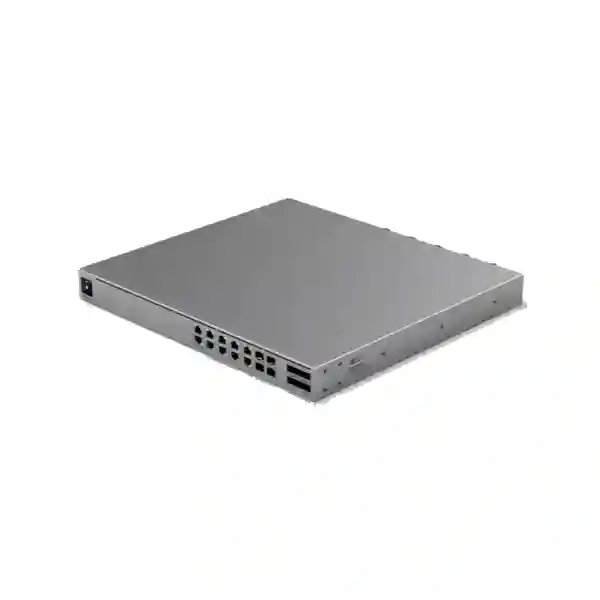
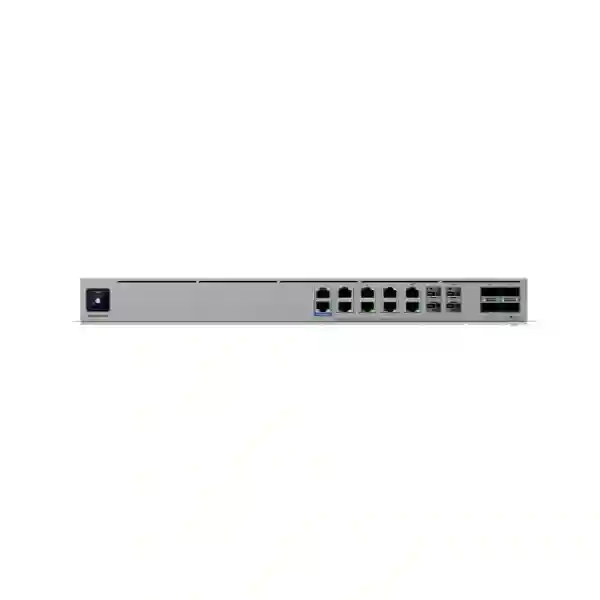
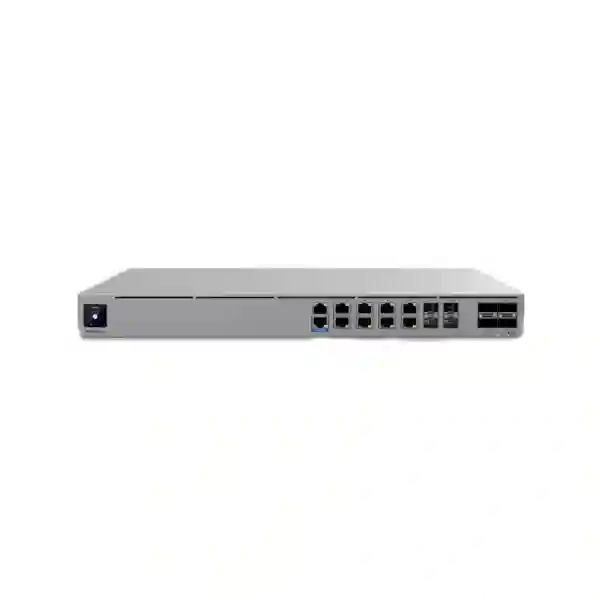
The physical interface inventory is substantial: two standard 1GbE RJ45 ports, eight RJ45 ports capable of up to 10GbE, four SFP28 ports capable of up to 25G, and four QSFP28 ports capable of up to 100G. There is also a dedicated 1GbE management connection and a console interface. The manufacturer lists one 100G QSFP28, one 25G SFP28, and one 10GbE RJ45 as default WAN ports, with a maximum of eight WAN ports subject to configuration.
This variety is useful only when it matches the network being built. Specify each port’s intended role in the design drawing: provider handoff, aggregation uplink, server or firewall interconnect, management, or high-availability link. Do not assume every port operates at its highest supported rate with every optic, module, cable, or peer device. Verify transceiver compatibility, connector type, fibre distance, cable routing, and link negotiation with the equipment on the other end before purchasing accessories.
Designing the 100G links thoughtfully
The four QSFP28 interfaces create options for connecting the gateway to high-capacity aggregation equipment or compatible service handoffs. They are relevant where large amounts of north-south traffic must move between routed networks and where the switching fabric already supports high-speed interconnects. Nevertheless, a 100G interface is a physical port capability, not a promise of 100 Gbps of inspected traffic in every configuration. The 79 Gbps IDS/IPS figure is a separate gateway performance metric.
For every planned 100G connection, document whether it will use an appropriate direct-attach cable or optical solution. Match form factor, optics, fibre type, reach, and the far-end switch’s supported modes. Include sensible spare components where business continuity requires them. Large networks often have multiple paths, so ask whether link aggregation, independent uplinks, or gateway-pair connections best fit the failure model. An unnecessary 100G purchase adds expense; an incompatible cable can prevent commissioning entirely.
Using 25G interfaces without creating hidden bottlenecks
The four SFP28 ports support up to 25G and can connect to compatible distribution switches, servers, or upstream infrastructure. They offer an intermediate option when 10G copper is insufficient but a 100G handoff is not needed. A planned design may place different service classes on distinct uplinks, use high-capacity fibre between buildings, or reserve selected interfaces for future expansion. The physical uplink should be chosen according to measured traffic and the expected number of aggregated downstream users.
An engineer should confirm the supported transceiver and port speed at both ends, then verify loss budgets and cabling quality where fibre is involved. Where a switch and gateway use different link modes, do not assume automatic negotiation will solve every mismatch. Include the relevant optical modules, patch leads, patch-panel changes, and installation testing in the procurement scope. It is better to account for these practical materials before the purchase than to discover them during a maintenance window.
Ten-gigabit copper and ordinary management access
Eight 10GbE RJ45 ports can simplify links to compatible copper-based infrastructure and permit multi-gigabit negotiation at supported lower rates. The additional 1GbE interfaces are useful for roles that do not need a high-speed handoff, while the separate management connection supports a cleaner operational access design. These interface classes make the gateway flexible, but they do not replace the need to understand electrical cabling distances, heat, switch capabilities, or dedicated management-network policy.
Map copper circuits by actual cable category and run length. Confirm that attached switches and endpoints can negotiate the intended speed rather than assuming that an RJ45 connector guarantees a 10G connection. Keep administrative access separated from user traffic where possible, protect management interfaces with appropriate permissions, and plan for console access in recovery scenarios. If using Shadow Mode, respect Ubiquiti’s designated connection requirements; port 2 has a documented role in the gateway-pair setup.
Multi-WAN for continuity and traffic selection
The EF-Core supports multiple WAN connections, load balancing, and policy-based WAN routing. This can help an organization use different upstream providers or connectivity services for resilient internet access and application-specific pathways. It is important to distinguish load balancing from guaranteed bandwidth aggregation: independent connections do not automatically become one faster connection for an individual flow. The actual user experience depends on upstream conditions, application session behavior, and how policies distribute traffic.
For a Tanzania deployment, compare the practical properties of each available provider circuit: service handoff, contracted speed, upstream routing arrangements, support escalation, public address needs, and fault history. Design health checks around meaningful destinations rather than only an interface-up signal. Test how voice, payment processing, cloud applications, and remote connections behave when the preferred WAN becomes unavailable. If a backup circuit depends on the same last-mile route or electrical supply, it may not remove the original risk.
Dynamic routing with BGP and OSPF
Support for BGP and OSPF makes the EF-Core suitable for routed environments that need more than static default routes. BGP may be relevant at planned network boundaries or advanced upstream arrangements, while OSPF is useful for certain internally routed topologies. Whether either protocol should be enabled depends on routing ownership, address plans, failover expectations, and the behavior of adjacent devices. Route-policy design must be reviewed carefully because an incorrect advertisement can affect many services at once.
Before enabling dynamic routing, define peers, route acceptance rules, summarization, authentication options supported by the intended configuration, and clear rollback procedures. Test path convergence and asymmetric routing with representative flows. For an enterprise with multiple buildings or sites, consistency of prefixes and route ownership is often more valuable than adding protocols for their own sake. Keep a diagram showing where the firewall routes traffic and where dedicated switches or routers should remain responsible for internal forwarding.
IPv6, address translation, and network services
The specification includes IPv6 ISP support, customizable DHCP service, advanced NAT options, and policy-based routing. These can help integrate contemporary provider connections and legacy business applications, but each requires a correct address plan. IPv6 should be treated as a first-class policy design question, not simply enabled without matching firewall rules and monitoring. NAT should be documented so troubleshooting teams understand how private services reach the internet and how inbound publishing is controlled.
For each VLAN or routed segment, record the subnet or prefix, gateway address, DNS requirements, lease strategy, and connectivity permissions. Identify any public-facing application requiring destination NAT or a reverse-proxy design, and evaluate whether direct exposure is necessary. Avoid building a tangled chain of translations where a clear route or secure application gateway would be simpler. During migration, confirm that client leases, name resolution, and expected return paths still work after the new firewall becomes active.
Site-to-site VPN for offices and branches
The EF-Core supports site-to-site connectivity options including IPsec, OpenVPN, and UniFi Site Magic. Ubiquiti positions this model for large-scale deployment and specifies support for more than 5,000 concurrent IPsec tunnels in its product materials. That figure is a scale capability, not a guarantee that every organization should build thousands of tunnels or that mixed VPN workloads will all perform identically. Encryption settings, peer capabilities, routes, and path conditions determine the practical results.
Start with a site matrix that lists each branch, local subnet, remote subnet, uplink, authentication arrangement, and service dependency. For non-UniFi peers, validate the actual interoperability requirements and agreed security settings rather than assuming that two products supporting IPsec need no engineering. Test tunnel recovery after WAN failover and make sure overlapping address space is resolved early. With many branches, consistent naming, policy templates, and documented ownership of routing changes will materially improve day-to-day support.
Remote-access VPN and user experience
The platform lists remote-access features including WireGuard, OpenVPN, Teleport, and Identity Endpoint one-click VPN, as well as other supported VPN modes. These options serve different endpoint and administration needs. A remote employee’s connection should be designed around access to required business resources, identity controls, endpoint posture, and practical bandwidth—not around simply establishing a tunnel. Determine which method is appropriate for the organization’s managed devices and identity ecosystem.
Document enrollment, account revocation, lost-device procedures, DNS behavior, split tunneling decisions, and any multi-factor authentication arrangement available in the selected architecture. Pilot remote access on ordinary user networks rather than only on a fast office connection. Confirm file access, voice applications, collaboration services, and access to internal names, then test what the user sees when their local connection drops. A supportable remote-access service includes instructions and operational ownership long after initial configuration.
SD-WAN features and their commercial boundary
Ubiquiti identifies license-free SD-WAN functionality for the EF-Core. UniFi Site Magic and relevant routing options can reduce repetitive work when building selected multi-site UniFi topologies. Buyers should interpret license-free carefully: it describes the supported SD-WAN functionality, not a blanket promise that every advanced threat intelligence service, support arrangement, third-party circuit, or security subscription is free. A realistic bill of materials separates hardware from connectivity, optional subscriptions, optics, and engineering services.
Before choosing an SD-WAN design, decide which applications need preferred paths, what happens under packet loss or congestion, and how changes are approved across sites. Evaluate whether the selected capabilities meet the organization’s route-control and observability requirements. Some enterprise environments require integration with existing SD-WAN orchestration or independent security services; those cases call for a deliberate comparison. The EF-Core can be attractive where UniFi Network is already a core part of the operational model.
Gateway high availability with Shadow Mode
Ubiquiti documents Shadow Mode using VRRP for a primary and standby UniFi gateway pair. For EF-Core deployments, a second compatible unit can be configured to take over gateway functions after certain primary failures. This approach addresses a different failure scenario from redundant power supplies: two PSUs reduce dependence on one internal supply, while a second gateway can cover the loss of the active appliance. Neither measure alone makes a complete network immune to switching, cabling, upstream, configuration, or application failures.
Plan the pair’s physical placement, dedicated high-availability interconnect, WAN handoffs, switch connections, addressing, and power feeds together. Ubiquiti specifically documents port 2 for the high-availability connection on the EF-Core; use the current instructions for the selected software release. Test role transitions under a controlled maintenance procedure and observe the effect on real user sessions. Define how the standby is updated, monitored, and replaced, and keep a documented recovery path if both units become unavailable.
Redundant power: understand the actual scope
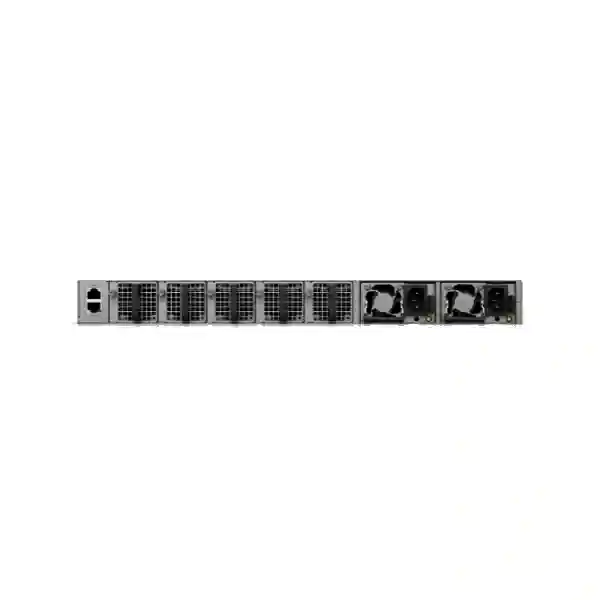
The chassis includes two hot-swappable 550W AC/DC power supply units and accepts a universal 100–240V AC input according to Ubiquiti’s technical sheet. Hot-swappable supplies support maintenance and some internal power-fault scenarios, but resilience depends on the external circuit design. Two supplies attached to the same overloaded strip or unprotected distribution path may still fail together. Where appropriate, plan independent protected feeds and record each connection for facilities and network teams.
Ubiquiti lists a maximum power consumption of 171W for the unit. This is different from the nameplate capacity of the two power supplies and should not be confused with their combined rating. UPS sizing should consider the gateway alongside the switches, optical modules, provider equipment, management access, and any other hardware required for the network to remain usable. Calculate runtime from the full critical load and maintenance objective rather than assuming that an appliance with dual power supplies automatically provides uninterrupted service.
Rack space, environmental limits, and service clearance
The EF-Core has a 1U rackmount form factor and dimensions of 442.4 by 43.7 by 400 millimetres. It weighs approximately 7.85 kilograms, and Ubiquiti specifies an operating temperature from 0 to 40 degrees Celsius and 5 to 95 percent non-condensing humidity. These figures are practical constraints during procurement: a rack may have nominal height available but insufficient usable depth, airflow clearance, or access for fibre connections and rear service.
Check rack rails and mounting requirements, cable bend radius, power-feed positions, ventilation, and replacement access before the device arrives. Include a plan for labelling QSFP28, SFP28, copper, management, and high-availability leads. For an equipment room subject to heat or intermittent cooling, monitor conditions rather than assuming that a published temperature range removes operational risk. A good physical installation makes routine maintenance safer and shortens troubleshooting when staff need to identify a failing component quickly.
UniFi Network management and operational consistency
The EF-Core runs the UniFi Network application and is designed to manage a sizeable UniFi deployment. A unified view of gateway settings, network devices, policy, and internet quality can be valuable for organizations with distributed administrators or many branch sites. The manufacturer lists support for more than 2,250 managed UniFi devices, but that indicative capacity should still be assessed against actual network complexity and the operational practices of the team.
Define who can change firewall rules, approve WAN policies, update software, and inspect security events. Apply least-privilege administrative access and preserve a change history. A single management platform reduces some workflow friction, but configuration errors can still propagate quickly if approval and rollback processes are weak. Record the software version baseline, maintenance window, backup expectations, and ownership of upgrades. Management visibility should support governance rather than replace it.
Monitoring internet quality and troubleshooting incidents
The EF-Core supports internet quality and outage reporting, traffic identification, and network-flow visibility. These functions can help differentiate an upstream circuit fault from congestion, application behavior, or an internal policy change. Useful monitoring begins with a small set of service-focused indicators: interface state, traffic levels, latency, packet loss, security events, VPN health, and the availability of critical business destinations. The chosen measures should map to the network’s actual service objectives.
Consider where logs and alert history need to reside, how long they must be retained, and whether a central security operations system is required. Verify supported export or integration methods for the installed software before committing to a particular analytics workflow. Test an alert route with the people expected to respond outside normal working hours. Monitoring that generates endless unowned notifications is less valuable than a smaller set of reliable signals backed by clear escalation and incident procedures.
Identity, RADIUS, and administrative boundaries
The specification includes an integrated RADIUS server and RADIUS over TLS capability, along with UniFi-oriented identity-aware networking options. These may contribute to a broader access architecture, but the exact role of the gateway should be established with the organization’s existing identity providers, wireless authentication, and remote-access controls. Security designers should distinguish user authentication, device authorization, network segmentation, and application access because each addresses a different part of the risk.
For example, a campus may need separate enrollment paths for staff laptops, visiting contractors, guests, and shared equipment. Build the identity workflow around a documented joiner-mover-leaver process and clear recovery steps if an authentication service is unavailable. Confirm the compatibility of any existing enterprise directory or certificate infrastructure before making purchasing commitments. Do not assume that a feature appearing on a specification sheet means every third-party identity or compliance integration is included without additional configuration.
Architecture pattern: firewall at the enterprise edge
In a straightforward large-site design, upstream providers connect to planned WAN interfaces, the EF-Core performs routed security policy enforcement, and high-capacity links connect to aggregation switches that distribute traffic through the campus or facility. Separate management and service networks reduce accidental access, while a second gateway can be added where high availability is part of the requirement. This is an illustrative pattern; the appropriate design may differ when dedicated core routers, private WANs, or existing security appliances are present.
The placement of default gateways matters. If all internal VLAN traffic is forced through a firewall without a defined reason, the device may become an unnecessary forwarding dependency for high-volume east-west applications. If all internal routing bypasses the gateway, important segmentation goals may be missed. Draw the trust boundaries before choosing the physical cable routes. Clearly mark internet access, shared services, server networks, management, backup links, and any controlled inter-zone paths.
Pre-deployment discovery: gather the facts first
Before purchasing, inventory the existing firewall rules, networks, public address allocations, WAN services, VPN peers, routing protocols, switch ports, transceivers, DNS and DHCP services, and critical applications. Measure present traffic over representative busy periods. Include unusual but important flows such as backups, software distribution, payroll, remote maintenance, and monthly reporting workloads. A device replacement is a good opportunity to remove obsolete policies, but only after validating that an apparently unused rule is truly unnecessary.
Identify business owners for services that may be affected during cutover. Record which services must remain reachable during an outage and which can tolerate a planned interruption. Capture current configuration backups using approved secure procedures; protect exported secrets and keys. Set measurable goals for throughput, recovery, security controls, and administration. This discovery output becomes the basis of a realistic quote, acceptance test, and migration plan rather than a list of hardware alone.
Design review and purchasing specification
A useful purchasing specification is a network design written in business terms and technical terms together. It should state the required number and speed of active interfaces, the upstream circuit details, projected security-inspected traffic, VPN scope, expected growth, and availability requirements. Add any need for a standby gateway, independent power feeds, correct optics, rack accessories, test resources, and training. Treat optional subscriptions as separate line items so the buyer can compare the full cost.
The design review should also cover software support expectations, backup responsibilities, authorization for security policy changes, and the steps to recover after a failed migration. If a current vendor must cooperate during installation, confirm responsibilities in advance. For organizations with procurement approval stages, separate mandatory features from future options. This limits ambiguity, makes competing proposals easier to evaluate, and helps prevent purchasing an impressive gateway that cannot be connected cleanly to the existing infrastructure.
A controlled migration from an older firewall
Most firewall migrations are policy and routing projects disguised as hardware changes. Establish a mapping between existing objects, addresses, NAT entries, VPN definitions, zone policies, and the constructs available in UniFi Network. Not every platform implements every rule type in the same way, so functional equivalence must be tested rather than assumed. Build the new policy in a controlled environment and confirm administrative access before moving production links.
Choose a maintenance window based on actual application use, not simply a convenient calendar slot. Prepare approved back-out criteria, a reachable out-of-band contact method, and a clear record of who will make each change. Test public services, branch tunnels, remote users, authentication, printing, voice, and any scheduled integrations after cutover. Preserve old-system information for troubleshooting in accordance with the organization’s retention rules. A migration is complete only when service owners validate normal use and the operations team accepts responsibility.
Proving performance in a realistic acceptance test
A meaningful proof of concept measures the applications and traffic classes the business will use. Test representative packet sizes, sustained throughput, short bursts, simultaneous sessions, VPN paths, and inspection rules. Observe CPU, memory, link counters, dropped packets, error rates, and user-perceived latency where the platform exposes suitable measures. Include encryption and filtering in the test configuration when those are part of the production requirement. Testing with security disabled may produce a result that is irrelevant to the final deployment.
Repeat selected tests during WAN failover, gateway role transition, and recovery from an upstream fault. Record the baseline, what changed, and whether the acceptance threshold was met. If a synthetic benchmark does not predict a specific application outcome, prioritize real application validation. The manufacturer’s published capacity figures are helpful for shortlisting, but the organization should approve the equipment based on the success of its own workload and resilience tests.
Tanzania-specific considerations without assumptions
Enterprise deployments in Tanzania should be planned around the actual premises, provider options, rack environment, staffing, and procurement process. Availability of a service in one building or city does not prove availability at another address. Ask prospective providers for documented handoff details, service-level terms, routing responsibilities, and restoration escalation contacts. Where a branch network relies on a particular application, test the path from that location rather than extrapolating from a headquarters connection.
Power continuity, equipment-room cooling, physical security, and safe fibre routing deserve the same attention as the firewall specification. For projects spanning several sites, document local contacts and the people permitted to approve configuration changes. Determine how spares and replacement hardware will be handled without presuming a particular supplier’s stock or warranty service. Any statements about installation coverage, local certifications, shipping, taxes, or support response times should be confirmed with the prospective supplier for the exact quotation.
Optics, cables, and accessories are part of the solution
A high-speed firewall is only as useful as its connected infrastructure. The purchasing list may need QSFP28 modules or direct-attach cables, SFP28 modules, compatible switches, fibre patch leads, copper patching, labelled cable managers, and UPS distribution. The exact materials depend on port roles, rack positions, distances, and vendor compatibility. A generic line item for cables is insufficient when production depends on 25G or 100G links.
Request an interface schedule that names the device port, far-end port, intended speed, medium, connector, and tested spare. Confirm whether the design requires one gateway or a pair and whether both locations have appropriate power. Keep management and recovery access in the design even if it does not require significant bandwidth. A proper bill of materials lets the buyer compare a complete deployment cost rather than only the price of the primary appliance.
Licensing, subscriptions, and total cost of ownership
The EF-Core offers a range of gateway and UniFi SD-WAN features without a general SD-WAN licence requirement as described by Ubiquiti. However, optional CyberSecure Enterprise security intelligence is presented separately, and other services, connectivity charges, support options, or hardware accessories may have their own costs. A purchasing team should verify which functions are included in the chosen firmware and which require an active subscription or a separate entitlement.
A fair total-cost evaluation includes hardware quantity, standby design, transceivers, switching changes, installation labour, staff training, maintenance effort, replacement strategy, and any recurring services. Avoid converting published overseas store prices into an assumed Tanzania selling price. Actual taxes, freight, service scope, lead times, and local availability can vary and must be confirmed for the intended offer. This is why a configuration-led quotation is more useful than a headline price without its operational context.
How to compare it with other gateways
The EF-Core occupies a high-capacity part of Ubiquiti’s UniFi gateway portfolio. When comparing it with the older Enterprise Firewall or with smaller Dream Machine and Cloud Gateway models, examine the exact model codes, current official specifications, desired interface speeds, security-inspection rates, management requirements, and availability design. The EF-Core and the earlier EFG are different devices; their names and capacity figures should not be interchanged in a purchasing request.
An alternative from another enterprise firewall vendor may offer particular security subscriptions, reporting systems, service arrangements, or specialized controls that matter more than maximum port speed. Conversely, a UniFi-centered environment may benefit from consistent administration and integrated network visibility. Write a weighted decision matrix: verified performance under required policies, interoperability, high availability, manageability, support model, full cost, and migration complexity. Select the platform that meets the real operational requirements, rather than assuming that a single throughput number settles the comparison.
Limits, risks, and sensible expectations
High capacity does not eliminate the need for careful design. The presence of 100G ports does not guarantee 100G of inspected application traffic; a supported VPN mode does not guarantee compatibility with every remote peer; and two hot-swappable power supplies do not protect against every power event. A standby gateway reduces certain appliance failure risks but requires correct switching, cabling, monitoring, and maintenance. Every advanced security feature also increases the need for clear policy ownership and disciplined change control.
Organizations with strict regulatory obligations, specialist third-party integrations, or very specific service-level commitments should validate those needs individually. Review software release notes and feature support for the intended version before signing off on an architecture. Where a function is business-critical, demonstrate it in a representative test instead of relying on marketing language. These checks are not reasons to avoid the EF-Core; they are the steps that turn a powerful firewall into a dependable production service.
A practical purchase and deployment checklist
Before approving a quote, confirm the exact model name EF-Core, quantities, required WAN connections, planned 10G/25G/100G links, optical modules, switch compatibility, rack depth, electrical feeds, and a suitable UPS design. Record whether Shadow Mode requires a second unit and whether its dedicated interconnect and upstream topology have been allowed for. Check current UniFi software compatibility for the deployment and any remote administration workflow. Confirm that procurement does not confuse an EF-Core with an EFG or another gateway.
Ask for an agreed commissioning plan that includes segmentation rules, VPN configuration, routing, certificate strategy where inspection is used, monitoring, backup, change approval, test evidence, and rollback. The quote should separately identify optional CyberSecure Enterprise subscription costs and any service or support provisions. Confirm local supply conditions, warranty terms, taxes, and delivery with the seller rather than treating unverified assumptions as product specifications. A well-prepared purchase request substantially reduces commissioning surprises.
Questions buyers commonly ask
The answers below focus on the device’s verified capabilities and the decisions that must still be made for a real network.
Is the Enterprise Firewall Core the same as the Enterprise Firewall (EFG)?
No. EF-Core is a distinct, higher-capacity model, and the official Ubiquiti specifications should be consulted for the exact device under consideration. Make sure the quotation and any accessory selection explicitly state EF-Core.
How fast is the EF-Core with IDS/IPS enabled?
Ubiquiti specifies 79 Gbps IDS/IPS throughput. Real application performance depends on traffic patterns, enabled features, routing and VPN workloads, and the final deployment. Validate your own requirements with a suitable acceptance test.
Does it have 100G ports?
Yes. The hardware includes four QSFP28 ports capable of up to 100G, plus four SFP28 ports capable of up to 25G and additional copper interfaces. Use verified compatible modules and peer connections.
Can two EF-Core units provide gateway failover?
Yes. Ubiquiti documents Shadow Mode high availability using an active and standby pair with VRRP. A secondary appliance and a properly designed interconnect, switching topology, and failover test are required.
Does the firewall include redundant power supplies?
Yes. Ubiquiti specifies two hot-swappable 550W power supply modules. External circuits and UPS arrangements still need an independent design if electrical resilience is a business requirement.
Is UniFi SD-WAN functionality licensed separately?
Ubiquiti describes its supported SD-WAN features as license-free. Optional services such as CyberSecure Enterprise are separate and should not be confused with the base SD-WAN feature entitlement.
Can it connect remote branches and roaming users?
The platform supports site-to-site and remote-access VPN options including IPsec and WireGuard, with UniFi-specific options such as Site Magic and Teleport. Validate the chosen architecture, peers, identity workflow, and WAN conditions before deployment.
Can it replace a core switch or wireless access points?
No. The EF-Core provides gateway, routing, and security functions; it does not provide wireless coverage or the full switching fabric a large campus may require. Plan the surrounding switching and access infrastructure separately.
What should I check before ordering in Tanzania?
Confirm the required ports and optics, network topology, power and rack requirements, firmware and subscription needs, and expected migration services. Request local confirmation of stock, price, taxes, delivery, and warranty terms.
Will SSL inspection work with every encrypted application?
Not necessarily. Certificate trust, application behavior, privacy policy, and some technical protections can limit decryption. Pilot the inspection design and create documented exclusions where justified.
How many clients and managed devices can the gateway support?
Ubiquiti lists more than 22,500 simultaneous connected users and more than 2,250 managed UniFi devices. These scale indicators are not substitutes for assessing actual policy, application, throughput, and operational requirements.
Request an EF-Core configuration-led quotation
Share your site count, current internet connections, required 10G/25G/100G links, expected traffic, security policy needs, and whether high availability is required. Ask for a reviewed solution covering the firewall, appropriate optics, power design, subscription choices, commissioning tests, and migration responsibilities. FourTeck Tanzania can use those requirements to prepare an appropriate proposal once product availability and commercial terms have been confirmed. No stock, price, delivery, or service-coverage claim is implied by this product guide.
Next step: request a product quotation and technical fit review.




Reviews
There are no reviews yet.