
Ubiquiti UniFi | Compact Multi-Gigabit Switching
Ubiquiti Flex Mini 2.5G USW-Flex-2.5G-5
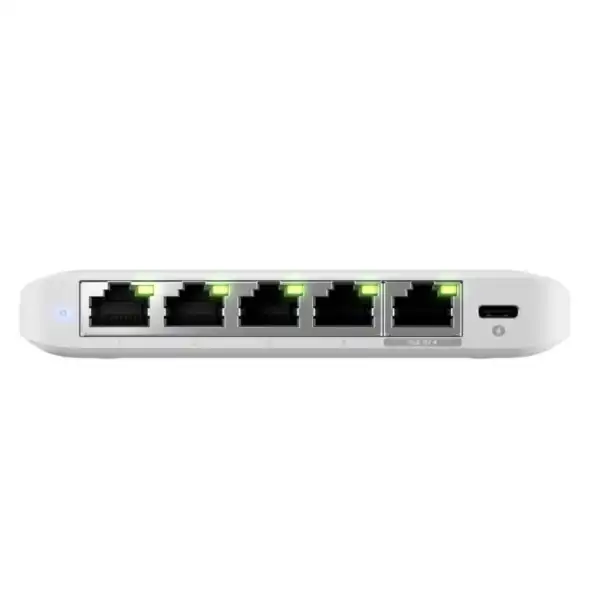
Add a focused set of faster wired connections to a UniFi network with five 2.5 GbE-capable RJ45 ports. Power the compact desktop switch through its designated PoE input or suitable USB-C supply, and manage it through a compatible UniFi Network installation. It does not provide PoE output.
Key technical details at a glance
| Model | USW-Flex-2.5G-5 |
|---|---|
| Ethernet ports | 5 × RJ45, 2.5G / 1G / 100M / 10M |
| Switching capacity | 25 Gbps |
| Total non-blocking throughput | 12.5 Gbps |
| Forwarding rate | 19 Mpps |
| Supported VLANs | 256 |
| MAC address table | 4,000 |
| Power inputs | USB-C 5 V DC, 1 A; or PoE input |
| Maximum consumption | 5 W (AC/DC), 6.4 W (PoE input) |
| Dimensions | 117.1 × 90 × 21.2 mm |
| Management requirement | UniFi Network 8.6.9 or later |
| PoE outputs | None |
Performance figures describe the switch hardware; actual link and application speeds depend on the complete network.
What the Flex Mini 2.5G is designed to solve
The Ubiquiti Flex Mini 2.5G brings multi-gigabit connectivity to places where a full-size aggregation switch would be unnecessarily large. A desk with a workstation and a network-attached storage device, a small technical workspace, or a compact wired extension of an established UniFi network can benefit from more than 1 GbE without requiring an entire network rebuild. The important distinction is that this unit is a network switch: it connects local Ethernet devices and forwards traffic. It is not a router, internet modem, wireless access point or PoE power distribution unit.
The exact manufacturer model is USW-Flex-2.5G-5. Every RJ45 port can negotiate at up to 2.5 Gbps with a suitable peer and cable; slower Ethernet endpoints can still connect. UniFi management helps administrators see and configure the device as part of a broader network. For Tanzania buyers, the decision should begin with the existing router, endpoint speeds, power source and number of required sockets, not with the highest speed printed on the product name.
Who should consider this switch
This switch is a practical candidate for people who already use UniFi Network and need a small collection of wired multi-gigabit ports. It suits a dedicated office desk, a small shared workspace, a compact server shelf, or a laboratory bench where connected equipment has 2.5 GbE interfaces. It can also be useful when a faster wired access point needs a 2.5 GbE data connection and receives its electrical power separately. The modest physical footprint makes placement easier than a large rack-mounted switch.
A different product may be a better investment when you have more than a handful of wired devices, expect rapid expansion, require 10 GbE backbone capacity, or want the switch itself to feed power to cameras and access points. Buyers without a UniFi management environment should also consider whether adopting another management platform is worthwhile. A simple unmanaged multi-gigabit switch can sometimes be easier for a small standalone network. The aim is an appropriate network design, rather than choosing a model solely because its individual ports are fast.
Understanding the five Ethernet ports
There are five RJ45 Ethernet ports, each rated for 2.5 GbE and backward compatible with 1 GbE, 100 MbE and 10 MbE connections. One of the five is the designated PoE input connection. That means a PoE-capable upstream device can deliver electrical power and network traffic through that Ethernet socket. It remains a data port; it is not an extra sixth connection. When planning a small network, count the cable arriving from the router or main switch as one of the five occupied sockets.
For example, one port might connect upstream while four connect to local equipment. If a workstation, NAS, wireless access point and printer use those four remaining connections, the switch is fully occupied even though the printer may run at only 1 GbE. The upstream port does not create a dedicated faster trunk: it also has a maximum link speed of 2.5 GbE. This compact port layout works well for focused applications, but there is little room to grow without another switch or a replacement.
Reading the performance numbers correctly
Ubiquiti specifies 25 Gbps switching capacity, 12.5 Gbps total non-blocking throughput, and a forwarding rate of 19 million packets per second. These are aggregate hardware capability figures, not the speed a single computer will receive from an internet connection or file transfer. The practical rate on one Ethernet connection is bounded by its negotiated link speed, and real applications also incur framing, protocol, storage and processing overhead. Treat the figures as switching specifications rather than a promise of a particular measured transfer result.
When several devices exchange local data at the same time, the switch can forward traffic between appropriate ports. But multiple devices sharing one 2.5 GbE uplink also share that uplink’s capacity. Four workstations downloading from a server across the same single connection cannot each assume an independent 2.5 Gbps path to that server. An upstream bottleneck may occur before the switch approaches its published aggregate capacity. Network design should account for traffic direction, the number of simultaneous users and where the busiest resources reside.
The difference between 1G and 2.5G in daily work
A 2.5 GbE connection offers a higher nominal link rate than ordinary gigabit Ethernet, but not every workload will feel substantially different. Transferring large files to a capable NAS, synchronizing sizeable project directories, or moving virtual machine images may benefit when the storage, computer adapters and network path can keep up. Small web requests, email messages and ordinary office documents are often constrained by other factors. A switch alone does not increase the speed of a slower broadband subscription or make a remote website respond faster.
Start by identifying the task that feels slow. If a local workstation is limited to 1 GbE when reading files from capable storage, upgrading both ends of that path can be worthwhile. If the NAS hard drives are already saturated, the faster link may offer little improvement until storage performance changes. Likewise, a laptop connected through a 1 GbE adapter will still use a 1 GbE link. A realistic upgrade has compatible interfaces at both ends, suitable cabling, and sufficient capacity in the services being accessed.
Workstations, desktops and docking stations
For an editing desk, engineering workstation, software development station or other desktop with frequent large local transfers, a nearby 2.5 GbE switch provides several convenient network sockets. A capable workstation might connect alongside shared storage and another machine used for testing or backups. UniFi management can be helpful when those computers belong to a managed business network. Confirm that the device really offers a 2.5 GbE network interface rather than assuming a modern computer does so automatically.
Laptop docks and USB Ethernet adapters deserve special attention. Some dock specifications describe high-speed USB connections while the actual Ethernet socket is limited to 1 GbE. Check the adapter’s rated Ethernet speed and the computer’s operating-system negotiation status before attributing slow results to the switch. Keep other bottlenecks in mind: external drives, encryption, CPU load, file-sharing protocols and security software can affect throughput. A sensible evaluation compares the old and new wired paths under the same working conditions.
Using the switch with network-attached storage
A NAS is one of the strongest reasons to consider a compact 2.5 GbE switch. If a storage appliance and a workstation both offer suitable 2.5 GbE interfaces, they can establish faster local links through this unit. Large backup jobs, media libraries and project files may finish sooner when the disks and storage service can sustain the additional traffic. The switch’s five ports also allow a few other nearby devices to connect without placing a full rack switch on the desk.
Not all NAS units have multi-gigabit ports, and not all storage arrays can fill a 2.5 GbE connection. Check the model’s network specifications, disk configuration and workload before purchasing. Avoid assuming that two Ethernet ports on a NAS automatically create one faster connection for an individual user; link aggregation behavior depends on the storage device and network configuration. If several heavy users need simultaneous storage access, a stronger upstream architecture or a 10 GbE-capable core may be the more useful improvement.
Data connections for Wi-Fi access points
Some modern wireless access points provide 2.5 GbE Ethernet interfaces, making a multi-gigabit wired connection useful for their uplink. The Flex Mini 2.5G can provide the Ethernet data path for a compatible access point without requiring a larger switch at that location. It is particularly useful when the access point’s existing power arrangement is already suitable, and the design needs a convenient compact data switch near other wired clients.
The limitation is electrical power. This model accepts PoE to power itself but does not provide PoE output to an access point. A PoE-powered access point must receive power from its own compatible injector or a different PoE-output switch. Select the injector by the access point’s actual power requirements, not by the Flex Mini’s PoE input rating. A 2.5 GbE wired link also does not guarantee a particular Wi-Fi speed for each client; radio conditions, access point capabilities, client devices and airtime sharing continue to influence wireless performance.
PoE input is not PoE output
The most important installation distinction is the direction of PoE power. On the USW-Flex-2.5G-5, one Ethernet connection can accept PoE input from an upstream source. That reduces the need to position an electrical outlet beside the switch. It is attractive for compact desks and locations where an existing powered network cable is available. The upstream equipment and cabling must supply a compatible form and voltage of power; confirm the exact power source before deployment.
PoE input does not mean the remaining Ethernet ports can power cameras, IP telephones, access points or other devices. They carry network data only. If your equipment requires Ethernet-delivered power, plan a separate appropriate injector or choose a switch with verified PoE output capability and adequate power budget. This distinction prevents an expensive mismatch at installation. Check the complete connected-device list, identify which devices require PoE, and match each requirement to an actual power source before deciding the switch is sufficient.
USB-C power option and consumption
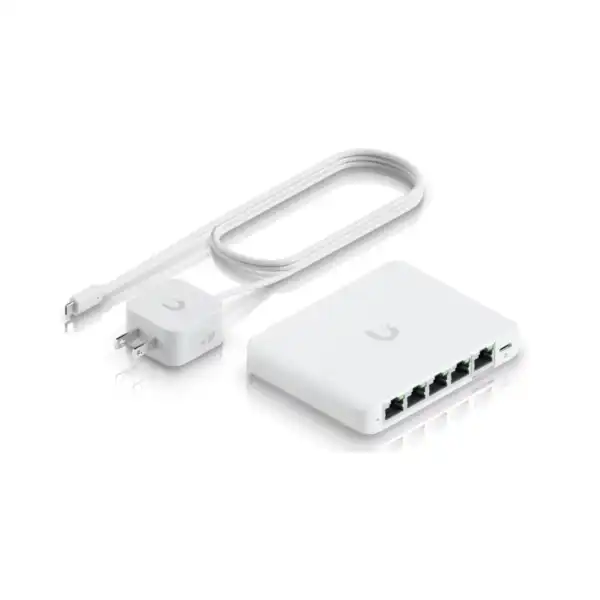
The switch also supports a USB Type-C power input rated at 5 V DC and 1 A. Ubiquiti lists an external 5 W AC/DC supply and specifies maximum consumption of 5 W when powered through the AC/DC input, or 6.4 W when using PoE input. The exact power accessory supplied may vary by sales package or market, so confirm included items in the quotation. A phone charging port or an arbitrary USB-C adapter should not be assumed suitable without verifying the required output.
Choosing between USB-C and PoE is primarily a deployment decision. USB-C can be straightforward on a desk with an appropriate nearby outlet; PoE can keep the installation tidier when a compatible upstream powered link is available. Neither method turns the switch into a power source for downstream devices. When specifying backup power, include the switch and any upstream router, controller, storage or access points that must remain operational. Maintaining power only to the switch will not preserve connectivity if the rest of the network is off.
Planning power delivery before installation
A good deployment drawing marks the chosen input method next to the switch, identifies the PoE-supplying port if used, and shows which local devices need independent power. For a PoE-powered installation, verify the source’s supported standard and output, cable condition and the number of other devices on the power budget. For USB-C power, check the adapter’s electrical ratings and the availability of a secure outlet. Keep a record of the final connection scheme for whoever supports the network.
If the installation includes a camera or access point that needs PoE, decide where its injector or PoE-output switch will live. An injector can add equipment and wiring that may undermine the original aim of using a very small switch. In that case, a compact PoE-output switch may be a better fit despite larger dimensions or cost. Evaluate power, data speeds, cable routes and maintainability together; one attractive product attribute should not hide an unsuitable overall design.
UniFi Network management requirement
The manufacturer lists UniFi Network version 8.6.9 or later as the application requirement. This matters when the switch is being added to an older installation: the network controller may need an update before it can manage the device correctly. Confirm controller and gateway compatibility with the currently supported release before making changes to a production environment. Keep a configuration backup and plan maintenance around connected users if a controller upgrade is required.
Within a supported UniFi environment, the value of a managed switch lies in having network settings and device visibility within a consistent management workflow. Administrators can organize compatible switch behavior around the rest of their site rather than treat every small device as a separate unmanaged box. The exact options visible in the application can depend on software versions and model capabilities. Check features against the published hardware list and the current interface instead of assuming every capability available on a larger UniFi switch exists on this compact model.
First-time setup and adoption checklist
Before connecting the new switch, make a simple port plan and verify that your UniFi Network application meets the minimum version. Identify a working upstream Ethernet link with access to the network used for device management. Supply appropriate power through the designated PoE-in port or the USB-C input. Connect the upstream cable and confirm physical link indicators and endpoint negotiation. In a managed environment, find the device in UniFi Network and complete the supported adoption process.
After adoption, give the switch an intelligible device name based on its location or purpose. Apply the intended network and port settings, then test at least one ordinary client before moving critical equipment. Confirm that VLAN placement, local routing and internet access work as planned. Record which physical socket carries the uplink, which carries each endpoint, and how the device is powered. If discovery or adoption does not succeed, check the version requirement, management connectivity and physical links before resetting hardware or changing unrelated network settings.
VLAN organization for smaller networks
Ubiquiti lists support for 256 VLANs, making the switch relevant when different traffic groups need logical separation within a supported UniFi design. In a small business, administrators may distinguish employee devices from guests, management equipment or controlled lab systems. The switch can be one part of that architecture. However, VLANs alone do not create full security policy: traffic between networks is governed by the gateway, firewall rules and other network equipment as applicable.
Begin with a small, documented VLAN plan. Decide what each segment is for, which devices belong in it, how the upstream port transports the required traffic, and which network services each group should reach. Avoid introducing unnecessary segments simply because the device offers a high VLAN count. For troubleshooting, record the expected network assignment of every port and test client access after configuration. The small form factor does not remove the need for disciplined network design, and complex segmentation may justify using larger or more advanced switching equipment.
Layer 2 controls and what they mean
The official specification includes STP and RSTP, flow control, storm control, multicast and broadcast rate limiting, port isolation, port mirroring, jumbo-frame support, loop protection and egress rate limiting. These are useful features to evaluate when a compact device becomes part of a managed network. For example, loop-related features can support better behavior in networks with redundant or accidentally duplicated paths, while port mirroring can assist a technician observing traffic for an authorized diagnostic task.
These capabilities should be configured only in the context of the larger network design. A mirrored port may expose sensitive network data to an attached diagnostic host; access should be controlled. Jumbo frames require compatible configuration along the end-to-end path and are not a universal performance improvement. Storm controls and rate limits can protect a network from certain traffic problems but may disrupt expected services if set carelessly. Verify the precise settings available in your UniFi Network release before relying on them for a requirement.
Understanding the uplink bottleneck
A compact switch often has several client-facing ports but only one connection back to the main network. On this model, that upstream link is still a 2.5 GbE RJ45 connection. When several devices send traffic beyond the local switch at the same time, they can compete for the bandwidth of the shared upstream path. This is normal Ethernet design behavior, not evidence that the switch has failed. The amount of contention depends on which devices communicate locally and which must reach resources elsewhere.
For example, a NAS and a workstation connected to the same small switch can exchange traffic directly through the switch when they are in the appropriate network. But several clients accessing a remote server through the upstream connection share that single link. If a multi-user business needs high aggregate capacity between access switches and core storage, consider uplinks faster than 2.5 GbE. The Flex Mini 2.5G has no dedicated 10 GbE or SFP+ port, so it should not be selected as a 10G aggregation device.
Cable quality and link negotiation
Although the switch provides 2.5 GbE-capable interfaces, the negotiated speed depends on the equipment and cable at the other end. Damaged connectors, questionable patch leads, excessive cable length or an endpoint that supports only gigabit can result in a lower rate. Check the actual link speed reported by the connected computer and the UniFi interface. This is more useful than assuming a cable or adapter is capable merely because it looks new.
For new installations, use correctly specified and terminated twisted-pair cabling appropriate for the planned distance and environment. Keep the cable route away from obvious physical damage, sharp bends and unsuitable electrical interference. When troubleshooting a low-speed link, try a known-good short patch cable, verify endpoint settings, inspect connectors and test another port. Avoid claiming the switch will upgrade an older device’s Ethernet hardware by itself. A 1 GbE printer or computer remains a 1 GbE endpoint even when connected to a faster switch.
Testing real transfer performance
A performance test should be tied to a business task rather than an isolated headline speed. If the objective is faster storage access, test a large file transfer between a capable workstation and NAS while observing network, disk and processor activity. If the objective is a better access point uplink, inspect negotiated Ethernet speed and measure the relevant client traffic under controlled conditions. Document the test path so the result can be explained and repeated.
It is also useful to distinguish internet speed tests from local area network tests. A broadband test crosses equipment and services beyond the Flex Mini, including the router, provider connection and test server. Local transfers are better for evaluating the wired switch path, although they remain limited by participating hosts. Repeat measurements at different times if other applications are active. When results fall short, investigate one constraint at a time: cable, adapter, endpoint, switch port, uplink, storage and software. This approach avoids replacing functional equipment on the basis of a misleading single measurement.
A focused small-office connection plan
Consider a small office desk cluster where a 2.5 GbE-capable main network link arrives at one location. The Flex Mini can extend that connection to several nearby wired devices while remaining compact enough for a shelf or desktop. A workstation and local storage system can benefit from higher-speed local transfers; a printer or legacy device can connect at its supported lower speed. Administrators can retain a consistent UniFi management approach if the office already uses the platform.
Before purchasing, make a table of current and future connections. Count the upstream link, each workstation, storage device, printer, access point and any test equipment. If all five ports are already committed on day one, think about whether adding another device next month is likely. Confirm which endpoint needs PoE and where that power comes from. The switch is a good fit when the five-port limit is acceptable, not when extra cables must be improvised around it to accommodate a growing business.
Retail, reception and service desks
A reception counter, service desk or small retail back-office area may need a tidy Ethernet connection for a computer, printer, payment-related equipment and an uplink. The Flex Mini provides a compact way to connect ordinary Ethernet devices with different negotiated speeds, subject to each device’s requirements. Its managed-network features may appeal when the site is already administered through UniFi. However, different business equipment has different reliability, segmentation and vendor-support requirements that should be considered before deployment.
If payment terminals, security devices or other sensitive systems are involved, follow the relevant service provider’s networking guidance and the organization’s security policy. Do not assume that a switch alone delivers regulatory compliance or secure isolation. Verify VLAN, firewall and management arrangements throughout the complete network. For operations that require uninterrupted service, plan backup power and upstream resilience separately. A small switch can be one useful component, but it should not be treated as a complete business continuity or security solution.
Home networking and technical labs
A home technology setup or technical lab often contains a mixture of older gigabit equipment and newer devices with 2.5 GbE adapters. A five-port multi-gigabit switch can make a small bench or study more convenient without forcing the owner to upgrade every connected endpoint. Local file copies, test machines and virtualization hosts can use the higher-speed links where supported. Because the switch belongs to the UniFi ecosystem, it can be particularly attractive when the network already has an adopted gateway and other UniFi equipment.
A lab is also a good setting for understanding limitations before expanding production use. Test VLAN assignments, observe link negotiation, and see how shared upstream bandwidth behaves when several machines are active. Avoid assuming that an application requiring advanced network automation, sophisticated access controls or 10 GbE connections will be supported merely because the unit is managed. The smallest convenient switch is not necessarily the best choice when the lab is intended to grow into a more demanding server environment.
Tanzania deployment and electrical planning
For an installation in Tanzania, start with the real deployment conditions rather than assuming an imported package matches the final site. Confirm the quotation, exact model, availability, included power accessory, suitable power connection and practical support arrangements with the seller. The manufacturer lists electrical input requirements for the device; a local installation must use a power supply suitable for the site’s mains environment and the switch’s USB-C input, or a compatible PoE source. Do not rely on an unverified adapter included in a different regional package.
Where continuity is important, decide which equipment needs backup power. The switch alone does not keep an office online if its router, upstream network or storage loses power. An appropriately designed UPS arrangement may include those critical components as well as any separate PoE injectors. Installation temperature, dust, cable routing and physical access deserve attention too. These are site-design considerations, not claims that the product is certified for every environment or stocked in any particular Tanzanian city. Confirm local commercial and regulatory matters with qualified parties when relevant.
Physical dimensions and placement
Ubiquiti specifies dimensions of 117.1 by 90 by 21.2 millimetres and a weight of approximately 206 grams. The compact desktop form factor is helpful where equipment needs to sit close to a workstation, under a desk area or beside a small communications cabinet. The enclosure is polycarbonate, so protect it from mechanical damage, crushing, unstable mounting and accidental cable strain. Choose a position that keeps Ethernet connections accessible for inspection and replacement.
The specified ambient operating range is minus 20 to 45 degrees Celsius, with 10 to 90 percent non-condensing humidity. These are manufacturer limits, not a reason to place the switch in direct sun, water exposure or an unprotected outdoor location. Consider nearby heat-producing equipment and allow suitable clearance. Route cables so they do not pull the light device off its surface. If an installation needs rack integration, weather resistance, industrial mounting or unusual environmental tolerance, choose hardware designed for those requirements rather than improvising around a compact desktop switch.
Network security responsibilities
A managed switch gives administrators configuration options, but it is not a substitute for a secure router, firewall, endpoint protection or an access policy. Decide who can administer UniFi Network, protect the management account with appropriate authentication, and use software maintenance practices consistent with organizational policy. Restrict exposure of management services and retain a current record of the network layout. When adjusting VLANs or port isolation, understand which devices must still reach shared services and the internet.
The manufacturer lists multiple Layer 2 protections, but their presence does not mean every attack or misconfiguration is prevented automatically. A malicious or incorrectly configured endpoint can still create problems outside the scope of switch features. Validate changes in a maintenance window where possible, monitor after deployment and document the intended network boundaries. For business systems, assess the full end-to-end path from client to gateway, application and storage. The best security outcome comes from a coherent design rather than purchasing a single managed component.
Maintenance and operational checks
After installation, a few routine checks help maintain a stable small network. Record the model and device name, management location, installed software environment, input power method and port assignments. Periodically review unexpected link-speed changes, recurring disconnections and the health of connected equipment. In a shared site, record the responsible administrator and where configuration backups are kept. This gives someone else a useful starting point when a device needs attention.
When updating UniFi Network or device firmware, review release notes and compatibility before applying changes, especially on a site with business-critical devices. If a link fails, confirm endpoint power, cable condition, negotiated speed, VLAN assignment and upstream connectivity before concluding that the switch hardware is defective. A simple port map can speed diagnostics significantly. Avoid unofficial assumptions about guaranteed firmware lifetimes, replacement turnaround or maintenance service; these depend on the actual supplier and support arrangement rather than the product’s basic technical specification.
Capacity planning and future expansion
Five ports are enough for an intentional small group of devices, but they can become limiting quickly. Count present connections and the likely additions over the expected life of the deployment. Include the upstream connection and any device that might be added for troubleshooting or temporary work. If the list exceeds five or leaves no spare port where one would be operationally valuable, compare larger switches before committing. Expanding with a chain of small switches can be possible, but it adds connections and may complicate power and uplink planning.
Future throughput matters as much as socket count. The Flex Mini has 2.5 GbE ports but no dedicated faster uplink. If the organization expects multiple heavy storage users, widespread Wi-Fi upgrades or high-speed inter-switch links, it may be more economical to choose equipment with 10 GbE or additional aggregation capabilities from the outset. Conversely, a small stable workspace can avoid paying for unused features by using a switch that closely matches its modest footprint and connection requirements.
How to compare alternative switches
Compare alternatives across five questions: the number of Ethernet ports, the speed of those ports, the uplink capacity, the direction and budget of PoE, and the management platform. A basic five-port gigabit switch may be sufficient for legacy equipment that cannot use faster links. An unmanaged five-port 2.5 GbE switch may suit a standalone environment where centralized configuration is not needed. The Flex Mini adds UniFi management and two power-input choices to a compact multi-gigabit format.
A larger managed switch is usually more appropriate when advanced switching functions, many VLAN-connected endpoints or additional operational headroom are essential. A PoE-output model is needed when the switch must supply electricity to access points, telephones or cameras. A 10 GbE-uplink switch is more suitable when the aggregation path must exceed 2.5 GbE. Compare the total installed system, including injectors, power supplies, cabling, controller compatibility and maintenance, rather than judging devices only by the price of the switch itself.
Avoiding common purchasing mistakes
One frequent mistake is confusing the original gigabit Flex Mini with the Flex Mini 2.5G. Verify the exact model code USW-Flex-2.5G-5 in the quotation and on the package. Another is expecting five free endpoint connections while forgetting that an upstream router or switch normally uses one of them. A third is seeing PoE in the description and assuming the product can run powered access points; in this model, PoE is an input method only.
Other mismatches include relying on a controller version below the published minimum, overlooking a 1 GbE interface in a dock or NAS, or buying for internet acceleration when the broadband connection is slower than the local Ethernet link. Finally, avoid basing a purchase on a price or included accessory advertised for a different country. Confirm the model, included power method, local quote and return or support conditions before payment. These checks are usually more valuable than comparing isolated benchmark figures.
Preparing a useful request for quotation
A good quote request describes the specific model, expected quantity, intended network, planned power source and required delivery context without exposing confidential infrastructure details. State whether the switch will be powered by a compatible upstream PoE source or by USB-C, and ask which accessories are included with the quoted package. Mention any need for separate PoE injectors, cable work or compatibility advice. Ask for local pricing and availability in the quotation rather than assuming a foreign list price applies in Tanzania.
For technical clarity, include the current UniFi Network version if known, the number of connected devices, and whether those devices need 2.5 GbE, gigabit or PoE power. The seller can then flag a mismatch before ordering. If your design needs more than five ports or a faster upstream connection, say so rather than forcing the chosen part number into an unsuitable requirement. This turns the conversation from a simple item inquiry into a more reliable purchasing decision.
Installation readiness checklist
Before commissioning, make sure the hardware model matches the order, the chosen input power is appropriate, and all five ports have assigned purposes. Verify the intended router or core-switch connection and the required client interfaces. Confirm that the management application meets Ubiquiti’s minimum version, and back up existing configurations before changing production network settings. Label cables where practical and keep the physical installation accessible for later support.
During commissioning, verify that the switch powers on normally, appears in the intended UniFi environment, and negotiates the expected speed with each device. Check any VLAN separation, gateway reachability, DNS access and business applications that depend on the connection. Test relevant local transfers and examine link stability under normal load. Finally, document the switch’s name, port map, firmware maintenance responsibility and power arrangement. A short, accurate handover record makes a compact network easier to support after the installation team leaves.
A decision summary for the buyer
Choose the Ubiquiti Flex Mini 2.5G USW-Flex-2.5G-5 when you need five compact 2.5 GbE-capable RJ45 ports, already use or intend to manage UniFi Network, and can power the device through the specified USB-C or PoE input. It is especially compelling for a small wired area where capable computers, storage and an uplink benefit from multi-gigabit Ethernet and where the number of connections is unlikely to increase soon.
Choose a different class of switch if the site needs PoE output, a dedicated 10 GbE uplink, significantly more ports, or a different management approach. Verify the actual capability of every endpoint and the upstream path before purchasing. For Tanzania orders, ask for a quote that confirms the exact model, available package, applicable local price and deployment accessories. The practical goal is a reliable, correctly sized connection point that improves the tasks your users actually perform.
Frequently asked questions
Does every port support 2.5 GbE?
Yes. Ubiquiti specifies five RJ45 ports that can negotiate at 2.5 GbE, 1 GbE, 100 MbE or 10 MbE. The actual negotiated rate depends on the peer device and cable. The designated PoE-in port also carries network traffic and is included within the total of five ports.
Can this switch power a UniFi access point?
No. The Flex Mini 2.5G accepts PoE input to power the switch, but it does not provide PoE output to downstream equipment. An access point that requires PoE must receive it through a compatible injector or a different PoE-output switch. Check the access point’s own power specification.
Can it be powered without PoE?
Yes. Ubiquiti lists a USB Type-C input rated for 5 V DC and 1 A, in addition to its PoE input method. Confirm that the quoted product package includes an appropriate adapter for your installation. Use a power source that matches the manufacturer requirements.
Do I need a UniFi controller?
The published application requirement is UniFi Network version 8.6.9 or later. For UniFi management and adoption, confirm you have an appropriate UniFi Network environment and that its version supports this model. An existing controller installation may require an update before adoption.
Will it make my internet connection 2.5 times faster?
Not automatically. The switch can create faster local Ethernet links between compatible devices, but broadband performance depends on the provider connection, router, cabling, endpoints and other bottlenecks. A 1 GbE router or a slower internet service cannot be accelerated simply by adding the switch.
Does it include a 10 GbE uplink or SFP+ socket?
No. All five RJ45 connections have a published maximum link rate of 2.5 GbE. There is no separate 10 GbE or SFP+ uplink. If several devices require a high-capacity link to central servers, compare models with a suitably faster upstream port.
Can gigabit printers or computers connect?
Yes. The ports support negotiation at gigabit and lower published Ethernet speeds as well as 2.5 GbE. A legacy device can connect at the speed it supports. The switch does not convert a 1 GbE network adapter into a 2.5 GbE adapter.
Is the switch useful for a NAS?
It can be, particularly when the NAS and the client computer both have 2.5 GbE interfaces and sufficient disk and processing performance. Check how many devices share the uplink and whether transfers are local. A faster link will not fix a slow storage system.
Does it support VLANs?
Ubiquiti lists support for 256 VLANs and several Layer 2 functions. Proper separation still requires a compatible gateway or other network services, correct port configuration and a documented traffic policy. Confirm the available settings in the UniFi Network version you operate.
Is there a confirmed Tanzania price or local stock level?
No Tanzania price, stock status or delivery commitment is stated here because those listing-specific details were not independently verified. Request a current quotation for the exact USW-Flex-2.5G-5 model and confirm the included power accessories and applicable local terms before ordering.
How many client devices can I attach?
There are five physical network ports in total. If one port is used to connect to the router or upstream network, four remain for other wired devices. Your actual port plan may differ, but the PoE-in connection is one of the five Ethernet ports, not an additional socket.
What should I check before installation?
Confirm the model, available power source, five-port plan, controller version, cable quality and endpoint capabilities. Decide whether any connected devices require separate PoE power. After installation, verify adoption where applicable, actual negotiated link speeds, VLAN behavior and the applications that matter to your users.
Request a Tanzania quote for the exact model
Ask FourTeck Tanzania about the Ubiquiti Flex Mini 2.5G USW-Flex-2.5G-5. Specify your device count, existing UniFi environment and intended power method so the quotation can address relevant compatibility and accessories. Confirm local price, stock, included items and commercial terms directly before purchase.
Enquire about the USW-Flex-2.5G-5 and your installation requirements.




Reviews
There are no reviews yet.