

FOURTECK TANZANIA • BUSINESS WIRELESS NETWORKS
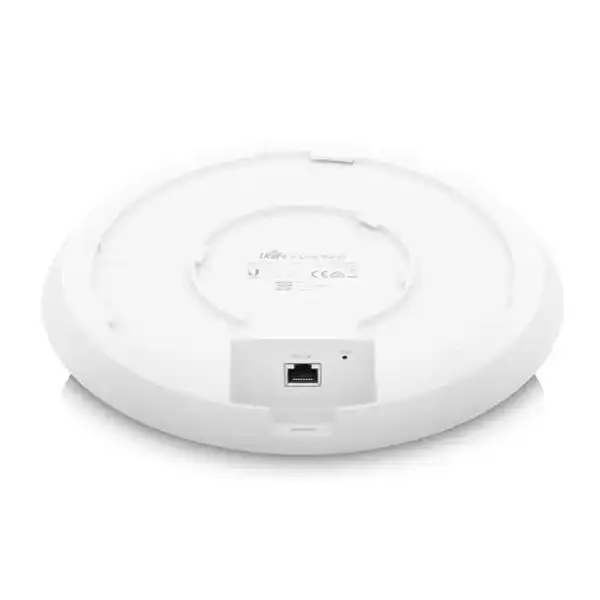
Ubiquiti U6 Enterprise (U6-Enterprise): Tri-band Wi-Fi 6E Access Point
Build a managed indoor wireless network with ten spatial streams, an Ethernet uplink up to 2.5 GbE and PoE+ operation. The Ubiquiti U6 Enterprise is designed for businesses and shared premises that need a thoughtful balance of client capacity, modern radios and network control.
For deployment in Tanzania, assess your floor plan, switching, devices and local 6 GHz conditions before treating theoretical specifications as guaranteed on-site results. FourTeck Tanzania can discuss network fit and an equipment quotation for the intended project.
Key technical specifications
| Wi-Fi hardware | Wi-Fi 6E, 2.4 / 5 / 6 GHz |
|---|---|
| Radio arrangement | 2×2 at 2.4 GHz; 4×4 at 5 GHz; 4×4 at 6 GHz |
| Spatial streams | 10 |
| Maximum PHY rate | 2.4 GHz 573.5 Mbps; 5 GHz 4.8 Gbps; 6 GHz 4.8 Gbps |
| Networking port | One 1/2.5 GbE RJ45 |
| Power requirement | PoE+; max power 22 W |
| Manufacturer coverage reference | 140 m² |
| Manufacturer client figure | 600+ |
| Mounting | Ceiling / wall |
| Management | UniFi Network |
These figures describe manufacturer-listed capabilities. Data rates are theoretical, and coverage, client capacity and 6 GHz availability depend on the installed environment and applicable rules.
A business access point, not an all-in-one router
The Ubiquiti U6 Enterprise is designed to create managed wireless coverage as part of a larger network. It is a relevant choice for facilities with multiple teams, shared workspaces, modern mobile devices, visitor access requirements or applications that are sensitive to congestion. It is particularly convenient when the organization already uses the UniFi management ecosystem. An access point provides the wireless connection into an existing wired network; it does not itself supply the internet subscription, replace the firewall or eliminate the need for switching.
A buyer should begin with the business task rather than the model name. An office may need predictable video meetings, an education centre may need dozens of active laptops at once, and a shared building may need staff and guest networks separated. Each situation calls for different decisions about number of access points, switch ports, user authentication, internet capacity and maintenance. A simple device substitution without studying those needs can preserve the same underlying problem despite faster hardware.
The U6 Enterprise is worth considering when its radio capacity, multi-gigabit uplink and management features match those requirements. For light workloads and mostly older devices, a less complex Wi-Fi 6 deployment may be entirely sufficient. For a new higher-performance build, compare the complete design with current Wi-Fi 7 alternatives as well. Product selection should follow a realistic coverage and capacity plan rather than a claim of universal superiority.
Tri-band Wi-Fi 6E and the device compatibility question
This model includes 2.4 GHz, 5 GHz and 6 GHz wireless radios. The familiar 2.4 GHz band serves many legacy and low-bandwidth devices and often reaches further through typical building obstacles, though it can be crowded. The 5 GHz band is important for current laptops, mobile phones and everyday business applications. The 6 GHz band adds spectrum for compatible Wi-Fi 6E equipment in operating regions where its use is supported and permitted. Together, the bands offer more planning options than a simple dual-band design.
An access point cannot turn an older client into a Wi-Fi 6E device. A laptop advertised as Wi-Fi 6 may only operate on 2.4 and 5 GHz, and many peripherals have much more limited capabilities. Build a sample client inventory: include staff laptops, visitors’ phones, scanners, printers, specialized handsets and building systems. Check radio bands, client-driver versions, supported authentication methods and any roaming sensitivities. This small preparation exercise is one of the best ways to avoid avoidable compatibility surprises.
The strongest client experience depends on sensible band and channel choices. Wider channels can offer higher theoretical link rates but may be unsuitable where airtime is congested or available channels are limited. More radios do not automatically mean every user has better service. The practical objective is to place each kind of device on a well-supported network, maintain usable signal where people work and keep the wired network capable of serving the resulting traffic.
Tanzania deployment: understand the 6 GHz limitation
The U6-Enterprise physically supports 6 GHz, but a hardware feature is not a statement of legal permission or regional software enablement. Tanzania’s communications regulator, TCRA, publishes spectrum plans, minimum technical requirements and equipment-approval processes. Applicable band ranges and operating conditions need to be confirmed against the current rules for the exact device and intended site. It is not appropriate to assume that a frequency range on a global manufacturer datasheet is available at full capability in Tanzania.
Ubiquiti separately maintains supported-region guidance for 6 GHz operation. The country configured on the UniFi system, product variant, current firmware, access-point eligibility and approved channels can affect the available configuration. Before buying primarily for 6 GHz, verify the manufacturer support position and any regulatory type-approval documentation required for the equipment. If these checks cannot be completed, design the baseline service using already verified capabilities and treat 6 GHz as conditional rather than a promised feature.
This distinction matters for tenders and technical specifications. Describing the unit as a Wi-Fi 6E access point is accurate; promising that every Tanzanian deployment can enable its 6 GHz radio is not. Document the difference in purchase requirements and acceptance criteria. Where the band is permitted and supported, add client compatibility and authentication tests before rollout. Never attempt to bypass regional settings or use unsupported radio configurations to obtain an advertised feature.
Ten spatial streams and realistic wireless rates
Ubiquiti lists ten spatial streams in total for this model: 2×2 operation on 2.4 GHz, 4×4 on 5 GHz and 4×4 on 6 GHz. Spatial streams are radio resources that can help a suitable access point handle modern traffic patterns. They do not represent ten dedicated channels for ten individual users, nor can a single ordinary client automatically combine them all. The number of spatial streams supported by the client remains a central part of its own possible connection speed.
The manufacturer lists up to 573.5 Mbps on the 2.4 GHz radio and up to 4.8 Gbps on each of the 5 GHz and 6 GHz radios under suitable channel-width conditions. These are theoretical maximum wireless data rates, not guaranteed application throughput or internet speeds. Wireless connections share airtime and incur protocol overhead; signal strength, interference, client capabilities and the wired backhaul can reduce observed results. Summing the three advertised radio rates is not a reasonable estimate for one person’s download speed.
Network planners should ask how many devices will transmit simultaneously and what they actually do. A room of mostly idle phones can impose less load than a smaller room of computers running interactive classes, backups or video calls. Measure the important workloads where possible, and size both the wireless side and upstream infrastructure for busy periods. This produces more useful expectations than relying on a single aggregate Gbps figure.
The role of the 2.5 GbE wired uplink
The unit includes one RJ45 port that supports 1 GbE and 2.5 GbE. The faster link can be valuable when multiple wireless clients access local servers or other substantial network resources at the same time. It also gives the wired side additional headroom relative to a strictly gigabit access point. The port’s headline speed is not an internet service guarantee and will not compensate for inadequate switching, an overloaded gateway or a small external bandwidth allocation.
Check the whole path between users and the services they need. If the U6 Enterprise is connected to a switch that negotiates only 1 GbE, its actual Ethernet link will not become 2.5 GbE simply because the radio hardware supports greater data rates. Improper terminations, a problematic cable run or an injector with unsuitable data interfaces can also cause unexpectedly low connection speeds. Verify the negotiated link after installation rather than assuming that the cable is operating as intended.
When multiple access points share a switch, review the available multi-gigabit ports and the switch uplink to the rest of the network. Also consider VLANs, gateway capacity and network traffic patterns. A balanced design may require changing a switch or improving cabling rather than buying a larger number of wireless devices. A clear bill of materials should show which infrastructure elements are included and which existing items are expected to remain.
PoE+ supply, power budget and continuity
The U6 Enterprise uses PoE+ power, with a stated maximum consumption of 22 watts. A compatible PoE+ switch port or injector supplies electrical power over the Ethernet cable, simplifying ceiling or wall deployment. The switch or injector still has to meet the device’s power requirements. A standard data-only switch port cannot power the access point, and the existence of a PoE label on an old switch does not automatically establish that it can deliver the required power class.
Review the total switch power budget, especially if the cabinet also powers telephones, cameras or additional access points. The sum of the maximum needs of connected equipment can exceed a switch’s shared budget even when every port appears suitable individually. If a separate injector is selected, verify its PoE+ compatibility, intended wiring arrangement and Ethernet negotiation capabilities. Account for safe cable routing and appropriate power protection in the installation plan.
In sites where short power interruptions would be costly, assess a suitable UPS for the network switch, internet gateway and related equipment. A UPS is a separate infrastructure decision, not a feature built into the access point. Also decide who will inspect alarms, restore service and maintain firmware after an outage. Wireless reliability is only as strong as the system supplying data and power to the ceiling device.
Coverage planning beyond the 140 m² figure
Ubiquiti gives 140 square metres as a coverage-area reference. That number is useful for initial orientation but should not be interpreted as a promise that one unit will cover every 140-square-metre building, or as a fixed radio radius. A large open room differs fundamentally from the same area divided by concrete walls, metal shelving, glass, service shafts or multiple floors. Neighboring wireless networks and the position of client devices can further change the usable service area.
Begin with a floor plan and identify the rooms in which dependable service is required. Ask where staff hold video meetings, where visitors gather, where operational devices connect and which enclosed rooms need priority. Document wall construction, ceiling access, mounting limitations and existing cable routes. A predictive coverage design is helpful, but a site survey and measured verification are valuable for irregular or demanding premises. An access point placed where cabling is convenient may not be where radio coverage is best.
Higher frequencies generally need more careful placement around obstacles. If a design relies on 6 GHz, a denser access-point layout may be appropriate compared with a network targeting broader lower-band coverage. More access points should still be coordinated to avoid needless interference. Select quantities according to both signal coverage and simultaneous traffic demand, then validate the result after mounting and configuring the equipment.
High-density capacity and the 600+ client rating
Ubiquiti identifies the U6 Enterprise as a device suitable for high-client-density settings and quotes a maximum client count above 600. This does not mean that 600 people can all run heavy video streams or file transfers at full performance at the same time. An associated smartphone may be idle for long periods, while an active laptop can consume substantial airtime. Capacity planning must therefore distinguish total associated devices, busy-hour active devices and the performance required by important applications.
Consider two very different sites. A conference venue may temporarily connect many personal devices, most using email and messaging. A training room may connect fewer machines that all download course material or join interactive sessions simultaneously. The latter may create the greater performance demand despite the smaller client count. For either site, estimate real traffic requirements, expected roaming behavior and the available internet or local-server capacity. Then determine whether one or several appropriately positioned units are needed.
Wireless congestion is only one possible cause of poor service. DHCP, DNS, authentication, gateway throughput, firewall rules and switching uplinks can all be stressed by a busy event. A successful design coordinates these components rather than treating the manufacturer client count as a complete network-size formula. When possible, test with realistic client activity before signing off a density-sensitive deployment.
Staff, guest and operational network separation
Business premises commonly need different levels of network access. Staff may require internal systems, guests may need internet-only access, and operational devices such as inventory terminals may need narrowly defined permissions. Ubiquiti lists UniFi capabilities including guest network isolation, client isolation, private pre-shared keys, dynamic RADIUS-assigned VLANs and captive portal options. These features can support separation policies when the surrounding network is configured to enforce them correctly.
First decide which users and devices should communicate with which systems. The wireless SSIDs, switch VLANs, DHCP scopes and gateway firewall rules must agree. Naming one SSID “Guest” does not make the entire network secure if its VLAN is incorrectly bridged into internal resources. Similarly, a captive portal is an onboarding mechanism and not a replacement for segmentation or a sound authentication policy. Verify the guest journey and administrative controls with real devices.
Where sensitive business services are involved, combine appropriate wireless authentication with least-privilege access, firmware management, administrator account controls and monitoring. Document each network role and its intended reachability. That way, technicians can extend coverage to additional rooms without accidentally exposing protected services or weakening a policy that users and operations rely upon.
WPA3 and older devices deserve specific testing
Six-gigahertz wireless operation introduces security requirements that may conflict with older client devices. Ubiquiti’s setup guidance discusses WPA3 and protected management frames, and explains that some legacy clients may not support the same modes as newer phones and laptops. This can be relevant for older scanners, printers, industrial handsets and specialist equipment. A client that fails to connect is not always reporting poor signal; it may have an authentication or driver compatibility problem.
Before changing a live network, identify devices that require WPA2 or unusual authentication behavior. Plan suitable networks for those devices on supported bands without needlessly weakening the configuration for modern clients. A separate SSID can be an appropriate solution when security policy and UniFi capabilities allow it. The exact settings should be tested against the software version and the client hardware rather than copied blindly from another installation.
Use staged migration. Configure representative test clients, check initial association, verify reconnects after sleep, and test application access and roaming. If a security-mode change prompts existing users to reconnect or re-enter credentials, communicate that requirement. These steps make the upgrade manageable for reception staff, classroom supervisors and other users who need connectivity during normal business hours.
Roaming and mobility across multiple access points
The U6 Enterprise supports wireless management features such as 802.11k, 802.11v and 802.11r according to Ubiquiti’s technical specification. These are relevant when clients move among access points in offices, corridors, campuses or shared facilities. They can assist a well-configured wireless environment, but client devices still make their own decisions about when to change access points. A listed roaming capability is not a guarantee of uninterrupted calls on every phone.
Good roaming depends on coverage overlap, channel selection, radio power, client drivers and the number and placement of access points. A facility with a single extremely powerful transmitter may have a weaker mobile experience than one with several sensibly sized coverage cells. Test the routes people actually use, such as walking between a meeting room and reception while on a voice call. Record where delays, drops or unexpected band choices occur.
Ubiquiti also supports wireless meshing, which can be helpful when wired connections are impractical. Nevertheless, a wired backhaul is usually the preferred starting point for predictable high-demand networks because wireless backhaul consumes radio resources and adds placement dependencies. Evaluate meshing deliberately rather than treating it as equivalent to installing a suitable Ethernet run in every case.
UniFi Network management and maintenance
This access point is managed using the UniFi Network application. Ubiquiti specifies a minimum supported software version in its product documentation, but organizations should also verify the current recommended version and their installed console or controller compatibility. If a site already operates UniFi hardware, administrators should review adoption, configuration backups and access permissions before adding new units. A smooth installation depends on network management as well as physical power and cabling.
Create clear names for access points and switch ports and associate them with the floor plan. Decide who may edit SSIDs, VLAN mappings, security settings and channel plans. Keep a record of firmware updates and important configuration changes, especially when a support technician may need to understand the history after a problem. A consistent baseline for administration, wireless profiles and network segmentation makes later expansion less error-prone.
Monitoring is most useful when paired with a response process. Decide how users report coverage issues, who investigates abnormal disconnections, and how updates are tested before broad deployment. When a network has several sites or departments, standardized settings can reduce avoidable differences. The U6 Enterprise can be a managed component of that environment, but the organization still needs operational ownership of the full network.
Physical installation, mounting and environment
The device measures approximately 220 millimetres across and 48 millimetres deep. Ubiquiti describes ceiling and wall mounting and lists a mount as included. Placement should balance radio coverage, cable reach, safety and ease of future maintenance. A central ceiling location can work well in an open office, but it may be unsuitable in a building divided by thick walls or where the busiest client area is far from the central position.
Design the cable route before fastening the unit. Provide appropriate structured cabling, a correctly terminated Ethernet link, useful labels and a record of the switch port. Verify PoE+ delivery and the actual data-link speed after installation. Protect the cable from inappropriate strain and make sure the mounting surface is suitable. Discuss any ceiling access restrictions or building work with the installer before the purchase scope is finalized.
Do not assume this model is weatherproof merely because the manufacturer’s operating-temperature range is broad. Outdoor exposure, condensation, rain and heavy dust call for equipment and installation methods intended for those conditions. Indoor location and environmental suitability should be verified as part of the site plan, along with local electrical and building safety practices.
Office and professional services example
Imagine an office with shared desks, enclosed meeting rooms, guest visitors and cloud-based collaboration tools. The buying objective is not simply a strong signal icon on every phone. Staff need usable performance during busy video meetings, visitors need separate access, and administrators need to diagnose problems without rebuilding the network from scratch. One or several U6 Enterprise units could be appropriate within a UniFi design if the site layout and client density justify them.
Start by counting active users and identifying where they work. Verify laptop radio capabilities, conference-room walls, available cable routes, existing switching and internet speeds. If the organization expects a benefit from 6 GHz, verify the regional and client prerequisites before including that benefit in the business case. Then choose a placement plan and authentication policy and specify which rooms require validation.
After installation, test conference calls, cloud tools, file access and guest connectivity from actual working positions. Record whether weak service follows a device, a room or the whole building. This approach directs future troubleshooting toward meaningful causes and makes the wireless investment easier to maintain as departments grow or layouts change.
Schools, training venues and digital learning
In learning environments, demand changes sharply between an empty classroom and a full session. Students may connect laptops simultaneously, open an online teaching platform or download the same material. The U6 Enterprise has high-density-oriented hardware, but the best design depends on how many devices are active and what applications they use. A manufacturer maximum-client figure does not substitute for measuring simultaneous demand in a teaching environment.
Differentiate staff, student and visitor needs. Staff may require administrative resources, students may have controlled access to education services, and visitors may use internet-only networks. Many institutions also operate older devices such as projectors, printers or specialized classroom equipment. Confirm that these devices can use the chosen bands and security modes before shifting everyone to a new SSID arrangement.
A training centre can benefit from a coordinated channel plan and enough access points to serve occupied rooms without excessive overlap. Ask about safe ceiling mounting, reliable Ethernet backhaul, appropriate PoE+ power and support responsibilities. A brief full-class test can reveal more about the design than a speed test run when no students are present.
Hospitality and busy guest environments
Hotels, shared offices and visitor venues combine unpredictable devices and variable occupancy. A reception area may have many short connections while a conference room can experience heavy simultaneous demand. Guest Wi-Fi needs to be usable and isolated appropriately from internal operations. The U6 Enterprise includes captive portal and guest-network features that can contribute to this design, provided the gateway, switch and other components support the intended policy.
A venue should consider its arrival patterns, room layout and the amount of internet bandwidth shared among guests. One access point on a corridor ceiling may not provide adequate service behind multiple concrete walls. Likewise, a large conference needs capacity planning rather than a single device selected purely from a maximum-client specification. Include onboarding tests for representative phones and laptops, and ensure legacy devices are not unexpectedly rejected by the security settings.
Operational success also requires someone to manage guest access and respond when a portal, authentication service or internet link fails. Define reasonable bandwidth policies, protect internal networks and consider backup power for critical upstream devices. The equipment choice should support a guest experience that can be operated consistently, not simply an impressive radio specification.
Retail, stock handling and business-critical equipment
A retail environment may use wireless stock scanners, staff terminals, laptops and guest phones at the same time. These devices do not have equal requirements. A scanner sending small transactions may depend heavily on reliable roaming, while a modern laptop may consume more bandwidth. Some operational hardware is limited to 2.4 GHz or older security mechanisms. The U6 Enterprise can participate in a structured wireless design, but each application should be matched to a compatible network.
Identify which processes cannot tolerate an extended interruption. Consider payment operations, inventory management and access to point-of-sale back-end services. Where a fixed device is especially important, assess whether a wired connection is more appropriate. If wireless is necessary, test at the device’s real location, including areas with metal racks and other difficult propagation conditions. Separating operational and guest traffic can reduce unnecessary exposure.
Plan for the rest of the infrastructure as well: the gateway, switch, PoE+ capacity, internet service and suitable backup power. If one element fails, a functioning access point cannot maintain services that depend on it. A project-specific risk review helps an organization decide where additional resilience is worth the expense.
How to compare Wi-Fi 6, 6E and Wi-Fi 7
Wi-Fi 6 can be a good option for environments dominated by 2.4 and 5 GHz clients. Wi-Fi 6E extends the Wi-Fi 6 family into the 6 GHz band where regulations and software support permit. Wi-Fi 7 introduces newer capabilities and may be worth considering in certain fresh installations. The newest generation is not automatically the best purchase if the real clients, switching and use cases cannot benefit from its differentiating features.
When comparing access points, examine radio configuration, spatial streams, uplink speed, PoE requirements, management integration, physical coverage needs and total cost of implementation. A Wi-Fi 7 model may require a different switching or power plan; an inexpensive Wi-Fi 6 model may be enough when 6 GHz cannot be used. The U6 Enterprise is compelling when its particular combination of ten streams, a 2.5 GbE uplink and tri-band capability matches the verified requirement.
Prepare a comparison at the network level rather than simply contrasting unit prices. Include required access-point count, switch ports, cable work, controller compatibility, security choices and deployment effort. If a site cannot currently enable 6 GHz, exclude any expected 6 GHz benefit from the immediate performance assumptions. This is a clearer basis for a financially responsible procurement decision.
A Tanzania procurement and site-readiness checklist
Before requesting a quotation, describe the premises and the operational goal. Provide a floor plan or approximate room dimensions, estimated active devices, important applications, current network equipment and any difficult materials such as concrete partitions or dense shelving. State whether there is already a UniFi console, the number of spare switch ports and whether the available switches provide PoE+. These facts help distinguish a simple product purchase from an infrastructure project.
Confirm the exact model and any required accessories. Check PoE+ power delivery, Ethernet port speeds, cable condition, management compatibility and planned mounting positions. Where 6 GHz is central to the project, confirm TCRA requirements, exact device approvals if needed and current Ubiquiti regional support. A regulatory assumption should not appear as a guaranteed function in a technical proposal. Also inventory older devices that may need a carefully planned separate SSID.
Ask the seller to make commercial terms explicit: exact product variant, current selling price, stock status, delivery terms, applicable warranty and any installation or support services. These items cannot be inferred from a global technical datasheet. A clear quotation should list what the buyer receives and what work or infrastructure remains the customer’s responsibility.
Installation testing and acceptance criteria
After installation, verify that the access point powers up reliably, appears in UniFi Network and negotiates the expected Ethernet data rate. Confirm that each SSID is attached to the right network and that the gateway, VLAN configuration and firewall rules deliver the intended access. Test staff and guest clients separately. An access point can broadcast correctly while the network behind it assigns the wrong address or blocks an important business application.
Test actual rooms and walking routes rather than only standing beneath the unit. Use representative laptops and mobile phones to evaluate coverage, authentication and application behavior. For busy environments, repeat selected tests when many users are present. If a service appears slow, compare wired and wireless behavior and identify whether the issue affects one device, one room or the whole network.
Record the final access-point locations, switch-port connections, firmware baseline and channel plan. Define what successful service means before the installer leaves: usable coverage in agreed areas, correct segregation and acceptable behavior for specified applications. This record provides a baseline for future expansion and helps avoid treating a temporary test result as a long-term guarantee.
Troubleshooting without guessing
A slow wireless network does not automatically mean a faulty access point. Check the client’s Wi-Fi generation, association band, signal level and nearby interference. Then inspect wired link negotiation, switching, internet access and local services. A 1 GbE upstream link, an overloaded gateway or a limited external connection can constrain user experience even when the radio itself is working well. Compare multiple devices and locations before changing global settings.
If users cannot find 6 GHz, check client compatibility, current firmware, security configuration, regulatory country and manufacturer-supported regions. Do not respond by applying an unsupported country profile. If older devices fail authentication, inspect WPA support and whether a suitable legacy network is appropriate. If users disconnect during movement, review coverage overlap, transmit power, roaming behavior and driver support instead of enabling every mobility feature at once.
If the device restarts or disappears from management, inspect the PoE+ supply, cable path, switch event logs and network reachability. Document one change at a time and retest the same problem scenario. Consistent records make technical support much more efficient and reduce the chance that a transient improvement is confused with a permanent solution.
Lifetime cost and a better buying decision
The full project cost includes more than the access point’s unit price. Depending on the site, a correct design may require multi-gigabit PoE+ switching, structured cabling, secure configuration, installation work, a UPS, client updates and continuing administration. In other cases, existing infrastructure may be suitable with only targeted adjustments. The key is to understand those dependencies before equipment is purchased rather than discovering them during installation.
Network owners should also plan who will manage administrator accounts, configuration backups, software updates and future user complaints. A deployment with clear documentation is easier to support than one whose physical cabling and wireless settings are known only to the original installer. That operational value is part of the return on a business networking investment, even though it does not appear in a wireless data-rate specification.
Choose the U6 Enterprise when the expected benefits are grounded in the site’s requirements. Do not assume a particular local price, warranty, stock position or delivery time without a current offer. Ask FourTeck Tanzania to clarify the hardware, necessary infrastructure and proposed work in a project-specific quotation so that the final purchase supports measurable needs.
Frequently asked questions
Is this a router?
No. The U6 Enterprise is a wireless access point used with suitable wired networking equipment. It does not provide a complete gateway, internet subscription or network switch. Check what additional components the intended site already owns.
Does it have a 6 GHz radio?
Yes. The hardware is Wi-Fi 6E capable and includes 6 GHz. Actual use requires compatible clients, supported configuration, current manufacturer regional support and compliance with applicable Tanzanian rules. Confirm these before relying on 6 GHz.
Can old laptops and phones connect?
Many older devices can use supported 2.4 GHz or 5 GHz SSIDs, subject to their authentication capabilities. They cannot acquire 6 GHz support through the access point alone. Test older printers and specialized equipment before changing production security settings.
Is the 600+ client rating guaranteed performance?
No. It is a manufacturer maximum-client specification, not a guarantee that all users can transfer data at high speed simultaneously. Busy-hour traffic, radio airtime, upstream connectivity and device behavior determine actual capacity.
What is the Ethernet connection speed?
It has one RJ45 port supporting 1 or 2.5 GbE. To use the multi-gigabit rate, the connected network equipment and cabling must support it. A slower link will not gain speed merely because the access point supports 2.5 GbE.
How is it powered?
It uses PoE+ with a listed maximum device consumption of 22 watts. A compatible PoE+ switch port or injector is needed. Check the overall switch power budget when multiple devices share the same switch.
Does one unit cover 140 m² everywhere?
No. The manufacturer figure is a planning reference. Walls, interference, number of floors, client capability and required performance can all change coverage. Use a site survey to decide the number and placement of units.
Can it be used outdoors?
Treat the model as an indoor access point. A wide operating-temperature range does not prove weather resistance. For exposed locations, specify equipment suitable for the environment and comply with any applicable operating restrictions.
Can it support guest Wi-Fi?
It provides UniFi features relevant to guest access and isolation. Secure deployment also requires proper network segmentation, switch configuration and firewall rules. A guest SSID name alone does not guarantee isolation from internal business systems.
Does Wi-Fi 6E require new client devices?
Existing compatible Wi-Fi clients may still use 2.4 or 5 GHz, but a benefit from 6 GHz requires 6E-capable or otherwise eligible client hardware, suitable security and permitted regional operation. Check the actual inventory first.
What network software is used?
The device is managed through UniFi Network. Check the manufacturer’s current compatibility guidance and the site’s installed controller or console version before procurement, especially when adding it to an existing UniFi environment.
What should I send to request a quote?
Provide the floor plan, estimated user and device count, existing gateway and switching details, cabling information, priority applications and whether 6 GHz is essential. Ask for confirmation of exact variant, price, accessories and any services.
Is a Tanzanian radio approval guaranteed?
No approval is implied merely by a global product specification. Verify current TCRA rules and any type-approval evidence applicable to the exact equipment. Also confirm Ubiquiti’s supported-region and software requirements.
Will an upgrade solve slow internet?
Only if the wireless layer is the limiting factor. Slow external bandwidth, poor cabling, an overloaded router or old client hardware can remain problems. Establish the bottleneck before deciding which equipment to replace.
Discuss your U6 Enterprise requirements with FourTeck Tanzania
The next step is to match the U6 Enterprise’s radio capability, PoE+ power and 2.5 GbE interface to your building, client devices and existing network equipment. Confirm relevant Tanzania spectrum and equipment conditions, and request a clear specification of compatible switching, cabling and other necessary project elements. This ensures the intended outcome is practical rather than a theoretical performance claim.
Contact FourTeck Tanzania with the site type, approximate floor plan, estimated active devices and priority applications. Request the exact product variant, current commercial terms and the scope of any proposed installation or support services. A useful quotation should state assumptions, accessories and responsibilities clearly before any purchase decision.
Request a project-specific U6-Enterprise quotation.




Reviews
There are no reviews yet.