
UniFi wireless networking | Tanzania
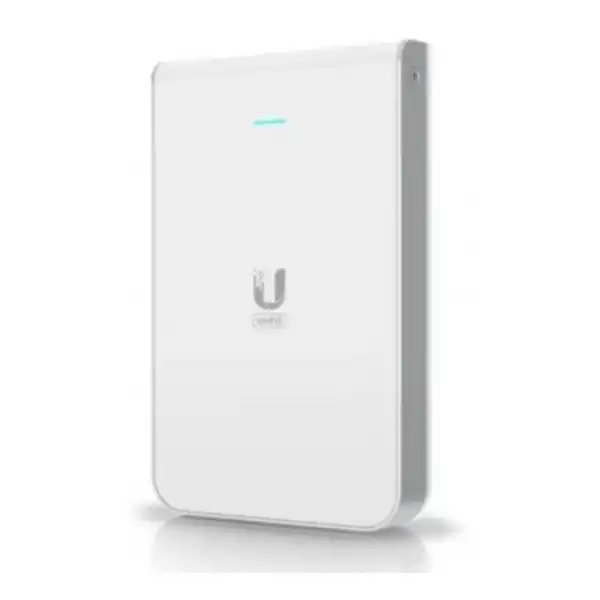
Ubiquiti U6 In-Wall U6-IW Wi-Fi 6 Access Point
The Ubiquiti U6 In-Wall U6-IW is a compact Wi-Fi 6 access point for rooms where you need both wireless coverage and convenient wired Ethernet connections. It combines a dual-band radio with a built-in four-port Gigabit switch, making it especially relevant to guest rooms, private offices, serviced apartments and similar spaces. One port can provide PoE output when the unit receives the required PoE+ input. Select this model for its physical layout and network integration, not for an unrealistic promise of maximum internet speed.
Buyer guidance: confirm Ethernet cabling, PoE power and wall placement before requesting an exact-model quotation.
Key features at a glance
Wi-Fi
Dual-band Wi-Fi 6: 2.4 GHz and 5 GHz
Wired ports
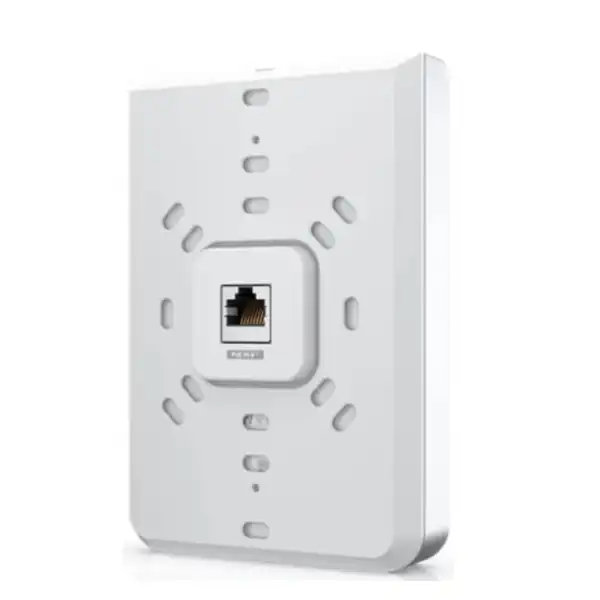
Four Gigabit Ethernet LAN outputs
Power
PoE input; PoE+ needed for PoE output
Best-fit location
Wall-mounted, room-focused deployment
Verified technical snapshot
| Wireless standard | Wi-Fi 6 (802.11ax), backward-compatible bands |
|---|---|
| Radios | 2.4 GHz (2×2) and 5 GHz (4×4) |
| Spatial streams | 6 total |
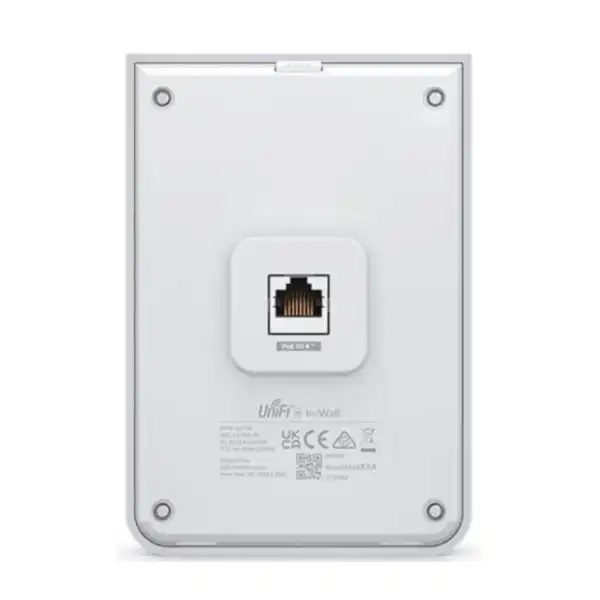
| Data-in interface | 1 × Gigabit Ethernet RJ45 |
| Data-out interfaces | 4 × Gigabit Ethernet RJ45 |
| PoE functionality | PoE input; 1 output conditional on PoE+ input |
| Advertised peak radio rates | 573.5 Mbps at 2.4 GHz; 4.8 Gbps at 5 GHz |
| Physical size | Approximately 139.7 × 96 × 31.2 mm |
| Management | UniFi Network; check controller and firmware compatibility |
Radio figures are theoretical link rates, not guaranteed internet download speeds. Power requirements and supported functions must be checked for the intended configuration.
What the U6 In-Wall does
The Ubiquiti U6 In-Wall U6-IW brings wireless access and several wired network connections together at a wall location. It is designed for a room or defined local area where Ethernet cabling already reaches a suitable wall point. Instead of installing a separate access point and an additional small desktop switch, a network designer can use one managed device to serve phones, laptops and other wireless clients while also connecting nearby wired equipment. That combination is particularly valuable when visible cables, crowded power sockets and floor-standing network accessories are undesirable.
This is an access point, not a complete internet service or a replacement for every router. An upstream network, functioning Ethernet cabling and suitable power are needed. UniFi Network provides the preferred central management environment, while a supported standalone setup may be an option for simpler requirements with reduced capabilities. Customers evaluating the model should first confirm the cabling and PoE available at the proposed installation point, then assess radio placement, number of wired endpoints and ongoing management needs.
At-a-glance technical facts
The U6-IW uses dual-band Wi-Fi 6 on 2.4 GHz and 5 GHz, with six spatial streams across those radios: 2 by 2 operation at 2.4 GHz and 4 by 4 at 5 GHz. It features one Gigabit Ethernet data-in uplink and four Gigabit Ethernet data-out ports. One of the data-out ports can also supply PoE to a compatible device when the access point is powered from appropriate PoE+ input. There is no 6 GHz radio, so customers requiring the 6 GHz band should consider another class of access point.
The manufacturer’s published maximum radio link rates are up to 573.5 Mbps on 2.4 GHz and 4.8 Gbps on 5 GHz under specified conditions and channel widths. These numbers are theoretical wireless link figures, not promised download speeds or aggregate wired throughput. The wired uplink is Gigabit Ethernet. Ubiquiti’s current specifications also list wall mounting, a compact enclosure approximately 139.7 by 96 by 31.2 mm and administration through UniFi Network. The actual result depends heavily on installation and client behavior.
A good fit for room-by-room coverage
The most natural application is a room that needs dependable local Wi-Fi and one or more wired network sockets. Examples include guest accommodation, serviced apartments, small meeting rooms, private offices, study rooms and individual workspaces. When each room has its own Ethernet run, an in-wall access point can reduce dependence on a single distant corridor device. It can also make wired connections readily available for equipment that benefits from a physical cable, such as a desk computer or television.
A larger building may use many access points, but the count should follow a site design rather than a simple devices-per-floor formula. Floors, doors, dense walls, furniture, metal cabinets and neighboring access points can all change the coverage pattern. A U6-IW may serve a room very well yet be the wrong tool for a long hall, a high-ceiling warehouse or an outdoor courtyard. Plan for real spaces and actual users, not only the coverage-area number shown in a specification table.
When to choose a different access point
An in-wall design is not universally superior to a ceiling-mounted or conventional wall-mounted radio. If the Ethernet termination is hidden behind furniture, close to the floor or on a wall facing away from users, a ceiling location may produce a more useful signal pattern. Similarly, a broad open-plan office might be easier to cover with fewer strategically placed ceiling access points. A building with no available wired feed at the target wall will need cabling work or a different approach.
Consider alternatives when you specifically require 6 GHz wireless, a multigigabit uplink, an outdoor-rated enclosure or dedicated wireless coverage across very large open spaces. The U6-IW’s strengths are its compact room-level placement and built-in LAN ports. Buying it solely because a theoretical Wi-Fi data rate appears high can lead to disappointment when the wired bottleneck, neighboring networks, client radios or placement determine the real experience. Match the form factor to the floor plan before deciding.
Understanding the two wireless bands
The 2.4 GHz band generally offers useful reach and compatibility with older or simpler clients, but it often has fewer practical non-overlapping channels and more competing traffic. The 5 GHz band can support higher link rates for capable devices, although its signal is usually more sensitive to walls and distance. The U6-IW provides both bands, allowing network administrators to select practical SSID, security and channel arrangements for mixed devices. A Wi-Fi 6 phone may benefit from improved efficiency, while an older laptop can still connect using a supported earlier standard.
The six spatial streams describe radio capability, not six dedicated internet channels for individual guests. Most smartphones and laptops have fewer streams than the access point, so one device does not automatically use the access point’s maximum link rate. The benefits become more meaningful when multiple compatible clients share the wireless environment. Modern Wi-Fi scheduling features can help manage traffic efficiently, but congestion, limited airtime and weak signals still require sensible radio design.
What the advertised speeds really mean
The headline 4.8 Gbps figure applies to the 5 GHz radio’s maximum theoretical physical layer rate with suitable clients and channel configuration. It does not mean that a laptop will download at 4.8 Gbps or that four wired computers each receive that amount of bandwidth. Protocol overhead, radio conditions and client hardware reduce the transfer rate, and the access point has a single Gigabit Ethernet uplink to the wider LAN. Local Wi-Fi conversations and total internet throughput are different measures, so compare like with like.
For internet access, first verify the upstream ISP service, gateway capacity, switch, cabling and any bandwidth limits. If a room has a 100 Mbps internet plan, installing a faster access point will not turn that plan into gigabit service. If the surrounding network is fast but Wi-Fi remains slow, check client signal strength, negotiated channel width, interference and airtime utilization. Buyer expectations should be based on real tests in the intended room rather than adding advertised figures from both radios.
Four wired Gigabit Ethernet ports
The built-in four-port Gigabit switch is a major distinction of the U6 In-Wall. A desk phone, wired desktop, television, printer or other compatible Ethernet endpoint can connect locally without introducing a separate unmanaged switch at the desk. This helps reduce visible patch leads and electrical accessories in rooms where equipment is concentrated near the wall. Each output port is a network connection, while the rear-facing input connects back to the upstream network and supplies the access point’s power.
Remember that the four ports do not create four independent uplinks to the core network. Traffic heading beyond the access point shares the single Gigabit data-in link and whatever upstream bandwidth is available. Before installation, identify which connected equipment needs network access only and which might also need power. Labeling room cables and maintaining a simple port plan makes support easier, especially in a property with many similar rooms or when different devices require distinct network policies.
PoE input: an essential buying check
Power over Ethernet, or PoE, allows the U6-IW to receive electrical power through its network cable rather than through a separate power cord. The manufacturer lists PoE as a supported method for operating the access point, and PoE+ as necessary when its PoE output function will be used. Before purchasing, identify the upstream switch model and its per-port and total PoE budget. A port marked only as a regular Ethernet port will not power the access point without suitable power-sourcing equipment.
A compatible injector can be considered where the upstream switch does not provide the required power, but the chosen injector and supply still need to match the intended configuration. For PoE pass-through, do not assume that any basic injector will be sufficient. The cable route, connectors and switch budget must accommodate the demand. This is one of the most important details to confirm before ordering a batch for a hotel, office or apartment installation, because power mismatches can delay otherwise straightforward deployments.
PoE output and downstream devices
One of the four wired output ports supports PoE output under the required PoE+ input condition. That can simplify a room when a suitable low-power connected device needs both data and electricity over one cable. However, the output should not be treated as an unlimited power source. The downstream device must be compatible with the provided PoE mode, and the upstream power budget must cover both the access point and the connected load. Check the exact power requirement of the attached hardware.
For a room with an IP phone, camera or another powered Ethernet endpoint, start with the device’s required PoE standard and wattage. Confirm whether it can be supplied by this port instead of assuming that any PoE-marked device will work. If the proposed downstream hardware needs more power, use a suitable separately powered PoE switch or other approved architecture. Also remember that PoE availability is distinct from data connectivity: the remaining LAN ports can provide wired network access without necessarily supplying power.
Mounting location and cable preparation
The U6-IW is designed for wall installation and is supplied with mounting hardware as described by Ubiquiti. Before drilling or ordering installation accessories, confirm the relevant wall box, cable entry and surface conditions at the site. A clean-looking final installation depends on proper mounting support and a sound Ethernet termination. Inspect cables for damage, confirm the required pinout and test connectivity between the wall point and network cabinet before attaching the device.
Place the access point where users will actually connect, not simply where a wall plate happens to be easiest to reach. Avoid hiding it behind large metal objects, permanently closed cupboards, thick furniture or crowded audiovisual cabinets when possible. Consider people moving within the room, furniture layouts and access for future servicing. In a property with repeated room designs, a pilot installation in representative rooms is more informative than assuming identical performance across every wall and floor.
How wall construction changes coverage
Building materials have a substantial influence on wireless coverage. Reinforced concrete, masonry, metal fittings, mirrors and certain glazing systems can weaken signals or create unusual reflections. A signal that reaches an adjacent room in one building may be poor through a similar-looking wall in another. Ceiling height, door position, room furnishings and the device’s orientation also affect results. A published square-metre coverage figure is therefore best treated as a general planning reference rather than a guaranteed service radius.
For a hotel or multi-unit apartment building, measure signal in the actual rooms using representative phones and laptops. Check at desks, beds, meeting tables and other places where people spend time. Look for both weak-signal areas and excessive overlap that may increase contention. A room-by-room plan provides better guidance than counting access points from floor area alone. When coverage is difficult, relocating one access point or adding another carefully placed unit may be more effective than simply raising transmit power.
Hospitality deployment considerations
Guest accommodation is a strong use case because the same room may need a wireless connection for visitors, a wired television and another Ethernet-powered device. In this setting, the U6-IW’s combination of local Wi-Fi and wired ports can simplify the physical layout. A suitable design might provide a consistent guest SSID across rooms while separating guest traffic from building management systems and staff devices. Actual policy enforcement depends on the whole network, including switches, gateway rules and management configuration.
Do not size a hospitality network only by the number of occupied rooms. Consider the likely number of guest devices, video streaming activity, common areas, conference spaces and peak evening traffic. A guest may arrive with a phone, laptop, tablet and streaming device, while another room remains unused. Plan backhaul, gateway capacity, internet service and maintenance practices accordingly. Test captive portal behavior, room-to-room isolation and reliable reconnection with real guest devices before opening the deployment to users.
Small office and consulting-room deployment
A private office can benefit from a tidy, wall-mounted access point near the workspace, particularly where wired network access is needed for a computer or desk phone. The U6-IW can serve wireless devices and supply connections for nearby equipment while remaining manageable within a wider UniFi installation. For meeting rooms, the wired ports can be useful where presentation equipment or conferencing hardware performs better on cable than over a busy shared wireless network.
Business users should separate convenience from capacity planning. Several people on calls, backups or cloud applications may create competing traffic that requires appropriate internet bandwidth and traffic policies. Sensitive workstations, guest devices and building equipment may require network isolation. Review meeting-room furniture layouts so the device is not screened by televisions or cabinets. If the workplace has a broad open layout, compare a ceiling AP arrangement rather than automatically installing an in-wall unit at every desk.
Apartments, homes and mixed-use buildings
In an apartment, the U6-IW can make sense where structured Ethernet already reaches a living area, study or bedroom. It offers a convenient way to connect a fixed television or computer while providing wireless service to mobile devices nearby. In a mixed-use building, separately planned residential, administrative and guest networks can be coordinated through the network infrastructure. The access point’s practical value increases when its wired connections are actually needed, rather than treating those ports as unused extras.
Assess the site before assuming one device can cover an entire residence. Thick internal walls, multiple floors and long room shapes may still require more than one access point. A modem or router near an entrance may already provide enough coverage for a small flat; in that situation, a separate U6-IW may not be necessary. Conversely, a room behind several concrete walls may benefit strongly from a dedicated wired access point. The most economical design uses the right number of devices in useful locations.
UniFi Network management
The product is part of Ubiquiti’s UniFi family, and the central management experience is a major reason to select it for a multiple-room installation. UniFi Network can help administrators view devices, configure wireless settings, identify connected clients and manage compatible network features from a common interface. The current manufacturer specification identifies UniFi Network version 6.0.45 and later as the minimum application requirement for this model. For new installations, verify the software and firmware compatibility of the actual controller environment.
UniFi Network may be provided through an appropriate UniFi console or a supported self-hosted arrangement. A small standalone installation may be possible under Ubiquiti’s supported AP setup options, but standalone operation does not provide the full experience of a centrally managed site. If the property already uses UniFi switches or gateways, plan how the new access point joins that environment. Management design should cover configuration backups, administrator access, firmware maintenance and a process for replacing a failed room device.
Planning the adoption process
Start by checking that the network is operational and that the switch port supplies the intended power. Connect the U6-IW using the designated incoming Ethernet port, then confirm it starts normally. Make sure the UniFi Network application is ready and accessible to an authorized administrator. New devices typically need to be discovered and adopted into the intended site before they can receive centrally managed configuration. Availability of discovery can depend on network topology, VLANs, routing and local security controls.
Once adopted, assign a clear device name that maps to the physical location, such as a floor and room identifier. Apply the intended wireless networks and appropriate updates, then test a wired client and a wireless client. Check whether any downstream PoE device actually powers up if that function is in use. Record the cabling endpoint, switch port and device placement for the maintenance team. For multi-room projects, establish and validate this repeatable process with a pilot before deploying it building-wide.
Wireless network names and guest access
A well-designed deployment does not require a unique network name in every room. Many properties use common SSIDs so devices can connect as people move through the building, while access point names identify individual locations to administrators. Whether a common SSID is right depends on access control, roaming needs and the network plan. Guest access can be separated from staff connectivity, and Ubiquiti lists guest-network features and hotspot capabilities in the UniFi platform. These features must be configured deliberately.
Consider the guest experience from connection to disconnection. A guest network should be easy to identify, avoid unnecessary friction and prevent inappropriate access to other tenants or internal business systems. Where authentication portals or vouchers are used, test them against phones and laptops before relying on them operationally. Also provide a clear process for changing access credentials and handling support requests. A product’s support for guest features is not itself proof that those controls are enabled in a delivered installation.
VLANs and wired-port security
VLANs can help group traffic logically on a shared physical infrastructure. For example, staff equipment, visitor wireless devices and managed room equipment may be assigned different networks when supported by the upstream switching, gateway and site policies. The U6-IW supports relevant UniFi networking features, but segregation is an end-to-end task. An incorrectly configured switch trunk or permissive gateway rule can undermine the intended boundary even if a wireless SSID appears to be assigned correctly.
Plan each wired output port as carefully as each SSID. A guest may plug a laptop into an accessible socket, so the effective port policy should match who can reach the port. Do not assume that the default settings of every switch and access point deliver a secure multi-tenant network. Agree on traffic boundaries, device management permissions and internet access rules in advance. Finally, verify isolation with practical tests between the networks; configuration screenshots alone are not a substitute for validation.
Radio channels and practical tuning
Wireless performance is influenced by neighboring networks as much as by the specification of the access point. In dense buildings, several U6-IW units may hear one another, alongside networks from adjacent premises. A planned channel arrangement helps avoid unnecessary overlap and contention. Ubiquiti’s general optimization guidance recommends 20 MHz for 2.4 GHz in many environments and frequently suggests 80 MHz for 5 GHz, but the final choice should reflect local congestion and the client’s real capabilities.
Wider channels can increase peak radio link rates but may be less practical when spectrum is busy. A 160 MHz setting should not be selected simply to reproduce an advertised maximum in a specification sheet. It may be better to have several stable cells with moderate channel widths than a few unstable cells chasing maximum PHY speed. Measure retries, signal strength and user experience, then adjust transmission power and channel choices together. Account for locally permitted channels and device settings during configuration.
Roaming between rooms and corridors
People carrying phones or laptops may move between a private room, corridor and shared meeting space. Consistent SSID and security settings can support a smoother experience across multiple access points, and UniFi exposes advanced roaming-related features for suitable managed deployments. However, client devices influence when they leave one AP and join another. No access point can force every phone to roam at precisely the ideal moment, and roaming behavior may differ between handset models.
For a building with many U6-IW units, avoid configuring excessive transmit power merely to make each room’s signal appear stronger in a single test. An overly strong distant signal can cause devices to remain associated with a less useful AP. Use site measurements and test movement with representative devices, including active video or voice calls where relevant. If roaming quality is critical, plan the whole UniFi network and verify features under the actual client mix rather than assuming one radio setting solves every transition.
Security and access management
The U6-IW participates in a network that can use modern wireless security choices, including WPA2 and WPA3 options supported by the platform and client devices. Choosing an encryption mode requires attention to older hardware, employee authentication needs and any guest onboarding workflow. A secure installation also protects UniFi administrator accounts and minimizes unnecessary access to management interfaces. Device firmware, controller software, passwords and network policy all matter more than a security label on the product box.
For business environments, define who can edit SSIDs, change VLAN assignments and view network information. Restrict privileged access, maintain a recoverable configuration backup and document any settings that differ from the site standard. Some guest devices will need a deliberately compatible security mode; do not silently weaken all business wireless security to accommodate one outdated endpoint. Separate such endpoints appropriately and keep policies under review. The access point is an important part of network security, but it is not a firewall by itself.
Reliability, electricity and maintenance
A room-level wireless design is only as reliable as the supporting infrastructure. Stable power for the upstream PoE switch, healthy Ethernet cables, a working gateway and sufficient internet connectivity are basic requirements. Where outages matter operationally, consider suitable backup power for network cabinets and other critical infrastructure. The access point itself cannot keep providing internet service if the upstream router, switch or internet connection is offline. Maintenance plans should reflect that dependency.
Document the location of the power source and the physical switch port for every installed unit. If a room reports repeated disconnections, check the switch logs, negotiated Ethernet link speed, PoE events and other clients before replacing the access point. Use a managed update schedule that allows testing on a representative device. Keep spare units and replacement procedures aligned with the property’s own support needs, without assuming a particular warranty duration or replacement time. These operational basics often matter more than selecting the highest headline radio speed.
Tanzania-specific planning considerations
For deployment in Tanzania, start with the property and network requirements rather than assumptions about nationwide stock or local service availability. Review the building’s Ethernet infrastructure, available PoE switches, typical room layouts, internet service characteristics and who will provide support after installation. Where the site experiences power interruptions, upstream backup-power planning is important. For a business serving guests or employees, the quality of the internal Wi-Fi does not eliminate the need for reliable external connectivity.
Radio configuration and product sourcing should follow the applicable local requirements for the equipment and installation. Do not infer Tanzanian type approval from certificates published for another market. Likewise, pricing, import arrangements, availability, warranty terms, delivery and technical service should be confirmed for the actual quote rather than copied from an overseas product listing. Ask for an exact model confirmation, a compatible PoE design and an itemized installation scope. Those questions are more useful than an unverified local price displayed without context.
Comparing in-wall and ceiling-mounted designs
An in-wall access point offers a natural location for room Ethernet termination and makes several local wired connections available. A ceiling access point is often easier to position centrally above users in an open area and may avoid obstruction by furniture. Neither approach is universally more modern or faster. Their effectiveness depends on how the radio pattern, mounting position and cabling fit the building. Choose the U6-IW when the convenience of room-level wired ports and wall installation solves a genuine deployment need.
When comparing total costs, consider more than the purchase price of each AP. Include structured cabling, wall or ceiling works, mounting hardware, required PoE supply, switches, installation time, testing and future maintenance. An in-wall device can reduce the number of small local switches in rooms, but it may also increase the number of APs needed compared with carefully placed ceiling units. A simple floor-plan exercise and pilot can reveal which design makes better operational and financial sense for the site.
Wi-Fi 6 today and future upgrade paths
Wi-Fi 6 remains useful for many mixed-device rooms because it supports contemporary clients while retaining backward compatibility with earlier Wi-Fi generations. The U6-IW can be a sensible component in a network where room-level Ethernet is already the standard. However, it is not a Wi-Fi 6E or Wi-Fi 7 product and does not provide a 6 GHz radio. It also does not have a multigigabit Ethernet uplink. A buyer who needs those capabilities should evaluate a different model before building a long-term standard around this device.
Future planning should consider how easily the building can accommodate a different access point later. Good-quality cable, labeled switch ports, adequate PoE budgets and sensible mounting locations provide flexibility beyond this particular model. Avoid selecting equipment purely for the newest standard if the property’s typical devices, internet service and applications would gain little from it. At the same time, do not overlook uplink or band limitations where high-density training rooms or future high-throughput workloads are part of the brief.
Troubleshooting common symptoms
If the access point does not start, inspect the cable, switch port and PoE source first. If it powers on but is not available for adoption, check the controller, network discovery path, VLAN settings and routing. If Wi-Fi works but wired clients do not, test the output port, endpoint cable, DHCP service and intended network policy. For PoE output faults, confirm that the access point receives suitable PoE+ input and that the downstream device’s requirement is compatible with the available budget.
If users report weak coverage, measure their signal where the problem occurs and inspect furniture and wall obstructions. If the signal is strong but traffic is slow, check upstream internet performance, link negotiation, channel congestion, client capabilities and policy limits. If only older devices fail to connect, review security and compatibility settings rather than reducing protection for every user. Keep a short incident record so recurring problems can be distinguished from isolated device issues. A structured sequence prevents unnecessary hardware swaps.
What to include in a purchasing request
For a useful quote, specify the exact product model U6-IW, the number of rooms, which rooms already have Ethernet outlets and how many local wired devices each room needs. State whether any attached device requires power through the U6-IW’s supported PoE output port. Share the make and model of the upstream PoE switch if known, together with current network equipment and the intended UniFi Network management arrangement. A floor plan or photos of representative wall points can help an installer assess positioning.
Ask the supplier to identify any power injectors, switch upgrades, mounting accessories, patch leads or installation services that are necessary but not included in the product itself. Request separate confirmation of quoted price, tax treatment, stock, lead time, warranty handling and commissioning responsibilities for Tanzania. For larger projects, consider a pilot room and an agreed acceptance checklist. A well-specified request reduces the chance of buying suitable radios but overlooking the cabling, configuration or support needed to make them useful.
Installation acceptance checklist
A finished installation should be evaluated against practical outcomes. Confirm each U6-IW is correctly mounted, properly powered, adopted into the intended network and clearly labeled. Test the wired output ports that will actually be used, including any agreed PoE-powered endpoint. Check that client devices receive the appropriate addressing and can reach the services they are authorized to use. Confirm that guest and staff network separation behaves as designed, not merely that two SSIDs appear on a phone.
Record wireless test results from representative positions within each room type, and investigate persistent weak spots before treating the project as complete. Include typical devices, high-usage periods when feasible and movement between coverage zones where roaming matters. Verify that the responsible administrator has appropriate credentials and that configuration recovery has been planned. Collect the final device and switch-port inventory. These steps convert a simple hardware purchase into a usable, maintainable wireless network that someone can support confidently.
How to assess the whole solution cost
The unit price alone is not an adequate basis for comparing a room Wi-Fi design. The total includes the access points, network switch capacity, available PoE budget, cable testing, cabling changes, mounting, management platform and commissioning. It may also include specialist planning or troubleshooting where walls, interference and user density are difficult. Conversely, using the U6-IW’s built-in four-port switch can sometimes avoid separate room switches and their power supplies. Evaluate that benefit against the added access point count and maintenance workload.
For ongoing expenses, consider administrator time, network monitoring, firmware management, internet capacity and power resilience. The lowest initial hardware quote can become costly if the system lacks accurate documentation or reliable support. Ask for an itemized quotation describing the delivered outcome, assumptions and exclusions. In Tanzania, confirm local commercial terms directly for the proposed installation; no local price, stock claim, service promise or regulatory status should be inferred from a generic international specification sheet.
A practical decision summary
Choose the Ubiquiti U6 In-Wall U6-IW if a wall Ethernet connection is available, the primary coverage requirement is a nearby room or defined space, and several wired endpoints would benefit from a compact integrated switch. Verify that the selected upstream port can provide appropriate PoE, especially if the downstream PoE feature is planned. Confirm that the organization’s management preferences fit UniFi Network and that the chosen wireless security and network segmentation can be implemented throughout the infrastructure.
Choose another form factor or generation if a central ceiling position is clearly better, if the intended location has poor radio conditions, or if 6 GHz, outdoor protection or a faster-than-Gigabit uplink is essential. For multi-room properties, the strongest purchasing decision comes from a surveyed floor plan, a realistic power and switching design and a working pilot installation. Request an exact-model quotation and installation specification based on these facts rather than relying on a single peak-speed figure.
U6-IW frequently asked questions
Is the U6-IW a router or a wireless access point?
It is primarily a Wi-Fi 6 access point with an integrated four-port Gigabit switch. It adds wireless and local wired connectivity to an existing network. A suitable router or gateway still handles upstream functions such as internet routing, and other network services must be available as required by the design. Treating it as a direct replacement for an ISP modem or a complete office gateway would be incorrect.
Can it run from a normal Ethernet switch without PoE?
A conventional data-only switch port does not supply the electricity required by the device. The access point needs a suitable PoE source, which may be a compatible PoE switch port or appropriate injector arrangement. Confirm power compatibility before purchase. If you also plan to power another Ethernet device from its output, the incoming power requirement increases to the PoE+ condition specified by Ubiquiti.
How many LAN ports does this access point provide?
The device has four Gigabit Ethernet data-out ports in addition to one incoming Gigabit Ethernet connection. The four outputs allow nearby compatible equipment to use wired connections. They do not mean the unit has four independent upstream links or four separate internet subscriptions. Devices connected through those ports share the access point’s overall upstream path to the rest of the network.
Does every Ethernet output deliver PoE?
No. The manufacturer identifies one supported PoE output among the four Gigabit Ethernet output ports. Its availability depends on suitable PoE+ input and sufficient power budget. Other ports should not be assumed to power connected devices. Check the downstream device’s PoE type and consumption, and obtain an appropriate design if several powered endpoints are needed in the same room.
Can this model provide 6 GHz Wi-Fi?
No. The U6-IW is a dual-band Wi-Fi 6 access point for 2.4 GHz and 5 GHz operation. Wi-Fi 6 is not the same as Wi-Fi 6E, which introduced use of the 6 GHz band where permitted, and it is not Wi-Fi 7. If a 6 GHz radio is an explicit requirement, select an appropriately specified alternative model.
Will I get 4.8 Gbps internet speed from the U6-IW?
No such speed can be promised. The 4.8 Gbps number is the maximum advertised 5 GHz physical-layer radio rate under specific conditions, not a measured user download rate. The unit’s uplink is Gigabit Ethernet, and real transfer speeds depend on the client, channel conditions, network configuration, uplink load and internet connection. Test actual application performance rather than comparing internet plans with radio PHY figures.
Does one unit cover an entire apartment or hotel floor?
It may serve a room or nearby area well, but an entire apartment or floor cannot be guaranteed without a layout review. Reinforced walls, multiple floors, doors, cabinets, neighboring radio networks and the placement of the device all matter. A hotel commonly needs room-by-room planning and sometimes separate common-area coverage. Use a survey or pilot installation before determining how many units are required.
Is UniFi Network management required?
UniFi Network is the recommended environment for centrally managing access points and is central to features used in larger deployments. Ubiquiti also documents supported standalone access-point operation for simpler situations, with meaningful feature limitations. For a building requiring coordinated SSIDs, roaming, monitoring and network policies, plan a proper UniFi Network installation and check controller compatibility before deployment.
Will the U6-IW work with older Wi-Fi devices?
Ubiquiti lists compatibility with older Wi-Fi standards alongside Wi-Fi 6. That supports many mixed environments, but an individual device must still support the configured band, encryption and authentication settings. Older devices may fail with a restrictive security mode or incompatible radio setting even when the AP supports their Wi-Fi generation. Test critical legacy equipment during commissioning.
Can guests and staff be kept on separate networks?
The UniFi platform provides features that can support different SSIDs and network policies, including guest-related controls. Effective separation depends on configuring all relevant access points, switches, gateways, VLANs and access rules correctly. Merely displaying two Wi-Fi names does not guarantee isolation. Confirm the intended security boundary through practical connectivity tests before the installation is placed into production.
Can it be mounted outdoors or in an exposed courtyard?
The U6-IW is intended as a compact wall-mounted access point for appropriate indoor-type installations. Do not assume that its operating temperature figures mean it has protection from rain, dust or water ingress. For an exposed location, choose equipment with an explicitly suitable environmental rating and mounting arrangement. Check the physical environment and local installation requirements before selecting any wireless hardware.
What should buyers in Tanzania confirm before ordering?
Confirm the exact U6-IW model, the required quantity, compatible PoE supply, room cabling and UniFi management arrangement. Ask for a verified Tanzania quotation stating price, availability, commercial terms and any included accessories or setup services. If the project is a larger building, request a pilot or survey. Local regulatory status, warranty handling and delivery arrangements should be confirmed by the relevant supplier or authority rather than assumed from overseas information.
Request an exact-model U6-IW quotation
Share your room count, wiring layout, upstream PoE equipment and intended wired devices to receive a properly scoped specification. Confirm the Tanzania price, stock status, commercial terms and any installation or configuration services directly as part of the quotation process.
Next step: ask FourTeck Tanzania to confirm model U6-IW and a compatible network power and deployment plan.




Reviews
There are no reviews yet.