
UniFi wireless networking • Tanzania buyer guide
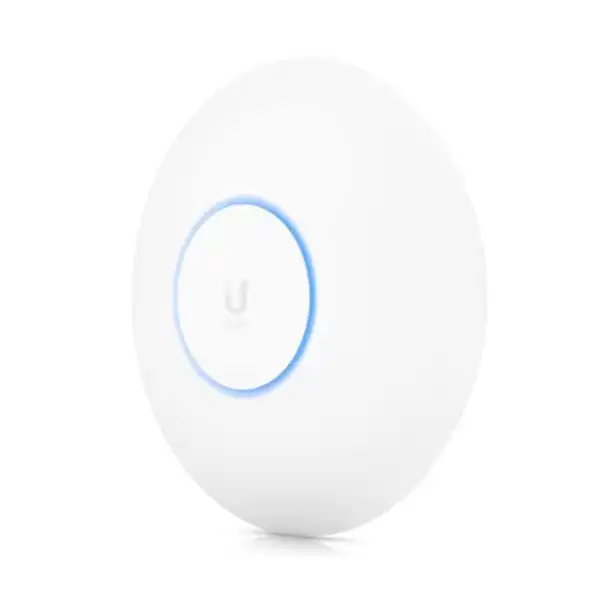
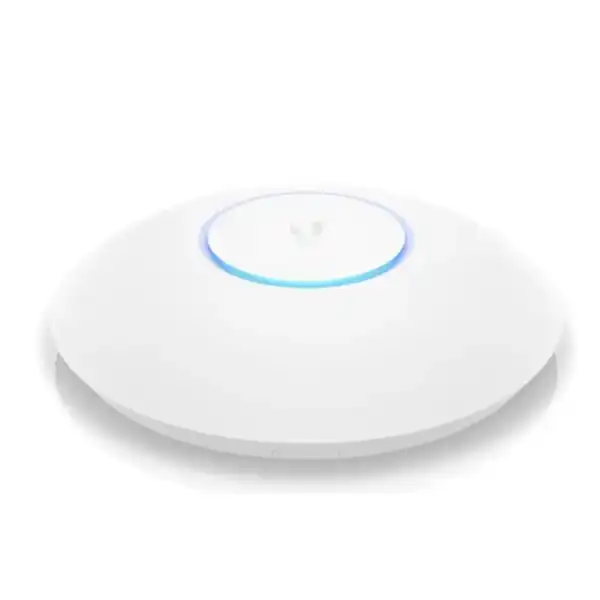
Ubiquiti U6 Pro (U6-Pro) WiFi 6 Access Point
The Ubiquiti U6 Pro is a dual-band WiFi 6 access point for organizations that want centrally managed business wireless coverage rather than a basic all-in-one router. For a Tanzania installation, assess the building layout, simultaneous users, Ethernet cabling, PoE power and security policy before deciding how many access points to buy. This page explains verified specifications, practical fit and the questions worth asking before requesting a quotation.
6 spatial streams
4×4 MIMO on 5 GHz
1 GbE uplink
13 W maximum power
Quick purchase summary
Best fit
Managed WiFi 6 for offices, training spaces, reception areas and multi-AP networks.
Key advantage
4×4 5 GHz MU-MIMO, a centrally managed UniFi workflow and flexible wall/ceiling mounting.
Plan around
GbE wired limit, dual-band 2.4/5 GHz operation, PoE supply, real building conditions.
Before ordering
Confirm survey scope, exact model, power source, required accessories and current local terms.
What this access point is designed to solve
A small office can have a fast internet subscription and still suffer from slow calls, unstable meeting connections, and weak reception in busy rooms. The bottleneck is often the local wireless design rather than the internet plan alone. The UniFi U6 Pro addresses the access-point part of that problem with dual-band WiFi 6, six spatial streams, and centrally managed radio settings. It is intended for businesses and other sites that want a dedicated ceiling- or wall-mounted wireless access point rather than relying on the basic WiFi built into a single router. Its 5 GHz radio uses 4 x 4 multi-user MIMO and its 2.4 GHz radio uses 2 x 2, giving a useful mix of capacity and reach for compatible devices.
For a buyer in Tanzania, the first decision is not simply whether the equipment is fast. Ask how many spaces need coverage, how many people use them at the same time, what the walls and ceilings are made of, and whether Ethernet cabling can reach suitable mounting locations. A well-positioned access point connected to a properly designed network can be more valuable than a high specification installed in the wrong corner. The U6 Pro is a practical candidate for offices, training rooms, guest areas, and multi-room sites, subject to a site-specific survey. Request a specification-based quotation and confirm required accessories before ordering.
At-a-glance product specifications
The figures below describe the access point itself, not a promise of internet speed or performance at every seat. Ubiquiti currently lists approximately 140 square metres of typical coverage and a maximum client count of 250 or more for the model. Those are planning indicators, not a guarantee that every connected device can transmit demanding traffic at once. The source also lists six spatial streams, a single Gigabit Ethernet uplink, PoE power, 13 W maximum power consumption, and an IP54 ingress-protection rating. Capacity and usable area will change with building materials, channel interference, radio configuration, client devices, and the applications running on the network.
The maximum listed radio data rates are 4.8 Gbps on 5 GHz using a 160 MHz channel and 573.5 Mbps on 2.4 GHz using a 40 MHz channel. These are radio link specifications rather than application throughput figures. The combined headline number is not an achievable single-user internet speed: client radios have their own limits, wireless airtime is shared, and this access point sends wired traffic through a one-gigabit Ethernet port. When evaluating the U6 Pro for a real deployment, compare anticipated traffic patterns, client capabilities, and switching capacity instead of choosing solely by an advertised aggregate rate.
| Specification | U6 Pro manufacturer listing |
|---|---|
| Model | U6-Pro |
| WiFi standard | WiFi 6, dual-band 2.4/5 GHz |
| Spatial streams | 6 total |
| 5 GHz radio | 4 × 4 MU-MIMO; up to 4.8 Gbps PHY rate at 160 MHz |
| 2.4 GHz radio | 2 × 2; up to 573.5 Mbps PHY rate at 40 MHz |
| Wired interface | 1 × GbE RJ45 |
| Power | PoE, 13 W maximum consumption |
| Indicative coverage | 140 m², site dependent |
| Listed maximum clients | 250+, not a concurrent application throughput guarantee |
| Mounting | Ceiling or wall; Pro mount included |
| Ingress protection | IP54 |
| Dimensions | Diameter 197 × 35 mm |
| Management | UniFi Network (current specs list version 6.0.45+) |
Who should shortlist the U6 Pro
An office with several rooms and a mixture of laptops, smartphones, and printers may need separate access points on each floor or in distinct work zones. The U6 Pro is well suited to the role of a centrally managed wireless node where desks, reception areas, and meeting rooms require consistent connectivity. A school or training centre may benefit from its ability to manage several wireless networks and to tune radios according to a timetable and room layout. Hospitality venues can use UniFi guest features to separate visitor access from staff systems, provided that the upstream gateway and switching configuration enforce the intended separation.
The same model may also make sense for a large residence with existing Ethernet cabling, a clinic with approved guest access, or a small campus with more than one access point. It is less appropriate when the requirement is a self-contained mobile router, a long-distance point-to-point bridge, or a device that must provide 6 GHz connectivity. It is not a substitute for an internet service, firewall, router, or power-backup system. If internet connectivity is unreliable or the switching infrastructure is undersized, installing a new access point will not remove those underlying limitations. Start with the workload and network design, then select the equipment.
How dual-band WiFi 6 helps in practice
WiFi 6, also called 802.11ax, is designed to use shared wireless airtime more efficiently when compatible clients and appropriate radio settings are present. In a busy workplace, that matters because numerous devices contend for service at the same time. The U6 Pro operates in the 2.4 GHz and 5 GHz bands. Two-point-four gigahertz can be useful for compatible older equipment and some longer-reach connections, but its limited channels and common interference sources may make it crowded. Five gigahertz normally provides more channel choices and greater potential throughput when the client is close enough to maintain a strong signal.
The six-stream architecture does not mean that a single handset receives six simultaneous streams or the sum of both radios' rated speeds. Most client devices have fewer antennas, and real capacity is divided among them. The practical benefit is flexible service for multiple clients under suitable conditions. For video meetings, internet-based applications, cloud storage, and point-of-sale systems, stability and latency usually matter at least as much as peak speed. A wireless plan should therefore set measurable objectives such as acceptable signal strength in key rooms, good roaming behaviour, and adequate bandwidth during the busiest operating period.
The 5 GHz 4 x 4 radio and channel-width choices
The U6 Pro's 5 GHz radio supports 4 x 4 downlink and uplink MU-MIMO and channel widths up to 160 MHz. A wide channel can produce impressive negotiated rates with compatible clients in clean spectrum, but occupying more spectrum also reduces the number of independent channels available to nearby access points. In a complex office, using the widest possible channel everywhere can increase overlap and reduce real-world consistency. For that reason, channel planning should reflect the number of access points, neighbouring networks, device mix, and expected peak activity rather than simply using the largest supported setting.
Ubiquiti's wireless guidance discusses 80 MHz as a common option for less congested environments and narrower settings for denser deployments. These are starting points, not universal prescriptions. A technical installer should measure radio conditions before and after deployment, check which client devices support the chosen channel width, and consider locally permitted frequency use. Where rooms are separated by thick walls or many users occupy the same area, adding a properly located wired access point may deliver a better experience than increasing transmit power. Stronger power can make an AP audible without improving the weaker return signal from a phone.
What the advertised coverage area does and does not mean
Ubiquiti's stated 140 square metre coverage figure is a useful initial reference. It cannot accurately tell a buyer how many access points will cover a building without knowing its floor plan, construction, ceiling height, interference, and expected client density. A large open room differs from an area of the same size divided by reinforced walls, metal shelving, glazed partitions, or several separate floors. Signal that appears adequate for browsing may be insufficient for a voice call while walking through a corridor. For this reason, do not multiply the brochure coverage figure by the desired building area and assume that the result is the final equipment quantity.
A reliable survey starts by identifying critical spaces and applications. Draw where users actually sit or move, list high-demand rooms, mark network cabinets and cable routes, and test the environment if possible. Plan overlapping cells for roaming without making every access point transmit at maximum power. If expansion is expected, design spare switch capacity and cable routes early. After installation, check signal quality in corners and on stairs, confirm that clients associate to the intended access points, and review performance at busy times. Treat the coverage figure as a discussion starter, not a contractual range guarantee.
Capacity planning for users and devices
A published maximum client count is not the same as a promise that hundreds of users can all stream high-definition video or join a meeting simultaneously. The current Ubiquiti specification shows 250+ maximum clients for the U6 Pro, while some older distributor sheets and reseller listings quote different larger figures. For buying decisions, the current manufacturer listing is the more defensible reference, and application capacity must still be assessed independently. A few high-traffic workstations or a room full of live video calls can consume more airtime than a large number of mostly idle phones. Connected-device counts alone do not explain the likely load.
Estimate how many devices are actively transferring data in the busiest fifteen minutes, what each application needs, and whether traffic must cross the local network or travel to the internet. Consider guests separately from staff and any equipment such as handheld scanners, phones, or security devices. Critical applications may benefit from network prioritization and a careful division between wired and wireless devices. Add an access point where high concentrations of users demand extra radio capacity; do not assume that one unit should serve an entire venue just because the maximum count is high. This is particularly important for event rooms and training sessions with synchronized activity.
Ethernet uplink: why one Gigabit port matters
The access point has one Gigabit Ethernet RJ45 port. This cable provides the wired connection to the network and can carry power when connected to a compatible PoE source. The one-gigabit port is a real design consideration: the wireless radios can advertise physical data rates above one gigabit, but traffic heading from wireless clients toward the LAN or internet shares this single wired uplink. A benchmark between two wireless clients or a PHY-rate display should not be interpreted as an unlimited external network path. The usable transfer rate also depends on protocol overhead, switching, client radios, and network conditions.
For an office with ordinary SaaS applications, browsing, shared documents, and business calls, the uplink may be entirely suitable when the network is designed sensibly. High-throughput local workloads such as many simultaneous large file transfers may justify assessing an access point with a multigigabit uplink or another placement strategy. Confirm the connected switch port negotiates at Gigabit speed; a damaged cable or unsuitable termination can force a slower connection and make the wireless system appear to be at fault. Include structured cabling quality in the project plan rather than treating it as a separate afterthought.
Power over Ethernet and the 13 W power budget
PoE simplifies installation by sending power and network traffic over the same Ethernet cable. Ubiquiti lists PoE as the U6 Pro power method, a supported device voltage range of 44–57 V DC, and 13 W maximum power consumption. The installer must verify that the intended PoE switch port or suitable adapter is compatible with this exact access point and that the switch has sufficient total power budget for all connected equipment. The maximum consumption figure is important because a multi-access-point network also needs allowance for other PoE devices, switch limits, and a sensible operational margin. An Ethernet port without PoE does not power the device.
Do not assume an existing adapter is correct merely because its connector fits. Check the product documentation, switch specifications, actual output voltage, and any included-accessory details on the exact purchase quotation. Many network projects benefit from a PoE switch in a protected cabinet supplied by backup power, but the correct configuration depends on local site conditions. If staff depend on online calling or payment systems, think through power continuity for the modem, router, switch, access points, and upstream connection together. Protecting only the access point will not keep the service available when the rest of the path goes offline.
Mounting, physical design and environmental limits
The U6 Pro is a compact circular access point, approximately 197 mm across and 35 mm deep. Ubiquiti lists ceiling and wall mounting, with a Pro mount included in the current specification. The enclosure has an IP54 rating, but that should not be treated as proof that any exposed outdoor installation is appropriate. A site subject to direct rain, prolonged weather exposure, extreme dust, or unusual heat needs an environmental review and possibly a different purpose-built access point. The product's operating temperature specification alone does not remove the need for safe cabling, suitable mounting surfaces, and protection of connected equipment.
A central ceiling position is often useful, but actual antenna patterns, room shape, and infrastructure constraints can change the best choice. Avoid hiding the unit inside a metal cabinet, placing it immediately beside powerful electrical equipment, or routing cable where it can be crushed or damaged. Consider service access before fixing it high above a reception desk or suspended ceiling. Label the cable, confirm a secure mount, and document the location in the UniFi management system. A neat installation should also allow technicians to identify the unit, inspect its connection, and replace it without disturbing critical services.
UniFi Network management and adoption
The U6 Pro belongs to the UniFi ecosystem and is managed through the UniFi Network application. Ubiquiti's current product technical page lists UniFi Network version 6.0.45 or later as an application requirement, though the administrator should choose a current supported version and verify compatibility for the actual deployment. Management may be hosted on a suitable UniFi console or another supported UniFi Network installation. The access point itself does not automatically replace the organization's firewall, routing service, or switch. Plan how administrators will adopt devices, apply firmware updates, back up configuration, and recover management access if the primary console is unavailable.
Central management is especially valuable when deploying multiple units. An administrator can view connected clients, configure wireless networks, monitor radio conditions, and coordinate changes from one interface instead of visiting each ceiling-mounted unit. That convenience also introduces responsibility for administrator credentials, update procedures, and documented access. Use restricted accounts for day-to-day support where possible, maintain a record of approved settings, and ensure the network continues to serve business applications if management connectivity is briefly unavailable. Before handover, demonstrate who owns the UniFi application and who can troubleshoot a failed adoption or accidental configuration change.
Security, guest WiFi and network segmentation
WiFi security is more than setting a strong password. The U6 Pro supports security and management features within UniFi, including WPA-family security options, multiple BSSIDs per radio, and support for VLAN-related configurations. A practical business design separates employee access from visitors and, when necessary, from sensitive equipment. The physical access point broadcasts the wireless service, but the intended separation also relies on correct switch, gateway, and firewall policies. A guest SSID is not a complete security boundary if it can still reach internal systems through misconfigured upstream networking.
Start by defining who needs access to what. Employees may require authenticated access to approved internal services, visitors normally need internet access only, and connected devices such as printers may need limited communication paths. Apply supported encryption consistently with client capabilities and organization policy, and avoid retaining obsolete security modes without a documented reason. If a captive portal is used, explain to visitors how to connect and keep collection of personal details proportionate to the business need. Review client isolation, DNS policy, firmware maintenance, and account security before go-live. Security settings should be tested with actual devices, because older equipment may require special handling or a carefully isolated network.
Roaming, band steering and multiple access points
An office extending across rooms or floors will often work better with several coordinated wired access points than with one powerful transmitter. The U6 Pro includes UniFi features associated with band steering and common roaming protocols. Those features can help compatible clients choose an appropriate access point and radio, but the client device still influences association and roaming behaviour. Smooth movement between coverage cells depends on sensible overlap, channel choice, security configuration, and the client's own implementation. It is not a guaranteed property of owning two identical access points.
In deployment, begin with a coverage and capacity plan rather than mounting units at equal geometric intervals. A staircase, busy corridor, reception desk, and meeting area can have different requirements. Tune transmit power to avoid excessive overlap and check whether a moving user can maintain a call in the areas that matter. Some older scanners or connected devices behave poorly with particular roaming optimizations; test them before enabling optional features site-wide. When a user reports that WiFi becomes slow after walking into another room, review the client connection history and signal readings rather than assuming more transmit power is the solution.
Wired backhaul versus wireless mesh
Ubiquiti lists wireless meshing as a supported feature of the U6 Pro. Meshing can be useful where running a dedicated Ethernet uplink to every wireless position is impractical. However, a wireless backhaul shares radio resources that would otherwise be available for clients, and each additional hop introduces more possibilities for interference or reduced capacity. For a busy office or a training environment with time-sensitive traffic, wired uplinks generally make capacity and troubleshooting more predictable. The availability of mesh should therefore be regarded as a deployment option, not a reason to omit network cabling wherever it can be provided safely.
If a mesh link is necessary, plan strong signal between the parent and downstream access points, minimize the number of hops, and verify that all connected devices are powered appropriately. Measure the performance from the farthest client rather than only testing next to the primary wired device. A warehouse corner, detached room, or temporary workspace may have a different acceptable tradeoff from the core office. Also document which AP is acting as a wireless parent and what happens if that link fails. During future expansion, revisit mesh assumptions: adding users to a formerly quiet zone can turn an adequate wireless backhaul into the primary performance bottleneck.
Practical office and professional-service scenario
Consider a business with reception, several offices, shared meeting rooms, and a mix of employee laptops and visitor phones. The obvious temptation is to mount one large access point near the network cabinet. A better plan starts by marking the rooms where calls, customer consultations, and cloud tools must work without interruption. Place the U6 Pro where its antenna coverage can serve those work areas, and consider additional units if walls or people density require them. Use a compatible PoE switch, reliable cabling, and a gateway that can enforce employee and guest access policies.
Then separate the office wireless networks according to actual users. Staff may need access to printers and internal applications; guests should not be able to browse office endpoints. Monitor the busy meeting-room period, not only an empty office on installation day. If the business uses voice over WiFi, walk the common routes during a live test call and look for interruptions at doorways. Keep the exact number and placement of access points open until a survey confirms the plan. The product can support a professional network design, but success comes from the entire wired and wireless system working together.
Training rooms, classrooms and shared spaces
A training room often has a predictable surge in activity: attendees open laptops at the same time, download course files, authenticate to an online platform, or stream demonstrations. This pattern is more demanding than an idle device count suggests. The U6 Pro can be assessed for such spaces because its 5 GHz radio provides four spatial streams and UniFi offers centralized monitoring and configuration. Yet a room full of active clients may still need more than one access point, especially when neighbouring rooms are equally busy. Capacity should be assessed through the application mix, available channels, uplink load, and the performance target for each participant.
Start by estimating simultaneous sessions during the busiest lesson, not simply total enrollment. Ask whether content will come from the internet, a local server, or a mixture of both. Confirm how users authenticate and whether student devices must communicate with each other. Where assessment systems or live examinations are involved, plan resilience and performance testing as part of the overall IT policy; no single wireless product can guarantee assessment continuity. For regular events, record a baseline after installation so that staff can detect when interference, a new neighbour network, or a changed application is degrading service.
Hospitality and visitor-access scenario
Guest areas have different priorities from back-office networks. Visitors expect straightforward connection, acceptable reception, and predictable browsing, while staff systems may have access to sensitive administrative tools. The U6 Pro offers UniFi hotspot features such as guest-network isolation and support for captive portal configurations. Those options are useful building blocks for a hotel, waiting area, serviced office, or customer lounge, but they require an appropriate upstream gateway and a considered access policy. A portal can also create friction if every returning visitor must repeat a lengthy process; choose settings that match the venue's needs and applicable privacy obligations.
Design around the real footprint of the premises. A lobby with open space is not equivalent to a corridor lined with guest rooms, and an outdoor seating zone may need a different access point. Inspect the building layout, choose appropriate wired locations, and avoid promising universal room coverage from a single unit. Separate front-desk devices and operational systems from guests through verified network policies. Consider how support staff will respond when a visitor cannot connect or when a portal is unreachable. Clear signage, documented credentials, and a tested fallback process can improve the experience more than an additional headline throughput claim.
High-value questions for a Tanzania deployment
When planning wireless networking in Tanzania, the purchasing discussion should cover more than the access point's list of features. Ask the project team to verify power quality, an appropriate UPS strategy where needed, available structured cabling, safe mounting locations, cabinet ventilation, and the network's internet connection. Confirm which equipment is part of the proposed quotation and which work, such as cabling, switch configuration, or site surveying, would be separate. A device might be compatible with the network design while the current modem, gateway, or switch is not sized for the intended number of users.
Regulatory requirements and permitted radio settings should be reviewed for the deployment location and device variant; a generic international specification should not be treated as a local approval certificate. Do not rely on a foreign online price to estimate what a local supply and installation project will cost. Before purchase, ask for the exact model, accessory list, intended mounting method, maintenance responsibilities, and the process for confirming local availability. No stock level, Tanzania shilling price, delivery period, local certification, or installation service is claimed here because those details require verification for the particular offer. A careful quotation gives the buyer a realistic scope rather than an attractive but incomplete hardware-only number.
What to verify before you order
A useful quotation should identify the U6 Pro model clearly and include the number of access points proposed for each area. It should state whether compatible PoE switching or adapters, cable runs, mounting materials, network configuration, and testing are included. If the network already uses UniFi, confirm that its management version and existing configuration can accommodate the new device. If the project uses equipment from several vendors, verify VLAN handling and switching capabilities instead of assuming every component behaves identically. Clarify what will be configured, who will administer the system, and what documentation the customer will receive at handover.
Also specify a practical acceptance test. Useful checks include a stable Gigabit Ethernet negotiation, successful adoption in UniFi Network, correct staff and guest access rules, adequate signal in critical locations, and acceptable performance under a realistic number of active clients. Ask how firmware and administrator access will be maintained after commissioning. If the business requires WiFi 6E or WiFi 7 features, six-gigahertz operation, multigigabit uplinks, a dedicated outdoor enclosure, or special environmental protection, describe that requirement before selecting this model. That conversation can prevent a mismatch that is expensive to correct after cabling and mounting are complete.
Common mistakes that make a good access point perform poorly
A common error is treating the U6 Pro as a universal replacement for a weak internet connection. If upstream capacity is limited or the router is overloaded, a stronger wireless link will not fix the underlying bottleneck. A second mistake is positioning the access point purely for appearance or convenience, such as above a metal cabinet or behind a dense obstruction. Another is creating an excessive number of overlapping access points without channel planning. More radios can increase contention if they all occupy the same frequencies or transmit too strongly for the space.
Other preventable problems include using a switch with an insufficient power budget, overlooking damaged Ethernet cabling, placing all important systems on a flat guest-accessible network, and testing only when the building is empty. An installer should review client capabilities before selecting very wide channels; older devices cannot use every WiFi 6 capability. With multiple units, verify that roaming settings do not disadvantage specialized hardware. Finally, maintain configuration and admin credentials so that simple changes do not require a factory reset. Most of these issues are installation and operational choices, which is why good network design matters as much as the access point model.
Choosing between U6 Pro and a newer access point
The U6 Pro remains a relevant WiFi 6 option for a project that primarily needs 2.4 GHz and 5 GHz service with a Gigabit wired uplink. Its 4 x 4 radio on 5 GHz is an important design feature, but it does not offer a 6 GHz radio or a multigigabit Ethernet port. If a project has new 6 GHz-capable devices, demands WiFi 7 functionality, or expects very high sustained LAN throughput, compare newer UniFi options against those requirements. The appropriate choice depends on the client fleet, spectrum conditions, wiring, budget, and how long the system should serve future workloads.
Do not assume that the newest standard automatically provides better results in every building. A carefully surveyed and correctly configured WiFi 6 network can outperform a poorly placed newer access point in common daily tasks. Conversely, buying a WiFi 6 device for a deployment explicitly planned around 6 GHz would be the wrong fit. Compare radio capabilities, uplink speed, PoE requirements, supported features, and total installation scope model by model using current manufacturer specifications. For an existing UniFi site, also check controller compatibility and whether network-wide settings need adjustment. Treat the decision as a network upgrade plan rather than a contest between marketing labels.
Installation and commissioning sequence
Begin with a walk-through or floor-plan review. Record user counts, especially busy-period demand, rooms with critical applications, existing access-point positions, and possible Ethernet routes. Next, determine candidate mounting positions and calculate the required PoE budget. Confirm that existing switches, gateways, and cabling can support the additional load. Then install the access point securely and adopt it to the intended UniFi Network environment. Configure wireless names, authentication, VLAN mapping, channel width, transmit power, and guest access according to a documented design rather than accepting every default without review.
Once the network is live, validate it in the places where people work. Check cabling and Gigabit link status, measure signal in the rooms that matter, test both radio bands with representative clients, and make calls or application transactions that resemble ordinary use. Verify isolation by attempting to reach protected services from a guest connection. For sites with several access points, test movement between cells and review radio overlap. Keep a short record of configuration, firmware version, final mounting location, and known environmental limitations. The aim is not simply to show that an access point powers on, but to establish a useful performance baseline for future support.
How to judge results after deployment
The best evidence of a successful installation is not a single speed-test screenshot. Measure whether users can complete their actual tasks during the expected peak period. For an office, that may mean a stable video call while cloud applications and document sharing continue. For a training centre, it may mean simultaneous access to the teaching platform during a full class. For guest networking, it may mean consistent onboarding and isolation from the business network. Track client signal, retransmissions where available, channel utilization, and Ethernet link state to explain variations rather than assuming that a higher advertised data rate is always better.
When problems occur, distinguish whether the failure is local WiFi, the wired LAN, DNS, the gateway, or internet service. Compare wireless and wired tests from the same network segment, then test a second client to rule out device-specific behaviour. Check if the client has moved to a distant access point, if radio interference increased, or if a switch port changed speed. Record changes to channels and transmit power so improvements can be evaluated. The U6 Pro is manageable and measurable, but routine monitoring and a clear troubleshooting process turn those tools into a more dependable everyday service.
Total project cost and long-term operation
Hardware is only one component of the cost of a business WiFi deployment. A responsible project budget also considers the number of access points, PoE switch capacity, structured cabling, conduit or ceiling work where required, gateway configuration, network segmentation, and testing. A controller or supported management installation may need setup and ongoing administration. If consistent service is important, include backup power for all essential components and not just the wireless hardware. The final scope will vary by building and should be confirmed before a purchase decision is made.
Ongoing responsibility matters too. Decide who maintains firmware, reviews admin access, handles client onboarding, and documents configuration changes. A simple backup and recovery procedure can reduce the effect of a failed console or misapplied setting. As the organization grows, monitor whether more wireless capacity is needed in new rooms or whether wired network upgrades have become necessary. Buying an access point with the right features today is useful; retaining predictable coverage and secure administration throughout its service life creates the lasting value. Ask for an itemized quote so hardware, configuration work, and any optional ongoing service are understood separately.
An informed next step
The Ubiquiti U6 Pro is a strong candidate when a Tanzania-based project needs centrally managed dual-band WiFi 6, a 4 x 4 5 GHz radio, and a practical Gigabit PoE uplink. Its key strengths are access-point capacity, UniFi management, and flexible deployment within a properly engineered network. Its limits are equally important: there is no 6 GHz radio, the wired interface is Gigabit rather than multigigabit, and every coverage or user-capacity estimate depends on the installation conditions. A product name alone cannot determine how many units the premises need.
To request a U6 Pro solution quotation, share the floor plan or approximate site layout, number of active users, essential applications, existing router and switch models, and any preferred mounting locations. Explain whether staff and visitors require separate networks and whether uninterrupted operation needs backup power. With that information, the proposed hardware and installation scope can be assessed before an order is placed. Ask for confirmation of the exact U6-Pro model, accessory requirements, local availability, price, and fulfilment terms as part of the actual offer; none of those commercial details should be assumed from an informational product description.
U6 Pro frequently asked questions
Is the U6 Pro a router or just an access point?
It is a UniFi wireless access point. It provides managed WiFi service to compatible clients when connected to an existing network. It does not replace the internet subscription, gateway, firewall, or router that those clients need to reach outside services. A complete deployment normally includes suitable switching, network cabling, and management configuration.
Does U6 Pro support WiFi 6 on both 2.4 GHz and 5 GHz?
The U6 Pro is a dual-band WiFi 6 device with 2.4 GHz and 5 GHz radios. Its listed radio architecture is 2 x 2 on 2.4 GHz and 4 x 4 on 5 GHz. Clients use the capabilities they support; older WiFi standards can still be part of a mixed network when configured appropriately.
Can I get 4.8 Gbps internet through a U6 Pro?
No such internet speed is guaranteed by the 4.8 Gbps figure. That number is a maximum 5 GHz radio data rate under particular channel and client conditions. The wired uplink is one Gigabit Ethernet port, and real application speed is further affected by airtime, protocol overhead, endpoint capability, gateway performance, and the internet package.
How many U6 Pro units do I need for my building?
There is no reliable universal number. The manufacturer lists about 140 square metres as an indicative coverage area, but actual planning must account for walls, ceilings, room occupancy, user density, and applications. A floor plan and ideally a wireless survey should guide quantity and positioning, especially for multi-floor or partitioned premises.
Can it connect hundreds of users?
The current Ubiquiti technical specification lists a maximum client count of 250 or more. This should not be interpreted as a promise that every connected device can carry a heavy workload at once. Calculate capacity around simultaneously active devices, application demands, available channels, and uplink throughput rather than the device count alone.
Does the U6 Pro need Power over Ethernet?
Yes, Ubiquiti specifies PoE power and a maximum consumption of 13 W. Use a verified compatible PoE switch or supported power adapter and check the total power budget for the full installation. An ordinary non-PoE Ethernet port does not provide the required electrical supply.
Can the U6 Pro be installed outdoors?
The manufacturer lists IP54 weatherproofing, but that alone should not be used to approve every exposed outdoor location. Assess rain exposure, enclosure requirements, mounting, cabling, and environmental conditions. For fully exposed outdoor areas, evaluate a model expressly suited to the intended installation instead of assuming this unit is the right choice.
Can staff and guests use separate wireless networks?
UniFi supports multiple wireless networks and guest-network features. To achieve meaningful separation, the upstream gateway, switch configuration, VLAN policies, and firewall rules must also be configured correctly. Test guest isolation before allowing visitors onto the network; a different WiFi name by itself does not ensure secure segmentation.
Will it work with an existing UniFi setup?
The U6 Pro uses the UniFi Network application; Ubiquiti currently lists version 6.0.45 or later as a minimum in its product specifications. Existing setups should be checked for supported firmware, management application version, network policies, and available PoE capacity before purchasing or adopting the new device.
Does it support wireless mesh connections?
Yes, Ubiquiti lists wireless meshing. A mesh design still needs power at each unit and adequate signal between access points. Since the backhaul shares wireless resources, Ethernet cabling is usually the preferred approach for heavily used business locations when feasible.
Is 160 MHz channel width always best?
No. Although the U6 Pro supports 160 MHz channels on 5 GHz, wider channels may be less practical where multiple access points or nearby networks share spectrum. Evaluate interference, supported client widths, local channel restrictions, and the density of the installation. Narrower channels can yield more predictable service in busy environments.
Can I buy the U6 Pro at a confirmed Tanzania price?
This description does not state a verified FourTeck Tanzania price, stock quantity, delivery arrangement, or installation entitlement. Ask for a current quotation for the exact model and requested accessories, and confirm the commercial terms before placing an order.
Discuss your U6 Pro project requirements
Share the approximate floor area, layout, number of simultaneous users, critical applications, current network devices, and whether cabling and PoE are already in place. Request a project-specific quote for the Ubiquiti U6 Pro and confirm the proposed access-point count, accessories, configuration scope, commercial terms and installation responsibilities before purchase.
Contact FourTeck Tanzania through its verified site contact or quotation channel. No unverified stock, local price, turnaround commitment or service coverage is implied.




Reviews
There are no reviews yet.