
Compact UniFi networking • Tanzania buyer guide
Ubiquiti UniFi Flex Mini USW-Flex-Mini — 5-Port Gigabit Switch
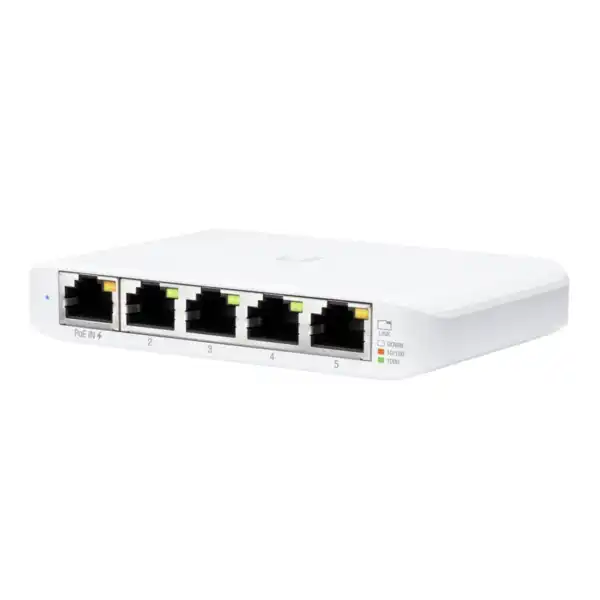
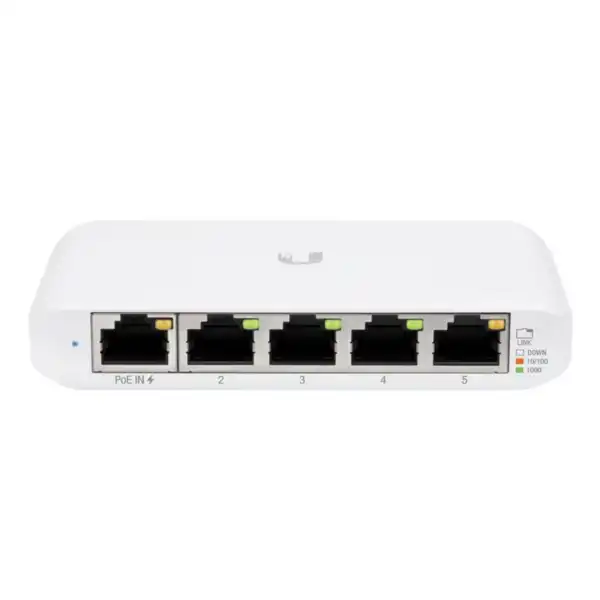
The Ubiquiti USW-Flex-Mini Tanzania buyer usually needs a small managed Ethernet switch that adds several wired connections without taking over the office network cabinet. The original USW-Flex-Mini provides five 10/100/1000 Mbps ports, supports UniFi Network management and can operate using compatible PoE input or 5V USB-C power. It is suitable for compact indoor wired extensions, but it cannot provide PoE power to connected devices. Use the buying guidance below to assess whether its port count, speeds, features and power arrangements fit the installation before requesting a quotation.
5 Gigabit ports • PoE input or USB-C power • UniFi Network management
Key specifications at a glance
- Model: USW-Flex-Mini; original five-port Gigabit version
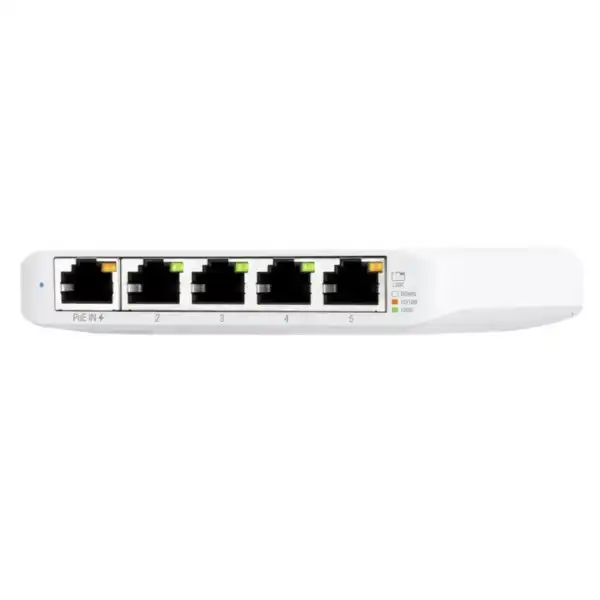
- Ethernet: 5 × 10/100/1000 Mbps RJ45, including port 1 with PoE input
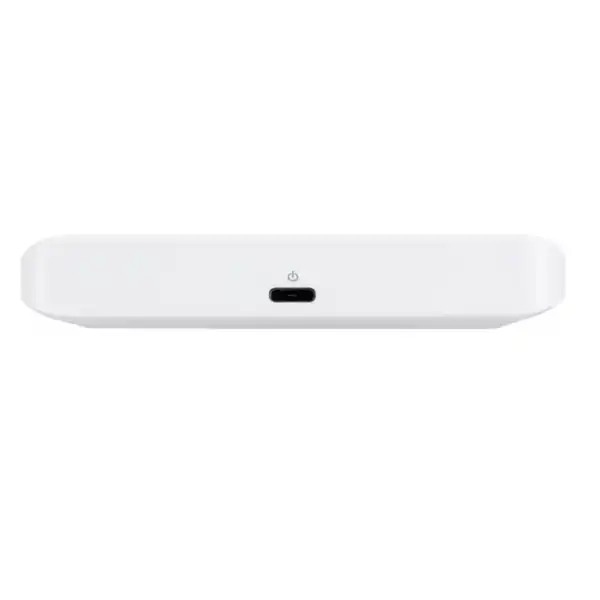
- Power: 802.3af/at PoE input or 5V, 1A USB-C
- Maximum consumption: 2.5W; no PoE output
- Switching capacity: 10 Gbps; non-blocking throughput: 5 Gbps
- Dimensions: approximately 107 × 70 × 21 mm; weight: 150 g
- Management: UniFi Network; selected Layer 2 functions
- Environment: indoor, -5°C to 45°C; 10%–90% non-condensing humidity
A practical way to add wired ports
The Ubiquiti USW-Flex-Mini Tanzania product is intended for someone who already has a working Ethernet network and needs several more wired connections in one small location. A typical setup starts with a network router or larger switch and one cable to the Flex Mini. The remaining ports can connect nearby computers, printers, media equipment or other devices that have ordinary Ethernet interfaces. That simple role makes it useful at a work desk, a front counter, a small meeting space or an equipment shelf where installing a larger rack switch would be unnecessary.
The important distinction is that the Flex Mini expands a local wired network; it does not replace the router, internet service, firewall, wireless access point or central network design. When connected correctly it provides local Layer 2 switching between compatible Ethernet devices and an uplink into the existing network. Buyers should begin by counting their devices, confirming the speed of the upstream connection and checking whether any connected equipment needs electricity delivered through the Ethernet cable. These three checks identify most of the cases where the Flex Mini is suitable and the cases where another product is needed.
What five Gigabit Ethernet ports mean
The original USW-Flex-Mini has five RJ45 interfaces, each supporting 10, 100 and 1,000 Mbps link negotiation. A common arrangement uses port 1 as the uplink and leaves four physical ports for local equipment. The first port is special because it can also accept compatible PoE power. However, it is still a normal Gigabit data port when power comes from USB-C instead. The port count does not create five additional ports at the end of a single uplink; one physical connection normally connects the switch back to the rest of the network.
A device connected to a Gigabit port can negotiate a one-gigabit link only when its own network adapter, cabling and the device at the other end support that speed. An older printer may connect at 100 Mbps and continue to work normally, while a capable workstation can negotiate 1 Gbps. These are Ethernet link rates, not promises of internet speed. If several computers download through the same one-gigabit uplink at once, they share the available capacity on that uplink even though their individual switch ports are Gigabit capable.
Performance in everyday networks
Ubiquiti lists a 10 Gbps switching capacity and 5 Gbps total non-blocking throughput for this model. These figures describe internal switching capability and should not be confused with the bandwidth of one Ethernet cable or a broadband subscription. A single physical port is limited to its negotiated connection speed, which is at most 1 Gbps on the original Flex Mini. The specification supports its role in small wired network extensions where devices need reliable local Ethernet rather than a sophisticated high-capacity aggregation switch.
Actual performance depends on the whole path between endpoints. For example, copying files between two computers connected locally can behave differently from copying files to storage that sits beyond the single uplink. Cabling, client network cards, storage speed, background traffic and configuration may all become bottlenecks before the switch’s headline capacity matters. For a workstation that routinely needs more than one gigabit per second to a server, first examine the server port, network path and uplink. A newer multi-gigabit switching model could be a better planning choice.
Power over Ethernet input on port 1
The USW-Flex-Mini supports IEEE 802.3af/at PoE input through its first Ethernet port. In a suitable installation, one cable from a compatible PoE-capable upstream switch can carry both the network connection and operating power. That is attractive where the switch sits on a counter or shelf without an adjacent mains socket. It can also simplify the appearance of a workspace by removing a separate local power lead. Confirm that the upstream equipment is a standards-compatible PoE power source before relying on this method.
PoE input does not mean that every switch connected upstream can power the Flex Mini. An ordinary non-PoE Ethernet port provides data but not the required electrical power. The upstream source must provide the supported PoE standard and have enough power budget available. The manufacturer specifies a maximum device power consumption of 2.5W, but cable condition, power-source negotiation and other devices drawing from a shared PoE switch still matter to the overall installation. If the upstream port is not a suitable PoE source, use the alternative USB-C power input.
USB-C power as an alternative
The other supported power method is a 5V USB-C input using a suitable 5V, 1A power supply. This option is straightforward when the network uplink comes from an ordinary Ethernet port and a nearby electrical socket is available. It also makes the first Ethernet port available exclusively as a data connection without requiring a PoE-capable upstream switch. Use a compliant supply with the specified electrical output rather than assuming every USB-C charger or USB socket will be appropriate for permanent network-equipment use.
Ubiquiti’s setup guidance explains that a 5V, 1A power adapter is included with single-pack versions, while multipack contents can differ. Package contents and plug format should therefore be confirmed for the exact unit being quoted in Tanzania. Do not assume that a locally suitable plug, extension lead, surge protector or backup-power accessory will be included without checking. When planning a business installation, decide how the switch will remain powered during an outage and whether the power source also supports the router and other upstream equipment.
Understand the PoE output limitation
This is one of the most important purchasing details: the Flex Mini accepts PoE power but does not provide PoE output to attached devices. Plugging a PoE camera, wireless access point or VoIP telephone into its regular Ethernet ports will not supply the electrical power that device needs. Such equipment may still exchange data through the Flex Mini if it has its own power arrangement, but the switch is not a substitute for a dedicated PoE-output switch or an appropriately selected injector. This distinction is easy to miss when a product name contains PoE terminology.
Before ordering, list every endpoint and mark whether it needs ordinary data, PoE input, or a higher-power standard. A desk with two computers and a printer may fit the Flex Mini well. A ceiling access point and multiple security cameras might call for a PoE switch with an adequate output budget instead. The number of ports alone is not enough to size a camera or wireless deployment. Compare electrical requirements, port speeds, physical location and the power capacity of the supplying equipment to avoid making a small switch carry a role it was not designed to fulfil.
How UniFi Network management fits
The USW-Flex-Mini belongs to the UniFi switching family and is intended to be adopted and managed through the UniFi Network application. In an existing UniFi environment, that allows administrators to see the switch alongside other managed devices, review port activity and adjust supported settings from a central interface. It is particularly convenient when several small switches are spread around an office and the administrator wants a consistent network overview instead of maintaining separate configuration pages on every device.
UniFi management is a practical advantage, but it also introduces a planning requirement. The buyer should know which UniFi Network installation will manage the device and whether that installation can reach it across the intended management network. It is unwise to buy the Flex Mini expecting a traditional independent web interface with every switch feature exposed. If the office has no UniFi system and only requires uncomplicated expansion, an unmanaged switch may be simpler. If comprehensive enterprise switching controls are required, choose a different managed model after reviewing its supported functions.
Adoption and first-time configuration
After connecting a suitable power source and data uplink, place the switch on a network from which its intended UniFi Network application can discover or reach it. The adoption process associates the hardware with that management system, after which supported configuration and firmware controls become available. The administrator should verify that the switch is the correct model, give it a meaningful name and confirm that its management connectivity is stable before assigning different networks to access ports. Exact screens and settings depend on the current UniFi software version.
Do not begin by changing multiple VLAN or port settings at once. A safer installation approach is to confirm the basic uplink first, adopt the device, check that each connected endpoint has the expected network access and then introduce controlled changes. Keep a record of which cable feeds the uplink and which local device uses each remaining port. If the switch loses contact with its management application after a network change, review the upstream VLAN and management path before performing a factory reset. Documentation and disciplined changes reduce avoidable interruptions.
VLAN configuration has limits
The Flex Mini supports basic network and VLAN configuration within the UniFi ecosystem, but it should not be treated as equivalent to a fully featured enterprise managed switch. Ubiquiti’s documentation describes port-based VLAN behavior and identifies limitations for some advanced switch functions. For a simple requirement such as placing a workstation port on a particular configured network, it can be a sensible choice when the complete path supports the intended VLANs. More elaborate trunk, tagging and access-control designs require careful checking rather than assumptions based on the word managed.
If the deployment has separate employee, visitor, voice or management networks, draw the intended path from the router or gateway through the upstream switch to the Flex Mini and finally to each endpoint. Check what arrives tagged or untagged, what is needed on the local port and what the current UniFi version allows for this device. Test a representative endpoint before rollout. Where complex VLAN policy or granular switch-based segmentation is a formal security requirement, select equipment whose official feature list explicitly covers those controls.
Security and segmentation decisions
VLAN membership can organize devices into different network segments, but a VLAN label alone does not create a complete security policy. The router, firewall or gateway normally determines whether clients on separate IP networks may communicate. Ubiquiti’s published access-control guidance also excludes Flex and Flex Mini models from the general switch ACL support available on many other UniFi switches. Buyers should therefore avoid treating this small switch as a replacement for the gateway, firewall or another security enforcement point.
For a small office, a sensible plan assigns important systems to the correct networks upstream, limits administrative access to UniFi management and makes sure guests cannot reach business systems unless the gateway policy intentionally allows it. Keep firmware under review and avoid placing unmanaged public connections on sensitive ports. If a customer needs per-user wired authentication, detailed access lists, compliance-driven controls or explicit port security behavior, verify another switch model before purchasing. The right network-security outcome comes from the complete design, not the mere presence of a managed switch.
Loop prevention and redundancy
Physical network loops can cause serious disruption when multiple cables connect switches in unintended ways. The Flex Mini is designed as a small access-edge device, not as a core switch for complex redundant topologies. Older manufacturer documentation notes limitations around spanning-tree capabilities, so buyers should not assume that it offers all the protection and control of larger managed switches. In particular, connecting two upstream cables without a planned and supported topology can be hazardous rather than beneficial.
Use one clearly identified uplink for a typical Flex Mini deployment. If the office wants resilient paths, redundant switches or automatic recovery from broken links, choose the architecture and model through a broader network design. Ubiquiti also identifies the USW-Flex-Mini as an exception to normal UniFi switch link-aggregation support, so it should not be purchased with the expectation of combining two Gigabit ports into a larger logical uplink. Carefully selected equipment and an accurate cable diagram are more dependable than improvising redundancy at installation time.
Compact placement and cooling
The manufacturer lists a compact desktop form factor of approximately 107 by 70 by 21 millimetres and a weight of about 150 grams. The enclosure makes sense on a desk, under a counter or on a small shelf where a conventional rack-mounted switch would be excessive. Allow enough room for the Ethernet connectors and cable bend radius, and avoid tugging on the lightweight device with stiff cables. Plan its location to keep ports accessible for maintenance rather than hiding every cable behind difficult-to-reach furniture.
Although the switch consumes little power, it is still electronic equipment with environmental limits. Ubiquiti specifies an operating temperature range of minus 5 to 45 degrees Celsius and non-condensing humidity requirements. Avoid direct rain, dripping water, exposed outdoor poles, sealed hot boxes and locations with constant dust or excessive heat. For installations in Tanzania, pay particular attention to enclosed cabinets, sun-exposed rooms and the possibility of unstable mains power. An indoor device should not be described or installed as a weatherproof outdoor switch.
Ethernet cabling and link quality
A small managed switch cannot compensate for damaged or poorly terminated cabling. Use suitable twisted-pair Ethernet cabling, inspect the RJ45 connectors and keep cable runs within the limitations of the relevant Ethernet cabling standard. For a Gigabit connection, all required conductors and pairs must be correctly terminated. An endpoint that negotiates at 100 Mbps rather than 1 Gbps may have a cable, connector, adapter or upstream-port issue, rather than a defective switching device.
Where cables run through office partitions, power equipment areas or crowded wiring paths, protect them from sharp bends, pinching and accidental disconnection. Label the uplink and local ports so support staff can trace connections quickly. Do not make the switch the end point of an improvised long-distance outdoor cable without considering grounding, electrical safety, lightning exposure and the network design. For a new installation, test the link and record its negotiated speed before the equipment is handed over. Reliable cabling is a small investment that prevents repeated troubleshooting.
A workstation or shared desk example
Imagine a desk where a single wall outlet provides access to the office LAN, but the user needs to connect a desktop computer, a wired laptop docking station, a small network printer and another Ethernet device. One cable can feed the Flex Mini and the four remaining ports can serve the local endpoints. In a UniFi-managed office, the network administrator can identify the switch in the management application rather than treating it as an invisible piece of wiring.
The desk still shares the bandwidth of the uplink to the office network, and the precise network permissions of each endpoint must match the upstream configuration. If a device needs power over Ethernet, provide that power through a suitable separate arrangement or reconsider the switch choice. This example works best when the requirement is uncomplicated Gigabit wired access in a small area. It becomes less attractive when the desk is expected to support multiple high-throughput workstations or security-sensitive segmentation rules requiring more advanced hardware controls.
Reception desks and point-of-service spaces
A reception area may need several reliable wired connections in a location with very little spare room. A compact switch can serve a computer, Ethernet-capable printer and other compatible data terminals without requiring a large networking cabinet. Because the Flex Mini supports PoE input, the network team may be able to position it where a local power socket is inconvenient, provided the upstream switch supplies compatible PoE and the rest of the connection plan has been checked.
Point-of-service and payment systems deserve additional care. Their provider may require a particular network separation, security policy, software configuration or approved connection method. Do not assume that adding a small switch satisfies those requirements. Confirm the device supplier’s instructions, network gateway rules, administrative access and backup-power needs before connecting critical business systems. The Flex Mini is a connection-expansion device, not a certification of payment-network compliance. For essential transactions, the quality of the entire power and internet path matters more than the physical size of the switch.
Small offices and shared meeting rooms
In a small office, the Flex Mini can solve a localized shortage of ports while the main router and larger switch continue to provide the network’s central services. It is useful near printers, common workstations or meeting-room equipment that benefits from a wired connection. The five-port format encourages buyers to place switching close to the devices instead of running a separate long cable to the main cabinet for every connection. This can simplify the local layout when cabling and IT policy permit it.
Count the complete deployment rather than just the equipment present today. Four available local ports may sound sufficient until a conference unit, video device or replacement printer is added. Review whether all connections can share the same Gigabit uplink and whether any are expected to use separate VLANs. If the room will expand significantly, a larger access switch may be more economical than chaining several miniature switches. A good port plan keeps room for normal maintenance and avoids making one small uplink the accidental bottleneck for an entire team.
Home office and media equipment use
A home office with a UniFi network might use the Flex Mini to connect a desktop computer, console, smart television or other wired equipment near the same location. A wired connection is often preferred when a device stays in one place and its Wi-Fi signal is inconsistent. The Flex Mini adds physical network connectivity without itself transmitting wireless signals, so it complements rather than replaces a wireless access point. Basic local switching does not require the buyer to redesign the household internet service.
This scenario still benefits from the same checks as a business office: a suitable power input, one reliable uplink and confirmation that the connected endpoints use compatible Ethernet speeds. If parental controls, device restrictions or guest isolation are important, those policies must be implemented by the appropriate gateway or management system and checked against the switch’s capabilities. A gamer or media creator expecting faster-than-Gigabit transfers should assess a multi-gigabit option instead. Buying to match the actual link requirements usually gives the best result.
Printers, storage and other wired endpoints
Office printers, small network-attached storage devices and workstations can all be candidates for a local Gigabit access switch if their interfaces and network policies are compatible. The important question is where the traffic goes. A printer can require only modest bandwidth, while a NAS serving several large file transfers may place sustained demand on the uplink. If the NAS and the receiving device connect through the same Flex Mini, traffic may stay local at Layer 2 when network addressing and policy permit it.
If storage sits on a different switch, the link from the Flex Mini to the upstream network becomes part of the data path. Consider the number of simultaneous users, the server’s capabilities and whether the route passes through other constrained equipment. Do not interpret a five-port Gigabit switch as having a single five-gigabit external network connection. For backup workflows, virtualization hosts or shared editing systems that move substantial files, a properly sized larger switch with faster uplinks may be the better long-term investment.
Cameras, access points and telephones
Security cameras, Wi-Fi access points and some desk phones frequently rely on Power over Ethernet for their own operation. The USW-Flex-Mini cannot provide that power through its downstream ports. A camera that works when connected to a PoE-output switch may fail to power on when moved to the Flex Mini, even though the Ethernet cable fits perfectly. Always distinguish a switch that accepts PoE input from a switch that actually supplies PoE output to other devices.
If a project includes several powered endpoints, consider a purpose-built PoE-output switch with sufficient individual-port capability and total power budget. Where an endpoint has its own suitable adapter, the Flex Mini may still carry its data, provided the network arrangement is correct. VoIP deployments also need attention to voice VLAN settings, call quality, upstream network behavior and power continuity. An inexpensive local data switch should never be the only item specified for a camera or telephony project without confirming each connected device’s electrical and networking requirements.
Compatibility with an existing network
The Flex Mini can carry ordinary Ethernet traffic between compatible devices, but its value as a managed switch is greatest when its UniFi Network adoption and configuration are planned. A mixed-vendor router or existing wired network does not automatically rule it out; what matters is how the switch will receive management access, what VLANs are present and whether the expected features are supported. Avoid assuming that products from different vendors will expose identical management features or port profiles.
For an existing deployment, record the router or gateway, the upstream switch model, its available port and PoE capability, the management network and the intended endpoints. Check whether another installed UniFi application can adopt the switch and whether the software version supports the required workflow. If no compatible management environment exists, the buyer may need an additional management plan or a different kind of switch. Proper compatibility review prevents a simple port-expansion purchase from becoming an unexpected controller or network-reconfiguration project.
Moving from an unmanaged switch
An unmanaged switch often works without a controller or per-port configuration, making it a good choice for an uncomplicated shared wired network. The Flex Mini adds a managed-device experience through UniFi Network and supports selected Layer 2 configuration and visibility. That can be worthwhile when the IT team already uses UniFi and wants to identify local switches centrally, inspect connected port status or apply supported settings. Management is not automatically an advantage if it introduces complexity that no one intends to maintain.
If the existing switch serves five devices on one ordinary network and no one needs monitoring or configuration, replacing it solely for the word managed may offer little practical benefit. On the other hand, if a technician regularly visits desks to discover which small switch feeds which equipment, central inventory and port visibility can improve support. Compare the full requirement: compatible network application, change-management process, VLAN behavior, cost of deployment and future support responsibilities. Choose for a real operational need, not an isolated feature label.
Comparing the original Flex Mini with faster models
The product on this page is the original USW-Flex-Mini with five ports rated up to one Gigabit per second each. It should not be confused with the separately named Flex Mini 2.5G model or other larger UniFi switches. A newer model may offer faster Ethernet links or a different feature set, but those capabilities must be checked against that specific product’s official documentation. Similar family names do not make the devices interchangeable in a performance specification or purchasing quotation.
Choose the original Flex Mini when a small number of 10/100/1000 Mbps connections and the supported UniFi management functions solve the problem. Consider a different model if a client workstation, storage appliance or network uplink already uses a multi-gigabit interface. Also consider a different switch when you need PoE output, additional ports, optical uplinks, link aggregation, advanced authentication or more extensive policy controls. Identifying the needed features early is more useful than buying a model and hoping firmware will add capabilities that the hardware or supported product class does not provide.
Power reliability in a Tanzania installation
Power planning matters for any small network component, including one that draws only 2.5W at maximum. If the Flex Mini uses USB-C and the local mains supply fails, the switch loses power unless its supply has an appropriate backup. If it receives PoE from an upstream switch, it depends on that switch’s power source instead. A backed-up central network switch can simplify the arrangement, but the router, any gateway and internet access equipment must also remain operational for the whole service path to function.
For an office in Tanzania, evaluate the installation’s actual power conditions rather than assuming every building has the same requirements. Keep cabling away from unsafe electrical arrangements, choose properly rated accessories and ask an installer to assess surge and backup requirements where necessary. The Flex Mini should be placed indoors in a suitable environment with ventilation and protection from moisture. These are practical deployment considerations, not claims about an included protection product, local installation service or a particular warranty. Those commercial details should be verified during quotation.
Avoid unnecessary network bottlenecks
A five-port switch creates convenient points of connection, but every uplink has a finite capacity. If one Gigabit cable links the Flex Mini to the main switch, all devices sending traffic beyond the local switch compete for that uplink. This is normally acceptable for modest office applications, but several sustained file transfers or high-bandwidth video workflows can expose the limit. A thoughtful layout places workloads according to actual traffic patterns instead of assuming all devices need the same network design.
List which devices communicate primarily with one another and which communicate with servers or internet services elsewhere. If most traffic must cross the uplink, estimate simultaneous usage and check the capabilities of the gateway and upstream switching equipment. Do not purchase the Flex Mini based on a 10 Gbps internal switching capacity as though it delivers a 10 Gbps external port. If the network is expected to grow, allowing for faster uplinks or more local ports now can reduce the cost and disruption of future replacement.
A careful installation sequence
Start by confirming the physical package, the model label and the selected power method. Position the device in a clean indoor place where connectors cannot easily be knocked loose. Connect the upstream network cable, supply suitable power through port 1 or USB-C, and observe the device’s status indications. Attach one endpoint, confirm that the link negotiates at the expected speed and test ordinary access to the intended network. Only then add the remaining equipment and check each connection.
For a managed deployment, the next step is adoption into the correct UniFi Network application, followed by a clearly named device record and any supported port settings. Apply network segmentation gradually, verifying behavior after each change. Record which endpoint connects to which port so a future technician does not need to unplug devices to identify cables. After completion, check that the upstream network, DHCP service, gateway access and required local services work as expected. A simple documented commissioning test can prevent much larger troubleshooting work later.
Troubleshooting an offline or undiscovered switch
If the switch seems offline, distinguish between a power problem, an Ethernet link problem and a management-discovery problem. First verify that the PoE source or USB-C power adapter is appropriate and working. Then inspect the uplink cable and port indicator. A switch can be powered but still have no valid path to its intended management application. Conversely, endpoints may be passing local traffic while the central interface reports the switch as unavailable because a management network or adoption issue remains.
Test with a known-good Ethernet cable and a simple network connection before changing many settings. Confirm the management application is reachable and that the upstream network allows the required discovery or management communication. Review recent VLAN changes, port profile changes and firmware updates if the problem began after maintenance. A factory reset can remove local configuration and should not be the first troubleshooting action in a working office. Record what was observed so the next step is based on evidence rather than repeated guesswork.
Keeping the device manageable over time
A small switch is easy to forget once it is installed, especially when tucked behind a desk. In a managed environment, give it a recognizable name based on its physical location and purpose. Keep a simple map of its uplink, local devices, power source and administrator responsibility. Check software compatibility before making broad UniFi Network upgrades, and use the management application’s supported maintenance process for device firmware. Those habits matter more than the miniature form factor.
Review port occupancy periodically so a temporary addition does not become an unexplained critical connection. When a device is moved, update the cabling record and check its network assignment. If a port repeatedly loses link, inspect the connected adapter and cable before blaming switching hardware. For organizations with formal IT policies, include the Flex Mini in standard inventory, change approvals and security reviews. Central visibility helps only when someone maintains the information and knows how to respond to warnings or unexpected configuration changes.
Selecting the right capacity before ordering
Begin with a small equipment list: the router or main switch, the proposed uplink, the four expected local devices and any possible additions. Next mark the maximum Ethernet speed, power requirement and network segment of each endpoint. This reveals whether five total ports are enough, whether one Gigabit per port is suitable and whether the product’s limited advanced management features match the network policy. It also distinguishes a simple desk extension from a specialist voice, surveillance or high-throughput application.
Check whether an existing UniFi Network controller or compatible UniFi console will be used for adoption. If the installation relies on PoE input, confirm that the upstream port supports 802.3af or 802.3at. If it relies on USB-C, confirm the power-supply package and mains plug requirements. A quote should identify the original USW-Flex-Mini rather than an unrelated Flex family model. Ask about any required patch cables or supporting power hardware separately instead of assuming the product box contains everything needed for the complete job.
Commercial questions to clarify with FourTeck Tanzania
The technical specification identifies the hardware, but a purchasing decision also depends on the precise package and current commercial terms. Ask FourTeck Tanzania to confirm the model being quoted, pack quantity, availability, price in the applicable currency, delivery options and warranty or return conditions. These details can vary and should not be inferred from the manufacturer’s international product page or another seller’s listing. No unverified local price or stock status is presented in this description.
Provide a short explanation of the intended use when requesting a quotation: for example, four wired desktop devices using one uplink, UniFi Network already installed, and PoE power available at the upstream port. If the use case involves cameras, IP telephones, fast storage, specialized VLANs or a hot equipment room, mention that at the beginning. This helps identify whether the Flex Mini is appropriate or whether another type of switch should be evaluated. The aim is a configuration that works on day one and remains maintainable.
Who should choose a different switch
The Flex Mini is not the best answer to every networking problem. Choose another model if you need to power Ethernet devices, connect more than five cables, provide faster-than-Gigabit physical ports, aggregate links or build a complex redundant topology. Likewise, more advanced security enforcement, detailed wired authentication or very specialized VLAN configurations may require a managed switch with a broader officially supported feature set. The compact form factor should not override the underlying network requirements.
Outdoor locations introduce additional concerns because this is an indoor desktop device rather than a weatherproof field switch. A camera enclosure, pole-mounted radio installation or exposed workshop might need purpose-designed hardware and appropriate electrical protection. Some networks also benefit more from adding a larger switch in the main cabinet than from extending several tiny switches at desks. A straightforward comparison of physical environment, uplink capacity, power, management and future growth often makes the right choice clear without unnecessary complexity.
Frequently asked questions about the USW-Flex-Mini
Is the USW-Flex-Mini a managed switch?
Yes. It belongs to the UniFi family and is designed to be adopted into the UniFi Network application for supported configuration, status and maintenance. Its managed functionality is more limited than that of many larger UniFi switches. Buyers who require advanced authentication, access-control lists or complex trunk configurations should verify a more capable model before purchase. A UniFi management environment and a reachable network path should be included in the installation plan.
How many devices can I connect?
The switch has five Ethernet ports in total. With one port used to connect to the existing router or upstream switch, four ports normally remain for local wired endpoints. The actual layout may differ, but a physical uplink still consumes a port. A printer, desktop PC, docking station or other network device can be connected if its Ethernet and network requirements are compatible. Count future devices before selecting a five-port product.
Can I power the switch using PoE?
Yes. Port 1 accepts compatible IEEE 802.3af/at PoE input. A properly configured upstream PoE switch can supply power and data on the same cable. An ordinary Ethernet port without PoE cannot power the Flex Mini this way. A supported 5V, 1A USB-C power supply is the alternative. Confirm power-source compatibility and the exact pack contents before installation, especially when ordering multiple units.
Can it power my UniFi access point or security camera?
No. The USW-Flex-Mini has PoE input, not PoE output. It cannot supply operating power to an access point, camera or telephone through its Ethernet ports. Those endpoints need their own supported power arrangements or a separate PoE-output switch or injector. The distinction should be checked early because data connectivity and electrical power are separate requirements, even when both use the same style of Ethernet cable.
Does it have 2.5GbE ports?
No. This page describes the original USW-Flex-Mini with five 10/100/1000 Mbps ports. A separately named Flex Mini 2.5G product belongs to a different specification and must not be confused with it. If a NAS, workstation or other device requires a faster Ethernet connection, assess the exact alternative model and the speed of the entire network path before selecting hardware.
Does the Flex Mini provide Wi-Fi or internet routing?
No. It is a wired Layer 2 Ethernet switch. It does not broadcast a wireless network, replace an internet gateway, create a broadband connection or provide the gateway’s firewall role. It operates as one part of a larger network that supplies appropriate routing and other services. If the buyer wants to extend Wi-Fi coverage rather than add wired ports, an access point and suitable network connectivity are normally the more relevant equipment choices.
Can I use VLANs with this switch?
The Flex Mini supports limited network and VLAN configuration through UniFi Network, including port-based arrangements, but it is not a substitute for a fully featured managed switch. Verify the exact VLAN behavior needed by the installation and the current management software. Security separation depends on upstream routing and firewall policy as well as correct port assignment. Complex trunking, authentication or access-policy requirements should be reviewed before procurement.
Is the device suitable for outdoor installation?
The Flex Mini is described as a compact desktop switch and should be used in a suitable indoor location. Manufacturer operating limits include minus 5 to 45 degrees Celsius and non-condensing humidity. It is not presented here as weatherproof or suitable for exposed outdoor poles or rain-prone cabinets. For an outdoor camera or radio installation, select properly rated equipment and account for the electrical, enclosure and cabling conditions at the actual site.
Do I need a UniFi controller or UniFi Network application?
The intended managed experience uses UniFi Network to adopt and configure the Flex Mini. The exact management arrangement can be an appropriate UniFi console or other supported UniFi Network installation. Confirm that the application is available and that the switch can reach it. A buyer who only needs basic unconfigured switching may wish to compare an unmanaged alternative rather than assuming this product offers a separate full-featured web-management interface.
What comes in the box?
Ubiquiti indicates that a 5V, 1A power adapter is included with the single-pack product, while package variants may differ. The exact accessories and plug configuration included in a Tanzania quotation should be confirmed before ordering. Do not assume that patch leads, extra PoE injectors, backup-power devices or installation accessories are included. Ask FourTeck Tanzania to identify the exact model and package being supplied.
Why is my Gigabit device connecting at 100 Mbps?
The switch negotiates 10, 100 or 1,000 Mbps depending on the complete connection. A damaged cable, incorrect termination, an older endpoint network card or an upstream interface limited to 100 Mbps can produce a slower link. Check the status indicator, try a known-good cable and confirm both endpoint specifications before replacing equipment. A one-gigabit physical link also does not guarantee one-gigabit internet service or file-transfer speeds.
Can the switch aggregate two ports for a faster uplink?
No. Ubiquiti’s link-aggregation documentation names the USW-Flex-Mini among models that do not support normal UniFi switch port aggregation. Do not plan to connect multiple upstream cables to create a faster logical uplink or improvised redundancy. A suitable higher-capacity switch, with the right physical port speeds and supported topology features, is the better choice when the design requires more bandwidth or resilient links.
How do I request pricing in Tanzania?
Request a quotation from FourTeck Tanzania using the exact name Ubiquiti USW-Flex-Mini, the required quantity and whether USB-C power or an upstream PoE source will be used. Describe the intended endpoints and any VLAN or management requirements. Price, availability, payment terms, shipping, warranty and related services should be confirmed for the actual quotation. No specific Tanzania stock position, local price or guaranteed delivery time is implied by this product description.
Request a Ubiquiti USW-Flex-Mini quote
Contact FourTeck Tanzania with the required quantity, the original USW-Flex-Mini model, the planned number of connected devices and the intended power source. Explain whether UniFi Network is already in use and whether the design includes VLANs or PoE-powered endpoints. The team can clarify the requested configuration and provide current commercial details for the exact offer. No local price, stock level, lead time, warranty length or installation service is assumed in this page.
Ask FourTeck Tanzania for current pricing and configuration guidance.




Reviews
There are no reviews yet.